Is NASA World Wind a Google Earth killer?

nasa-logo.pngBrowsing over any part of the world and focusing down on a spot with incredible precision is now possible with free software like NASA World Wind. This program uses satellite technology to bring the globe to your desktop.

NASA released World Wind six months before Google Earth, yet it failed to make as much of an impact. However, anything coming out of the prestigious aeronautics administration is definitely worth a closer look. So what sets World Wind apart from Google Earth?

World Wind’s real selling point is the quality of its satellite imagery. World Wind reveals Earth in many different perspectives thanks to the large variety of maps. Blue Marble exposes Earth in its true colors, Landsat 7 gives you high resolution imagery, and MODIS can display time relevant data such as earthquakes, fires or floods. Browse mountain ranges and observe the snowy peaks, the clouds, and the different colors of the rock, with incredible precision. Be aware though that the lower you go, the more detail will appear, and World Wind will take more time to process the image.

Continue reading “Is NASA World Wind a Google Earth killer?”

Speedball 2: Brutal Deluxe

s.pngTo some, speedball is a dangerous mix of illicit substances but to others it’s an excellent futuristic sports title developed by the Bitmap Brothers in 1991. Mix the rules of football, handball and rugby, add two teams of psycho-cyborg gladiators locked in a metal arena with a metal ball and you get speedball. The game consists of passing the ball around to reach the other team’s net and score more goals than them in a limited amount of time. However, unlike the sports we play nowadays in speedball you can joyfully mangle your opponents to get the ball back.
Speedball 2: Brutal Deluxe is the second release in the series. Teams now have 9 players instead of 6 and you can hit targets on the walls to get bonuses. There’s also a number of power ups and other options strewn across the gaming field. The reason we’ve decided to cover this classic is that Kotaku announced today that Frogster Interactive would be releasing a sequel in the summer of 2007. The gaming blog is worried that it will turn out to be a bad “Unreal Tournament Mod”, however with Bitmap Brother Mike Montgomery on the team we can hope for the original spirit of Speedball to carry on.

What about improvements? Will the game environment move on from 2D to 3D? Any chances of multiplayer or online gaming? What about the tournament modes? Will new challenges be introduced? We’ll just have to wait till this summer to see.

Optimize your PC’s performance

9955.pngWhen looking to maximize your PC’s performance the first place you look is usually the hardware. Do you have a fast micro processor and is the latest sound card installed? What about your graphics and 3D cards? Are they up to scratch? Now upping your hardware is almost certain to cost you a hefty amount, and with the rate at which PCs improve (every 6 months processors double their strength) it’s not always the best solution. Instead we suggest you run a number of applications to analyze your PC and improve its performances.

First of all, get hold of a system analyzer like PC Wizard and inspect the insides of your PC. Monitor the performance of your processors and compare your hardware to other models on the market. Ideally, you’re looking to measure the limitations of your PC and understand what it can and can’t do. If after running PC Wizard you find your PC is missing out, your best bet is to run to the PC store and grab that piece of hardware you’re missing.

After dissecting your hardware, it’s a good idea to clean up your hard drive of any unnecessary files and make some space. You can use Wash and Go to remove registry entries, corrupted files, duplicates and outdated Windows service packs (thought you’d never get rid of theses didn’t you?). Once this little cleaning-up task is done, round it off by partitioning your disk with Norton Partition Magic. This application will rearrange your files and create multiple partitions. This prevents loss of important data and separates your information in well structured sections on your disk.

Continue reading “Optimize your PC’s performance”

Bittorrent to sell legal downloads

bt.pngThat’s the message that appeared on Bittorrent’s website this morning. In a few hours, Bittorrent will launch its very own legal download store, the Bittorrent Entertainment Network, with 3,000 movies, 1,000 games and around 1,000 music videos made available. Bittorrent struck deals with 34 major studios like Warner Brothers, Paramount Pictures. 20th Century Fox and MGM to distribute their content on the store. Thanks to the Bittorrent technology downloads should prove to be relatively fast. The store will offer up a “self pub capability” where independent artists can publish and showcase their videos.
However, the service does have some restrictions. Users will only be able to enjoy content 24 hours following its download. Movies will be offered at a starting price of $3.99 and TV shows at $1.99. All downloaded content will have Windows Media DRM protection, which means it will only open up with Windows Media Player. So much for Mac and Linux users. Bram Cohen, founder of Bittorrent was actually against having DRM:

We are not happy with the user interface implications of digital rights management, or DRM… it’s an unfortunate thing. We would really like to strip it all away.

It was introduced, probably under the pressure of the big content providers and probably to safeguard the rental model of the Bittorrent Entertainment Network. That way Bittorrent can offer cheaper content and control what users download.

What Bittorrent is doing is entering the legal download market, where heavyweights such as the iTunes Store, Amazon or Wal Mart already rule. Yet the biggest competitor to the Bittorrent store might still be piracy itself. According to PC World, Bittorrent expects a third of its users to give up piracy and embrace the new store but a quick look around the blogosphere this morning shows that skepticism was high among bloggers. Why would anybody who can get the same content for free want to pay $3.99 for it? We’ll have to wait till the store opens up to give you the full low down and our first impressions.

Quickly make a backup of all your files

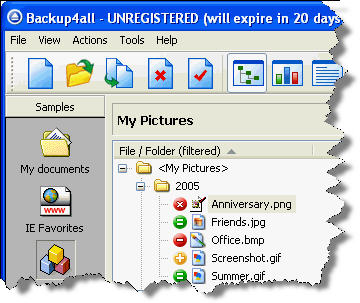
b.jpgYou probably never really go through the hassle of backing-up your documents regularly. Unfortunately, if one day you lose all those critical files, you’ll be the only one to blame. Creating backups is far from thrilling, but should never be overlooked, no matter how reliable you think your PC is.

Backup4all makes copy creation a breeze by automating the whole process. The key is to properly setup your backups so that the application takes care of it all for you. When you launch the program, simply select the files or folders you’ll need to backup. You can create individual backup profiles with a description, an icon and scheduling when Backup4all should save a copy. Set up filters to specify the type of file, the date and size of documents to save. Enable sounds and email alerts to notify you if a backup is successful or not.

Continue reading “Quickly make a backup of all your files”

Skype Pro released

skype-logo.jpgThe world’s most famous VoIP company, Skype, has launched a “Pro subscription deal” primarily aimed at business users or phone addicts. The new deal includes a “low monthly subscription of €2” and “zero cents per minute calls to domestic landlines in 15 countries in Europe.”
It clearly looks like Skype wants its users to trash their landline and go VoIP all the way. However, while local calls will cost you nothing, keep in mind that there will be a 3.9 cents connection fee on every call. To entice customers to sign up, Skype will offer, among other things, various discounts on VoIP phones, a 5€ Skype credit and free SKype Voicemail. European users are surely hoping that Skype’s next move will be to offer their Unlimited deal, which was launched in North America in December, and offers free SkypeOut calls for a yearly fee of $14.95.

Watch TV on the Internet with TVU Player

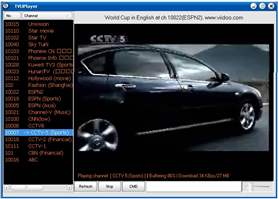
tvu-player-1.pngThanks to the constant improvement of broadband connections, watching TV over the internet is now possible. The current trend is to use Peer to Peer (P2P) technology to stream media quickly to consumers. TVU Player allows you to watch major cable channels over the internet, by sharing your bandwidth with other users.

TVU Player usually streams around 20 different channels, from a large American sports network to the major Chinese television channel and you can watch everything from gossip to movies or sports. TVU Player is extremely simple to use, you only have to double click on the channel of your choice, wait a few minutes for it to buffer, and start watching. Refreshing every now and then lets you check whether new channels are on offer.

TVU Player is a bit unstable, so you shouldn’t be surprised if it fails to initialize or if the channel you are watching tends to lag. If very few people are connected to the same channel you might get poor streaming quality, but if you are watching a popular program there should be a good number of peers sharing the load and the transmission will flow. Always remember to check the number of peers before watching a channel.

Continue reading “Watch TV on the Internet with TVU Player”

Rip HD DVDs with the new AnyDVD HD Beta

anydvd.gifSlysoft recently released a Beta (version 6.1.2.0) of its AnyDVD application, which will remove copy protection and regional codes (what they call “on the fly remastering”) for HD-DVD and AACS. In our full review of Anydvd we already touted its discretion and simplicity, and enjoyed how you can “watch the DVD at the same time” as it is being ripped by the program. No doubt this Beta will attract the interest of avid DVD users, however they’ll have to make sure they’re machines are up to the task. On the Slysoft forum there’s a thread on what hardware is recommended to play back your ripped HD DVDs.

Even though the announcement was widely relayed over the Internet it hasn’t spawned much controversy. Toshiba has kept quiet over the release of the AnyDVD Beta, which will rip its very own HD DVDs. It is widely expected that once AnyDVD comes out of Beta it will also be able to rip Blu Ray DVDs too. We’ll see then if the news sparks more controversy in the DVD world.

Democracy edging towards 1.0

d1.pngBefore Joost burst onto the headlines, Democracy was around as an Internet TV platform, showing us what the future of broadcasting might look like. The program allows users to watch and post videos on free internet TV channels. Working at the crossroads between an RSS aggregator and a Bittorrent client, Democracy lets you list all your favorite channels and download episodes in a few clicks.

Yesterday saw the release of Democracy 0.9.5, bringing with it a good number of improvements and fixes. In a probable move to compete with Zudeo or even YouTube, each video now has a share tab which you can use to send clips by email, post to Video Bomb, Digg, del.icio.us or Reddit. Videos that you have downloaded are now organized by channel to make them easier to find.

Downloading episodes on Democracy was already really smooth but the team behind the TV app has added some improvements to the Bittorrent client. Although I always downloaded episodes in one go, I suppose the introduction of pause/resume will come in extremely handy if you have a queue of videos waiting. Democracy finally shows seeding on your torrents, giving you more insight to manage your downloads. Streamlining the download process, Democracy will also retry whenever your connection breaks down. An extensive list of all the changes is on the Democracy blog and the new Windows and Mac versions are now available for download on Softonic.

Top 10 iPod apps

b_ipod_blk_front_nr.jpgAnybody who has an iPod knows that it’s much more than a simple MP3 player. The new models let you watch movies or store your photos and you can make use of the space to store and carry with you your documents.

When you first buy an iPod, Apple recommends installing iTunes on your PC, to be able to manage and transfer your music library onto your mobile device. Sure, iTunes is a great app, at least it’s where I keep all my tracks and download all my podcasts, but it isn’t the only program that works with your iPod. There are many applications out there to make use of all the possibilities that your mobile device offers.

We’ve compiled a list of 10 Windows programs to diversify the way you use your iPod. Manage your content, convert video files, or transfer and read media files thanks to the following programs:

  1. Anapod Explorer : Organize your iPod contents
  2. Yamipod : Copy music from your iPod to your PC
  3. Xilisoft iPod Video Converter : Convert any video file to the iPod format
  4. River Past Crazi Video for iPod: Convert videos to play on your mobile devices
  5. iPod Media Studio : Transfer DVDs to your iPod
  6. Juice : Transfer podcasts to your iPod
  7. Tubehunter : Download online videos to your iPod
  8. Pod2Go : Read the news on your iPod
  9. Virtual iPod : Transfer your music from your iPod to your PC
  10. PodPlus : Use your iPod as a storage device