All Super Mario RPG post-game content you might miss

Super Mario RPG post-game content transforms the familiar Mushroom Kingdom into a playground of challenges, secrets, and rewards, inviting players to extend their adventure beyond the main storyline. As the credits roll and the dust settles on the epic quest, a new chapter unfolds

Let’s delve into the details of the post-game content, exploring the various features and activities that await players seeking to achieve 100% completion.

All Super Mario RPG post-game contents

Super Mario RPG Remake offers an extensive post-game experience that adds layers of depth and challenge for players who have completed the main storyline, including:

  • Boss rematches
  • Sound player
  • Play report
  • Monster List unlockables

Boss rematches: Enhanced challenges

One of the standout features of the post-game content is the ability to rematch certain bosses. These bosses, such as Scratchy-Throat Belome, Leveled-Up Punchinello, and Engine 023 Booster, return with increased difficulty, providing a fresh and challenging experience. To unlock these rematches, players must complete the main story, watch the credits, visit Marrymore Hotel, and then head to Star Hill to initiate the post-game content. Talking to Frog Sage at Tadpole Pond reveals the first boss available for a rematch.
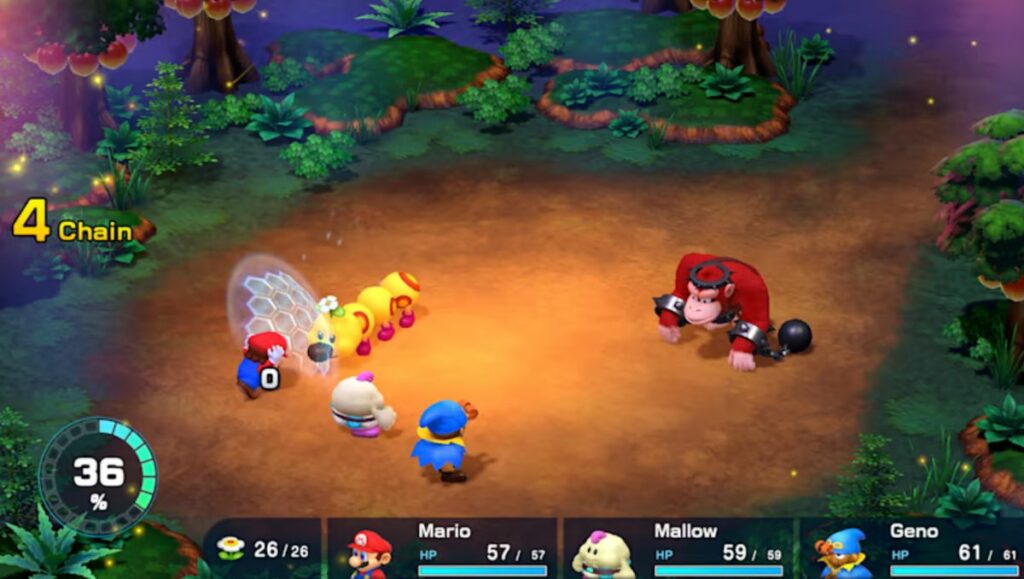
(Credit)

Each boss rematch yields unique rewards, such as the Sage Stick, Wonder Chomp, Stella 023, Enduring Brooch, Extra-Shiny Stone, and Crystal Shard. The order in which you rematch bosses matters, and returning to Frog Sage after each victory unveils the next rematchable boss.

Sound Player: Musical Nostalgia

The Sound Player is a delightful addition to the remake, allowing players to listen to tracks from the original game as well as newly arranged compositions by Yoko Shimomura. To unlock the Sound Player, players simply need to complete the game, with a notification appearing upon starting the post-game. The Sound Player can then be accessed through the Journal.


Super Mario Bros 3: Mario Forever
Download

Play report: Comprehensive records

The Play Report feature becomes available upon defeating the game and provides an in-depth look at various records within the game. This includes battle records and minigame records, making it a valuable tool for those aiming for 100% completion. The Play Report helps track progress, revealing information such as hidden treasures yet to be unlocked and the maximum consecutive Super Jumps performed.

Monster List unlockables: Revealing the unknown

Upon entering the post-game, players unlock all previously unknown names (marked as ???) in the Monster List. This feature allows players to view the monsters they may have missed during the main storyline, completing their Monster List and gaining a comprehensive understanding of the game’s creatures.

(Credit)

How to achieve 100% clear: A checklist

To attain the coveted 100% clear status, players must embark on a comprehensive checklist:

  • Complete all side quests: Explore the game thoroughly to discover and complete side quests, each offering unique rewards.
  • Get Gold medals in minigames: Master various minigames to achieve high scores and earn gold medals, tracked in the Play Report.
  • Raise your party’s levels to the max: Engage in battles to reach the maximum level of 30 for each character, unlocking their full potential.
  • Get the strongest weapons and accessories: Pursue the most potent equipment, including challenging achievements like obtaining the Super Suit.
  • Collect all music for the Sound Player: Explore the game world to find and complete the musical collection in the Sound Player.
  • Defeat the secret bosses: Challenge optional secret bosses, Jinx and Culex, to test your skills and achieve true mastery.
  • Defeat the rematchable bosses: Conquer powered-up versions of bosses in higher difficulty settings to solidify 100% completion.
  • Complete all records in the monster list: Check off every entry in the Monster List to receive the Monster Trophy.
  • Check the Play Report: Confirm 100% completion by reviewing the Play Report in the Journal, ensuring no ??? or incomplete records remain.

Super Mario RPG Remake’s post-game content enriches the gaming experience, offering a plethora of challenges, rewards, and unlockables for those dedicated to exploring every corner of the Mushroom Kingdom.

Amazon thinks a human touch to AI is necessary

Amazon is introducing a groundbreaking tool, Model Evaluation on Bedrock, aiming to transform the evaluation process for AI models. Revealed during the recent AWS re: Invent conference, the tool addresses the challenge of accurately selecting models for specific projects, preventing developers from using models that may not meet accuracy requirements or are too large for their needs.

Inside Amazon’s Bedrock Model Evaluation Revolution

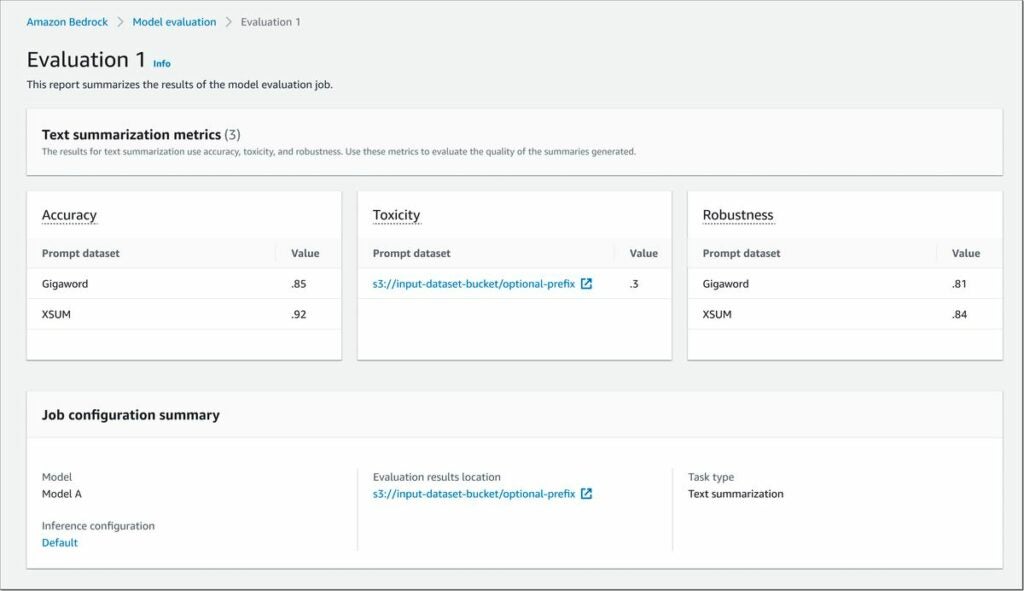
The tool consists of two components: automated evaluation and human evaluation. In the automated version, developers can assess a model’s performance on metrics like robustness and accuracy, covering tasks such as summarization, text classification, question and answer, and text generation. Bedrock includes popular third-party AI models, enhancing the variety of choices available.

(Credit)

AWS provides standard test datasets, but developers can also bring their own data into the benchmarking platform, offering a more realistic evaluation. The system generates a comprehensive report, shedding light on the model’s strengths and weaknesses.

Human benchmarking

For human evaluation, users can collaborate with AWS’s team or use their own resources, specifying task type, evaluation metrics, and preferred datasets. This human touch allows for insights that automated systems may miss, such as empathy or friendliness.

Importantly, Amazon recognizes the diverse needs of developers and doesn’t mandate all customers to benchmark models. This flexibility is particularly beneficial for developers familiar with Bedrock’s foundation models or those with a clear understanding of their preferences.

AWS Console Download

During the preview phase, AWS will only charge for model inference used during evaluation, making the benchmarking service accessible. This move reflects Amazon’s commitment to facilitating responsible and effective AI practices, providing a tailored solution for companies to measure the impact of models on their projects.

In essence, Amazon’s Bedrock Model Evaluation addresses the ongoing challenge of selecting the right AI models by offering both automated and human-driven evaluations. This initiative aligns with Amazon’s commitment to empowering developers and fostering responsible AI practices in the rapidly evolving landscape of artificial intelligence.

No more easy Microsoft Rewards

Microsoft Rewards has recently made headlines with its latest updates. Reports suggest that the program, known for its journey from Bing Rewards to its current Microsoft Rewards branding, has undergone significant changes, including the elimination of the daily Edge search bonus. Finally, Microsoft clarified the issue.

A brief history

Originating as Bing Rewards and rebranded as Microsoft Rewards in 2016, the program absorbed the Xbox Live Rewards in 2018. It consistently allowed users to earn points for various activities, redeemable for gift cards, sweepstakes, or charitable contributions.

Recent changes: Reports from TrueAchievements highlight the elimination of the daily Edge search bonus, where users could earn up to 20 points daily in the US. Additionally, a “cool down” period has been introduced for regular search activities, altering the user experience.

Rumors also circulate about Microsoft potentially shutting down the Microsoft Rewards app on Xbox consoles, favoring the new Rewards hub in the Xbox user interface.

Microsoft’s statement

The company’s spokesperson emphasizes the ongoing evolution of the program to align with growth and member satisfaction with these words:

“Over the last few years, the Microsoft Rewards program has regularly evolved to reflect our growth and expansion. We evaluate every change for consistency and fairness, tuning the methods and frequency through which our members can earn points. Whether searching with Bing, browsing with Edge, playing on Xbox, or making purchases in the Microsoft store, we know our members take delight in the added incentive the Microsoft Rewards program offers. We aim to grow in ways that continue to provide value to our members, and we eagerly monitor feedback to ensure satisfaction. We appreciate the enthusiasm and loyalty of our Microsoft Rewards members and remain excited for the program’s future.”

Microsoft Edge DOWNLOAD

Nevertheless, the fundamental essence of the program has persevered. Users can still accrue points by engaging in activities such as completing surveys, conducting searches on Bing, and more. These earned points can be converted into digital gift cards, entries into sweepstakes, or contributions to charitable causes.

A deep dive into the Bard YouTube Extension experience

The Bard YouTube extension by Google is a chatbot designed to simplify your video engagement. However, this new enhancement might not be good for all of the parts. But first, let’s understand what is capable of it.

It dissects videos using prompt-driven interactions, allowing users to skip through content and quickly access specific details.

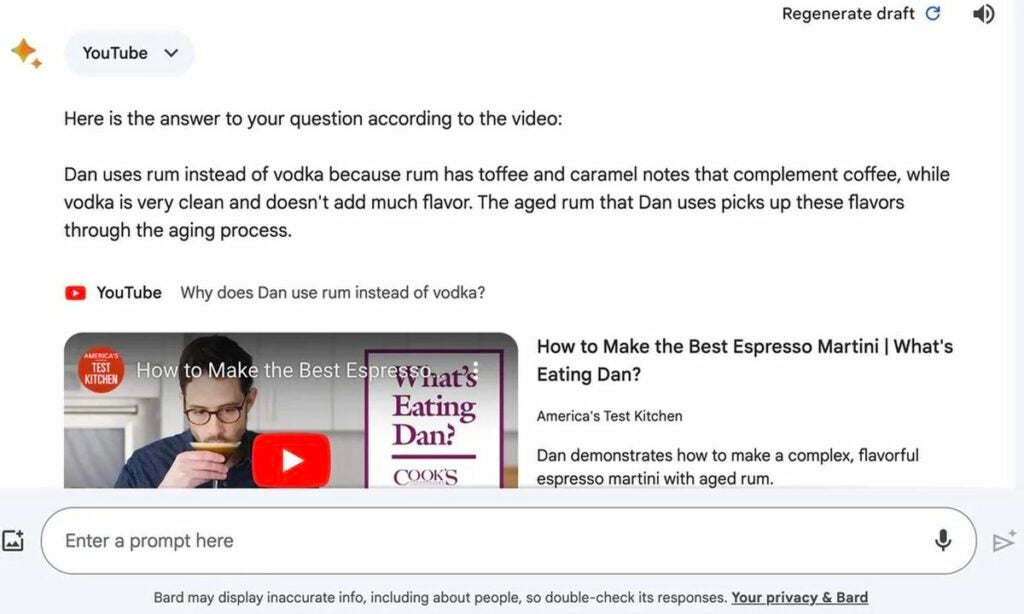
The accuracy of the YouTube Bard extension is evident in practical examples, including a test conducted on a video from America’s Test Kitchen by Verge, known for its recipe content. In this specific instance, the user queried Bard about the recipe for an Espresso Martini, and Bard successfully extracted accurate information, providing details on ingredients and step-by-step instructions. This showcases Bard’s proficiency in comprehending and summarizing content effectively, enhancing user experience.

(Credit)

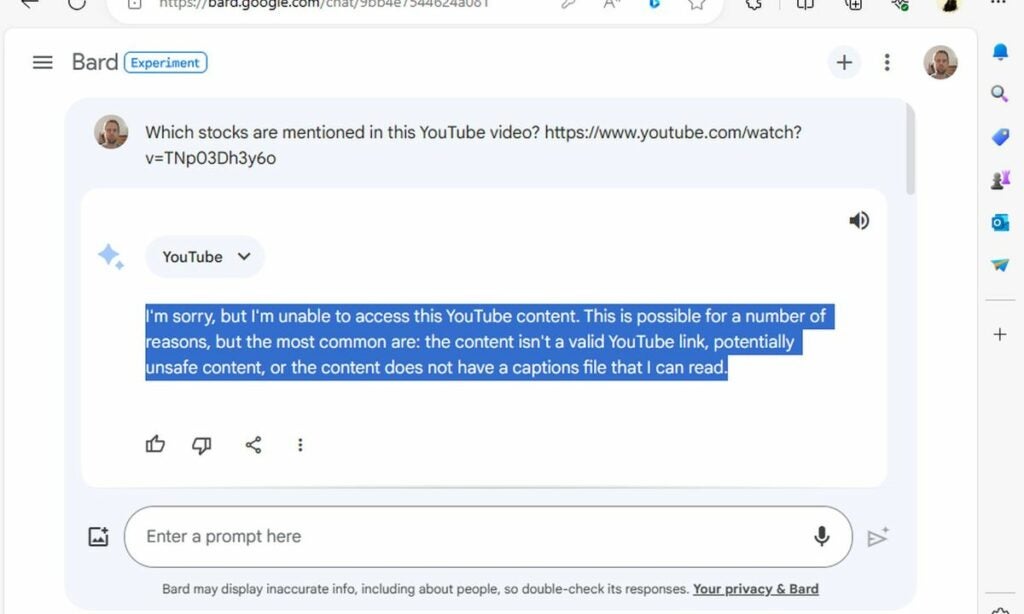
However, it’s essential to acknowledge potential limitations. According to a Ghacks report, Bard may encounter difficulties in retrieving data from a video if it lacks closed captions. In such cases, Bard responds with an explanation, stating, “I’m sorry, but I’m unable to access this YouTube content. This is possible for a number of reasons, but the most common are: the content isn’t a valid YouTube link, potentially unsafe content, or the content does not have a captions file that I can read.”

Bard YouTube Extension
(Credit)

Here are the key features of Bard YouTube Extension:

  • Advanced query handling: Bard can now handle complex queries related to specific video content. Whether it’s dissecting recipe quantities or summarizing instructional steps, Bard has your queries covered.
  • Content summarization: The standout feature of Bard’s YouTube extension is its ability to summarize key points from videos. From extracting ingredient details to providing measurements, Bard ensures you get a quick overview without having to watch the entire video.
  • User-friendly interaction: Bard has made the interaction process incredibly user-friendly. Through simple prompts, users can access specific details by typing a few queries, making it an intuitive and efficient experience.
  • Opt-in Labs experience: The YouTube integration is an opt-in Labs experience. Users have the choice to explore and utilize this feature, although it might require some experimentation and strategic prompts to get the desired information.

How to use Bard YouTube Extension easily

Using the Bard YouTube extension is a straightforward process that enhances your video-watching experience. Here’s a step-by-step guide on how to use the Bard YouTube extension:

  • Open your browser and access the Bard chatbot.
  • Look for the extension button situated in the top right corner of the Bard chatbot interface.
  • Click on the extension button and activate the YouTube extension.
  • Begin testing the feature with specific queries, especially those related to the details you seek in videos. Whether it’s a recipe or instructional content, prompt Bard to extract the information you need.
Bard YouTube Extension
(Credit)

Is Bard YouTube Extension not showing?

If you’re experiencing issues with Bard YouTube extensions not showing, here are some troubleshooting steps to address the problem:

  • Ensure that extensions are available for personal Google accounts. Google Workspace accounts for schools, businesses, or organizations might not have access to extensions.
  • Check if extensions are turned on. Visit bard.google.com and click on the puzzle piece icon in the top right corner. If extensions are turned off, you will see a toggle to enable them.
  • If the above steps don’t work, try using a different browser or device. Clear your browser’s cache and cookies to eliminate potential issues.
  • Note that Bard extensions may not be available for certain Google Workspace apps, such as Docs, Sheets, and Slides. Extensions are currently limited to specific Google Workspace apps.
  • Check if Bard extensions are rolled out in your area. If the extension icon is not visible at all, it might not be available in your location yet.

If none of the above solutions work, consider reaching out to Google support for further assistance.

A broader perspective

Google’s Bard YouTube extension introduces an innovative way to engage with video content, but it raises concerns for content creators. A significant worry is the potential impact on monetization, as Bard allows users to extract detailed information without engaging with ads or the full video, posing a threat to a YouTuber’s ad revenue. There’s also the concern of a reduction in overall watch time, a critical factor in YouTube’s recommendation algorithm. If users turn to Bard for quick answers, creators may experience decreased visibility.

Bard YouTube Extension

Content creators who use paywalls for exclusive content face challenges, as Bard’s ability to extract information behind paywalls could diminish the perceived value of premium content. Moreover, the tool’s influence on YouTube’s recommendation algorithm may alter user behavior patterns, affecting how videos are suggested and potentially limiting a creator’s reach.

While Bard is currently part of an opt-in Labs experience, its broader implications and long-term effects on content creation and consumption remain to be fully addressed by the industry. Striking a delicate balance between user convenience and the challenges faced by content creators is crucial for maintaining a sustainable and thriving YouTube community.

The latest One UI update might hurt your Android device

The Android 14-based One UI 6.0 update, which has been eagerly anticipated and widely adopted on various Samsung high-end and mid-range phones, brings a plethora of new features and design changes. However, an unforeseen drawback has allegedly surfaced, particularly concerning OLED screens.

Users ask: Where is the screen burn-in protection for status bar elements?

According to various user experiences, one notable omission in One UI 6.0 is the absence of screen burn-in protection for certain elements, specifically the status bar. Screen burn-in is a phenomenon associated with OLED screens, where the extended display of static images or UI elements in the same position can lead to the degradation of organic materials within pixels. This degradation results in a reduction in brightness and potential long-term damage to the screen.

When elements on an OLED screen, such as the battery icon and buttons, stay static for too long, it can lead to screen burn-in. This issue arises from displaying the same images/UI elements over extended periods, degrading organic materials in pixels and causing reduced brightness, image retention, and patches.

To counteract the risk of screen burn-in, modern smartphones equipped with OLED panels typically utilize a preventive measure known as pixel shifting. Pixel shifting subtly adjusts the position of UI elements, preventing static image retention and distributing the wear and tear more evenly across the screen.

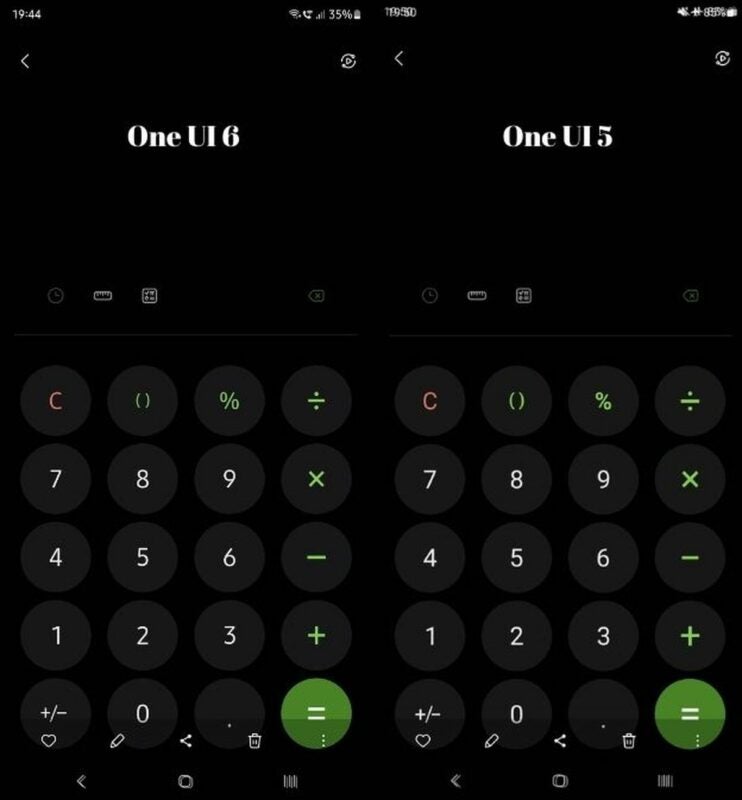
However, users who have updated to One UI 6.0 have observed a crucial absence of this protective feature for the status bar elements, such as the battery icon, clock, and other essential indicators. A side-by-side comparison with the previous One UI 5 reveals that while the navigation bar elements have shifted as expected, the status bar elements remain static, lacking the pixel-shifting mechanism.

(Credit)

The revelation of this missing screen burn-in protection feature has sparked discussions and expressions of concern within the user community. Some users have taken to platforms like Reddit to highlight this issue, with hopes that Samsung will address the matter promptly through a future software update.

In summary, what is missing on OLED screens after the One UI 6.0 update is the pixel-shifting mechanism for the status bar elements, leaving a potential gap in the protection against screen burn-in. As users await a resolution, the hope is that Samsung acknowledges and rectifies this oversight swiftly to ensure the continued excellence of OLED displays on devices running One UI 6.0.

Here’s why Nvidia can’t ship its latest AI chip

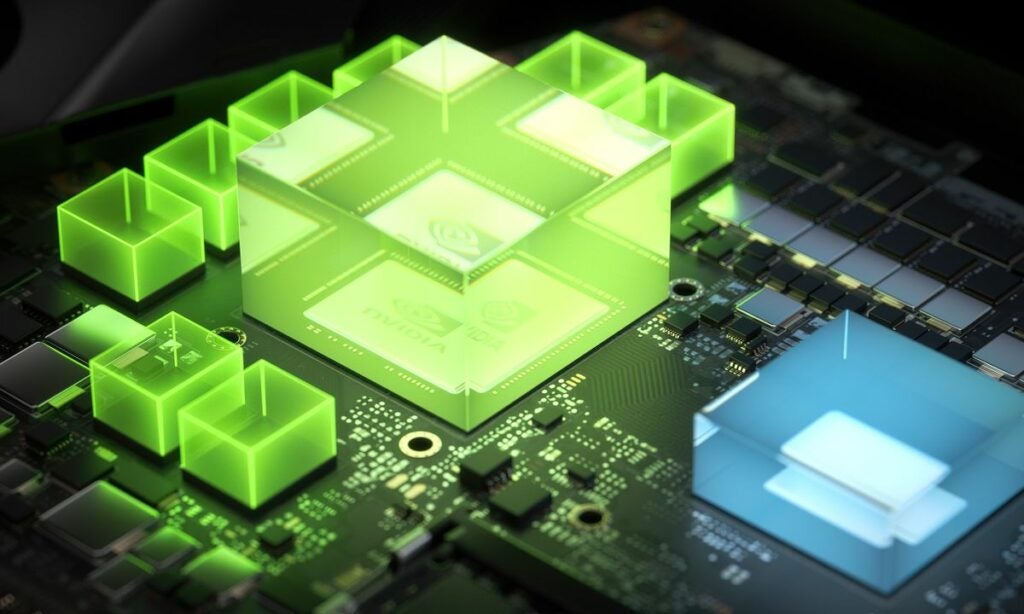
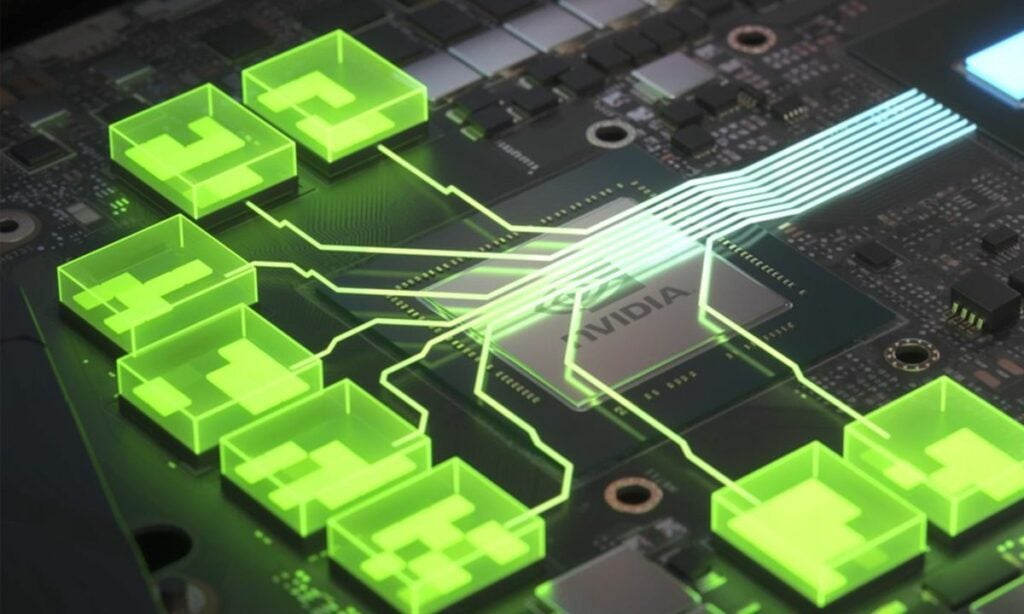
NVIDIA’s eagerly anticipated H20 AI chip, slated for a November launch in China, is hitting delays. The setback, attributed to integration challenges faced by server manufacturers, pushes the launch to early 2024.

Nvidia’s explanation failed to stop stock price declines

NVIDIA’s launch of the China-exclusive H20 AI chip is delayed to Q1 2024 due to integration challenges faced by server manufacturers, impacting the company’s compliance strategy amidst stringent US export restrictions and causing a decline of around 2.4% in pre-market trade. Here are all the details you need to know about it:

  • Integration issues: NVIDIA’s highly anticipated H20 AI chip faces a delay in shipping due to reported integration challenges encountered by server manufacturers. The term “server manufacturers” refers to companies that produce physical servers incorporating NVIDIA’s AI chips. These manufacturers design and build servers that utilize NVIDIA’s AI chips, ensuring seamless integration of the chip into their server hardware.
(Credit)
  • Initial launch schedule: Originally slated for a November launch, the H20 chip is now rescheduled for the first quarter of 2024, with NVIDIA citing the need to address the difficulties in seamlessly integrating the chip into servers.
  • Compliance strategy: The H20 chip is part of NVIDIA’s strategic move to comply with stringent US export restrictions. Alongside the H20, the company developed compliance chips, including the L20 and L2, specifically tailored for the Chinese market.
  • Reduced computing capabilities: To adhere to export regulations, the compliance chips, including the H20, boast cutting-edge AI features while operating within reduced computing capabilities.
  • Impact of export restrictions: The export restrictions have not only affected NVIDIA’s ability to ship certain advanced products to China but have also allowed competitors, notably Huawei, to secure orders that were once dominated by NVIDIA.
  • Rivalry with AMD: AMD, NVIDIA’s rival in the semiconductor industry, is strategically positioning itself to capitalize on the growing demand for AI chips in China. Lisa Su, AMD’s CEO, announced plans to develop an AI chip explicitly designed for the Chinese market, challenging NVIDIA’s dominance.

Problems bring more problems

NVIDIA faces a decline of around 2.4% in pre-market trade as it delays the launch of its China-compliant H20 AI chip, citing integration issues with server manufacturers; this setback follows tightened U.S. export restrictions on AI chips to China, impacting NVIDIA’s revenue, with the H20 delay potentially hindering its competitive stance against local rivals like Huawei.

(Credit)

The delay in NVIDIA’s H20 chip launch underscores the shifting dynamics in the tech race in China, as companies navigate export restrictions, integrate advanced technology, and compete for supremacy in the AI chip market.

As the industry observes these developments, the delayed launch of NVIDIA’s H20 AI chip sheds light on the intricate challenges faced by tech giants in a landscape shaped by regulatory constraints and fierce competition.

This new Google Meet feature will make you want to raise your hand

Google Meet just dropped a game-changer: hand gesture detection. It’s like your real-world moves are now part of the digital chat. Imagine this: you raise your hand IRL, and boom, everyone sees a virtual high-five.

We’re diving into the deets of this cool feature—how it works, what you can do with it, and the sweet nostalgia it adds to online hangs. Say hello to the future of digital chitchat, where your gestures matter!

Google Meet DOWNLOAD

Wave to Google Meet’s new feature

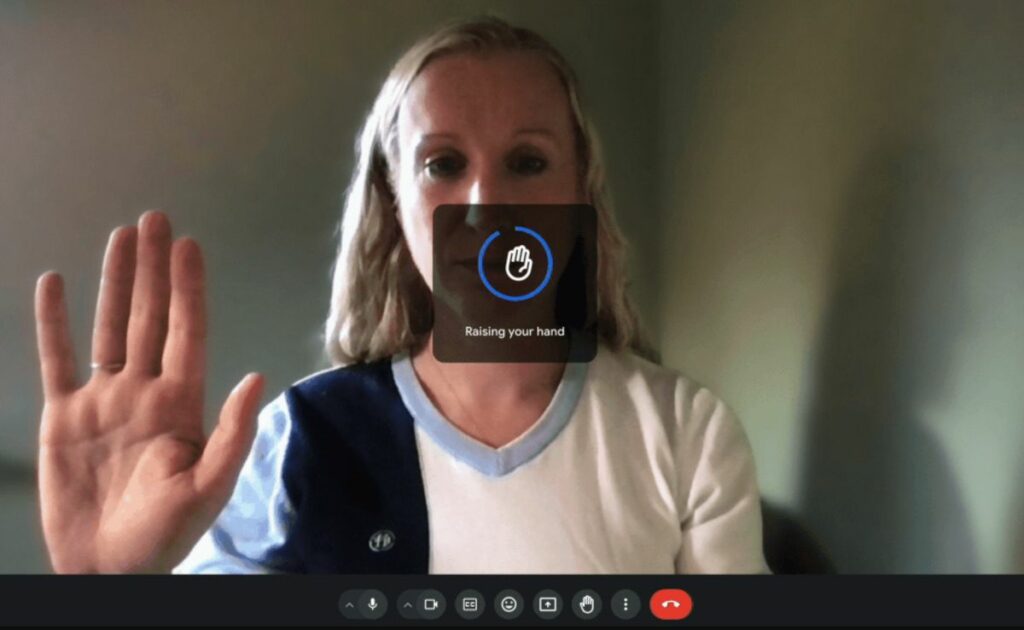
Google Meet’s latest feature, hand gesture detection, revolutionizes virtual meetings. Using artificial intelligence, it recognizes when participants physically raise their hands during video calls.

Image credit: Google

Activated by keeping the hand visible to the camera, this innovative addition provides a seamless way to signal questions or comments. The virtual hand raise icon appears, moving users to the main grid for moderators to easily identify those seeking to contribute. Exciting, right? Here is all the details you need to know about it:

  • Hand gesture detection: Google Meet introduces a hand gesture detection feature for video calls. The AI-powered system recognizes physical hand raises during virtual meetings.
  • Activation and visibility: Hand detection only works when your hand is visible to the camera. It must be away from your face and body for the system to recognize the gesture.
  • Triggering the icon: Users need to keep their hand raised for a few seconds to activate the gesture detection. Once triggered, a virtual hand raise icon appears in the user’s video window.
  • Moderator notification: The raised hand icon signals moderators that the participant has a question or comment. Users are moved to the main grid, making their requests more noticeable.
  • Integration and customization: Available across most Google Meet Workspace plans. The feature is turned off by default but can be enabled in settings.
(Credit)
  • Preventing accidental triggers: Hand gesture detection is automatically turned off for active speakers. This prevents unintended triggers during lively discussions.
  • Practical applications: Offers convenience, similar to clicking the hand raise button, with a touch of nostalgia. Useful when away from the computer mouse or when hands are not easily visible.
  • User-friendly functionality: Enhances the virtual meeting experience by introducing a physical element. Bridges the gap between traditional in-person communication and virtual interactions.
  • Continued innovation: Google Meet continues its trend of innovation, following the recent introduction of a portrait touch-up mode. These updates aim to make virtual meetings more engaging and user-friendly.

How to use Google Meet’s new hand gesture detection

Google Meet’s hand gesture feature, set to enhance the virtual meeting experience, comes with specific rollout details. For administrators, it’s important to note that there is no direct control over this feature; it cannot be toggled on or off. End users will find the feature turned OFF by default. To activate it, users can navigate to “More options > Reactions > Hand Raise Gesture” within Google Meet. Additional guidance on utilizing this feature is available in the Help Center.

Rollout

The rollout pace varies for different domains. Rapid Release domains will experience a full rollout, with feature visibility expected within 1–3 days, starting from November 21, 2023. On the other hand, Scheduled Release domains will see a more gradual rollout, extending up to 15 days, commencing on November 28, 2023.

Availability

As for availability, the Hand Raise Gesture feature is accessible across various Google Workspace plans, including Business Plus, Business Standard, Enterprise Essentials, Enterprise Plus, Enterprise Standard, Enterprise Starter, Education Plus, the Teaching and Learning Upgrade customers, and Google Workspace Individual subscribers. This inclusive availability ensures a wide range of users can leverage the benefits of this feature in their virtual meetings.

For more detailed information, click here.

How to uninstall Edge in Windows 10 and 11 after the latest updates

Microsoft’s recent updates, designed to comply with European Union regulations, bring a wave of changes, including an easy way to uninstall Edge.

Spoiler alert: this perk is currently reserved for EU citizens, prompting others to delve into Windows Registry tweaks and location spoofing.

In this guide, we unveil a global workaround, offering users everywhere a simplified path to uninstall Microsoft Edge and take command of their Windows experience. Fear not, if you want to download it again you can easily reinstall it.

How to uninstall Edge in Windows 10 and 11 easily in 8 steps

Uninstalling Microsoft Edge in Windows 10 and 11 can be accomplished with a new method that involves manipulating system files. While straightforward, it’s imperative to exercise caution, as this process entails modifying critical components of the operating system. Here are the steps to uninstall Edge you need to follow:

  • Download ViVeTool
  • Command Prompt as Administrator
  • Enable hidden feature
  • File Explorer and permissions
  • Notepad configuration
  • Update Notepad
  • Save changes and restart

Note: Prioritize data backup and create a system restore point before proceeding to ensure a safety net for any unforeseen issues and make sure your system is running Windows 10 build 19045.3757 or Windows 11 build 22621/31.2787 or a more recent version.

Now, let’s break down each step one by one and uninstall Edge in Windows 10 and 11 easily.

Download ViVeTool

  • Obtain ViVeTool from its GitHub repository, a tool designed to unlock hidden features in Windows.
  • Extract the downloaded file to a directory of your choosing.

Command Prompt as Administrator

  • Launch Command Prompt with administrative privileges by right-clicking the Start menu and selecting “Command Prompt (Admin)” or “PowerShell (Admin).”
  • Navigate to the ViVeTool directory using the cd command (e.g., cd C:\YourFolderPath\ViVeTool).

Enable hidden feature

  • In the elevated Command Prompt, input vivetool /enable /id:44353396 and execute the command.
  • Reboot your system to apply the changes effectively.

File Explorer and permissions

  • Open File Explorer and direct it to C:\Windows\system32.
  • Locate the file named IntegratedServicesRegionPolicySet, right-click it, and access its “Properties.”
  • Within the “Security” tab, navigate to “Advanced” and transfer ownership to the Administrators group.

Notepad configuration

  • Launch Notepad with administrative privileges by pressing Win + R, typing notepad, and executing it with Ctrl + Shift + Enter.
  • Identify and modify the setting in the JSON file pertaining to Edge uninstallation.
  • Adjust the value of defaultState as needed.

Registry editing

  • Open the Registry Editor by pressing Win + R and entering regedit.
  • Navigate to Computer\HKEY_USERS\.DEFAULT\Control Panel\International\Geo and document the value of the “Name” entry.

Update Notepad

  • Return to Notepad and include your country name in the list of supported regions based on the information gathered from the Registry Editor.

Save changes and restart

  • Save the alterations made in Notepad and initiate a system restart.

Following these steps should enable you to uninstall Microsoft Edge from your Windows 10 or 11 system. In the event of any complications or undesired outcomes, consider reversing the steps or utilizing the system restore point created earlier. Caution is paramount when dealing with system files to prevent unintended consequences.

Time for a new browser! Explore a range of options to find the perfect one for you:

Featured image credit: Microsoft

You can be the new Karate Kid: Casting call announced

The next New Karate Kid casting call has reverberated through the world of martial arts enthusiasts like a powerful roundhouse kick, signaling not just an audition but an open invitation to step into the legendary footsteps of Ralph Macchio and Jackie Chan to Miyagi-verse.

As the cinematic world eagerly awaits the next chapter in the Karate Kid saga, a global search is underway for the teenager who will not only share the screen with these iconic figures but potentially redefine the very essence of the beloved franchise.

New Karate Kid casting call announced by Jackie Chan and Ralph Macchio

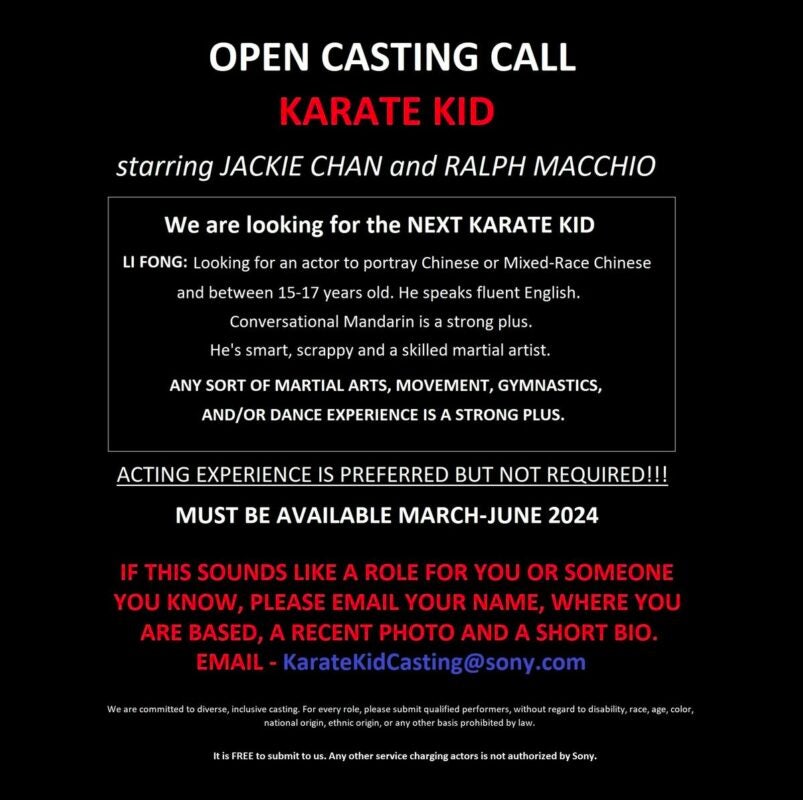
Get ready to kick your way into the spotlight because the search is on for the next Karate Kid! In the new Karate Kid casting call that echoes with excitement, Ralph Macchio and Jackie Chan have declared an open invitation for a new teenage star to join their ranks in the upcoming Karate Kid movie.

Following the triumphant success of Cobra Kai, the dynamic duo of Macchio and Chan is gearing up for a fresh adventure, and they want you to be a part of it. The global casting call is your ticket to stardom, offering aspiring talents a shot at sharing the screen with these martial arts legends.

The call introduces us to Li Fong, a character set to bring a new flavor to the Karate Kid universe. If you’re between 15-17 years old, Chinese or of mixed-race Chinese descent, and can throw down in English (bonus points for conversational Mandarin), this could be your moment to shine. Li Fong is described as smart, scrappy, and a skilled martial artist, making this an opportunity for a breakout star to leave their mark on the iconic franchise.

New Karate Kid casting call: Answer the call! Be the next Karate Kid in the legendary saga. Casting is now open for skilled teens. Explore now.
New Karate Kid casting call (Image credit)

For more detailed information about the new Karate Kid casting call, click here and visit the official page.

The buzz around this casting call suggests that the upcoming film will seamlessly blend the best of the Karate Kid worlds. With Macchio and Chan at the helm, it’s not just a movie; it’s an invitation to become a part of cinematic history. The Miyagi-verse, rich with tradition and mentorship, is expanding, and you could be the one to carry its legacy forward.

Directed by Jonathan Entwistle, the visionary behind The End of the F***ing World, the film is slated for release in December 2024.

So, dust off your martial arts skills, perfect that high kick, and get ready for your shot at stardom – because the next Karate Kid could very well be you!

Featured image credit: Sony

Fortnite age restriction backlash explained

Are you one of the gamers who found the “Fortnite age restriction update” to be the worst update ever? You are not the only one.

Fortnite, the iconic battle royale game, has recently found itself in the midst of controversy with its latest update, which introduces age and content ratings for Fortnite Creative islands.

While the intent behind this move is ostensibly to provide players and parents with more control and information, the implementation has triggered a substantial backlash, with many players deeming it “the worst update in the history of the game.”

The Fortnite age restriction rollout

The crux of the issue lies in the extension of age and content ratings to the game’s Creative mode. Unlike the Battle Royale mode, where the age rating remains ‘T for Teen,’ Creative islands can now be rated as low as ‘E for Everyone.’ This seemingly innocuous update takes a turn for the contentious when applied to the realm of cosmetics.

Epic Games, the developers behind Fortnite, have chosen to mirror these age restrictions on cosmetics. Now, skins with more mature themes are only permitted on specific Creative islands, introducing an unexpected layer of complexity to the game.

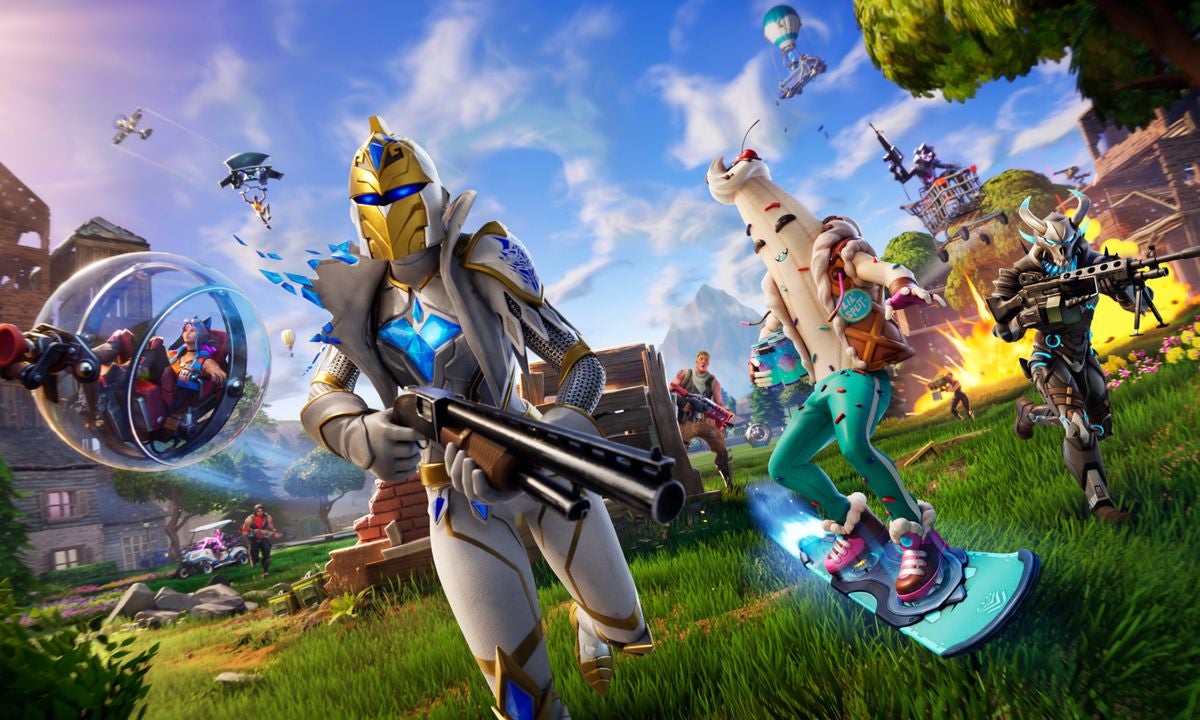
Fortnite age restriction update: Explore Fortnite's latest update, stirring controversy with age and content ratings for Creative islands
Fortnite age restriction backlash (Credit)

The affected cosmetics include skins featuring holstered guns or bandoliers holding ammo/explosives. Even monstrous skins like Xenomorph or Mincemeat have not escaped the restrictions. The real point of contention, however, lies in the apparent arbitrariness of the selection process, leaving players frustrated and bewildered.

Fortnite DOWNLOAD

Inconsistencies and confusion

Players have voiced their dissatisfaction with what they perceive as inconsistent application of the restrictions. Cute and seemingly harmless skins, like Meowscles, are now restricted to maps rated for players aged 10 and above due to associated weapons. On the flip side, the Michael Myers skin faces no such limitations, sparking confusion and frustration within the Fortnite community.

The controversy expands beyond character skins to encompass seemingly inconspicuous elements such as menu music and loading screens. Fans are questioning the justification for placing age restrictions on these elements, which are only visible to the individual player and do not impact the gaming experience for others.

Epic’s adjustments and community uproar

In response to the backlash, Epic Games has made efforts to address concerns. The company went as far as modifying this season’s loading screen, removing any imagery of weaponry to align with a more family-friendly experience. However, these adjustments have failed to appease the disgruntled player base.

The discontent has culminated in players actively seeking refunds for restricted cosmetics and petitioning for a complete reversal of the update.

Future plans

The Fortnite social media team has assured players that work is underway to adapt gated cosmetics for use in ‘E’ and ‘E10+’ rated islands. While this is a step towards resolving the issue, the gradual progress may not be swift enough to quell the growing unrest within the Fortnite community. They claim that most players’ Outfits will auto-adjust to suit island content ratings within the next year, but whether this will be sufficient to assuage the frustrated player base remains to be seen.

As Fortnite’s player community remains divided over Forntie age restrictions, the controversy underscores the delicate balance game developers must strike between creative freedom and content regulation in the evolving landscape of online gaming.

Featured image credit: Fortnite