Editorial: Limewire is no great loss

The popular P2P program which was finally shut down yesterday was a mine of pirated, illegal and malicious content.

LimeWire, the banned peer-to-peer file sharing application, was a pioneer in its field. Launched in May 2000, it enabled millions of users to download an unimaginable quantity of almost exclusively unlicensed content (I can’t work it out but it’s somewhere up there between an exabyte and a zettabyte). But few in the know are mourning its demise, even if it comes at the hands of the sometimes reviled RIAA.

limewire-legal-notice.png

LimeWire, you see, despite having the most complete feature set of any of the major Gnutella clients, was not a piece of software that engendered much love from software experts. Sure, it was hugely popular. But with network-specific software, popularity just breeds popularity: it is not a sign of real objective quality. Continue reading “Editorial: Limewire is no great loss”

Is there life after LimeWire?

In the complicated and legally dubious world of file sharing, news that a service is being forced to close down is nothing new. LimeWire is the latest to come under fire from the music industry – at the last count, the company was being sued by no fewer than 8 different labels! Whether or not they’ll actually manage to take the giant down remains to be seen, but so you can relax, safe in the knowledge that even if it does go under, you’ll still have plenty of options, we’re rounding up the best of the rest.

Alternative P2P clients

ares2.png

Ares is a P2P powerhouse. Incredibly popular in Europe, but a great app anywhere, Ares is even a Softonic Award winner. With a giant preview screen and simple, user-friendly configuration options, this app would definitely be my first choice.

Frostwire is the go-to app for LimeWire fans. Built around LimeWire’s code, but open-source, it manages to be familiar and ad-free at the same time – sounds like a good option to me!

eMule certainly seems like it has been around for forever. That’s pretty much because it has, but that just goes to show that it does a great job. It can be slow for new users, but it’s open-source, solid and secure, so it is easy to see why it remains a hugely popular application.

Vuze is an application that takes a very different approach to the P2P market. Apart from incorporating a filesharing app that was previously known as Azureus, it tries to integrate social media and legal download options. Some purists will laugh at the idea, but the truth is that P2P filesharing is one of the web’s grandmas. Wasn’t about time for a makeover?

Limewire makes sharing sociable

Sharing music is something I’ve always done, but I have to admit that the internet has made the experience a bit cold. It’s easy, sure, but not as personal as in the past when it was all about giving each other cassettes. P2P file sharing is impersonal at best, and obviously has legal “issues” when it comes to copyrighted stuff.
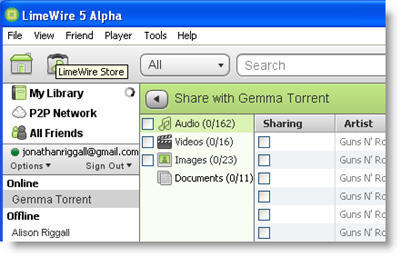
For the past few weeks I’ve been playing with the alpha version of Limewire 5, and I’m really impressed. Firstly, it’s been completely redesigned, and now looks ultra modern, sleek and attractive. While you still have the “Upgrade to Pro” pop-up every time you start, it looks and feels much friendlier.

All the features we’re used to are present and correct – there’s nothing that current users will find difficult to do in version 5 – and there’s something new too. If you have friends with Limewire and Gmail, Jabber or LiveJournal accounts, you can share file directly with them without sharing them publicly. Connecting Limewire to Gmail friend lists is genius – you don’t have to even think about IP addresses or any complicated connecting, just pick the files you want to share and that’s it.

Unlike older file sharing communities, you can’t search and add friends from the Limewire network, just use ones from you own friend lists. This is quite a change, and means two things – firstly, that you can have a really neat sharing community of your actual friends, and secondly that you can be sure no one is spying on what you’re sharing. I have read that Limewire is considering adding Facebook contacts to the app in a future release. Considering how many people are connected with each other through Facebook, utilizing that for easy file-sharing has wonderful potential. Not only can I get that warm community feeling when sharing music again, but sharing anything, from pictures to documents, is finally as easy as you want it to be.


New Limewire to get a browser

lmewire-store.pngIt’s already widely known that everyone’s favorite peer to peer (P2P) application for PC and Mac, Limewire, is soon going to offer an online store, where you’ll be able to buy and download songs and albums in MP3 format at a selected fee. Here’s the press release in case you missed the story back in August. Initially the site was supposed to Beta in fall and be up for the holidays but it seems the project has been somewhat delayed.

The good news is that Limewire is very likely to be fitted with a browser (which you can test out in the latest Beta released yesterday), as we can read on the latest post by the developers. As they explain, the idea has been around for a while, and right now the real challenge is choosing what browser to integrate to the Limewire client, the purpose being the following,

With the launch of the LimeWire Store, we wanted to be able to search the Store through the LimeWire client and the easiest way to achieve this was to integrate a web browser into the client.

Initially the idea was to use a Java Desktop Integration Component (JDIC) browser, but unfortunately Sun, the developer of the browser, seems to have let go of the project since August 2006. The Limewire team have weighed up the solutions and found IBM’s Eclipse to work out best. It does get more technical, so I’ll spare you the details, except to say that the Limewire team worked on building a browser in SWT (used to make Eclipse) which could be embedded in the Swing built Limewire client.

The question now is: Will fitting Limewire with a browser kill what is a simple and easy to use P2P client, by considerably increasing its memory usage and bloating it with features? Or will both the browser and the online store prove to be a real asset to the Limewire resource?

[Via: P2P Blog]

Top 5 LimeWire acceleration tools

LimeWire logoAlthough I use eMule more, LimeWire is still one of my favourite P2P apps simply because it’s so easy to use and reliable. On the downside, it doesn’t return as many hits as eMule but most importantly, I find the download speeds significantly lower. A while back, James gave some practical tips on how to improve LimeWire download speeds but if they haven’t done much for you, then here’s a list of my top 5 suggestions to boost downloads.

  • P2P Doctor – Removes malware that may be blocking LimeWire
  • P2PTurbo – Inspects LimeWire and claims download speeds of up to 600% quicker

Share your favourite files with the latest LimeWire

Limewire logoOne of the most popular open source P2P programs on Softonic, LimeWire is a fast, easy-to-use file sharing program that has just been updated to make file sharing even quicker and safer. To ensure P2P file sharing on the network is more secure and responsible, the developers have introduced a filtering system to encourage safer, more responsible file sharing.

Speeding up Limewire

limewirelogo.jpgLimewire has been one of the most popular P2P apps ever since file sharing exploded onto the scene a few years back. Although it’s still a pretty reliable performer, the old timer of the P2P world can sometimes leave you disappointed in terms of download speeds. Whether this is a deliberate ploy to get you to ‘Go Pro’ for $30 is open to debate, but if you don’t fancy paying out to speed up then there is a solution.

If you’re experiencing painfully slow transfer times in Limewire, then the first thing to do is to make sure the port you set for the program is configured to be open to connections in both your firewall and your router. The globe icon at the bottom left of the Limewire window tells you the firewall status. If the globe appears behind a wall, you’re still blocked. Limewire will still be allowing connections, but almost certainly not at maximum capacity. If you enable port connections through your firewall then this should improve. If not, it’s likely that your ISP could be throttling your downloads, in which case you might want to try connecting from a proxy server.

To inject more download power into Limewire, you should try Limewire Accelerator, which speeds up the download process to a significant degree using its built-in optimisation features. Not only does it help to improve download speeds, you should also find that connections drop out a lot less. If after all this you’re still not a happy bunny then we suggest using a decent BitTorrent client such as BitComet.

eMule vs Limewire

Today we’re going to take a look at eMule and Limewire, two of the biggest free P2P filesharing programs around. We will compare them according to a certain amount of factors like version, network, downloading process, search function and extra features.

emule2.jpgFirst of all, let us remind you that both programs are at very different levels of development. While eMule is known to be one of the most popular P2P applications, it is still only at version 0.47c. Limewire is now 4.12 and offers a PRO (but not free) version with advanced features. However there are loads of moded versions of eMule, like MorphXT, Plus or Xtreme with different skins or performance enhancements.

Concerning networks, eMule and Limewire are in two different ball parks. eMule connects to the eDonkey and Kad networks while Limewire connects to Gnutella. These are probably the most popular around, and yield excellent results, whatever you may be looking for. When setting up Limewire, if your router is UPnP enabled it will automatically forward a port for you. This is because Limewire supports UPnP port mapping. With eMule you will have to choose and forward a port yourself.

Continue reading “eMule vs Limewire”