Gmail Help Me Write with Gemini: 7 Ready-to-Use Prompts for Complaints, Sales & Internal Memos

If your inbox were a physical place that you spent a day, you’d leave feeling drained and disoriented. You’d start at a desk hearing a complaint about a delayed order, while trying to welcome in a potential sales lead who’s just decided to make a surprise visit at the same time, and then you’ve got a meeting in ten minutes to deliver a sensitive presentation to your team. All in quick succession.

Thankfully it’s virtual, but even so, each message demands a change in subject, task, and tone. This constant shifting is emotionally taxing and energy draining. In fact, psychologists call this “Context Switching”, that’s the mental effort required to shift your focus between unrelated tasks. Its results? Less productivity, increased stress and the sensation that you’re never on schedule.

We are aware not all jobs are the same, but some of us can receive over 100 emails a day and spend at least 10 to 12 hours weekly managing emails. And even if you try to take it slow, there’s a rush to respond that can lead to defensive, unclear, or vague messages, prompting (yet) more communication.

Take a breath. Google’s Gemini in Gmail with the “Help me write” feature can help a bit as a drafting assistant by handling those initial drafts so you can prioritize the things that feel more rewarding. Do you want to know how?

In today’s article we’ll provide 7 specific prompts to help you manage customer complaints, speed up sales cycles, and organize internal memos… All so you can get through the day without spending it entirely in your (thankfully not physical) inbox!

Google Gemini DOWNLOAD

So… What’s Gmail’s Help me write and How can Gemini Boosts Your Drafts?

Gemini is Google’s advanced AI for generating text, and “Help me write” is a drafting feature in Gmail that utilizes Gemini’s capabilities (sorry, Outlook users).

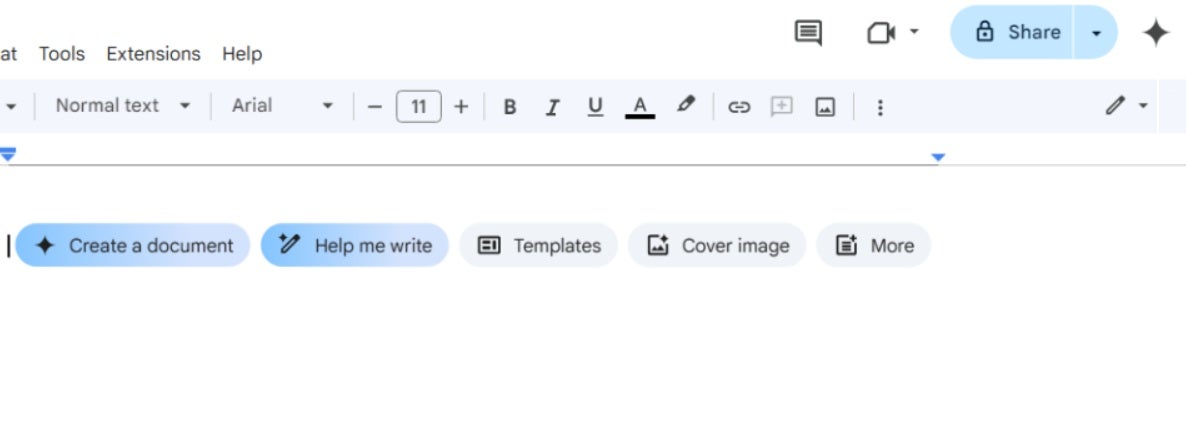
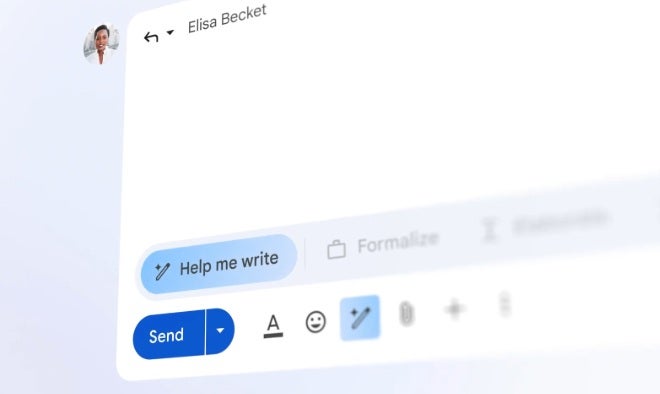
On the desktop, the “Help me write” icon is a pencil with a sparkle, and is found at the bottom of the compose or reply window. On mobile, it appears as a shortcut in an empty message. Its main function is to assist you in drafting or refining emails. 

Help me Write will:

  • Generate new emails based on prompts.
  • Refine drafts to match tone and style preferences.
  • Ensure that drafts align with your instructions.

However it’s important to keep this in mind, and it applies to most AI tools. Help me Write:

  • Cannot read your mind, it needs explicit instructions.
  • Does not make decisions for you.
  • Should not be used for legal, medical, or financial advice.

Gmail’s Gemini features are included in specific Google Workspace and Google AI plans, with variations in availability based on your region. Also, note that Google does not use your Workspace content to train Gemini models, keeping your data entirely managed by you.

How to Get the Best Results: Setting Clear Prompts

A prompt is a direction given to Gemini, outlining what you need along with specific instructions. For the AI to understand us and give us the best results, we have to add this information:

  1. Persona: Who should Gemini emulate?
    • Example: A helpful customer support agent.
  2. Task: What do you want it to do?
    • Example: Draft an apology email.
  3. Context: What specific details does it require?
    • Example: Recipient details, situation specifics.
  4. Format: What structure should the output have?
    • Example: A brief email using three bullet points.

That’s enough to get a good draft and you can follow up with a simple tweak to adjust according to your needs. That’s typically as simple as “Make it shorter” or “Be more empathetic”. 

This approach helps you achieve the right tone, letting you switch between addressing heated complaints and craft straightforward internal communications without feeling the burden of context switching.

Prompts to Help Manage Customer Complaints and Support Responses

Dealing with customer complaints takes a significant emotional toll. Let’s see how Gemini can assist you in creating empathetic and professional replies even when situations become tense.

Prompt 1: Deescalate a Delayed Shipment Complaint

Our first prompt will aim to calm down a client after a late delivery. Picture the kind of email that pulls your attention away from everything else. A long-time, high-value customer writes in, angry that their order is 6 days late and hinting they might post a negative public review.

A “VIP customer” here means someone whose history and spend make their feedback especially important for your business. This reply needs to be fast, clear, and generous without stepping into legal language.

When you use Gmail’s Help me write with Gemini for this situation, make sure your draft covers:

  • What went wrong and when. Briefly state that the order is 6 days late and acknowledge the impact on them.
  • Who the customer is and why they matter. Show that you recognize their loyalty and status as a VIP, not just an order number.
  • What you are offering to fix it
    Spell out the specific options you are willing to provide within your policies. Here are some examples:
    • A no cost replacement sent with express shipping this week.
    • A refund.
    • Plus a 20 percent credit on their account to recognize the inconvenience.
  • How you handle legal language. You want to apologise and take responsibility for the experience, while avoiding phrases that sound like a formal admission of legal liability. Keep it human and practical instead of legalistic.

Prompt to paste into “Help me write”

“Act as a customer support agent. Write a concise, warm reply to a VIP customer whose order is delayed by 6 days. Acknowledge their frustration and apologise for the experience. Briefly explain the delay without blaming the carrier. Offer either a no cost replacement with express shipping this week or a full refund, and add a 20 percent credit for the inconvenience. Do not admit legal liability. End with clear next steps and your direct contact details. Keep the email under 140 words and use plain language.”

Post-generative tuning

  • If the draft sounds stiff, ask Gemini to “make it more personal and conversational” while keeping the same offer.
  • If it runs long, ask it to “shorten while keeping all offers and the 20 percent credit.”
  • Double-check that the replacement, refund, and credit match your current refund, shipping, and discount policies before sending.

Prompt 2: Upholding Your Refund Policy Gracefully

Some emails feel heavier than others. A customer writes in, upset, asking for a refund long after your policy allows it. You still have to answer kindly, protect the policy, and not spend your whole afternoon rewriting the same explanation. This is where Help me write with Gemini can carry the first draft for you.

In this scenario, a customer requests a refund after your refund window has closed. Your reply needs to:

  • Restate the policy in simple language. Say what the refund policy is and repeat the exact time limit, for example 30 days from the purchase date.
  • Anchor the reply to their case. Briefly mention what they bought and when they purchased it so they know you actually checked their order.
  • Offer clear alternatives. Explain that a full refund is not possible now, then offer specific options depending on your actual policies such as:
    • A 5 store credit, which is a balance they can use on a future order.
    • A coupon code (such as 5% off) for their next purchase
  • Stay firm, but still helpful. The tone should be respectful and calm, not apologetic to the point of weakening the policy.

Prompt to paste into “Help me write”

“You are a customer support agent. Write a respectful reply to a refund request that is past our 30 day refund window. Restate the refund policy and its time limit in clear, simple terms. Thank the customer for their business. Explain that a full refund is not possible, then offer either a 5 dollar store credit or a 5 percent discount coupon code on a future purchase. Invite them to reply if they have questions. Keep the tone firm but helpful. Keep it under 120 words and use plain language.”

Post-generative tuning

  • If the reply sounds soft, ask Gemini to “make the tone more firm but still polite.”
  • For large or long term customers, ask it to “make the tone slightly more formal while keeping the same policy and offers.”
  • Before sending, confirm that the policy text, the 30 day limit, the 40 dollar credit, and the 15 percent discount match what your legal and operations teams have set.

Better Sales Emails and Follow-Ups

Crafting Sales emails requires the right tone and timing. Gemini can assist in composing messages that are both personal and relevant, enabling salespeople to dedicate more time to engagement.

Prompt 3: Cold Outreach Emails That Are Likely to Get Opened

Reaching out to a new prospect usually starts with a short message that has to earn a reply. You want it to feel specific, tied to something real happening in their world, and not stuffed with buzzwords.

When you use Help me write for a first draft, include:

  • The prospect’s role, company, and industry.
  • A recent business signal, such as funding, a new office, a product launch, or a hiring wave.
  • The problem your product solves, explained in plain language.
  • One simple action you want from them, like a quick call or a short reply.

Prompt to paste into “Help me write”

“You are a B2B sales rep. Write a friendly, concise cold email to [ROLE] at [COMPANY] in [INDUSTRY]. Reference [SPECIFIC NEWS OR SIGNAL] in the first sentence. Connect that to the problem we solve, which is [PROBLEM IN PLAIN LANGUAGE]. End with one clear, low effort call to action, such as a 15 minute call next week or a quick reply to confirm interest. Avoid buzzwords. Keep it under 100 words and use simple language.”

Post-generative tuning

  • Ask Gemini to shorten if it still feels long.
  • Try a few versions that vary the opener or call to action.
  • Swap any technical terms for everyday wording before sending.

Prompt 4: Casual Follow Up After a Silent Prospect

You sent a proposal five days ago but you haven’t received any reply yet (what is normally called a Silent Prospect). You want to check in without sounding impatient, and you want to add a bit of value so the email feels helpful, not just like a reminder.

When you use Help me write, provide:

  • The date you sent the proposal and a short description of what it covered.
  • A useful resource, such as a case study, short video, or one pager.
  • Any timing context, like an upcoming renewal, event, or deadline they mentioned.

Prompt to paste into “Help me write”

“You are a sales rep. Write a light, respectful follow up to my proposal sent on [DATE] with subject “[SUBJECT]”. In one short line, reference the earlier email. Share this helpful resource for their decision, [LINK OR TITLE], without sounding salesy. Ask a simple question to check if timing or priorities have changed. Offer an easy no if now is not a fit. Keep it easy to skim and under 120 words..”

Post-generative tuning

  • Make sure you include a clear way for them to say “no” so there is no pressure.
  • For senior contacts, ask Gemini to increase formality slightly.
  • Add one line that reminds them of the key benefit or outcome, not every feature.

Prompt 5: Summarizing Demo Next Steps

After a demo or deep discovery call, everyone walks away with their own version of what was agreed. A short, structured summary keeps the deal on track and avoids confusion later.

When you use Help me write, gather:

  • The main goals and problems they shared.
  • The features or parts of your offer they cared about most.
  • Decisions made, who owns what, and target timelines.
  • Any planned pilots, trials, or next meetings.

Prompt to paste into “Help me write”

“You are an account executive. Turn the notes below into an email with a short thank you opener and three sections: What we heard, What we proposed, Agreed next steps. Under Agreed next steps, list owners and dates. Keep the tone friendly and confident. Add a brief TL;DR at the top for busy readers. [PASTE BULLET NOTES]”

Post-generative tuning

  • If the reply comes back cluttered, ask Gemini to tighten each section while keeping all owners and dates.
  • Check names, numbers, and timelines carefully against your notes before sending.
  • Keep the TL;DR to a few short lines so someone skimming on their phone can follow the plan.

Prompts for Clearer Internal Memos and Team Updates

Internal emails often arrive when your brain is already tired from customer questions and sales threads. Status updates, project summaries, and process changes still need to be written clearly so people stay aligned, but they are easy to put off. 

Thanks to Gemini’s ‘Help me write feature’ in Gmail you can take loose notes and turn them into structured updates that are easier to send and easier to read.

Prompt 6: Project Status and Updates Summaries

Project leads often have scattered notes and chat messages instead of a clean update. Stakeholders, meaning anyone who cares about the project or is affected by it, need a clear view of where things stand without digging through long threads.

When you use “Help me write”, share:

  • What is completed, what is still in progress, and what comes next.
  • Key dates and milestones, such as launches or review meetings.
  • Who the audience is, for example executives, managers, or the core team.

A TL;DR is a very short summary at the top of the email for readers who only have time for a quick scan.

Prompt to paste into “Help me write”

“You are a project lead. Write a clear status email with a two sentence TL;DR at the top. Organize the rest into headings: Progress, Blockers, Next steps. Highlight any decisions needed, risks, and key dates. Keep each bullet short and easy to scan. Adjust the level of detail for [AUDIENCE TYPE].”

Post-generative tuning

  • For executives, ask Gemini to compress the email so it fits on one screen.
  • Reuse the same structure each week so people know where to look.
  • Call out decisions in their own bullet so they are hard to miss.

Prompt 7: Sincere Process Change Announcement

Process changes are updates to how work gets done, such as new approval flows or tools. These messages can trigger worry or resistance if they arrive without context. Human resources (HR) and communications teams can use Gemini to shape a note that is honest, clear, and respectful.

When you use Help me write, include:

  • What exactly is changing and what stays the same.
  • The real reasons, such as budget limits, compliance rules, or efficiency.
  • What support is available, like training, guides, or help channels.
  • The preferred style, for example direct and straightforward.

Prompt to paste into “Help me write”

“You are an HR and communications partner. Draft a clear, respectful announcement about a process change. Structure it into: Why we are making this change, What is changing and when, What stays the same, How to get help or give feedback. Acknowledge that the change may feel hard. Thank the team for their flexibility. Keep the tone human and direct.”

Post-generative tuning

  • Use a more formal tone for messages sent to the whole company.
  • Read the draft out loud and refine any wording that could be misunderstood.
  • Make sure the message still sounds like your leadership team, not a template.

Use Gmail’s Refinement Tools to Edit Gemini’s Initial Drafts

The first drafts produced by Gemini should be seen as a preliminary step that you can then fine-tune using Gmail’s editing tools:

  • Formalize: Adjusts the tone to be more professional.
  • Elaborate: Expands on the details and points.
  • Shorten: Condenses the message.
  • Polish: Refines language and improves readability.
  • Recreate: Provides a fresh version based on your initial prompt.

For instance, use “Shorten” for sales emails that must be brief or “Elaborate” for more complex internal communication that requires further detail. Experiment until the tone aligns with your requirements.

Review and Refine Before Hitting Send

Powerful though it may be, the responsibility for how accurate the content is falls on your shoulders. Before you send a Gemini-assisted email, conduct these checks;

  • Fact-check: Are names, timings, offers, and policy details accurate?
  • Alignment: Make sure proposed actions are in line with company policies.
  • Tone: Does it align with your communication style and brand identity?
  • Expert Review: When it comes to sensitive or complex matters, let a relevant specialist review the communication.

A thorough review is essential for quality assurance from a business and a professional standpoint.

Google Gemini DOWNLOAD

Now Put These Gemini Prompts to Work

“Help me write” in Gmail has been developed to handle the hard work of preparing initial drafts, letting you concentrate on core business functions. Through mastering select prompts, precious hours can be saved from your working week as well as reducing context-switching.

To start, concentrate on using just a single prompt. For example, choose Prompt 1 for difficult customer support communications, Prompt 3 for new sales approaches, or Prompt 6 for end-of-week project updates. Once you’ve tried them, just check the final email and tweak the prompt and personalize it as much as you want until the result feels right. Finally, save them for further use.

Gemini’s “Help me write” is an amazing AI tool that won’t just boost the clarity of your emails, but also save you precious time. Try it now!

Proactively Manage Threats with NordStellar: Identify Breaches and Vulnerabilities Before They Cause Harm

With the traditional approach to security, tools focus on what’s going on within your network. NordStellar, however, takes a modern approach and understands that risks also come from outside your defined perimeter, where your EDRs and SIEMs have no reach. We’re talking about the spaces where hackers are trading your data, planning attacks, and scanning your online footprint.

The dark web, for instance, is a well-known source for such activities. Sites here sell stolen data, where items like stealer logs are being sold as a hot commodity—bundles of data taken from compromised devices by malware that steals login credentials or session cookies. In fact, something as simple as a cookie with a login status can sometimes be used to bypass passwords altogether and even Multi-Factor Authentication (MFA). 

the dark web

Another risk is what’s known as your external attack surface, and it consists of all the organization’s internet-facing assets. There’s also cybersquatting, where registered lookalike domains can trick users into clicking on fake links. So while you might have the best protection on your network, if you’re not looking outside, there are still very real and very significant risks to your business.

Common external threats include employee credentials ending up on forums, cookie sessions being sold, phishing scams using your brand, and forgotten subdomains compromised due to open ports.

These attacks can be every bit as devastating as internal attacks. A stolen account can lead to financial fraud. Data sold on the dark web leads to unauthorized access for network attacks and leaks. Lookalike domains hurt user trust. Finally, unpatched systems provide a pathway for ransomware. These all may result in regulatory exposure and expense.

NordStellar DOWNLOAD

How NordStellar Protects Outside Your Perimeter

NordStellar is a threat exposure management platform, which means it looks for danger in places you do not control. It continuously scans external sources such as criminal forums on the dark web, ransomware blogs, Telegram channels, and other sources for signs that your company, people, or assets are being targeted.

You define the scope. Add your domains, brand names, executive names, project code names, partner identifiers, and IP addresses. NordStellar then correlates what it finds with your scope, adds context, and ranks issues by risk so the most urgent items rise to the top. This is the same risk-first behavior reviewers describe when they note alerts are sorted by severity and the platform covers attack surface management.

When something relevant appears, you receive an alert with the source link, the timestamp, and who or what is at risk. You can deliver these alerts to email, Slack, Microsoft Teams, and other applications via custom webhooks or route them to your SIEM (Security Information and Event Management) and SOAR (Security Orchestration, Automation, and Response) through the API.

The practical outcome is faster decisions and fewer surprises. Teams spot leaked credentials before they are abused, catch lookalike domains before a phishing run, and uncover exposed assets on the public internet that internal scanners have not flagged yet. Third-party summaries in 2025 highlight this outside-in visibility as a core strength of the platform.

How to Set It Up

  1. Add what to watch. Enter monitored domains, brand names, VIP identities, partner names or domains, and IP addresses. Automated asset discovery and mapping is available to speed this step. 
  2. Connect where alerts should go. As mentioned, you can link email, Slack, Teams, and your security stack. If your team works from a SIEM or SOAR, enable the API integration so alerts and context flow into the tools you already use. 
  3. Let the system run and triage. NordStellar continuously collects signals and assigns a risk level to each finding. Findings can be reviewed, assigned, and tracked to resolution using your existing SIEM or other workflow management tools.

NordStellar’s Key Capabilities

NordStellar provides real-time protection that detects, monitors, and helps you respond to external threats before they escalate. Here are just a few of the many ways that this comprehensive solution will keep your company safe.

Data Breach Monitoring

NordStellar’s approach to data breach monitoring focuses on detecting data breach dumps, combo lists, and infostealer logs such as those that include active session cookies, as well as stolen credentials and Personally Identifiable Information (PII). 

As mentioned, because session cookies alone can let an attacker skip passwords and MFA entirely, it’s vital to catch these. With a valid cookie, an attacker can behave like a user in your organization until their access is revoked. That means a basic infection on any home device can become a huge business risk.

Alerts from the data breach monitoring feature log where data was found, when, and the domains and services involved. 

Dark Web Monitoring

This feature tracks forums and listings online that include targeting or data leaks. NordStellar’s coverage extensively includes marketplaces, ransomware blogs, forums, and Telegram channels. If something is spotted, you’re alerted in real time from a predefined keyword list that you manage.

This keyword list includes things like your brand, product names, executives, partners, and internal project codenames. Any asset that you want to protect. This coverage extends to over 40,000 sources, and results include source and context, which you or your analysts can verify.

This will give you the opportunity to learn about breaches and leaks of stolen credentials early, and you may even catch planned phishing and lookalike domains before they affect users

Alerts are handy because they include the post’s content, author, and exposure time. 

Attack Surface Management

Attack Surface Management identifies and evaluates internet-facing assets. NordStellar inventories your organization’s domains, subdomains, and IP addresses, fingerprinting technologies and finding weaknesses.

Common issues detected include open ports, software versions with known vulnerabilities,  forgotten sites, and misconfigurations. Information about vulnerabilities  includes detected CVEs, CVSS scores, and affected ports and services.

Because NordStellar uses passive techniques, it complements internal vulnerability scanners and agent-based tools. It shows what attackers can see.

NordStellar uses automated discovery, DNS enumeration, passive scanning, and crawling to keep inventories up to date. Alerts are sent instantly as vulnerabilities or new open ports are detected. The current scope does not include deep cloud environment scanning, so it should be paired with cloud-native tools as well. Depending on your structure, it’s worth reviewing asset findings weekly with app teams and integrating results in CMDB.

NordStellar DOWNLOAD

Cybersquatting Detection

Cybersquatting Detection finds spoofed domains that mimic your brand. NordStellar uses content and visual similarity models, as well as hosting, DNS, and IP indicators, to assess risk.

Detections cover misspellings, homoglyphs, and added words. It also renders sites to detect mimicked login pages and phishing. You get clean alerts that include registrars, hosting, and screen captures for fast review.

A suggested action plan helps you respond. Validate intent, notify registrars, and request takedown in cases of clear abuse.

Brand Protection Add-on

Brand Protection is an optional add-on that widens monitoring to the open web, social networks, and mobile app stores. It looks for abuse of your brand, such as lookalike domains, fake pages and profiles, and cloned or malicious apps that try to pass as yours.

The service includes a managed response. When NordStellar confirms an incident, it initiates takedowns, which means filing formal removal requests with the domain registrar, hosting provider, social platform, or app store to pull down the offending content. You receive periodic reports that list each case, what was removed, and the current status.

This add-on was introduced in October 2025 and is now part of NordStellar’s portfolio.

Results You Can Measure in 90 days

NordStellar can make a measurable difference to your security in a very short space of time.

Proactive protection enables you to detect risks faster. Stolen credentials, session cookies, phishing domains, and exposed systems don’t go unnoticed, so incidents are mitigated faster. Comprehensive visibility reduces risks by leveraging one of the broadest external data pools, with 40,000-plus sources, 90 billion-plus leaked credentials, and 50 million-plus stealer logs analyzed.

Incident context is provided in alerts, so you know exactly where it was observed and its potential impact. Faster detection and means of validation result in a reduction in time to respond.

NordStellar DOWNLOAD

Start Now and Get the Black Friday Offer

Get started with NordStellar by taking advantage of its Black Friday offer while it lasts. Sign up, configure your top domains, brands, VIPs, and assets, and set delivery to inbox, Slack, and SIEM. Set up your 1st proof-of-value test and see risk cases within days.

Don’t wait for your data to show up on a forum. Start monitoring now to avoid threats from outside your perimeter.

Omnisend’s BFCM 2025 Spending Projections: What Will Drive Your Clients and How to Adapt

With the holiday season just around the corner, it’s that time of year again: Black Friday and Cyber Monday. In ecommerce, this is the final stretch everything builds toward since, for many brands, what happens over these few days decides how the whole quarter looks. If you are on the hook for growth, retention, or marketing, you probably feel uneasy in your stomach already. But how do you pull a real BFCM revenue lift without wrecking your margins or turning your brand into “just another discount”? That is what we are going to dig into here.

Keep in mind prices have been climbing for months on basics like food, fuel, and rent, so your customers are coming into this season with their guard up.  They are now more reluctant than ever to click the “buy now” button and more selective in deciding what actually makes it into the cart. That kind of caution changes everything for you. It affects what sells, how fast stock moves, and how much trust you build or burn with every single order.

That is where Omnisend’s latest BFCM 2025 spending research comes in. It gives you more than headline stats. It opens a window into how your customers actually shop, where they hold back, and what finally nudges them to commit to the purchase.

This is How Omnisend’s BFCM 2025 Survey Can Maximize Your Benefits

Omnisend runs an all in one marketing platform that brings email, SMS, and web push together for more than 150,000 online businesses worldwide. This allows them to see a huge volume of real campaign performance and customer behaviour every single day. Instead of sitting on that data, their team runs structured surveys and turns those findings into strategic insights that brands can use to plan, budget, and grow more confidently.

To plan a successful campaign, you can use Omnisend’s Black Friday and Cyber Monday predictions for this 2025. This research gathers data from August 2025, surveying 4,000 consumers across four key markets: the United States, the United Kingdom, Canada, and Australia. The goal was to find out how people really plan to approach BFCM this year. The survey looked at how much they expect to spend, the types of products they plan to buy, how they prefer to pay or even where they plan to shop. 

It also includes a helpful comparison to their behavior in 2024. This way you can see not just what they will do this year, but how their habits are shifting over time.

What Shoppers Plan to Spend by Country During BFCM 2025

Omnisend’s projections point to higher BFCM spend in all four markets.

  • United States: About 80 billion dollars, up roughly 20 billion year on year.
  • United Kingdom: About 13.9 billion pounds, up about 4.1 billion.
  • Canada: About 9.3 billion dollars, up around 1.7 billion.
  • Australia: About 6.1 billion dollars, up about 1 billion.

Surprisingly, even with inflation and maybe some lingering debt on their minds, shoppers are actually planning to spend more during BFCM 2025 than they did last year. This period has firmly become a high-intent window where a big slice of annual ecommerce revenue now lands. A key reason? Many consumers are pulling Christmas spending forward into BFCM to take advantage of  its discounts and keep their overall holiday costs down.

Average budgets per shopper rise as well, which helps with forecasting and offer design.

  • United States: Around 340 dollars on Black Friday and 300 dollars on Cyber Monday, both up strongly versus last year.
  • United Kingdom: About 299 pounds on Black Friday and 228 pounds on Cyber Monday.
  • Canada: About 319 dollars on Black Friday and 242 dollars on Cyber Monday.
  • Australia: About 332 dollars on Black Friday and 240 dollars on Cyber Monday.

The core signal is simple. Even with inflation and debt concerns, shoppers plan to spend more during BFCM than last year. BFCM remains a high intent window where a large share of annual ecommerce revenue is at stake.

Benchmark your BFCM revenue plan against these averages and increases. If you sell in a market that lags the list above, aim to close the gap with better targeting, stronger owned channel execution, and clear value in delivery and returns.

Black Friday and Cyber Monday: From Shopping Spree to a Budgeting Tool

Omnisend’s research points to an actual change in how people think about BFCM. Instead of treating it as a blowout weekend, many shoppers now see it as their chance to buy Christmas gifts early while prices are still low. This way they are not stung by higher costs later in the season. For a lot of households, it is about easing pressure on the budget, not chasing extra indulgence.

Why this change of mind in customer behavior?

  1. The prices for everyday items are very high.
  2. Some of the shoppers still are in debt from last year’s holiday season. 
  3. Many customers feel exposed to unexpected bills and want to avoid paying full price in December.

You likely serve customers in scenarios like these. A parent buys all children’s gifts during BFCM to avoid using credit in December. A young professional replaces a laptop during BFCM because they cannot justify full price in January. A good choice for your business would be to build a BFCM strategy around being smart with savings and carefully design your offers to appeal, not just loud percentage banners. 

As a whole: Make it easy for shoppers to feel they are making a financially sound decision.

What People Will Buy During BFCM 2025

Not all countries tackle Black Friday and Cyber Monday the same way. For example, in the US, shoppers lean harder into tech, from new phones to gaming gear. In the UK they aim for beauty products and things to improve their weekly shopping, with skincare and groceries taking a bigger slice of the budget. Across every market, toys keep showing up at the top of the list, as families plan ahead their Christmas presents to make sure Santa will make their child smile. 

Here are the main categories shoppers say they will focus their budgets on this year:

  • Clothing and apparel leads in every market.
  • Tech and electronics are the second pillar, especially strong in the US and UK.
  • Toys are the fastest growing category as parents spread out gifting costs.
  • Beauty, home decor, and food matter as secondary categories, with higher interest in beauty and food in the UK.

So for apparel, you could promote capsule outfits and bundles that reduce returns and raise cart size. For electronics, perhaps use accessory upsells. For toys, try to build age-based gift guides that encourage multi-item baskets. 

Want to be right on the money? We recommend using Omnisend’s platform and its segmentation and automation tools to more effectively target these categories to drive those types of campaigns.

Where Will People Shop And How To Protect Your Direct Channel

As the world’s most powerful and known brand in eCommerce, Amazon remains the default BFCM destination in all four markets. However, additionally, value driven marketplaces like Temu and Shein are rising fast, especially in Australia and Canada. Social commerce, such as TikTok Shop, is gaining share with younger buyers.

These popular platforms will pull buyers away from your site, so your response starts on your owned ground. Make value obvious on your site with competitive pricing, clear delivery terms, fair returns, and helpful support

To attract customers, it’s a good idea to use platforms like Omnisend to leverage your email, SMS, and web pushes to keep past customers from drifting to marketplaces when BFCM starts. This will strengthen your owned channels so you reach people before those other marketplace tabs are opened in their browsers.

How Shoppers Pay And What That Means For Your Business

The 4,000 respondents of this survey gave clear intent on how they plan to shop this year.

Consumer Motivators for Retailer Selection

  • Discounts: They are the most important factor. Discounts continue to be the most important factor, with up to about 70% of respondents indicating they are crucial.
  • Free Shipping: This is the second most important motivator, influencing up to about 59% of responses.
  • Other mentions went to loyalty programs, early access deals, and influencer campaigns, which have less impact..

What does this really mean for you? Push discounts a bit harder and your margins vanish. Set free shipping too low and small orders start eating into profit. Keep firing out promo after promo and your list gets tired, tunes you out, and stops opening.

If you want to make profit and still grab attention, you might have to step away from your usual comfort zone. Instead of throwing out one big blanket discount on everything, try encouraging spending in a smart way. For example, you could set up tiered offers that unlock better savings as the cart grows. Also, adding a free-shipping threshold can be the clincher that customers need to make that purchase.

To really drive your campaigns you can grant even stronger deals to engaged or high value segments, not everyone. These tactics only work when you can segment and automate them well, which is where a platform like Omnisend helps.

Buy Now Pay Later (BNPL)

Buy now, pay later lets customers split a purchase into different payments at checkout. In Omnisend’s data, around 14 to 21 percent of shoppers across the four markets plan to use BNPL during BFCM 2025. Using this payment method is especially popular for items like electronics and premium fashion.

BNLP has both good and bad things. The good is that it can push conversion up and nudge average order values higher, especially when you are selling big ticket items. However, it can also bring extra processing fees, make refunds harder, and there’s always the risk customers will get into debt.

So expect both types of behaviour. One shopper opts for BNPL on a premium laptop so there is still room in the budget for the rest of their gift list. Another ignores it completely, since they are still carrying the debt from another buy now pay later deal.

Our recommendation is offering BNPL, but not making it into a pivotal part of your Black Friday or Cyber Monday strategy. Simply highlight it for higher price tiers or bundles through segmentation. 

BFCM 2025 Strategies and the Path Towards Long Term Growth

Four points stand out from Omnisend’s research. Shoppers plan to spend more overall on BFCM 2025, yet they will do it in a careful way. Clothing, tech, and toys dominate demand, and marketplaces will compete hard for those sales. Discounts and free shipping still drive decisions, while simple payment options such as BNPL help higher priced baskets. Brands must protect margin with tiers, thresholds, and smart targeting.

Time and budget are tight, and you only get one Black Friday and Cyber Monday window. Take the next steps now. Review your data and segment your list. Turn on core automations across email, SMS, and push. Build offers that respect the budgeting mindset. Any tips to get a better outcome? Use a platform like Omnisend to coordinate channels from one place and track impact during the weekend.

Quantifying Productivity: A Guide to Benchmarking AutoCAD 2026 Performance

AutoCAD 2026 rolls out with promises of enhanced speed and efficiency, claiming up to 11 times faster file open times and 4 times faster startups. While Autodesk’s benchmarks are impressive, real-world environments might yield different results. 

This article guides you through validating these claims with practical benchmarking methods using your own data. Learn how to measure performance gains accurately, translate them into ROI, and ensure your setup maintains these improvements post-upgrade. 

This is particularly important if your company is running pay-as-you-go use of AutoCAD via Autodesk’s Flex Token system. When you show a clear and demonstrable ROI, you clear up some of that budget to reinvest back as additional credits to help boost your own team’s output. That reinvestment could be the difference to cover additional users or more days of usage for you or your team.

Autodesk Flex GET NOW

Autodesk Flex Tokens: Pay-As-You-Go for Occasional Use

If your team has a long tail of infrequent users, Autodesk offers its Flex tokens, a convenient pay-as-you-go option. You pre-purchase tokens and assign users. When a user opens a product, tokens are charged once per 24 hour period for that product. Tokens expire after 12 months, with older tokens being consumed first. Admins can track usage in their Autodesk Account.

AutoCAD’s current Flex rate is 7 tokens per day. Autodesk’s rate sheet estimates about 21 USD per day at a 3 USD token price. Pricing can change, so we recommend using your quotes or visiting Autodesk’s official website for more information.

The token system applies to most Autodesk products, including AutoCAD LT, 3DS Max, Alias, Revit, Navisworks and more. 

Find the Breakeven Point

Breakeven days per month equals monthly subscription price divided by seven tokens multiplied by your token price. If a user opens AutoCAD fewer days than that number, Flex likely costs less. Use the same math in your ROI appendix to flag occasional users.

How to Achieve More Flex Tokens for You or Your Team

Below you’ll see how the changes in AutoCAD 2026 lead to clear performance improvements, which in turn unlocks unproductive time usually spent waiting. You can correlate this time with your hourly rates and produce a justifiable ROI that you can use to increase the token budget or even expand your production suite capabilities with flex tokens for other Autodesk software. 

What Changed in AutoCAD 2026 That Affects Speed and Visuals

AutoCAD 2026 builds on the 2025 graphics work and focuses on faster opens and smoother displays. The DWG format remains AutoCAD 2018, which lowers rollout friction across mixed project teams.

A key addition is GPU Text optimization for TrueType fonts. You get crisper text and improved selection highlighting when running in DirectX 12 Advanced Mode. To be able to use it, verify your settings in the Graphics Performance dialog with GRAPHICSCONFIG. The system requirement for these features is DirectX 12 with Feature Level 12_0 support. On supported hardware, you can also use modern Fast visual styles in 3D more reliably.

If you do not see Advanced Mode, check your drivers and hardware support. Document the graphics mode you use so you do not confuse graphics changes with version changes.

Where Slow Opens Waste Your Project Hours

Slowdowns show up at predictable moments:

  • Morning startup when everyone launches at once.
  • Opening large host files with many Xrefs from a network share.
  • Switching between sheet files while plotting or checking markups.

Network latency adds delay, missing Xref paths force long searches and antivirus scanners touch DWGs and caches during every open. Each event takes only seconds, but those seconds stack up across a day.

Root Causes of Slow AutoCAD Startup and File Open in Real Environments

Startup and open time depend on file health, network conditions, system setup, and graphics mode:

  • File level. Broken or relative Xref paths that no longer resolve. Many clipped Xrefs. Large images. Corrupt or bloated content that triggers recovery actions.
  • Network level. Slow or unstable shares. Long support search paths. Remote assets and fonts on high latency storage.
  • System level. Outdated GPU drivers. Real time antivirus scanning of Autodesk folders and caches. Hardware that does not meet DX12 Feature Level 12_0.
  • Graphics mode mismatch. AutoCAD 2026 adds features in DX12 Advanced Mode. If you drop to DX11, behavior and speed can differ. Use GRAPHICSCONFIG to check. The GFXDX12 variable can force DX11 for troubleshooting. You can also use -GRAPHICSCONFIG for scripted checks.

Knowing these factors helps you design a clean benchmark and a reliable rollout plan.

A Repeatable Benchmarking Method for Your Files

This section lays out a practical method you can defend. It uses your workstation, your files, and clear timing rules.

Select Representative Test Assets

Pick three internal cases that reflect how you work.

  • Small 2D schematic.
  • Complex architectural plan or sheet with multiple Xrefs.
  • Large 3D or heavy 2.5D drawing.

Control Xrefs and support paths. Remove invalid search paths that cause long lookups. For one pass, keep Xrefs loaded. For a second pass, unload Xrefs to show their impact.

Define the Metrics

Measure two numbers on the same workstation.

  • Application startup time.
  • File open time.

Test AutoCAD 2025 and 2026 with the same profile and the same files. Run each case from a fast local NVMe drive first, then from your standard network share. This shows the best case versus as used.

Lock Down the Environment

Keep everything else the same.

  • Same Windows profile and AutoCAD profile. Same options and support paths.
  • Same GPU driver version. Windows High Performance power plan.
  • Same graphics mode. Confirm DX12 Advanced Mode in GRAPHICSCONFIG and record it.
  • Consistent antivirus policy. Apply Autodesk’s recommended folder exclusions.

Reboot once before each test set if that is part of your IT standard.

Time File Open with AutoLISP Reactors

Use editor or document reactors to record BeginOpen and EndOpen events. Compute the delta with MILLISECS and write results to CSV. Keep it simple and self documenting.

Example snippet:

; Save as open_timer.lsp and load in both versions
(setq ot-start 0)

(defun ot-begin (reactor param)
  (setq ot-start (getvar “MILLISECS”))
)

(defun ot-end (reactor param)
  (setq ot-end (getvar “MILLISECS”))
  (setq ot-elapsed (/ (- ot-end ot-start) 1000.0))
  (setq f (open “C:/Temp/acad_open_times.csv” “a”))
  (write-line
    (strcat (getvar “LoginName”) “,” (getvar “ACADVER”) “,” (getvar “DWGNAME”) “,” (rtos ot-elapsed 2 3))
    f)
  (close f)
)

(vlr-remove-all :vlr-editor-reactor)
(setq ot-react
  (vlr-editor-reactor nil
    ‘((:vlr-beginOpen . ot-begin) (:vlr-endOpen . ot-end))
  )
)
(princ)

This captures elapsed open time in seconds with millisecond precision.

Time Application Startup with S::STARTUP

Write a tiny launcher that records a timestamp to a temp file, then starts acad.exe with a fixed profile. In acaddoc.lsp, define S::STARTUP to read the pre launch timestamp, call MILLISECS, compute the delta, and append to a CSV. Use the same switches, for example, /p for profile and /b to load your logging script. This isolates the cold start to the first drawing initialized.

Run Enough Iterations and Use Sturdy Statistics

Run at least 5 iterations per case per storage location per version. Use the median for each case to reduce noise. Report the interquartile range to show spread. Remember that vendor numbers vary by system and files, so your medians are the point that matters.

How to Report Results That Decision Makers Trust

Lead with clear charts and one page commentary.

  • Show percent change for startup and each file class, split by local versus network.
  • Call out the effect of Xrefs and search paths. Show the gap between unloaded and loaded Xref runs so everyone sees why network results differ from local SSD results.
  • Note the graphics mode and driver used so no one misreads a mode change as a version effect.

Close with a short paragraph on how the test reflects daily work. Use simple language.

Turn Seconds Saved into ROI the Finance Team Accepts

Translate measured time savings into labor cost savings with a standard formula. ROI percent equals net return divided by investment cost. Net return equals labor cost saved minus upgrade and rollout cost.

Inputs to collect:

  • Average startups per user per day.
  • Average file opens per user per day.
  • Median time saved per event from your benchmark.
  • Working days per year.
  • Fully burdened hourly rate, including benefits and overhead.
  • Upgrade costs such as deployment time, and brief training.

A simple worksheet flow:

  • Annual minutes saved per user equals events per day multiplied by time saved per event multiplied by working days.
  • Convert minutes to hours and multiply by the fully burdened rate to get annual labor savings.
  • Subtract upgrade and rollout costs to get net return.
  • Divide net return by investment cost to get ROI percent.

Add a sensitivity table that varies the time saved by plus or minus 20 percent. This reflects real variability and eases reviews with finance.

Setup Steps that Lock in Speed Gains After Upgrade 

A few housekeeping steps preserve the wins you measured.

  • Verify DX12 Advanced Mode on supported hardware. Update GPU drivers. Confirm options with GRAPHICSCONFIG or -GRAPHICSCONFIG.
  • Clean up Xref paths and support paths. Remove invalid locations and standardize search order.
  • Apply Autodesk’s antivirus exclusions for install folders, content folders, and caches.
  • Use accoreconsole for batch pre cleaning scripts. Measure user experience in the full UI for startup and open time.

Document these steps in your deployment plan so they stick.

Caveats Before a Company Wide Rollout

Set expectations and reduce surprises.

  • Hardware without DirectX 12 Feature Level 12_0 will not use the DX12 only GPU text path. Plan upgrades or run a DX11 versus DX12 A B check using GFXDX12.
  • Compatibility is strong. AutoCAD 2019 through 2026 save to the AutoCAD 2018 DWG format, which reduces multi team risk.
  • Expect variation across projects with many Xrefs or remote assets. Measure both local and network cases during your pilot.

A short pilot you can run this month

Start small and finish with numbers that leaders can act on.

  • One workstation that meets DX12 FL 12_0. Both versions installed, 2025 and 2026.
  • Three drawings, small 2D, complex plan with Xrefs, large 3D or heavy 2.5D.
  • Two storage locations, local NVMe and your standard network share.
  • Five iterations per case, consistent profile, drivers, graphics mode, and AV policy.

Deliverables:

  • A two page benchmark summary with medians and interquartile ranges, local and network.
  • A one page ROI cut that plugs your measured medians into the worksheet.
  • A Flex Tokens graphic that flags occasional users and costs based on your pricing, with the gap your ROI opens up.

Measure, report, and tune. You will know where AutoCAD 2026 speeds up your work, by how much, and what that means in tokens for your team.

Autodesk Flex GET NOW

Decide on the Upgrade with Your Measured Gains and Smarter Licensing

The next step is simple. Conduct the one-week pilot, record the median seconds for startup and file-open on your hardware, then convert those seconds into annual labor value and a clear ROI. This gives you the numbers your management can rely on and verifies Autodesk’s own benchmark of 11 times faster file opens and 4 times faster startups versus 2025.

Using a minor and easy to set up benchmark and a simplified cost model, you can justify more flex tokens as part of the AutoCAD 2026 upgrade with proof. Verified productivity via performance enhancements mean you or your team can apply more Flex where it fits.