5 Alternatives to Internet Explorer

Internet Explorer is a Microsoft staple and comes pre-installed on Windows PCs. But that doesn’t necessarily make it the best browser out there.

There are many other browsers, some more well known than others, that might better suit your needs.

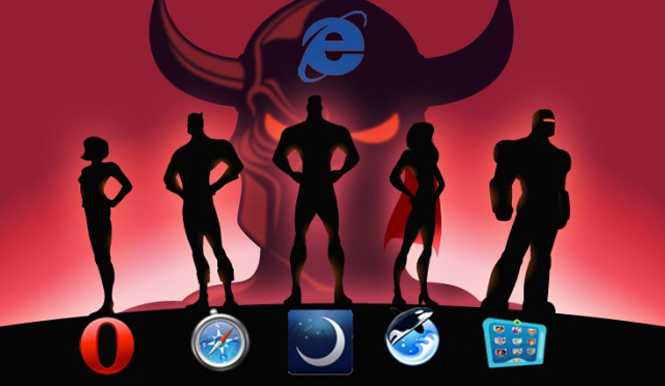
Internet Explorer isn’t a bad browser, but it doesn’t have the nickname ‘Internet Exploder’ for nothing. You can already download and try IE 11 Developer Preview, and it is indeed very fast, but if you use it on a regular basis, you might be worried by reports of security vulnerabilities.

So, let’s have a look at some of the more interesting alternatives to Internet Explorer without resorting to its two largest competitors, Firefox and Google Chrome.

Opera

The Norwegian browser pretty much invented everything that’s best about browsers. It’s considered one of the most modern and powerful browsers available. The reason it didn’t become the number one browser in the world? It’s certainly not because of quality and innovation, in which Opera has always been a cut above the others. It might just be a question of marketing. Version 15 has been rewritten from scratch and looks great in terms of usability and appearance. It’s fast and stable, thanks to the Quick Access menu that allows you to manage bookmarks with great efficiency.
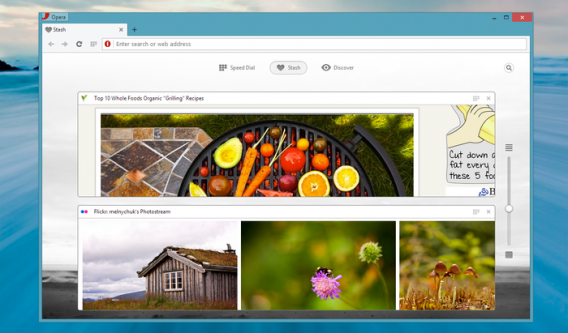
Even when network conditions are limited, Opera offers excellent performance. It’s based on the Chromium engine, which ensures compatibility with all the latest technology. It’s a great browser, from any point of view.

Safari

The Apple browser isn’t widely used on Windows PCs, but it’s an excellent option for navigation. Since it’s been equipped with automated address bar search, a standard created by Google, it’s increased its already excellent usability even further, making it a great example to follow. The view panels are an excellent way to display all open pages, and RAM is managed very effectively (which doesn’t happen, for example, with Firefox).
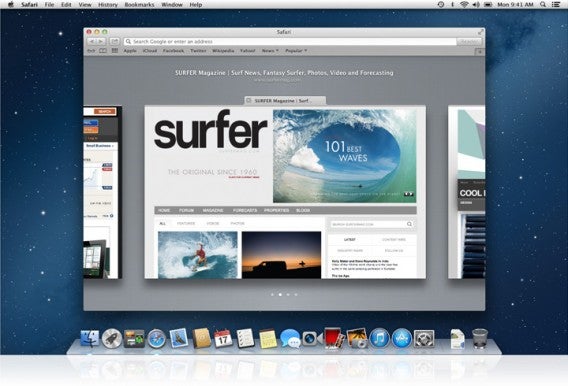
Thanks to iCloud’s tabs, it syncs your open pages and tabs on the iPhone, iPad and Mac. If you’ve never tried it, it’s a great option: fast and easy to use.

KIDO’Z

KIDO’Z is a browser for children. The interface is simple, colorful and customizable, and most importantly allows parents to have full control over what their children can and can’t access. As a result, the internet becomes a safe place for kids to discover, learn and have fun!

The browser has a menu that offers three sections: videos, games and websites. The administrator of the browser may decide to block all pop-ups, running scripts, and also set a timer for automatic opening and closing of programs.
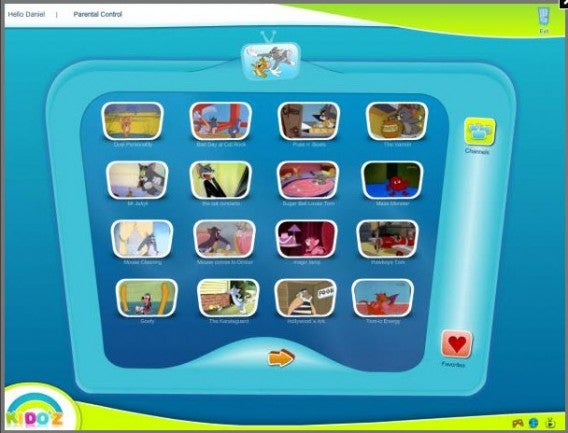
KIDO’Z is a web browser for children done well, although it’s not officially supported by Windows 7.

Orca Browser

Orca Browser has a lightweight, multi-language interface and is powered by the Firefox engine, but it’s actually more agile than Firefox itself. What’s most striking about this browser is the speed with which it opens web pages. It includes tabbed browsing and has some original and interesting features, including an excellent system for storing personal data.
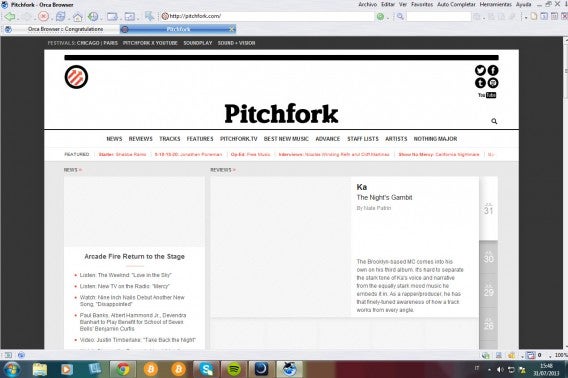
Bookmarks are saved online, as well as RSS feeds, passwords and settings, allowing you access to your preferred browser settings on any computer using Orca Browser.

Lunascape

The name evokes the legendary Netscape, one of the pioneers of web navigation. Having said that, Lunascape may not be the best web browser for everyone. You can view pages using three different rendering engines that you select manually: Trident (Internet Explorer), Gecko (Firefox) and WebKit (Google Chrome up to version 27 and Safari). This makes it useful for those who program in HTML.
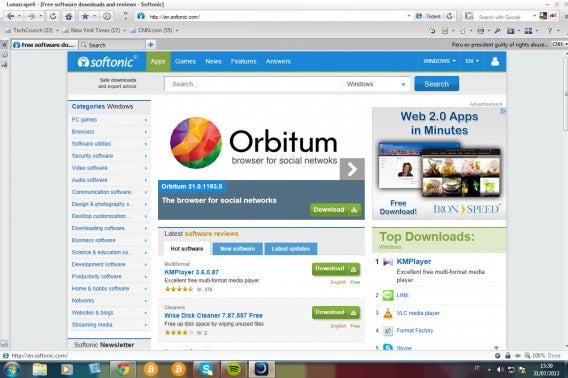
The initial setup requires patience but, as noted, it’s a browser designed for those who work with websites. It’s also compatible with Firefox plugins.

You can always stick with Google Chrome, Firefox, or even Internet Explorer, but it might be that some of these other browsers will serve your needs much better. Don’t be afraid to try them out!

Original article by Pier Francesco Piccolomini, first published on Softonic IT.
The top 5 file managers for Android

Android phones are flexible when it comes to managing files, but as many Android users already know, the file manager that comes with Android devices doesn’t always work perfectly (and older models won’t even have one!).

Thankfully, there are plenty of options out there to compensate for the shortcomings of Android’s built-in file manager. The question: which ones are the best? To help you figure out, we’ve selected five of our favorite applications to manage files on your Android device. It’s part of our excellent series, Basic Tips for Android!

Now, all you need to do is choose the one which is best for you!

File Expert

If you need a file manager with advanced options, this is the program for you. The main advantage of File Expert is its connectivity: you can access the files from a PC or a WiFi connection. It also lets you upload files via FTP.

EStrongs File Explorer

Although visually a bit sloppy, the EStrongs File Explorer has everything a good file manager should have. Moreover, it allows you to synchronize accounts with popular web storage services like Dropbox, Google Drive, or SkyDrive.

OI File Manager

OI File Manager does virtually everything that Windows Explorer does on your PC. It can copy, rename, move, delete and even send files via your favorite email service. With clear icons and good usability, it’s a great option for your Android.

Astro File Manager

Astro File Manager is one of the veteran file managers available on the market. If you are after a stable application, even on older phones, this is a great option. Its main strength is its backup function.

AndroZip File Manager

This is one of the most basic (and popular!) managers on our list. The AndroZip File Manager has the reputation of being a great manager for fully compressed files. If you usually work with archives like ZIP, RAR, GZIP, TAR, BZIP2 or others, then this is the app for you.

Do you use any file manager apps for Android? Tell us in the comments below!

Check out more great tips for getting the most from your Android device here.

Original article written by Felipe Pessoa, published on Softonic BR.

WinRAR 5.0: Interview with CEO Burak Canboy

Coinciding with the release of WinRAR 5.0, we were able to get a brief interview with Burak Canboy, CEO of WinRAR since 2002, about the software and the changes we can expect in version 5.0.

File compressors were designed to overcome storage space limitations. Is there still a need for a powerful file compressor for the desktop? Why?

File compression remains important for a variety of reasons. Although, yes, physical storage media comes at much less of a premium now than in the past, there are still many valuable functions compression has to offer beyond simple space-saving. Regardless of compression, archivers are still convenient to collect many files for storage and quicker transfer. It’s easier to operate with a single archived entity than with thousands of separate files. Such file collections can provide additional benefits such as data recovery.

WinRAR 5.0 introduces a new format for recovery record, much more efficient to repair damaged data and therefore with a higher chance to save data from being lost forever. Additionally, data security is a vital function WinRAR provides. With RAR compression and encryption, the user’s data is then safe from unwanted access or tampering.

WinRAR 5.0 brings a lot of changes. One of them is 256-bit AES encryption. Why did you choose to improve RAR’s security?

AES-128 is pretty secure as well, so there was no urgent need to switch from AES-128 to AES-256. But we decided to change the archive format for different reasons, such as better data recovery, larger compression dictionary, and better support of advanced file system features such as hard links and junctions. Also, some users did require an update to 256-bit for compliance with various security standards. WinRAR is very popular amongst governmental institutions, banks and medical companies throughout the world and we wanted to make sure our product will comply with current security standards.

The new RAR5 format is the main new feature of WinRAR 5.0

‘WinRAR for Android’ is quite a popular search, and it’s rising. Are there plans for an official RAR compression utility for Android?

Yes, we are considering development of an Android version.

What’s your take on software piracy? Did it affect WinRAR’s growth in recent years?

Piracy affects everyone in the software business. Piracy of our product is clearly high and has most certainly impacted our growth throughout the years. However, this is a hurdle with which every software producer currently has to deal. Yet this problem does not hurt us as much as it may hurt others since we already have a very liberal way of allowing users to continue using our software after the trial-period is over. Many users actually believe our software is freeware and why would you bother about using a pirated and potentially harmful version if the original can be used instead?

In which countries is WinRAR more popular at the moment?

RAR is extremely popular throughout the globe. The largest markets, in terms of downloads alone, are the United States and the European Union. Yet we already have a massive user-base in all countries using non-latin character code. For over 15 years WinRAR has been available in around 50 languages including Russian, Chinese (simplified and traditional), Thai, Arab, Hebrew, etc. WinRAR has been the first choice for software to add to a computer system after installing Windows. So in Eastern Europe, Russia, North Africa, China and most of the rest of Asia, as well as in South and Middle America, we can proudly say that WinRAR is the most often used PC software after Microsoft Windows.

WinRAR’s design hasn’t changed much over the years. Why?

We’ve decided, in terms of interface, to give our users the familiarity they have come to expect over the years. Some aspects of the interface may be customized but the general appearance has remained the same – it’s not flashy but it certainly gets the job done. What’s going on behind the scenes, however, has changed substantially. Users are more than welcome to apply one of the themes available on our website to customize their user interface.

What would you say is the main advantage of using WinRAR against open source alternatives like 7zip?

On the technical side, WinRAR offers faster compression, faster decompression (especially for lower redundancy data), better resistance to archive damage such as archive truncation and recovery record. Beyond functional capability, we are simply a more trusted brand than the free alternatives. WinRAR has been on the market for the better part of twenty years and continues to be one of the most widely used PC titles in the world.

Is Eugene Roshal still working on RAR? If so, what’s his role?

Yes, as Software Architect and Developer.

Those are some of the changes you can expect with WinRAR version 5.0 Thanks to Burak Canboy for sitting down with us!

Download WinRAR 5.0 for Windows (32bits)

Download WinRAR 5.0 for Windows (64bits)

Original article by Fabrizio Ferri-Benedetti on Softonic ES. Adapted from the Spanish.

WinRar 5.0 – is it really better than 7-zip?

The main change for WinRAR 5 is the new RAR5 format, a serious competitor to 7z, 7-Zip’s proprietory format. In this article I’m going to tell you what you need to know about RAR5 and compare it with 7-Zip.

What are the benefits: RAR4 vs RAR5?

There are millions of RAR files in the world and most of them have been compressed with the algorithm RAR4, which can open almost all decompressors and almost all versions of WinRAR. WinRAR Version 5 introduces a higher standard, RAR5.

For starters, RAR5 increases the compression dictionary size to 1GB (in the 64-bit version). The larger the dictionary, which stores the repeatable parts of a file, the better the compression, but only for huge files.

The default size of the RAR compression dictionary is 32MB, a much lower figure. So when would you need to use large dictionary sizes? When you have huge files that you aren’t going to share, such as when you make a back up.

Another important change is the new recovery log. RAR5 format is much more resistant to damage than RAR4, but only with a log size equal or greater than 5% of the file, even if it’s corrupted.

Finally, with RAR5 you can encrypt your data with a 256-bit AES algorithm. It’s certainly not the strongest encryption on the market, but it is very, very robust. The U.S. government uses it to protect its Top Secret content.

Mini-comparison: RAR5 vs. 7-Zip vs. RAR4

In several tests, RAR5 has outperformed 7-Zip in terms of speed and compression ratio. For example, in a test published in Hyperspin, WinRAR 5 decompressed a 5GB image in two minutes compared to almost six minutes for 7-Zip.

We did a quick test comparing RAR5, RAR4 and 7-Zip (LZMA and LZMA2). The machine used was a Dell Precision Workstation 490 with CPU Intel Xeon 5130 (dual-processor quad-core), 16GB of RAM and Windows 8 Pro 64bit.

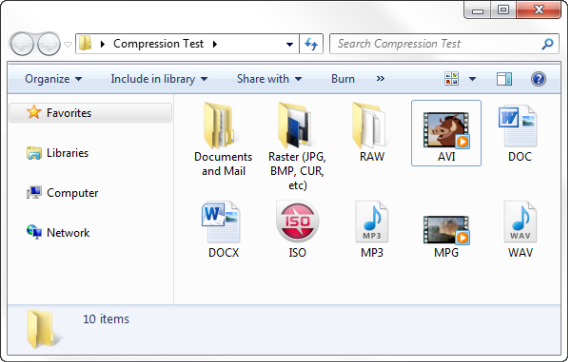
The file contained 104 different file types (documents, videos, images and uncompressed music) in ten folders, occupying a total area of 528.031.744 bytes in the NTFS partition. Source and destination were the same ATA hard drive.

Three default options were used: fastest, most powerful and normal. The only thing that changed was the size of the dictionaries to match, as far as possible, those used by RAR5 (apart from RAR4, which was limited to 4mb).

Starting with the obvious: RAR algorithm speed is impressive both in RAR4 andRAR5. Bear in mind that the normal RAR5 level uses 32MB dictionaries, which increased compression times considerably.

7-Zip results weren’t great. In the case of LZMA, which is the algorithm 7-Zip uses by default, the CPU is hardly used, whereas LZMA2 doesn’t have this limitation. But even using eight multithreaded cores couldn’t beat RAR4.

The results of compression, which can be tentatively drawn from the sample used, show some advantage to using RAR over 7-Zip, but they’re not very significant.

Can RAR5 be used now?

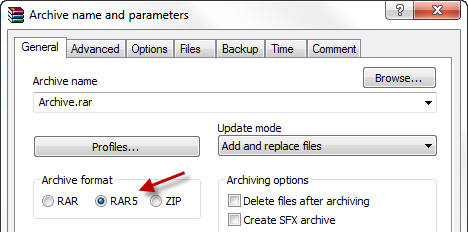
Absolutely. To do this you have to choose the option RAR5 to compress a new file from WinRAR 5.0. The default dictionary size is 32 megabytes.

Why can’t I unzip RAR5?

Files compressed with the algorithm RAR5 are still very new and, can only be opened by WinRAR 5. We tested several of the most popular decompressors, such as 7-Zip and IZArc, and we haven’t managed to open RAR5 files.

Although RAR isn’t an open source format, WinRAR distributes the source code of the UnRAR utility, which is free and only for command lines. On the same page the RAR5 format specifications are available.

Whether other decompressors will open RAR5 files depends on how fast they adopt the new standard. In the case of 7-Zip, Igor Pavlov, the lead developer, has said that adding support for RAR5 “isn’t a priority”.

What version of RAR should you use?

Right now, for compatibility reasons, our recommendation is to use RAR4, which WinRAR offers by default. To share RAR5 files it’s best to wait until the format gets a bit more popular, or create a self-extracting file.

Which compression format are you going to use?

10 essential games for your Android device

So, you’ve bought a shiny new Android and can’t wait to download the coolest games from Softonic. We understand the overwhelming number of choices out there, so we’ve prepared a list of the 10 coolest games for Android that will keep you glued to your device for hours on end. They’re part of our awesome Basic Tips for Android series – check them out below!

Angry Birds – An unqualified success

Angry Birds is a fun action game for Android. The mission is simple: Shoot pigs with a slingshot full of birds. Some games have an inexplicable hold on us – you play once, and you’re hooked. Angry Birds for Android is a great example.

Real Racing 3 – Our favorite when it comes to mobile racing games

Real Racing 3 is one of the best racing games for Android. Incredible graphics, realistic cars and several different types of races. All this and it’s free! There are several different race modes, including a new one, Time Trial, which lets you race against competitors from all over the world – the fastest time wins in a single elimination round. You can buy new cars, and repair or buy upgrades for your racing machine with money you earn while competing.

Asphalt 7: Heat – Burn rubber and win the race

Asphalt 7: Heat for Android brings all the magic of mobile car races to Google’s operating system. Undoubtedly one of the best racing games. Asphalt 7: Heat for Android has all the elements for a runaway success. There are six game modes, 15 tracks and 60 different cars. It’s impossible not to have fun.

Pou – Join the craze

Pou is a virtual pet for Android. Do you remember Tamagotchi? Pou is similar. You need to feed it, clean it and play with it for it to grow strong and healthy. Pou first appears on your phone’s display looking like a delicate little ball. By swiping your finger on the screen, it follows your movement with its eyes. And it’s full of minigames!

Talking Tom Cat – The most charming cat on Android

Talking Tom Cat is a super fun game for Android. Tom is a virtual cat who repeats everything you say and can even be quite rude. Talking Tom Cat is a first and foremost a game, it’s fun and good for a few laughs. But Tom is practically a real cat – you feed it, cuddle it and scratch its head when needed.

Candy Crush Saga – Logic and quick thinking

Candy Crush Saga is a strategy game for Android in the style of Bejeweled and Tetris. Perfect for people who like dynamic and fun puzzles, you connect vertical or horizontal lines of at least three of the same candy. Align four or more candies and you get special items that help end the level faster.

Real Football 2013 – Show who’s boss on the pitch

Real Football 2013 is the new version of the best free soccer game for mobile devices. Manage your team and compete with the best European teams on Android. The biggest new feature of Real Football 2013 is that, in addition to competing on the field, you have to train and manage your team and score wins for the franchise.

Temple Run 2 – Run, Lola, Run

Temple Run 2 is the exciting sequel to one of the most downloaded Android games from Softonic. The graphics and effects in this version are the best ever. Do you like ancient temples, monsters, and amazing Indiana Jones-style races? Then make room on your Android for Temple Run 2. This new version is even better than the first Temple Run.

Subway Surfers – World tour

Subway Surfers is a great action game for Android. The goal of the game is to avoid the Vandal Squad and a pitbull chasing you through the yards. The reason? You were caught painting graffiti in stations and on trains. Avoid obstacles, collect coins and dodge oncoming trains.

Grand Theft Auto: Vice City – Mafia hitmen, drug deals and criminal empires

Grand Theft Auto: Vice City is a great game for Android. Join the underworld mafia and show that you too can be a Godfather. It’s a simple idea that makes an excellent game for Android. In Grand Theft Auto: Vice City, you live in a replica of 1980s Miami and need to seek out the mobsters responsible for crimes.

Is there a great game missing from our list? Comment and let us know what your favorite game for Android is!

While you’re here, check out our Basic Tips for Android series!

Original article written by Felipe Pessoa for Softonic BR.

Gamescom 2013: Hands on with The Sims 4

After months of waiting, EA finally showed us The Sims 4 at Gamescom 2013. First we saw the trailer at the pre-event conference, then we tried out a pre-alpha version of the Sims creation mode, saw the improved Build mode and got a first look at the new Sims personalities. After this little intro, we can’t wait to get our hands on The Sims 4.

Default player

<!–

By use of this code snippet, I agree to the Brightcove Publisher T and C

found at https://accounts.brightcove.com/en/terms-and-conditions/.

–>

<!–

This script tag will cause the Brightcove Players defined above it to be created as soon

as the line is read by the browser. If you wish to have the player instantiated only after

the rest of the HTML is processed and the page load is complete, remove the line.

–>

brightcove.createExperiences();

Better Sim customization

Each version of the first three generations of Sims took a huge leap in the evolution of character editing mode, but there was always room for improvement. For example, why can’t we edit body parts? Well, in The Sims 4 you can, thanks to a very intuitive UI for grabbing any part of the body or face of a Sim to shape it to our liking: cankles? A droopy butt? A beer belly? More muscle mass? Just a few clicks and you’ll be able to change the way your Sim looks like never before.

If you want an easier option, you can now choose from a few dozen predefined Sims that finally have long-overdue features like the ability to match facial features to skin tone, making Sims more closely resemble the world’s ethnic diversity.

But it’s not just about looks… The Sims 4 includes more advanced customization features, although these options were unavailable in the pre-alpha version we saw. Choosing the tone of a Sim’s voice was available in previous versions but it’s now is more finely-tuned. We can now also change the way a Sim walks: want a prim and proper Sim or a flashy wideboy? Easygoing or flirty? The way a person walks speak volumes…

Build mode is faster and easier

I always liked building houses in the Sims, but I usually chose predefined houses since building a home from scratch was a time-consuming task. Not so with The Sims 4!

Building homes is now much simpler: you no longer build a wall at a time, but instead select modules and customize them as you please. The same thing with roofs. There used to be a risk that they’d end up patchy and unfinished despite your best efforts. Like the characters, roofs can now be modeled, so the options open to you are infinite.

Making windows look good in your houses is an art. If you lack patience, this new version features an intelligent system that detects the size of the rooms and conveniently distributes windows throughout the home. The result looks great.

Choosing furniture in The Sims can be even more of a pain than shopping at a certain famous Swedish store. To save time, The Sims 4 includes several preset furniture sets, which are distributed around the room according to their size. You can then relocate each piece separately.

With the addition of all these build enhancements, EA have ensured that players no longer have to waste their valuable in-game time with boring, repetitive tasks, letting you get down to what the Sims is really all about – living your life!

Livin’ large

We already saw a hint in the trailer, and what we saw in the demo definitely convinced us – the Sims are more realistic and unpredictable than ever. We saw the moods introduced in the Sims 3 evolve into something much more logical and a feature that’s surely going to keep us on our toes.

Every action a Sim performs, either alone or through interaction with other Sims, will really affect their mood. Share your creative ideas for Sims on the Hub, and watch how The Sims 4 tells you if your Sim is animated, excited, exhausted or angry.

Not only have our Sims’ moods evolved, but also the way the Sims interact with each other. In earlier Sims versions, did you feel that no one even noticed if your Sim did something strange? This won’t happen in The Sims 4 – the other Sims will react to everything your little digital friend does.

But that’s not all. Sims’ life experience will influence the way they react and interact with other Sims. Your Sims will continue to have classic “Sim” interactions, but they’ll also be able to have conversations about things they have experienced, making day-to-day experiences much more varied.

Are there other surprises in store?

At first glance, The Sims 4 won’t include any major graphics enhancements like we saw in the previous version, but this version takes a big leap in gameplay.

The new editing modes seem game-changing, but the stars of this version will definitely be the Sims themselves… Will they really be as “human” as EA claims or will we be disappointed? We’ll get our answer in 2014.

Hands on with VLC for iOS

VLC is officially back for the iPhone and iPad. Announced as a faster, more flexible version of VLC with a more powerful media player, the new version of VLC for iOS has it all.

Let’s review some of the most exciting new features of VLC for iOS.

New playback options

VLC iOS Start Screen
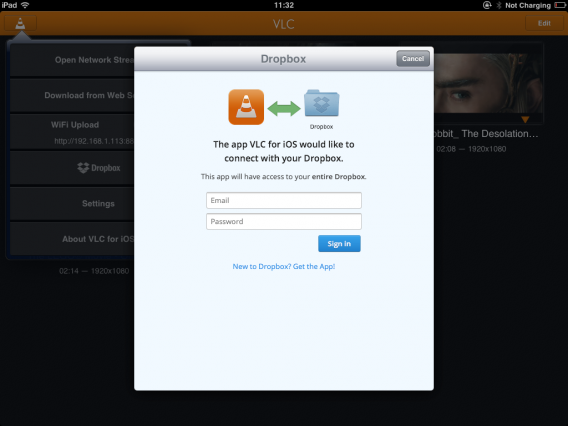
When you launch VLC for iOS, the application displays a completely blank screen. If you were hoping to find a file explorer similar to the Windows, Mac or Android versions, you may be disappointed. Playing videos requires you to choose one of the options available: streaming, WiFi transfer, iTunes sync or the most recently added option, streaming from Dropbox.

VLC ios Dropbox

As is customary with most iOS applications, you have to use the iTunes interface to copy videos to your iOS device before you can play them using VLC.

VLC iOS sync files

Once you’ve added videos to VLC, they appear almost instantly in the application as large static thumbnails.

VLC iOS Browser

A universal player?

VLC was able to read all the video formats we tried during testing. Unfortunately, it seems that the application is limited to video formats: MP3 files did not work and are clearly not yet supported by the application.

VLC iOS playback

Despite a polite warning message stating that the iPad might be too small to read some videos, VLC streamed the videos smoothly and at a very high image quality. And, as an additional bonus, VLC for iOS even seems to support subtitles.

VLC iOS bookmark

Notable features

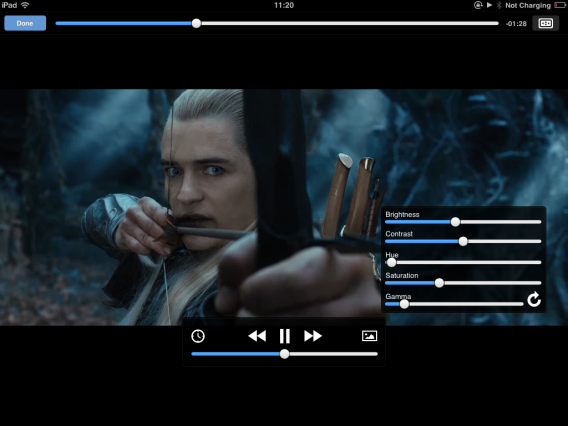
A nice feature is the playback window that provides detailed settings for changing the brightness, contrast, and saturation of the video, as well as options to control playback speed and image size. Even better, VLC for iOS automatically resumes playback of interrupted videos. This is an essential feature for watching films on mobile platforms.

VLC iOS settings

Setting the bar high

Free, powerful, and flexible, this new version of VLC for iOS immediately stands out as a serious competitor to paid video players already available on this platform. Only constrained by the limitations of Apple’s mobile operating system (no file explorer, limited communication with other applications, etc.), VLC for iOS is an application not to be missed.

Which applications do you use to watch videos on your mobile device?

Original article written by Samuel Marc for Softonic FR.

http://vlc-media-player.softonic.fr/android

Use Android Device Manager to locate your device

Until recently, there was no official way to locate a lost or stolen Android phone. Fortunately, Google launched Android Device Manager. In the article below, I’ll explain how quick and easy it is to configure and use Android Device Manager to locate your Android device.

What is Device Manager?

Android Device Manager is a service through which you can locate your lost or stolen Android phone or tablet using maps. Once located, you can send a request for the device to either make a sound, or remotely wipe all data from the device.

What are the requirements?

Android Device Manager works on any device with Android 2.2 or higher; there’s no need to install any app or update the operating system.

If your device is connected to your Google account or you use Google Play, you’ll automatically be able to use this function.

Using Device Manager

Follow these 5 easy steps to find your Android device.

1. Log in to your Google Account

You can log into your Google Account at android.com/DeviceManager, where your linked devices will automatically be recognized.

2. Choose the device you wish to locate

If you have more than one Android device, choose which one you wish to locate by clicking on the arrow to the right of the device name.

3. Wait while your device is located

Depending on the situation, Google may take more or less time to locate your device, especially if you are in transit or in an area where cell phone service is unstable.

Once found, your device’s location is indicated with a blue dot on the map, as well as an estimate of the location’s accuracy. To update the map, click the arrow icon.

4. Send a tone or delete the device’s data

If the device is near your current location or is somewhere secure, Android Device Manager can send a sound notification to your phone or tablet to play at full volume for five minutes, even if the device is on silent or vibrate.

Alternatively, if you’ve enabled the remote wipe options in Google, you can remotely delete all the data stored on the device, including photos, contacts, emails and apps, with a simple click of the ‘Erase Device’ button.

5. Contact the authorities

If you think your Android device has fallen into the wrong hands, contact the appropriate authorities and file a report.

When doesn’t it work?

A Wi-fi connection is necessary to locate the device on the map. If there’s no internet connection, the device can’t communicate with Google and Android Device Manager won’t be able to locate it. If you have GPS enabled, the accuracy of its location will be even greater.

Device Manager also won’t work if:

  • The tablet or phone is turned off or out of the coverage area
  • The device has been reset to its factory settings


To ensure that your device can be located, you should activate two options in your Google Settings. Go to Security > Device Manager and enable both available options.

You can also go to Google Settings > Location and enable ‘Access the location’.

If you want alternatives, try…

Are you going to use Android Device Manager?

Original article written by Fabrizio Ferri-Benedetti for Softonic ES.

The top 10 games of 2013 – so far!

August. Full of canned TV shows and endless family barbecues. In other words, it’s a good opportunity for you to plunge into the best games of the year. Burn your holiday beach reads! This is our selection of the 10 best PC and console games from the last 6 months.

DmC: Devil May Cry

The reinvention of Dante in DmC: Devil May Cry is great to see. Our beloved Dante is back and more cocksure than ever, serving up a cocktail of devastating combat and acerbic wit. We love it!

PC

The Cave

The Cave is one of the big surprises of 2013, with its unexpected combo of Super Mario and The Famous Five, played out in a mysterious and captivating atmosphere worthy of the Twilight Zone. And that’s not counting the stunning cartoon graphics, the unusual narrator, the cavern itself, and the epic soundtrack! It’s a surprising game with a unique atmosphere.

PC | Mac

Crysis 3

Crysis 3 is an exceptional FPS. Don Prophet’s high tech armor, eradicate the Sephs once and for all, and thwart the C.E.L.L. This game’s perfect for adrenaline junkies and great for letting off steam!

PC

BioShock: Infinite

With this new chapter in the BioShock saga, Irrational Games returns to its video game roots. BioShock Infinite is an assault on the senses and as intense, garish and dizzy as a roller coaster. And like all good theme park rides, once you get on, you won’t want to get off!

PC

Tomb Raider

Going beyond a simple reboot, Crystal Dynamics have rebuilt Tomb Raider from the building blocks of the franchise. By incorporating elements of survival horror and role-playing with the traditional shoot-explore combo, they’re redefining the entire action-adventure genre in a new and relevant way. It’s great!

PC

SimCity

This new edition of SimCity gives a fresh lick of paint to the famous city builder while managing to adapt it to modern tastes. The management game has never been so alive and the new online features, when they work, provide previously unavailable opportunities for interaction.

We can’t wait for its planned release on Mac in early August.

PC

Far Cry 3 Blood Dragon

Blood Dragon is a tribute to action movies and the anime designs of the 80s; the fruit of the fertile imagination of big kids, it’s a fantasy mix of pixels and neon lights that plays to the tune of a synthesizer soundtrack. Retro, ironic fun.

PC

GRID 2

Grid 2 shows its true colors from the first few minutes of gameplay. Who needs the realism of the simulations of yesteryear when you can have this? Make way for strong emotions and the pure adrenaline rush you get at the wheel of the fastest cars on the planet.

PC

The Last Of Us

Acute tension, a scenario that lives up to the name, gameplay with elements of strategy and planning…The Last of Us keeps all its promises. A survival horror with dramatic depth that’s rarely seen in the genre.

PS3

Surgeon Simulator 2013

Surgeon Simulator 2013 presents itself as a cardiac surgery simulation. In reality, it’s a crazy game in which you don the gloves of the worst surgeon in the world! You need to perform a heart transplant; given the level of skill of the “doctor”, controlling his hands to successfully operate is pretty tricky! The height of digital stupidity, the pinnacle of videogame absurdity…it’s a must!

PC | Mac | Web

You might also like…

Best of GDC 2013

E3 2013 round up

Original article, written by Samuel Marc, first published by Softonic FR

The best racing games for your mobile device

Gran Turismo, Forza MotorSport, Need for Speed, Mario Kartgreat racing games exist for all the major gaming consoles. But there are also plenty of free, high-quality racing games for your Android, iPhone and Windows phones. Which ones are the best? Here’s a rundown of the five best mobile racing games, all free!

Real Racing 3

The Real Racing franchise is already a classic when it comes to mobile driving games. Currently in its third installment, the game features over 50 cars, including makes like Porsche, Lamborghini and Audi, as well as legendary circuits such as Laguna Seca and Silverstone.

Real Racing 3 has solo and multiplayer modes and a level of technical quality that matches any console.

Download Real Racing 3 for Android

Download Real Racing 3 for iPhone

Death Rally

If you’re an aggressive driver and prefer action to elegance, definitely check out Death Rally. In this futuristic rally game, you personify a driver who’s armed to the teeth.

While the main goal is to excel at the wheel, Death Rally also allows you to have fun with machine guns and exploding bombs.

Download Death Rally for Android

Download Death Rally for iPhone

Drag Racing

If you prefer your driving to be a little more peaceful, don’t worry, there are games out there for you too! Take Drag Racing, for example, where driving skills are more important than explosions and shooting.

In Drag Racing, you only compete against one other car, but it’s guaranteed excitement with a strategic component that’s key to winning races.

Download Drag Racing for Android

Download Drag Racing for iPhone

Download Drag Racing for Windows Phone 7

Fast & Furious 6: The Game

We’re sure many of our readers are fans of the Fast & Furious film series starring Vin Diesel and Paul Walker. The racing sequences from these movies are spectacular, and developers Kabam have transferred them to a mobile game.

Fast & Furious 6: The Game lets you experience racing at full speed in high-end cars, from the latest models to classics like the 1970 Dodge Charger.

Download Fast & Furious 6: The Game for Android

Download Fast & Furious 6: The Game for iPhone

Bike Race Free

We couldn’t complete our list without mentioning at least one motorcycle game. Our choice: Bike Race Free. In this free game, there are no other opponents, only the mountain. Drive your bike through amazing tracks and overcome all kinds of obstacles if you want to make it safely to the finish.

The simplicity of the controls (this doesn’t mean it’s not challenging) makes Bike Race Free a game suitable for all ages, making it a great all-rounder to have on your phone.

Download Bike Race Free for Android

Download Bike Race Free for iPhone

What’s your favorite mobile driving game?

Original article written by Maria Baeta on Softonic ES.