Tip: Force Chrome to provide search results in English

Last year, I finally switched my main browser from Firefox to Chrome. As I was already familiar with Chrome,  and because Chrome makes it easy to import bookmarks, settings and account info from other browsers, this switch was fairly easy. But I had one major problem: Location.

Living in Spain, but working and blogging in English, I’d rather not get Spanish Google results for every query. Once in a while, I find them useful. But on the whole, I need US market results which take me straight to English-language websites. Every single time I tried to switch to Google USA or Google NCR (‘no country redirect’), Chrome would chuckle and send me to Google Spain. Without fail.

Fixing it is easy, but it took me a while to find the method that worked. If you’re having a problem with non-English search results pages in Google Chrome, here’s how to force Google to serve US English results instead. The instructions come courtesy of user ‘eyeverve’ on the Chrome support forums:
1. In Chrome, click the wrench icon. (upper-right)

2. Click ‘Options‘ [This item is called ‘Preferences‘ on Macs]

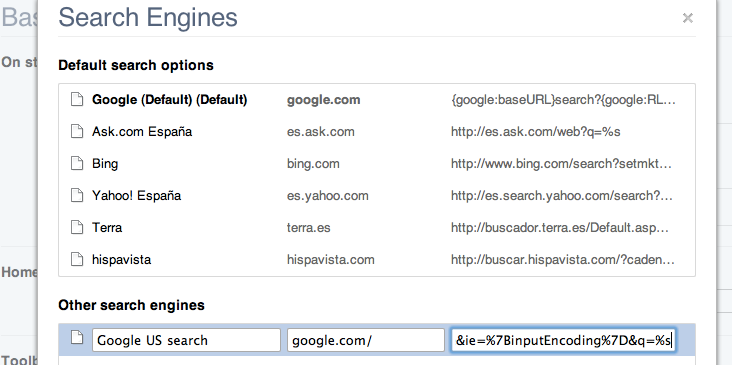
3. Under the ‘Basic‘ tab, select ‘Manage Search Engines‘ in the Search section

4. At the bottom of the list of search engines, you’ll see three fields that allow you to add a new one. Add this info into the three fields in the correct order:

Name: Google US Search
Keywordgoogle.com/
URLhttp://www.google.com/search?{google:RLZ}{google:acceptedSuggestion}{google:originalQueryForSuggestion}sourceid=chrome&ie={inputEncoding}&q=%s

(You should paste this link without any breaks or spaces)

5. Hit ‘Enter’ and your search engine should be saved. Finally, hover your mouse pointer over the newly added Google entry to see a button that reads ‘Make default‘ – select this in order to change your default Google search.

Close the preferences tab and test your new Google search by typing a search term into the Omnibox (Chrome’s address and search bar).

iOS 4.2 available today – Apple

At long last, iOS 4.2 will be made available today for iPad, iPhone and iPod Touch. Apart from bringing iOS 4 to the iPad (it’s still stuck on 3.2 at the moment), this update also adds some fun new features to iPhone and iPod Touch. Here’s a rundown of the key additions and changes in iOS 4.2.

ipad-yawn.png

iPad

  • Multitasking now supported, allegedly not affecting battery life
  • Folders added, letting users organize their apps
  • Unified Inbox in the Mail app

iPad, iPhone and iPod Touch

  • AirPlay – stream media from your iThing to your Apple TV or AirPlay enabled speakers
  • GameCenter – adds a social layer to gaming on iOS devices
  • AirPrint – the incongruously popular/controversial printing solution
  • Find my iThing – MobileMe subscribers can track down lost or stolen devices
  • Various stability, functionality and security enhancements

Of course, Steve Jobs still doesn’t want iOS device owners to use WiFi to sync their gadgets. Maybe that’ll come in 5.0?

Editorial: Limewire is no great loss

The popular P2P program which was finally shut down yesterday was a mine of pirated, illegal and malicious content.

LimeWire, the banned peer-to-peer file sharing application, was a pioneer in its field. Launched in May 2000, it enabled millions of users to download an unimaginable quantity of almost exclusively unlicensed content (I can’t work it out but it’s somewhere up there between an exabyte and a zettabyte). But few in the know are mourning its demise, even if it comes at the hands of the sometimes reviled RIAA.

limewire-legal-notice.png

LimeWire, you see, despite having the most complete feature set of any of the major Gnutella clients, was not a piece of software that engendered much love from software experts. Sure, it was hugely popular. But with network-specific software, popularity just breeds popularity: it is not a sign of real objective quality. Continue reading “Editorial: Limewire is no great loss”

How to sync Google contacts with Mac for FaceTime

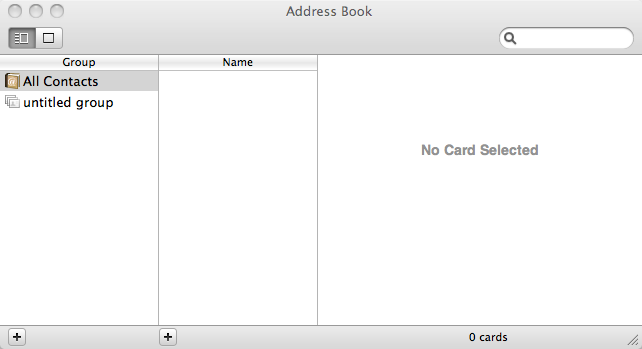
Apple’s new FaceTime for Mac beta was one of the more popular announcements from yesterday’s event. The only significant drawback with FaceTime for Mac is that it uses Address Book, your Mac’s built-in contacts utility. This is OK if you also use Address Book. If, like me, you’ve studiously ignored it because you only ever use Gmail, however, then it’s time to remedy that state of affairs.

It’s really very easy to sync your Google Contacts with your Mac.

First, open Address Book.

address3.png

Now open Preferences by hitting (⌘ ,) or selecting FaceTime and then Preferences from the menu bar.

Select Accounts and then check the Synchronize with Google checkbox. Continue reading “How to sync Google contacts with Mac for FaceTime”

Facebook announces improvements to games platform

We all love Facebook games, right? The dull machismo of Mafia Wars, bully-tips in Sorority Life and button-pushing-till-you-drop Farmville have rendered games consoles and high-end PCs dead, right?

Well, maybe not. But that doesn’t mean that social gaming has to be annoying and rubbish. Facebook today announced some improvements to its gaming platform, basically aimed at getting more people to play Facebook games while simultaneously trying to irritate the rest of us less.

Over at the FB Developer blog, Jared Morgenstern said:

People who use Facebook either tend to tell us that they love playing games or hate them, and we haven’t had the right tools to enable developers to grow their games while at the same time providing a great user experience for non-gamers. We’re building more sophisticated tools that will allow us all to be more successful against those goals.

facebook-games-notifications.jpg

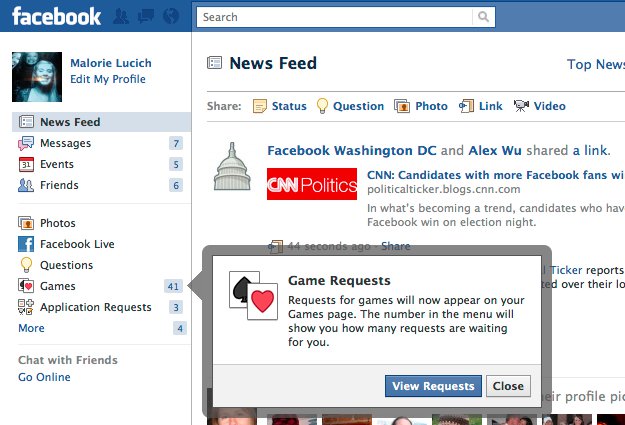
The improvements consist of recognizing who does and doesn’t use games, targeting update info towards those who do, and finally grouping game invites under a new ‘Games’ section, rather than leaving them grouped with Application Requests.

Now, these changes don’t sound huge. But anything that can make Facebook more fun but also less annoying has to be a good thing, right?

Google launches Instant search, saves you time

One of the innovations we expected to see from Google today was the introduction of Instant search. And Google hasn’t disappointed us. You can already try Google Instant here.

google-instant-1.png

The new interface, a marvel of modern engineering, was introduced in order to save users time. In the Instant FAQ, Google says:

Google Instant is a new search enhancement that shows results as you type. We are pushing the limits of our technology and infrastructure to help you get better search results, faster. Our key technical insight was that people type slowly, but read quickly, typically taking 300 milliseconds between keystrokes, but only 30 milliseconds (a tenth of the time!) to glance at another part of the page. This means that you can scan a results page while you type.

Google will be launching more new features for search this evening. To stay up to date with the search event live, check out Google’s YouTube channel.

Mozilla releases Firefox 3.6.9 and 3.5.1.2 security updates

Firefox has been updated to version 3.6.9. The new version features various security fixes, the most important being the inclusion of support for an anti-clickjacking mechanism. From Mozilla:

Introduced support for the X-FRAME-OPTIONS HTTP response header. Site owners can use this to mitigate clickjacking attacks by ensuring that their content is not embedded into other sites.
Fixed several security issues.

For users still running the 3.5 family of the browser, update 3.5.12 was released, with various security updates but not the X-FRAME-OPTIONS fix.

Your Firefox should detect and download the updated version automatically. Alternatively, grab the latest edition from Softonic here.

Oh, and don’t forget to update Flash player while you’re at it!

‘Google Me’ might be Google’s new social network

Further rumors have appeared that seem to confirm beyond any doubt that Google is planning to launch a social network service to rival Facebook. In these latest stories, Google is reported to be in talks with various games developers, including Disney’s Playdom and Zynga (a company in which Google has recently invested a large amount of money).

google-me-1.png

This news follows previous claims that Google is definitely working on a social network service to be called Google Me. Google hasn’t exactly experienced huge success in the social realm thus far. It purchased Brazilian giant, Orkut in 2008 and has presided over a gentle slide in that network’s traffic (Orkut remains #1 in Brazil, but Facebook is making inroads). The Socialstream project never came to much. Buzz and Wave haven’t proven to be game changers and despite the company’s great successes in other areas, like mobile OS Android, you get the feeling that its social networking efforts have been almost entirely unfocused.

But put a few of Google’s more recent search tweaks may prove that the firm’s involved in some pretty serious research. Recently, Google Profiles started to show up more in search results. Sharing items and subscribing to users’ feeds has improved in Reader (after multiple tweaks) and last month Google even let users customize the classic front page of their search engine (a common criticism of Facebook is its lack of customization options).

Of course, this could all  just be pointing to Google launching something altogether easier and cheaper. A social games platform would fit that bill. But I reckon the clues point to a more unified alternative to Facebook that combines social games, Profiles, Buzz, Reader, Gmail, Wave, Docs and everything else into one central social hub.

Google testing new image search interface

Google seems to be testing a radically changed image search user interface. Reports on various websites say that it might have been around for up to a week… and that it looks a bit like Bing. I just got the new interface this afternoon. And I don’t use Bing.

The new look page focuses entirely on images, removing all the additional data which was previously displayed under each result. That data isn’t gone completely, though. It now displays when you mouseover an image. The page also automatically loads more results as you scroll, kind of like a Twitter app that loads older messages the further down you go. In all, it’s an attractive new way of presenting image search results.

google-img-1.png

Clicking an image is a different matter, though. This action now loads the source website in an iframe, with a slightly opaque layer on top of it, and the image highlighted and expanded. There’s also a section to the right of the page containing the relevant image’s info. Clicking anywhere in the main part of this page forces the image source page to load. This part of the new UI experience is less positive – it feels like the user is expected to know how it works bef0ore using it.

google-img-2.png

Expect this interface to continue to evolve as Google continues its tests. The second-step page, which displays the image in its original location, is in particular need of work.

No add-ons work with Mozilla Firefox 4

minefield-icon.pngBefore you jump straight to the comments section, yes I’m aware that Firefox 4 beta doesn’t have to be compatible with pre-existing add-ons. The idea of my experiment was to see how much Firefox’s new add-ons center changes the way browser extensions work. The answer is: a lot!

Hacking Firefox to make it run addons designed to run in previous versions of the browser is hardly an advanced job. Just add a couple of Boolean values to the advanced preferences and you can tell Minefield (the best name for a beta program ever!), not to check add-on compatibility. Generally, this can force compatibility when the version change is minor (e.g. 3.5 to 3.6). It doesn’t usually work for most add-ons across major version updates.

minefield-welcome.png

And 4.0 is no exception! After telling Minefield (4.0b2Pre) to accept all my 3.6 add-ons and restarting, the extensions all appeared to  have loaded satisfactorily. FoxyTunes, Alexa, Google Wave, Tumblr Post, Firebug and Echofon all appear in the status bar where I’d expect to see them. But none of them do anything. Nor does Greasemonkey. In fact, except for the built-in extensions, the only add-on currently seems to function is the classic Tab Mix Plus.

So for those of you asking the question: ‘how do I force an add-on to be compatible with Firefox 4.0?‘, the answer is: You can’t. Be patient, Firefox 4 will be released soon and your favorite add-ons will be updated in no time.