New Steam client out now

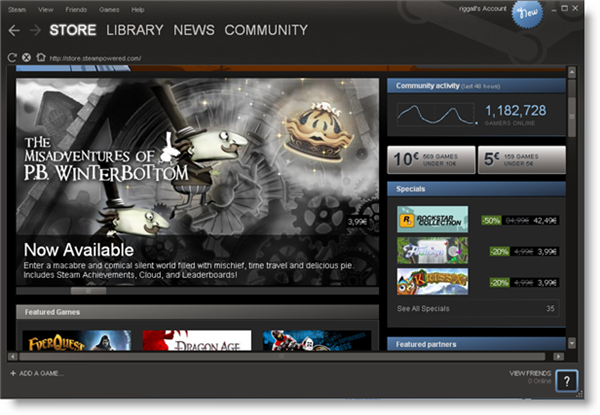
If you’re into PC gaming, Valve Software’s Steam client is an almost essential application. Managing game purchases and libraries, while offering game community services, it’s an excellent program that has come a long way since its release almost seven years ago.

Now out of beta testing, we have a new version of Steam, 009 – and it’s much improved. The interface is cleaner, bolder and much nicer to navigate. There’s a new wishlist, so you can keep track of games you want, and your friends are shown more prominently too. Now you can see which games your friends play, and what’s on their wish list too. The community element of Steam is integral to why people use it, and this new version makes it a much more central feature.

There’s a more powerful library in the new Steam, allowing you to create your own categories and the search is now real time, making big game libraries much faster to navigate. Overall, it’s a great update, though I hope Valve can reduce the number of client updates they release for this one, as I find them pretty intrusive. Check out our review here.

Voddler launches web client

After having to temporarily suspend the desktop client last month, yesterday Voddler’s web client went live bringing free movies to a much wider audience and moved it a little closer to what Hulu offers in the USA. However, to watch the films, I think you still need a desktop client to stream them and an invite.

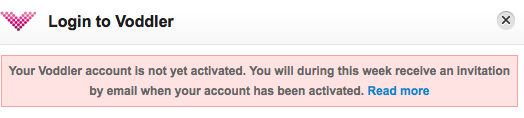
At the moment, even those that are lucky enough to have beta invites to the desktop client still have to wait. When you click on a movie to watch and try to login, you receive the following message:

Voddler login

So hopefully, at some stage later this week I’ll be able to test the web client properly to see how it performs although after waiting so long for a beta invite, it’s clear that Voddler aren’t in a hurry when it comes to these sorts of things.

It is still possible to navigate around the site and browse the Voddler movie catalog though. First impressions are the same as before – more recent films will have to be added for Voddler to become really popular but these are early days so hopefully that will improve. The web client doesn’t differ massively from the desktop client but the huge bonus of course is that it works within your browser and with your mouse unlike the awkward keyboard based desktop version. They’ve also added TV shows although being a Swedish based project, these are all in Swedish.

Voddler Homepage:

Voddler Homepage

Most Popular Movies: Continue reading “Voddler launches web client”

Supreme Commander 2 demo released


If your main problem with real time strategy is that the games don’t have enough scale, Supreme Commander 2 looks like solving that problem. This futuristic game puts you in the position of Supreme Commander, controlling an army from a giant robot. Square Enix have just released a demo through Steam, and if your PC is up to it, I’d recommend having a go.

The gameplay is fairly standard, as you have to build factories, armies, manage resources and so on while defending or attacking enemies. It’s good, but doesn’t reinvent the wheel. However, the size of Supreme Commander is impressive, with huge armies and vast play areas. Personally, I find the scale a bit overwhelming, but if you love multitasking, this is definitely the game for you. My only complaint is that the dialogue is pretty cheesy and hammy which detracts from the overall feeling of the game.

Supreme Commander 2 requires the Steam client which can be downloaded here, though you’ll need at least a 2.6 GHz processor to run it!

Chrome support for extensions is official now

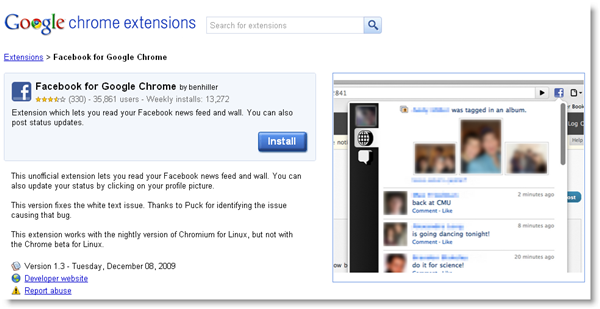
Though they were already included in a developer build a few weeks ago, it wasn’t until today that Google made it official: Chrome now supports extensions! Thanks to this long-awaited feature, Chrome users can now expand the capabilities of their browser with small plug-ins that add diverse functionality to the program.

Chrome supports extensions

You can find and download Chrome extensions in a special online gallery that organizes them by popularity, date and rating. Right now there are about 1,800 extensions available, many of which are exact copies of Firefox’s popular add-ons – which undoubtedly helps a lot in browser switching. Every extension has its own page, featuring a description, some screenshots, user reviews and links to the developer’s site and the documentation, if any.

Installing a Chrome extension is really easy. Simply browse the gallery to find the extension you’re interested in, click the big blue Install button, accept the confirmation message and you’re done. Unlike Firefox, you don’t even need to restart the browser.

Chrome supports extensions

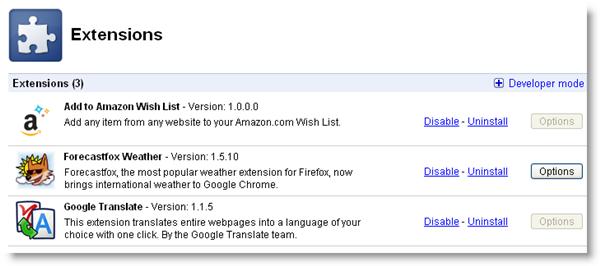
If you want to check your installed extensions, open Chrome’s configuration menu (the wrench icon) and select Extensions. The browser will open a new tab with the list of installed extensions, as well as links to disable and uninstall them, and direct access to the extension’s options – if available.

Chrome supports extensions

Finally, if you’re a developer and would like to publish a Chrome extension, you can do so from the gallery itself. Click the Publish your extensions link on the left side of the gallery interface and fill in all the details. The extension will be immediately be ready for download.

Snow Leopard to be released on Friday

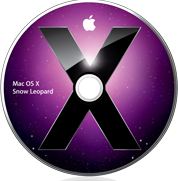
Snow Leopard DiscA little earlier than expected perhaps, Apple have officially announced that the next release of Mac OS X 10.6 Snow Leopard will be released on Friday at Apple’s retail stores and Apple Authorized Resellers. Apple’s online store is now accepting pre-orders. The Unofficial Apple Weblog set tongues wagging earlier today when they noted that the Apple Store was down signaling something big was in the pipeline.

Bertrand Serlet, Apple’s senior vice president of Software Engineering announced:

Snow Leopard builds on our most successful operating system ever and we’re happy to get it to users earlier than expected. For just $29, Leopard users get a smooth upgrade to the world’s most advanced operating system and the only system with built in Exchange support.

To get an idea of what to expect in Snow Leopard, check-out my posts earlier this year about the new features and the sneak preview at the WWDC in June. If there’s one thing that will definitely make Snow Leopard worth upgrading for it can be summarized in one word – speed. For the modest sum of $29, I’m looking forward to an altogether faster and smoother OS X if not a particularly different one visually. For those with an eye to working with Microsoft Exchange, it’s an absolute must since it’s the first Mac OS to support it.

Here are just a few other good reasons to upgrade if Apple’s claims are to be believed:

  • A more responsive Finder
  • Mail that loads messages up to twice as fast
  • Time Machine with an up to 80 percent faster initial backup
  • A Dock with Exposé integration
  • QuickTime X with a redesigned player that allows users to easily view, record, trim and share video
  • A 64-bit version of Safari 4 that is up to 50 percent faster and resistant to crashes caused by plug-ins
  • 7GB extra hard drive space – Snow Leopard is half the size of the previous version and frees up to 7GB

Look out for a full review coming soon!

Outlook to be released for Mac

msoffice2010 logoOver 10 years after its original release on Windows, Microsoft have finally decided that they’re going to release Outlook for Mac in Office 2010 next year.

Entourage will be ditched in favor of Microsoft’s flagship e-mail client which could prove a real headache for current users although the company have promised to maintain all the functionality – including public folders, managed folders and category syncing – of Entourage Web Services Edition.

However, there is some hope that Outlook for Mac might not be just another ugly awkward Windows implementation on OS X. For a start, it’s going to be developed completely in Cocoa says Microsoft Mac Business Unit general manager Eric Wilfrid:

We’re building on the most modern OS X frameworks to make Outlook beautiful, to make it high performance, and to make it well integrated with the OS.

It’s also going to have a much faster database than Entourage that will integrate with Time Machine backups and Spotlight searches. However, typically, Microsoft have said that Outlook for Mac won’t feature exactly the same functionality as Outlook for Windows. I can imagine it could be a similar frustrating experience as using Outlook Webmail in Firefox compared to Microsoft Internet Explorer as I railed against a while back.

Obviously, Microsoft are targeting this at business users and as Mac usage increases and businesses stay put using Outlook, it could be a smart move. It’s certainly well overdue. However, the fact that it won’t be out until late 2010 and that Apple are already going to make Mail, iCal and Address Book compatible with Exchange servers may make it yet another case of too little too late for Microsoft.

Times: Read your RSS feeds in a newspaper style

TimesThere’s been a lot of talk recently about the best way forward for newspapers in the digital age. Rupert Murdoch thinks the best way is to charge for content, Charlie Brooker thinks a virtual coin is the solution while those at the New York Times think a dedicated subscriber funded reader app is the future.

Murdoch’s idea I feel is, excuse the pun, behind the times. Brooker’s is slightly less mad and so it’s the NYT Reader that gets my vote as something that can realistically sustain newspaper profitability. Which is why I was impressed by the simply named Times RSS reader.

Times features all the benefits of a solid RSS reader but with the elegance of a newspaper style interface. It’s organized just like a newspaper with the page sections along the top such as Technology, Science, Sport and News. You can create your own pages simply by going to “Edit” and “Create Page”. To add an RSS feed, click on the pen in the top right hand corner.
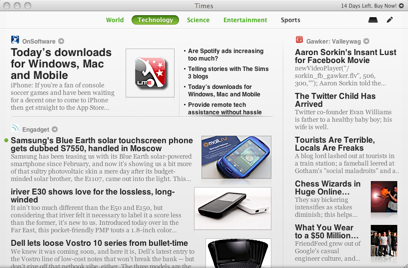
Times main page

Your feeds panel then opens showing all the feeds you have assigned to various pages. Enter a website address for the feed, Times will do a quick check to see if it is has an RSS feed and when the green tick appears, simply enter a name for it. Then you can drag and drop the feeds into position on the blank page in front of you thus creating your own personalized page.

One slick little bonus of Times is “The Shelf” which works on the same principle as Stacks on Leopard. You can drag items of interest onto your shelf for reading later and when you click on the shelf symbol in the top right corner, the shelf appears with the articles expanded Stacks style so you can see exactly what you’d like to read.
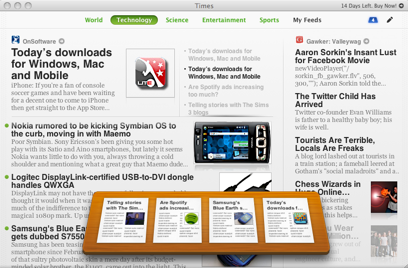
Times Shelf screenshot

The overall look and feel of Times is a refreshing change from your average RSS reader. However, navigation can be a little frustrating. Hiding the feeds requires you to access the “View” menu when you should be apple to drag or pop the panel back up when you’re done adding a new feed. It’s also a little annoying how you can’t access the comments on blog posts using Times – you have to go directly to the page itself which will open in your default browser if you just click on the title. You can however share feeds extremely easily on Digg, Facebook and Twitter thanks to integration with all three.

Times is definitely worth trying for those RSS addicts who are nostalgic for newspapers and may even give the newspaper industry itself a thing or two to think about when considering future formats.
Spotify to launch on iPhone – but will Apple allow it?

spotify logoIt’s the news Spotify fans like myself have been waiting for – the music application will finally be available on iPhone “within a few weeks” according to the Swedish company. The question is, will the Apple iPhone apps store approve it?

Spotify is serious competition for iTunes – and considerably superior in my opinion – and allowing it onto the iPhone store could deal a major blow to Apple’s flagship music app. Out of interest, I just performed a search for Spotify on Mac on the Apple downloads website and no results were found although I’m not sure how much can be read into this.

A promotional video launched by Spotify shows that users will also be able to listen to music offline by downloading playlists onto their iPhone. This is great news for those who live in areas where network coverage is poor. However, the bad news is that initially, it’s only going to be available to premium users but this could finally be the driver that Spotify has been looking for to encourage users to convert from the free ad-supported version.

The likelihood is that Apple will approve the app. After all, Spotify is growing hugely and its success will only drive iPhone sales even further and these should offset any losses iTunes makes. And by blocking it from the store, it’s only going to make iPhone users want it more and no doubt, eventually someone would create a hack for it anyway.

One other strange thing worth noting about this news is that Spotify mobile was first demoed on Android and yet it’s being released on iPhone first. Depending on the success of the iPhone version, an Android release will surely follow shortly. US users will have to wait the longest unfortunately – Spotify hasn’t even launched there yet and isn’t expected to until the end of this year.

[youtube]http://www.youtube.com/watch?v=QNCb1IdmJ_0[/youtube]

Spotify launches CD quality audio

spotify logoEarlier this year I wrote about my enthusiasm for music app Spotify and today I’m pleased to read it’s going to get even better with CD quality streaming for premium users. A premium account currently costs around $10 per month and essentially means that your music doesn’t get interrupted by adverts. However, for the time being, only the most popular tracks will be streamed in CD quality with the rest being converted over the coming weeks.

To enable higher quality streaming, simply access Spotify’s service’s preference menu and tick the “enable high bitrate” box. The move will effectively double the quality of streaming on Spotify with the company claiming they now offer the highest quality music streaming site on the net. I may be tone deaf but as far as I can tell, the current 128kbs streaming quality is already pretty good so I’ll be very interested to hear what the new quality sounds like.

However, signs are that Spotify users are still opting to use the free service rather than upgrade to premium and this latest move is another tactic for Spotify to try and change this situation. They’ve already tried a few other methods to encourage people to convert such as releasing exclusive remixes to premium users, allowing them to enter compeititions and offering exclusive releases of new albums.

Free users haven’t been neglected though. A new mobile service is due to be rolled out shortly and will allow you to sync Spotify with your mobile device and will be available to all users. There have also been plenty of cool new features added to the free service since it was released which I’m going to cover shortly to help your get more out of Spotify.

WordPress 2.8 ‘Baker’ released

WordPress today announced the release of the latest version of its awesome eponymous blog platform. Version 2.8 (‘Baker’, after the famous Jazz trumpeter Chet Baker), consists of few immediately visible changes but plenty of performance enhancements.

Once you’ve had a time to play around with the new version, you’ll spot an overhauled widget interface, easier to handle theme installations, a new CodePress editor for editing themes and plugins within wp-admin and a new Screen Options interface that lets you customize the look of your admin area to fit your monitor. As well as all that, WordPress seems to run much faster.

Find full details of the new release on the WordPress Codex. Or just watch their video…

You can download the latest version of WordPress here, but if you’re running 2.7 or higher, you should be able to upgrade automatically. If you don’t have a web host but you’d like to try WordPress out, skip along to WordPress.com and register for a free hosted blog!