
Word perfect Spanish on the move

dictionary3.jpgThese days, travelling for business or pleasure can often mean that you speak English all the way because so many people understand it. However, you’ll often find that making an effort to use the local language, whether to seal the deal or just to order a coffee, can make a big difference in the way people welcome you.

The Concise Oxford English Dictionary from Mobile Systems is a tool that can help you if you’ve already made the effort to learn some Spanish beforehand. It’s not a traveller’s phrase-book but it does contain precise translations for more than 170,000 words and phrases, all in a simple and easy-to-use interface which guarantees instant results.

The way that the dictionary is presented makes it easy to locate the info you’re looking for. Its default start-up screen is a list of the first half-dozen or so words beginning with ‘A’, and a text box which allows you to start searching for words immediately. We weren’t sure about displaying the full list of words as a default view: how many times will you choose to scroll through the full list rather than searching for your term? But as we typed, the dictionary filtered the words on-screen, narrowing down the choices until there were just a handful to pick from. In the end, we felt that this method of displaying information could well serve as a time-saver, and it’s therefore a must-have feature on any business dictionary.

Continue reading “Word perfect Spanish on the move”

Bittorrent to sell legal downloads

bt.pngThat’s the message that appeared on Bittorrent’s website this morning. In a few hours, Bittorrent will launch its very own legal download store, the Bittorrent Entertainment Network, with 3,000 movies, 1,000 games and around 1,000 music videos made available. Bittorrent struck deals with 34 major studios like Warner Brothers, Paramount Pictures. 20th Century Fox and MGM to distribute their content on the store. Thanks to the Bittorrent technology downloads should prove to be relatively fast. The store will offer up a “self pub capability” where independent artists can publish and showcase their videos.

However, the service does have some restrictions. Users will only be able to enjoy content 24 hours following its download. Movies will be offered at a starting price of $3.99 and TV shows at $1.99. All downloaded content will have Windows Media DRM protection, which means it will only open up with Windows Media Player. So much for Mac and Linux users. Bram Cohen, founder of Bittorrent was actually against having DRM:

We are not happy with the user interface implications of digital rights management, or DRM… it’s an unfortunate thing. We would really like to strip it all away.

It was introduced, probably under the pressure of the big content providers and probably to safeguard the rental model of the Bittorrent Entertainment Network. That way Bittorrent can offer cheaper content and control what users download.

What Bittorrent is doing is entering the legal download market, where heavyweights such as the iTunes Store, Amazon or Wal Mart already rule. Yet the biggest competitor to the Bittorrent store might still be piracy itself. According to PC World, Bittorrent expects a third of its users to give up piracy and embrace the new store but a quick look around the blogosphere this morning shows that skepticism was high among bloggers. Why would anybody who can get the same content for free want to pay $3.99 for it? We’ll have to wait till the store opens up to give you the full low down and our first impressions.

Watch films on your iPod

iPodIf you’re going on a long journey or are on the move a lot, wouldn’t it be nice to be able to take your favourite films with you without splashing out on a portable DVD player? Well if you’ve got an iPod, the good news is you can. However, you’ll need a decent conversion program to convert all those movies into something that will play on an iPod.

The most popular on Softonic is Free iPod Video Convertor. The program can convert DVD/VCD into AVI, MPEG, WMV, RM, RMVB, DivX, ASF, and VOB in just a few clicks. Like most of these programs, it’s a simple case of dragging the file you want to convert into the conversion queue and clicking ‘Convert’ but remembering to remove components that you might not need. Most users rate this the best because it does the job in the quickest time with the least output errors although its certainly not perfect. Some users report there are certain files that simply won’t convert or when they have been converted, don’t play properly on their iPod.

If you’re looking for something that goes beyond iPods too, then try Any Video Convertor . It can convert almost all video formats including DivX, XviD, MOV, RM, RMVB, MPEG, VOB, DVD, WMV, AVI to MPEG-4 movie format for iPods. However, it also converts for playback on PSP and several other portable video devices such as mobile phones. Whilst this supports more formats, the conversion time will be considerably slower for iPods although if you have many devices, it’s a better option.

Finally, a similar and equally popular alternative to Any Video Converter is AVOne Video Converter. This works in a rather different way however by utilising the timeline function common to video editing programs. The advantage of this is that you can cut and splice movies according to which scenes you want to watch. This way, you can store some of your favourite movie scenes on your iPod without putting the whole movie on there.

So there you have it. Go forth and convert!

A free, fast and reliable PDF viewer

logo_foxitreader.jpgPDF (Portable Document Format) is a file format that represents documents in a fixed layout, no matter which platform, device, operating system or application you use. Being more and more widely used both in personal and commercial environments you should definitely include a PDF reader amongst your must-have software applications.

Foxit Reader is probably your best choice. You may have heard about a more popular PDF viewer known as Adobe Acrobat, but Foxit really beats it in size and speed. Its installation file is only 1.7 MB (against Acrobat’s 20.8 MB download) and it opens up in a snap, without annoying splash up screens and endless credits lists.
Continue reading “A free, fast and reliable PDF viewer”

Top 10 Flash alternatives

clipboard01.jpgWhile sites built with Flash may always be to everyone’s liking, when you stumble across sites such as Viva Voodoo! you remember why it’s become a popular platform. The authoring tool gives you the power to conjure up spell-binding animations, games and immersive online applications. As connection speeds improve, Flash sites are able to load much quicker, making it now a truly viable alternative to HTML and CSS.

Of course, it takes hours of practice and dedication to be able to develop truly gripping Flash sites, and the cost of the Adobe app often puts people off. However, you shouldn’t be dissuaded from working with Flash because there are plenty of alterative programs that let you create animations without having to learn Flash itself. While these apps don’t contain nearly as many creative tools as the Flash authoring tool, they certainly allow you to design eye-catching presentations and animations.

1. Trendy Flash Site Builder: create professional quality Flash sites
2. KoolMoves: produce animated pages and banners
3. Flash Slideshow Maker: make animated photo slideshows
4. Amara Flash Photo Animation: transform your pictures into Flash animations
5. Selteco Flash Designer: Flash animation creator with effects templates
6. Amara Flash Slideshow Builder: produce captivating photographic slideshows
7. Zinc: build Flash-based desktop animations
8. Wondershare Flash Album Studio: apply cool themes and music to your photos
9. Text-Osterone: more than 200 animated text effects using Flash
10. Instant Demo: Screen cam creates Flash with MP3 sound

Clearer ideas with ConceptDraw MindMap

conceptdraw.jpgMany work tasks involve brainstorming sessions and sharing ideas with each other in order to achieve the final goal. However, having too many people involved in a project may lead to confusion and failure. It’s essential to stay organized and follow a clear road, knowing exactly at which stage of the process you are, what other people’s tasks are and what lies ahead of you all.

This is exactly what you can do with ConceptDraw MindMap: capture ideas and create handy, colourful diagrams with them that help you organize your team, your projects and your work.

After a very easy installation, we face the toughest part: getting to use the program. In fact, ConceptDraw has a quite steep learning curve and takes time and effort to be managed properly. But you shouldn’t take this as a downside, as you can count on the program’s thorough help system and a series of really helpful video tutorials available on ConceptDraw’s website, which we strongly recommend you to watch.
Continue reading “Clearer ideas with ConceptDraw MindMap”

The evolution of email

email.jpgGoogle has finally opened Gmail to the public, which means that you no longer need an invitation to open up an account. Gmail has thus become one of the largest webmail services in the world, not only in terms of users, but also in terms of storage space. Starting at 1 GB per user during its first year, Gmail is now constantly increasing its storage space by the second. Google say they plan to keep on doing so as long as they have enough space left on their servers.
However, more long in the tooth Internet users know email wasn’t always so advanced. There was a time when webmail didn’t even exist and messages were managed through classic email clients like Eudora or Outlook Express. Email was physically downloaded and stored on your PC, so that you could only check it from home unless you left copies on the mail server. Besides, limited-bandwidth connections made it very difficult, not to say impossible, to send or receive oversized email messages.

Then, web-based email finally appeared, with Hotmail as one of its biggest representatives. Hard to believe though it sounds, Hotmail offered only 2 MB of storage space which were increased up to 250 MB in July 2004, only three months after Gmail’s launch. Nowadays, following the fashionable web apps trend, there’s a large variety of webmail services you can choose from, with online access from anywhere, large numbers in storage space, spam filters and a lot more of features.

Email has naturally evolved from being a somewhat useful desktop application to one of the fastest, most effective online communication tools. It’s totally integrated in our daily lives, to such an extent that it feels just natural to ask your friends for their email address instead of their phone number. After more than 40 years of history, we’re eager to see what email has to offer in the following decades.

By the way, in case you’re wondering, we’ll remain faithful to our Gmail accounts.

Google Desktop vulnerability exposed

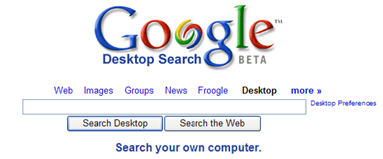
googledesktop2.jpgGoogle has been prompted into releasing fixes for Google Desktop after it was discovered the popular search utility was vulnerable to intruders. The holes were discovered by a PC security firm who highlighted a script vulnerability that could allow hackers to browse through the entire contents of a hardrive.
Google Desktop uses the same indexing technology as applied by its search engine – it trawls through every single document on a PC to enable users to perform a Google search on their own computer. However, the security firm said that there is a specific weak point in the integration between Google Desktop and Google’s online search engine. They claimed that any hacker could have also circumvented a firewall or anti-virus package to exploit the vulnerability.

“A fix was developed quickly, and users are being automatically updated with the patch,” Google said in a statement. “In addition, we have another layer of security checks to the latest version of Google Desktop to protect users from similar vulnerabilities in the future.”

The specific problem is a feature in Google Desktop which allows users to place ‘Desktop’ as one of the drop down choices on the Google home page search bar. Although the option is convenient, it immediately opens a backdoor between the contents of your PC and the internet.

Although I’m a big fan of Google products, I’ve never been keen on Google Desktop for precisely this reason. I don’t like the thought of anything trawling through my hardrive that can then send that information to a third party. Although they’ve patched it, Google should give users better warning on this type of risk when installing Goolge Desktop. Obviously, the safest thing is to not install it at all and stick to Windows inbuilt search function even if it hasn’t got Google’s amazing search power behind it.

Quickly make a backup of all your files

b.jpgYou probably never really go through the hassle of backing-up your documents regularly. Unfortunately, if one day you lose all those critical files, you’ll be the only one to blame. Creating backups is far from thrilling, but should never be overlooked, no matter how reliable you think your PC is.
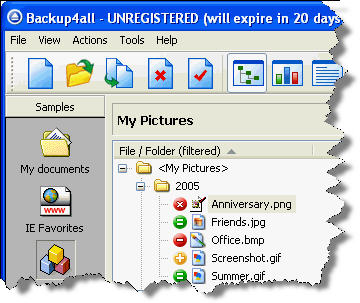
Backup4all makes copy creation a breeze by automating the whole process. The key is to properly setup your backups so that the application takes care of it all for you. When you launch the program, simply select the files or folders you’ll need to backup. You can create individual backup profiles with a description, an icon and scheduling when Backup4all should save a copy. Set up filters to specify the type of file, the date and size of documents to save. Enable sounds and email alerts to notify you if a backup is successful or not.

Continue reading “Quickly make a backup of all your files”

Joost signs Viacom deal

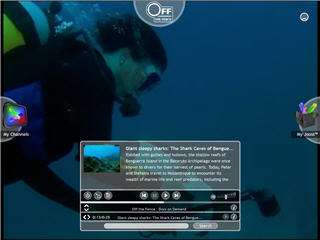
joost3.jpgIt looks like YouTube has a real fight on its hands if it wants to pursue commercial programming. The forthcoming online video service Joost has announced it has signed a deal with media giants Viacom to provide full length TV programming. The deal with cover content from MTV, BET and Paramount Pictures film studio.

The agreement will come as a big blow to YouTube who has been hounded by Viacom to remove its material from the site. Earlier this month, Viacom requested around 100,000 clips from its networks to be removed from the site. No financial details are available but Viacom have promised to provide thousands of hours of free programming mainly aimed at younger Joost users. Examples will include Beavis and Butthead and Punk’d.

Joost (formerly known as The Venice Project) has been designed by the creators of Skype and is currently still in beta form and only available to those who sign up at its website and are invited to test it. It claims it will offer secure ‘piracy-proof’ content when it is finally released later this year.

Considering that Joost has not even officially been released yet, this deal indicates just how ambitious its makers are. However, it may be unwise of YouTube to enter into a commercial war with Joost. The best thing about YouTube is that it offers not programming but the best clips and snippets from TV around the world. There are already several P2P apps that offer channel streaming such as TVU Player that carry programming from the big networks but these are unlicensed and as such, somewhat unreliable. Joost runs the risk of simply offering more of the same while YouTube should stick to what it does best – letting users upload all those TV snapshots and archived footage that you can spend hours searching through.