7-Zip: a quality file compressor

7ZipTo extract and compress your files, 7-Zip is a perfectly viable alternative to the better known WinZip or WinRAR. The application works exactly like its main competitors yet manages to mix in WinZip’s selection of tools with WinRAR’s versatility.

The 7-Zip interface is similar to that of its competitors, with a main file manager and a command line to search and select files to extract or compress. The control panel is comprised of the essential buttons like extract, add and test, but also features copy, move and delete functions to allow you to manage your files. 7-Zip extracts and compresses files as fast as WinZip and WinRAR and handles the main archive formats like ZIP, TAR, RAR and ISO.

Continue reading “7-Zip: a quality file compressor”

Google Desktop to offer free SMS texting

orkutOne of Google Desktop’s coolest features is the social networking tool Orkut. Until now, it was very much an online networking tool allowing you link up with likeminded people or search for “romantic interests” as Google put it. However, Orkut is now branching it out into the offline world by enabling users to send free SMS messages to mobile phones.

At the moment, it’s only available in Brazil where they’ve come to an agreement with a local mobile network but if all goes well, the plan is for a worldwide rollout this year. The new SMS feature means Orkut’s special ‘scrapping‘ feature will be extended to mobiles, allowing you to do it on the move and pretty much anywhere else you’ve got an internet connection. Google also promise some new “hidden goodies” in the new Orkut which only the “adventurous” will find.

Whether this is yet another Google masterstroke remains to be seen. Other similar projects have been plagued with technical difficulties and commercial problems with the networks. Also, the fact that most people text while on the move makes us wonder whether it really will take-off.

In the meantime, keep an eye on your orkut account as when its finally available in your country, there will be a message from Google telling you how to get started.

A1 Spanish wherever you go

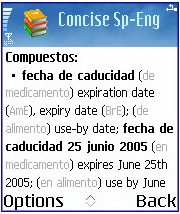
concise_spanish_2.pngThese days, travelling for business or pleasure can often mean that you speak English all the way because so many people understand it. However, you’ll often find that making an effort to use the local language, whether to seal the deal or just to order a coffee, can make a big difference in the way people welcome you.


The Concise Oxford English Dictionary from Mobile Systems is a tool that can help you if you’ve already made the effort to learn some Spanish beforehand. It’s not a traveller’s phrase-book but it does contain precise translations for more than 170,000 words and phrases, all in a simple and easy-to-use interface which guarantees instant results.

The way that the dictionary is presented makes it easy to locate the info you’re looking for. Its default start-up screen is a list of the first half-dozen or so words beginning with ‘A’, and a text box which allows you to start searching for words immediately. We weren’t sure about displaying the full list of words as a default view: how many times will you choose to scroll through the full list rather than searching for your term? But as we typed, the dictionary filtered the words on-screen, narrowing down the choices until there were just a handful to pick from. In the end, we felt that this method of displaying information could well serve as a time-saver, and it’s therefore a must-have feature on any business dictionary.
Continue reading “A1 Spanish wherever you go”

Find local concerts through iTunes

guitar.jpgiConcertCal is a neat new plug-in for iTunes that recommends concerts and gigs in your area based on the music you’ve been listening to. It’s a very nice idea and slots neatly into the iTunes interface, in the form of a calendar of local events, drawn up automatically based on your IP address and your musical preferences. Alternatively, you can enter the address of a town or city you are visiting, and search for concerts there.

Unfortunately, the service is only available to US users at the moment (and even then, not all major towns are covered) and the search is by no means comprehensive in terms of the number of listings returned. However, the developer assures us that it is working on adding more sources for smaller web sites in local areas to boost search capabilities. We love the idea of being given instant local gig recommendations without having to trawl through newspaper or magazine listings, and hope to see iConcertCal stretch beyond the shores of the States before too long.

Voice chat made easy for online games

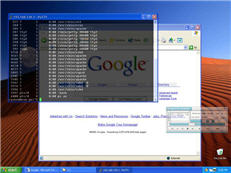
tslogo.gifWhen playing multiplayer online games you usually need to communicate with your friends for various different reasons: to design a strategy for your next assault or just to have some fun, relaxing chit-chat while mercilessly killing enemies. Many games feature a chat tool that allows you to exchange messages with other players but typing a sentence while trying to stay alive in the game can be really annoying. The only solution then is using voice communication. It’s easier, faster and far more comfortable than writing messages on a tiny chat window. And one of the best options for voice communications in multiplayer online games is TeamSpeak.
Continue reading “Voice chat made easy for online games”

Vista-style transparency for nothing

vitrite.jpgOne of the most hyped features of Vista is its new transparent windows, courtesy of the Aero graphics engine. This is a useful option if you’ve got lots of windows open on a crowded screen and more to the point, it looks good. However, if like many others you’re still not convinced Vista is worth upgrading to, you can still have this classy little feature courtesy of Vitrite.

Vitrite is a tiny app that allows you to manually adjust the level of transparency for almost any visible window. When executed, Vitrite minimizes to the system tray in the lower right corner of the screen. If you wish to make a window transparent, you simply click on the window and press ‘Ctrl Shift’ plus any number on your keyboard depending how transparent you want to make it with one being the most transparent setting. So no more flicking between tabs or scrolling through your toolbar to see what you’ve got open – you can see everything at a glance. Obviously, be careful that you don’t pile too many windows on top of each other or else everything will start to look incomprehensible.

Note as well that Vitrite also offers the option to toggle the ‘always on top’ feature. Again, just press ‘Ctrl Shift’ with the ‘+’ key to make the active window float on top of the other windows. So there you have it – one of Vista’s most attractive features for nothing!

Get hold of codecs with afreeCodecVT

1132370366.pngAnybody who’s watched AVI movies has had to use a codec, yet few people really understand what they are or how they work. To make things clear, codecs encode (and decode) your media file so that your media player can read it. AfreeCodecVT will avoid all the hassle by helping you choose the right codec according to the media file you have and will provide all sorts of information on all the codecs that exist out there.
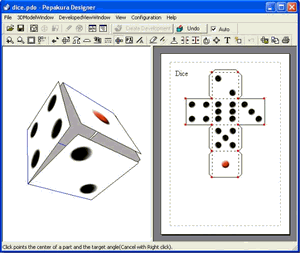
A simple one-stop interface makes afreeCodecVT a reliable and easy to use gateway for the codec hungry crowd. AfreeCodecVT is first and foremost a huge database with every imaginable resource on codecs and the ways they’re used. The codec wizard will answer your doubts and the codec search will link you to the regularly updated codec library from the afreeCodecVT website. There’s a good chance the one you need is among the ones most downloaded by other users.

Continue reading “Get hold of codecs with afreeCodecVT”

Use your PC for non-techie hobbies

origami.gifIt seems that nowadays we’re all somehow obliged to enjoy geek hobbies, such as playing videogames, surfing the net or retouching digital pictures. What happened to all those good old hobbies people used to have? Not so long ago, children traded football cards while their parents collected stamps, cooked new cake recipes for dessert or knitted warm sweaters for all the family.

Society has definitely turned hi-tech but traditional hobbies are still a very valid option for those who want to make the most of their spare time –preferably not in front of a screen. In any case, there’s always a way to combine both technological and more conventional hobbies.

Regarding software, for example, you can find apps that help you organize your favorite cooking recipes or manage almost any type of collection, from the classical coins and stamps anthology to collections of books, movies or even wines. If you like reading comics, your PC allows you to enjoy a wide variety of daily comic strips right on your desktop.

Finally, there are also software applications dedicated to less common hobbies like origami (the art of making paper figures) or even to really traditional activities like cross-stitching.

WMDC – ActiveSync for Vista

windows-mobile-2.pngAnyone out there who uses a Windows Mobile device (Pocket PC or Smartphone) will be familiar with Microsoft’s ActiveSync software. Ugly, irritating and very user-unfriendly, ActiveSync has been causing problems for users for years. Perhaps that’s why MS have finally decided to lay it to rest and replace it with the brand new (and, yet again, snappily titled!) Windows Mobile Device Center (WMDC).

There’s no doubt that the new tool offers some serious improvements on ActiveSync’s design and performance. Now adopting a fully-integrated GUI, the WMDC finally feels like a native part of the OS rather than just an add-on. Features for handling music and images are finally introduced and look pretty good (the photo-tagging option is a nice touch). Aslo improved are connection stability, file browsing and setup, making WMDC a much more complete and reliable solution than ActiveSync ever was.

That’s not to say, however, that WMDC is flawless. There are numerous problems with the new program, including some which will definitely prove to be deal-breakers for some users. For example, PocketPC2000 and PocketPC2002 devices are simply not supported by WMDC. The reasoning behind this decision seems somewhat dismissive of users who might own these older devices (Jason Langridge: “[If you’ve got a 6 year-old device]… I’d doubt you’d be running the latest version of Windows”). Bizarrely, WMDC can sync with Outlook 2007 but not with Vista’s new built-in ‘Mail’ or ‘Cal’ applications.
Continue reading “WMDC – ActiveSync for Vista”

Create your own Icy Tower character

Harold the Homeboy has become something of a cult hero in gaming circles now following the success of Icy Tower. However, due to the addictive nature of the game you end up spending so much time with the little dude that it’s possible to become sick of the sight of him (especially if you want to be as good as the player in this video).

[youtube]lMqq07EZwDk[/youtube]

The good news is it’s possible to give Harold a makeover using the built-in templates files. Enter the “\icy tower\characters\template” folder in Windows Explorer and click on the paintbrush icon to open a sprite version of the character. Press Ctrl + E to open up the sprites for editing Use the editor to tweak the character’s design, ensuring that every part of every sprite is the same colour. Make sure you don’t go out of Harold’s green outline (though you can change the colour of this outline). Now save the image and play the game with the template character selected.