Skip to content

Softonic English

Just another Softonic Sites site

Prepare Your Computer for Black Friday: How to Optimize Performance with CCleaner Free

With Black Friday just around the corner, the speed and efficiency of your computer become essential for snagging online deals. There’s nothing worse than missing out on a great bargain because of slow loading times or clunky navigation. Over time, computers accumulate temporary files, cache, cookies, and other elements that consume resources and hinder smooth browsing.

CCleaner Free
CCleaner Free Download

Sounds like a big problem, right? Fortunately, CCleaner Free, the popular computer cleaning software, helps optimize your device by removing temporary files and adjusting settings to speed up navigation. In this guide, we’ll show you how to use CCleaner Free to boost your computer’s performance, enabling seamless shopping on one of the busiest days of the year.

CCleaner Free: A Must-Have Tool for Better Online Shopping

Over time, computers tend to fill up with temporary files, cookies, and background processes. This “extra weight” can slow down your device, affecting how quickly it completes tasks, including online browsing. The result? Sluggish page loads, system crashes, and frustrating delays—especially inconvenient during time-sensitive events like Black Friday, where every second counts in scoring that irresistible deal.

This is where CCleaner Free comes into play. The optimization tool effectively cleans your device by removing unnecessary files and programs that consume system memory and resources. With regular clean-ups using CCleaner Free, your computer can browse faster, minimize crashes, and improve overall performance—making for a faster, smoother shopping experience.
Basic Steps to Optimize Your Computer with CCleaner Free

To ensure an optimal shopping experience on Black Friday, here’s how to use CCleaner Free efficiently:

1. Clean Temporary Files and Cache

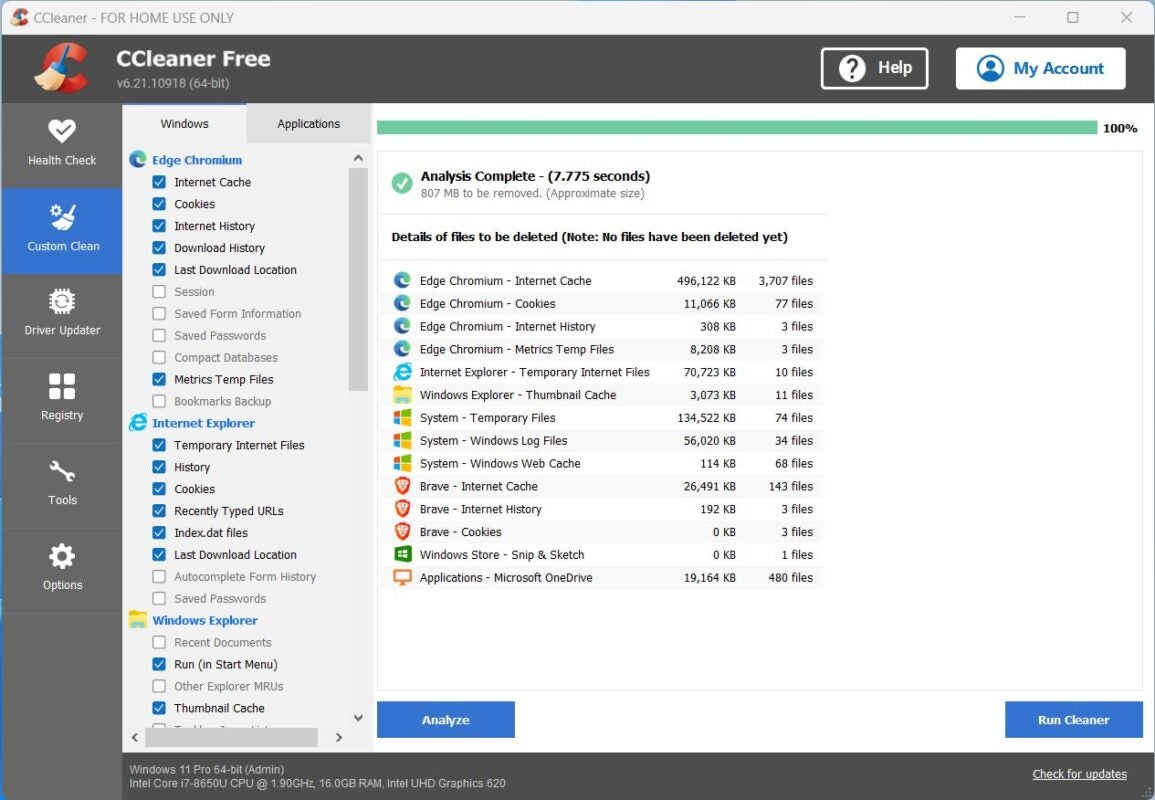
Temporary files and browser cache accumulate as you visit websites. While these can speed up future visits, excessive accumulation slows down your system and consumes storage space. CCleaner Free analyzes your computer for unnecessary temporary files and cache, allowing you to delete them with just a few clicks.

Steps to clean these files:

  • Open CCleaner Free and select the “Custom Clean” tab.
  • Check the boxes for “Internet Temporary Files” and “Internet Cache” (names may vary depending on your browser).
  • Click “Run Cleaner.”

By completing this simple process, you’ll improve website load times and free up disk space, allowing your computer to manage resources more efficiently while shopping online. This helps reduce system slowdowns and ensures each click is faster and smoother.

2. Delete Unnecessary Cookies

Cookies store browsing data, including preferences and session details. While some cookies enhance your shopping experience with personalized content, they can also take up space and affect page loading speeds. CCleaner Free enables you to manage cookies selectively, keeping only those essential for your shopping while removing the rest.

Steps to manage cookies with CCleaner Free:

  • Open the program and go to the “Options” tab.
  • Click on “Cookies” to view a full list of cookies stored in your browser.
  • Select the cookies you want to keep (e.g., from trusted shopping sites) and move them to the right-hand list.
  • Highlight unnecessary cookies, right-click, and select “Delete.”

This personalized management speeds up browsing and enhances security by reducing stored cookie data. Plus, by eliminating unnecessary cookies, your browser can load pages more fluidly—especially useful when navigating multiple deal sites on Black Friday.


3. Optimize System Startup

A common issue affecting computer performance is the large number of programs that launch at startup. Reducing the number of programs that automatically run can significantly speed up boot times and free up system resources for other tasks. CCleaner Free simplifies this process, allowing you to disable non-essential programs from starting up.

Steps to manage startup programs with CCleaner Free:

  • Navigate to the “Tools” tab and select “Startup.”
  • Review the list of programs that run at startup.
  • Select non-essential programs and click “Disable.”
  • Exit CCleaner Free and restart your computer to notice the improved startup speed.

By doing this, you’ll enjoy a quicker boot time on Black Friday, getting you to your favorite shopping sites faster without delays caused by unnecessary startup programs.

CCleaner Free
CCleaner Free Download

Additional Tips for Fast and Secure Shopping

Beyond optimizing your device with CCleaner Free, here are other recommendations to enhance your online shopping experience:

  • Keep your browser updated: Browser updates often include performance and security improvements. Ensure you’re running the latest version to avoid browsing issues.
  • Close unnecessary programs: Only keep active the programs you’re using. This frees up RAM and lets your browser function more efficiently.
  • Check your internet connection: Before shopping, confirm you have a stable connection. If possible, use a wired connection instead of Wi-Fi for faster speeds.
  • Protect personal information: Adjust your browser’s privacy settings to reduce the risk of fraud. Always shop on trusted, secure websites.

Get Your Computer Ready for Black Friday with CCleaner Free!

Black Friday is fast approaching, and CCleaner Free is your ally in preparing your computer to seize every deal. By removing unnecessary files, optimizing performance, and ensuring faster navigation, CCleaner Free guarantees you won’t waste a second during this important shopping event. Follow these steps, get your device ready, and be prepared to act quickly. No deal will slip through your fingers when your computer is optimized with CCleaner Free!

Author: Pedro Domínguez

{ "de-DE": "", "en-US": "Publicist and audiovisual producer in love with social networks. I spend more time thinking about which videogames I will play than playing them.", "es-ES": "Publicista y productor audiovisual enamorado de las redes sociales. Paso más tiempo pensando a qué videojuegos voy a jugar que jugándolos.", "fr-FR": "Publicitaire et producteur audiovisuel passionné par les réseaux sociaux. Je passe plus de temps à penser aux jeux vidéo auxquels je jouerai qu'à y jouer.", "it-IT": "", "ja-JP": "", "nl-NL": "", "pl-PL": "", "pt-BR": "", "social": { "email": "", "facebook": "", "twitter": "", "linkedin": "" } } View all posts by Pedro Domínguez

Author Pedro DomínguezPosted on November 28, 2024July 1, 2025Categories News

Post navigation

Previous Previous post: This is Anthropic's proposal for AI to be trained more easily
Next Next post: Protecting Ourselves Against Malware, Especially When Away from Home or on Vacation

Recent Posts

  • Bluey lives, the fight continues: Why Disney+ just released new mini-episodes even though they promised the series was over
  • The critics are hating The Mandalorian and Grogu and that could mean the end of Star Wars
  • Sony's new game is strange, creepy, and dodging literal bullet rains is incredibly fun
  • Yoshi arrives on Switch 2 to cap off an outstanding first half of the year for Nintendo
  • The most hated character from Final Fantasy VII Rebirth will return for the third part

Archives

  • May 2026
  • April 2026
  • March 2026
  • February 2026
  • January 2026
  • December 2025
  • November 2025
  • October 2025
  • September 2025
  • August 2025
  • July 2025
  • June 2025
  • May 2025
  • April 2025
  • March 2025
  • February 2025
  • January 2025
  • December 2024
  • November 2024
  • October 2024
  • September 2024
  • August 2024
  • July 2024
  • June 2024
  • May 2024
  • April 2024
  • March 2024
  • February 2024
  • January 2024
  • December 2023
  • November 2023
  • October 2023
  • September 2023
  • August 2023
  • July 2023
  • June 2023
  • May 2023
  • April 2023
  • March 2023
  • February 2023
  • January 2023
  • December 2022
  • November 2022
  • October 2022
  • September 2022
  • August 2022
  • July 2022
  • June 2022
  • May 2022
  • April 2022
  • March 2022
  • February 2022
  • January 2022
  • December 2021
  • November 2021
  • October 2021
  • September 2021
  • August 2021
  • July 2021
  • June 2021
  • May 2021
  • April 2021
  • March 2021
  • February 2021
  • January 2021
  • December 2020
  • November 2020
  • October 2020
  • September 2020
  • August 2020
  • July 2020
  • June 2020
  • May 2020
  • April 2020
  • March 2020
  • February 2020
  • January 2020
  • December 2019
  • November 2019
  • October 2019
  • September 2019
  • August 2019
  • July 2019
  • June 2019
  • May 2019
  • April 2019
  • March 2019
  • February 2019
  • January 2019
  • December 2018
  • November 2018
  • October 2018
  • September 2018
  • August 2018
  • July 2018
  • June 2018
  • May 2018
  • April 2018
  • March 2018
  • February 2018
  • January 2018
  • December 2017
  • November 2017
  • October 2017
  • September 2017
  • August 2017
  • July 2017
  • June 2017
  • May 2017
  • April 2017
  • March 2017
  • February 2017
  • January 2017
  • December 2016
  • November 2016
  • October 2016
  • September 2016
  • August 2016
  • July 2016
  • June 2016
  • May 2016
  • April 2016
  • March 2016
  • February 2016
  • January 2016
  • December 2015
  • November 2015
  • October 2015
  • September 2015
  • August 2015
  • July 2015
  • June 2015
  • May 2015
  • April 2015
  • March 2015
  • February 2015
  • January 2015
  • December 2014
  • November 2014
  • October 2014
  • September 2014
  • August 2014
  • July 2014
  • June 2014
  • May 2014
  • April 2014
  • March 2014
  • February 2014
  • January 2014
  • December 2013
  • November 2013
  • October 2013
  • September 2013
  • August 2013
  • July 2013
  • June 2013
  • May 2013
  • April 2013
  • March 2013
  • February 2013
  • January 2013
  • December 2012
  • November 2012
  • October 2012
  • September 2012
  • August 2012
  • July 2012
  • June 2012
  • May 2012
  • April 2012
  • March 2012
  • February 2012
  • January 2012
  • December 2011
  • November 2011
  • October 2011
  • September 2011
  • August 2011
  • July 2011
  • June 2011
  • May 2011
  • April 2011
  • March 2011
  • February 2011
  • January 2011
  • December 2010
  • November 2010
  • October 2010
  • September 2010
  • August 2010
  • July 2010
  • June 2010
  • May 2010
  • April 2010
  • March 2010
  • February 2010
  • January 2010
  • December 2009
  • November 2009
  • October 2009
  • September 2009
  • August 2009
  • July 2009
  • June 2009
  • May 2009
  • April 2009
  • March 2009
  • February 2009
  • January 2009
  • December 2008
  • November 2008
  • October 2008
  • September 2008
  • August 2008
  • July 2008
  • June 2008
  • May 2008
  • April 2008
  • March 2008
  • February 2008
  • January 2008
  • December 2007
  • November 2007
  • October 2007
  • September 2007
  • August 2007
  • July 2007
  • June 2007
  • May 2007
  • April 2007
  • March 2007
  • February 2007
  • January 2007
  • December 2006
  • November 2006
  • September 2006
  • August 2006
  • June 2006
  • May 2006
  • July 2001
  • January 2001
  • November 2000
  • September 2000
  • August 2000
  • July 2000
  • April 2000
  • March 2000

Categories

  • Affiliate post
  • Expert Review
  • Gaming
  • Guides
  • How to
  • Legacy how To
  • News
  • Noticias
  • Software>Security
  • Sponsored
  • Trucos y Consejos
  • Uncategorized
  • Windows software

Meta

  • Log in
  • Entries feed
  • Comments feed
  • WordPress.org
Softonic English Proudly powered by WordPress