It’s everyone’s responsibility—whether we work on the internet or simply use it in some way—to protect ourselves from malicious actors. Call them hackers or cybercriminals; they all seek the same thing: to take advantage of us by any means possible, and their tactics are increasingly sophisticated.

To protect ourselves, we must be cautious in our daily online activities when reading emails, opening documents received via WhatsApp, or visiting unfamiliar websites. Even clicking a link to what appears to be a favorite store can lead us into a trap. In any of these scenarios, a cybercriminal may be waiting for us to make a mistake.
And that mistake can be costly: it could result in losing access to our bank accounts, having our computer taken hostage along with our private data, or losing control of our professional accounts. In short, they aim to cause harm one way or another.
Ultimately, their goal is usually financial gain. They take something of ours and demand a ransom for its return. While not every cybercrime is about money, around 90% of cybercriminal activity involves financial extortion or deceit. This is why we need to stay vigilant, especially when on vacation.
Understanding Seasonal Malware Threats: Why Cybercriminals Strike at Specific Times
Many people are unaware that cyberattacks, particularly malware attacks, tend to spike during holiday periods like summer, Christmas, and other major national holidays.
In fact, the Federal Bureau of Investigation (FBI) and the Cybersecurity and Infrastructure Security Agency (CISA) report an increase in high-impact ransomware attacks on holidays and weekends, times when offices are typically closed, and people are often away from home.
For this reason, the FBI and CISA encourage everyone, including individuals, to evaluate their cybersecurity and adopt best practices and mitigations to address cyber risks. For companies, this means having a dedicated cybersecurity team. It involves following a few best practices and using reliable antivirus software for regular citizens.
How Avast Free Antivirus Protects Us Against Seasonal Malware Threats
Here’s an overview of how Avast Free Antivirus helps protect all users who download it. It’s one of the best basic antivirus options available today, and it’s free.
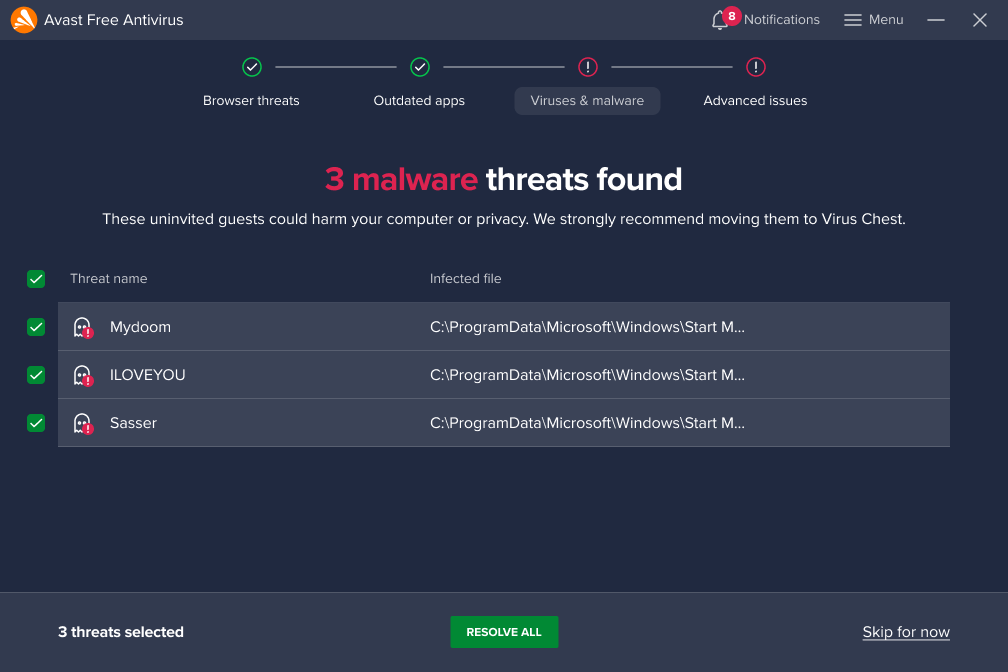
Continuous Protection
Avast’s real-time scanning now includes advanced features like AI-powered Web Shield, which enhances scam prevention and offers robust protection against online scams. It continues to monitor your system for viruses, malware, ransomware, and other online threats, scanning files, applications, and downloads as they are accessed to block harmful content before it can cause any damage.
Example: Imagine you download a file from a website. Avast’s real-time protection immediately scans the file and places it in quarantine if it contains malware, preventing it from infecting your computer without any further action required on your part.
Behavior Shield
Proactive Threat Monitoring: Avast’s Behavior Shield is designed to detect suspicious program behavior that may indicate an unknown or zero-day attack. It monitors your applications and stops any unusual activity before it can damage your system.
Zero-Day Attack Prevention: A zero-day attack occurs when hackers exploit vulnerabilities that developers haven’t yet discovered or patched. Behavior Shield helps prevent these attacks by flagging and blocking suspicious actions that might indicate an attempt to exploit a new vulnerability.
Example: If a trusted program suddenly begins encrypting files without permission (a common sign of ransomware), Behavior Shield would detect this unusual activity and stop the process, protecting your data from being held hostage.
WiFi Security Scan
Network Vulnerability Detection: Avast’s WiFi Inspector scans your home or public WiFi networks for potential security weaknesses. It checks for unsecured networks, weak passwords, and devices vulnerable to attacks.
Importance of WiFi Security: Securing your WiFi network is critical since an unsecured network can be an easy target for hackers. They could exploit vulnerabilities to intercept your data, access connected devices, or even take control of your network.
Example: Are you using public WiFi in a café while on vacation? WiFi Inspector will scan the network and alert you if it’s not secure.
Smart Scan: The Ultimate Tool
All-in-One Analysis: Avast’s Smart Scan combines several types of scans. It checks for malware, outdated software, network issues, and more, giving you a comprehensive view of your system’s health.
A complete scan saves time by checking for multiple security concerns all at once, making it easier to identify and address any issues quickly.
These are just a few of the key tools Avast Free Antivirus offers. If you’re in the market for a powerful and free antivirus, Avast Free Antivirus is one of the top options available, and downloading it is just a click away.
