Gmail introduces a feature that will help users unsubscribe

Gmail has launched a new feature called Manage Subscriptions, which promises to make it easier for users to unsubscribe from multiple senders simultaneously. This feature is in the process of being implemented in the apps for Android, iOS, and its desktop version, although it is not yet available to all users. The new tool allows users to view a list of active subscriptions along with the number of recent emails received from each sender, information that can be crucial for those looking to clean up their inboxes. Unexpected results Despite the introduction […]

Gmail has launched a new feature called Manage subscriptions, which promises to make it easier for users to unsubscribe from multiple senders simultaneously. This feature is in the process of being rolled out in the apps for Android, iOS, and its desktop version, although it is not yet available to all users. The new tool allows users to view a list of their active subscriptions along with the number of recent emails received from each sender, information that can be crucial for those looking to clean up their inboxes.

Unexpected Results

Despite the introduction of this feature, reports from various agencies suggest that there has not been a significant increase in subscription cancellation rates among customers. This could indicate that users who already manage their emails effectively are not as affected by the new feature. According to observations, the impact on Gmail accounts could be minimal, especially for those whose sends are well-segmented and tailored to user engagement levels.

The design of the new option prioritizes the volume of emails, reinforcing the need for brands to adjust their sending frequency based on subscriber engagement. Effective strategies include sending fewer emails to those who show low engagement and increasing frequency for more active users. This aligns with what many specialists have advocated for years: smart segmentation is essential to maintain a good level of engagement and minimize cancellations.

In this context, the new Gmail feature can be seen as a opportunity for marketers to refine their strategies and maintain their focus on real interaction with their audiences. It is expected that, in the end, most users who adopt this feature will do so occasionally rather than constantly, which could influence their list management habits in the future.

Gmail has just been hacked: is your email account safe?

In a concerning finding, cybersecurity researchers have detected seven malicious packages on the Python Package Index (PyPI) development platform that abused Gmail to exfiltrate sensitive data and communicate with their operators. The discovery, made by the firm Socket, revealed that some of these packages mimic the legitimate Coffin package, making it easier to deceive users. The seven packages, which include names like Coffin-Codes-Pro, Coffin-Codes, and Coffin-Grave, had accumulated over 55,000 downloads, and some of them had been available on the platform for more than four years. The criminals are targeting cryptocurrency users with new malware […]

In a concerning finding, cybersecurity researchers have detected seven malicious packages on the Python Package Index (PyPI) development platform that abused Gmail to exfiltrate sensitive data and communicate with their operators.

The discovery, made by the firm Socket, revealed that some of these packages imitate the legitimate Coffin package, making it easier to deceive.

The seven packages, which include names like Coffin-Codes-Pro, Coffin-Codes, and Coffin-Grave, had accumulated over 55,000 downloads and some of them had been available on the platform for more than four years.

Criminals are targeting cryptocurrency users with new malware on the Python platform

These packages, once installed, connect to Gmail using encoded credentials, allowing them to bypass most security measures, establishing communication with a command and control (C2) server.

The investigation indicates that the attackers, apparently interested in stealing cryptocurrencies, used email addresses that contained terms like “blockchain” and “bitcoin”.

One of the compromised email addresses was sphacoffin@gmail.com, which was used to send signals that the malware was active. This unauthorized access allows attackers to send commands, steal files, and execute code remotely.

In light of this threat, experts urge all Python users to immediately remove the malicious packages and rotate the compromised credentials.

In addition, it is recommended to be vigilant for unusual outgoing connections, particularly SMTP traffic, and to always verify the authenticity of packages before installation. Researchers emphasize the importance of conducting regular audits of dependencies to detect unexpected or malicious packages in the early stages.

Google has updated Gmail to combat spam better than ever before

Gmail is a tool that’s integral to the lives of billions of users worldwide, and spam has always been one of its major issues. That’s why Google’s latest improvement will allow Gmail to filter spam more effectively than ever before, significantly reducing the number of fraudulent emails that users receive in their inboxes.

It’s always been a nuisance, which is why it’s noteworthy that Google is taking such measures to prioritize the well-being of Gmail users. Implementing stricter filters to prevent the infiltration of spam emails into both personal and professional Gmail accounts is a significant step. Since this is a recent development, users will start noticing a decrease in the volume of spam messages from now on.

Gmail DOWNLOAD

Improvements against spam

Google, as explained in its security-focused blog, has implemented a new text vectorizer that will prevent fraudulent messages from bypassing the quality filters that previously evaded detection without triggering alarms. Thanks to the vectorizer, Gmail will now be able to detect when a message is written deceptively, exploiting character formatting to bypass Google’s security measures.

Google has made efforts to implement this valuable improvement, but it is not the only company fighting against spam. In fact, in recent months, Mozilla released an extension for Firefox aimed at creating an artificial filter for newsletters from sites where users register, thus reducing the amount of unwanted email users receive.

Anti-spam improvements… and anti-inactive accounts

Yes, Google is making efforts to protect users from annoying spam, but they’re also considering their own interests: inactive accounts result in an inefficient use of energy and resources. That’s why they’ve decided to implement measures for the first time to delete Google accounts with extremely low activity. Google set the inactivity time limit at two years, giving users 24 months to use their account at least once.

Regarding how to let Google know that an account is active, there are several actions that would certify to the big G that an account is being used and shouldn’t be deleted: watching videos on YouTube (as it moves the history of that account), having devices logged into that account, sending emails…

Gmail DOWNLOAD

A glitch in Gmail has caused delays of several hours in the delivery of emails

Gmail, Google’s email management tool, experienced an unusual glitch that resulted in emails being delayed for a few hours without reaching their intended recipients. However, after resolving the issues related to this incident, all sent messages were able to reach their destination without further complications.

Given the volume of business that Gmail handles, just a few hours are enough for a significant number of emails to be stuck. Fortunately, for both Google and those who work with Gmail, the issue could be resolved on the same day.

Gmail DOWNLOAD


More than four hours of delays

As reported in the United States, some incidents on Google’s servers prevented Gmail from functioning properly. This caused Gmail services to be semi-collapsed during the hours when the incident was active, hindering the natural sending of emails. They took longer than usual to arrive, and this issue affected many tasks and work due to the delay.

Fortunately for Google and for those whose work depends on its service, this service was restored on the same day, about four hours after the server issues. These events, which took place on November 30th, could become a mere anecdote for all those affected who, after some time, were able to work normally.

Gmail had problems that affected many users in the United States

The latest changes to Gmail

Google always strives to ensure that its tools, applications, and services function as efficiently as possible. Therefore, they deemed it relevant to make a series of “sacrifices” for a greater good. What sacrifice did they want to undertake? They decided to start eliminating emails with higher inactivity.

This decision, aimed at reducing the amount of server space for Gmail accounts whose usage doesn’t correspond to the space and energy it consumes, would first target the deletion of accounts that were created but never used for any action. However, starting in 2024, accounts that have been inactive for more than 2 years will be deleted. Therefore, if you don’t want your account to be removed, you’ll need to take actions such as watching YouTube videos with that account, checking emails, sending a message, or any action that involves activity on that account.

Google has released the Gmail app for Wear OS

As many of you may already know, yesterday the new Google Pixel 8 and 8 Pro were officially introduced, although we had been receiving updates about them frequently due to the numerous leaks they had experienced. However, we’re not here to talk about the new phones from Mountain View, but rather about another announcement that took place yesterday.

Gmail DOWNLOAD

In addition to the mentioned new devices, the company introduced and launched the new Pixel Watch 2, a smartwatch that stands out primarily for improving the health functions and physical activity monitoring that its previous version offered. With this new smartwatch, as reported by the media outlet 9to5Google, Google debuted the official Gmail app on Wear OS, and it is now available for download from the Play Store of the aforementioned smartwatch.

Gmail can now be installed on smartwatches running Wear OS 3 and 4

The Gmail app is compatible with both Wear OS 3 and Wear OS 4, so if you have devices with these operating systems, you can enjoy Google’s service immediately. To be honest, you could interact with Gmail from a Wear OS smartwatch before, but it only allowed you to archive, reply, or delete emails directly from the notification that the device displayed when receiving a message. This has, of course, changed, and now the experience is comprehensive right from the watch itself.

When we talk about a comprehensive experience, we mean that now, from your Wear OS smartwatch, you can check your Gmail inbox, manually update it, open emails, and interact with them as if you were doing it from your smartphone or PC. You can even switch between Google accounts seamlessly. Additionally, it appears that this Wear OS app features an exclusive watch face with an analog clock and a button that shows the number of unread emails.

Gmail DOWNLOAD

While the Gmail app for Wear OS was officially introduced yesterday, it was actually announced at the past Google I/O 2023 event, which took place in May. So, we’ve been waiting for it for a few months. As mentioned earlier, the app for the renowned service from Mountain View is now available for Wear OS smartwatches.

Gmail will allow us to send client-side encrypted emails from our mobile devices

In most of the applications we use in our daily lives, we can find comprehensive data protection systems, such as end-to-end encryption employed by apps like WhatsApp. However, not all applications are up-to-date when it comes to data protection. Google, for instance, had not implemented the aforementioned system in one of its most recognized and widely used services, Gmail.

Gmail DOWNLOAD

About end-to-end encryption, we can indicate that this system involves encrypting our messages from one point of the conversation to the other. This means that the content of the text cannot be read at any point and is only decrypted when it reaches the intended recipient. Well, this is what the technology giant aims to add to the Gmail app for Android and iOS, although there are a few nuances to consider.

Security will soon increase in Gmail

Gmail does use encryption to protect our emails, but this encryption is applied only when the emails are stored on their servers. Therefore, while a message travels from our smartphone to the server, there is a potential vulnerability where someone could conduct an attack to obtain the content of our email. However, performing such an action is not straightforward. Still, having an extra layer of protection is always a good practice.

The system of “client-side email encryption,” which is already available in the desktop version of the app, will soon be introduced to Gmail for mobile devices, both on Android and iOS platforms. With this implementation, emails sent from our mobile devices will be encrypted with their own encryption key. Undoubtedly, Gmail’s security is enhanced thanks to this method.

To use this email encryption, you’ll need to follow a few simple steps. This system will appear as a new option when composing a new email in the Gmail mobile app (represented by a shield icon). However, the significant limitation is that, for now, it will only be available for business users. The company administrator will have to configure this option through Google Workspace.

Gmail DOWNLOAD

Certainly, this is undeniably good news for the protection of our data and emails. However, it remains to be seen whether this feature will be rolled out comprehensively to all users, as currently, only a select few business users can employ it.

Google will eliminate the basic HTML version of Gmail in 2024

Google has announced a significant change in one of its main services. We’re talking about Gmail, the technology giant’s email platform with a large user base, which is now preparing to bid farewell to one of its most important components. The company has confirmed that in 2024, it will eliminate Gmail’s basic HTML view.

Gmail DOWNLOAD

At one point, this mentioned view was crucial for users to access Gmail. Now, from the TenFourFox blog, they noticed Google’s plans on Gmail’s support page, even though the company didn’t seem very willing to announce it publicly. In fact, if it weren’t for the media already reporting on this news, the company might not have commented on it at all.

Gmail will remove its basic HTML view in January 2024

The company has confirmed the news following the earlier reports, and we can now start preparing our best farewell to Gmail’s basic HTML view, which will only be available until January 2024. From that point onward, all users of the platform will only be able to use the standard Gmail view, which includes the latest features and better security and accessibility options.

With Gmail’s basic HTML view, the capabilities of Google’s service are much more limited, as it only allows us to check the emails we receive and perform basic functions like replying or forwarding. Additionally, due to its limited features, this version was more accessible to users with slower internet connections and older systems.

Gmail DOWNLOAD

For now, there isn’t much information about Google’s reasons for removing Gmail’s basic HTML view, although it’s logical to assume that they want to shut it down because it’s outdated. Despite being a rather antiquated view, as mentioned earlier, some users may still be using it today. Therefore, this decision may leave some of those users behind, but the number of affected individuals is likely to be exceptionally low.

10 Google Mail Tips and Tricks To Catapult Your Work Productivity in 2022

The new year is the ideal time for improvement and to make new resolutions. Everything and everyone can get a fresh beginning, including you. A popular resolution or goal for many people in the new year is to improve their work productivity by not wasting time and getting more things done in less time. 

Just making goals won’t work; you need to work on your goals to make them productive. Here are some easy Gmail tips that you can try and give your work the necessary boost in the right direction. So, clean up your mailbox and get back on track this year. Check out these awesome Gmail hacks that can undoubtedly boost your productivity in 2022.

Undo a sent email

Ever happened that you wrote a message in a hurry and hit the send button and suddenly realized there were some mistakes in the mail. Either you have sent it to the wrong person or missed something to include in the mail. Gmail has a setting that can prevent this mishap from happening. Go to Settings>> Labs>>Undo Button>> Enable. It helps you undo a sent mail quickly so you can get back to focusing on your work. 

Utilizing read & unread message functionality

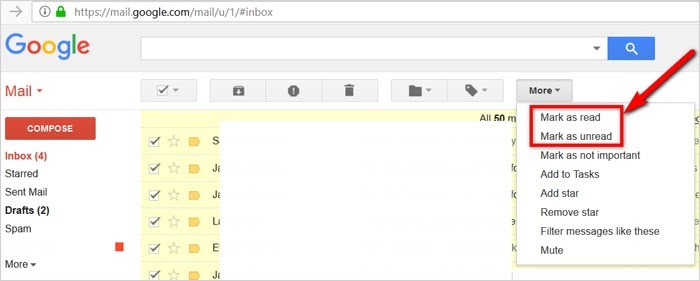
For any user, the read and unread messages are distinctions when a new message arrives in Gmail. But, it’s an opportunity for Gmail power. Click the More category, and you can mark the emails as “read” or “unread” based on your choice. In this way, you can highlight the messages you haven’t gotten yet or curtail the email priority that’s not worth reading so you don’t waste valuable time. 

10 Google Mail Tips and Tricks

Bring priority emails to the top

All Gmail messages are displayed chronologically by default. Browsing through a handful of marketing emails to arrive at an important mail from your boss might not increase your productivity. The Priority Inbox feature of Gmail will filter messages based on your priority. You can activate it by going to Settings>>Inbox Tab>>Inbox Type>>Priority.

10 Google Mail Tips and Tricks

Creating canned responses

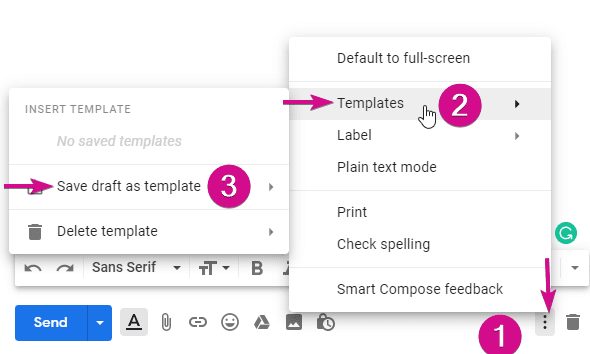
Another huge time saver is making email templates. These templates are canned or saved replies that you can easily send to any of your senders. To create a canned response, type a message that you want as a canned response. Before sending, click on More Options>>Canned Responses>>New Canned Response. It will prompt you to name it.

Once you send the canned message, you can either reply to an existing message or compose a new one. Click on More options and select the response you want to use.

10 Google Mail Tips and Tricks

Check Gmail messages offline

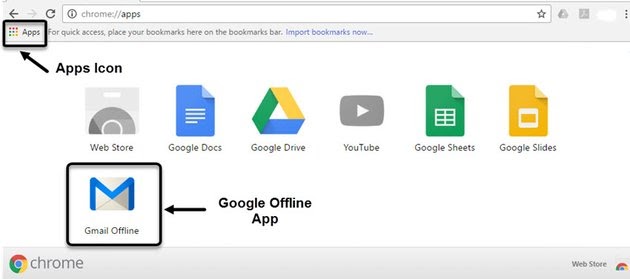
It turns out you need not get hooked with a Wi-Fi connection every time you need to check a mail. By downloading the Gmail Offline extension on Chrome, you can read, search, respond and archive messages without any internet connection. It means you don’t need to waste productive time on emails when you’re back online.

Before using this extension, you need to turn it on when connected online. To go offline, go to the top right corner and click on Settings. The extension will start syncing and downloading mails for a couple of minutes before you venture offline. 

10 Google Mail Tips and Tricks

Using multiple gmail accounts

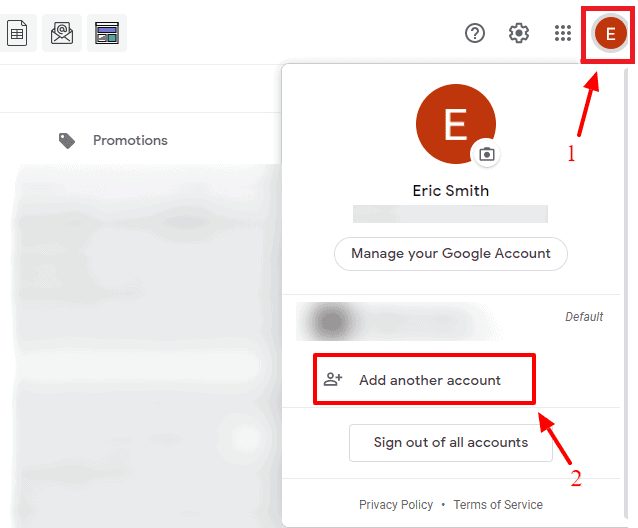
You can switch between multiple email accounts and different inboxes with complete ease as a Gmail user. It’s possible to stay logged in to other Gmail accounts and access messages from any different accounts without signing in every time. In this way, you can keep your personal and work emails separate and not let the former distract you from the latter.

Firstly, add the different Gmail account(s), and to do this, click on your Gmail gravatar on the top right corner. Once all accounts are added, click on the gravatar every time to select the Gmail account you want to use. The best part about this hack is that you don’t have to re-enter the Gmail password every time.

10 Google Mail Tips and Tricks

Scheduling emails

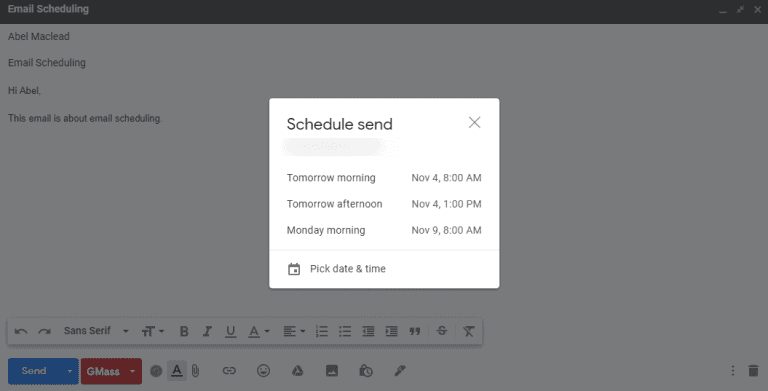
It’s impossible to stay online 24/7 to send email messages, isn’t it? That’s why there is an Email Scheduling feature that you can use to plan the outgoing messages ahead of time. Spend time doing so in the morning and at intervals so you can spend productive time in between with your work.

When you have composed an email, click on the down arrow beside Send button. Select a date and time when you wish to send that particular message, and Gmail will take care of the rest.

10 Google Mail Tips and Tricks

Customizing Inbox display

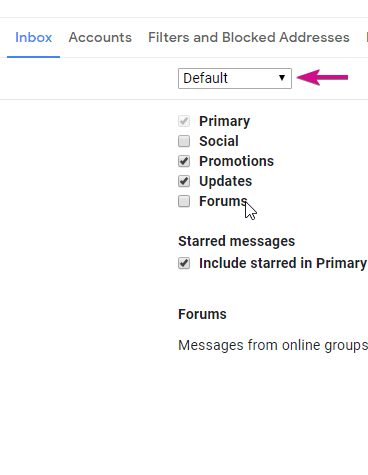
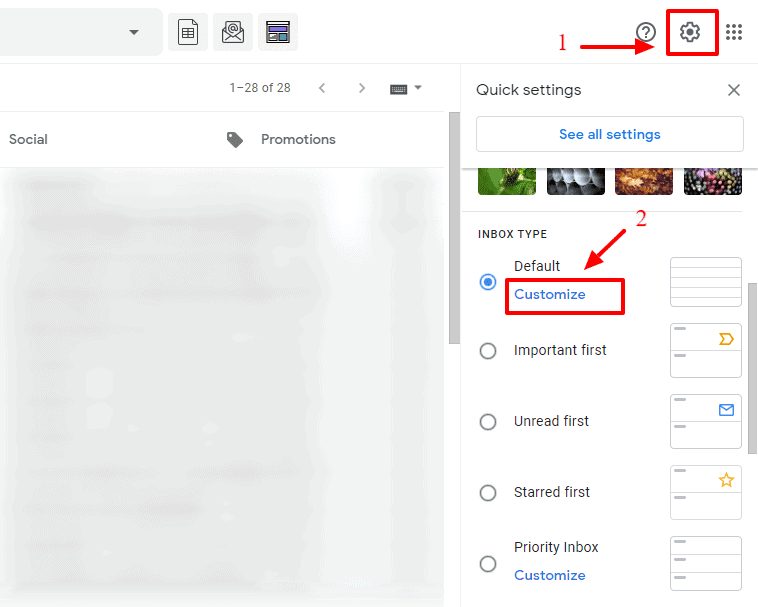
Don’t like the inbox messages split into different labels like Primary, Social, and Updates? Does it disrupt your focus and productivity? Now, it’s possible to customize the display of Gmail Inbox depending on your tastes. On the upper right corner, click on Settings, and under the Inbox Type, choose the Customize button. When the dialog box opens, you can select which messages you want in the Primary, Social, and Updates category in the Inbox tab. 

10 Google Mail Tips and Tricks

Expand and contract main Gmail menu

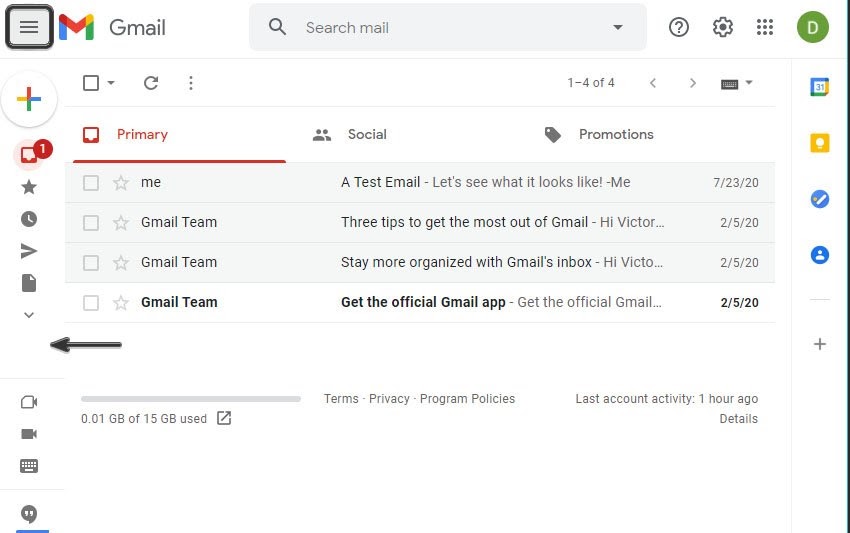
Searching for innovative ways to enhance the looks of your Gmail? Now, you can hide the main menu by clicking on the Main Menu button, which is available on top of Gmail. It is a handy way to cut back on clutter in the Gmail inbox. Now, the menu will be represented by icons instead of texts, and you can always expand the menu to its original size.

10 Google Mail Tips and Tricks

Use nudges for reply reminder

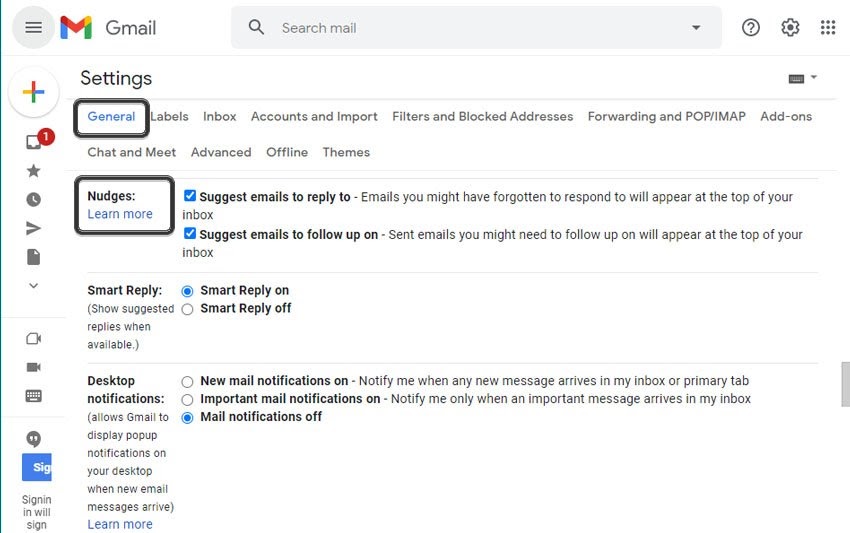
How often have you wanted to reply to an email but forgot to do so? Well, there is a Gmail hack for this situation. Use Nudges as they are handy reminders. When active, you will receive a reminder at the top of your inbox if the message needs any reply after some time. 

10 Google Mail Tips and Tricks

Focus on your productivity!

These Gmail tricks and hacks will certainly change the way you send/receive emails and enhance work productivity at the same time. These tips will certainly conquer the email and make you a power user. Try to master the above hacks and I am more than sure that you will have a great time managing emails and even show off these tricks to your colleagues and friends at the same time!