The Apple Notes app will receive two important updates in iOS 18

The Notes app from Apple is on its way to becoming an even more essential tool within the brand’s device ecosystem. The next major update of Apple’s mobile operating system, iOS 18, would introduce two important improvements to this iconic app.
iOS 17 DOWNLOAD

According to AppleInsider, there are at least two standout features in development for the Notes app. First, there is expected to be an implementation of audio recordings directly within the app, similar to the functionality of Voice Memos but with better integration.

This will allow iOS 18 users to record, play and save audio directly in their notes, making it easier to create multimedia content and digital albums. In addition, they will be able to add text and images along with the recordings, as well as detailed descriptions or contextual entries.

The user interface of the Notes app will be visually similar to that of Voice Memos, with graphical representations of the captured audio. These audio note recordings will be available on all devices connected to iCloud running at least iOS 18 or macOS 15.

In addition to this audio recording feature, iOS 18 is expected to introduce a new feature called “Math Notes”, which will allow the Notes app to interact with Apple’s Calculator app, being able to perform calculations as users enter them. This feature is scheduled to debut alongside the redesign of the Calculator app for macOS.

Initially, these new improvements to the Notes app would only be the beginning of a series of new features that will transform its usefulness and versatility. Although specific details about how the math notes function will work have not yet been revealed, it is expected that users will be able to activate it from the Calculator app through a designated option.

With these updates, Apple aims to strengthen the position of the Notes app as an essential tool for both creatives and everyday users, providing new ways to capture, organize, and utilize information on their Apple devices.

iOS 18 will likely be presented during the 2024 Apple Worldwide Developers Conference (WWDC), which will begin on June 8, so we won’t have to wait long to learn more about the company’s new operating system.
iOS 17 DOWNLOAD

Apple releases iOS 17.4.1 with bug fixes and enhanced security: we can now update

New versions that bring us more improvements for security and also bug fixes.

Apple released yesterday the updates iOS 17.4.1 and iPadOS 17.4.1. These new versions come after the release of iOS 17.4 and iPadOS 17.4, which introduced specific changes for the European Union, new emojis, improvements in the Podcasts app, several security improvements and other novelties. New versions that bring us more security improvements and also bug fixes.

iOS 17 Download

A minor update, but equally important

Updates are available for download on our iPhone and iPad, as always, in Settings > General > Software Update. In addition, for those users who have not yet updated their devices to iOS 17, Apple has also released a security update in the form of iOS 16.7.7. According to the release notes, these updates focus on implementing “important security updates and bug fixes”.

As reported by MacRumors, in iPadOS 17.4.1, a bug that affected certain models of iPad and could prevent the Camera app from scanning QR codes has been fixed. The affected models include the 6th and 7th generation iPad, the 10.5-inch iPad Pro, and the second generation 12.9-inch iPad Pro. Apple recommends affected users to update to iPadOS 17.4.1 to fix the bug.

iOS 17 Download

Although the release notes do not specifically mention the fix for this issue, it is likely that it has been included along with other unspecified improvements and security updates. A minor update, yes, but one that paves the way for the arrival of the next ones.

iOS 18 will be the AI update: and the responsible team has received new talent with this purchase

Let’s remember that Tim Cook has promised that the company will innovate with generative AI in 2024, anticipating that this “will offer transformative opportunities for our users.”

Apple has taken a further step towards consolidating its position in the field of artificial intelligence with the acquisition of DarwinAI, a startup based in Canada. A move that highlights Apple’s commitment to compete head-to-head with Microsoft or Google in the AI market and from which we should see the first results in just a couple of months.

iOS 17 Download

DarwinAI is now part of Apple

DarwinAI stands out in its field for having developed artificial intelligence technology aimed at inspecting components during manufacturing processes, as well as for its focus on creating smaller and more efficient AI systems. Innovations that promise to improve Apple’s production processes, on the one hand, but that are also key to the development of AI applications that require lower resource consumption, a crucial aspect for mobile devices and other electronic devices.

The acquisition, which was reported by Bloomberg, has led to the disappearance of DarwinAI’s online presence; their website and social media accounts have been deactivated after the purchase. This is a common practice in acquisitions of this nature, where the technology and talent of the acquired company are fully integrated into the buyer’s operations. According to reports, dozens of former DarwinAI employees are now part of Apple’s artificial intelligence division, including AI researcher Alexander Wong, who played a crucial role in DarwinAI and now holds a director position in Apple’s AI group.

As in other occasions, Apple has confirmed its acquisition with its usual statement: “Apple occasionally acquires small technology companies. In general, we do not discuss our purpose or plans”. However, it is evident that the company is seeking to strengthen its capabilities in AI, particularly to enhance the artificial intelligence features in its upcoming versions of the operating systems iOS 18 and macOS 15.

To compete with services like Microsoft’s Bing, OpenAI’s ChatGPT, and other generative AI offerings, Apple needs to integrate generative AI into a wide range of products. We already know, according to rumors, that the company is testing large language models, and it is expected that the features will arrive on Siri, Shortcuts, Messages, Apple Music, on our AirPods and much more, along with iOS 18.

The key to Apple’s approach, however, and the difference with Microsoft, OpenAI, or Google, is where these models are executed. While it is common to run AI directly in the cloud, Apple intends to follow a different strategy, one that protects our privacy: local execution. In this sense, DarwinAI’s experience in creating more compact and efficient AI systems is particularly valuable and can help the company implement the different models directly on our devices.

iOS 17 Download

Let’s remember that Tim Cook has promised that the company will innovate with generative AI in 2024, anticipating that it “will offer transformative opportunities for our users”. With this acquisition, Apple’s AI team is strengthened with cutting-edge talent and technology, and at the same time, another piece is added to the puzzle that we would have to see resolved with iOS 18.

Even more Apple AI: now we can animate photos with just one sentence

With Keyframer, Apple reinforces, once again, its position in the field of artificial intelligence and shows us another card.

Apple continues its advance in the field of artificial intelligence —without making too much noise— with the launch of a tool capable of animating static images using large language models (LLMs) based on simple text prompts. This tool, named “Keyframer”, represents a qualitative leap in the way we can carry out animations with photographs and is one more piece of a puzzle that Apple should show us soon.

Apple Developer Download

Another piece of Apple’s strategy

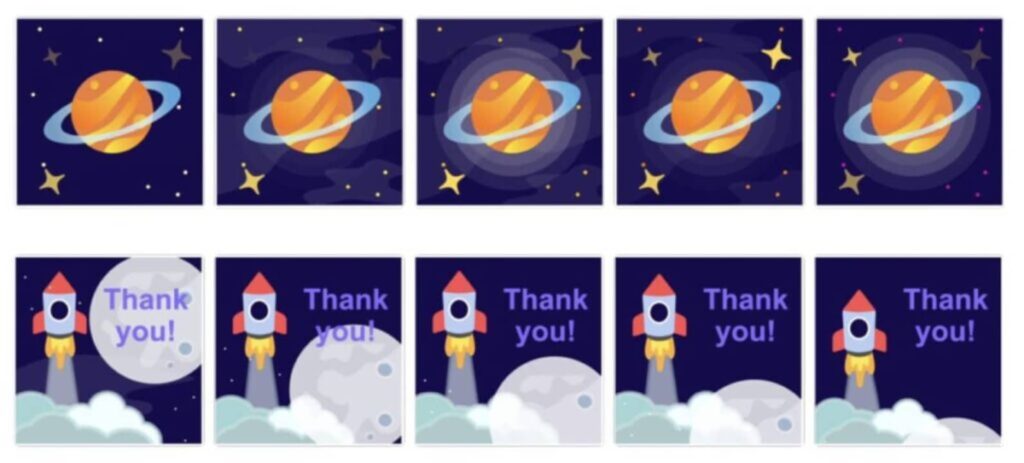
The new Apple tool, detailed in depth in a recent paper titled “Keyframer: Empowering Animation Design Using Large Language Models”, allows us to transform scalable vector graphics (SVG) images into dynamic animations using simple text commands. For example, when loading an image of a spaceship, the user can request “generate three designs where the sky changes color progressively and the stars blink”, and Keyframer will produce the necessary CSS code to carry out this animation.

The main advantage of Keyframer, however, lies in its ability to allow users to refine their creations through successive indications, thus optimizing the creative process without the need to define all design elements from the beginning. According to Apple, which has interviewed designers and engineers, this tool is “much faster when it comes to making animations” and “does things that used to take several hours to do”.

Apple Developer Download

With Keyframer, Apple reinforces, once again, its position in the field of artificial intelligence and shows us one more card —perhaps its application in Keynote— of its strategy before iOS 18 arrives and completely changes what our iPhone will be able to do with a simple request to Siri.

The EU is backtracking and the DMA will not affect iMessage: what does it mean?

An objective that doesn’t come from regulation imposition but from the natural evolution of standards, which we will all soon enjoy.

Recently, the European Union has decided, after its initial attempt, not to include iMessage, Apple’s messaging service, in the strict regulations of the Digital Markets Act (DMA). As Apple responded to the EU after its inclusion in an initial draft list, the Cupertino company’s service does not have enough users to be affected by this new law.

iOS 17 Download

Without regulation, but with the same result

The DMA is a legislation that seeks to regulate tech giants, which it calls “digital gatekeepers,” forcing them to open their platforms to third parties and ensure the interoperability of their services. One aspect of this DMA is to require services like iMessage to implement interoperability with other messaging platforms, such as WhatsApp or Messenger, both owned by Facebook.

However, after a five-month investigation, the European Commission concluded that iMessage does not hold a dominant position in the market, especially regarding its use by businesses, and therefore, it will not be subject to interoperability regulations under the DMA. This decision has been welcomed by both Apple and Microsoft (owner of Bing, which was also excluded from certain regulations under the same logic), who have expressed their satisfaction with not being affected by the DMA.

The most important thing here is to make a clear distinction. iMessage as a protocol is one thing, and the Messages app on our iPhone, iPad, or Mac is another thing. And this is an important distinction to keep in mind because, while iMessage won’t have to integrate third-party services and can continue to maintain Apple’s service security standards, the Messages app presents other changes.

By its own decision, Apple announced that the Messages app will adopt the RCS protocol in the coming months. This will mean that through Messages we will be able to send photos, videos, audio messages, stickers, and other types of content typical of iMessage to anyone. RCS replaces traditional SMS and already has support on Android. Thus, we will be able to communicate with anyone through the Messages app just like we would already do on Telegram or WhatsApp, for example.

iOS 17 Download

Ultimately, we are facing a truly interesting scenario. While we will continue to enjoy maximum privacy and security when sending messages between Apple devices, thanks to RCS we will be able to communicate much more freely than before when talking to Android users. This is not achieved through regulation but through the natural evolution of standards, and soon we will all enjoy it.

Apple releases iOS 17.3.1 and other systems with bug fixes: we can now update

Despite the few updates, Apple urges us to update our devices to the latest available versions through the Software Update section in the General section of the Settings app on our devices.

Apple has released version 17.3.1 of iOS and iPadOS, as well as minor updates for watchOS and macOS Sonoma. These updates come after the release of significant new features in previous versions, such as the Anti-Theft Protection of iOS 17.3, for example, and focus on fixing some bugs and improving the performance of our devices.

iOS 17 Download

A minor, but interesting update

The iOS and iPadOS version 17.3.1, available for iPhone and iPad, focuses on fixing a bug that could cause text to duplicate or overlap unexpectedly while typing. An error that, although it may seem minor, could greatly affect the usability and efficiency of writing. The same error, in fact, that macOS Sonoma 14.3.1 solves, where the text could be replaced by random characters while typing.

Meanwhile, Apple has updated watchOS to version 10.3.1, introducing improvements and bug fixes that are not specified in the release notes. However, Apple recommends installing the update on all watches compatible with watchOS 10.

iOS 17 Download

Despite the few updates, Apple urges us to update our devices to the latest available versions through the Software Update section in the General section of the Settings app on our devices. This ensures access to the latest improvements and bug fixes and makes our iPhone, iPad, Mac, or Apple Watch work as best as possible.

Apple introduces a new AI to modify images: nobody seems to realize it, but it’s that impressive

Despite the fact that these advancements have not captured media attention to the extent of other technological releases, the potential impact of MGIE, along with the clues it gives us about the company’s AI projects, is noteworthy.

In a time where artificial intelligence (AI) has become a fundamental pillar for technological advancement, Apple has taken another step forward by introducing an innovation that, although it has not captured headlines massively, promises to revolutionize the way we interact with our images. It is “MGIE” (MLLM-Guided Image Editing), an open-source AI model capable of editing images based on natural language instructions. A tool, developed in collaboration with researchers from the University of California, that represents a very significant advance in the field of image editing, allowing pixel-level manipulations based on our requests.

iOS 17 Download

“Hey Siri, make the sky clear in this photo and add a Christmas tree next to the house”

Apple has already introduced several AI models of its own, without attracting much attention. And not because of their quality, but because of their limited promotion and their almost exclusive publication in academic media. New models that, if the rumors are true, will come with iOS 18 and can significantly change the landscape of artificial intelligence.

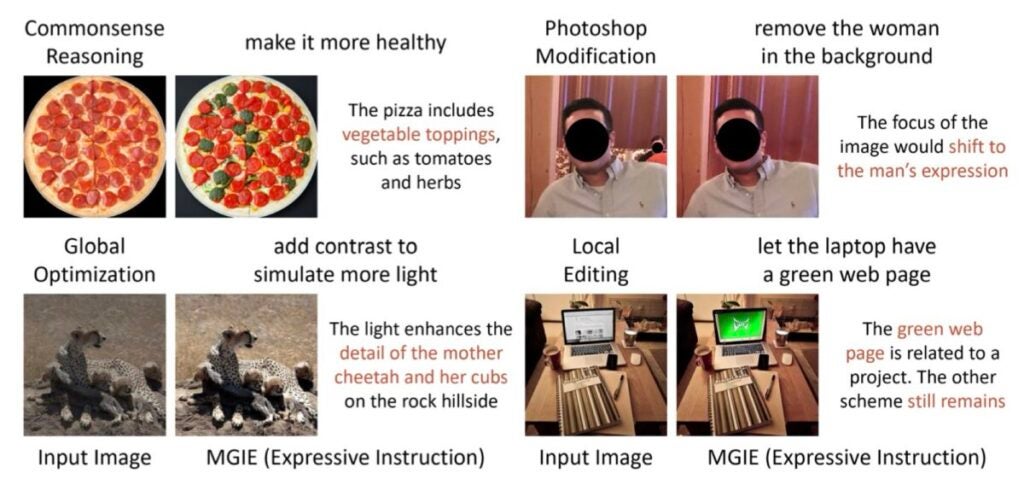
On this occasion, MGIE uses large multimodal language models (MLLMs) to interpret the requests we make and perform a wide range of edits, from global photo enhancements such as brightness, contrast, or sharpness adjustments, to the application of artistic effects such as hand drawing. In addition, it allows for local editing that can modify the shape, size, color, or texture of specific regions or objects in the image, and even perform Photoshop-style modifications, such as cropping, resizing, rotating, adding filters, changing backgrounds, and merging images.

A request as simple as asking to add some lightning to a landscape photo gives truly amazing results. The same if we ask it to convert a photo of chocolate donuts to strawberry donuts. As we can see in the examples above, the tool can perform global optimizations, such as “adding contrast to simulate more light”, or Photoshop-style modifications, such as removing people from the background of a photo to focus attention on the subject’s facial expression.

After the presentation of MGIE at the International Conference on Learning Representations, the model is now available on GitHub, including the code, data, and pre-trained models, so we can already test the system if we have the necessary equipment for it.

This release marks Apple’s second major breakthrough in AI research in just a few months, following the development of new techniques for deploying large language models (LLMs) on iPhones and other Apple devices with certain RAM specifications.

iOS 17 Download

Although these advances have not captured media attention to the extent that other technological releases have, the potential impact of MGIE, in addition to the clues it gives us about the company’s AI projects, is something very noteworthy. The ability to edit images in an intuitive and precise way, along with the integration of generative AI in our devices, probably with iOS 18, will undoubtedly mark a before and after.

iOS 17 comes after iOS 16, but iOS 18 could change everything

The combination of a new Siri, along with the arrival of Apple’s AI to the operating system, could make iOS 18 something truly great.

The adoption of iOS 17 on Apple devices has marked a slower pace compared to its predecessor, iOS 16, according to the latest statistics provided by Apple. To date, 76 percent of iPhones released in the last four years have installed iOS 17 since its release in September, a lower percentage than the 81 percent that iOS 16 had reached in the same period the previous year.

iOS 17 Download

A lower fee than expected

Although iOS 17 has introduced several significant updates since its release, including three major updates and a fourth one coming in March, the adoption among users has not met previous expectations. Among all active iPhones, 66 percent are running iOS 17, while 20 percent are still operating under iOS 16 and 4 percent are using even older versions.

The situation is similar, although slightly better, in the field of iPads. 61 percent of iPads released in the last four years have iPadOS 17, showing a faster adoption compared to iPadOS 16 at the same point last year.

While it is easy to be amazed by this pace, especially considering the many new features that iOS 17 brought to our iPhones and iPads, the truth is that the situation can turn around soon. With the arrival of iOS 18 scheduled for September and its first beta in June, Apple has a golden opportunity to incentivize us to update. The update has already been described by Apple itself as “the biggest in the company’s history”.

iOS 17 Download

The combination of a new Siri, along with the arrival of Apple’s AI to the operating system, can make iOS 18 something really great. In the meantime, there is still a way to go for iOS 17, in order to reach more devices. Starting with iOS 17.4, which brings very important changes and the rest of the updates in the meantime, with our eyes already set on WWDC 24, we await iOS 18.

You might want to disable NameDrop on your iPhone, police warns

Following a recent update, the iPhone NameDrop warning has become a topic of concern among law enforcement agencies, prompting them to advise iPhone users to exercise caution.

Notably, the Middletown Division of Police in Ohio took to Facebook to alert parents about the potential risks associated with the NameDrop feature that’s part of the iOS 17 update. This move highlights the need for awareness and vigilance among iPhone users regarding new features and their implications for privacy and security.

iOS 17 DOWNLOAD

Where is NameDrop in iPhone settings?

The iPhone NameDrop warning concerns a feature that can be toggled on or off in the AirDrop settings. This function facilitates the effortless sharing of contact information between an iPhone or an Apple Watch simply by bringing the devices into close proximity.

Once the devices establish a connection, users have the option to either share their own information or receive details from the other device. Additionally, users can abort the transfer at any moment either by locking their phone or by moving the devices apart before the sharing process is complete, as explained by Apple.

The Middletown Division of Police took to Facebook, issuing an advisory specifically to parents. “PARENTS: Don’t forget to change these settings on your child’s phone to help keep them safe,” they cautioned in their post. This highlights the need for parents to be proactive in managing the settings on their children’s devices to ensure their safety.

Adding to the chorus of caution, the Oakland County Sheriff’s Office in Michigan also raised concerns about this feature. They pointed out that with the latest update, NameDrop is enabled by default, which might catch many users off guard.

The sheriff’s office noted, even though you can refuse to share your info, “many people do not check their settings and realize how their phone works.” This statement underlines a common oversight among users, emphasizing the importance of familiarizing oneself with new features and their default settings.

iOS 17 DOWNLOAD

How to disable NameDrop in iOS 17?

To disable the NameDrop feature in iOS 17, follow these straightforward steps:

  • Open the “Settings” app on your iPhone.
  • Scroll down and tap on “General” to access general settings.
  • In the General settings, find and click on “AirDrop.”
  • Look for the “‘Bringing Devices Together” option within the AirDrop settings.
  • Toggle this option to the off position to disable NameDrop.

By following these simple steps, you can easily turn off NameDrop, addressing concerns related to the iPhone NameDrop warning.

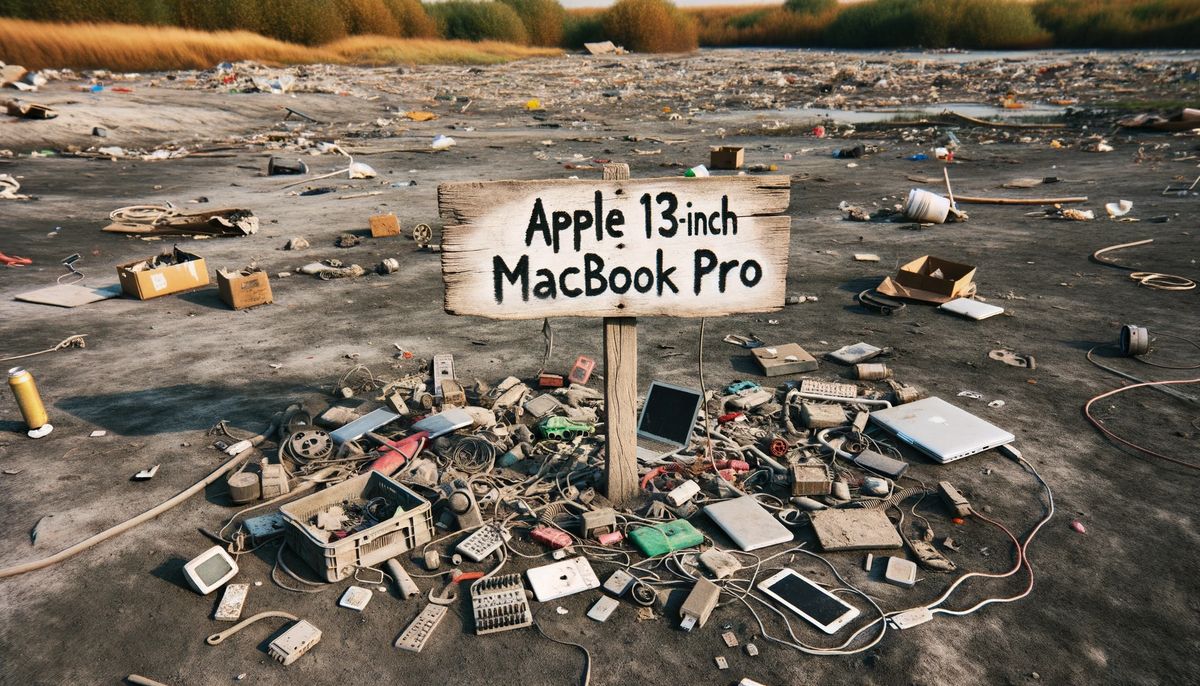
Farewell, the 13-inch MacBook Pro

At Apple’s “Scary Fast” October event, there was more suspense in the air than in the latest blockbuster thriller. In a dramatic turn of events, as the curtain lifted on the new 14-inch MacBook Pro, the stage darkened for the 13-inch model, ushering it out of the spotlight for good.

For the urban wanderer who cherished a blend of compactness and stamina, the 13-inch MacBook Pro was the darling of the range. Its legendary 20-hour battery life stood out even when compared to its larger 18-hour siblings — and that wasn’t just marketing fluff.

Then, of course, was the keyboard’s unique Touch Bar feature. It was the jazz of tech features: while some tapped along, others missed the old rhythm of physical keys. With the OLED touchscreen replacing some of the beloved tactile buttons, reactions were mixed, to say the least.

So, as we bid adieu to the 13-inch MacBook Pro, the tech world remains divided: while some may reminisce, others are eagerly looking ahead to what’s next.

From center stage to sidelines

Once the darling of Apple’s lineup, the 13-inch MacBook Pro, armed with the M2 chip, was the go-to for those who wanted Pro-level performance without breaking the bank. But as the tech world knows, competition isn’t always from outside – sometimes it’s in-house.

Enter the 2022 13-inch MacBook Air, also powered by the M2 chip. Not only was it lighter on the wallet by around $200, but it also boasted a crisper webcam, a more dazzling display, and a svelte build that seemed to almost float in hand. And then there’s the MagSafe 3 power port, a subtle game-changer, letting you juice up the Air while leaving both USB-C ports open for business – a perk the Pro couldn’t match.

While the Air skipped the Touch Bar party – a feature some critics playfully dubbed the tech world’s “magic trick without the magic” – it seemed to win over many with its streamlined approach.

Yet, the 13-inch MacBook Pro wasn’t without its merits. Its internal fans, a nod to those involved in heavyweight tasks like video editing, ensured that when things got hot, the laptop kept its cool. And from the perspective of battery life, as an expert who’s reviewed many a laptop, I’ve seen the 13-inch MacBook Pro outpace even the Air.

Despite its battery prowess, the Air’s overall feature set seemed to cast a longer shadow, making it the more tempting pick for many over the 13-inch MacBook Pro.

Welcome, 14-inch contender!

Apple, always having a keen ear to the ground, seemed to sense the dwindling allure of its introductory Pro. So, in a move that feels like a tech relay race, the baton has been passed from the 13-inch MacBook Pro to its sprightly sibling, the 14-inch MacBook Pro armed with the fresh M3 chip.

And with this shift, the Touch Bar bids its adieu. A farewell that, candidly, many of us tech aficionados at Mashable (yours truly included) are raising a glass to.

iOS 17 DOWNLOAD

While this new entry-level Pro doesn’t flex as much muscle as its M3 Pro and M3 Max counterparts, it’s by no means a slouch. It’s like trading up from a sports car to a supercar: you’re getting that extra rev in performance over the M2, and for a starting ticket of $1,599, it’s alluring.

So, as we turn the page, we tip our hats to the 13-inch MacBook Pro and its once-trendy Touch Bar. It’s the end of an era, but the dawn of another exciting chapter.