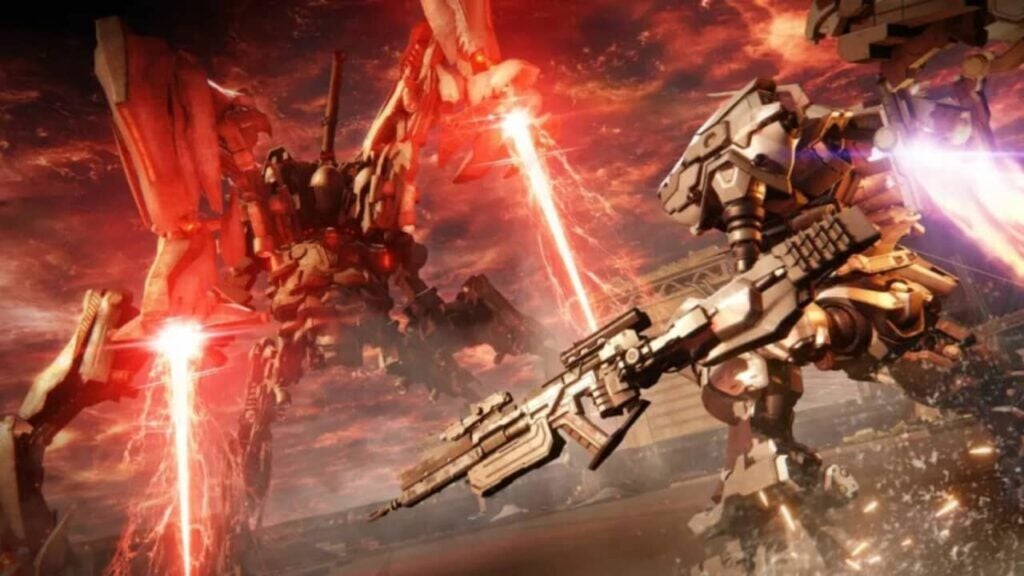
Armored Core 6 patch notes for September 11 are out, and it looks like the developers have worked on stabilizing the game rather than adding more features or content to it.
Since its release, Armored Core 6 has become very popular and is surely one of the biggest hits of the year. However, there are many things to adjust, add, or drop in the game to offer a better experience. Recently, the developers dropped another update to make sure players are enjoying the game to the fullest. The latest update includes balance adjustments, bug fixes, and more. Let’s delve into it and tell you everything the official Armored Core 6 patch notes announcement includes!
Fixed a bug that prevented certain weapons from dealing damage to the boss of the mission “Destroy the Weaponized Mining Ship”.
Fixed a bug that caused the boss of the mission “Prevent Corporate Salvage of New Tech” to be unable to detect the player.
Fixed a bug that caused certain enemies to not be displayed correctly during the mission “Survey the Uninhabited Floating City”.
Fixed a bug that caused certain enemies and background objects to be displayed incorrectly during the mission “Attack the Old Spaceport”.
Fixed a bug that caused vertical missiles and certain coral weapons to deal unintended amounts of damage.
Improved camera controls when spectating online arena battles.
Fixed a bug that caused the punch animation to not be displayed correctly on the opponent’s screen during online arena battles.
Other bug fixes.
[Xbox One / Xbox Series X|S / Steam] Fixed a bug that caused the game to enter offline mode and unable to save progress after the device recovers from sleep mode.
[Steam] Fixed the text displayed onscreen after selecting “Quit Game” from the System Menu on the title screen.
[Steam] Fixed a bug causing certain bosses to be rendered incorrectly.
Armored Core VI: Fires of Rubicon is an excellent game, but it’s also a game that can be difficult, so here are some tips.
While summer usually isn’t the best time of year for video games, this year is an honorable exception. Due to delays, the avoidance of competing with other major titles, and specific decisions from certain big studios, we have a very eventful August full of announcements that would typically have occurred between February and April or between September and November. That’s why it’s impossible for anyone not to have something to sink their teeth into during the holidays. Even if what excites them are giant robots.
The latest from From Software, the creators of Dark Souls and Elden Ring, is a mecha game. For the uninitiated, that means giant piloted robots. Although calling it new is a bit misleading. Armored Core is a franchise that has been around since the first PlayStation era and is revered as one of the deepest when it comes to customizing these giant robots. That’s why, at first glance, it might seem intimidating. But it doesn’t have to be! Not if you have our help.
That’s why we’re going to provide you with five tips to make sure the game doesn’t give you a hard time. Because while it’s true that Armored Core VI: Fires of Rubicon is a rather unique game with a rich history, it’s not necessarily a difficult game. You just need to learn to speak its language. And we’re going to show you how to do it.
The thruster is your best friend
You’re piloting a several-ton machine. Moreover, it doesn’t have wheels; it has legs. That means its movement is slow and very, very heavy. If you try to move like in a shooter game, using the left stick to achieve agile and smooth movement, you’ll die constantly. The first thing you need to learn is that if mechs have thrusters on their back, it’s meant to be used. To be used constantly. What do we mean by “constantly”? Literally every second of gameplay. That’s why we’ll provide you with a summary of each and every one of them.
Just remember one thing: all of this consumes EN (and you won’t be able to do it if you don’t have EN), unless we say otherwise. The EN bar recharges when we are on the ground and not using any ability that consumes EN.
Vertical Thruster (Hold A/X Button): Similar to jumping, but by holding it, you stay in the air for a certain amount of time. Necessary to avoid the blast radius of missile explosions and to move in the air to engage airborne enemies in melee attacks.
Quick Thruster (Press X/Square Button and a direction): Perform a quick dodge, highly useful for evading melee strikes and projectiles.
Assault Thruster (Press Left Stick): Propel forward rapidly. This not only makes you move much faster but also catches your enemies off guard, quickly positions you, and deals more damage—essential if you want to engage in close combat or land a shotgun blast.
Movement Thrust (Press B/Circle Button): Your mech activates the thrusters to move instead of its mechanical steps. This significantly increases your speed and doesn’t consume EN. Always activate movement thrust to navigate the environment and stay mobile in combat while you recharge the EN bar. You don’t want to be dodging bullets with a robot limited to leg movement speed.
Don’t skip the tutorials
You might think that you’ve played enough action games in your life to never need another tutorial again. Well, you’re mistaken. Unless you’re a veteran of the series, you need the tutorials because Armored Core operates on its own terms. Its customization system is quite complex, and when you add to that an equally complex mechanical system, learning it takes a more than reasonable amount of time.
After all, it’s not just about learning the specifics of each limb controlling a weapon or the different types of propulsion. It’s also about understanding the different configurations, weapons, radars, and heads. Even the fact that this is a game where movement is 100% in 3D. If you don’t learn to fly and control the amount of EN you have left, don’t expect to get any platinum medals. Let alone defeat any bosses. That’s why you shouldn’t skip the tutorials — don’t say we didn’t warn you.
We understand that in other games, legs might not be something you even consider, but seriously, we’re not joking: legs are important in Armored Core. So much so that your mech’s gameplay style will completely change based on the type of legs you equip. Bipedal legs are all-around, capable of doing a bit of everything without excelling in any particular aspect. Inverted limbs are excellent for quickly transitioning between ground and aerial combat, making them outstanding targets that are hard for distant foes to hit. Quadrupedal legs allow for extended periods of floating, turning into mini battle stations. Tank legs allow you to carry much more weight and heavier equipment, turning them into walking fortresses of cataclysmic power.
What are the best legs? It depends on the mission’s requirements and your play style. When in doubt, bipedal mechs will always get the job done gracefully. But a well-configured specialized mech will easily accomplish what a biped might struggle to achieve.
Save your settings
Armored Core is a game that, from its origins, has been based on spending more time designing mechs than using them in combat. And that’s perfectly fine—it’s part of the charm. Therefore, please, save every mech design you create. You have 100 save slots, so running out of space is unlikely. Save every mech configuration that has helped you overcome a particular mission, because it’s almost certain that it will come in handy in the future. That’s the essence of the game—constantly switching between mechs and configurations. Don’t be afraid to change. The beauty of this game lies in adapting your mech to suit each mission. The idea of getting attached to a single build and never changing it is reserved for games from other companies, not From Software.
Auto-lock is what keeps you alive
This may sound sacrilegious to anyone who is not a veteran of the franchise —for the veterans, not so much because, well: they’re used to entries where manual aiming doesn’t even exist as such—, but you’re going to have to put your gamer pride aside. Auto-lock is going to save your life in practically every situation.
You can choose not to use it. We understand that if you come from Souls or Elden Ring, and you’ve spent many hours, you’ve already gotten used to not using it, but Armored Core is a different beast. Manual control is much more delicate and complex, highly dependent on the particular parts of your mech. That’s why you should take advantage of the auto-lock feature, which you can use by clicking the right stick. You’ll have plenty of time to switch to manual aiming once you get used to the wonders of this fascinating game.