
5 best apps to help you manage stress

Take control of your stress and anxiety with these apps.

Meditation

According to a recent poll from Gallup, 55% of Americans are stressed out at some point during the day.

When we are stressed, it affects those around us as well. We don’t sleep as well, we can fall into depression, and we can become irritable.

To help manage stress, there are apps that can help you make it through the day and keep your composure. Do yourself a favor and download some of these apps to help ease your tension. 

5 apps to help you manage stress

1. Breathe2Relax

Breathe2Relax

Breathe in. Breathe out.

It should be a simple concept, but when we fry ourselves, we don’t take the time to pause and calm down.

The app does so much more than give you breathing exercises. It also can pair with your Apple Watch to monitor your heart rate. It will also monitor your stress patterns for you and show you your progress.

Breathe2Relax Download now ►
7

2. At Ease

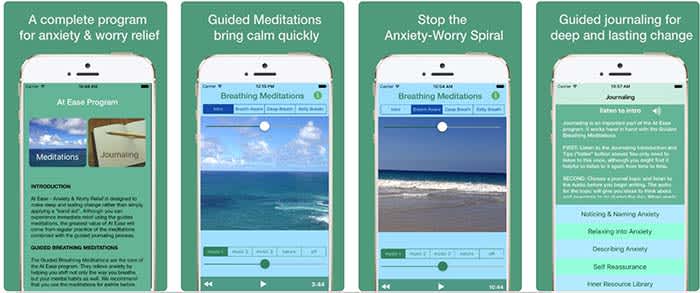
At EaseAt Ease comes with a lot of the tools you find in other stress-management apps. There are breathing exercises and meditations you can do to help manage your stress. However, where the app shines is in its guided journaling feature. 

Guided journaling helps the user become self-aware of the things causing them to feel stressed and anxious. You ask yourself some of the tough questions to help pinpoint the root causes of your stress. From there, you work on how to treat yourself.

This app costs $3, but for those who think this can help them, it’s well worth it.

9

3. Headspace

Headspace

There is such a learning curve with meditation. It is so much more than sitting “criss-cross applesauce” while chanting “Om” over and over again.

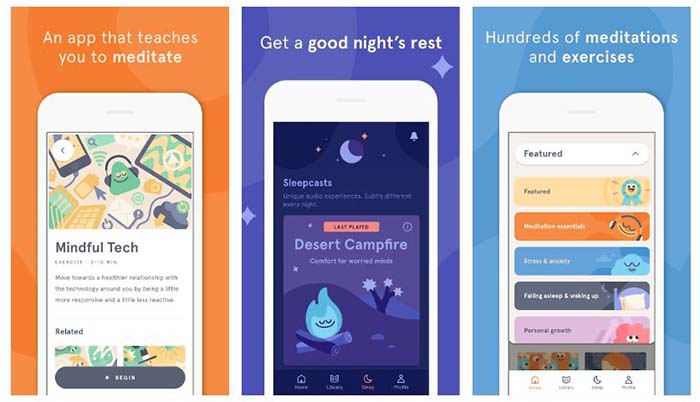
Headspace has a 10-day course that teaches you how to properly mediate. That may sound excessive, but you only have to devote a few minutes a day to learning.

Headspace uses real-life science coupled with ancient meditation practices to help you reduce your stress and anxiety.

Headspace Download free ►
10

4. Happify

HappifyHappify uses activities and mobile games to help you manage your stress. Yes, we’re serious.

The app might sound a bit odd, but the experts and scientists at Happify have put research and studies into how the games operate. More than 80% of the people who used the app said that their stress levels went down because of the app.

The games help teach you positive skills like how to give, how to show empathy, and how to savor the moment. The app also helps you track your progress so you can see for yourself how far you’ve come on your journey.

8

5. Pacifica

Pacifica

We saved the best for last.

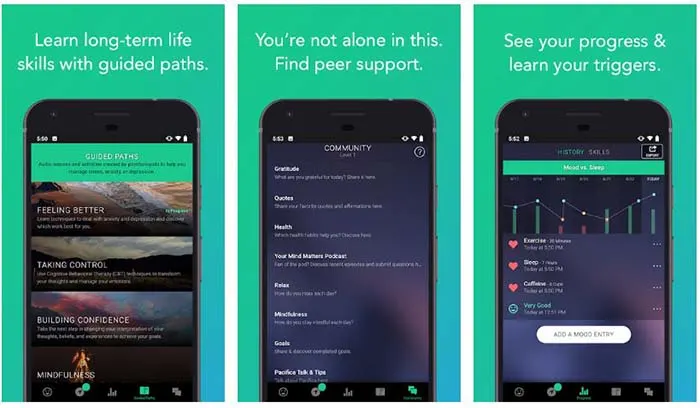
Pacifica is an all-in-one app to help manage stress, anxiety, and depression. The app features several different types of exercises to help you manage your breathing, relax your muscles, and even help give you a more positive outlook on life. 

The app also manages your lifestyle patterns such as how often you workout, how often you sleep, and your caffeine intake. Even better, the app can help you find a therapist in your area and help you find support systems such as groups and even podcasts.

10

Wrapping up

These apps can help, but the things causing you stress and anxiety might have a deeper meaning. If you have chronic anxiety, it may be in your best interest to see a therapist or psychiatrist. Anti-depressants and anxiety medication might be your answer.

Talk to your family and loved ones about your stress, and get the help you need.

Top 5 free puzzle apps that are worth your time

Throw knives and flip guns with some of the games on this list!

Puzzle game

When you’re surfing the web or social media, you’re bombarded by dozens of ads for games. Most of these are hardly worth your time. However, some of them look like they might be worth a download!

We sifted through the swamp of bad games and found these five great puzzle games. If you have a few minutes to kill, these can be a lot of fun.

All of these games are free, but they do have a paid version if you don’t want to see ads. However, the ads aren’t that frequent in comparison to other free mobile games.

Top 5 free puzzle game apps that are worth your time

Slices

Slices

Slices isn’t worst game on this list, but it is still very addictive. Basically, you have a pie that’s cut into six pieces. You have to make pies out of different pieces, but you only have six tins. Also, slices come in different shapes, and you can’t put the same shape into the same tin.

This will keep you entertaining, and also make you a little hungry.

The reason it ranks so low is because there are instances when you’ll do everything right, but you’ll lose anyway. In the rest of these games, if you are quick enough, and plan ahead, you can keep playing. Slices doesn’t always play that way.

There is an option to pay for a “save” so you don’t lose a round, or you can sometimes watch an ad to get saved. We’d recommend toughing it out, and starting it over since there’s no guarantee that you won’t lose within the next few slices anyway.

8

Jelly Shift

Jelly Shift

Jelly Shift is basically that old game show “Hole in the Wall,” but without the human suffering.

You control a wad of jelly as it travels through an obstacle course. You have to resize yourself in order to clear various hurdles.

Where the game is really fun is the unlockables. Over time, you’ll unlock different skins for your jelly including ones that make it look like an animal.

After a while, this game can get kind of boring as most of the levels just feel like more of the same. However, if you have 10 minutes to kill, this can be a lot of fun.

Jelly Shift Download now ►
9

Helix Jump

Helix Jump

Oh man, time flies when you’re playing Helix Jump!

In the game, you control a bouncing ball as it makes its way down a twisty tower. On each level of the tower there is a patch of area that will cause you to lose. Your goal is to reach the bottom of the tower without hitting any of those patches.

As you progress, the towers get bigger and bigger and get more and more challenging. However, you have a secret weapon. If you build up some momentum and pass through multiple layers without touching the ground, you can become invincible and bust through a layer. 

Helix Jump is a lot of fun; just make sure you don’t spend more time playing than you intended.

Helix Jump Download Now ►
8

FlipTheGun

FLIPTHEGUN

This is one of the most non-conventional shooting games that you’ll ever find.

In FlipTheGun, you control a gun that propels through the air by firing. You lose if you run out of ammo or if you fall to your demise. you can collect ammo by hitting the lime-green bullets in the air. You can also collect coins which you can use to buy other guns.

Other guns include shotguns, rifles, snipers, lasers, freeze-rays, squirt guns, and even money-cannons. A lot of the fun in this game comes from collecting the different guns to determine which is the best one for you.

FlipTheGun Download now ►
8

Knife Hit

Knife Hit

Knife Hit has a dumb name, but it’s an awesome concept. You act like an assassin as you throw knives at a target, trying not to clink off other knives. This one will make you feel like John Wick.

Like FlipTheGun, you can collect different types of knives. However, you have an insane amount of knives you can collect in this game. There are currently 136 knives you can unlock, and that doesn’t include the 40+ you can buy if you really want them. Also, the game is always updating to include new knives.

The game even has boss fights! You can face off against bosses, and if you win, you get a cool new knife!

Knife Hit Download Now ►
10

Wrapping up

What’s your favorite game to play to kill some time? Do you like puzzle games or do you prefer an adventure game? Let us know in the comments below!

How to fix a slow computer

Is your slow computer driving you crazy? Try out these tricks to make it run faster!

Slow computer

When you’re just trying to get some work done, or blow a few hours surfing the web, a slow-moving computer can throw a wrench in your plan.

Before throwing your computer out of the window in a fit of rage, try out these tips. There are plenty of quick, free, and easy methods to make your computer run faster. 

How to fix a slow computer

Restart your computer/check start-up programs

Although this advice is annoying, there’s a lot of truth to it. It could be that your computer has been on for too long, and it needs to restart. Shut down your computer and start it back up. About 99% of the time, this will solve your problem.

If your computer is still running slow, it’s time to look at what programs automatically start when you log into your computer. It’s pretty common for antivirus programs and messaging apps like Skype to open automatically. Essentially, while you’re trying to open up something like your web browser or a program for work, your computer is too busy trying to open five other programs.

Here’s how to check your start-up programs on Windows 10:

  1. Go to your Start menu and type “run.”
  2. Choose the “Run” app.
  3. In the window that pops up, type “msconfig” and hit “open.”
  4. In the next window that pops up, you’ll be able to see what programs start automatically, and disable them.

Here’s how to do it on Mac:

Mac Login Items

  1. Open System Preferences
  2. Click to “Users & Groups”
  3. Choose your nickname on the left
  4. Choose the “Login” tab
  5. Click the startup programs you want to remove
  6. Press the “–” sign

This is also a good opportunity to reinstall Windows. All versions of Windows get regular updates unless they’ve been discontinued, so updating or reinstalling periodically will keep your computer running smoothly.

Regularly scan for viruses

Maybe you downloaded something you shouldn’t have downloaded. Maybe you went to a shady website. Maybe you clicked on something with malicious intent. Whatever happened, there’s a good chance that you have a virus. 

Luckily, most of the time, getting rid of a virus is both quick and free. Download an anti-virus program like Malwarebytes and scan your computer.

Malwarebytes Download now ►
8

Malwarebytes will scan your computer entirely and will quarantine off everything that might be harmful.

To be completely honest, you should run a weekly virus scan anyway. A lot of the time, there are viruses that are running in the background of your computer. They are stealing personal information like passwords and are sending them to hackers. Weekly virus scans can solve this problem easily.

Check to see how many programs are running

Multiple programs

Your computer is capable of running all sorts of programs, but it can be difficult to run multiple programs at once, especially if you have an older model. 

If you have a Mac, go to Force Quit (under the Apple menu in the upper left corner) and you’ll see every program you have open. If you run Windows 10, hit Ctrl+Alt+Delete and open the Task Manager to see everything that’s open.

If your computer is running Steam, Photoshop, Google Chrome, Microsoft Word, InDesign, Microsoft Excel, and VLC all at once, you should probably close some of those.

Check your computer’s memory/storage

computer memory

Check your computer’s storage. If you are full or nearly full, it can cause your computer to run a little slow. If you can’t or don’t want to delete anything, find a cloud service to store your files. You can also use Google Drive! If you REALLY want to, you can buy an external hard drive, but why do that when there are free options!

7

There’s a bit of a misconception with this tip.

If you have a bunch of small photos from your trip to Cancun or Word documents from your English 105 class, those probably aren’t going to slow down your computer.

Your computer probably has a minimum of 100 gigabytes of storage, so deleting a file that’s 20 kilobytes is not going to make a difference at all. 

However, if you have a lot of huge game files, HD video files, and a ton of useless programs, you might want to consider dropping some of those. Don’t worry about temp files; worry about large files and your drive space.

Run disk defragment and disk repair

Disk defragment and disk repair can keep your computer running properly and make it run quicker. 

To run disk defragment on Windows 10, follow these steps:

  1. Go to “This PC.”
  2. From there, right-click your hard drive and click “Properties.”
  3. Go to “Tools.”
  4. Click “Optimize,” and then click “Optimize” again.

Mac doesn’t have a built-in tool for defragment, but a third-party app like this one can help you!

7

Disk clean-up is really easy to do on Windows 10:

  1. Type “Disk Cleanup” in your search bar, and click the app with the corresponding name.
  2. Click the option to clean up system files.
  3. Once the scan is done, delete the files the app suggests you delete.

Once again, Mac doesn’t have a built-in tool, but we have another third-party app that can help you out:

Disk Cleanup Pro for Mac Download now ►
9

Bite the bullet and buy a new computer

New computer

Although expensive, computers are very disposable.

You can buy a pricey, fancy-schmancy computer and it could be considered low-tech garbage in just a few years. If you’ve been using the same computer for a few years, it might be time to put some money aside to get a new one. 

Yeah, yeah, yeah. That’s easier said than done. If you need some help managing your money to buy a computer, that’s a whole different story. 

Wrapping up

Hopefully, by the end of this article, your computer is running faster. If you tried something else and it worked, let us know in the comments below!

How to use VLC

VLC is the premier free tool for all of your audio and video files! Here’s how to use it!

VLC

No, that traffic cone on your buddy’s desktop doesn’t mean his computer is under construction.

It means that your friend is using VLC, the best free tool for playing and capturing video! 

VLC plays most media files as well as DVDs, CDs, VCDs, and many streaming protocols. This tool really comes in handy. More often than naught, your device’s default video player is less than optimal. Once the program finally opens, you have to wait for it to load the video, and then play it. This only works if your video player can even play video in that format in the first place. VLC can play just about anything, and it does so quicker than most other apps. 

VLC for mobile Download now ►
8

How to use VLC

Use VLC to play audio/video files

VLC open file

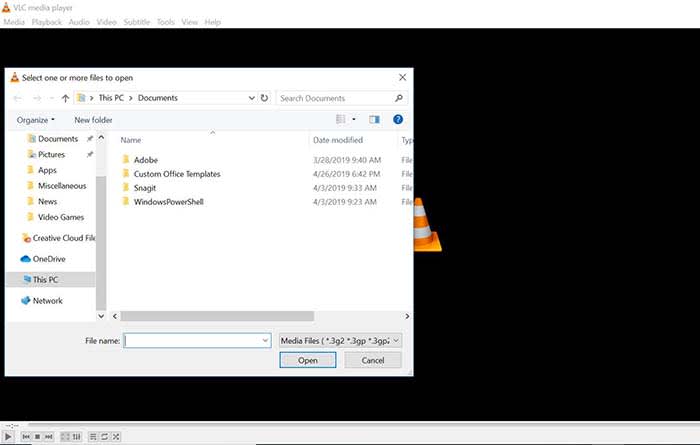
Playing a file with VLC is a lot like opening a photo in Photoshop. Either manually open the file by going to Media, and clicking Open File, or drag just drag the file onto the VLC window.

Keep a library of videos

VLC
Image courtesy of VLC

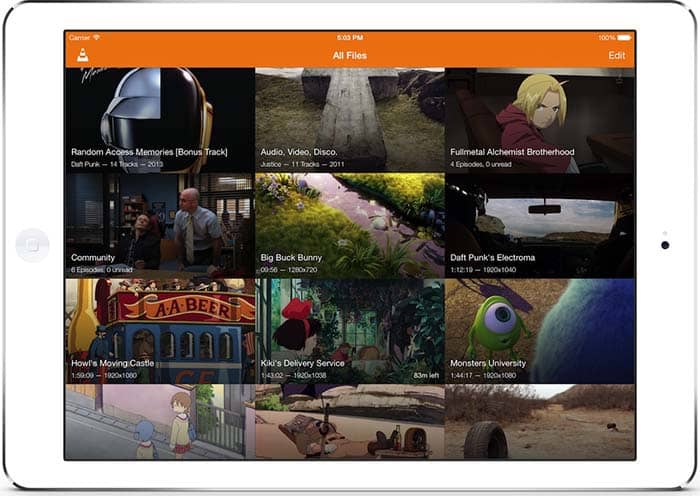
If you watch multiple videos on VLC, you have the option to keep a library of them to finger through at your leisure. Once you have several files loaded into VLC, you can organize them under All Files. Do you have a huge collection of anime? Organize them with VLC! Do you have a digital version of every movie in the MCU? Create a specialized folder for them!

Stream yourself

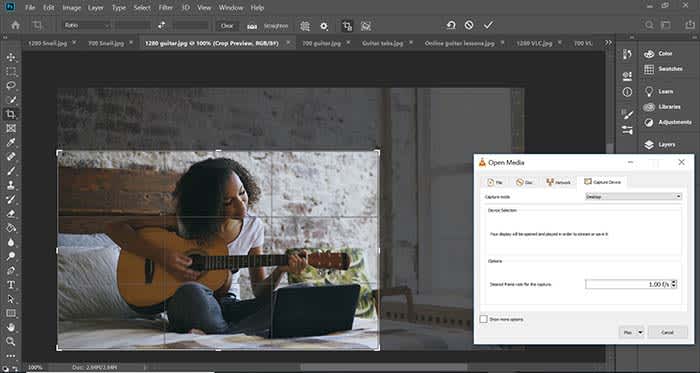
If you want to take a picture of yourself or record a video of yourself with a webcam, your device probably already has some built-in tools. However, it probably doesn’t have tools that help you stream yourself.

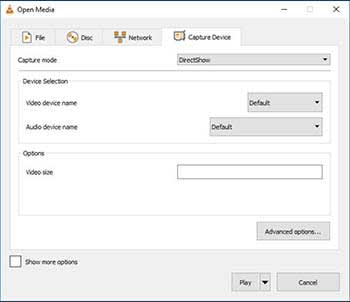
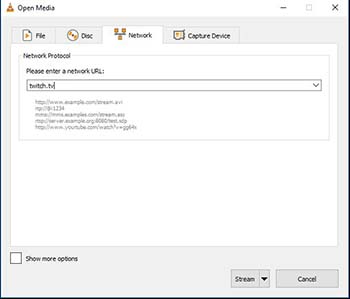
Go to Media and click Open Capture Device. Choose your preferred settings from here, and click the play button to start recording yourself. If you want to stream yourself, Go to Media and click Stream. A new window will pop up with streaming options.

VLC stream

You can even throw in a URL to the website you will be streaming to.

VLC stream

Record your desktop

Capture photoshop tutorialLet’s say you’re a content creator and you need to record your desktop. VLC has the answer. Go to Media and click Open Capture Device. Now you can record your desktop and do it in whatever FPS rate your computer can muster.
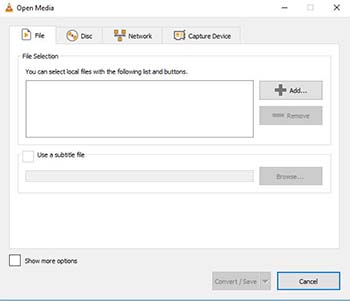

All of a sudden, you have an option for recording your next “let’s play” or that Photoshop tutorial you were making for your YouTube channel.

Convert files

VLC convert

If you have an old video or music file that is in some weird format, you can actually change the format with VLC. Click on Media and choose Convert/Save. From here, you can add files and change their format with the option at the bottom of the window. Finally, those weird videos from high school that you recorded with an off-brand video recorder can be converted to MP4. Sure, you might’ve wanted that cringey video you made for a class to die, but now you can share the video with them on Facebook!

Edit audio/video files

VLC edit

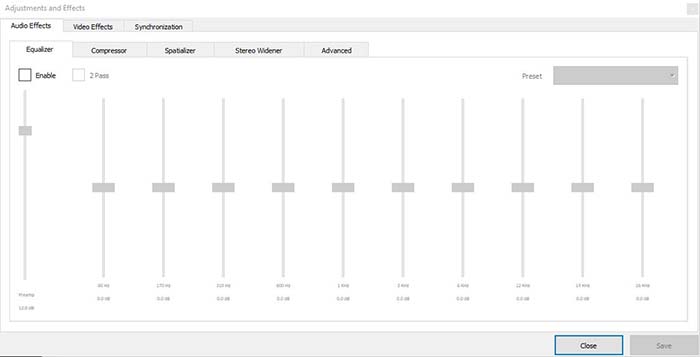
Ever take notes in class, but you can’t hear them because of background noise? Have you ever recorded a video of your friend, but it turned out too dark? VLC has tools to fix these issues and more! Go to Tools, and from there click on Effects and Filters. Here, you can edit audio and video files to make them as you see fit.

A quick note on the legality

VLC is meant to be used for audio and video files you legally own. It is not meant to be used for movies you illegally download or torrent from piracy sites. Also, the capture mode should not be used to rip videos from other sites.

Wrapping up

If you have a huge collection of video files that you want to watch/catalog, VLC is your best option. If you are looking for an easy to use program for streaming yourself, and recording your desktop, VLC is your best option yet again! It’s free to use, and a quick download. Basically, there’s no reason why you shouldn’t download it!

VLC for mobile Download now ►
8

Change the voice on Waze to Cookie Monster, Woody, and more

Ride with friends by changing the voice on Waze!

Waze

The default voice on GPS apps like Waze can get grating. If you’re on a long road trip, you might as well listen to a voice that isn’t driving you up a wall.

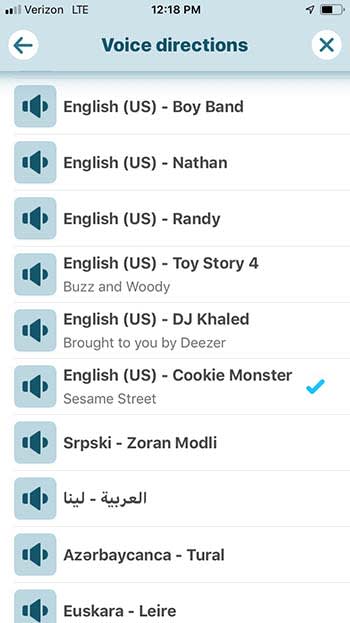
Well, there’s a way to do it! Soon, you will be guided down the road by Cookie Monster, Buzz Lightyear, Woody, and even DJ Khaled.

How to change the voice on Waze

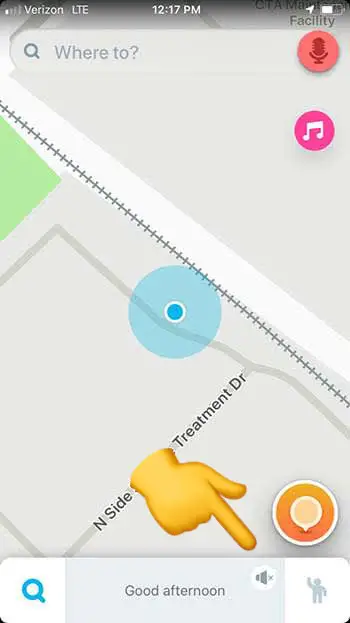
Step 1: Open Waze

Adjust Waze voice

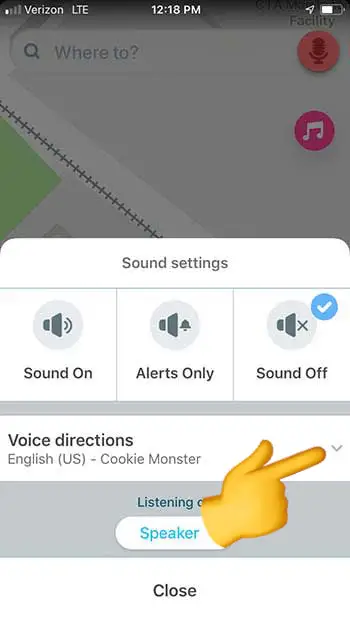
Step 2: Click on the sound settings (the speaker icon)

Waze voice selector

Step 3: Click on the drop-down arrow next to “voice directions”

Waze

Step 4: Choose the voice you want

You can also choose to hear your directions in a different language in this option. 

Record your own voice

Waze

If you want something done right, you have to do it yourself.

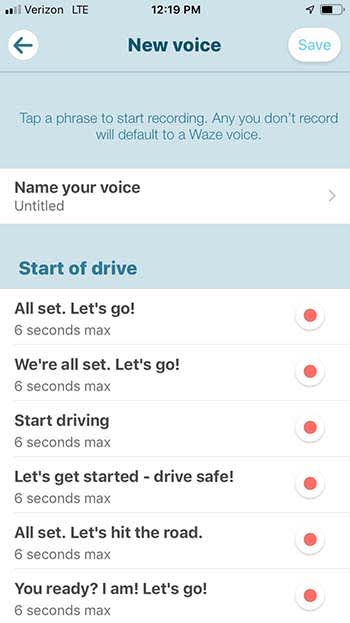
Waze also gives users the option to record their own voice for GPS directions. If you do it, it’s going to take you a bit of time to record every option Waze has available, but you could have some fun with it. Rather than recording what Waze tells you to, you can technically say whatever you want. Obviously, you should say “turn left” when it tells you too, but non-directional options are yours to mess with! You could even record your girlfriend’s voice to have her nag you the whole way to your destination!

Wrapping up

No matter which option you go with, remember to be safe on the road. Also, if you choose Cookie Monster, remember to pack a few cookies just in case he gets hungry.

Google Maps helps you find the best menu items

Need help picking out what to eat at a restaurant? Google can help!

Restaurant menu

With Google Translate, Google Earth, and this new feature for Google Maps, Google is rapidly becoming your most important travel companion.

When you’re trying out a new restaurant, it can be difficult to decide what menu items to try.

Luckily, Google Maps now has a new feature called “dish-cover” that helps you choose by laying out the most popular items on the menu.

Google Maps Download Now ►
7

To use the service, look up a restaurant on Google Maps. From there, scroll down to “Popular Dishes” below.

Google Maps gif
Courtesy of Google Blog

Along with listing out the popular menu items, you can now get photos of the food as well as reviews from restaurant patrons to help persuade or dissuade you.

Now, rather than looking up a restaurant on Google Maps, followed by checking the reviews on Yelp, dish-cover streamlines the whole process.

Also, if you are visiting a country that speaks a foreign language, Google Maps has you covered. The app will automatically translate the reviews for you to the language of your choosing.

Google Translate Download now ►
8
Google Earth Download Now ►
7

Now, you can also become a “restaurant critic” yourself. Next time you visit your favorite restaurant, snap a photo of your food, and tell other users why they should order it! 

The new feature is available today for Android users, and will be available for iOS users in the coming months.

The Hero Hoodie is a simple solution to a common problem

The Hero Hoodie converts from a hoodie to a backpack in seconds!

Hoodie

Nobody likes being that loser in public who wears their hoodie around their waist. As soon as you tie those sleeves together, you can go from the suavest guy at the party, to everyone’s dorky dad in an instant.

You might be saying to yourself, “I don’t do that, I just drape it over my shoulder!” Well, you’re not better off than the waist dork. As soon as you need to reach for something in your pocket, or give one of your boys a high-five you will realize that your arm is already too busy with your fumbling hoodie.

Fear not, gentle reader. The Hero Hoodie is here to solve your hoodie dilemmas:

With just a flicka-da-wrist, you can transform your hoodie into a backpack! Along with being able to comfortably store your hoodie on your back, you can also put the rest of your stuff inside.

How good is this product? When it was pitched on NBC’s “Shark Tank,” several Sharks fought over the product, until the product eventually got a sweet deal.

Ladies, aren’t you tired of every pair of pants you own having the worst pockets imaginable? Well, now you can throw your phone, keys, or whatever you want into your Hero Hoodie! 

The Hero Hoodie runs a little bit more than the average hoodie you’d buy at Target or Kohls. However, the price tag is more than worth it as the design is both stylish and modern. You can buy it on Amazon, or from their store online! 

Will Smith, Martin Lawrence, ride together in ‘Bad Boys For Life’ trailer

Burnett and Lowrey are back to the streets of Miami in “Bad Boys for Life.”

Will Smith

It’s been 17 years since Will Smith and Martin Lawrence asked audience members “whatcha gonna do when they come for you.” Those years were nice to Will Smith as he continued to stay in shape and make more hit movies. However, those years definitely don’t look like they were kind to Lawrence as you can see in the new trailer for “Bad Boys for Life.”

Will Smith still looks like he is capable of taking down street-urchins in the drug-filled streets of Miami. However, Lawrence looks like he has a frequently used loyalty card to Krispy Kreme in his wallet and a gym membership that hasn’t been used since the Bush administration.

In the two previous Bad Boys films, Smith and Lawrence played Marcus Burnett and Mike Lowrey: two loose-canon cops that continuously get in over their heads. Their witty banter is only matched by their over-the-top detective antics and explosion-filled romps.

The movie centers around the two cops trying to figure out what to do with their lives. Burnett (Lawrence’s character) is now the police inspector while Lowrey is still looking for his next rush of adrenaline. However, when trouble comes a-knocking, the two suit back up for “one last ride.”

Yeah, it’s the same cliché story you’ve heard 1,000 times.

However, it looks like the days of over-the-top explosions might be behind them as Michael Bay did not return to direct the movie. Instead, an up-and-coming directing duo has taken the reigns. It still has yet to be seen whether or not the two will make or break themselves with “Bad Boys For Life.”

NBA 2K20 in hot water over gambling controversy

Slot machines and games of chance have caused gamers to call out NBA 2K20, and ratings boards.

NBA 2K20

The internet has been abuzz ever since the most recent trailer for NBA 2K20. In the trailer, there are slot machines and other games of chance. What truly upset gamers is that despite the blatant gambling themes in the game, the ESRB rated the game “E for Everyone.” PEGI also didn’t flag the game either.

The game will also continue to have players buy packs of cards for the chance to unlock content in the game. This is similar to loot boxes which are also under fire for being deemed as gambling by many gamers.

Why should I care?

If you’re a parent, you obviously want to protect your kids from adult content such as gambling. However, even if you’re a seasoned gamer that is used to this kind of content, you should still be worried. 

It might seem like this isn’t a big deal for you, but this could set a new standard for modern video games. Loot boxes are nothing new, but they are getting more and more popular in video games. The issue is that you are already spending upwards of $60 for a game, but you’re then expected to dish-out more money hand over fist so that you can get more content. This content ranges from unnecessary stuff that’s just in the game for fun, and items that can actually make the game playable/winnable.

A game that is infamous for having these “pay-to-win” features is Star Wars: Battlefront. As many players know: either you buy the guns that help you win the game, or you get creamed over and over again by the players that do. 

What has been the response?

Gamers, fans of the franchise, and parents have all expressed their disgust for the game and the two rating boards. The trailer on YouTube has about an 85% dislike rating with comments filled with hatred for the game. This has caused the developers to unlist the video to try and stop the amount of attention it gets. 

In an article for Polygon, the PEGI board responded by saying that they didn’t flag the game for the gambling content because they can’t say for sure whether the gambling mechanics will be prominent in the game. 

The ESRB has not yet responded to the outcry from gamers and parents, and still marks the game as “E for Everyone.” On the ESRB website, they only flag the game for “mild language.”

What should I do?

If you really want this game, we probably aren’t going to convince you to boycott it. Just keep in all of this in mind in case you were considering buying this game for your little brother/cousin/nephew etc. However, the ESRB and PEGI need to held accountable for the game’s ridiculous rating. Voice your opinion on the matter, and get the discussion going.

Watch: final ‘Joker’ trailer gives us first look at Robert De Niro

Still too early to tell whether or not ‘Joker’ will be the saving grace DC needs.

Joker

With just a little more than a month until it comes out, the final trailer for “Joker” has given us the first look at Robert De Niro’s character.

De Niro is playing Murray Franklin, a Johnny Carson-like character who mocks Joker during his late-night talk show.

It looks like Franklin might be the final straw that causes Joker to snap and become the Clown Prince of Crime. After being shunned by society, getting the snot kicked out of him, and finally mocked so publicly, Joker looks like he finally wants to get even with the world.

It’s still up for debate whether or not “Joker” will be a hit or a flop. It could be just what DC needs to get out of their slump, or it could be high school theater.

We’ll keep our hopes up for now, but we’d highly recommend that you wait for the first reviews to come out before you see this one for yourself.