Is AI a Job Killer? Study Finds 80% of Jobs at Risk, but with Nuances

If AI eats people’s jobs, what will happen to those unemployed positions? Will it be a benefit for ordinary people or for businessmen?

Overnight, in 2023 it seems like we’ve woken up straight into the future. Artificial Intelligence has turned everything so upside down that it is difficult to even imagine the job landscape in a few years. If AI eats people’s jobs, what will happen to those unemployed positions? Will it be a benefit for ordinary people or for businessmen? Although we all intuit the answer to this question, let’s see what conclusions Ethan Mollick, a Wharton College professor who has realized AI saves time and money, has come to.

It’s a drag to work

Mollick’s experiment was simple: he needed a marketing plan to kick off Wharton Interactive’s Saturn Parable, a grandiloquent name that hides a simulation to learn how to be a group leader. What would take days to do with a lot of people around him giving their opinions, was completed in just half an hour using Bing, ChatGPT4, MidJourney, ElevenLabs and D-iD on his own.

ChatGPT ACCESS

With these tools and a little ingenuity, Mollick created a marketing plan: branding, website, promotional video and even social media posts. At the very least, the professor is sure that a human team could have done better… But not so fast. Supply and demand. Are we doomed to a future of mediocre websites and marketing campaigns… Or maybe this is the beginning before AI learns what creativity is?

But the most interesting part of the experiment is posed in its conclusion: “When we can all do superhuman amounts of work, what happens? Do we do less work and have more leisure? Do we work more and do the work of ten people? Do employers benefit? Workers? I’m not sure”. Listen: anyone who says they have a magic recipe or that they know exactly what is going to happen in a few years is lying.

AI may change the world, it may stay the same. It certainly has the potential to lose 80% of jobs. It may do so and the world goes into global crisis, or it may gain millions of other jobs and we live better. There may be many who don’t even need to lift a finger to earn money. Hopefully, as Mollick points out in his conclusions, “we will live in a future where we do less of the boring work to focus on the more creative work we enjoy doing.”

The future of sci-fi movies is now. All that remains to be seen is whether we like living in it.

Meet Microsoft Loop: The Next Big Thing in Productivity That Could Replace Notion

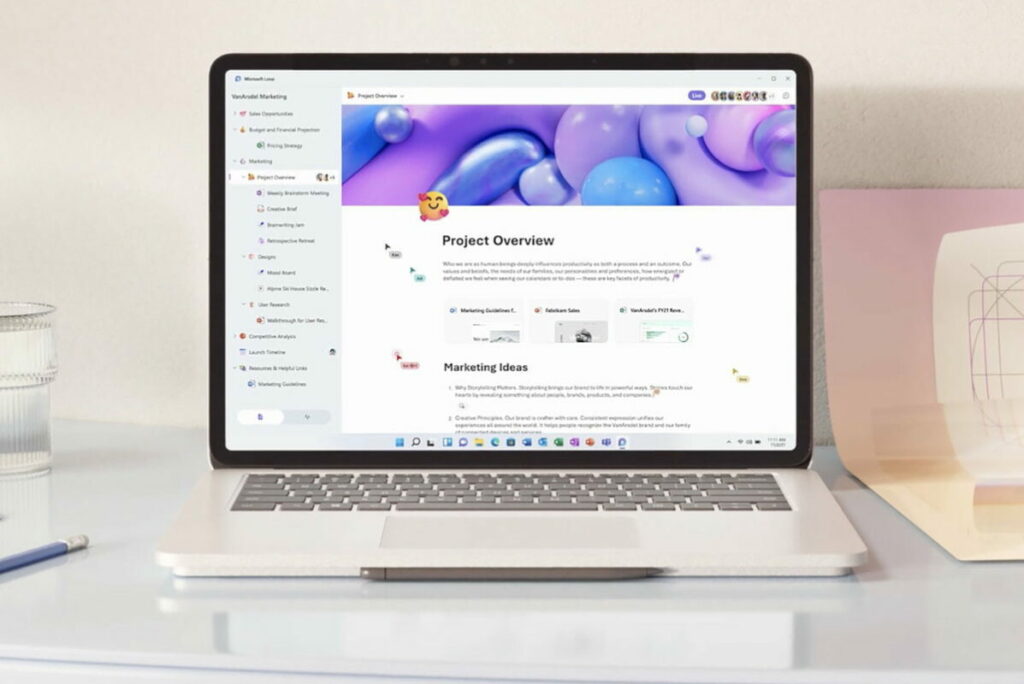
Loop is like the evolved version of Google Docs: it is a collaborative work tool in which up to 50 people can act at the same time.

After the success of Notion, it was only a matter of time before Microsoft wanted to come up with its own version: conceptualized in the midst of the worst of the pandemic to streamline remote work, Loop has finally been released in a trial version so that we can familiarize ourselves with this new way of understanding teamwork, the different functions and the differentiation between environments. Not clear on what Loop is? Don’t worry: we’ll explain it to you.

Going round and round

Loop is like an evolved version of Google Docs: it is a collaborative work tool in which up to 50 people can work at the same time (although it is recommended for groups of between 2 and 12 people so as not to cause chaos). The best thing is that you can create as many different environments as you want… And divide them among the different groups.

Microsoft Loop DOWNLOAD

You could, for example, set up an environment for brainstorming with the creative team, another to make business decisions with the shareholders and another to see what meal you order on Friday with all the employees. Each one divided by users, but all in the same workspace, so you can switch between them with a simple click: you will have the possibility to manage as many projects as you can handle in the same space, with different people and in real time.

Some examples of things you can create in Loop with just two clicks: voting tables where you can add the pros and cons of each decision, track the progress of different areas, reward the best ideas with emojis, add multimedia material or, of course, write lists of all kinds. All this using Copilot, customized to your needs and totally free of charge. And the best part: this is just the beginning, and it will most likely grow even more by adding templates from outside Microsoft. The possibilities are endless.

The idea is that you have everything in one place, without the need to rummage through Google Drive or your files: in a single space you can find everything you need for your day-to-day life. Not only work documents, but also, for example, lists of your collections, travel plans or scripts for podcasts. All at the same time, in the same place.

Please note, however, that the app is not yet available on Android and iOS only via Test Flight until the trial period is over. In the meantime, all you need is a Microsoft account to start experiencing the future for yourself.