 Anybody who has an iPod knows that it’s much more than a simple MP3 player. The new models let you watch movies or store your photos and you can make use of the space to store and carry with you your documents.
When you first buy an iPod, Apple recommends installing iTunes on your PC, to be able to manage and transfer your music library onto your mobile device. Sure, iTunes is a great app, at least it’s where I keep all my tracks and download all my podcasts, but it isn’t the only program that works with your iPod. There are many applications out there to make use of all the possibilities that your mobile device offers.
We’ve compiled a list of 10 Windows programs to diversify the way you use your iPod. Manage your content, convert video files, or transfer and read media files thanks to the following programs:
- Anapod Explorer : Organize your iPod contents
- Yamipod : Copy music from your iPod to your PC
- Xilisoft iPod Video Converter : Convert any video file to the iPod format
- River Past Crazi Video for iPod: Convert videos to play on your mobile devices
- iPod Media Studio : Transfer DVDs to your iPod
- Juice : Transfer podcasts to your iPod
- Tubehunter : Download online videos to your iPod
- Pod2Go : Read the news on your iPod
- Virtual iPod : Transfer your music from your iPod to your PC
- PodPlus : Use your iPod as a storage device
 The PDF format has become the de-facto standard in graphical document distribution and it looks like Adobe is shaping up to enhance its grip on the market. The company has
  Do you know how safe your PC really is? Tests such as those carried out by the
 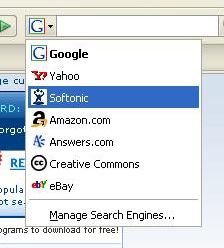 One of the most outstanding features in Firefox is its built-in search engine from which you can conveniently search many websites, depending on how you configure it. Yes, there’s more to this search tool than just asking Google. Try clicking on the “G” logo beside the input field and you’ll see quite a complete search engine menu to choose from: Yahoo!, Amazon, Answers… Just select any of them and enter your keywords to search that site right away.
 If you have trouble getting your kids to learn their geography or you just want to test your knowledge, World of Where may be of interest to you. The program is extremely easy to use. Once you launch it, a world map appears and you can choose which continent you want to be quizzed on. Good to know however, the trial version only lets you navigate to Europe.
 To extract and compress your files, 7-Zip is a perfectly viable alternative to the better known WinZip or WinRAR. The application works exactly like its main competitors yet manages to mix in WinZip’s selection of tools with WinRAR’s versatility.
 One of
 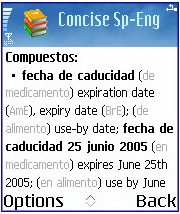 These days, travelling for business or pleasure can often mean that you speak English all the way because so many people understand it. However, you’ll often find that making an effort to use the local language, whether to seal the deal or just to order a coffee, can make a big difference in the way people welcome you.
 When playing multiplayer online games you usually need to communicate with your friends for various different reasons: to design a strategy for your next assault or just to have some fun, relaxing chit-chat while mercilessly killing enemies. Many games feature a chat tool that allows you to exchange messages with other players but typing a sentence while trying to stay alive in the game can be really annoying. The only solution then is using voice communication. It’s easier, faster and far more comfortable than writing messages on a tiny chat window. And one of the best options for voice communications in multiplayer online games is TeamSpeak.