
Spicebird – a potential rival to Outlook?

sb1.pngIt might sound like a generic name for a Spice Girl but Spicebird is actually one of the most exciting communication suites to have been developed in a long time.

If it fulfills its potential, Spicebird could spell the end of Microsoft Outlook’s dominance and be a permanent fixture on desktops everywhere. If it doesn’t, it will be remembered as a poor spin-off of the moderately successful Thunderbird e-mail client that Mozilla developed. Spicebird isn’t actually being developed by Mozilla although it is based on the Mozilla Gecko engine. It is in fact being developed by Synovel and features principally an e-mail client, calendar and and an IM client based on Jabber. Everything has been integrated in an intelligent way so that if someone sends you an important date by e-mail or via the chat, you’re prompted whether you want to add it to your calendar’s agenda. The suite has also been developed with a focus on integration with Gmail so if you’re a user, all your contacts can be conveniently imported immediately. Spicebird also features a nifty RSS reader to keep you ahead of the latest news from your favourite sites. And like Outlook, it warns you when a meeting or appointment is approaching on your calendar.
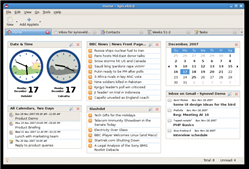
Homescreen At the moment, Spicebird is still very much a work in progress and in the future will include new languages and many more extensions to enhance it’s performance. However, there are still many basic things that still need to improve before it can seriously rival Outlook including a more advanced contacts list and much lighter RAM consumption. In terms of the e-mail client, there are undeniable similarities between Mozilla’s Thunderbird and Spicebird but unfortunately, the two don’t seem to have been integrated very well so importing your contacts isn’t possible.

I’ve got my fingers crossed that this could be the Firefox of communication suites and I’ll be keeping a close eye on the Spicebird website for the final version later this year.

Software to make music learning fun

Musical NotesI’ve always loved music but I’ve never been particularly musical. The best I managed at school was to learn how to play the triangle. I did attempt to learn the recorder but the classes were so boring – all we ever played was ‘Three Blind Mice’. If the classes had been a bit more fun, maybe I would have stuck at it.

Nowadays, you can use software to aid the learning process whether you’re learning to play an instrument, notation or even how to read and write musical scores. Music Memory is a good place to start as it helps test your powers of notation recognition and ability to reproduce it on your keyboard. If you’re tone deaf, this program will soon reveal it. If you’re just starting out on the guitar then Frets of Fire won’t exactly improve your playing skills but it will give you an idea of what sequence of chords and notes sound good.

Piano Hero on the other hand is a more serious attempt at improving your piano skills. It turns your keyboard into a virtual piano and can be focused to test either your left or right handed skills. Meanwhile learning to read music is one of the hardest aspects of becoming a musician but Note Attack is a great aid which turns the notes into targets that you have to shoot at.

If you can’t be bothered putting in the effort to learn an instrument or reach for the stars, then you can still live out your fantasies with Rock Legend where you play a part in a struggling band. You have to deal with everything from rehersals to adoring fans although unfortunately, there’s no groupies.

Complete software kit for bloggers

Blogging software tools and servicesSo you’ve decided to start your own blog. Congratulations! Whether you intend to create a professional blog or simply write a personal diary, blogging is an excellent hobby that keeps you in touch with the rest of the world. It lets you meet new people, learn different perspectives and share anything you like, from news headlines to your newborn son’s first photos. Once you’ve made up your mind, it’s time to get down to business. Here’s a list of all the software applications and online services that may be helpful in your blogging adventure. Remember that perseverance is the key to success! Try to update your blog on a regular basis and you’ll soon see the results.
  • First of all, you need to choose the blogging platform you’re going to use. The most popular ones are WordPress, Blogger and to a lesser extent, LiveJournal.
  • After taking a snapshot you’ll probably need to improve or retouch it in some way. Download a graphic editor such as PhotoFiltre, PhotoScape or Active Pixels for these easy editing tasks.
  • You may also need to make video captures to record screen activity. These videos are great to explain software tips or show off your skill in a particular videogame. You can capture them easily with HyperSnap-DX, WeGame or AviScreen Classic.
  • Blogging platforms usually provide a bunch of ready-to-use templates but in case you want to use your own design, download a coding editor such as Dreamweaver, UltraEdit-32 or EclipseStyle and let your inner artist loose.

How to: Create a wish list of iTunes movie rentals

iTunes rentalYesterday we gave you the lowdown on the new iTunes movie rental service, which works seamlessly in iTunes and offers loads of exciting titles from the six major studios. With this new service, Apple are looking to revive their Apple TV, of which version 2.0 was announced during the Macworld Keynote. It’s also an extra step forward for the iTunes store, which introduced movies and then iPod games not so long ago. Overall, initial reactions to iTunes movie rentals have been pretty positive. I reckon this is a great feature if you have an Apple TV, but not so wonderful if you only have a Macbook or iMac. I have to admit that my idea of renting a movie is still associated with watching it on the big screen and sitting back in the sofa.

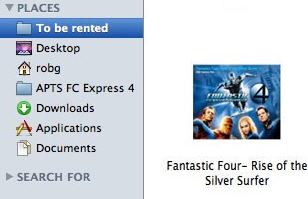
One of the small things that Apple left out is being able to create a wish list for your rentals. Now having a wish list in iTunes is great – mine’s full of albums waiting to be bought. Even though you can’t drag rentals into a new list in iTunes there’s a workaround to this. Simply go to the movie page in the rentals section of iTunes and drag the title into a new “To rent” folder in your Finder. Your wish list of rentals will be available as webloc files in that folder. You can have it appear in your sidebar but apparently not in your Dock. Even better, use Shift-Command-Control-4 and drag a part of the movie page in iTunes (like the movie cover) and paste that into the stored file. This will give your list those cool little preview thumbnails that you can enjoy in Leopard.

Even though it’s probably not as easy as creating a simple wishlist in iTunes, it’s the only way around for now. And on a positive note, it also means that you can view your wishlist even when iTunes is turned off.

[Via: macosxhints.com]

Software to simplify your sampling

Record PlayerIf you’re an aspiring DJ or create your own music, sampling is one way to add dimension to your tunes. It’s thought that sampling goes back as far as the early 60’s when James Tenney sampled ‘Blue Suede Shoes’ by Elvis Presley. The Beatles were one of its early pioneers but it wasn’t until Rap music came along that the technique really became widespread.
In those days, sampling was an expensive process involving multi-track suites and lots of studio time. Nowadays you can start sampling in seconds for free with a multitude of different software. There’s nothing more annoying than when you want to sample a great bassline or beat but there’s a vocal track over it. The brilliant Vocal Remover is a simple plugin for Winamp which solves this problem in seconds. The plugin isolates the vocal track and with a simple slidebar, you can reduce the volume of the vocals to the level you want or eliminate it entirely. However, the results vary according to the track you’re sampling and so if you need something a bit more powerful (and are prepared to spend some time learning how to use it) then Reaktor is a powerful editing suite that can sample just about anything and enrich it with effects.

If you’ve got a massive collection of vinyl, then you can also sample these too. Although it can’t sample directly, RIP Vinyl allows you to record your vinyl in digital format and from there, you can sample the tracks in a program like Reaktor. Spin It Again does the same job but also allows you to grab cassette recordings too.

Bear in mind though that if you’re intending to use your sampling for commercial gain, you must be very careful who or what you sample. A useful reference for this kind of thing is the Sampling Law website which gives some useful advice on this often grey area. In addition, if you’re interested to find out from which song the samples used in your favourite songs came from, check out the Second Hand Songs database.

Fix iTunes artwork Error 609 with FixTunes

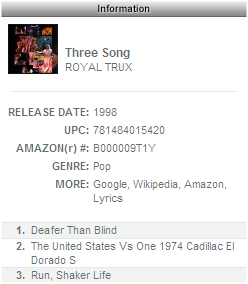
FixTunes (and Royal Trux)With iTunes sitting pretty as the most popular music player on the market, you’d be forgiven for thinking it’s near-perfect. In fact, as the program’s development continues apace with Apple’s business plan, it has become increasingly bloated and now throws up some pretty irritating errors. Example: Cover Flow is awesome technology which makes for a much more intuitive user experience when browsing through albums in your music library. But for many users starting out, Cover Flow is a barren wasteland, devoid of album art.
iTunes includes a feature which allows the user to automatically download album artwork for selected tracks but this is not a feature which ever feels like it has been properly implemented. At various times, without warning, users experience the error 609: basically that for some reason, iTunes couldn’t download what the user wanted. With a complete lack of assistance in the Apple support forums, the company has left the door open for yet another 3rd party fix.

The aptly named FixTunes deals with the ‘artwork not found’ error, as well as fixing pretty much any tagging error that’s afflicting your music library. Simply start-up iTunes and FixTunes, select the tracks you want to find artwork or information for (or just select your whole library) and set FixTunes to work, downloading all the required info with the minimum of fuss. Check the data and then click ‘Fix’ to apply it to your library.

FixTunes is particularly useful because it does away with the hassle and work which other ‘simple’ tag-fixing programs always seem to entail. Using a database of over 4 million songs, along with a clever percentage-based accuracy measure, it will only fix what it’s certain about, leaving you to decide for anything below a certain threshold. In testing, we found zero false-positives and a reassuring number of ‘not identifieds’ which just needed a small change to the detected data. Now you too can share in the majesty of Cover Flow!

Sidebars to increase your productivity

Vista SidebarSometimes it’s nice to have a bit on the side and nowhere is this more true than on your desktop. Sidebars can make your life easier in all kinds of ways – making applications easier to access, files on hand quicker, removing the need for shortcuts all over your desktop and much more.

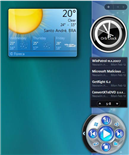
Probably the best, and certainly the most popular out there, is Vista Sidebar XP. One of the innovations in Vista was the introduction of sidebars but this program proves just how simple it is to add to XP. The sidebar offers widgets of various kinds including clocks, weather forecasts, RSS readers and many more. Less popular but along the same lines is Thoosje Vista Sidebar which does pretty much the same thing although the developers claim it uses 50% less RAM than Vista’s Sidebar. Meanwhile Windows Sidebar Styler takes both of these programs one step further by giving you greater control over how the sidebar is customised and allowing you to add unlimited widgets due to the support of Windows Presentation Foundation.

Not all Sidebars try to emulate Vista though. DameK UltraBlue for example is an entire makeover for XP that includes a nifty Sidebar. That said, it does bear more than a passing resemblance to Vista’s sidebar although it’s based more on the early prototypes of the operating system when it was known as Longhorn. Other sidebars try to emulate Yahoo! Widget Engine such as Desktop Sidebar whereas Aston is very much it’s own product taking an original but basic approach to sidebar management.

If you want to get an idea of what sidebars look like or what they can do, check out this useful example of how they can be used in Vista:

[youtube]Nfj-RhfeFEg[/youtube]

Apple introduces iTunes movie rentals

iTunes rentalWhether you like it or not, Steve Jobs’ Keynote Address at the yearly Macworld conference (which you can view on the Apple website) is always a major tech event. This year had its fair share of novelties, with the expected ultra-thin MacBook Air, wireless backup syncing via Time Capsule, new Apple TV and improvements to both the iPhone and the iPod Touch. However we won’t focus on any of these, but instead look at iTunes movie rentals.

The service is currently limited to the US version of iTunes but hopefully will be extended to other countries soon. You pay $2.99 for an old movie and $3.99 for a new one and you’ll get 24 hours to watch a movie (though you’ll have 30 days to begin viewing). High Definition (HD) movies are only downloadable via Apple TV and cost $4.99 for a new title and $3.99 for older films. The most impressive thing is how Apple managed to get the six major studios (Walt Disney, Warner Brothers, Paramount, Sony, 20th Century Fox and Universal) on board, meaning the lineup of movies available to rent is looking extremely exciting. Also, thanks to a new deal with Twentieth Century Fox, every time you buy a physical DVD from the publisher you’ll also automatically get an iTunes Digital Copy with that.

Updating your iTunes to 7.6 (PC or Mac) will allow you to browse through the rental section in the iTunes store. It’s as easy as buying a title on iTunes and you can view it almost immediately after downloading. Apple also lets you transfer the rented movie to any of your Apple devices (iPods and Apple TV included). One of the drawbacks though is that you’ll only be able to rent new releases 30 days after they’ve been released in DVD.

Releasing rentals on iTunes is a great move by Apple and it certainly makes the Apple TV even more attractive, but Apple are still moving into a competitive market, where Netflix, Movielink and Vudu are already present.

Top 5 DVD decryption tools

DVD Decrypter logoDecryption of DVDs is not always about copying them. Sometimes you need to decrypt a DVD to extract a certain audiotrack, subtitle or enable you to add some of your own and then re-burn it. The problem is that DVD encryption techniques are becoming increasingly sophisticated. In the fight against piracy, production companies are having to stay one step ahead of those that want to decrypt DVDs and then copy them for their own commercial gain. If you are having problem decrypting one of your favourite DVDs, one of these should eventually work:
  • DVD Decrypter – The most powerful solution out there – decrypts just about anything
  • AnyDVD HD – Another powerful decrypter that also removes region codes from DVDs
  • RipIt4Me – Claims to be able to decrypt all those DVDs that DVD Decrypter can’t
  • Easydivx – Designed specifically for those that want to decrypt and then backup in DivX

Turn your Gmail account into a file storage system

Gmail accounts offer high-capacity mail inboxes, but do you really need that much space just to store your emails? I don’t know about you but sometimes I do get the impression that I’m wasting my Gmail space by using it just to store a few valuable messages, a dozen newsletters and tons of spam.

Use Gmail to store filesThis is why I looked for a better way to use Gmail and make the most out of this space. Soon I found the perfect solution: it’s called GSpace and it’s a Firefox extension with which you can turn your Gmail account into a free online file storage system.
Although it doesn’t feature as much space as other storage services and it’s mainly intended for personal use (i.e. no file sharing) the GSpace extension is still a great way to transfer files between your office and home computers, or to keep backup copies always at hand, just to mention two possible usages.

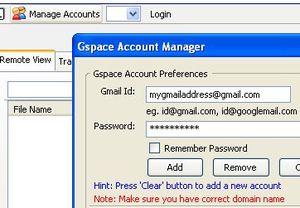
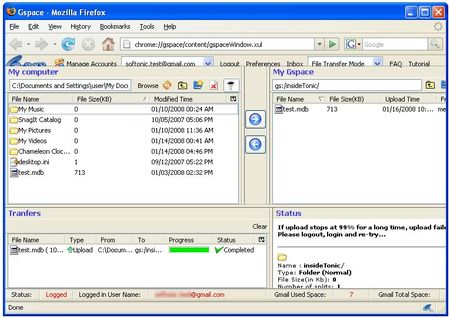
Gspace is really simple. Install the extension and click on the icon that will appear on the bottom right corner of the browser’s interface. Click on the Manage Accounts button and enter your account details – you can configure as many Gmail accounts as you want. Click on the Add button, close the window and you’re ready to use your new online hard drive. You’ll be able to create directories and move up and down the folder hierarchy, but if you want to start transferring files, go to Tools > GSpace and the GSpace manager will open in a new tab.

Use Gmail to store files

This manager works just like any standard FTP drive: select the files you want to upload on the left pane (the local drive), browse to the destination folder on the right pane (the remote drive) and start uploading them. From this tab you’ll also be able to open the extension’s preferences menu and access the GSpace FAQ and tutorial sections, in case you have any problems with it.