Hulu goes live in USA

Hulu logoA new video on demand project called Hulu which allows users to watch mainstream films and TV shows for free, has gone live today in the USA. There’s nothing remotely illegal about it, either – the project is a joint venture of NBC Universal and News Corp which opens up their massive archive of programming – ranging from TV series such as The Simpsons to films such as The Big Lebowski – to millions of users.

The service, which is only accessible for internet users within the USA to begin with, offers full length episodes from the FOX and NBC channels as well as various others including Bravo and both the Sci-Fi and Sundance channels. Unfortunately, viewers outside of the USA can’t access any of its enticing content although they can surf the site. When you try to access a show or film however, you are presented with the message, “”Unfortunately, this video is not currently available in your country or region. We apologize for the inconvenience”.

The downside is that most movies are split into separate parts and although they are free to watch, they are interspersed with commercials although interestingly, users can select the type of genre of commercial they want to watch. The site does allow users to embed footage into their websites but some have already started to take advantage of this and create cloned Hulu sites, such as OPENhulu, which just re-post entire shows and films.

Starcraft 2 update: discover the Zergs

zerg.jpgNearly a year ago we announced how Blizzard had started work on the sequel to one of their most famous titles, Starcraft. We even showed you the trailer for the upcoming game. Since then, nothing new has really been revealed, not even the release date, which some say should come around the first trimester of 2009.

This week though, Blizzard gave a bit more information on one of the races you’ll find in the game, the Zergs. These efficient killers will be divided in two units, Hydralisk and Mutalisk, and instead of focusing on creating weapons or ships, will use biological mutations to make their own specie more deadly and resistant. The whole Zerg environment is effectively organic. Check out the Blizzard page for sketches and paintings of the race.

50,000 Mac open source projects on MacForge.net

MacforgeMany people know about SourceForge.net, the place to go to if you’re looking for open source applications and code, but what about MacForge.net? The site was created by MacVerse for MacTech only recently, in 2005, to bring together the Mac open source community and foster open source projects. It has quickly become popular and can now claim to have over 50,000 open source applications in all sorts of categories, from text editors to chat programs or even games. It’s worth to dig in as you can find good open source alternatives to common software. For developers and software programmers it’s also a great place to exchange ideas and get working on common projects.

[Via: MacMinute]

Today’s downloads for Windows, Mac and Mobile.

Download PictomioAfter some time under development, Pictomio has finally launched its first public 1.0 version. Though still in beta, this amazing image viewer has become an impressive manager with features such as 3D models for albums and categories, an album and category sidebar to quickly drop your images, a powerful zoom and the possibility to categorize photos by several topics.

PsiPeople tend to stick to the more known messaging clients when there are so many excellent open source alternatives out there like Psi. This client was built to connect to multiple Jabber accounts and almost all IM accounts. It’s highly customizable, offers SSL encryption and is supported by a strong community of users.

Get PocketMusic in your pocketSince the introduction of the iPhone into popular culture, it seems today that if you haven’t got a decent music player on your mobile, you’re a bit of a dork. ear not though, because with the PocketMusic Player Bundle, you can replace the default Windows Movile audio player with something altogether cooler. The software provides an amazing environment in which to enjoy digital music, with a raft of features, skins and playback controls.

The great software Easter egg hunt: Day 1 – Photoshop

Crack Photoshop’s easter eggsEaster is coming up and consequently you may be thinking about going out and buying a job lot of eggs for your friends and family. Not me though, because this year I’m not bothering with chocolate eggs. Instead, I’m embarking on my very own software Easter egg hunt – and you can come with me. Don’t know what I’m on about? Then you obviously have never unearthed one of the hidden treats instead a computer application.

Easter eggs are basically little bits of code added by a program’s developer as a bit of fun. They can contain messages, images, animations, games or make the program peform in an unusual way. Usually, in order to crack into the eggs you’ll need to delve into a menu sytem, or hit a certain combination of keys or peer through the program files directory. See the Wikipedia entry on Easter eggs for more background on them.

For the first day of my Easter egg hunt, I thought I’d start with one of my favourite apps, Photoshop. Thanks to Eeggs.com I managed to unlock three eggs-iting hidden features in the Adobe app. First I encountered a tiny wizard called Merlin (and no, I hadn’t been drinking) by opening up the ‘Layers’ window. You need to press and hold the ‘Alt’ key (the ‘Option’ key on Mac) then click the arrow button in the top-right of the window. Keeping the Alt key and the mouse button held down, move the cursor over ‘Palette options’. Hey presto! Merlin will now appear.

The second one is a little more obscure and involves navigating to the ‘photoshop.dll’ file within the Adobe Photoshop CS2 folder inside your Program Files. Open this file with Notepad and scroll down until you see text that has been spaced out with an extra space between letters. If you can manage to read it, you’ll discover it’s a warped internal dialogue of an Adobe programmer who had obviously been at the coffee a bit too much one night.

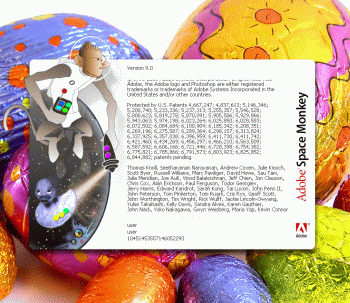
My favourite Photoshop Easter egg though, is one that replaces the default About splash page with one for the fictional ‘Adobe Spacemonkey’ software. This one’s quite easy to get into – just hold down the ‘Ctrl’ key (‘Option’ + ‘Command’ on the Mac) and select ‘About’. If only Adobe had developed this one in real life.

Continue with the Easter egg hunt here.

Run multiple operating systems on one PC

Parallel screenshotA while back I looked at a few tips for customising Windows boot sequence. However, what happens if you want to go one step further and run multiple operating systems in one PC. Say, for testing or software compatibility purposes, you need Windows Vista, Windows XP and Windows 2000 or even Mac OS on the same PC. Is it possible?

The good news is, yes it is and there are two ways of doing it. One is to divide your hard drive and install separate operating systems on each partition (known as Dual Booting and a very time consuming process). A much easier way however is to install a Virtual Machine – a program which can recreate other operating systems “virtually” within your current operating system. It is the latter I will focus on because by doing so, you can switch between operating systems as if you were simply toggling between applications on your desktop. And best of all, it takes no time to setup.

For Windows users, undoubtedly one of the best is Microsoft’s own Virtual PC 2007 which installs a virtual environment in which several operating systems are possible. This includes versions of MS-DOS, Windows and OS/2. If you’re not a fan of Microsoft products however, then popular in the Softonic office is VMware which similarly, creates a virtual environment and operating system in which we can test and experiment with applications to our heart’s content without running the risk of damaging our operating systems or hard drives. The advantage with VMware is that is also allows you to experiment in Linux and NetWare environments.

If you find either of the above hard to get to grips with, then probably the simplest solution is Parallels Workstation. This extremely easy to use package of Windows and Linux recreates all Windows platforms, OS/2 and even Solaris and eComStation.

Of course, installing a virtual operating system is no substitute for installing a real operating system. A virtual machine can only simulate an operating system up to a certain point and there will be many features lacking that you are used to in the real thing. For more information about Virtual Machines as an alternative to Dual Booting, Microsoft provide a good analysis of the pros and cons here.

Track US primaries online

Track US primaries onlineI’m not particularly interested in politics, but I know many people do follow political campaigns and elections as if it was the Champions League – or the NBA finals for those of you on the other side of the pond. If you’re among them, I’m sure you’ll be enjoying the American electoral process, one of the longest ones I’ve ever seen. Caucus, state primaries, candidates, Super Tuesdays… if you want to keep up with everything, you’re probably going to need help.

Fortunately you can now count on the Web to follow the latest news about the US elections and track primaries results almost in real time. The main source of information is Google News, where they’ve created a special section (Elections) to host all the information relating to the American democratic process. Plus you can subscribe to its RSS feed and create Google Alerts relating to any topic of your interest (namely Hillary or Obama) to warn you by email every time there are news about it.

Another Google app to follow US elections is Google Maps. They have developed a new layer for Google Maps that shows primaries results right on the United States map. It’s a clear, handy way to check percentages thanks to a color code and also the extended data you get by clicking on each state.

Finally, there’s another tool besides Google to obtain more information about the American elections. It’s not exactly primaries results or news headlines, but rather the candidates’ popularity on Twitter. So every time Hillary, Obama, McCain and the rest of them are mentioned in any Twitter around the world, it’ll appear on Politweets. Happy primaries everyone!

Firefox 3 beta 4 released

Firefox 3 logoMozilla have announced the release of the fourth beta version of the Firefox 3 browser. The fourth beta of the next major Firefox version offers over 900 bug fixes over Beta 3, including improvements in the download manager, full page zoom options, better integration with Vista, Mac OS X and Linux, and significant improvements in speed and memory usage.

The new Windows version can be downloaded from the Firefox beta page and the Mac version can be found here. Full details on all the changes and fixes can be found on the Firefox 3 Beta 4 Release Notes page. Developers should check the The Mozilla Developer News weblog’s announcement of Firefox 3 Beta 4 which includes links of interest.

Other added areas of improvement include an enhanced user interface, richer personalization throughout, improved platform features and performance improvements including the perennial memory leak problem that Firefox suffers from. Note that this beta 4 version is strictly for testing purposes and extensions used in your current version of Firefox may not yet be compatible with it.

Is Amazon MP3 better than iTunes?

iTunes and amazonmp3Which digital store is the best one to turn to for your musical needs? Not an easy question, considering how different Amazon MP3 and iTunes are.

The iTunes store has been around since April 2003, first offering only music, then videos by July 2006, iPod games in September 2006 and finally movie rentals in January 2008. Only recently, the iTunes store was recognized as being the second biggest music seller, only behind Wal Mart.

The Amazon website of course, has been around since 1995 and offers everything from video games to furniture, toys or what made it famous worldwide, books. Amazon still remains to this day one of the biggest successes of the internet and one of the top visited sites worldwide. Amazon MP3, the online music store launched by Jeff Bezos in public beta in September 2007 and officially in January 2008, offers “over 2 million songs from more than 180,000 artists and over 20,000 labels”. What really got people talking though is that Amazon MP3 would offer DRM-free music from labels EMI, Universal, Sony BMG and Warner Music.

Of course DRM-free music is where everybody is headed, and long known at least since Steve Jobs pleaded for labels to offer DRM-free songs. A number of unprotected songs from participating labels can now be bought on iTunes, however Apple still implements its very own FairPlay DRM, which limits the number of copies you can make of a song and what computer or iPod you can play it on.

iTunes, which runs both on PCs and Macs, is probably a more integrated solution as you can purchase, download, organize and play all your media from one interface. Amazon has a separate downloader, available for PC, Mac and Linux. Although it’s not a complete media application like iTunes, it works really well and lets you store your music wherever you want.

Which one is the best digital store then? Ostatic sees Amazon as the better option, citing a number of reasons. First of all, Amazon doesn’t tie users down to an operating system. I’d agree with that. I hate that iTunes is such a closed environment, and that it only works with iPods and not other MP3 players. Second, Amazon music is DRM-free. Now I wouldn’t consider this valid, simply because, as said before all music is going to be DRM-free anyways. Third, Amazon is a bit cheaper. Yes, but Amazon MP3 is only available in the US for now, whereas iTunes has localized version for 21 different countries. That’s something that can’t be beat. Fourth, as Ostatic say, Amazon has a good collection of artists. True but it doesn’t yet come close to what you can find on iTunes.

If you ask me, I still think iTunes is ahead of Amazon, but am definitely rooting for Amazon, as I think we really need a solid alternative to Apple’s digital offering. Having a solid competitor can only benefit the online media market and give us a better choice of music, movies and other TV series.

Alternatives to Pandora

Pandora's Box In Greek legend, Pandora got a nasty surprise when she opened the box that unleashed all the evils of mankind. I got an equally nasty surprise when at the weekend, I surfed into the online music application of the same name and found that it was no longer available to users outside of the USA. In actual fact, users outside the US had been banned since May although press releases to announce the news were sent out much later, such as January in the UK. This was quite a disappointment because Pandora used to be one of my favourite online music apps that served as a good alternative if I didn’t have any MP3s on hand and I occasionally discovered a new artist or band that I liked. The reason behind all this seems to be a change in law regarding artist royalties. The change meant that sites such as Pandora would have to pay a huge increase in royalties and licensing fees for broadcasting songs abroad, and has affected most Pandora listeners since the beginning of the year. Pandora founder Tim Westergren explained the problem facing his site (and internet radio in general) in an interview with 10ZenMonkeys.com:

We pay a licensing fee for every song that we stream, which was determined by the Copyright Royalty Board. And the royalty board just voted to almost triple those fees within the next couple of years. So overnight, they’ve made webcast radio pretty much impossible. It’s impossible, at these new rates, to really operate a radio station online.

Fortunately, there are a few downloadable alternatives out there that are still operating within the confines of this ruling. One of the most popular and successful has been Last.fm. The program works by “scrobbling” the tracks you play on your PC and sending the information to the Lastfm database. From there, other users can see what kind of music you are into and the program can suggest other users and bands you may be interested in. A similar, but far less widely used alternatives to Last.fm is Social.fm.

If this doesn’t grab your fancy and you just can’t live without Pandora, then Digital Alchemy have some suggestions about how you can try and listen to Pandora outside of the USA. One of these is surfing into the site via a proxy although as they point out, Pandora is Flash based and proxies are notoriously bad at handling such sites. Other online alternatives are Musicovery and Deezer (formerly known as Blogmusik).

Let us know if you’ve found any other great alternatives to Pandora or a way to circumnavigate the block outside of the USA.