whois queries in your Mac Terminal

tuaw_whois_search_cory_12837918723987.jpgTuaw.com offer up a great tip on how to use the ‘whois’ query in your Mac Terminal. What is it anyways? Using ‘whois’ you get all sorts of information on an IP address , a domain name or a website. It’s a great way to learn who owns what or who is behind the website your visit. It can be useful to check if you’re not visiting a dodgy site or just to learn more about a site out of curiosity.

Generally you can use ‘whois’ simply from any search engine from your browser. There is another slightly more techie way to do it, from the lesser used Mac Terminal. Just open it up from your Utilities in Applications. In the Terminal type whois followed by a space and then the url your searching for. Then all you have to do is press Enter and all the information you’re searching for will show up.

Fun and games for fashion victims

Nick Mead sports-casual lookI’m not Giorgio Armani – in fact I’ve never been a dedicated follower of fashion although I have occasionally shopped at Topman and River Island. I guess PC users in general are not known for their fashion sense which is presumably why developers give the theme a wide berth although there are some useful design apps and games that can indulge the clothes horse in you.

In fact, Virtual Fashion is an immensely popular program proving what a powerful tool the PC can be for serious designers. This 2D design environment is mainly aimed at those learning their trade but amateurs can easily use it to see how they’d look in a silk tiara and high heels (which I didn’t by the way). And if you need a website to promote and sell all those wonderful designs you’ve come up with, try Trendy Flash Site Builder which is ideal for creating impressive fashion based websites. Even if your fashion taste isn’t great, this design tool will ensure that at least your website is.

However, it’s games that most developers have chosen to focus on in the fashion arena. Fashion Fable sees you play the role of a fashion designer as you move through 60 levels in an attempt to launch your very own fashion chain. Posh Shop meanwhile has nothing to do with Victoria Beckham but requires you to respond to the demands and whims of high class customers who know their Armani from their Adidas. Finally, there is the platform style Dress Shop Hop which attempts to combine the best of both games as you try to satisfy customers on the spot by using weird and wonderful machines to design clothes. Continue reading “Fun and games for fashion victims”

Google Sky available on the web

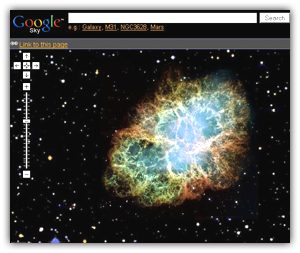
Google Sky onlineGoogle has decided to make Google Sky available online, just like the powerful Google Maps. Up to now Google Sky was just a feature added in the latest version of Google Earth software, the ultimate digital atlas of geography. Now you can gaze at stars, constellations and other celestial elements from the comfort of your web browser.

Though a bit clunky sometimes – and quite slow when opening certain menus – Google Sky is a great resource of information and spatial imagery for all astronomy fans. The web’s interface is similar to that of Google Maps so you’ll soon get the knack of it: you can move around with your mouse, zoom in and out and view images in different styles (infrared, microwave, backyard astronomy) just like the satellite and terrain options in Google Maps. What’s more, you can click on many elements to display a window with basic data and a link to extended information.

The web version of Google Sky also includes special categories to easily browse constellations, galaxies and even the Solar System, where a click on Earth will open a new browser tab with Google Maps. But the most powerful feature in Google Sky is its embedded search tool, which you can use to locate any celestial object by its name.

5 tools to clean up your cookie crumbs

CookieBefore the internet came along, cookies were what we Brits knew as American biscuits and the weakness of that distinguished member of Sesame Street, the Cookie Monster. Then Netscape began, invented one of the world’s first web browsers and eventually, invented the concept of HTTP cookies that are now an essential part of virtually all browsers. From the very start, cookies were controversial because they raised some of the first serious invasion of privacy issues for internet users. Should any website be able to leave behind data on your PC that a website can recognise at a later date, even if it facilitates your user experience? Of course, most people don’t mind this as long as there is nothing malicious involved.

It’s when the cookies that are left behind are of a more devious or harmful nature that the problems begin. There are still a lot of misconceptions about what cookies are and are not. This useful FAQ delves into the issue in a lot more detail but if you’re the kind of person who doesn’t want to risk any breach of your privacy, no matter what the cookies are for, then you may need to use one of these dedicated cookie cleaners:

Powerful Cookies
– Deletes and destroy all cookies including typed URL’s

Cookie Viewer
– Allows you to pick and choose which cookies to delete

Expired Cookie Cleaner – Gets rid of those long-term cookies that others leave behind

Delete Cookies – Designed especially to get rid of those cookies that target Internet Explorer

Cookie Monster – Manage cookies stored across multiple browsers on your system

How to add a dash of color to black and white photos

While browsing photo galleries online, I’ve often stumbled upon black and white photos with a pinch of color that made them really appealing. I don’ know about you, but I’ve always wanted to learn how to apply that effect to my own photos. And guess what? Now I found a way to do it in just two simple steps. Pay attention:

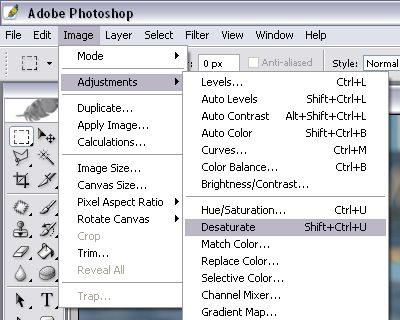
1. First of all, note that this tutorial has a trick: it works with color pictures. So, open up your color image and desaturate it with the Image > Adjustments > Desaturate menu or the Shift+Ctrl+U shortcut.

B&W photos with a dash of color

2. Now grab the History Brush tool (Y) and in the top palette bar adjust its size to 10 or 12 px, and he hardness to 100%. Then start painting the areas where you want to bring color back. Change the brush size and use the zoom tool when necessary if you need to reach small details. Also remember to release the mouse button from time to time, so that if you need to correct any mistakes you don’t have to undo the whole thing. Continue reading “How to add a dash of color to black and white photos”

Pump up the volume in your media player

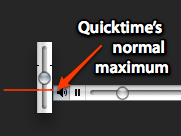
Quicktime overdriveWhen using either VLC or Quicktime, you have ways of increasing the volume more than what the normal slider bars in both applications let you. In Quicktime, as MacMerc.com suggest, just press the Shift key, while you’re adjusting the slider at the bottom left of the Quicktime interface. In VLC, if you’ve reached the maximum and still aren’t satisfied, just press Ctrl and the Up arrow. You’ll see a white volume bar appear on the right of your screen. Just like in Quicktime, this lets you reach a higher volume than usual. An other easy way of improving the sound is by choosing the right preset in the equalizer in VLC. If you’re watching a movie or TV show, I’ve found that either ‘classical’ or ‘live’ give you the best types of sounds.

Babelgum talks about content and the future of web TV

After hearing the news that Babelgum will invest €10m in new productions, mostly shorts and documentaries, we wanted to find out more about where online television is heading, and what we can expect from it. We spoke to Valerio Zingarelli, Babelgum CEO, to ask him about what’s going on in the market. He let us know the company’s views on their current content strategy, the future of web TV and the low-down on their revenue-share system, as well as responding to some criticism in the blogosphere.

Babelgum

It is in the news that Babelgum will invest €10m into independent film production. Could you tell us where your company is heading and why it is independent film worth investing in?

Babelgum remains primarily a web distribution platform for non exclusive “long-tail” content; a platform that allows professionals to showcase and monetize safely and instantly their content, bypassing today’s distribution bottlenecks. The self produced content will always represent a small minority of all our content on offer (1%). The reasons why we are dedicating a budget to develop also our own productions are:
1) As Spike Lee put it, Babelgum’s mission is to nurture young talent;
2) Having exclusive self produced content is part of – I would say – every good content strategy. It helps to attract users in those areas where Babelgum wants to become a point of reference: indie films and Nature. Continue reading “Babelgum talks about content and the future of web TV”

The great software Easter egg hunt: Day 2 – Windows

Open up some new XP functionsHaving uncovered a basketful of Photoshop Easter eggs yesterday, today I decided to delve into Windows XP for some more hidden treats. It turns out the guys at Microsoft are pretty kind-hearted, as there are plenty of cool tricks buried in the OS. For instance, as BizzNTech reveals, you can get up-close and personal in MS Paint simply by opening an image, clicking the Zoom tool and left-clicking on the line directly beneath the 8x mark. As if by magic – a 10x zoom function!

Fed up of getting stumped by Solitatire? Well, you can win a game in an instant just by holding down Shift+Alt+2. What about Minesweeper? Bide yourself some time by launching the game then pressing the Windows key+D to display the desktop. Select Minesweeper from the taskbar and you’ll notice that the clock has stopped.

Here’s a great one for all you conspiracy theorists out there, courtesy of The Easter Eggs Archive. Load up Notepad and type “bush hid the facts” into the editor. Save the document (it doesn’t matter what name you choose), close the application, then load the .txt document again. What the heck happened to your text??

Keeping with the censorship theme, it seems Windows won’t tolerate foul language either. Go to the Control Panel and open up the ‘Speech’ properties dialog. Type the word “crotch” into the preview box and click ‘Preview Voice’. Instead of saying “crotch” Windows will say “crow’s nest”. I’ll leave you to watch some more cracking hidden XP features, while I go off to search for some more eggs to serve up to you tomorrow.

[youtube]gELIrIw89xM&hl[/youtube]

Continue with the Easter egg hunt here.

Top 10 Gmail extensions and plugins

Gmail logoA few days ago, I looked at some tips for helping avoid the increasing problem of e-mail stress – that horrible feeling when you feel utterly terrorised by your inbox. One e-mail client which I’ve always found reduces this problem to a minimum is Gmail. In fact, I think that Gmail is so good, I don’t know why everyone doesn’t use it. Anyway, as good as Gmail is, there are several applications and plugins which can help you get even more out of Google’s one and only e-mail client. These range from extensions that double-up your Gmail to serve as a hard drive to simply changing the look of your client with some new skins. Here’s a selection of ten top tools to get more out of this excellent web based e-mail client:

Gmail Notifier – Get notified of new mail without even opening your browser

Gmail Shell Drive Extension – Use your Gmail as extra hard drive space

GmailAssistant – Get notified of mail in multiple Gmail accounts

Better Gmail – A compilation of useful Gmail enhancements

Gmail Remote Command – Control your PC remotely via your Gmail account

Google Gmail Loader – Import all your e-mail from other accounts into Gmail

Gmail Manager Extension
– Check your Gmail directly from Firefox

GmailClipseClient
– Manage multiple Gmail accounts under one client

Gmail Skins – Give Gmail a whole new look with some great skins

Google Talk – Get notified of new Gmail while using Google’s instant messaging client

How to find out what Windows error codes mean

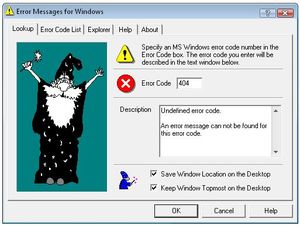
Error Messages for WindowsAfter so many years working with computers I’m somehow used to dealing with all sorts of error messages. However there are still some error message windows I find mysterious and intriguing, especially when they only display a number (Error 123) and a single button (OK) which you can use to accept your failure.

If you too feel like Windows is teasing you with these strange codes, follow my advice: download Error Messages for Windows and you’ll know exactly what Windows is trying to tell you when displaying something like Error 123. Actually, this error code means “The filename, directory name, or volume label syntax is incorrect“, which makes much more sense than just a number, right?

Error Messages for Windows features an exhaustive list with all error codes you can get in Windows and their correspondent meaning. What’s more, the description can be easily copied to the clipboard for further usage, such as posting on a tech forum for help or sending an email to a customer support center.

The only error codes you won’t find here are the ones you encounter when browsing the web, such as the famous 404 for a not found webpage. In that case, the program will display a message like this: “Undefined error code. An error message can not be found for this error code“. See, even errors can produce errors. Will this be a never-ending catch-22?