BitTorrent goes mainstream with Orb

BitTiorrent logoBitTorrent has signed a deal to spread its content even further via Orb’s desktop sharing software. From now on, BitTorrent comes bundled with the Orb installer which allows people to share their media by streaming it to other PC’s and mobile devices.

According to NewTeeVee:

In practice, an Orb user would get access to BitTorrent content on his PC and then be able to use Orb to stream that content to any of his devices — from a PS3 to an iPhone. Typically BitTorrent is used to download content — video or music — to a personal computer, which is difficult to share within the home.

Orb meanwhile gave a little more detail about how it will look:

With Orb and BitTorrent installed on their PC, users will see a familiar media library view of all the media on that computer. Organized by media type, users can quickly and easily organize their titles, make playlists, and share content with their friends via email, SMS, or on a social networking-like page. Simply put, BitTorrent enables the download of content to the home and Orb enables access to that content from any device the user may own.

The potential reach here is certainly huge although the million dollar question, as always, is what kind of content will users be able to download and access on the move. At the moment, many independent music artists such as Radiohead and the Dave Mathews Band are releasing material on BitTorrent bit the content on offer will have to be much more mainstream, and backed by major record labels and film studios, if the deal is going to really bear fruit.

To get started with the new application, you can download it here.

Create the Indiana Jones text effect in Photoshop

onsoftware-jones.png

Now that the adventures of Indiana Jones have hit cinemas worldwide for the fourth time, I thought it would be a good idea to get in the Indy mood with a simple yet appealing Photoshop tutorial. Just follow these easy steps and you’ll be able to create an Indiana Jones text effect in a snap.

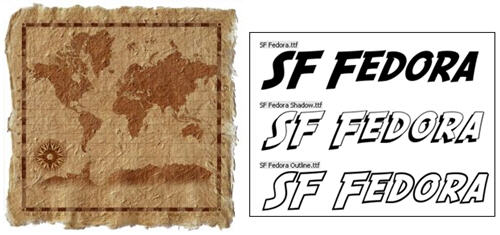
1. First of all, we need some material, namely the background picture and the Indy text font. I used an old map from the free stock photo site Stock Xchng for the background, and the SF Fedora font you can download from Dafont.

Create the Indiana Jones text effect in Photoshop

2. Now it’s time to work: open a blank document with transparent background and write any text you like with the Indy font. Then click on the Warp text button (see screenshot) and apply an arc effect, modifying the default parameters to make it more similar to the original movie title. In this case I used +12% Bend, -26% Horizontal distortion and +2% Vertical distortion. Continue reading “Create the Indiana Jones text effect in Photoshop”

How to enjoy Linux – without installing it

Ulteo logoLinux is one of those things that most general PC users stay clear of because traditionally it has been viewed as intimidating to setup and use especially when it comes to installing external components. Nowadays, that’s not really the case because the most recent releases of Linux distributions are the most user friendly ever.
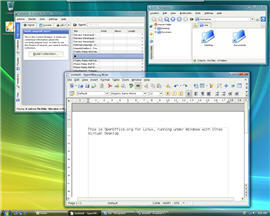
Still, for many users it’s still a no go area as they stick to the more familiar confines of Windows – better the devil you know. However, did you know that you can enjoy all the benefits of a Linux environment without installing it courtesy of Ulteo? Ulteo is a virtual desktop that allows you to run Linux applications in a Windows environment. You’ll have to sign-up for an Ulteo account to synchronise data stored on your hard drive with Ulteo but once done, it’s a surprisingly powerful and useful way to run Linux without installing it.

Ulteo screenshot

Ulteo comes preinstalled with all the major tools you need to work and surf the internet and is intended as a replacement for Windows. Amongst the packages you receive are Firefox, OpenOffice (that can now work with MS Office 2007 and 2008 documents), KPdf to deal with your PDF documents, Kopete (a cross-client instant messenger), Skype, Thunderbird, Enigmail, Gimp and Digikam to manage your pictures and Inkscape and Scribus to create great graphics and DTP projects. It’s a genuinely exciting package filled with open source applications that are easy to use and won’t bug you with ads or registration requests.

All you need to get going is a web browser with Java enabled – if you’re a regular user of both Linux and Windows, then Ulteo is definitely one way to make switching between the two easier than ever.

Today’s downloads for Windows, Mac and Mobile

Download WorldWide TelescopeWindows: Have you ever wanted to gaze at stars from your backyard, but couldn’t afford a proper telescope? Now you can take a look at the whole universe from your computer with WorldWide Telescope. This astronomy atlas includes thousands of images from planets, constellations, galaxies and other celestial elements, all brough to you with just a mouse click.

TapeDeckMac: The TapeDeck audio recorder will immediately appeal to all of you that, just like me, still keep all their cassette tapes around. The application looks and sounds just like a tape deck player. It offers three audio qualities and has text searchable capabilities. A real trip back to the 80s!

Relieve bus boredom with VexedPocket PC: Don’t you just hate those long bus journies where you’ve got nothing to read and your battery has run out on your MP3 player? Vexed is just the game for these kind of trips and lives up to its name by providing you with hours of brain-bending fun. The purpose of the game is to clear the board by matching up colored blocks. Be careful though, because you can’t move them upwards. It’s harder than it sounds!

Skype to offer film clip sharing

JamanSkype users are about to enjoy an exciting new link up with film download site Jaman who will allow them to insert clips of their films into chat conversations according to PR-Inside.

While in a chat, Skype users will just click on the ‘Insert Video’ button, then select the videos they want to share in conversations. Faisal Galaria, Jaman’s General Manager and VP Corporate Development, told PR-Insider:

Sharing a favorite movie with friends and family is an expression of your personality and is a great conversation starter. Through Skype, Jaman will connect people around the world over the Internet, making it even easier for people to discover and enjoy film.

Skype fans will have to wait a while though before getting their hands on the service – it won’t be rolled out for a couple of months yet, according to the company. However, Jaman is mainly full of independent titles and while this may appeal to European users, American users will surely want more mainstream films to be added although this would obviously create some major copyright issues. The possibilities are truly exciting though – one of my favourite aspects of YouTube is the commenting system as it’s fun to hear other people’s comments about particular clips and this will facilitate the same kind of thing between one or more users, but in real-time.

In the meantime, check out some of the movies that are available on Jaman that you’ll soon be able to share your favourite moments from with Skype users.

Video conversion tools: Online VS Offline

Video conversionThere is always an ever-increasing need to convert video files into formats that are suitable for portable devices like iPod, PSP and mobile phones. This is because people want to have their favorite YouTube videos with them wherever they go, and also because users produce more video content they would like to show to their friends or see whenever they want.

There’s a great need then for easy to use, effective and ideally free conversion and editing tools. Although there are web services that offer these features, in my experience it can be hard to edit or encode video files online, both because of the upload bandwidth limits and because while editing, if anything goes wrong, like a temporary server failure, a problem with the connection or a stability issue of your browser, you can lose all your work.

If you need to convert small videos and you want to try some online services, here’s a list of useful website to keep in mind:

  • YouConvertIt – Convert any media file format (Documents, Images, Audio, Video & Archives) for free and without installing anything to your PC.
  • Cellsea – Free online video editor and converter. It has some issues managing medium-sized files.
  • Hey!Watch – Hey!Watch is a professional and reliable encoding platform available via a simple and intuitive interface. No file size limit.
  • Youtubehack – Download YouTube video as FLV, MPG, XviD, MOV or MP3 (sound only) format.

Specifically for medium-sized videos, it’ll be some time before web applications overtake software you install on your computer, although it’s good to have options available and surely online services will improve in the near future. For the moment, you will get better results with some freeware applications:

  • On DVDVideoSoft you’ll find a collection of free software for your PC, for fast and efficient results, to download, convert, extract, edit videos.
  • SUPER – If you need a simple, yet very efficient tool to convert, encode or play any multimedia file, without reading manuals or spending long hours training, then this program is all you need. It is a multimedia encoder and a multimedia player, easy-to-use with one simple click.
  • Videora and Free iPod Video Converter – If you are interested just in converting files for your iPod.

Flickr block access to flickery

flickeryHaving heard of this new Flickr desktop client for Mac, flickery, I was going to try it out and see how well it fared compared to the FlickrShops, Photonics and other 1001s that already provide the same service. flickery looked pretty good: a simple interface, integrated search and access to all the normal flickr tools like uploading, creating photosets and commenting. Unfortunately the application, which is still only in public beta is not available anymore. The explanation?

A note on the developer’s blog says it all:

The nice guys from flickr.com just contacted me and told me they had to suspend my API key of flickery for now, because flickery is causing them too much traffic.

It’s a little surprising that an application which is still only in public beta could cause traffic problems in a website hosting billions of photos and getting easily thousands of uploads every day. Obviously though, developers wanting to use the Flickr API, which is available for non commercial use, have to abide to the terms of use, and given the explanation, flickery broke the following rule:

  • Use Flickr APIs in a manner that adversely impacts the stability of Flickr.com servers or adversely impacts the behavior of other applications using the Flickr APIs.

Let’s hope this is only temporary and that Flickr will help out the developer find a way of making the application less strenuous on their servers so that we can enjoy the flickery desktop client once again.

The easiest way to create panoramic photos

create panoramic photosA few days ago one of my friends was really excited about having discovered a program to create panoramic photos. She didn’t know such programs existed at all – you’ll have to excuse her, my friends are not software junkies like me. Her discovery made me think that many other people could be in the same situation and that panoramic photos would then make a perfect topic for a blog post.

Panoramic pictures or simply panoramas are really wide images, usually from nature landscapes or city skylines, which are made of individual photos of different areas all stitched together to create the whole view. The difficulty in creating panoramas is not only in taking the right images, but also in sticking them properly to build the original view.

I’m sure there must be quite a bunch of tools with which you can create panoramic photos, but I’m also sure none of them is as simple to use as AutoStitch. This great tool was developed by a Computer Science student and it’s probably the easiest way to create panoramas. Just unzip the file and run the program. Load your images and AutoStitch will automatically start working on them to create the panoramic image. Once done, you’ll find the result saved in the same folder where your original photos are. The panorama may need some further cropping to erase blanked out margins, but the hardest part is already done. Easy as pie!

Barcelona panorama

Working with RAW on Mac

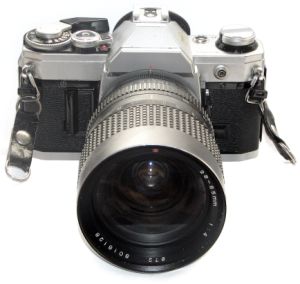
SLR cameraLooking to take better photos? if your camera supports it then the natural step up is to shoot everything in the RAW format. Whereas when your camera saves a picture as a JPEG, it adjusts the settings automatically, photos taken in RAW will include all the information, which you can adjust later.

To make it simple, a JPEG is like a print from the photo shop, while RAW is the negative. You then decide how the picture looks.

A photo taken in RAW may not look spectacular in your camera’s preview, but once you’ve edited it, adjusted contrast and light, removed noise and dust and cleaned out unnecessary detail, you’ll come up with a much nicer image, and probably better than what you would have gotten if shot in JPEG.

To be able to work with RAW you need to make sure that your camera supports it and that your memory card is large enough. RAW is much bigger than JPEG simply because it stores all the data, not just what the camera considers relevant. To edit in RAW you’ll need to have the right software. This is where we come in.

If you’re serious about photography and are looking for a full fledged image editor that handles RAW, whilst offering powerful organization and publishing tools, then you have to go for either Adobe Lightroom or Apple Aperture. Both are excellent choices and although true fans will have their reasons why one is much better than the other, you really have to test both out to see which one you prefer. Continue reading “Working with RAW on Mac”

The all new Ad-Aware 2008 launches today

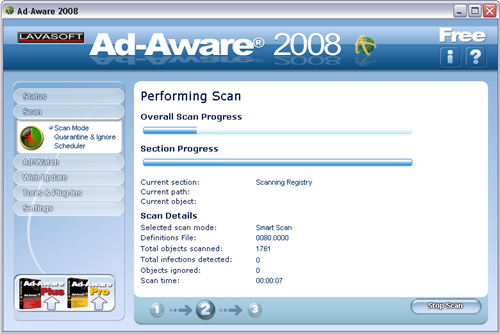
Download Ad-Aware 2008After a few weeks of open beta stage, during which the Lavasoft developers counted on users’ feedback to improve and fine-tune the last details in their flagship, Ad-Aware 2008 is finally here.

Though the user interface in itself hasn’t changed that much since the previous version, the new Ad-Aware 2008 includes a few interesting enhancements such as a noticeable improvement in stability and performance, which makes the program a lot lighter on system resources. The anti-rootkit and threat detection tools have been enhanced to provide you with a more extended, efficient protection, and the program features now an integrated anti-virus functionality as well.

Ad-Aware is very easy to install and use, especially if you’ve been using the previous version, because the program features a similar design. It’s constantly updated with new definitions, so that you keep up with the latest online threats and also includes a system restoration point to help you recover your system from a virus or Trojan attack. I especially liked the fact that Ad-Aware supports multiple browsers, which enables you to manage web browsing traces and control your privacy online in Internet Explorer, Firefox and Opera.

Download Ad-Aware 2008

The program still keeps some functions as exclusive to the Pro and Plus versions (like the customizable scans or the real-time monitor) but still, Ad-Aware 2008 Free is a reliable, effective anti-malware tool that will keep your system safe and sound without disturbing your daily workflow.