Is your ISP capping your bandwidth?

UTorrent logoRecently, I’ve noticed a massive slowdown in the speed of the torrents I’ve been downloading with uTorrent. Despite double checking that my IP address is static and that the router ports are open, my download speeds are back to what they were when I first installed the program on a dynamic IP address with no ports open.

Since I’m sure the problem is not at my end, my only conclusion is that my ISP has flagged uTorrent as a bandwidth heavy application and blocked the traffic coming through it. Bandwidth capping is obviously a hard thing to prove because only your ISP really knows what’s going on behind the scenes and of course, they’re not going to reveal to you which applications they’ve flagged. As wikipedia points out, bandwidth capping is the only way ISPs have been able to deal with the huge increase in people using static, rather than dynamic, IP addresses to download torrents and stream other large amounts of data:

Many ISPs engineered their facilities in the 1990s to use dynamic capacity allocation to serve multiple bursty users. Each user is expected to use high speed transmission for only a short time, for example to download a megabyte web page in less than a second. When use is continuous, as for file sharing or Internet radio or streaming video, a few users who use the connection at high rates for hours at a time may seriously impair the service of others.

However, if you approach an ISP expressing concerns that you think your bandwidth may have been capped, you’ll probably be given the same old spiel that AT&T gave the Gizmodo blog:

We have said consistently that AT&T will not allow itself to become a policeman or enforcement agent on the Internet. We have also made clear that there is nothing inherently wrong with P2P applications like BitTorrent, which are advanced, and legal, technologies that are used and welcomed on our network. We do not block or degrade any P2P application to manage network congestion. At the same time, we feel that any company involved with the Internet should be concerned about illegal activity, whether it is identity theft or intellectual property theft.

Some ISPs may venture to admit that they do use some kind of method to control bandwidth across their network. In the case of Comcast for example, Gizmodo did at least manage to get an admission of “delaying” tactics on their part when it comes to controlling traffic:

We have a responsibility to provide all of our customers with a good Internet experience and we use the latest technologies to manage our network so that they can continue to enjoy these applications. During periods of heavy peer-to-peer congestion, which can degrade the experience for all customers, we use several network management technologies that, when necessary, enable us to delay—not block—some peer-to-peer traffic.

However, in the UK some operators have already taken the initiative and introduced capping quite publicly. Virgin were one of the first to do so last year claiming that 5% of users were downloading as much as 3GB of data during peak times which “amounts to 750 music tracks in just a few hours”. With HD and BluRay videos now flooding torrent sites and forums, the demands on bandwidth are going to increase dramatically.

There’s obviously a limit on how much can be downloaded over a network without it collapsing and bandwidth caps are perfectly understandable until technology and broadband infrastructures advance but bringing uTorrent to a virtual standstill seems excessive.
A quick note on Google Reader Notes

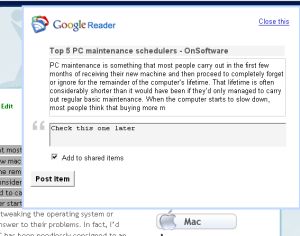
Add notes and web clippings in Google ReaderAs something of a Google Reader addict I was interested to try out the new ‘Notes’ feature within the RSS reader, which sees the service take a Twitter-style twist. The tool is designed to let you quickly add information and web site content into a new ‘Notes’ section within Reader. You can manually enter notes or copy and paste web content into a clipping box accessible from your browser toolbar, before sharing these notes with your friends.

Overall, I’ve been pretty impressed with this new functionality. I like the way that you can quickly add snippets from a web page just by clicking the shortcut button in your browser and the ability to view notes in Expanded or List view, in the same way as you do with feeds. However, there are a couple of things that rankle with me. Firstly, once you’ve added a note it’s impossible to delete it, which means the section soon becomes clogged with information that’s no longer important or relevant.

My second gripe is perhaps a more serious one and indicates the importance Google is now placing on its expanding social networking services. Whenever you enter a new note in Google Reader it will automatically be set to ‘Shared’, so that anyone of your online pals can view it. When adding a web clipping you can simply uncheck a box to get around this problem. However, when entering a note manually, it will be shared by default, so you have to remember to go in and unshare it if it’s data of a sensitive nature. Privacy issues aside, well done to Google on another fine productivity-boosting invention.

Adium to offer Facebook support

facebook_chat.jpgGood news from the Adium blog, the free multi-protocol messaging client will soon let you use the Facebook Chat feature, which was only implemented on April 6. The new feature will display your contacts with their little thumbnail image, status update and an availability icon. You’ll obviously need to have a Facebook account, but the good thing is you won’t have to have the website opened up in your browser to use it.

In my opinion, this goes to show why Adium still remains by far the best messaging client on Mac for personal users. It works with almost all the protocols out there, its interface can be customized and the client is very regularly updated. I also find Adium to be on the whole very stable and enjoy its design.

Facebook Chat is a popular new feature on the social networking website, as you can interact directly with your friends. The question now is, will other messenger client offer support for Facebook Chat? If Adium is GPL, there’s no reason why other GPL clients Psi, Coccinella or Spark couldn’t offer it. But it also all depends on whether Facebook wants to have the Chat feature available everywhere or just on a limited few. Obviously, if you’re using Facebook Chat in Adium, it means you aren’t on the site, downloading applications or clicking on ads.

Add some transparency to Windows XP

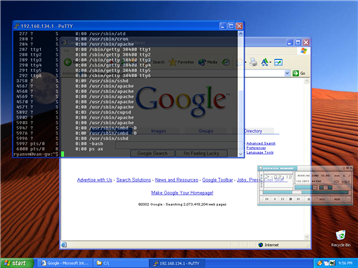
One of the big innovations in Windows Vista was the addition of transparency to the operating system. Transparency can help in a number of ways. Not least, it allows you to see what’s behind certain Windows or folders without having to minimise everything. It’s also highly useful if you need to hide a program window that you don’t want others to see while it runs on your system. And of course, it looks quite cool too. Although many people still prefer to use XP over Vista, it doesn’t feature the transparency features Vista does but you can add them using various utilities and plugins.

Vitrite screenshot

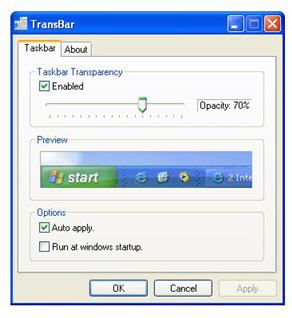
To start with, you can make the XP toolbar transparent with Transbar as Elena explained a while back. Transbar features a slider so that you can control the level of transparency that suits you and your desktop and you’ll be surprised how radically it changes the look and feel of your working area. Meanwhile Vitrite is aimed at adding transparency options to your windows. It utilizes a dormant transparency function in Windows XP that allows you to click on a window and by holding down the Ctrl and Shift keys, select the level of transparency you want between 1-9.

Transbar screenshot

If you want to add transparency to only a certain part of the screen, then ChaosCrystal is an excellent choice. It allows you to use a cross hair to select an area of the screen you want to target and then drag a transparency box over the area that you want to make transparent. Finally, if you’re looking for something more comprehensive, that includes more than just transparency tools, then XP Visual Tools offers a range of XP customisation options including new desktop templates and transparency features for everything ranging from folders to windows.

Top password generators to improve your security

Top password generatorsFace it: coming up with a new password every time you sign up for something is not that easy anymore. You’ve run out of new ideas and have developed a dangerous tendency to use the same password everywhere. But before you compromise your online security, follow our advice and install one of these password generators. They can all help you to create new passwords based on the options you select and make them easy to remember as well.
Softonic launches new user profiles and features

If you thought it had been a little quiet around here of late, that’s for a very good reason. We’ve all been hard at work implementing and testing a new codebase for Softonic English which makes the site smarter and easier to use, as well as adding some great new features for users.

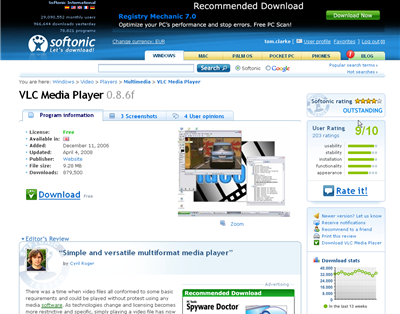
Softonic program pageThe homepage, while appearing quite similar to its previous version actually includes numerous changes and enhancements, including a new high-visibility zone for blog posts like this one; much better category listings; dynamic charts which show whether programs have moved up or down since last week and a smoother, cleaner design.

Our program page has also undergone some important changes. Apart from some cosmetic adjustments and enhancements, we’ve also made it much easier to interact with programs, meaning that the tools that let you rate, review, bookmark and track your favourite software are always easily accessible.

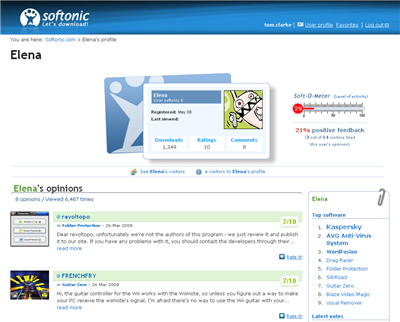
But the biggest new feature for the site is our new user profile page. Visitors to the Spanish Softonic will already be familiar with the features available in the new profile page. Now you can pick an avatar, visit other profiles, see your visitors and more. We’ve also got the Soft-O-Meter, a popular feature on the Spanish site which shows your level activity on Softonic.

Softonic user profile pageFinally, we’ve launched Softonic Deluxe – a premium edition of Softonic designed for true fans of software. Deluxe members get access to a special edition of Softonic, free of advertising and with 100% guaranteed high-speed and secure downloads. For more info about Softonic Deluxe or to get a free trial, click here.

We’re always working on more features and already have loads of exciting new stuff in development… but we’ll let you know about that later. For the moment, take a look at the new, improved Softonic. And as always, please let us know if you’ve got an opinion on the site or an idea for making it even better!

Why do wireless router signals fluctuate?

RouterThere’s nothing more annoying than a router signal that’s constantly fluctuating and cutting off your internet connection. It’s always at that crucial moment when you’re saving something or sending an e-mail that the darned signal goes and you’re left in limbo until it reconnects again. So why do router signals fluctuate so much?


The main factor is quite simply, distance. The further away you are from your router, the more problems your wireless card will have holding onto the connection. The range of your router very much depends on the model, the specific 802.11 protocol it uses and whether there are any major obstacles between it and your PC. According to About.com, the average range of a router using the 802.11a, 802.11b and 802.11g protocols (the three most common) is 150 ft (46m) indoors and 300ft (82m) outdoors. However, as they point out, there are differences between the protocols and the way they react to different obstacles:

Obstructions in home such as brick walls and metal frames or siding greatly can reduce the range of a Wi-Fi LAN by 25% or more. Because 802.11a employs a higher signalling frequency than 802.11b/g, 802.11a is most susceptible to obstructions. Interference from microwave ovens and other equipment also affects range. 802.11b and 802.11g are both susceptible to these.

The problem is that the routers that Internet Service Providers give you when you sign up are invariably quite cheap and not very powerful. There’s no way that my router has a range of almost 50m – I struggle to maintain a connection when any further away than less than half of that. But the weirdest thing of all is, even when the router is next to my laptop, the signal still fluctuates wildly although at least I suffer less broken connections. The answer I’ve found is to use a better router. Linksys and D-Link are known for their signal strength and if you’re looking for something really powerful (and expensive) then check this out.

If changing the position and model of your router haven’t helped, then it’s most likely that the wireless card on your laptop or PC is at fault. Before throwing it out though, try testing your wireless router with an external wireless card. This plugs into your PCMCIA slot and will prove whether it’s your machine that’s at fault. It’s better to use a PCMCIA card rather than one that plugs into your USB ports because they are generally better at picking up signals.

If none of the above have helped, then Microsoft have a good 10 point plan for improving your wireless network including a few extra tips such as replacing your router’s antenna, adding a wireless repeater, changing your wireless channel and updating your router firmware.

Mac Tip – Google Docs features from Safari

Google DocsSo you have your Google account and have gotten accustomed to using Google Docs for writing and saving documents online? Although it’s obviously much more limited then any proper office desktop application like Microsoft Office or iWork, Google Docs provides a great way of accessing and editing documents online. Personally I like using it in case of an emergency, or if I know that I won’t have my MacBook with me and still need to consult some documents.

Surprisingly, Google Docs doesn’t support Apple’s Safari, so, even though you can still open it, you lose out on all the features. One way to activate those features in Safari is by tricking Google Docs into thinking you are using Firefox. As macosxhints explains, you’ll need to activate the Debug Menu in Safari in order to this. Make sure Safari is closed, then open up a Terminal window and type in the following:

% defaults write com.apple.Safari IncludeDebugMenu 1

This will activate the Debug Menu in your Safari browse. Then select Develop>User Agent and choose a Firefox entry. Normally Google Docs features will be enabled and you will be able to enjoy them just as much as if you were using it on Firefox.

Open Office Beta 3 released

Open Office logoThe next major release of Open Office is now publicly available for testing and features some interesting new enhancements and improved compatibility with Microsoft Office. Of particular note is the fact that it is now able to run on Mac OS without the need for X11 therefore meaning it now behaves like any other Aqua application. Equally important is the fact that Open Office now works with Microsoft Office 2007 and 2008 documents.

Other exciting improvements include a solver component which allows solving optimization problems where the optimum value of a particular spreadsheet cell has to be calculated, chart enhancements, better sharing options for spreadsheets, some new and updated icons and enhanced editing features in Writer to make tracking changes much easier to follow. The developers behind Open Office have also introduced a new Start Centre which they claim will make launching components from the suite much easier:

The most immediately visible change to OpenOffice.org 3.0 is the new “Start Centre”, new fresh-looking icons, and a new zoom control in the status bar. A closer look shows that 3.0 has a myriad of new features. Notable Calc improvements include a new solver component; support for spreadsheet collaboration through workbook sharing; and an increase to 1024 columns per sheet. Writer has an improved notes feature and displays of multiple pages while editing. There are numerous Chart enhancements, and an improved crop feature in Draw and Impress.

Note that because this is still a beta version, you may experience some bugs or difficulties but for me, this is certainly the most exciting Open Office yet and with ability to work with MS Office 2007 and 2008 now added, surely even more users are going to wonder why they should bother coughing up hundreds of dollars for Microsoft Office.

Camino 2.0 in development

CaminoI used to be a daily user of the Camino web browser, right before I decided to switch back to Firefox, as I couldn’t live without my extensions, something Camino could not offer. I still like the Camino browser for Mac though, and consider it to be up there with the best. The interface is very clean, it loads websites quickly, is extremely safe for browsing and has almost as many settings as Firefox. Since the Camino team separated from the Mozilla project, I also feel more work has been put into it and that new versions are being released more frequently.

Version 1.6 came out only two weeks ago, yet we’re already hearing of developments for version 2.0. According to the Camino Roadmap, this next iteration of Camino is expected to “bring major improvements to web page rendering”, thanks to the new Gecko 1.9 layout engine, the same one that Firefox 3.0 will carry. Camino, which, with a score of 52/100 on the Acid3 Test is one of the better browsers in terms of web standards compatibility, will also continue to improve in the area. With version 3 of Firefox taking time to come out, and questions on the safety of Apple’s Safari browser rising now and again, it’s good to see Camino upping the ante and hard at work on a solid browser for Mac.