When did file sharers suddenly become pirates?

Pirates of the Caribbean cover“If thought corrupts language, language can also corrupt thought.” So wrote George Orwell in his famous essay Politics and the English language. I couldn’t help thinking about this when I read the word “Pirates” suddenly being used to describe file sharers in The Guardian yesterday.

Other UK media outlets have picked up on the trend. Odeo writes “UK file pirates to face the music”. Meanwhile Newser reports “UK file pirates could lose net privileges”. Rewind to before the Pirate Bay guilty verdict and it was quite a different story. “Does legal action against file sharers dissuade others?” read one Guardian headline, “File-sharers want to have your cake and eat it too.” read another. Perhaps The Guardian headline “Online file sharers buy more music” compared to yesterday’s headline “Study finds pirates 10 times more likely to buy music” couldn’t better illustrate the case in point.

Pirates are all the rage nowadays what with hijacking ships in Somalia and the high profile Pirate Bay trial, it’s inevitable that some bright spark would eventually coin the phrase for file sharers. Due to the recent ship hijackings however, the word pirate has taken on increasingly negative connotations. Piracy was a common term to describe any kind of illegal copying but a “pirate” for most of us was a bearded bloke with an eye-patch, one wooden leg and a parrot on his shoulder. Using the word to refer to file sharers tars them with the same criminal brush as the pirates that are currently running amok in the world’s waterways.

The effect is that it will naturally dissuade people from file sharing of any kind. No one wants to be branded as a pirate nowadays after all. Millions of files, folders, audio and video are exchanged every day perfectly legally. The result of the Pirate Bay trial should not be seen as a green light to demonise file sharing on the net. Besides, the result of the trial can hardly be taken seriously now that its emerged the judge was also a member of a copyright lobby group prompting calls for a retrial. That’s a bit like Dick Cheney deciding whether an inmate at Guantanamo is guilty or not.

I don’t believe there is a media vendetta against file sharers. The article using the term pirates in The Guardian was actually highlighting a Norwegian study that found those that downloaded music illegally were more likely than those that don’t to buy music. The point however, as Orwell made, is that use of language is a powerful tool that can shape thought. In an age when a term can spread like wild fire over the internet, that’s more relevant than ever before.

WireTap Pro – a true Mac golden oldie

WireTap Pro logoKing Kong, Psycho, Texas Chainsaw Massacre. What do they all have in common? Well, apart from madmen (or an ape) it’s that they’re all remakes that don’t live up to the original. In my mind, WireTap Studio never quite lived up to WireTap Pro which, despite being discontinued by Ambrosia Software in 2007, is still the best audio recorder on the Mac. I still prefer the Pro version because of it’s simplicity, discreetness and easy of use.
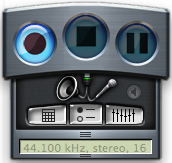
Nowadays, you won’t find any mention of WireTap Pro on Ambrosia’s website (apart from old press releases) but they have at least provided the last available download link for it (version 1.3.4). Firstly, I don’t think Wiretap Studio is a bad application (certainly nowhere near as bad as the Texas Chainsaw remake), but it’s the simplicity, flexibility and no fuss ease-of-use of WireTap Pro that gives it the edge.

WireTap ProWireTap Pro lets you switch between recording from your microphone or speakers in a click. Both are clearly highlighted on front of the main recording panel which is small and discreet. Clicking on them highlights one or the other or both if you want to record from both sources. The highlighting is a little obscure and could have done with being a bit clearer but just squint a little and you’ll see which one is activated. Press the record button and you’re done! This simplicity is precisely why I like WireTap Pro so much. Just remember that if you choose to record both from the microphone and internal speaker, make sure you wear headphones otherwise WireTap Pro will record both the internal and external output at the same time. So, if you’re recording a telephone conversation, it will record the respondents voice twice and make them sound like a doppelganger or something!
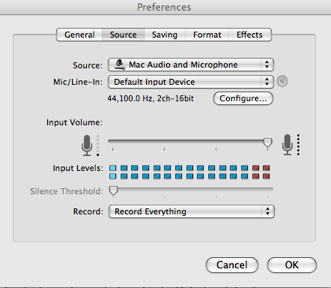
When you click stop to stop recording, WireTap Studio immediately prompts you to give a name to the recorded file that it saves within the WireTap Pro folder. This folder can be browsed and accessed independently of WireTap Pro – one of the things lost in WireTap Studio is that it only allows you to listen and manage files through the application itself. There’s no mucking around with configuring input channels, sound levels and there’s no annoying bleeping or audio warnings that you’re recording which is ideal for recording phone conversations.

WireTap Pro optionsHowever, that’s not to say there’s not plenty of room for tinkering. There are a set of options to change the graphic equalizer and you can choose from 4 recording formats – AIFF, MP3, AAC and Quicktime. The default is AIFF which is a bit annoying but I just changed it to MP3 in a click.

Finally, as an added bonus, WireTap Pro offers an automatic recording tool for radio shows, podcasts and other web broadcasts that can be scheduled according to when they are aired. Of course, nowadays, iTunes and other apps offer this and many web broadcasts are archived for later listening anyway. However, for those that don’t, it’s a great way to keep track of your favourite broadcasts. Unfortunately, it can’t actually open the web stream for you though – you’ll have to be on hand to do that but you could always leave it streaming and set WireTap Pro to record while you’re away.

So there you have it. If WireTap Pro were a film, it would definitely be the 1969 original of The Italian Job compared to WireTap Studio which would be the 2003 remake. I’m sure Michael Caine would agree.

Console scrapheap challenge

Still room for lipglossWhat happens when geeks gets bored of playing their computer games? Well, they take their consoles and turn them into fashion accessories,of course. I’m always amazed to hear about the crazy DIY projects that console fanboys dream up, and the new Nintendo purse is probably favorite of all time. Devised by uber-modder Jeri Ellsworth, the bag houses an NES chip with an integrated LCD screen (ripped out from a portable DVD player) and two stick-on velcro controllers. All this, and there’s still room for a woman’s customary treasure trove of ‘essential’ items.

The Nintendo purse got be thinking about history’s other mad and marvelous mods. Here are some of the most memorable:

Xbox 360 arcade controller: Super nerd Akira Kuramoto decided the standard Xbox control pad just wasn’t big enough for him. So he set about building an arcade controller made out of a whole Xbox. For a closer look at his creation check out the gallery on TechEBlog.

Mega controller

Super Nintoaster: If you’re hungry for a new way to play those retro 16-bit classics then the Nintoaster will have you drooling. The device, dreamed up by Stupidfingers, wonderfully incorporates the SNES into a toaster, and you can even address the screen brightness using the temperature knob. Continue reading “Console scrapheap challenge”

Create video tutorials the easy way

Video tutorials have become a fashionable way to demo certain software apps. It’s also the best way to create tutorials and explain how to do specific tasks with your computer. Why is that? I can see two main reasons: first, they’re more comfortable to follow than a long, boring text; second, they’re also much easier to understand for people who are not particularly computer-skilled.

Producing high-quality video tutorials with zooms, transitions and video effects can be difficult and time-consuming. But if all you need to do is a short video explaining your uncle how to configure the anti-virus automatic updates or delete cookies in Firefox, BB Flashback Express is the perfect tool.

Create video tutorials the easy way

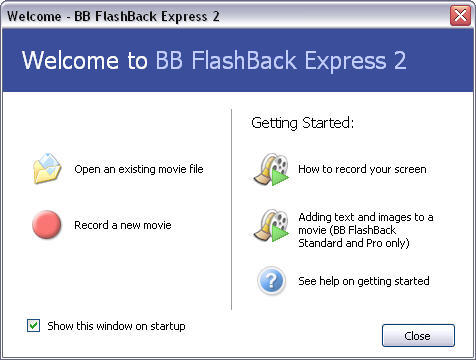
With BB Flashback Express you can easily record any on-screen activity and the export the video to AVI or Flash format, or upload it to YouTube – or other sites – right away. Don’t worry about settings: the whole configuration process is done via an intuitive step-by-step wizard that guides you through video, sound and other details.

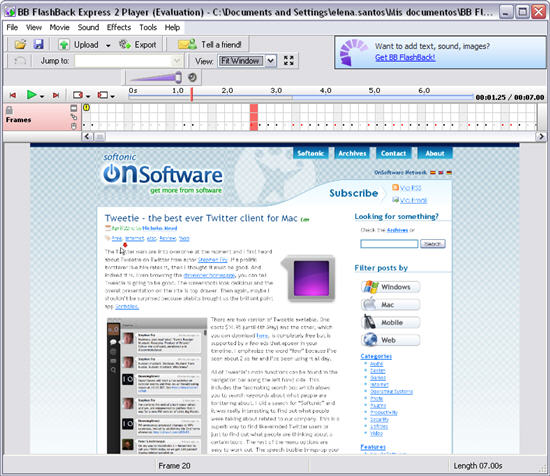
BB Flashback Express has some nice features, such as mouse click highlights, support for recording animations and moving graphics and the special ability to hide shortcuts and use a plan wallpaper when you’re recording the desktop. It also supports recording from various sound sources, as well as your webcam. Once your video is recorded, you can use the program’s built-in player to check it out.

Create video tutorials the easy way

Unfortunately once your video is recorded you won’t be able to edit it: BB Flashback Express doesn’t include any editing tools, as they are offered as an exclusive feature of the paid versions of the program (BB Flashback Standard and Pro).

Tweetie – the best ever Twitter client for Mac

Tweetie logoThe Twitter wars are into overdrive at the moment and I first heard about Tweetie on Twitter from actor Stephen Fry. If a prolific twitterer like him rates it, then I thought it must be good. And indeed it is. Even browsing the developer homepage, you can tell Tweetie is going to be good. The screenshots look delicious and the overall presentation on the site is top drawer. Then again, maybe I shouldn’t be surprised because atebits brought us the brilliant paint app Scribbles.
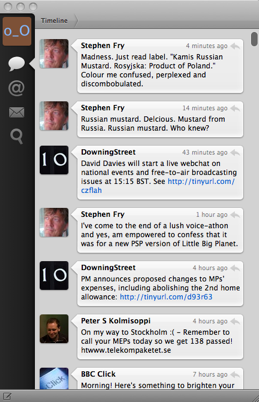
Tweetie There are two version of Tweetie available. One costs $14.95 (until 4th May) and the other, which you can download here, is completely free but is supported by a few ads that appear in your timeline. I emphasize the word “few” because I’ve seen about 2 so far and I’ve been using it all day.

All of Tweetie’s main functions can be found in the navigation bar along the left hand side. This includes the fascinating search box which allows you to search keywords about what people are twittering about. I did a search for “Softonic” and it was really interesting to find out what people were talking about related to our company. This is a superb way to find like-minded Twitter users or just to find out what people are thinking about a certain topic. The rest of the menu options are easy to work out. The speech bubble brings-up your latest tweets, the @ symbol reveals replies to tweets that have been sent to you and the envelope shows direct messages you’ve received.

There’s even more to Tweetie than this though. Remember when Gmail introduced threaded messages to e-mail? Well Tweetie has done exactly the same by introducing direct message threading – direct messages are treated as ongoing conversations so you can see how each one links to the previous. The same goes for conversations.

In addition to all of the above, you can view user profiles and all of their tweets simply by double clicking on their avatar with no need to visit the Twitter homepage. Also, for those that love to share webpages on Twitter, Tweetie features a bookmarklet button which can be dragged onto your browser and instantly post the page to your Tweetie account when clicked. It’s the same principle as the PressThis! button integrated with WordPress.

Tweetie bookmarklet

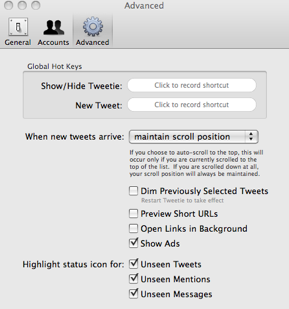
The preferences offer you the ability to change the font type and size, choose whether to show your full name or username and which URL shortening and image posting services you’d like Tweetie to use. You can add as many accounts as you like under the accounts options which displays a list of the ones currently used by Tweetie. Finally, the advanced options allow you to record a few keyboard shortcuts to hide Tweetie and write new tweets, preview short URLs and when you want Tweetie to highlight the status icon.

TweetieSo what are the drawbacks? The major oversight of Tweetie is the fact that there are no tweet notifications which seems bizarre but this will surely soon be rectified. In the meantime, there is a useful script available written by a user which refreshes Tweetie every 3 minutes and supports Growl alerts. There are therefore no options for configuring sounds – Tweetie is completely silent which may be a drawback for those that love their twitter clients to make a bit of noise now and then. There are no options to create Twitter groups or multi-party replies either although since I’ve never needed these, it’s not something I personally miss.

These are relatively minor drawbacks however and overall, Tweetie is by some margin the best Twitter client I’ve ever used. The best thing I’ve tried on the Mac this year since Spotify.

Google launches new image and news search tools

Google labs logoGoogle Labs has finally rolled out its Similar Images tool which allows users to perform searches with the actual images themselves. At the same time, the company released News Timeline which gives a chronological view of news events.
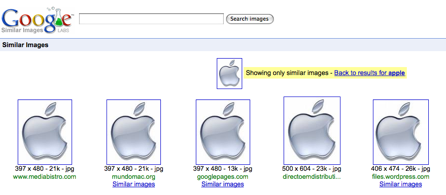
Similar Images works in a similar way to Google Image Search the difference being that some images have the option “Similar Images” below them. Clicking on this option brings-up all the images that look very similar to it. I can see this tool being useful if a particular image isn’t quite as good as you wanted because Similar Images will give you very similar images but with slightly different angles and quality. Or, if you’re shopping around for something you like, similar images will help you find other products that look similar to it. The drawback is that not all images have enough similar ones cached in order to offer you the option of Similar Images as I found with a search for “Softonic”.

Google Similar Images

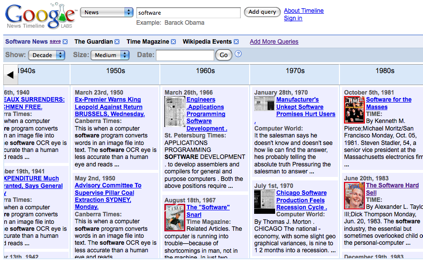
News Timeline is a more powerful tool and will appeal to historians, researchers or news junkies wanting to view news chronologically. You can choose to view news from anything within the past day to the past decade. Choosing the decade option is the best illustration of how useful the tool is giving you an encyclopedia-style timeline of the major news stories, front covers and events that shaped a particular topic. It’s going to be a great tool for students and historians to discover when a term first started appearing. For example, it’s fascinating to search for the word “internet” and go back in News Timeline to see when it first started to appear (although rather confusingly I found it started appearing in the 1920’s!). You can also choose which sources to base your searches on. The default settings are Time Magazine and Wikipedia Events but you can change the settings to add blogs, newspapers, and magazines of your choosing making it a truly customisable and powerful search tool.

Google News Timeline

There’s no Google video guide to News Timeline yet but you can check out their painfully cheesy guide to Similar Images below although be warned – it looks like some kind of road safety video from the 1970s.

[youtube]http://www.youtube.com/watch?v=6fD2t4d2Ln4[/youtube]

Today’s downloads for Windows, Mac and Mobile

Download Returnil Virtual SystemWindows: Have you ever wanted to test a program but were afraid of possible consequences for your PC? Here’s your life vest! Returnil Virtual System creates a temporary disposable copy of your system on a virtual partition that lets you test anything without ruining your actual system. Simply reboot and you’ll be back to your dear computer.

Monitor your physical activity using your phoneSymbian: Want to get in shape for the summer? Nokia Activity Monitor is an innovative utility that lets you monitor your level of physical activity using your phone. The program makes use of the accelerometer, a sensor included on some of the newer Nokia handsets. Activity Monitor uses this sensor to count the steps you take throughout the day.

0t_stainless.pngMac: Sick of browser crashes due to unstable tabs? Stainless is a new super lightweight browser that looks like Google Chrome but is much simpler and operates each tab independently. The advantage of this is that if you’re experiencing slow page loads due to Flash plugins or Java problems, it won’t affect the rest of the tabs!

Posterous: Micro-blogging for lazy bloggers

Posterous: Microblogging service for lazy bloggersStarting a blog is quite easy: you simply choose the platform (WordPress, Blogger or LiveJournal, for example), pick a title and start writing. You can blog about any topic you like, or use it as a kind of personal diary to express your inner thoughts and feelings – always bearing in mind that this is all publicly available, of course.
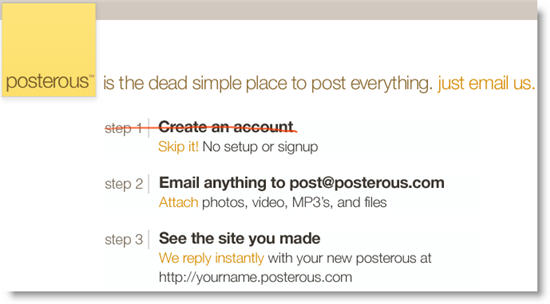
But if you feel too lazy to write more than two paragraphs and don’t want all the hassle of having to create a user accounts, use an online editor and fiddle with weird codes every time you want to link to a photo or video you like, try Posterous instead. Posterous is a perfect example of micro-blogging, a variety of blogs we mentioned a while ago whose main characteristic is simplicity. Rather than publishing long posts after a long research of several different sources, micro-blogging focuses on quick posts, almost like Twitter messages, only with multimedia support and no character limit.

Among the dozen different micro-blogging services you can use, Posterous stands out for its ease to use. First, you don’t need to create a user account. Second, you can publish posts by email. And last but not least, you can user a really handy bookmarklet to share photos, videos, online documents and much more.

Posterous: Microblogging service for lazy bloggers

So, all you have to do to start using Posterous is: send your first post by email to post@posterous.com. The system will immediately reply to you with a temporary domain name and the link to your newly created posterous. You can then visit the website, protect it with a password, pick a subdomain and configure some settings.

I liked Posterous for many reasons: it’s one of the easiest micro-blogging services I’ve ever seen (that bookmarklet is simply gorgeous!), it’s great to share stuff with family and friends (by creating a shared posterous with multiple editors) and can also be protected from prying eyes by marking it as private. So if you’ve always wanted all the advantages of having a blog, but without the hard work, don’t think it twice and create your posterous now! Meanwhile, you can always check mine out…

“Conficker” style botnet appears on the Mac

symantec logoDuring the recent Conficker scare, Mac users could at least sleep easy that their systems were in no danger of being infected. That may no longer be the case however according to security experts Symantec.

Although it was first spotted in January, Symantec have examined it in further detail and claim to have discovered a botnet named OSX.Iservice that hid itself in pirated versions of Apple’s iWork ’09 and Adobe Photoshop CS4 and were shared on a bitorrent network.

Symantec announced that:

OSX.Iservice is an interesting piece of malware — not only does it make use of Mac OS internals, but it is also the first Mac botnet that we are aware of.

As described the The Register, an infected user will commonly experience that their Mac CPU resources are permanently running at 100% as the botnet links-up with other infected Macs. The scary thing is, OSX.Iservice (nicknamed iBotnet by Symantec) is the same type of thing as the Conficker botnet on PCs that has wreaked such havoc across the world. The good news is that it only reached around a 1000 Macs before it was identified and removal is simple. Also, unlike a PC virus which can infect a computer by simply clicking on a link, iBotnet requires users to double click on a file for it to get into your system.

It’s natural that hackers will increasingly target Macs as their popularity increases and sales of PCs sag. There is after all a hell of a lot of money to be made from cyber crime. However, it’s also natural that security software developers such as Symantec will seek to “heighten awareness” of such events in order to encourage Mac users to buy their security software so you sometimes have to take news like this with pinch of salt.

Macs are still much safer than PCs but maybe the moral of this latest scare is to be very careful opening files that you have downloaded from dubious sources.

Software to send you to sleep

Software to send you to sleepIf you’ve ever suffered from insomnia then you’ll have probably experimented with all kinds of ways to help you get to sleep. If you’ve tried counting sheep, going for a walk, or listening to Jeff Buckley and you’re still wide awake then switch on your computer and download some sleep aids. There are many apps out there specifically designed to send you to sleep, or to make sure you have ‘quality’ sleep. Here is a selection of the best:

BrainWave Generator – Plays a binaural note through your speakers or headphones that actually changes your brain frequency to the state required to induce sleep.

White Noise Sleep System: Does a similar thing to BrainWave Generator, only with more natural-sounding noises. These noises can be programmed to play at specific times.

Pzizz – Mac-based ‘power nap software’ that offers a natural way to boost your energy levels. It combines NLP with music, sound effects and a binaural beat to induce a wonderfully relaxed state.

Sweet Dreams – Helps you get to sleep to the sound of music. It can be set to reduce the volume of your PC speakers gradually, which is conducive to falling asleep naturally. Unless you’re listening to Megadeath.

The Graveyard – Not officially a sleep aid, but a very, very boring game that will quickly have your eyelids succumbing to gravity. You play an old lady walking around a graveyard listening to music and sitting on benches. Zzzzz