Friday Timewaster: Higher

You may have seen images of a house flying under balloon power somewhere recently, and I have no idea how influenced by that Higher is, but I can tell you this a hypnotically relaxing game. This is a free, Flash based browser game. Starting on the ground, rolling your cursor over passing balloons will slowly raise you into the sky, which is full of mines! You can click and hold the mines to move them out of the way, or preferably into each other, thus clearing your path to the stratosphere and beyond. If you need to move left and right, you can do so using the WASD keys. Space pauses, and you can click on ‘upgrade’ to exchange the points you’ve one for house upgrades that will take you even higher than before.

After a couple of minutes you should get the hang of Higher, and it then becomes a really engrossing game, with you constantly managing your balloons and shifting mines out of the way. The pause is a big relief, and your progress is automatically saved as long as you don’t delete your browser history.

The essence of the web or the height of exploitation?

Way back when, at the very beginning of home computing, you had two options for obtaining software. You could buy it, or you could buy it.

Luckily, things have changed. Companies like Google and Mozilla started to do something that was completely unheard of – something that would really irritate giants like Microsoft. They began to produce open-source services and software for large-scale distribution. Suddenly, you didn’t have to be a slave to the big boys – unless you wanted to. Open source went hand in hand with other free things. Crowdsourcing. GPL. Suddenly the Internet looked like a very different place. Thousands of people were working together to bring computing to everyone. Cooperation and free access were the mainstays of the movement.


gnu.png


The history of open-source software is heart-warming. It is also just that – history. Things have changed, and companies like the ones mentioned above are now huge corporations with multi-million dollar turnovers. They have money. They have fame. They have power. Is it still fair for them to ask other people to do their work for free?

Don’t get me wrong. I love free software, a pretty major requisite for working at Softonic. The other day I was browsing through the latest software news when I noticed an ad for a design challenge from a big-name company. The competition invited users to overcome a design problem with tabs and, although I found it hard to pin down the precise details, the winning solution would have a Creative Commons Attribution license. This means that the company in question, or anyone else, would be free to ‘remix’ the solution for their own use. And the reward for providing this solution, this raw material? Money? A job? A holiday in the Seychelles? Nope. As far as I could see, their name would be mentioned in connection with the solution. Continue reading “The essence of the web or the height of exploitation?”

Ask OnSoftware: What are Augmented Reality apps?

An interesting query from one of our (anonymous) readers on a topic which has even cropped up in our editorial meetings:

Hi! I’ve been thinking about buying a smartphone, and one of the features I’ve heard people talking about on mobile blogs is “Augmented Reality”. What is that, and why is it useful? Should it affect my choice of phone?

Though it seems like something of a current buzzword, Augmented Reality as a term was actually coined in the 1980’s. In simple terms, Augmented Reality – also called AR – means the enhancement of what you have around you by adding a layer of data to it. In other words, you can use AR to make your surroundings ‘smarter’ – pointing out places of interest, for example.

[youtube]http://www.youtube.com/watch?v=nkPHDMVxKn0[/youtube]

On my HTC Magic Android phone (AKA the myTouch 3G), I’ve tried out a few of the more popular AR apps and I can honestly say that while I don’t use them 24/7, knowing that I have them to hand is a great feeling. Wikitude AR is the first Augmented Reality app I tried and its results were impressive. Simply point your phone’s camera at anything you like and Wikitude combines GPS location, your phone’s internal compass and a variety of data streams (most notably Wikipedia) to provide you with a wealth of information about what you’re looking at. A newer competitor, Layar, performs similarly but with the advantage of being free and open – meaning that anyone can add their own data layer to it.

[youtube]http://www.youtube.com/watch?v=8EA8xlicmT8[/youtube]

Another application, Google’s Sky Map, may not be considered to be a classic use of AR but in my opinion it’s a great example of what Augmented Reality can do. Using it to locate and name celestial objects is actually really fun and enhances a fun hobby. Continue reading “Ask OnSoftware: What are Augmented Reality apps?”

Today’s downloads for Windows, Mac and Mobile

Crossover Games logoMac: One of the only bad things about switching to Mac from Windows is the loss of games. Despite everything, PCs are still more popular than Mac for gaming. CrossOver Games comes from the same makers of CrossOver which allows you to run many Windows applications on your Mac in a virtual environment. Like CrossOver, CrossOver Games is designed for those with little technical knowledge and holds your hand throughout the setup.

Windows: Believe it or not, there are people who need to be reminded of when it’s time to leave work… and TimeStamp is the perfect app for them! This cute little program lets you mark the time you start work and the time you finish as if it was a real punch clock – it even features a “punching” sound effect. A great way to control your working hours.

Mobile: Take control of nitro charged monster trucks, and charge of danger filled courses in Stunt Car Racing 99 Tracks. This is a 2D game, where the aim is to compete courses in the best time possible, with the highest score. Mix care with speed for the best results, there is a surprising amount of subtelty needed here to succeed!

Does the tech industry care about sustainability?

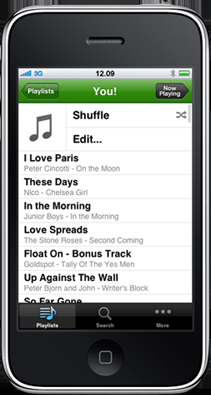
What got me started thinking about this most recently was testing Spotify mobile, for Android and iPhone. The high quality streaming service means users needn’t carry their music collections around on their devices, just open Spotify and listen to whatever they want. I find it hard to believe that streaming all that data is an efficient way to listen to music.

Old heavy industry has a poor environmental image, but do new high tech industries do much better? We don’t imagine smoke stacks and poisoned lakes etc when we think of web 2.0 (or 2.1, 3.0…), but is there any evidence this industry thinks about the future of the planet any more than the old industries?

With the Spotify mobile apps one thing becomes quickly obvious – streaming to your phone hits your battery, much more than listening to your personal library would.

I have a contact who works with design sustainability in the UK, and after a short discussion about Spotify, his answer was unequivocal: “Digital streaming has the look of another clever technology that is not good for us“.

In essence it’s because when consuming media ‘locally’, you only have to download it once, and can then access it as many times as you want, only using the energy of that one device. But with streaming services, every time you access media you are consuming more energy in the sending and receiving  of information, the server running at the other end and your device too. That uses more energy.

We are supposed to be cutting our energy consumption dramatically over the next decade, and yet are developing new technologies that are obviously less energy efficient. I’m picking on Spotify because it’s new – video services like Voddler would undoubtedly be worse, and any streaming service is essentially wasteful. These services are convenient, and people love what they can do, but shouldn’t convenience be secondary to sustainability? The idea of downloading content that is then “thrown away” immediately after use is dreadful, after all.

I read many tech blogs daily, and the environment is basically off the radar, as if it’s not their concern. It is everyone’s concern: if sustainability and energy efficiency aren’t part of your development and design decisions in the 21st Century, you are designing irresponsibly.


999 free FILEminimizer Pictures licenses to mark 9-9-9

fileminimizer_pictures_thb.pngBecause any excuse is good enough for a celebration, today we’re celebrating that according to our calendars, today’s the 9th day of the 9th month of 2009. To mark the day, we’re giving away 999 licenses for the brand new program FILEminimizer Pictures.

FILEminimizer Pictures is a handy utility which lets you compress images, significantly reducing filesize without losing much in the way of quality.

How do I get my license?

To get a license for FILEminimizer Pictures all you have to do is leave a comment on this blog post, making sure that you include a valid email address.

UPDATE: there was a great response to this giveaway, and as of Wednesday afternoon, we’ve now run out of licenses. You can buy the full version from Softonic here.

file-license-1.png

The program is priced at €24.95 (€17.22 from Softonic) but, thanks to the developer (and OnSoftware!) you can get the full version for free. Hurry up, and don’t forget to tell your friends. The offer is open until September 30th, or when the licenses run out.

Simple WiFi hotspot hacks

Everybody needs hotspot Internet access from time to time, but have you ever thought about how to make it as safe and efficient as possible? There are lots of hacks that even a beginner can use to get the most out of this resource, starting with help tracking those elusive hotspots down…

antenna.jpg

If you need a Wifi connection but aren’t sure where to look, don’t worry! There are plenty of tools that mean you won’t have to hang around in the street, looking like someone who is up to no good. Boingo is one example, a service that gives you access to the hundreds of Boingo hotspots around the globe. The only problem with services like Boingo is that many require membership and/or subscription, which isn’t exactly what you want to hear in your time of need. NetStumbler is a no-subscribe alternative, but I think it’s always good to have a few on hand, because hotspot finders are famously finicky.

locked_gate_2.jpg

What about safety? Are you sure that no one is taking advantage of the fact that you are taking advantage of some free Internet? You’ll need to protect yourself from possible attacks, and luckily there are plenty of programs that will help you do just that. Hotspot Shield is a perennial favorite, re-routing your IP address through a VPN (virtual private network) connection of its own. This blurs your connection’s origins, making it much harder to hack.

As these programs work by making your IP address a little hard to pin down, they also have another, unexpected benefit. Many of the US’s most popular websites – such as Hulu and Pandora – are not available outside of the country. These companies know whether you are on American soil by – wait for it – looking at your IP address! Obviously, if they can’t tell that you’re not in the US, they can’t prevent you from accessing their sites, a surprise that makes IP based-hotspot shields twice as attractive! Continue reading “Simple WiFi hotspot hacks”

Friday Timewaster: Canabalt

Canabalt is a pretty simple proposition – you have to make a daring escape. From where or what you’re never told, although the scenery might give you some clues. It’s a one button game – your tuxedo-ed protagonist runs automatically, and you need to jump to avoid falls and obstacles. It gets progressively faster, and if you die, you start again. It’s not clear if there’s an end, or you are just trying to get a high score (in meters). It doesn’t matter – with its great music, sound effects, and enigmatic black and white widescreen presentation – it’s just cool.

How to: Fix Mail problems in Snow Leopard

Apple Mail logoLast week I looked at a few potential pitfalls to watch-out for when installing Snow Leopard and asked you to report any new ones you’d discovered. Overwhelmingly, you identified Apple Mail as the main causality with many users reporting they either can’t send anything (some receiving the message “Error 54: Connection Reset By Peer“) or that it simply crashes on opening. How on earth Apple didn’t test this is not clear but as some of us at Softonic think, maybe they just presumed only dinosaurs use a Mail client nowadays 😉

As regards sending problems, it may not be Apple’s fault however. It seems that it could be related to a SMTP issues specific to different ISPs. Obviously, there’s no way that Apple could have tested Mail with every ISP in the world beforehand. One Apple forum user explains:

With some ISP, notably those that are cable, the SMTP is not separately authenticated, but rather is trusted based upon the IP address of the Modem they provide you. For such ISPs and SMTP, the authentication must be set to None, and no password or username enter for the Outgoing Server. It is simple for Mail to guess wrong about this, and you must set it right in the settings for the SMTP.

However, other uses have reported that changing SMTP settings still hasn’t worked for them. Here’s a collection of suggestions to help you get Mail working again:

Update SMTP Authentication

This is Apple’s only official response on issues related to sending problems. Go to the “Mail” menu and select “Preferences”. Click “Accounts” and then select the account the one having problems. From the SMTP server pop-up menu at the bottom choose “Edit SMTP Server List”. Click “Advanced” and then select the “Authentication” pull down menu and select the appropriate authentication type (from your ISP or the Mail Online Setup Assistant). Fill in the username and password and click OK.

Edit Outgoing Mail Server

Go to “Mail”  and “Preferences” and select “Edit Outgoing Mail Server”. Select “Advanced” and then change the radio button to Custom Port 25 (depending upon your ISP). Se the Authentication to “None” and click OK.

Move Mail folder to desktop

Sounds simple but apparently it’s worked for a number of users. Locate your mail folder in “/username/libary” and then move it the desktop. You can then import your mail messages by going to “File” and then “Import” and browse to the Mail folder on your desktop. You may find your mail is a bit disorganized after importing but you’ll just have to put everything back in it’s right place and folder manually.

Repair Permissions

Ideally this should be done just before and after your upgrade to Snow Leopard. If you’ve already upgraded however, you’ll just have to use Disk Utility to repair them afterwards.

Use Time Machine

If all of the above fails, then just use Time Machine to rollback to reliable old Leopard.

Photoshop tutorial: How to clone yourself

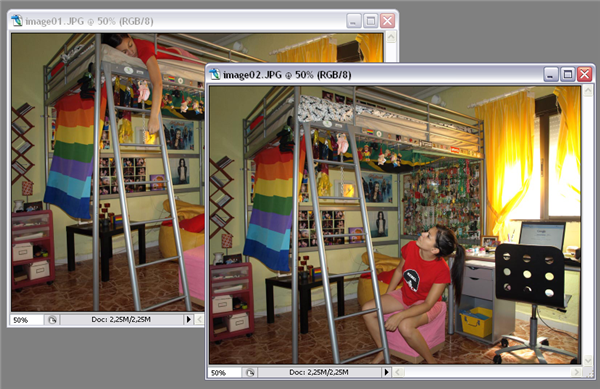
A couple of days ago I checked my niece’s website and was surprised to see a really funny photo in which she appeared twice, as if she had a secret twin sister I didn’t know about. Later on she told me that it was a Photoshop effect thanks to which you can clone yourself in a picture. She explained me how to do it, and it’s actually much easier than it seems! Simply follow these steps and you’ll see:

1. First of all, you need to take a few pictures of yourself. A couple of things to take into account in this photo session: first, they should all be taken in exactly the same place, without moving the camera a single inch; and second, they should all have the same light values, so configure your camera settings accordingly. Take as many photos as clones you want to create, posing in a different position each time.

Photoshop tutorial: How to clone yourself

2. Open all the images in Photoshop. Select one of them with Ctrl+A and paste it on top of another, so that it’s added as a new layer. Continue reading “Photoshop tutorial: How to clone yourself”