Manage and edit file associations in Windows

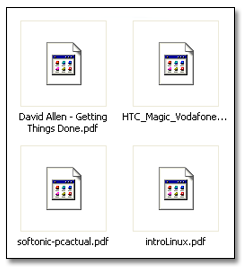
Manage and edit file associations in WindowsYou may have seen icons like these ones before. Don’t worry, there’s nothing wrong with your computer.  They just indicate that there’s some kind of problem with that specific file type: either you don’t have the appropriate application to open it, or the file extension hasn’t been associated yet – that is, Windows doesn’t know which program to use to open them, even if it’s already installed on your system.

Fixing this issue is easier than it seems: it only takes a couple of minutes and doesn’t require extended computer knowledge. All you have to do is double click the file as if you were actually going to open it and the system will display a dialog window asking you which program should be used. The question has two possible answers:

Manage and edit file associations in Windows

Continue reading “Manage and edit file associations in Windows”

Two turntables and a microphone? You only need your iPhone

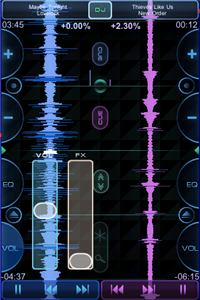
Touch DJ is a recently-approved MP3 mixing app for the iPhone. At $19.99 it’s certainly not cheap, but it’s one of the most impressive apps I’ve ever seen for Apple’s device.

Really convincing you that the iPhone is a powerful little computer, Touch DJ is almost as good as desktop mixing applications. Currently in version 1.0, it’s missing a BPM counter and the library has to be imported – it can’t access your iTunes library. Nevertheless, it makes incredible use of the minimal real estate on the iPhone. There’s a wealth of useful information on screen, but it doesn’t feel cluttered.

To get around the fact you can’t pre-listen to tracks while playing, Touch DJ uses innovative ‘visual mixing’ to allow syncing of your tracks. Bass sounds are highlighted on the moving waves, and the beat makes them flash. Using this you can – with some practice – beat match very well and do some impressive mixes. There are also effects, spins and the touch interface means manipulating tracks feels very tactile.

It’s not a magic DJ tool – you still need practice and it’s essential to know your tracks back to front to mix them well, but just the fact there is such a complete application on the iPhone is amazing. Read my review here, and check it out at the iTunes store.

Calibre: the best ebook manager out there

Last year I received the best birthday gift ever: an ebook reader. For someone who likes reading as much as me, and can’t help buying more books all the time, having an ebook is almost a basic need. And for those of you also own an ebook reader, Calibre is definitely a must-have app.

Calibre: the best ebook manager out there

Calibre is like iTunes for ebooks. It’s a cross-platform, feature-rich manager that helps you organize your collection of ebooks in a snap, adding the ebooks from your hard drive folder, downloading their metadata from the Web and displaying them in a handy list – though you can also view your collection in a flashier, Coverflow-like style. Continue reading “Calibre: the best ebook manager out there”

CCleaner’s advanced options – should you risk it?

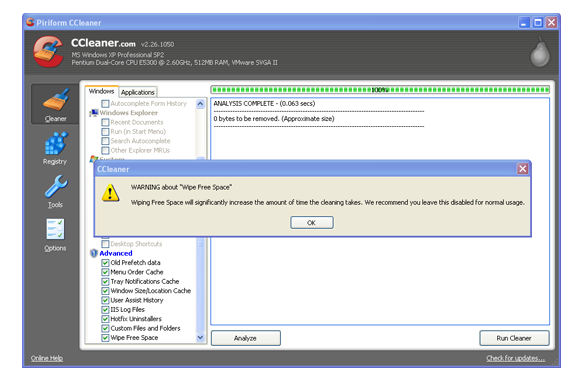
So you’ve listened to the warnings and read the horror stories, but you’ve still come back for more. You must be a brave soul, because CCleaner‘s advanced options are pretty scary.

ad02.png

I’ll say it again, while CCleaner will positively shout it – don’t use the Advanced options unless you are very, very sure that you know what you are doing. These options are precisely the tools that could do some serious damage to your system if used wrongly. Bearing this in mind, let’s go through what some of these Advanced bits actually do.

Advanced

Old Prefetch Data – this is actually a controversial option. Pre-fetch files are basically parts of programs that Windows caches (‘pre-fetches’) so they are easily accessible when needed. Some people argue that over time the function becomes overcrowded, hence the need to delete. Others argue that Windows deletes them automatically, so there is no need. Nobody seems to be able to agree, so this one is completely in your own hands.

Menu Order Cache – this is where Windows stores information about the items that appear or have appeared in your Start menu. As CCleaner warns, any custom preferences will be reset, although nothing will actually be removed.

Tray Notifications Cache – again, where Windows stores information about the items that appear or have appeared in the Tray Menu. If you have any special set-up, it will be reset. Continue reading “CCleaner’s advanced options – should you risk it?”

How to calibrate an external monitor on a Macbook

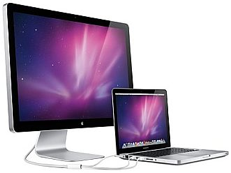
macbook-monitor.pngUsing an external monitor with your Macbook is beneficial in many ways. Firstly, it’s much easier on your eyes to use a bigger display than a Macbook screen. Secondly, it makes it much easier to spread-out your work and organize your desktop. Thirdly, if you are video editing or need a large working space, an external monitor expands your screen estate. Finally, it can extend the lifetime of your Macbook monitor because you can work with your Macbook closed.

Note that Macbooks are designed for use with DVI monitors but you can connect a VGA monitor by using a Mini-DVI to VGA Adapter cable.

However, when you attach an external monitor, you might find that the colors and resolution are a bit amiss. Fortunately, OS X has a very simple to use calibration tool which makes sure you are getting the best out of your external monitor.

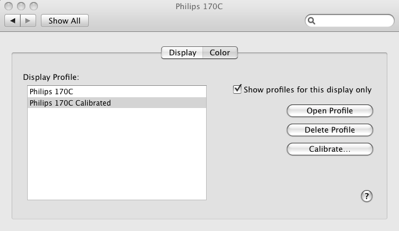
To open the screen calibration tool go to your System Preferences and select Display.

Select the Color tab and then Calibrate:

scb1.png

The calibration wizard then takes you through a series of configuration tests. The first step is to ensure that your contrast and brightness settings are set to their highest levels on your monitor: Continue reading “How to calibrate an external monitor on a Macbook”

Remote control your computer from your iPhone

Imagine being able to access and control your computer from anywhere on Earth using your iPhone. Sounds pretty futuristic, right? Actually, it’s not because there are apps  available already that let you tap into your PC or Mac on your phone. And these remote control apps do a lot more that just allowing you to view your files and folders. In fact, they actually let you use your operating system interface, running apps, carrying out commands, and even typing. Essentially this means you can turn your iPhone into a PC!

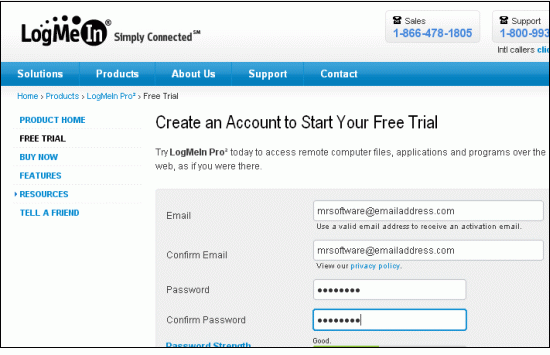
1. The creme de la creme of remote access apps is LogMeIn Ignition. To use the service, you first need to sign up for a free LogMeIn account on the developer’s web site.

Step One

2. Now you should download the LogMeIn desktop client when prompted and run the installer. Once it’s running, you’re ready to starting accessing this machine. If you like, you can install multiple clients on multiple computers, then you can access all of these on your iPhone. Continue reading “Remote control your computer from your iPhone”

Starting a business from home – as cheaply as possible!

If you’re thinking about starting a business from home, congratulations! It’s a great challenge for the new year and could turn into a lucrative venture. You’re brave too, starting out in difficult financial times, which is why we’ve decided to make things a bit easier by gathering together some of the best free, home-business oriented tools around.

wp-logo.pngFirst, make sure your clients know you exist. Unfortunately, free business card software is thin on the ground. Luckily it’s easy to order them online cheaply and, in the meantime, you can download a trial version of a program like Business Card Designer Plus or Advanced Business Card Maker and experiment with possible designs and layouts.

Having a website is crucial. If you fancy building your own, take a look at a tool like MoreMotion Web Express. Bear in mind that you can also use a blog as a website; WordPress is a great place to start. It’s easier than making a website and, if you have little or no experience, the finished product is much more likely to look professional.

skype2.pngNow they know you’re there, make sure your public can get in touch! Skype is the first stop – there’s a professional version, but it’s oriented towards multiple-employee situations. It’s good to aim high, but you’ll have to wait a while for that! If you’ve decided to use Outlook (and many don’t) there are some great tools out there to keep your inbox spam-free and under control.

Once your name is out there and the emails and calls start pouring in, you’ll need tight management to make sure everything’s under control. For a start, don’t even think about spending your hard-earned cash on Microsoft Office. OpenOffice will do a perfect job and is completely free, while Open Workbench will help you keep a close eye on your projects. Sooner or later, the money’s sure to start pouring in. Make sure you’re up to the accounting with a suitable program – GNUCash is sure to do a great job!
Find hidden regional themes in Windows 7

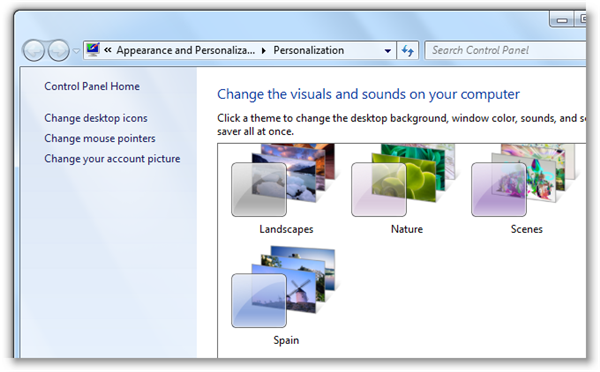
Windows 7 features a nice collection of themes with which you can easily change the look and feel of your operating system. You can find them under the Personalize menu, right-clicking anywhere on the desktop. Depending on your area, you’ll get different sets of location specific themes – in my case, I have a Spain set with nice wallpapers displaying the Guggenheim Museum in Bilbao, the windmills in La Mancha and the coves of Majorca.

Find additional regional themes in Windows 7

But these are not the only regional themes you can use in Windows 7. There are other additional themes you can easily find in the system. Click the Start button and enter C:\Windows\Globalization\MCT in the Search field. Continue reading “Find hidden regional themes in Windows 7”

CCleaner: avoiding the perils and the pitfalls

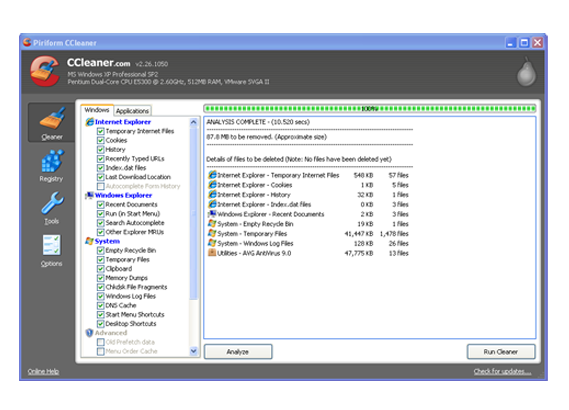
ccleaner1.pngCCleaner is one of the most popular apps on Softonic, and with good reason. It’s a great tool to clear garbage from your computer, speeding it up and protecting your privacy.

Download CCleaner

Unfortunately, if you use it carelessly, CCleaner can sometimes do its job a little too well, cleaning away stuff that’s actually pretty important. Looking around the internet for examples, I found this hilarious plea for assistance: “Help, CCleaner’s erased my whole iTunes library”! That’s some pretty careless cleaning!

The first piece of advice for the safe use of CCleaner is simple, but it’s still something that people forget. If you don’t know what something is, don’t erase it! I thought I’d run through some of the Windows options, briefly describing the less familiar so that you can decide whether or not you want to erase them. Ultimately, the decision to erase is yours, not CCleaner’s, so think carefully before making any decisions!

ccleaner2.png

Internet Explorer

Index .dat Files – these files are related to Temporary Internet Files and, like them, record the websites you have visited. Continue reading “CCleaner: avoiding the perils and the pitfalls”

Friday Timewaster: Paradox embrace


Paradox Embrace is a puzzle platformer in which you travel between different times to complete puzzles.  You character can flip between three eras, using portals that exist amongst the platforms.

To progress you’ll need to find keys and potions, which will only be accessible in particular eras. You may need to move from the future to the stone age to avoid a machine, for example. While it could be very confusing trying to essentially play three games at the same time, the creators have put in a great hint system that keeps you on target, without making things too easy.

You can play Paradox Embrace from your browser, and it requires Flash.  It’s not a short game, and thankfully your progress is automatically saved, so as long as you don’t clear your browser history, you’ll be able to play through at your leisure.