Skype – not just for computers!

I love Skype and use it all the time, and I bet lots of you do too. I have to confess that I use the standard laptop + webcam combo most often, but just the other day I was reminded of all the other ways there are of using the service. Did you know you can use Skype on your iPhone? PSP? Your TV?!

skype1.png

Despite the options available, most people use Skype on their home computer. The famous VoIP developers have all angles covered, from Windows to Mac and even Linux. There’s even a business version for people who want to use it professionally – and they should. Businesses that advertise online but have no Skype support drive me crazy!

Obviously there’s no use limiting such great technology to your home, which is why Skype is also available for iPhone, Windows Mobile and Symbian. Regardless of where you are and what cell phone you’re using, there’s really no need to miss out on the wonder-app.

I wouldn’t be surprised if you already knew about those Skype options – you are technology fans, after all – but what about Skype for your PSP? As long as your PSP is from the 2000 series, and you have a WiFi connection, headphones and a few other bits, you can use Skype as if you were at home. You’ll have to set up the service first, but once you do, you’ll have another way of calling family and friends for free.
combo1.png

I’ve saved the best until last – Skype on your TV. Ok,  it’s not possible right now, but it will be very soon. Just think – your boy/girlfriend’s handsome/pretty face in 48” HD, or long conversations with your grandmother while relaxing on the sofa – it’ll be almost as good as being there in person! Skype are slating this spring for the release of the Skype-enabled TVs and special webcams you’ll need, so watch this space!

Should developers charge for updates?

Apple Software Update

In the many hours of software research and reviewing we do at Softonic, one issue that constantly crops-up is that of paid software updates.

Personally, I’ve lost count of the number of times I’ve read complaints by disgruntled users that they are being asked to shell-out yet more cash to update an app.

Currently, developers can charge what they want for any kind of update even if it’s a simple bug fix or security update meaning they’ve got users over a barrel. Of course, in reality, most developers aren’t as unscrupulous as this and usually only charge when they’ve added significant new features to a product.

However, this is where the controversy lies. What constitutes simply a new feature and what constitutes a radically new product? Recent trends suggest that users are becoming increasingly demanding about what should constitute a paid update and how much they’re prepared to pay for it. For example, almost half of all iPod Touch users refused to pay the $5-10 to update to iPhone 3.0. Chikita Research found that:

Despite its hype, iPhone OS 3.0 had very little to offer iPod Touch users. Push notifications? MMS? Tethering? Essentially useless on a device that relies on WiFi for a connection. iPod Touch users are essentially asked to pay for copy/paste, in-app purchases, and the ability to buy a segment of the latest apps from the app store.

Apple meantime insisted that the update did add new functionality to the iPod Touch in a typical example of how user and developer opinions differ. Continue reading “Should developers charge for updates?”

How to: rip music from your iPod

The moment your friends and relatives learn you work for a software distribution company like Softonic, they immediately assume you know every single program that exists on Earth. And “How do I rip music from my iPod?” is one of those classic questions you’re constantly being asked, together with “how to make Windows start up faster” and “I think I have a virus, can you help me?”.

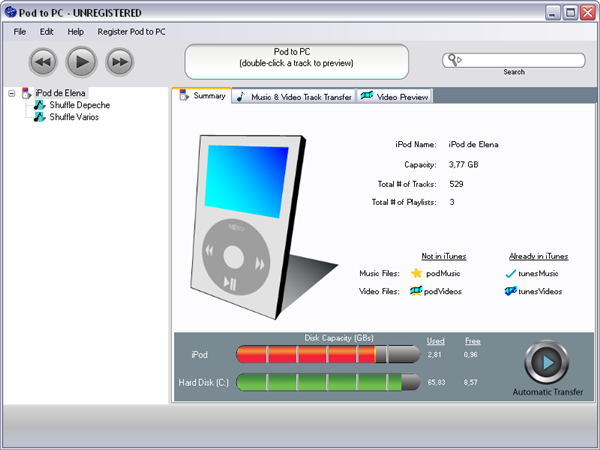
But talking about ripping music from your iPod, it’s easier than it may seem. All you need your iPod, the USB cable to connect it to your computer and Pod To PC. This app lets you manage the contents of your iPod, as well as transfer any selected tracks from the Apple device to a folder on your computer without any hassle.

Ripping music from your iPod

After plugging in your iPod to the computer and launching Pod to PC, you’ll see the program’s main interface with a summary of the iPod’s features – pretty much like the iPod screen on iTunes. Click on the Music & Video Track Transfer tab, and you’ll see a list of all the contents of your iPod. The list can be sorted in several ways, and the program also includes direct access to the  playlists stored on the iPod and a built-in search tool to locate a given song more easily.

When you’ve selected all the songs you want to copy from the iPod to the computer, hit the Transfer button. The destination folder for those files – as well as the name they’ll be stored with on your hard drive – can be set up in Pod to PC’s configuration menu, in Edit > Options.

There’s a catch though: Pod to PC is not free, and the trial version only allows you to transfer 10 songs at a time. But $19.95 is a reasonable price to pay, if it allows you to recover all the music from your iPod.

Social location apps: Gowalla vs foursquare

GPS based social-location apps are set to be this years breakout services. Currently it seems that foursquare and Gowalla are the main contenders. Both offer similar, free, services.

Like Facebook, you need to invite friends who can use the service. Then you’ll have a community of people whose location you can see. Wherever you are, you’ll be able to see the places other users have visited and created on the service. When there, you can ‘check in’, which gives you points, or wins you a virtual gift or achievement.

With Gowalla, you collect stamps when you visit a spot, and can collect items other users have left around. This is all added to your Gowalla Passport. You can follow what your friends are doing too. There are also ‘trips’, which are like missions – visit all the places in a trip and you can win virtual pins for your passport. I love the design of Gowalla’s interface, but the community is still a bit small, so the experience is a bit cold. I have to convince all my iPhone owning friends to use it too.

Foursquare isn’t as nice to look at, but its community is more developed. Having said that, here in Barcelona there aren’t many users of either service yet! The competitive nature of foursquare is more obvious – it offers stats on your friends and you, so you can see who has the most points. Visit a place more than your friends and you’ll be crowned ‘Mayor’ of that place! Check into wherever you are, and your friends will see and be able to recommend stuff for you to do. You can also learn about their habit, and maybe places you didn’t know about.

Both Gowalla and foursquare are promising services, but its difficult to recommend one over the other! Gowalla is more fun, foursquare feels more functional. If Facebook is a model for success, then foursquare is most likely to be the service people choose. The best one will be the one with lots of users, and importantly, the one most popular in your circle of friends.

Best Twitter apps for iPhone and BlackBerry

I still find it a bit weird that there’s no official Twitter client for iPhone or BlackBerry. I mean, what do all those guys at Twitter actually do all day that means they haven’t got time to knock up a couple of mobile apps? I guess we shouldn’t worry too much because there are several decent applications that let you tweet from your phone. There are plenty of duds too, so here’s a cut-out-and-keep guide to the best.

iPhone

TweetDeckPorted from the popular desktop client, TweetDeck for iPhone is a powerful command center from where to preach to your minions on Twitter. It uses a column-based interface that lets you quickly swoosh between friend feeds, searches, direct messages, etc. You can add and remove columns at will, helping to make for a very personalized tweeting experience.

TwitterificTwitterrific is another client that offers a bevy of features locked within a clear and concise user interface. The app, which supports multiple Twitter accounts allows you to define auto-refreshes of your feed, and checking links in tweets is really well integrated. There are options to change the appearance too, as well as three settings for font size. You can also post your location and easily tweet images taken on your iPhone.

TwitterfonA slightly less elaborate choice is TwitterFon, which lets you tweet quickly from a streamlined (if slightly dull interface). Although it doesn’t pack the same depth of features as the other two, it’s a bit easier to navigate. Besides allowing you to tweet normally, TwitterFon also lets you post pictures from your iPhone, and links from Safari using a bookmarklet.

BlackBerry

TwibbleIf you’re a BlackBerry user looking for a Twitter client then I recommend you have a look at Twibble. This Java-based app is perfect for keeping in touch with your followers on the go. Thanks to its location-aware features, Twibble lets you quickly tweet details of exactly where you are in the World to anyone who is following you. Likewise, you can also track the location of the people you’re following. The app supports text templates, and allows you to create shortcuts to make handling the program much easier.

openBeakOpenBeak (once known as Twitterberry) is a pretty easy-to-use solution which is great for fans of minimalist interfaces. It comes with integrated camera support, so you can take shots on your BlackBerry and post them to Twitter without leaving the application. It lacks advanced features but lets you do all the basics such as checking your friends, yours and the public timeline, then replying to posts, retweeting them, or add them to favorites, all with just a couple of clicks.

UbertwitterIf it’s a feature-heavy client you’re looking for then try ÜberTwitter. The client offers location features without the need for GPS, and lets you see everyone who is tweeting around you. Besides its integrated camera support, ÜberTwitter also lets you send videos from your device embedded into Twitter.  The app even gives you the option to update your Google Talk status automatically every time you tweet, which is pretty cool. Be warned, all these goodies do make ÜberTwitter a little more sluggish than the others, though.
Of course, if you find any of these clients to be too much fuss, you can always just use good old Twitter.com in your phone’s browser.

Share any file in Google Docs soon!

Over the next couple of weeks – and it hasn’t happened to me yet – Google Docs will allow you to upload any file to its free gigabyte of cloud based storage.

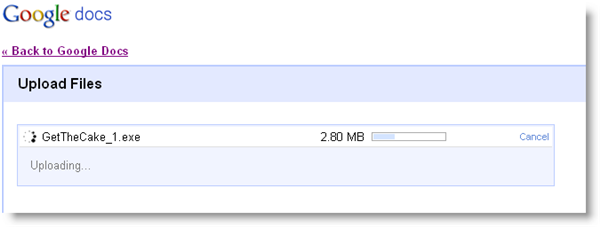
That doesn’t sound very exciting, but it’s a great feature for the already great Google suite. Google Docs is an excellent way to share and collaborate with documents over the web, but until now the type of file you could upload to Docs was limited to document files. You couldn’t share EXE files, for example, and you couldn’t email them either – with the new feature you’ll be able to upload any file, and share it with whoever you want.

Suddenly, Google Docs looks a lot cooler. Some might complain that 1gig is not a lot of storage – Microsoft Live SkyDrive offers 25Gigs – but there is no other company that offers the same range of complementary products, and more importantly it’s where the users are. I think 1gig is fine to be going on with, as is the 250mb files size limit. When uploading files now to Google Docs, it’s much smoother and faster than other sharing sites I’ve tried, like the dreaded Rapidshare.  Dropbox is nice, but it needs installation. With Google, everything stays in your browser.

So, I think this is a great development. It’s not the G-drive that had been talked about, but it’ll really help online collaborative work, and sharing between friends too.

How to: Open ISO files without burning

Virtual CloneDrive logoHave you ever wanted to open an ISO, IMG or CCD file but either didn’t want to burn it, didn’t have a blank DVD spare or didn’t even have a DVD burner? Well you can by mounting the file for free using a virtual drive cloning tool.

Virtual drive cloning means that you effectively create a new DVD drive for your computer – but it exists only virtually on your desktop. It’s pretty much like getting a new DVD drive for free with the added bonus that you don’t have to mess around with DVDs or burners.

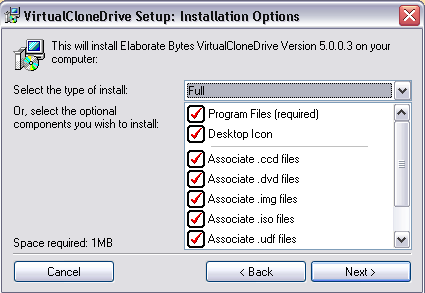
I used the excellent Virtual CloneDrive although you can use any drive cloning app such as DAEMON Tools. When you install it, you’ll be asked whether you want to associate appropriate file types to it such as ISO, IMG, CCD, DVD and UDF files.

Virtual CloneDrive 1

If you don’t intend on using an application to burn discs regularly using your physical DVD drive, it will make your life a lot easier if you select them all so that whenever you encounter one of these file types, Virtual CloneDrive will mount them automatically. Alternatively, you should see an option to mount the files in Explorer or failing that, right click on the target file and select Virtual CloneDrive from the context menu and then Mount. Continue reading “How to: Open ISO files without burning”

Top software for 2010

It’s that time of year again when we whip our crystal ball out of the drawer and take a look at what software is in store for the coming year. We were proved right with all our software predictions for 2009, so I’m trusting the ball to work its magic once again. Here we go with a guide to what to expect from the coming year:

1. Chromium OS

ChroThis was an easy one, because Google has already released the source code for its shiny new operating system. The OS is being touted as the perfect solution for netbooks, because it’s entirely based around the web and thus doesn’t require cavernous hard disk space. We were initially underwhelmed by Chromium when we gave it a run-out a couple of months back, but the OS is sure to look a lot different come the end of the year, and Google’s reputation alone should be enough to convince hoards of people to make the switch to browser-based computing.

2. Internet Explorer 9

IE9For the last few years poor old IE has been kicked, battered and stamped on by web users like a cute puppy who got old. Microsoft began work on Internet Explorer 9 a few weeks ago and unveiled some details of the browser at its Professional Developers Conference in Los Angeles in November. When finally released, hopefully towards the end of the year, IE9 will be equipped with new hardware-accelerated text and graphics to make web sites look better. The new version’s Direct2D browsing technology is designed to significantly speed up web applications, which is necessary if Microsoft continues to push the wonders of cloud computing. Internet Explorer 9 could see Firefox turncoats flocking back to their roots. Alternatively, and more likely, no one will notice much difference in the browser and its release will pass with no great fanfare.

3. Adobe Creative Suite 5

CS5Rumor has it that the new versions of Photoshop, Flash et. al should be with us around April. It’ll be a new era for the design suite because the Mac version has been completely rebuilt in Cocoa, and will no longer run on PowerPC chips. Judging by the sneaky peeks we’ve seen here and from what was announced at Adobe MAX 2009, designers will be whimpering with delight when CS5 finally becomes available. New goodies you can expect from the suite include ‘wet look’ 3D Photoshop paint brushes, native iPhone game compiling in Flash, and a ‘Smart Paste’ tool for Dreamweaver that makes it easier to integrate vector graphics and Illustrator-created content into your web sites.

Continue reading “Top software for 2010”

My Top 5 PC games for 2010

Despite pronouncements of its death, PC gaming still seems to be alive and kicking, even if the consoles get all the headlines! Here’s my pick of 5 games that are worth getting excited about this year.

BioShock 2: One of the most impressive and decisive games of recent years returns, this time putting you in the enormous shoes of a Big Daddy. These huge beasts from the first game look really mean, but it’ll be interesting to see how developers Take Two make that experience as gripping as the shocking first game was.

Mass Effect 2: The sprawling space opera of Mass Effect continues in it’s sequel, released later this month. This action role play promises improved combat and enemy AI, as well as an even more involving storyline that will have you racing around the galaxy once more.

Mafia 2: The wait for a sequel to the 2002 original has certainly been a long one! Taking us back to a fictional city in the US, between 1945-55, Mafia 2 certainly looks beautiful. Crime, car chases and shooting never get old, but will the traditional story of rising through the ranks be interesting in 2010? Continue reading “My Top 5 PC games for 2010”

Uninstall stubborn programs for free with Revo Uninstaller

Revo UninstallerOne thing that I’ve always thought is woefully inadequate in Windows is the Add/Remove Programs console in the Control Panel.

Firstly, I often find that it doesn’t even display everything that’s installed on my computer. Secondly, it usually does a pretty poor job of removing programs because it leaves behind registry entries and temporary files.

More importantly however, if you encounter a program that can’t be removed for some reason, it’s absolutely useless.

I recently had a problem where a program I’d installed wouldn’t uninstall. I simply kept receiving a meaningless Windows error message that gave no clue as to what the problem was. And I couldn’t re-install it until it had been uninstalled from my computer. I usually resort to CCleaner’s program removal tool in such instances but even that couldn’t help on this particular occasion.

Then I tried the free version of Revo Uninstaller and was so impressed, I’m using it as my default removal tool. Within a minute, Revo Uninstaller had not only removed the program but had located and deleted all the registry entries and temporary files that would normally have been left behind.

Using Revo Uninstaller is very simple. As soon as you open it, the main interface displays which programs are installed. Simply select the one you want to remove and Revo proceeds to perform a very through removal process including making a backup point in case anything goes wrong or it removes something you don’t want it to. Continue reading “Uninstall stubborn programs for free with Revo Uninstaller”