First impressions of Opera Mini for iPhone

Opera logoOne of the highlights of our trip to this year’s Mobile World Congress was the chance to see the new iPhone version of Opera in action.

The announcement of the Beta version of Opera Mini 5.0 was conducted in a tentative, almost hush-hush manner. Press were not allowed to take photos or video of the software and Opera made it clear that the new browser isn’t designed to run on jailbroken iPhones, and nothing will be available to download until the app has been sent to Apple and approved. The good news is that we were privileged enough to get a private demo of Opera Mini for iPhone.

Opera Mini will be marketed as a replacement for the Safari browser that exists natively within the iPhone. It’s fair to say that this new offering from everyone’s favorite Norwegian software developer makes Safari look distinctly old and sluggish. The new browser features Opera’s much-copied Speed Dial screen, giving you access to favorite pages with a single tap. These favorites can be synced to any other version of Opera on a desktop or mobile device.

Opera demonstrated the speed of the new browser by first loading the New York Times site in Safari, then in Opera. The Apple browser took a whole minute to completely render the page, whereas Mini did it in just 15 seconds. Opera manages to make speed improvements by compressing pages on its own servers and delivering them at lightning speeds.

The user interface of Opera Mini for iPhone is much the same as it is on other mobile platforms. There’s no zoom button, but a simple tap on an image will enlarge it. Opera has been careful to meet the strict recommendations of Apple’s SDK, including utilizing the built-in keyboard and no button to exit the app.

Opera Mini for iPhoneUnfortunately, the anticipated support for Flash in Opera Mini hasn’t materialized. Go to YouTube and you land directly on the mobile site. Each video opens individually on the phone’s internal drive, as is the case with other versions of Opera Mini.

Multi-page browsing is a lot slicker in Mini that it is in Safari. While the default Apple browser displays a little icon stating how many pages are hidden behind, Opera displays them as tabs, making for a much more comfortable experience.

Overall, we were mightily impressed with Opera Mini for iPhone. It’s very quick and very easy to use, which are the two prerequisites for a mobile web browser. The browser combines the features that made Opera such a success on the small screen, with the technical prowess of the iPhone. Make no mistake, this is a marked improvement on Safari.

Opera Mini is still not without flaws, and we noticed that it displays some sites in their traditional web version, rather than the mobile-ready version. Of course, it’s still in beta, so these things will surely get ironed out over time. For goodness sake, it’s not even on the App Store yet!

[Via: OnSoftware France]
Windows Phone 7: The essentials

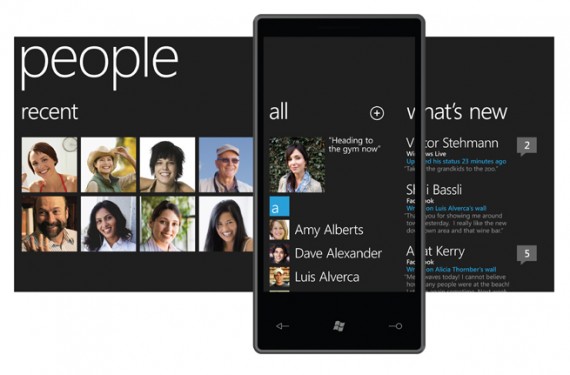
After Microsoft’s keynote on the new Windows 7 Phone, the future of the mobile platform developed by the Redmond company starts to take shape. Let’s take a look at the main characteristics of this new version.

Windows Phone 7: The essentials

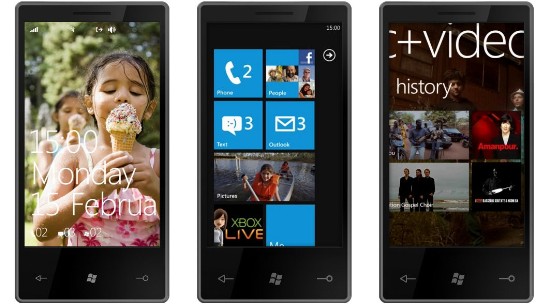
First of all, Windows 7 Phone features a radically different design, much simpler than what we were used to see on mobile interfaces, and particularly on Windows Mobile devices. There are fewer icons and the screen doesn’t feel as ‘crowded’ as on Apple’s iPhone, Android devices or the last generation of Samsung phones; a decision taken and encouraged by Microsoft, which has criticized “those screens covered with miniature icons” from its most direct competitors.

The new Home screen in Windows 7 Phone is divided into several squared areas, each of them devoted to a different topic: calls, text messages, emails, social networks, and so on. These topics can be easily customized and adapted to your needs.

Windows Phone 7: The essentials

Besides the Home screen, Windows 7 Phone is built around 6 main hubs which, when put together, create your digital identity: Continue reading “Windows Phone 7: The essentials”

Today’s downloads for Windows, Mac and Mobile

Download Ad-Aware 8.2Windows: If you’re searching for a reliable tool to protect your system from all sorts of malware, Ad-Aware is the answer. The all-new version 8.2 of this excellent security suite includes important new features such as an email scanner to keep you safe from dangerous attachments, a real-time file scanner that detects malicious files and a rootkit removal system.

CleanAppMac: CleanApp helps you to thoroughly eliminate applications that you may have uninstalled in Mac OS X but that have left behind unwanted files and folders. Normally, when you remove a program, only the application itself is moved to the trash which means that there can be many other files left behind that you’re not aware of. CleanApp makes sure that nothing gets left behind.

PlantsvzombiesiPhone: Tower defense games have been done to death, but PopCap has breathed life into a often dull genre with Plants Versus Zombies. PopCap have taken this incredibly addictive game and put it on the iPhone, with almost everything intact. Utilizing your gardening skills, with the occasional help of Crazy Dave, you have to harvest sunlight to grow an army of plants to destroy the hordes of approaching zombies.

Google Buzz – the fallout

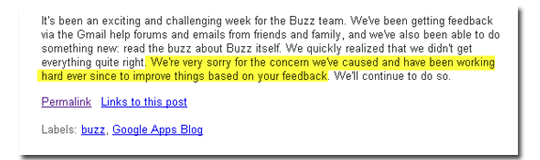
When I wrote about Google Buzz the other day, I maintained that it was a badly thought-out and directionless project. Even so, I didn’t expect the huge backlash in the days that followed – raging blog posts, groveling apologies and even a lawsuit. Has Google really messed this one up?

aplo.png

To their credit, Google have reacted fast. The internet giant has made it easier to disable or remove Buzz by introducing a Buzz panel when you access your Settings or click the “turn off buzz” button at the very bottom of your screen. To protect privacy – the main concern of Buzz haters, it seems – Google have given us more opportunities to block people, and the list of people you are following is no longer automatically searchable from Google. My big gripe – the auto-following – has been discontinued and replaced with an auto-suggest function – but only for first-time users. The rest of us are still stuck with the dilemma of what to do with those auto-awkwards – the people following you who can only be discouraged with a rather harsh block.

settings2.png

As we’ve all seen from Facebook and other internet privacy meltdowns, things can get pretty heated on the web. My guess is that most people don’t really care about privacy – it’s just that the ones who do make a lot of noise. What struck me most about the Buzz fiasco, however, is how Google got it SO wrong. Did the Buzz project manager fall asleep? Did they give the job to a hapless intern? Either way, Google dropped the ball big time. Let’s just hope it taught them a lesson, eh?

Facebook emoticons for chats

Facebook emoticons for chatsFacebook is the ultimate way to keep in touch. You can post on people’s walls, send private messages, share photos and videos, and of course, talk to your friends online on Facebook’s embedded chat tool. The Facebook chat app is quite simple – nothing like Live Messenger – but it works fine and what’s more, supports a wide range of emoticons. You just have to type in the right combination of characters (without the extra blank spaces) to get a tiny yellow face that conveys your emotions in a more expressive way:

Smile: Facebook emoticons for chats : )

Big smile: Facebook emoticons for chats : D

Wink: Facebook emoticons for chats ; )

Happy eyes: Facebook emoticons for chats  ^_^

Laughing: Facebook emoticons for chats >:o

Weird smile: Facebook emoticons for chats : 3

Grumpy: Facebook emoticons for chats  >:-(

Sad: Facebook emoticons for chats  : (

Crying: Facebook emoticons for chats :’ (

Shocked: Facebook emoticons for chats : o

Cheeky: Facebook emoticons for chats  8 )

Continue reading “Facebook emoticons for chats”

Watch and follow the Winter Olympics online

So you’ve visited the Winter Olympics in Google Earth, got your iPhone setup to follow the results but what about the most important thing of all – watching the events live! Well, if you don’t have a TV in the office or can’t get time off work to watch your favorite events, fortunately there are several ways to watch the 2010 Winter Olympics online.

Firstly, check out when your favorite events are scheduled. I like the BBC Winter Olympics Schedule for this.

BBC Winter Olympics Schedule

You can of course also use the Vancouver 2010 Winter Olympics website for this too.

Now for viewing options. Most terrestrial broadcasters in your country are streaming much of the Winter Olympics online so all you need to do is visit the websites of the main terrestrial channels in your country. For example, the BBC is showing live coverage in the UK. Continue reading “Watch and follow the Winter Olympics online”

The lowdown on removing duplicate files

A question we hear a lot around here is “Do you know any programs that will help me do X?”. The problem when it comes to duplicate files, however, is the opposite – the question’s more likely to be: “There are so many dupe programs out there, how do I know which one is best?!”. So what’s important when it comes to zapping dupes?

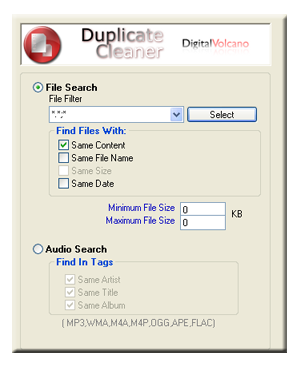
First, make sure you’re using the best tools for the job. If you need to focus on music or images, grab a format-specific cleaner, because it will offer you specific tools for the files in question. If you want a general cull of duplicate files, it’s worth paying attention to how the program analyzes your files. This is especially important to make sure you don’t accidentally delete files that are not actually the same. There are various ways the program will do its job, so have a look at the following before you download anything:

dup.png

Name

This is a simple but not very accurate search. Just think – you’ve saved the same document twice under different names. If you just search by name, you’ll still end up with two copies clogging up your hard drive! Continue reading “The lowdown on removing duplicate files”

Today’s downloads for Windows, Mac and Mobile

Download DVD ShrinkWindows: If you have dozens of movies on DVD and want to make sure they stay as shiny and crisp as the first day you played them, why not backing them up? With DVD Shrink you can easily backup video DVDs to your hard drive and then burn those files to a blank DVD with your favorite burning software. A backup in time will let you enjoy them forever!

AroundmeiPhone: If you’re fed up with asking people where the nearest supermarket is, where to find a taxi rank, or whether there are any decent bars or restaurants in the vicinity, then check out AroundMe. The iPhone software automatically detects your current location and provides one-click access to lists of the nearest banks, bars, cafes, gas stations, and more.

OpenOffice logoMac: Nowadays, there really is no need to pay for Microsoft Office if all you need to do is basic editing of documents, spreadsheets and presentations. Whenever people ask me what I can recommend as a free alternative to Microsoft Office, I’ll frequently recommend OpenOffice.org (now updated to version 3.2). OpenOffice.org is a multi-platform and multilingual office suite that is compatible with all major office suites.

Zombies are the in-thing!

OK, that’s been true for a while, but with PopCap’s release of last year’s Plants Vs Zombies for iPhone, zombies are once again becoming difficult to avoid!

If you feel like getting down with the undead, but find games like Left 4 Dead too gruesome, here are my top three brain-eating alternatives:

1: Plants VS Zombies. If you haven’t played this, download the demo, now available for PC and Mac! Zombies and gardening combine to make incredibly addictive gameplay. It’s part of the ‘tower defense’ genre, but don’t let that put you off as it’s an almost perfect game. Can you afford to miss a zombie Michael Jackson?

2: Attack of the Paper Zombies !!! This free indie game for Windows is a great mix of real-time strategy and the undead, although in this case, the lifeless hordes are also aliens! The pencil and paper graphical style is probably unique for a zombie game too. Download it here.

3: Pixel Force: Left 4 Dead. You may remember that re-imagining things can be a terrible disaster – Planet of the Apes, for example. However, Pixel Force: Left 4 Dead re-imagines Valve’s fantastic cooperative shooter as a Nintendo Entertainment System game from 1986. It feels like the real deal, too. I think the original’s more exciting, but this is still a cool game. No Nintendo required, you can download and play it in Windows.

YouTube Disco: discover new music on YouTube

I already knew a couple of online tools, such as TubeRadio.fm and TurnTubelist, that use YouTube’s impressive video database to create and enjoy custom mixes and playlists. But this is the first time I see YouTube taking the first step towards a music discovery and mixing service: the all new YouTube Disco.

YouTube Disco: discover new music on YouTube

YouTube Disco is not the first tool of its kind, but it’s probably the easiest one to use. Simply enter a song title or artist name and you’ll get two sets of results, organized in a double-column interface.

YouTube Disco: discover new music on YouTube

The column on the left contains a list of related songs and similar artists, whereas the column on the right includes a list of songs composed specifically by the artist you just searched for. YouTube Disco will start playing the left-side list right away on an embedded player, while you can freely rearrange the songs, jump to the next one or even add new songs from the right-side list.

YouTube Disco also displays information about the selected artists, includes a handful of related artists you may also like, and lets you save the playlists you create for later use – provided you have a YouTube account.