Timewaster: e7

e7 is a great little browser game, where you’ve been taken to an alien planet to stop a huge bomb that’s been created to destroy Earth. The ground is unusual on this planet, and you can use it like a trampoline to jump into the air, or propel yourself at alien ships out to stop you complete your mission.

With it’s minimal Flash graphics and eerie rushing wind, e7 is atmospheric, and has a strange sad feeling to it. The gameplay is different, and there are only a couple of sticking points that might take a few goes to get past.  It shouldn’t take much over half an hour to complete, and it’s worth the effort. Play e7 here.

Should Medal of Honor be banned?


Medal of Honor is returning to our joypads this October, going head to head with Call of Duty: Black Ops for the Christmas sales crown.

UK politician Liam Fox has called for the game to be banned, because the multiplayer part requires some players to be the Taliban, the bad guys in this Medal of Honor, which is set in Afghanistan.

I don’t agree with that, but having seen all the promotional videos and material for the game, I couldn’t help feeling depressed that here is yet another ‘realistic’ war based first person shooter. I understand it’s a huge market – last year’s Modern Warfare 2 has become the UK’s best seller – but however gritty the story, and whatever tweaks are applied to the gameplay it’s just going to be a very unimaginative game. There are so many possibilities in videogaming, and really, I think the war setting’s been done to death.

I’d also like to see Medal of Honor banned, for the awful macho posturing in its trailer videos which you can see at the game’s homepage, and especially for its gratuitous use of the band Linkin Park. War is horrific enough already!

Medal of Honor is released October 12, as a PC Download as well as on Xbox 360 and PS3.  If you are a fan, there’s an official wallpaper to keep you going, available here.

Undo Send in Gmail for up to 30 Seconds!

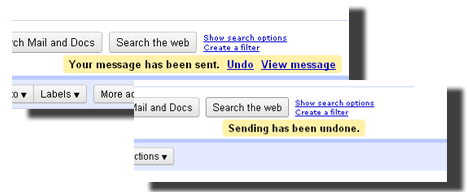
We’ve all been there. You hit send, and promptly think “doh”! Whether it’s because you’ve called your boss an jackass, or you’ve forgotten to add some essential information, a short grace period on recently sent emails would be fantastic.

Many of you will already know that this feature has been available for a while in Google Labs. What’s newsworthy now is that it that you can configure Undo Send to give you 5, 10, 20 or 30 seconds to cancel the send. Just 5 seconds to reconsider a hastily-sent email? If you were that quick, you probably wouldn’t have sent it in the first place!

combo12.png

How to make The GIMP look like Photoshop

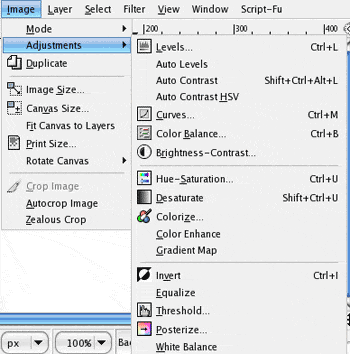
gimplogo.pngThe GIMP is one of the best free image editing tools for Mac. It’s the closest thing you’ll find to Adobe Photoshop without paying big bucks. However, a frequent complaint by those switching from Photoshop to The GIMP is that the interface isn’t exactly easy to use.

The GIMP has been designed in a rather awkward way, so that anyone used to Photoshop quickly gets confused by menu layout and the different naming conventions that The GIMP uses.

An excellent solution to this problem is GIMPshop.

GIMPshop is a modification of The GIMP which gives it an Adobe Photoshop style interface so that you can enjoy the best of both worlds. All of the functionality of The GIMP remains the same with the bonus of a much easier to use Photoshop style interface.

GIMPshop features menu layouts, dialogs and naming conventions that all Adobe Photoshop users will be familiar with.

GIMPshop

However, there are a few issues to be aware of when trying to install it on Mac. Firstly, you’ll need Apple’s X11 to run GIMPshop. Secondly, the main problem that Leopard and Snow Leopard users will have is getting GIMPshop to remain stable. Although GIMPshop is supposed to officially support Leopard and Snow Leopard, the reality is quite different.

It can easily be made to work properly though by modifying a library file. Instructions of how to do so are here and the libraries you need to make it work are here.

Of course, GIMPshop isn’t a replacement for Photoshop but it’s probably the closest thing you’ll ever get for free. It’s available for Windows and Mac.

Stop Autoplay on YouTube

final.pngIf you’re looking for more than one video on YouTube, it makes sense to open them in new tabs – it saves you time and makes the process more efficient. Unfortunately, YouTube’s autoplay function means that unless you want to hear what hell surely sounds like, you’ll need to pause them one by one, which kind of defeats the purpose.

Luckily there are add-ons for both Firefox and Chrome that will help turn autoplay off!

Chrome users can give Stop AutoPlay for YouTube a try. This simple extension works like charm, pausing your videos but letting them buffer, so when you get around to watching them, they’ll be ready to go.

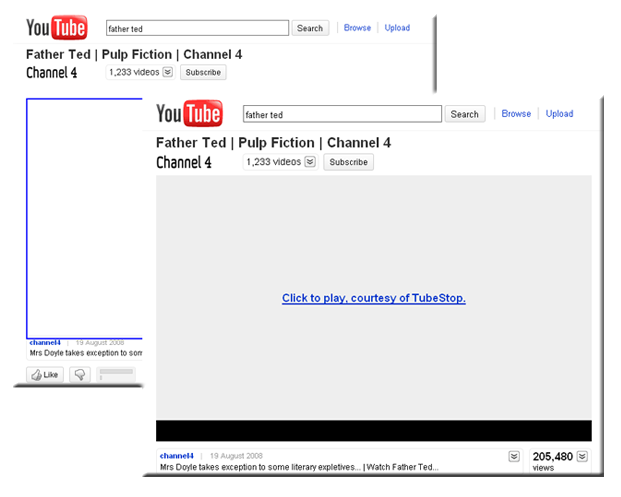
Firefox users have various options, among them TubeStop. This add-on works perfectly on YouTube, as well as on any site that has YouTube video embedded, but unlike Stop AutoPlay for YouTube, it doesn’t let the videos buffer. Bear in mind, though, that if you have a slow internet connection, this can actually be a good thing.

Another option is Stop Autoplay. Fans of this add-on claim that it works on most sites with autoplay features, not just YouTube. That’s because it stops the automatic start of Flash elements in general, which is something that you may or not want. Even so, it stops YouTube videos in their tracks, ready for you to hit play when you’re set to go.
combo11.png

Via OnSoftware ES.

Turn your Facebook photos into art with Aviary Effects

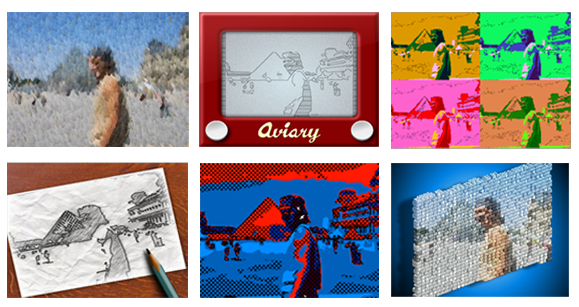
I’ve always professed that I’m no oil painting, but Aviary’s new Facebook app has proved me wrong – because now I actually am. Aviary Effects allows you to turn your Facebook photos into works of art, quickly and simply.

The application lets you apply effects to any photos of you from your Facebook albums and even get creative with photos of your friends. There are six different effects to choose from. Besides Oil Paint, you can also select Pop Art, Etch-a-Sketch, Warhol, Sketch and Lego. Each effect can be customized, changing the intensity via a slider, as well as altering the background colors and amount of brush strokes.

I should point out that Aviary Effects seems a little unstable at the moment, and it managed to crash Firefox a few times when trying to apply an effect. Nevertheless it’s a fun way to breath new life into all those profile pictures that have been there for years.

Aviary Effects

Google Gesture Search for Android

Gesture Search is an application for Android phones that lets you search for things like songs, contacts and applications by starting to write the name of the item on your screen. Being from Google Labs, this app is seriously cool.

To make Gesture Search an even easier, more natural app to use, you can open  it by just Double Flipping your cell phone.[youtube]http://www.youtube.com/watch?v=gD3ZYKIqj7A[/youtube]
Despite the video and animated demonstration in Gesture Search’s getting started guide, it took me a little while to master. In the end, I realized the key to the movement is keeping your device more or less upright – in other words, don’t hold it flat like you normally would.

Once the app is open, just begin to draw on the screen. At the moment it supports English (upper and lowercase and numbers) and you can write the characters in one movement or more – Gesture Search automatically realizes if you have finished. Once you write, a list of possibilities will appear. You can scroll down and tap as normal (Gesture Search can also detect the difference between scrolling and writing.). If you want to refine the search, just trace the second letter, and so on. Continue reading “Google Gesture Search for Android”

3 Alternatives to Nero on Mac

Those that have recently switched to Mac from Windows often miss certain applications that aren’t available on OS X. One of these is Nero for burning DVDs and CDs. Fear not however because there are alternatives to Nero on Mac to burn discs with.

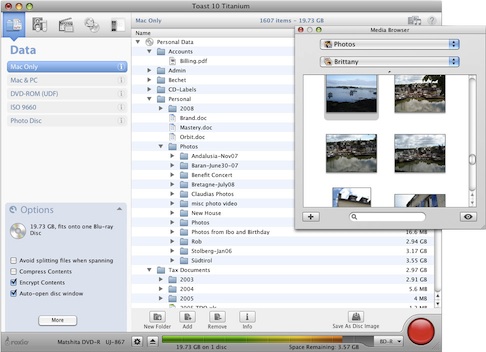
Roxio Toast is the most comparable burning suite to Nero. Like Nero – which now calls itself a “multimedia suite” – Toast offers more than just burning including video and audio editing and even management of your TiVo recorded TV shows. You can also create hybrid discs with Roxio Toast that will work on both Macs and PC.

Toast for Mac.jpg

Continue reading “3 Alternatives to Nero on Mac”

Facebook Places: location sharing for the masses

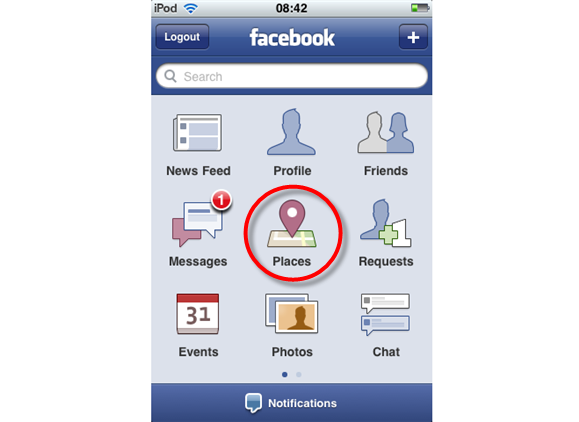
Geolocation has finally made it to Facebook. From now on, around 150 million Facebook users (those who access the social network via their phones) will be able to share their locations thanks to the new Facebook Places functionality. It’s not a new app, but a new feature in the latest version of the Facebook app for iPhone. And though it’s currently only available in the United States, we’ve already know some of its features.

Facebook Places

Facebook Places will allow you to share the places you visit with your friends by checking in to them when you arrive. You can also add a couple of lines to your update to provide more information, and tag your friends along. Like Foursquare or Gowalla, if the place you just visited is not available in Facebook places, you can add it yourself. The “People here now” feature enables you to see who’s in that place, though this information is only visible for people who have checked in to the same place, and only for a limited period of time.

Facebook Places

Regarding privacy, Facebook provides you with all the configuration settings you need to keep Places as public or private as you want. You can block friends from tagging you in their check-ins, disable your profile from appearing in the “People here now” list, control who sees the places you’ve visited and remove any Places check-in or tag at any moment – just like you do with photo tags.

Facebook Places doesn’t seem to have a badge system like Foursquare, but third-party apps will be able to use its data to build more enriching experiences about locations – think about trip planning, restaurant reviews and so on. Like I said before, Places is only available in the United States, but Facebook expects to roll it out to other countries very soon.

Tumblr releases official client for Android

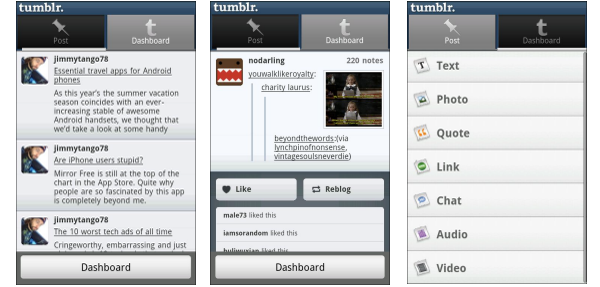
Tumblr logoIf, like myself, you enjoy a bit of Tumbling in your spare time, then you might be interested to hear that the official Tumblr Android app has been released today. The free app lets you quickly post text, photos, video, audio to the microblogging site directly from your device. Handily, Tumblr for Android lets you simultaneously post to Twitter, too.

You can also use it to follow other users’ posts. These are displayed, along with your own offerings, in a neat timeline in the dashboard. The app lets you like and reblog posts from other people that you’re following, although it won’t let you reblog from strangers, annoyingly.

Although it’s fairly attractive and easy to use, the official Android Tumblr client is far from perfect. There are a few glitches that need some attention, such as some bugs with uploading videos and linking to photos. But it shows plenty of promise and could eventually make a more attractive alternative to Twitter for Android users. Check out my full review for more.

Tumblr Android screenshots