
US Government plans to wiretap Facebook, Twitter and Skype

wiretap28sep10.pngDo you think a government should be allowed to snoop on your Facebook, Twitter and Skype activity? Well if not, you’d better kick up a stink now because according to The New York Times, Obama and his administration are seeking to expand their “role” in eavesdropping on internet users including e-mails, social networking sites and Blackberries.

The NYT reports:

Essentially, officials want Congress to require all services that enable communications — including encrypted e-mail transmitters like BlackBerry, social networking Web sites like Facebook and software that allows direct “peer to peer” messaging like Skype — to be technically capable of complying if served with a wiretap order. The mandate would include being able to intercept and unscramble encrypted messages.

The Government claims the measures are necessary “in light of increased communications on the Internet between members of terrorist groups and organized crime gangs.” What’s perhaps equally astounding about this story is that apart from the NYT, not only has it not received much mainstream media coverage but there’s been little reaction from civil liberties groups. Former intelligence officer and police detective Mike Snopes observed in The Examiner:

It’s amazing how during the Bush administration, the limited actions taken to monitor terrorists’ communications met with fury from civil liberties groups and members of the news media. Now that a liberal-left president sits in the Oval Office, these same people are silent regarding increased surveillance of U.S. citizens by law enforcement and intelligence agencies.

The cybersecurity plan proposes some other pretty draconian measures that could mean that tough encryption is a thing of the past. It proposes that:

  • Communications services that encrypt messages must have a way to unscramble them.
  • Foreign-based providers that do business inside the United States must install a domestic office capable of performing intercepts.
  • Developers of software that enables peer-to-peer communication must redesign their service to allow interception.

This raises many issues. As the NYT points out, how can this be applied to freeware that’s developed for free by volunteers? That’s not to mention the security backdoors that such a plan would inevitably expose software to. For anyone with a concern for keeping the internet free and open and an interest in security freeware in general, the US Government’s latest cybersecurity plan sounds like bad news.
RIM unleashes its tablet: Playbook

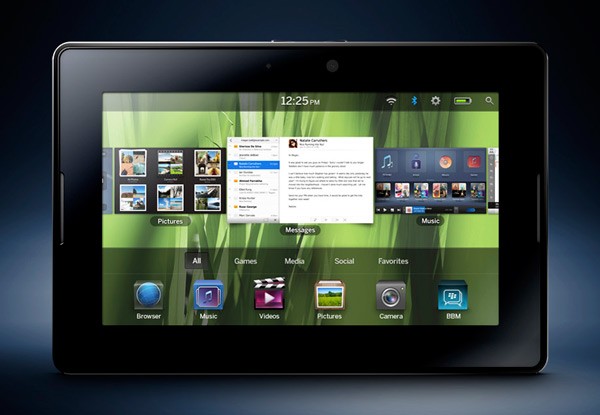
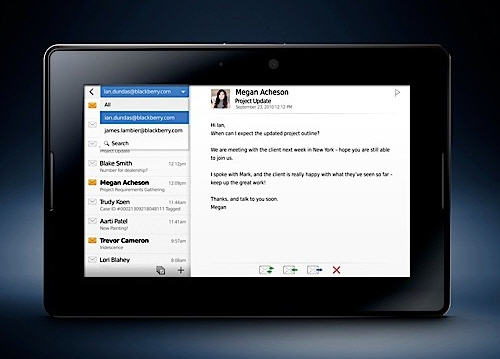
Research In Motion (RIM) has introduced the company’s new tablet, Playbook, at their annual Developer’s Conference in San Francisco. Despite the playful name, the Playbook is focused on business, which makes sense taking into account that this is also the main target of RIM’s smartphone, the Blackberry.

RIM Playbook

Though the Playbook won’t be commercially available until early 2011, we already learnt about some of its features. It’ll run a special tablet-oriented OS developed by QNX – recently acquired by RIM – and will have Bluetooth and WiFi connectivity. It won’t have support for 3G but you’ll be able to get that by tethering to a Blackberry – another smart move for them, but a bit of an annoyance for the user.

RIM Playbook

During the device’s presentation, RIM boasted about its ability to run Flash and Adobe AIR apps. According to the company’s founder, Dan Dodge, the Playbook will be “an incredible gaming platform for publishers and the players”. Surely the dual-core 1 GHz CPU, the 1 GB of RAM and the 7-inch, 1024×600 screen will help! Other features in the Playbook include two cameras (front and rear) HD video capabilities, HDMI port and a microUSB jack.

RIM Playbook

With the launch of the Playbook, the tablet market is getting increasingly crowded and competitive. I’m already looking forward to seeing future tablet wars between Apple and RIM.

Head to Head: Tumblr vs. Posterous

So you’ve made up your mind and you want to create a blog. The question now is, how are you going to do it? There are many options available, for newbies and experts, for those who prefer to have everything set up and those who like to be in control of every single detail. But besides the traditional blogging platforms like Blogger or WordPress, there are also a couple of alternatives for what is known as micro-blogging – a simpler, easier to update blog, perfect for those who don’t need lots of features.

Head to Head: Tumblr vs. Posterous

The two most popular micro-blogging platforms are Tumblr and Posterous. You may think they’re quite similar, but the moment you analyze them in depth, you realize they also have quite remarkable differences. Let’s take a look at both of them and maybe then you’ll know which one suits you best.

Continue reading “Head to Head: Tumblr vs. Posterous”

Windows Phone 7 Ads: ‘Don’t use your phone’


Microsoft are hoping that come November, Windows Phone 7 will take the smartphone battle to Android and iOS, and their new ads are certainly taking an unusual point of view:

What’s wrong with smartphones? According to Microsoft, it’s that we’re glued to them, and keep falling down stairs. Windows Phone 7’s interface will allow us to get all the info we need with just a quick look, or as they put it, ‘glance and go’. Check out the ad below. Does it make you want one, or will you stick with your Android or iPhone?

[youtube]http://www.youtube.com/watch?v=HvV6_t3crlk[/youtube]

iTunes update adds Ping sidebar


My main criticism of Apple’s new musical social network, Ping, was its poor integration with iTunes. In its original version it was only integrated into the store, which I thought was very weak.

Now with iTunes version 10.0.1, a Ping sidebar has been added to the right of the interface, and you are now able to ‘like’ anything you’re listening to. I have to admit that makes it a lot better, and answers my criticism that Ping didn’t mesh with user’s libraries. The sidebar also sums up the activity, purchases and likes of your Ping friends. Overall, it’s a big step in the right direction, but it’s still no Last.fm killer, and the experience isn’t rich enough to convert me just yet. It will be interesting to see how quickly we’ll see further improvements to Ping in the future.

Create your own Google search story on Google

When Google ran this 60-second TV ad during the SuperBowl they probably didn’t imagine the incredible response it would have. People liked it so much that Google decided to implement a simple tool in YouTube with which to build your own ‘search story’.

Create your own Google search story on Google

Now, don’t expect anything like Premiere or Final Cut – this is just a simple online app to mix up a few Google searches, add a pre-made background music and put it all together to create a fun story, a greeting card or a cute message for that special one.

Here’s how the Google Search Stories Video Creator works:

1. Go to the YouTube SearchStories channel and click the big blue button to create your own.

Create your own Google search story on Google

2. Time to get creative! You need to enter up to six search terms that can make up a story, using different Google services – web search, images, maps, books, and so on. The page offers a few tips on how to write good stories, and even a tutorial to show you the basics. You can also preview the results as you enter the search terms

Create your own Google search story on Google

Continue reading “Create your own Google search story on Google”

Twidroyd adds new Live Preview mode

The new version of Twidroyd has been released, which features an interesting new tool called Live Preview, for previewing tweeted links. Version 4.0 of the popular Android Twitter client can now display web pages mentioned in a tweet without launching them in the browser – or even leaving the screen you’re on!

Twidroyd

Rotate your device to landscape mode and Live Preview mode will automatically kick in. Recent tweets are displayed in a panel on the left of the screen. Select one of these tweets and if it has a link in it, the corresponding web page will be shown in the large preview panel. Although pages don’t always render perfectly, it makes for a good way to quickly check if you’re interested in a site that’s been shared, without having to load it up.

Twidroyd is evolving into a very useful mobile Twitter tool and it’s now packed with lots of cool features. However, the app’s developer still needs to improve loading speeds and make the interface a bit more user-friendly if it’s to compete with the official Android Twitter client. You can read my full review of Twidroyd 4.0 on Softonic.

Follow new Google developments on their ‘New’ page


Search giant Google has launched another product, and this time it’s a hub for showcasing all its new developments, Google New. The page is neatly divided into sections for various products like Docs or Maps, giving us the latest developments on all of them.

With Google now being active in so many areas, Google New is a pretty good idea, allowing us to keep tabs on the company with ease! There are two drop down menus, allowing you to focus on specific products, say Gmail, or a particular area of interest, like education or mobile.

McAfee jumps on the URL shortening bandwagon

Everyone seems to want in on URL shortening, as it’s a neat way to share links and great for Twitter’s 140 character limit. McAfee has launched a beta URL shortening service of their own, apparently to calm nervous users who are worried about dangerous shortened links.

The McAf.ee shortened links apparently use ‘Global Threat Intelligence to protect you‘, and open the link with a special frame informing you the site is safe. It’s not pretty! It also offers none of the interesting statistics that services such as Bit.ly do, and it’s hard to see why McAfee’s attempt might be a success.

We would suggest that the best way to avoid malicious URLs and websites is to only click links from reliable sources. Most scam tweets, emails and Facebook status updates aren’t very sophisticated after all!

Civilization 5 for Mac coming soon (probably)

civilization-ban.png

There’s been a lot of excitement in the Mac community over the release of Civilization 5 on Steam. The game was released for PC users on Steam on 21st September but there’s still no sign of a Mac version at the moment. Firaxis – the developers of Civilization 5 – have made no official statement but back in April, they unofficially confirmed to TUAW that a release will eventually be made on Mac. TUAW reports in an off the record conversion with a Firaxis representative:

The rep was noncommittal, as you might expect, but he did say that every single previous version of Civilization has eventually come to the Mac, and that Civ V would probably not be an exception.

It’s a bit annoying that neither Steam or Firaxis haven’t issued any official news on the Mac release but for now, Mac Civ 5 fans will just have to keep their fingers crossed.

Meanwhile, the PC release was celebrated at Firaxis HQ in the State of Maryland by declaring September 21, 2010 officially as “Sid Meier’s Civilization V Day“. However, many PC users have had their celebrations cut short by technical glitches with the game. Due to the many different configurations and makeups of PCs, it hasn’t run as well it should have for some gamers. If you’ve been hit by technical problems and bugs with Civilization 5, check out some of the advice here on the World Gaming Network and G4tv.