Call of Duty Black Ops trailer premiers tonight!

Premiering a Call of Duty: Black Ops trailer tonight looks like someone trying to steal Medal Of Honor’s release thunder tomorrow, but all’s fair in love and war. Here’s a teaser trailer for the trailer! You can watch the full trailer during the Minnesota Vikings vs. New York Jets football game tonight on ESPN. If 16 brief seconds of action leaves you wanting more, head over to the Call of Duty: Black Ops homepage, where you can watch a ton of preview videos.

My first impression is that it’s pretty much carrying on in the Modern Warfare tradition; bombastic, over the top hollywood action. That means there’s a clear line in the sand between this and Medal of Honor, which looks like it’s taking a much grittier approach.

[youtube]http://www.youtube.com/watch?v=bZDQUMsx2w0&feature=player_embedded[/youtube]
Windows Phone 7 ads used Angry Birds without permission

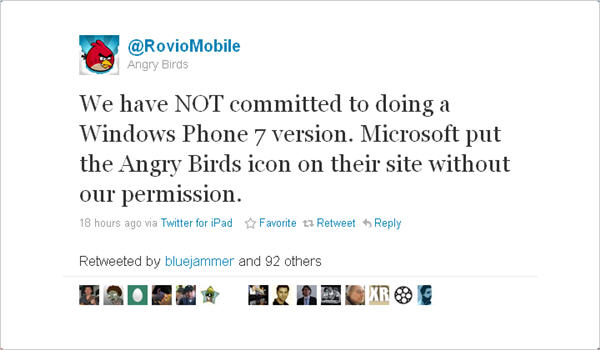
According to Engadget, Angry Birds developer Rovio Mobile is less than happy with Microsoft. For a while, apparently until the developer complained, Microsoft was using the Angry Birds icon in their Windows Phone 7 marketing campaign. Rovio Mobile responded angrily:

They later added that developing a Windows Phone version is not out of the question, but that it’s not currently planned. Whether or not this was mistaken or cynical on Microsoft’s behalf, it highlights how important it thinks apps will be to the success of its platform.

Video: Hands-on guide to using Windows Phone 7

Microsoft finally launches its hotly-anticipated new mobile operating system, Windows Phone 7 today. If you’re thinking of getting one of the new phones, why not first check out the official Windows Phone 7 emulator, which lets you have a play around with the OS? Grab the developer tools suite, then check out this video guide to the emulator before having a look around Windows Phone 7 yourself!

[youtube]http://www.youtube.com/watch?v=sf-jWHCK_4I[/youtube]

Noam Chomsky to appear on Second Life

screen-capture-3.jpg

What do you get if you mix the one of the world’s most important intellectuals with one of the net’s most popular virtual worlds? Noam Chomsky on Second Life is the answer.

Despite his 81 years, Professor Chomsky has always been one to try and embrace both new technologies and youth culture in his long history of political dissent and has taken the rather unusual step of appearing on Second Life. Chomsky has been invited by Metanomics, a weekly show which aims to look at the serious side of virtual worlds. Chomsky will be in conversation with host Robert Bloomfield and will take questions from other Second Life users. The event will take place Tuesday October 12th at 12:00 p.m. PST.

Jenn Forager of Metanomics told Chomsky Watch the event provides Second Life users with a rare chance to interact with a great mind within the virtual world:

One element of Second Life that never stops impressing me is the opportunity to not only hear but interact and pose questions to such thought leaders. We may be using the internet and an avatar to extend ourselves over the distance, but participating in such discussions is thrilling and allows the rare experience of speaking with remarkable people.

If you’re not a Second Life user but want to join in, the Metanomics site gives you details of how to get involved. Alternatively, you can watch a live broadcast of the event.

Give your photos a Halloween touch with Picnik

Halloween is just around the corner, and I’m already getting in the mood for it. Not only have I downloaded a few Halloween wallpapers, but I’ve also had lots of fun with the special Halloween effects recently featured in Picnik, the online photo editor.

Picnik Halloween

According to the announcement in Google’s official blog (remember Google bought Picnick in March 2010), the popular photo editor has launched a new special collection of Halloween imagery to make your photos look as spooky as possible – without losing Picnik’s traditional ease of use. All you need to do is upload a photo and start applying the Halloween eyecandy, available in the sidebar on the left side of your screen.

Picnik Halloween
I hope Alma, our dear Softonic Executive Assistant, doesn’t get mad at me for this.

The Picnik Halloween special pack includes different types of material to give your photos a Halloween look:

  • Halloween effects – From bloody fangs to scary yellow eyes, here’s everything you need to quickly turn anyone into a vampire, a zombie, a ghost or any other creature of the night. No biting necessary!
  • Halloween text – Add a message from beyond the grave with these spooky text fonts. My personal advice: use a brilliant, blood-inspired red as the text color.
  • Halloween stickers – Give a final touch to your creation with Picnik’s selection of stickers: jack-o-lanterns, bats, tombstones, ghosts, spider webs and other creepy decorative items.

Not all of the Halloween effects are available for free – some of them can only be used with a Picnik Premium account – but still, it’s a fun way to start celebrating Halloween 2010.

HTCSense.com powers up the Android experience

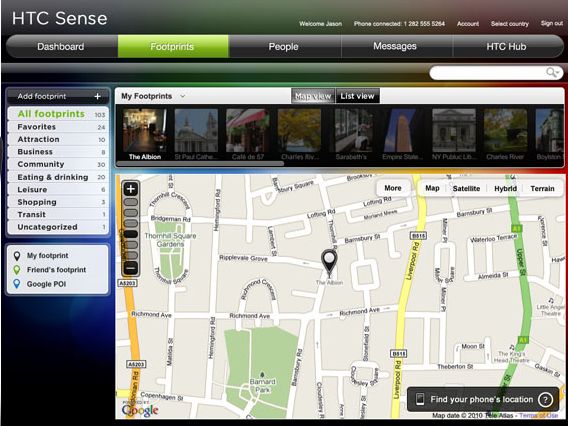
HTC has today launched a new site that delivers some innovative new features to users of HTC Sense devices. HTCSense.com provides added value to users of its new Android devices, the HTC Desire HD and the HTC Desire Z .

One of the coolest uses for HTCSense.com is to help you find your phone if it’s gone walkabouts. You can instruct the site to make your phone ring loudly, so you can locate it if it’s stuck behind the sofa or under the bed. Even better, you can track the exact location of your phone with HTCSense.com, including the ability to lock it – or to post a reward message on it for anyone who hands it back to you.

HTCSense.com backs up all of your SMS messages online for posterity, and it even lets you send text messages online. Other uses for the service including adding and editing contacts, downloading apps that have been reviewed and tested by HTC, and even plotting everywhere you’ve been today on a map, using the site’s Footprints service.

HTC Sense Footprints

Facebook adds new Groups feature

Facebook users are today experiencing a new way of connecting with people on the social network, following the release of a new Groups feature. The changes are designed to make it easier to share certain information with certain groups of people.

Instead of subjecting your entire Friends list to your updates, photos, links, etc., you can can now choose to share stuff only with selected people – solving one of the big problems with Facebook up to now. It means you can share business-related stuff just with colleagues, post family photos only to your nearest and dearest, or stop your parents finding out who you’re dating!

Find out exactly how it works here, then get on Facebook and try it out!

[youtube]http://www.youtube.com/watch?v=I6ud_SZARCs[/youtube]

Apple’s withdrawal of IS Drive makes little sense

isdrive2.png

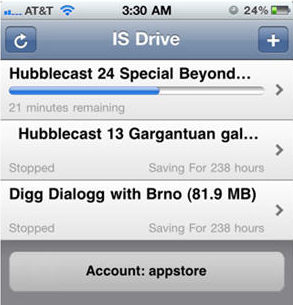
Within hours of Apple accepting P2P management application IS Drive into the App store, they withdrew it yesterday over potential piracy concerns. But the logic behind the withdrawal is hard to follow. If Apple refuse to publish an application that allows iPhone users to manage BitTorrent downloads on their Mac, surely it has to withdraw every application – such as LogMeIn Hamachi, Chicken of the VNC which allow users to remotely connect to their Mac and download files. Even a simple browser like Safari could “potentially” be used to download illegal material.

It seems what has happened here is that Apple approved it but then ran a mile after seeing the word “BitTorrent” used in the application’s description submitted by the developer Derek Kepner. Which raises the question, don’t they check the descriptions submitted by developers before they are released into the App store? This rejection on what are effectively use of language grounds is especially ironic when you consider Kepner was well aware that using the word “torrent” could have Apple running for the hills. He told Torrentfreak:

I didn’t see any reason for the app to be rejected in Apple’s recently released guidelines. So, I was very careful with this release to not use the dirty word ‘torrent,’ and I’ll continue to carefully add new features, so stay tuned.

There are a huge number of applications that can be used for illegal purposes. Is it really Apple’s role to say users can’t be trusted to use applications legally? And if so, where should they draw the line? It seems that the line at the moment is word “torrent” because As Macworld report, this isn’t the first time that Apple have rejected a torrent application. Back in 2009 they rejected Drivetrain which would have allowed users to manage Transmission from their iPhone.

But since you can effectively do exactly the same thing by logging into your Mac with other applications, the withdrawal of IS Drive makes little sense.

Use a video as your Mac desktop background

myliv3.png

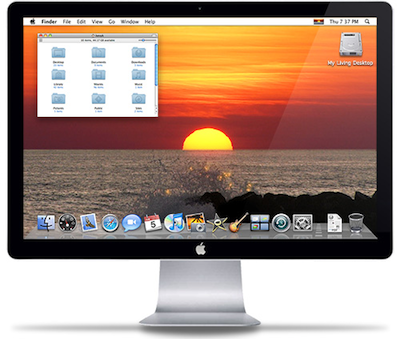
Are you bored with using pictures as your desktop background? Then why not use a video with My Living Desktop?

My Living Desktop is an interesting blend of a video desktop (i.e. a moving wallpaper) and a traditional screensaver. The aim is to turn your desktop into a moving, soothing living environment although you can use any video you want, including home movies. There are 26 relaxing high definition video scenes from around the world to choose from to get you started.

myliv5.jpg

While many will be tempted to add their own video, relaxation is the aim of My Living Desktop. There’s even an Auto Serenity Break which reminds you when it’s time to take a break from the screen. If you like particular scenes in the videos, you can rate them so that My Living Desktop replays them more. And while you might think that My Living Desktop could slow down your machine while you’re using it, there’s actually no noticeable difference.

Continue reading “Use a video as your Mac desktop background”

Google Goggles now available for iPhone

Google Goggles has just been released for iPhone, as part of an update to the official Google Mobile App. The app allows you to point your phone at an object such as a building, a book or a piece of art, and instantly get information about it from Google. Check out what it can do in this quirky promotional video.

[youtube]http://www.youtube.com/watch?v=ezc108DTaug[/youtube]

Although it doesn’t yet work with faces, Goggles is still a very cool piece of technology, and you feel a bit like you’re looking through Robocop’s visor when you’re using it. Now I think about it, many of the tools in the Google Mobile App replicate the functionality of  futuristic cyborgs of the 90s. There’s the ubiquitous homing device (Google Earth), speak-to-search (Google Voice), instant remote communication (Gmail and Buzz), and a powerful interpreter (Google Translate) that would put C3PO to shame.

Oh, and you should bear in mind that Google Goggles functionality only works on iPhone 3GS and iPhone 4 devices.