Update coming for Minecraft this Halloween


With a million registered users and 300,000 purchases, indie game Minecraft is quite a phenomenon. It’s still in its alpha development phase though, and October 31 sees the next major update, which promises to make the game scarier and a bit harder. One change sees torches start to run down like batteries. There will be new lanterns that last forever, but I imagine they require more resources. This means your huge caves and mining complexes are going start filling up with new scary monsters unless you get to work fitting lanterns!

If that means absolutely nothing to you, watch this short fan-made trailer for the game, it does a pretty good job of introducing you to this fantastic world.

[youtube]http://www.youtube.com/watch?v=FaMTedT6P0I[/youtube]

As well as tweaks and monsters, there’ll be a new realm, Hell, which you can portal into and out of for very fast travel. I imagine there’s a scary price to pay, going by the name!

If a those million users aren’t enough to convince you, check out my review to see why you should buy this fantastic game ‘about placing blocks while running from skeletons’.

Google TV official website launches

Five months after we heard about Google TV for the first time at the Google I/O event,  we’ve got some news: the launch of the new official Google TV website and Google TV blog.

With a sleek, dark design and eye-catching animations, the Google TV website includes the answers to all the questions you may have about Google’s new service, which will no doubt be launching soon. The website offers a list of Google TV features, a Spotlight area with featured content, and even a form aimed at developers who want more information on how to create apps for Google TV.

Google TV official website launches

As for the Google TV blog, it’s quite empty at the moment as you’d expect, but be advised to include it in your RSS feeds if you want to keep track of all news related to Google TV.

In order to get Google TV, you’ll  need to buy either a standalone smart TV like the Sony Internet TV, or a separate box you can use with your current TV, like the Logitech Revue. According to the Google TV website, both devices will be available this fall.

First BitTorrent app approved by Apple

Believe it or not, a BitTorrent app is now officially available for download in the AppStore. IS Drive is the first app of this kind to be approved by Apple, despite its traditionally tight rules to software authorization. In fact, the iOS Developer Program policy still reads that uploaded apps cannot break the law or infringe copyright in any way – which makes this release even more surprising.

First BitTorrent app approved by Apple

IS Drive is a client that allows ImageShack Drive Premium users to check on their downloads’ status. Ironically this app was available on Cydia before, under the name “Jack Torrents”.  The app’s developer, Derek Kepner, admitted in an interview with TorrentFreak that he was “on dangerous ground here“, but he also insisted that his app was not designed to break the law. “There is no real torrenting happening on the client side”, Kepner said. “It’s not a torrent client. It’s an ImageShack Drive client“.

Whether it was just a question of luck or Apple really is loosening some of its guidelines, the fact is that IS Drive is available for download in the AppStore.

Facebook introduces improvements to Photos

While the Facebook-based movie The Social Network has started generating box office benefits ($23 million in its opening weekend), the popular website just announced that they’re planning to introduce a bunch of improvements to the Photos tool, focused mainly on three areas: image resolution, the photo uploader and the photo browser.

To begin with, Facebook will increase the size of photos from 720 pixels to 2048 pixels – that’s 8 times the original size. This generous new resolution will allow you to print photos downloaded from Facebook without quality loss.

Facebook introduces improvements to Photos

Next, the photo uploader. This tool has been completely rebuilt to provide you with a more reliable user experience. The new Facebook photo uploader will be based on the latest Flash technology, and it also features an improved tagging utility. Through the main changes are under the hood, you’ll probably appreciate the faster speed and more stable uploads -especially when you have dozens of photos.

Finally, Facebook’s new photo browser allows you to view photos more comfortably. Photos are displayed on a new layer on top of your screen, so that you can flick through them without having to open a new page, or move back and forth between tabs.

According to the Facebook blog, these changes will be rolled out to all Facebook users over the next month.

What is the most violent iPhone game?

This week saw the release onto the App Store of the ultra-violent iOS game, 100 Nazi Scalps. This bloody shoot em’ up casts you as a soldier with one mission: to kill as many Nazis as you can. The game – clearly an homage to Tarantino’s Inglourious Basterds – sees you charge through each level splattering blood around the screen as you eliminate the enemy with your deadly arsenal of weapons.

[youtube]http://www.youtube.com/watch?v=kR73_XqxUq8[/youtube]

Playing 100 Nazi Scalps got me wondering if this was actually the most violent iPhone game of all time. Despite being cartoony, the game is very brutal and kills are more gruesome than most hack and slash iOS. However, there are apps that contain more shocking themes. Here’s a run-down of how my favorite ultra-violent mobile games square up. Please let us know which iOS game you think is the most brutal.

GTA new

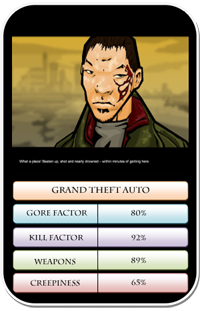
Grand Theft Auto: Chinatown Wars

Grand Theft Auto is world renowned for its violence and Rockstar’s controversial series of games has been causing outrage for years. Chinatown Wars on the iPhone is one of the tamest versions of GTA to date, but that’s not to say it’s all teddy bears and tea parties. Dealing with themes such as murder, drug deals gone bad, car jacking and armed robbery, Chinatown Wars is not one to play with the grand kids.

The game’s aerial view means the violence isn’t as intense as it is in the recent console versions of the game. However, the pools of blood that appear when you make a kill, and some of the gruesome cut scenes, help to retain the trademark controversy of the GTA series.

Price: $9.99

Continue reading “What is the most violent iPhone game?”

Symbian OS ditched by Sony Ericsson and Samsung

Symbian logoThese are troubling times for the Symbian mobile operating system. Earlier this week, Sony Ericsson announced that it will stop making devices based on the OS. Today, in another blow to the open source platform, Samsung has also revealed that it is pulling its support for Symbian.
This leaves Nokia as the only major handset manufacturer to still be making phones that run Symbian, a platform which remains the world’s most popular mobile OS. From a software developer’s perspective the ditching of Symbian by Sony Ericsson and Samsung could actually be a blessing, however. These developers will now be content in the knowledge that their creations will probably only ever go to market on a Nokia handset, allowing them to concentrate on implementing apps that tightly integrate with this hardware.

How to: Uninstall Internet Explorer 9

You were the first one to download it, you tested all of its tools and functions, and you collected a bunch of webslices and accelerators… But now you just want to get rid of Internet Explorer 9. Don’t worry, we won’t judge you for it!

However you may need help to uninstall Microsoft’s latest browser, as the process is not as clear as you might think. Here’s a short guide on how to remove Internet Explorer 9 from your system and move on to another browser.

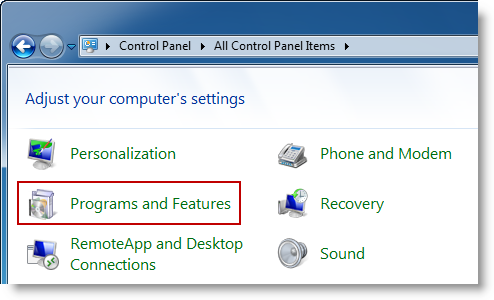
1. Click the Start button, go to the Control Panel and select Uninstall a program (if you have the settings sorted by Category) or Programs and Features if you have the Icon view.

How to: Uninstall Internet Explorer 9

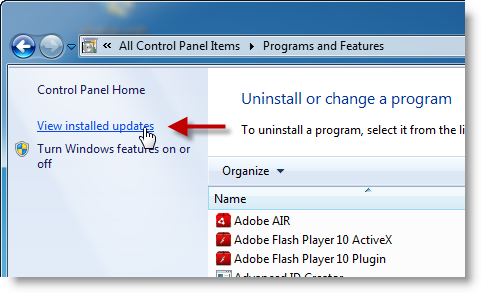
2. You’ll see Internet Explorer 9 is not included in the default list of installed software, because it’s considered to be an update. You’ll need to select the View installed updates option in order to make it appear on the list.

How to: Uninstall Internet Explorer 9

3. Wait until the program list has been populated, and scroll down until you find Internet Explorer 9. Select it and hit the Uninstall button.

How to: Uninstall Internet Explorer 9

4. Windows will uninstall Internet Explorer 9. The process can take a few minutes and requires a system restart afterwards. Note that this doesn’t mean you don’t have Internet Explorer on your system – Windows just downgrades it to version 8.

How to: Uninstall Internet Explorer 9

[Via: OnSoftware Spain]

Why Spotify won’t auto-play next song in search results

spotify2.pngRegular Spotify users may have recently noticed a rather annoying problem after applying the latest update. When you search for a song or artist and select a track to play, Spotify won’t automatically move onto the next track in the list when the last one is finished anymore. This is quite annoying when you just want to search and listen to an artist or group’s tracks at random.

Believe it or not, this is a change that Spotify have made on purpose in the latest update. The reason is that they say most users only use the search bar for a specific song and don’t want to autoplay an entire batch of tracks. However, I (like many others apparently) do use the search tool regularly to just search for an artist and listen to their songs at random.

There has been no official word published by Spotify on the matter but a member of the Spotify team named Jude told one confused user:

This is a change made in the latest update of Spotify. It only affects play from the Search Results list. Most users only wish to play a specific track from the search results. Playlists, albums, artist pages, Library lists etc, continue to play continuously as before. However, after the strong feedback from Spotify subscribers, we will be reviewing this change in the behavior of the Search results list.

So the good news is it seems like Spotify are going to roll-back the change due to the number of complaints they’ve had. However, in the meantime, the only way to autoplay tracks after making a search is to drag them into your Playlist.