Quickly save online recipes to Google Docs

I’ve been whipping up lots of recipes I’ve got off the internet lately. I’m not showing off, but I’m surprised our house hasn’t been given a Michelin star by now. My problem, however, is that by the time the dish is digesting I’ve already forgotten where I got the recipe from.

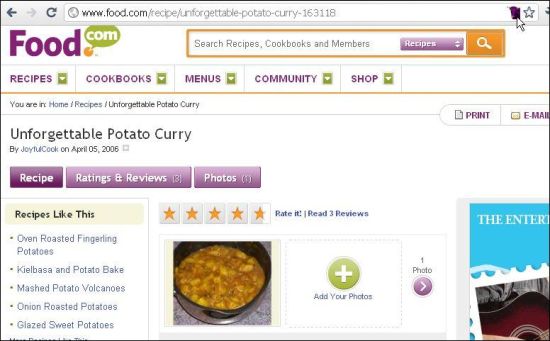
Luckily for my girlfriend I’ve just discovered a handy Google Chrome extension called gRecipes. This add-on lets you instantly save internet recipes to Google Docs just by clicking an icon the Chrome address bar. Recipes are stored as text document, with standardized formatting, making it practical to print them out to create your own personalized cookbook, or share them with your buddies using Gmail.

gRecipes currently only works with recipes from Food.com, Epicurious, Food & Wine, and AllRecipes. It’s a shame there aren’t more supported sites, although the developer claims to be working on this. Here’s hoping my current oracle, BBC Good Food, gets added. Man, I’m getting hungry now.

Store recipes in Google Docs

Controversial 1378 KM game delayed until December

1378km.png

It might not be one of the most anticipated blockbuster games releases of the year but it’s certainly becoming one of the most controversial. And not only is it free but it’s being released in conjunction with a University. The game is 1378 KM, where gamers can play the role of a West German border guard or a civilian trying to cross the border and such is the controversy surrounding it that its release has been delayed until December.

1378 KM, named after the length of the old border between East and West Germany, has been developed by 23 year-old German university student Jens M.Stober and allows players to choose whether to play a border guard or a civilian trying to cross the border. Escapees can receive prison sentences if they are caught and honors are awarded to border guards for kills but border guards who shoot to kill more than three times are transported to the year 2000 where they face trial for their crimes. The game also features the political ramifications of too many escape attempts or border kills.

Continue reading “Controversial 1378 KM game delayed until December”

How to: Stream video from your PC to the iPad

Since I bought an iPad last a few months ago, one of the ways I’ve been using it is as a small extension of my iMac’s screen. The iPad is great to watch a couple of episodes of your favorite TV show, lying on the couch or in bed, right before going to sleep, when you don’t want to sit in front of the computer or set up video streaming on your console.

How to: Stream media content from your PC to the iPad

You can use the iPad as a small portable video player in two ways: one is using a program to convert video files (like HandBrake) and then syncing them with the device via iTunes, and the other is using a streaming app like ZumoCast. With ZumoCast you can stream content from your computer (documents, photos, videos and music) to the iPad or the iPhone – no need to convert and sync anything. Plus, it’s really easy to use!

The first thing you need to do is install ZumoCast in the computer you want to stream content from. ZumoCast is available for both Windows and Mac, so simply choose your version and follow the instructions. As part of the installation process, you’ll need to create a free ZumoCast user account.

Continue reading “How to: Stream video from your PC to the iPad”

Play Medal of Honor PC multiplayer now!

Who cares about Call of Duty any more? Taliban or no Taliban, Medal of Honor is back in a big way and will certainly be one of the biggest sellers this year. Electronic Arts have opened their multiplayer beta to all comers – you just need to sign up for a free EA account, then you can download and jump in.

You’ll have to hurry though, as the beta closes October 7, 11:59 PDT, a full week before the official release. It looks like Medal of Honor is firing another round at Windows XP, as it only runs on Vista and Windows 7. From what we’ve seen, Medal of Honor multiplayer really takes the fight to Call of Duty and Bad Company and is a massive return to form. Stay tuned for a full review!

Free Browser Game: Give Up Robot 2

Give Up Robot 2 is a free browser game that puts you in the shoes (well, wheels) of a little robot who’s being tormented by an evil genius robot intent on your destruction. Armed with only a jump and a grappling hook, you need to make your way through really tricky one-room platform levels that will test your reactions as much as your patience!

Rendered in bright blocky graphics, Give Up Robot 2 is loud and in your face, but quite charming all the same. It’s like a mix between Portal, Just Cause and the sadistic platformers of the 80s. If that sounds like your thing, head over to Adult Swim and give it a go. It’s free to play, and requires Flash.

Block online distractions and increase productivity

Think about it: how many times have you opened up Facebook ‘just for a quick check’, and ended up spending a couple of hours looking at photos or planting more strawberries in Farmville? Procrastination is a dangerous habit that can seriously affect your productivity, especially if you work on the web and have access to all sorts of distractions.

The only way to avoid this waste of time is to make use of your willpower and avoid giving in to those temptations until you’ve finished with your work. Luckily for the weakest, there are also special tools to block certain programs and websites, thus preventing them from distracting you at the worst moment.

Block online distractions and increase productivity

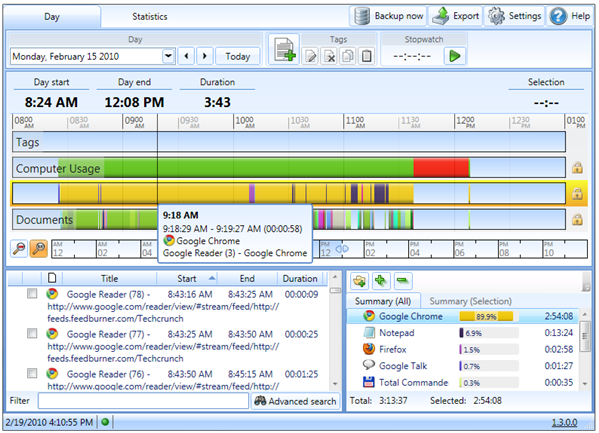
One of these special programs is ManicTime, a complete tool that logs the amount of time you spend on each program, document or even website. Thanks to a colorful report, which uses bars to represent time, a quick glance is enough to see how you’ve spent a whole day in front of the computer, and what are the programs you’ve spent most time on.

Continue reading “Block online distractions and increase productivity”

Head to Head: Google Maps vs. Bing Maps

Microsoft’s Bing has been a surprising success in the search world, even if it’s a long way off challenging Google as top dog. Both companies offer a map service and have been piling in features to entice users, but which is the best?

Usability

This is always my main concern, and in terms of basic mouse navigation both Bing and Google Maps are fine. Zooming in and out is fast, whichever view you’re using. Bing has a neat Automatic view mode, which switches views according to how zoomed in you are. This is great, and leaves you in Bing’s excellent Bird’s Eye view, which is much nicer to look at then a simple satellite view.

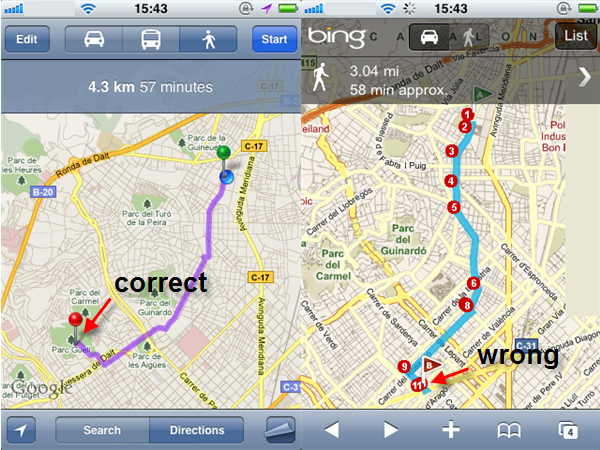
However, in terms of usability, Google Maps pretty much wipes the floor with Bing from there on in. The maps are better quality and more accurate, and the directions are also improved with Google, according to tests I’ve done. In the image below, I searched for the same directions in both systems, and as you can see they look different. That’s because Bing is taking me to the wrong place, for some reason. This is a good example of the occasional inaccuracy in Bing Maps, which makes it hard to trust overall.

Continue reading “Head to Head: Google Maps vs. Bing Maps”

Skype for Android released!

Well, Android users have been waiting long enough, but Skype have finally announced the launch of Skype for Android, bringing the famous free call app to your phone.

sype_android4

It’s a potentially huge development, and as long as you are running Android OS 2.1 (Eclair), you’re good to go. As long as you have a Skype account, just sign in and get calling. Just remember that there’s still a possibility that you’ll be billed for internet access, so unless you are using wifi, check with your carrier before ringing up that long-lost cousin in Australia.

I’ve taken a quick look at Skype for Android, and it seems like a pretty smooth ride. It has a nice little introductory sequence – although I’m a bit skeptical that anyone’s first contact with Skype is likely to be on Android – and the app is easy to find your way around and use. Our test call – from one end of the office to the other – was absolutely perfect, and I’d bet that once you’ve tried Skype for Android, you’ll wonder how you ever lived without it.

Left for Dead 2 comes to Mac

 Just when Mac gamers thought they would never get in on any zombie-shooting action, Valve have announced that Left 4 Dead 2 will be released for the Mac on Tuesday, October 5th.

Admittedly, the announcement is a little vague, saying the release is scheduled for October 5th and that they are running a little late in the same post. Even so, we’re sticking with the concrete date and keeping our fingers crossed.

Left 4 Dead 2 for Mac comes accompanied by lots of good news – if you own Left 4 Dead 2 on the PC, you will automatically own it on the Mac. All you’ll have to do is download and start playing! If that wasn’t enough, it also seems that Steam owners will get all previously released DLC for free. That’s a total of eight – the original 5 campaigns and “The Passing”, “The Sacrifice” and “No Mercy” thrown in for good measure.

Happy shooting!

Spotify updates to 0.4.8

Music app Spotify has updated to 0.4.8, bringing with it some pretty cool features that users are sure to appreciate.

0.4.8 makes it easier to send tracks to Facebook, Twitter, Windows Live and Spotify friends. Just pick your song or album, right-click and pick “Share To…”. A little window will pop up where you can share the track easily, adding a message and publishing to any services you have a linked account with.

dmx_spotify

The social types among you are going to like Inbox Messaging – now when you send a song to someone’s inbox, you can add a short message – perfect for making things just that little bit more personal.

The search history has also been improved in this version – just click on the little triangle to the right of the search box and you’ll be able to see what you’ve been looking for and clean the history in a few easy clicks.

Download Spotify 0.4.8 for Windows or Mac.