Get Spider Player Pro free

Spider Player has been a worthy rival to Winamp for many years now and if you haven’t tried it, you’ve got no more excuses. Recently the developer has opted to make the Pro version available absolutely free.

The Basic version has been discontinued and replaced by a free fully functional version of the Pro version. Formerly, Spider Player Basic had some limitations such as a lack of Last.fm support, radio recordings were limited to 5 minutes, you could only rip a CD track and convert one file at a time and you couldn’t use custom encoders. However, all these limitations have been removed in this latest version.
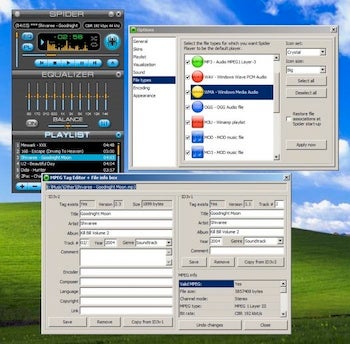
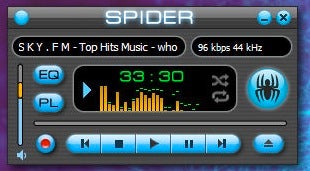
The look is a key part of Spider Player as the developers have included a “tuning” bar in the skin which allows you to change the tone of it according to the mood you are in. As with Winamp, you can also divide-up the player as you like. For example, when you open it, the main playback window, equalizer and playlist are all joined together. But you can split these up as you like and place them in various parts of your desktop for easy access.

To control playback in Spider Player, you can simply drag and drop the status bar and it responds very quickly. There’s also a pitchshifter, echo and reverb bar to play with. Finally, once minimized, Spider Player also sits neatly in your system tray so it’s well integrated into your OS.
Download Spider Player Pro here.

Customize Your Droid with Androidify

Android users know and love their little green ‘droid, but in keeping with the free and open ethos of the operating system, Google thought it was high time the icon got a little more personal.

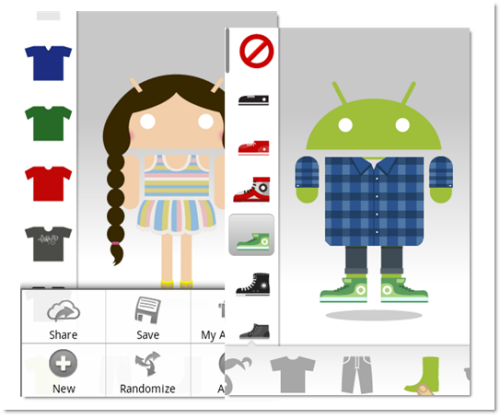
This is where Androidify comes in! This newly released app lets you take a basic green Android and personalize it from your Android phone. It’s really easy to use – change the shape of the Android with your fingers and use the little coat hanger option on the bottom right to change color, add hair, choose clothes, tweak faces and more. It’s great fun and made really easy with the getting started tutorial.

Once you’re happy with your Android, you can save it to bunches of different services, Facebook, contacts and wallpaper included. The little Android is really cute, bobbing around, looking to see what you’re choosing for him and even waving at you from time to time. It’s fun, free and easy to share, and we have the feeling it’s going to be a big success!

Download Androidify now!

Kindle update brings page numbers to the iPhone!

Kindle for iPhone has been updated to 2.6, bringing with it two changes, but ones that will be warmly welcomed by users.

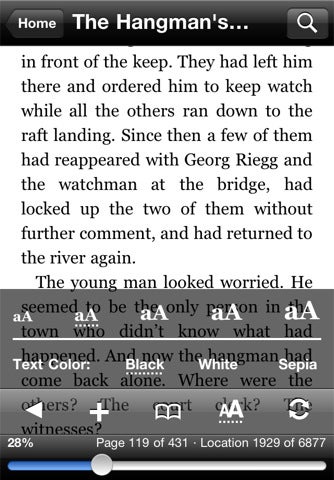
Firstly, Kindle for iPhone users will be able to see the percentage of the book read, meaning you’ll always know exactly what you’ve gotten though and what still lays ahead.

Secondly, Kindle will now support page numbers. I know, page numbers are not exactly revolutionary, but handy nonetheless. Now users will be able to keep up with non-Kindle readers, keeping everyone, literally, on the same page.

Download Kindle for iPhone 2.6 here.

Google CEO makes big claims at Mobile Congress

Google CEO Eric Schmidt has gone all hippy on us at his keynote at the Mobile World Congress. He rather awkwardly tried to cover up the fact that Google only had one new app to talk about at the Mobile World Congress by launching into a bizarre monologue about how Google can save the World.

Proclaiming that Smartphones will save the world, Schmidt argued that ‘people who love the Earth can love it more’ thanks to Google Earth and Google Maps. He talked about how we will never need our memories anymore, as Smartphones will store all the data about where we’ve been, who we’ve been with and what we’ve been doing.

Schmidt highlighted how we can ‘be who we want to be’, using Google Translate to speak to people in any language. He explained how no one will ever get lost again because of Google Maps on our devices. He proclaimed that phones will help save lives by enabling you to find people who are in trouble if you know CPR. Yes, he actually said that.

It all started to get even more unusual when he suggested that the Android platform can help end wars and bring down repressive governments.

Essentially what we saw was Schmidt’s attempt to deflect attention away from the fact that Google had very little to present. In fact, from my count it was just one app, albeit one that looks pretty neat.

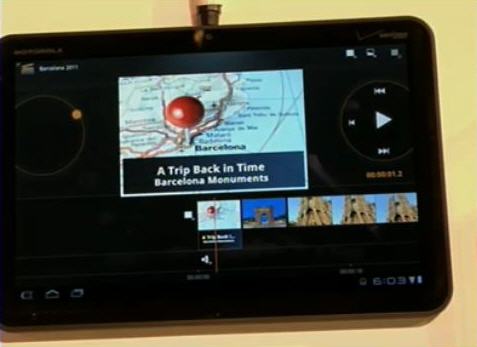
The new Movie Studio application will allow users to edit video quickly and easily on their Android device. Demonstrated on a Motorola Zoom device running Honeycomb (below), Google showed us some of the features of the device, which include multiple media types, effects, filters, and direct upload to YouTube.

It looks nice, but its announcement was overshadowed by Schmidt’s clowning around as a Big Brother figure.
In fact he warned the audience at the Congress, that you can either embrace the changes to the mobile world, or get terrified by them. Personally, I’m getting out of the conference and away from all these megalomaniacs.

How to: Backup your Facebook account

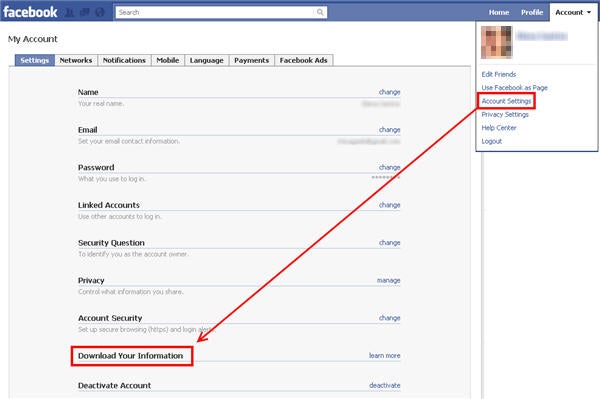
You may have not noticed it, but after a few months using Facebook on a regular basis your profile page contains valuable information about yourself: your activities, your hobbies, your friends. This is why it’s not a bad idea to backup your Facebook account, just in case. Luckily Facebook has implemented a tool to easily download a complete backup copy of your profile. Simply follow these four steps:

1. Log in to your Facebook profile and go to Account > Account Settings. Then select the Download Your Information option.

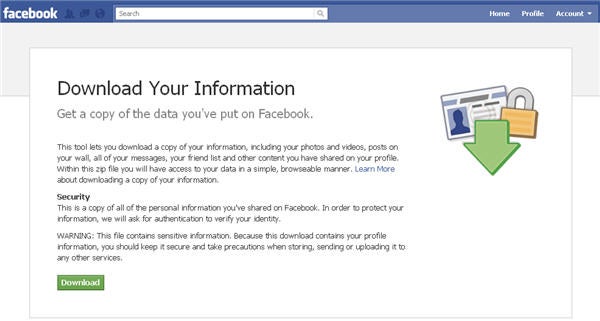
2. You’ll get an informative message that explains how the tool works and how to take proper care of your data once you’ve downloaded the file. Hit the green Download button and Facebook will start generating a backup copy of your whole  account, since you joined the network. As this process may take a long time – depending on how much information you’ve uploaded to your profile – just leave Facebook working on it in the background and move on to something else.

Continue reading “How to: Backup your Facebook account”

iOS Photoshop Express Updated

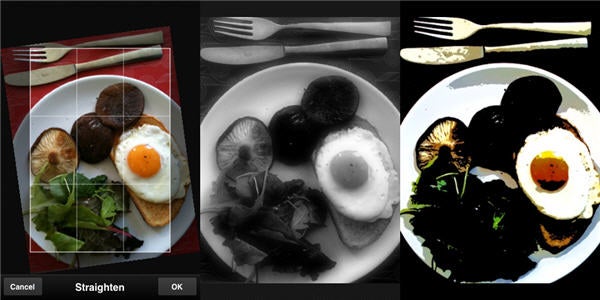
Adobe’s free iOS photo editor Photoshop Express got an update today to 1.5.3. This popular and simple app now requires iOS 4.2, so don’t upgrade if you’re still using iOS 3!

Otherwise this update brings ‘Retina Display’ support for crisper iPhone 4 usage, alongside better background actions like uploading to the web. This update does seem to run a little more smoothly, and still offers probably the best all-around photo editing for iPhones. There are others that specialize better, like Mill Colour,  but Photoshop Express is still the ideal choice for the average user.

Free Browser Game: Stream

One of the biggest indie games of recent years, Braid, made you manipulate time to complete platform puzzles. Unity-based browser game Stream also uses this idea, but in a first person 3D environment.


Using traditional mouse and keyboard controls for movement, time manipulation is shared between the two. This is my main criticism of the game, as it can be confusing. Despite this, Stream offers some complex but satisfying puzzling. The first levels are pretty simple, but the second floor puts you up against some daunting rooms to get through.

Stream’s presentation is slick, although the eerie-tense atmosphere is getting done to death in the indie development world! Play it at Kongregate, requires the Unity plugin.

[via Indie Games]

Microsoft Announces Major New Update to Windows Phone 7

Microsoft has today revealed details of an upgrade to Windows Phone 7 at the Mobile World Congress.

Not content to sit back and bask in the potential of last week’s Nokia deal, Microsoft CEO Steve Ballmer presented details of changes to the Windows Phone 7 coming later this year.

The significant changes in the free update will include copy and paste support, multi-tasking, the addition of SkyDrive support into Office for Windows Phone 7, native Twitter integration, and a version of Internet Explorer 9 for the device.

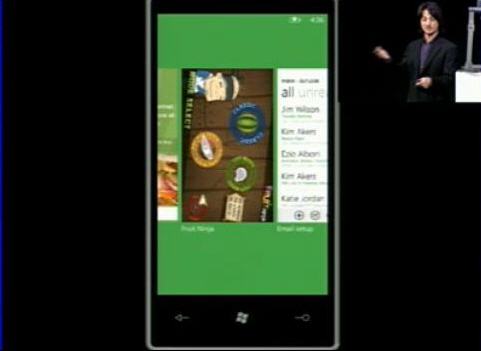
An early build of the Windows Phone 7 update was demoed during the keynote, with some interesting additions clear to see. Multitasking, in particular, looks slick, with near instant switching between apps using the Start button. Multiple running apps can be browsed by holding the Start button, then flicking through the previews of the open apps.

Windows Phone 7 Multitasking

An interesting point to note is that the new multitasking will support third party audio applications. Windows Phone 7 users will be able to tune into radio apps while using other programs on their phone.

Internet Explorer 9 for Windows Phone 7 was also shown. Its support for graphics hardware acceleration was demonstrated by running the IE fish task test through a Windows Phone and an iPhone, with IE9 delivering a significantly smoother view of the fish, even with more fish on screen at once.

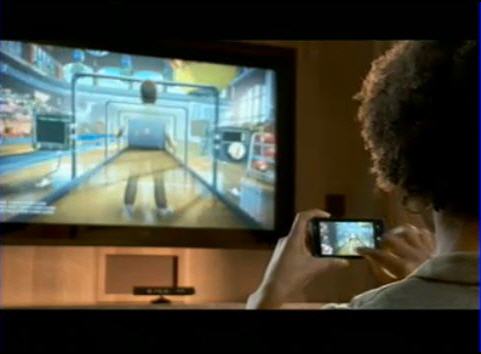
Another highlight of the demo was a video showing an early build of Kinect support for Windows Phone 7. The example given was a bowling mobile game, which is controlled by linking the phone up to the Kinect.

Windows Phone 7 Kinect

Steve Ballmer, predictably, was a little excited about the new update, saying: “Windows Phones are now the easiest to use and most delightful phones available”.

Google launches wedding planner portal

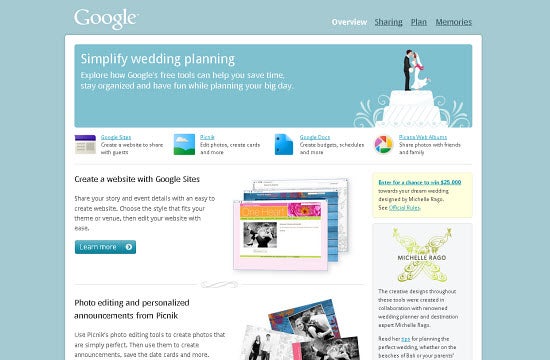
Happy Valentine’s Day! There’s good news for all you love birds out there, and this time it’s brought to you from Google. A few days ago, the internet search giant launched its very own portal focused solely on helping couples plan their wedding day: Google Weddings.

In a way, it might sound weird that Google’s getting into the wedding business. That was certainly my first thought when I heard the news. If you take a moment to think about it though, it does make sense. You can use Google Docs to access a myriad of different pre-made wedding templates, for example. Create a website with Google Sites to share important information with your guests. Even create announcements with Picnik or organize and share photos on Picasa with your friends after the event.

With all the great web apps available through Google, it’s actually quite a convenient way to get organized for your special day. The best part about it is that a lot of people already make use of these tools now, so they’ll be familiar when you get started planning for this new event. For those who don’t, Google has very kindly made a Google Weddings tutorial page to help get you started.  For an event that’s notorious for often being incredibly complicated to plan, things just got a little simpler thanks to Google.

What to expect at the Mobile World Congress 2011

Not only is the 14th February a day for romantics, this year it’s also a pretty exciting date for mobile phone lovers.  The World Mobile Congress starts in earnest on Monday, as thousands of people from across the industry descend on Barcelona for the high profile four-day event.

But what can we expect to see at the conference this year? Well, Nokia and Microsoft have already pricked up the ears of the industry following today’s announcement that the Finnish handset giant will start packing Windows Phone 7 into its devices.

Controversial new Nokia CEO Stephen Elop and his Microsoft counterpart Steve Ballmer will both be present at the event to fill us in on exactly how this huge deal will work. Microsoft is likely to also reveal an update to Windows Phone 7, while Nokia will bring us news on the future of Meego.

Tablets will be huge a part of this year’s Mobile World Congress. Besides getting a look at the BlackBerry Playbook, we will almost certainly be tripping over Android tablets as we pass through the exhibition. It will be interesting to see Google’s plans for porting its new Honeycomb OS onto tablets, and hopefully former Google CEO Eric Schmidt will be able to convey some order to the chaotic world of Android operating systems.

Other big trends to watch out for at the MWC 2011 will include mobile payments, 4G connections, 3D on mobile devices, and augmented reality.

OnSoftware will bravely fight its way through the hoards of mobile geeks at the event to give you an insight into all the exciting stuff going on in this burgeoning industry right now.  For all the big news and some of the smaller, weirder tidbits from the event, be sure to follow us on Twitter @softonic_en