New features in Internet Explorer 9 RC

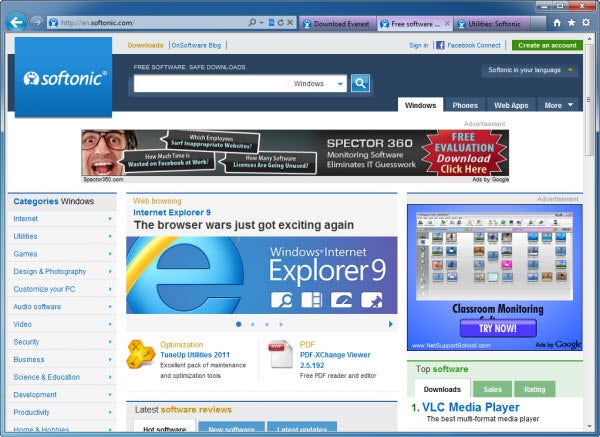
Five months after taking a look at its first Beta version, we’re finally able to test Internet Explorer 9 Release Candidate. At first sight it may seem that nothing has changed since that first beta. However, a deeper look soon reveals small appearance and performance improvements, as well as new features related mainly to security.

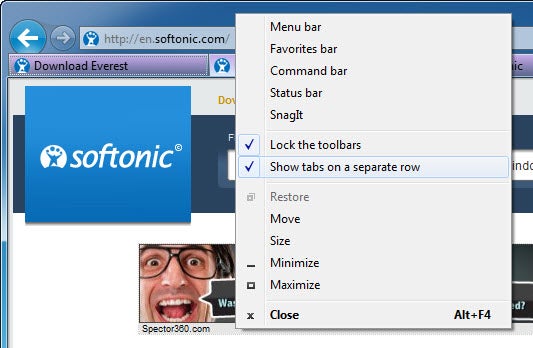
As for appearance, Internet Explorer 9 RC has applied a few minor changes: tabs are now squared (no rounded corners anymore), and the design of the buttons inside the address bar has been improved. There’s also a new option to show tabs on a separate row, for those who prefer having the address bar on one line, and the tab bar on another.

Talking about functionality, IE9 includes everything we already saw in the Beta version: Webslices, a new Download manager, a Performance advisor for add-ons, inPrivate browsing and the ability to pin specific websites to the superbar in Windows, among others.
Continue reading “New features in Internet Explorer 9 RC”

Microsoft and Nokia team up on Windows Phone 7

At its Strategy and Financial Briefing in London today, Nokia has confirmed it is aligning with Microsoft for its 2011 smartphone strategies. Specifically, Nokia will begin producing Windows Phone 7 devices for Microsoft in an effort to catch up with current mobile leaders iPhone and Google.

The broad strategic partnership between Microsoft and Nokia includes making the Windows Phone Nokia’s primary platform for smartphones in 2011. Bing will be Nokia’s primary search engine across all of its smartphone devices, for one, while Microsoft will adopt Nokia Maps as its primary mapping service. Nokia’s app store will merge with Microsoft’s Marketplace as well, likely bringing even more content and app options to Windows Phone 7 users.

Nokia has assured users that Symbian devices will still be produced, although at the same time noting that it will become more of a “franchise platform.” This presumably means that Nokia will continue to sell the devices, as well as introduce new phones on the Symbian OS currently in development, with the ultimate goal being to retain Nokia customers and eventually migrate them over to the Windows phone platform in the years to come.

MeeGo, Nokia’s Linux-based open source OS, will also continue being developed, with a new MeeGo device set for release in late 2011. Nokia’s game plan for MeeGo seems ultimately to be more long-term. Nokia seems to be hedging its bets, using MeeGo as an open source project to gauge the mobile market’s longer term future, in terms of trends to be on the look-out for.

What does this new partnership between Nokia and Microsoft mean for the future of the mobile market in general?

It’s difficult to know for sure, but we can make some educated guesses. Nokia is a well-known and respected mobile company, as is Microsoft in its own element. Apple and Google might be leading the mobile industry currently, but Windows Phone 7 is a cool operating system and with this boost it might finally get the audience it deserves.

Whereas Android hasn’t had the gaming success of iOS, Windows Phone 7 already has some really impressive titles that up the ante for mobile gaming. A bigger audience could make it the gamer’s choice OS. More competition for Apple and Google in this sphere will be nothing if not interesting.

PES 2011 now available for Android

FIFA 2011 is largely thought to have taken this year’s football game crown, but Konami have jumped in and released PES 2011 for the Android platform. That makes Pro Evo the default winner on Google’s phone OS, as it doesn’t support FIFA yet.

PES 2011 will run on Android 1.6, but it seems as if the performance might not be great on older phones. Unfortunately, neither Konami or the Android Market give any indication about recommended processors or RAM. The level of detail is impressive, and seems to do a good impression of its big brother console versions. Having big titles like this can only be a good thing for Android’s gaming reputation, which is still eclipsed by Apple’s iOS. PES 2011 can be purchased from the Android market at just under $7.

Four simple rules for smartphone safety

Last week, an Android app was revealed at the 18th annual Network and Distributed System Security Symposium (NDSS) in San Diego, California that demonstrated just how much information could be disseminated from your phone during the course of a single call. The purpose was to demonstrate how smartphone apps can record financial data you give over the phone while on a call and transmit it to other locations. Named Soundminer, this proof-of-concept app for Google’s Android OS monitors the phone calls you make. It also records credit card numbers you either speak into your phone’s microphone or type into its number pad.

Given that one of Google’s primary boasts during the release of Gingerbread was the ability to use your phone as a credit card to make in-store purchases, the gravity of this new threat is clear. While smartphone users in general are becoming savvier about not allowing an untrusted app access to all of their phone’s data, many don’t view a request for microphone access as an active security threat. This issue isn’t exclusive to Android phones either. Recent developer studies have shown that many iPhone apps have also collected user data that tracks your location, among other things.

Although there are clearly ways around smartphone security, as long as you use yours responsibly and are careful with what you install, you should be safe.

Here are 4 ways to keep your smartphone secure:

1. Use discretion when downloading apps to your phone. Make sure you trust the developer, and do an online search to find out more about them if you’re unfamiliar.

2. Only download apps from sites you trust, and read reviews on the app before making the ultimate decision to install it.

3. Take care to note what private data each app is requesting access to. Be it your location, personal information, or text messages, some apps want to access a lot of information. Ensure it makes sense for the app to access that information before choosing to grant it.

4. Make sure to download app updates to your phone when prompted. Many of these come with additional security patches that will help protect your phone.

How to connect a Windows Phone 7 device to a Mac

To some, the idea of connecting a Windows Phone to a Mac seems a little wrong somehow.  One eloquent colleague recently described me syncing a Windows Phone 7 device to an iMac as “like a monkey mating with a camel”. Microsoft isn’t overly keen on its products mixing with Macs either, and has yet to release its excellent Zune Windows Phone 7 management software on the Apple platform.

In my opinion, there’s nothing wrong with a beautiful mobile phone hooking up with a beautiful desktop computer and sharing themselves with each other–regardless of their different parentage. If you too, want to connect a Windows Phone 7 device to a Mac then fear not: it can be done!

All you need to do is download and install a piece of software called Windows Phone 7 Connector (developed by Microsoft itself, incidentally). This simple, free utility allows you to sync music, photos, videos and podcasts from your existing iTunes and iPhoto libraries to your Windows Phone 7.

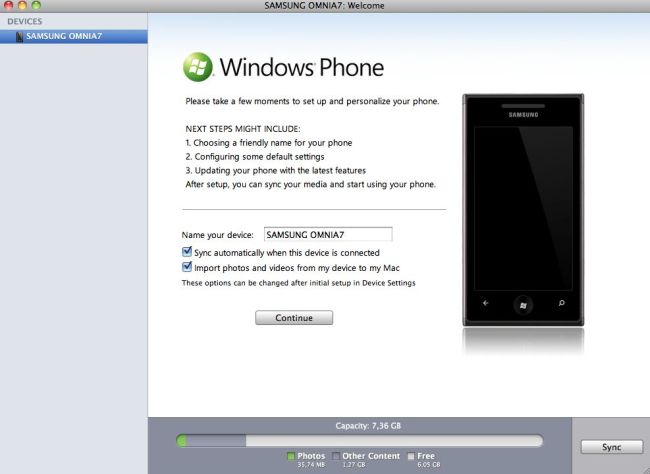
When you plug your Windows Phone 7 handset into your Mac, you’ll be invited to set up and personalize your phone. Here you can change the name of the device, download the latest OS updates and change some of the default settings.

Continue reading “How to connect a Windows Phone 7 device to a Mac”

Free browser game: Fotonica

Fotonica is a visceral 3D arcade game, that sees you running at incredible speeds over vector graphic landscapes. It’s on-rails, so you only control your speed and jumping. The aim is to keep going as long as you can without falling off the track.

Despite really simple controls, the speed and difficulty will keep you coming back. There are four tracks and an endless mode for high score chasing. Each track has multiple ‘routes’ of high or low platforms, and there are dots to collect. Reach the highest speed and you’ll enter a psychedelic gold mode, where your breathing is amplified and the game becomes almost dreamlike. Sometimes gold mode can be distracting and make you miss a jump, and collecting dots momentarily obscures your vision, but the adrenalin rush of the game will keep you motivated.

Play Fotonica here. Note that it requires the Unity plugin.

The Mobile World Congress iPhone survival kit

This year’s Mobile World Congress is starting Monday February 14th in Barcelona, Spain. The location couldn’t be better for us – a short ride on the red line and we’re there – but for others it’s a long trip that involves buying plane tickets, booking hotels, changing currency and knowing their way around the beautiful city of Barcelona. Luckily, there’s an app for all that! We’ve compiled a list of  10 iPhone apps that will surely prove to be very useful for those of you planning to attend MWC next week. Here they are:

Kayak – The ultimate traveling app! With Kayak you can search for flights, book a hotel, rent a car, organize your itinerary and much more, all for free. The app includes information about airports and lets you track flight status as well.

Currency – If you’re new to euros, this app could be a life-savior. Currency includes updated exchange rate information for more than 100 different countries and currencies. It’s the perfect tool to know if they’re charging you too much for the paella!

Barcelona Subway – Once you’re in Barcelona, metro is by far the fastest and most efficient way to move around the city. With this app you’ll have all the information you need about the Barcelona metro (maps, stations, trip planners) right on your iPhone.

Catalunya Taxi – Do you prefer taking a taxi? No worries! Catalunya Taxi helps you get one without having to call a taxi service and wait on the line. Book a taxi ride, obtain an estimated price in advance and get the booking confirmation by text message.

Mobile World Live -When you’re at the Congress you probably won’t have time to follow all the conferences and exhibitions going on at the same time. Use the Mobile World Congress official app to keep track of everything going on in the mobile industry!

Bump – One important activity in the MWC is networking. Forget about your old-style business cards and use Bump instea: an app that lets you share whatever you want (photos, messages, contacts, even Facebook friend requests) just by bumping two phones together.

Babelingo – Of course, networking is so much easier when you speak the same language. If you don’t, Babelingo can give you a hand with its collection of more than 300 useful phrases translated into 11 languages. Just choose your desired phrase and the app will display the translation.

AroundMe – Now where’s the nearest ATM? Where can I find a coffee shop for a short break? I need to buy something, is there a supermarket near the MWC? Find the answer to these and other questions in the AroundMe app – a must-have when travelling abroad!

Lonely Planet Barcelona City Guide – Work is over! It’s time for tourism, and the Lonely Planet guides have all the information you need. This app will tell you about all the museums, markets, monuments and tapas bars you can’t miss while you’re in Barcelona!

Bus Turístic Virtual -Another great option to explore Barcelona is the Bus Turístic – three bus routes that cover all the points of interest in the city. With the help of augmented reality, this app lets you locate the most outstanding spots in Barcelona and make the most of your visit.
Save money on your next shopping trip with mobile coupons

With the advent of the smartphone, quite a few everyday tasks have become easier. You can now keep up with your emails in a matter of seconds, take pictures andshare them with friends, all without having to find a computer. The technology keeps growing as well. With Google’s release of Gingerbread a few months back, phones can even be used as credit card substitutes in some instances.

Now you can use your phone to take advantage of great deals based on where you shop and even what you’re looking to buy. Time to get rid of your Sunday coupons. There’ll be no more arduous newspaper clipping projects for you. Here are some great apps for your iPhone that will help you save a bundle.

MobiQpons: This handy little app uses your current location to bring you coupons valid in stores closest to you. MobiQpons tracks your location and uses it to sort coupons within about a 10 mile radius. You also have the option of manually adding your location, either by city or zip code, or sorting by the coupon’s product category. Overall, it’s a great way of saving money, especially if you live in a larger city where there are more opportunities for store savings. Just be sure to ask store owners or cashiers the best way to redeem each coupon. Most don’t come with a bar code.

Grocery Gadget: At first glance, this app seems to have nothing to do with coupons and instead appears to simply allow you to create a list of grocery items you need to buy on your next shopping trip. A closer look, however, will reveal an integrated coupon feature. Based on the items in your grocery list, this app scours nearby stores and pulls up any related coupons, complete with a bar code to be scanned for your discount at the register. Note that you do need to sign up for an online service to make use of the coupons. The process is relatively simple however.

Shopkick: This app uses a GPS tracker to locate stores you’re within a certain range of. A signal is then sent to participating stores allows you to earn points toward discounts on specific store items. The points are known as kickbucks, and much like Foursquare you can earn more kickbucks by doing certain things at specific stores like scanning an item with your device’s camera. Kickbucks can also be used to donate to over 30 different charities. Right now, Shopkick is only available in a select few larger U.S. metropolitan areas, but the service promises to expand quickly.

Amazon Price Check: Instantaneously check and compare the prices of store products with Amazon.com’s own inventory with this app. If your device has a built-in camera, you can scan in product bar codes, or even snap a picture of the product you’re interested in. Price Check provides customer reviews and ratings straight from Amazon’s main website as well If you like what you see, you can even buy the product online. Although it’s not technically a coupon app, it does allow you to make informed purchase decisions and potentially save a lot of money in the process.

Angry Birds Valentine’s Edition available on the AppStore

If you have already grown tired of playing the Christmas-themed version of Angry Birds Seasons, we have good news for you: the popular game just got updated with a special new version to celebrate Valentine’s Day.

Angry Birds Valentine’s Edition features the same great gameplay and insane level of addiction as the original game, only in a more ‘romantic’ environment – meaning the graphics have been sprinkled with hearts, ribbons, balloons and lots of pink. Beside the new decoration, you aim remains the same: using physics laws and a slingshot, throw birds against the pigs’ hideouts to destroy them. Not sure how this act of revenge and destruction goes with the spirit of Valentine’s Day, but it’s certainly a lot of fun!

The new Valentine’s Edition of Angry Birds is already available on the AppStore for $0.99.

Pola: Create retro instant camera images

You can tell I love old instant photos just by the number of times I’ve written about them on this blog: a Photoshop tutorial to create a Polaroid style collage, a list of instant photo apps – both desktop and online… But even if it’s not a new topic, you still find new ways to transform your photos into retro instant photos that are well worth a blog post.

This is the case of Pola, the latest addition to my collection of instant photo apps. Pola stands out for several reasons: it’s very easy to use, it doesn’t require installation and it includes a few options to customize your Polaroid-style images.

To create an instant photo image in Pola, all you need to do is drag and drop the image onto the program’s interface and wait a few second. The instant photo version of your image will be automatically generated and saved to the same folder as the original one – that is, under a different name to prevent accidental file overwriting.

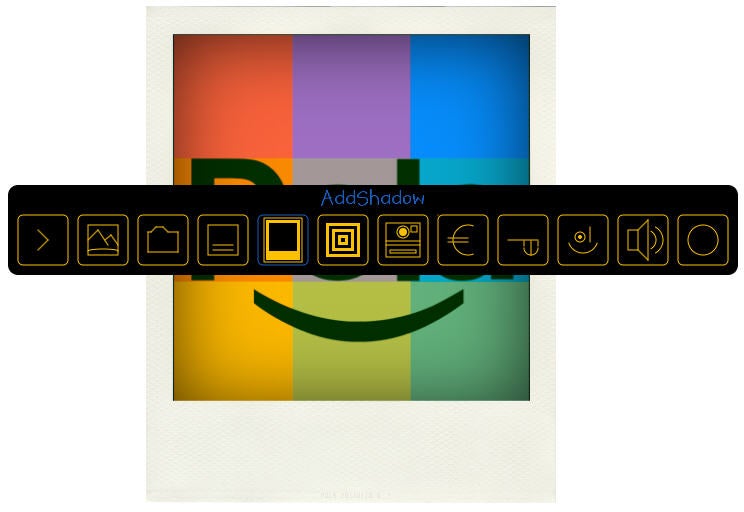
That’s Pola’s basic functionality. Apart from that, Pola includes several ‘cartridges’ (filters) that apply different effects to your images, and also lets you add a shadow effect and a custom message to the image. All these functions are easily accessible from Pola’s toolbar, just by clicking anywhere on the program’s interface.

Pola is not an image editor, so don’t ask for any extra tools. But if what you want to do is turn your images into instant photos without hassle, this may be the perfect program.