Bulletstorm Producers Poke Fun at Call of Duty

Epic Games are obviously pretty confident that their upcoming Bulletstorm release is going to wipe the floor with legendary shooter Call of Duty. They’re so confident in fact, that they’ve even made a parody of the game  – Duty Calls: the Storm before the Calm.

[youtube]http://www.youtube.com/watch?v=goiMExAZCko[/youtube]

You need to be pretty confident of your own abilities before you take a step like that, but Epic Games have every reason – the Bulletstorm trailer is pretty impressive and with the Bulletstorm demo available now on the XBox Live and PlayStation network, you’ll soon be able to see for yourself. In any case, The Bulletstorm release date is slated for February 22nd.

You can download and play Duty Calls: the Storm before the Calm by clicking here. It’s a big download for such a short game, but it’s pretty funny! Check out our review here.

Follow the latest news in Egypt with Livestation

Recent events in Egypt have proved how powerful the internet can be at getting news out when official channels are blocked. One of the big beneficiaries has been Livestation which has seen downloads rocket over the past week. The main reason is because huge numbers of people have been searching for Al Jazeera’s coverage of the drama unfolding in Egypt which you can watch on the excellent app.

Livestation has official agreements with many other major channels such as the BBC World, CNN and The Discovery Channel meaning that you’re guaranteed high quality programming and images. Even better, you can interact with other users very easily via an online chat function which also gives viewers a chance to rate their favorite channels.

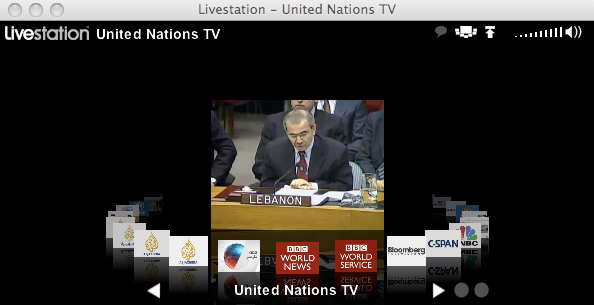
You can add channels by going to the developer website and simply clicking “Add to player” and you’ll find that it’s automatically added to your channel list in Livestation. The presentation of Livestation is superb – you can select channels in a 3D revolving list of logos in much the same way as you do albums in iTunes. The quality of the streams in terms of video and sound is usually first class (although can vary as evidenced above) and expanding it to full screen mode usually retains excellent quality.

The latest version has added several handy new features. Not only have more interesting channels been added – The United Nations TV Channel and UNHCR Channel – but you can now tweet directly from Livestation. Simply add your Twitter username and password and a special screen grab function allows you to post images of what you’re watching at any time. The search function has also been significantly enhanced allowing you to filter results by Premium Partner, Viewer Added and Free Partner.

On the downside, the chat function is still sparsely populated. You might find that many channels simply have no one to chat to. There’s also no way to record programs which I’d like to see in the next release. Mac PPC users are also out of luck as the latest version doesn’t support them.

You get more tips on how to get the most out of it from the Livestation blog. Livestation is available for download on both Windows and Mac.

The Best Ways to Make an Animated GIF

If you want to make a cool animated profile picture, you should think about making a GIF. They’re really easy and quick, and as long as you have the materials (a series of images or a video), it couldn’t be easier.

To take the pain out of the process, we’ve rounded up 3 of the best desktop apps for creating GIF animations. Download the one you like the best, get animating and a funny GIF avatar will be yours!

Easy GIF Animator is one that lives up to its name – it’s a feature-rich, easy-to-use GIF animator that’s especially useful if you want to make GIFs from scratch – i.e. without a set of images. That’s particularly useful if you want to make a text-based GIF, say with a song lyric, funny quote or instructions. Easy GIF Animator isn’t a free program, but the trial version has 20 free uses, so you’re sure to be able to get what you need.

MS GIF Animator is an old-fashioned program, but it’s no-install and free, so if you want to get animating quickly, it’s the perfect fix. This app supports .AVI video. Making a GIF from a video file is the ultimate easy GIF and takes an absolute a minimum of effort – just grab an .AVI file, pick the frames you want and save as a GIF. MS GIF Animator will let you make various tweaks and improvements, but even with very little involvement, you’ll still get a great GIF!

Beneton Movie GIF is the last in our list. Completely free and very user-friendly, it has loads of sample GIFs and help, so even if you are attempting something a little more complex, you won’t have any problems. It doesn’t support video however, and be warned that it tries to install other software items, so keep an eye on the installation process!

Dragon Age 2 PC Demo Confirmed

After some denial throughout the day, EA have officially confirmed to us that the hotly-anticipated Dragon Age 2 demo will be released on February 22.

Demos for role playing games are tricky, as many full games take hours to get into.  There’s no reason to expect that Dragon Age 2 will be any simpler. From the screenshots, it looks like we can expect the same mix of brown and red that defined the look of the last game! We’ll post our first impressions as soon as we get our hands on it; until then you can check out our preview here.

Foodily lets you share Super Bowl party menus on Facebook

So, it’s the Packers versus the Steelers this year, is it?  If you get a lot of grief from friends who want you to attend their Super Bowl party over all others, how exactly do you choose between parties?  I am apathetic about football games in general, no matter how important or hyped-up, and so I base my football-related decisions on food. In this instance, Foodily might just be able to help you make an informed choice come Super Bowl Sunday.

[youtube]http://www.youtube.com/watch?v=Wzgf7BxInN4[/youtube]

Although not a catalog geared specifically toward Super Bowl food recipes, typing that specific query into Foodily’s search box generates well over 15,000 results. Each recipe comes with a list of ingredients, cooking directions, and the ability either to like or save recipes for later viewing. What makes Foodily stand out even further, however, is the ability to list recipes and even entire menus on a Facebook events invitation. Expected attendees can also add to the list to generate an even more accurate menu of options. See the potential?

Make your friends work for your attendance at their Super Bowl party! Tell them to let you know what they’re planning on making before you accept an invitation using Foodily. Warning: This may decrease the number of invitations you actually receive in subsequent years (although depending on just how much you like football, this might not necessarily end up being a bad thing!).

For those of you who actually do get revved up for Game Day, James has pointed out some great ways to prepare for the big day with his iPhone Super Bowl Survival Kit. And for those like me who are far more interested in the food aspect of the entire affair, check out Niamh’s post on the best food apps for Mac, as well as her picks for the best recipe software all-around. Game on!

Vlingo reveals details of new voice-controlled TV app

Soon you will be able to bark orders at your TV, telling it to record the latest episode of Breaking Bad, or find a good Clint Eastwood movie for you to watch – just with your voice. Voice app developer Vlingo has revealed that it has developed a voice control system for a leading (unnamed) TV manufacturer, which is due for release in June this year.

Vlingo to launch new TV app

The Internet-enabled device will come packaged with Vlingo’s voice and virtual assistant technologies, allowing users to command the device through speech.  Users will be able to tell the TV to perform certain common television functions, such as recording programs, as well as ordering it to carry out internet-based actions by saying things like “Update Facebook, or “Find my friends on FourSquare”.

Dave Grannan, President & CEO of Vlingo told us how Internet TV is an area the voice control company is very keen to move into, as it looks to expand on the success of its mobile apps:

We are really excited about this because the use case for Vlingo Virtual Assistant in this paradigm is probably the most powerful. Most of us have seen the failed attempts at connecting a keyboard to a television set. Having a natural language voice interface for a television will be a very powerful thing.

Grannan also revealed that Vlingo intends to launch PC and Mac versions of its popular Virtual Assistant application. The company is also working on an in-car voice control application for Hyundai. Known as Blue Link, the software will allow drivers to speak commands such as “turn the air conditioning up”, “play the Beatles” or “find the nearest petrol station”.

Browse and rate linked content on Twitter via Tumbl.in

Twitter users who love to share or browse content through the popular link-sharing website Stumbleupon take note: Now you can do the same with links posted to Twitter feeds. Tumbl.in makes it possible.

Don’t let the name confuse you. This handy web-based tool has nothing to do with the microblogging website Tumblr. Instead, Tumbl.in links directly to your Twitter account and pulls links tweeted about from a variety of different sources. You can specify where you want the links to be chosen from. Tumbl.in can pull this information from your main Twitter feed, select Twitter lists you define, or just from specific categories of interest you choose.

Much like Stumbleupon, Tumbl.in has a built-in menu bar that loads at the top of your browser screen while the content loads in the larger space below. You have the option to retweet content you like or else choose from a few different descriptions like “Amazing” and “WTF” based on your reaction to the content. Click on the Tumbl.in icon at the top far right to open the next link.

With popular Twitter clients out there like TweetDeck and Seesmic Desktop, there are so many different ways to read your Twitter feed now that Tumbl.in might seem a little pointless. There are surprisingly few ways to sort through specific categories of interest however, and even fewer programs that filter only links. For the diehard fan of Stumbleupon who either wants to give Twitter a go or is simply looking for an easier way to find interesting content, Tumbl.in is definitely worth a try.

A new interface design for Google Docs

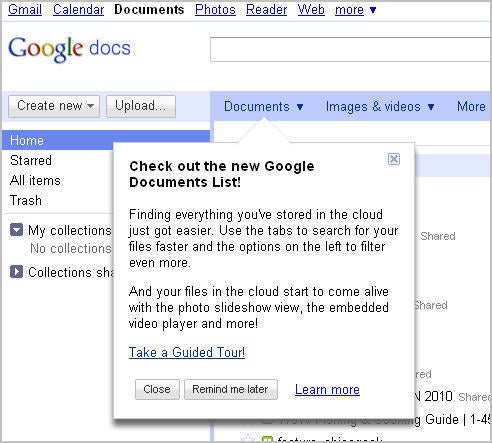
If you’re an enthusiastic Google Docs user like me, you’ll be happy to know that our favorite online document editor just got a facelift.

Google Docs

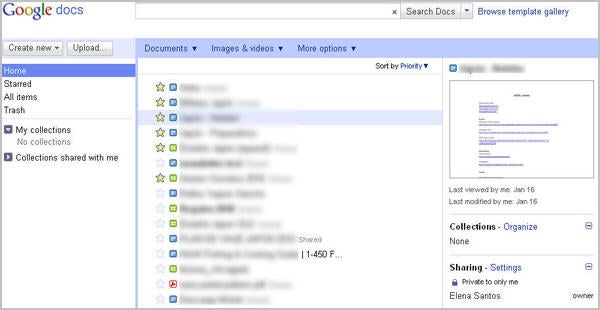
The new Google Docs design is much more similar to Gmail now, with a sidebar on the left featuring quick accesses to the Home page, the Trash and the list of starred items, and a couple of handy buttons to create new documents or upload them from your hard drive. Home can be configured to show only the documents you want to see.

Another new feature in Google Docs is collections. You can now organize documents in collections, and easily share them with your friends. Also, filters have been improved: the top tab bar already lets you filter by type – separating documents from images and videos – and the More options tab gives you more possibilities to filter files: by visibility or ownership.

Google Docs

Finally, if you click anywhere in the row of a given file (not the title, as that will open it) you’ll see a details pane on the right, displaying information about the selected file: who’s got access to it, in which collection it is stored and when it was last viewed or modified, along with a small preview of the document’s content.

Five reasons to give up Firefox

I’ve had a few good years with Firefox, but I disagree with Nick that we should stick with it. Progress never stops, and it’s become impossible to ignore how much Opera, Safari and especially Chrome have improved. It’s time to dump Firefox, and here’s why:

1: Memory usage

Sure, there are thousands of neat add-ons for Firefox, but install a few and after a while you’ll see its memory use rocket. I have often discovered Firefox eating a gigabyte of memory after a few hours at work, which is just unreasonable. I have found Opera and Google are much lighter on resources over a day in the office.

2: Looks

I know there is beauty on the inside, but why not have it outside too? When it comes to your browser, you don’t need to compromise with attractiveness. Firefox has been leapfrogged by everyone when it comes to looking great – even the dreaded Internet Explorer is looking better these days.

3: Out-dated features

Have you seen the downloader in Chrome? Firefox will just seem inadequate once you have. Firefox extensions? You have to restart the browser to install. Those are just two of the Mozilla browser’s out-of-date features. Try Opera if you want to see a truly modern feature set. What’s more, the Firefox interface takes up more room than is necessary – changing browser will give you more browsing real estate to play with.

4: Stability

Firefox crashes every day for me. I discovered that with Chrome, each tab is a separate process and so you can isolate and kill the problem without losing all of your open tabs. That’s much better, and minimizes your chances of losing work.

5: Familiarity isn’t good

A fact of computing is rapid change – don’t let comfortable familiarity keep you from moving with the times or you may find yourself too far behind to catch up.  Just because a feature works differently doesn’t mean it doesn’t work at all! Familiarity is what keeps IE 6 and 7 in the browser charts. Safari, Chrome and Opera all do things in their own ways, but they are all great browsers and you’re missing out if you don’t give them a chance!

Get 9 apps for $49 and help flood victims in Australia

There are several ways to do work for charity: you can donate food and clothes to people in need in your neighborhood, join an NGO or even buy software. Yes, you did read that: buying software can also help people.

Just like the Humble Bundle helped raise money for the Child’s Play Charity, the Bundlelytic charity bundle enables you to help those in need with just a mouse click. In this case, half of the proceeds will be used to help the victims of the recent floods in Queensland, Australia.

The bundle includes 9 useful Windows applications, which together have a value of $299 but which you can get for just $49.99. The programs included in the pack are:

  • SafeWallet – Store all your sensitive data (passwords, credit card numbers and so on) in this encrypted vault with support for syncing with most mobile phones.
  • Divvy – A must-have for productivity junkies, this app lets you organize all your active windows in the most comfortable way.
  • Altaro Oops!Backup – Create backup copies of your important documents, and go back to any of their previous versions at any time.
  • System Speedup Pro – Fix the most common problems in Windows with just one click, and remove suspicious processes and junk file as well.
  • novaPDF Professional – Fully featured app that lets you convert any document to PDF through a virtual printer driver.
  • EASEUS Data Recovery Wizard – Recover accidentally deleted data from corrupted or reformatted partitions, USB drives, and memory cards.
  • Returnil System Safe – Crate a safe virtual environment on your system to test potentially dangerous applications.
  • Pixo – An original image editor that lets you apply effects to your photos as if you were painting over them.

If you decide to buy the bundle, you’ll automatically be entered into a draw to win a 250GB ioSafe portable hard drive and one of 100 copies of Nitro PDF Professional. So you see, you have nothing to lose and lots to win: good quality software, a handy portable hard drive and of course, helping people.