NeoOffice for Mac now donation only

The office suite NeoOffice for Mac is no longer free as of version 3.2. The popular package, which is based on OpenOffice but has been modified for Macs, has always been free up until now but those that want to download the latest version are required to make a donation before doing so. The developers have posted a message on their download page saying:

The NeoOffice project is funded solely by donations from NeoOffice users like yourself. As a way to thank our donors who make the NeoOffice project possible, NeoOffice 3.2 can be downloaded by all NeoOffice donors who have donated US$10 (or €7 or £6 or CA$10 or AU$10 or ¥834) or more within the last year.

$10 is still a very modest contribution to what is an excellent alternative to Microsoft Office. However, version 3.1.2 is still free although unlike 3.2.0, it’s not prepared for the forthcoming release of Lion so don’t be surprised if it stops working when you upgrade.

A download link for NeoOffice 3.1.2 and 3.2 is available here.

Free Browser Game: Convergence

Convergence is a free game about life. You play through three stages of someone’s life, making choices for them, and will see how that effects their success and happiness.

Will you compete with your brother and do as your mother says as a baby? How will you balance your job and your girlfriend? With charming 8-but graphics, Convergence is a gentle game with multiple endings that depend on the choices you make in the first stages.

This is an very unusual game, but it’s an interesting experience. Check it out at Kongregate, and make sure you have the latest version of Flash installed.

[via indiegames.com]

The great software Easter egg hunt – web app special!

2008 was the year of the Great Software Easter Egg hunt on OnSoftware, where we rooted out some of the coolest hidden computer program tricks or secrets (known as Easter eggs) ever made.

But three years is a long time in the tech world, and since then applications have begun moving away from the desktop and into the cloud. It seems that cheeky web app developers are just as keen to hide tasty Easter eggs in modern day online applications, though, just like the wise-cracking software programmers of old.

Don’t worry though folks, I haven’t lost my knack for sniffing out hidden software secrets, and I’m about to blow the lid on the greatest Easter eggs on the web. Happy Easter!

Google Tilt

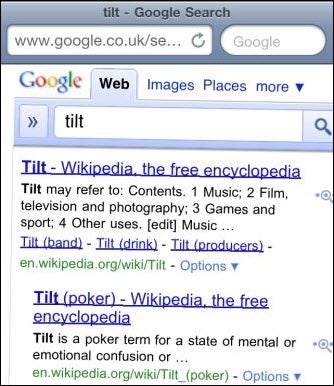
A hangover from a Google April Fool’s joke this year, this little trick works with Android and iPhone devices. Simply type “Tilt” into Google in your mobile browser and you’ll be presented with a strangely skewed search results page.

Google Tilt Continue reading “The great software Easter egg hunt – web app special!”

Top 5 OCR software for Macs

Optical Character Recognition (OCR) software is ideal if you need to edit a document but don’t have it in an editable form. For instance, you may want to use text from a document but only have it in hard copy. OCR software allows you to scan it and then translate the printed characters into something you can edit on your Mac saving you hours of painstaking manual typing. Alternatively, its useful for creating a fully searchable version of a PDF document. Although there aren’t many reliable OCR software tools for Mac, here are some of the best:

VueScan One of the most useful and lightweight scanning tools for Mac is also great for OCR scanning. VueScan is impressively accurate in this respect although it works even better if you download this dictionary of common words. Just place the file (vuedict.dat) in the same directory as the VueScan program and choose the language using the “Output|OCR text language” option.

Adobe Acrobat X Pro Many people are surprised when they learn that Adobe Acrobat also allows OCR scanning of documents. To use it, go to Taskbar Create >> PDF from Scanner and choose any of the 3 document presets (Black & White Document, Grayscale Document, Color Document). These 3 Presets have the OCR option enabled by default so you can get a fully searchable scanned PDF in a single click. For full instructions, check here.

ABBYY FineReader Express If accuracy is extremely important, then ABBYY is one of the most precise OCR readers out there. Its also available in a huge number of languages (171) compared to most OCR software so it will read just about any language. Although accuracy is great, formatting can sometimes be an issue and you may find yourself having to do some manual readjustment. The professional version is more accurate when it comes to formatting however.

PDFPen Although PDFPen is used mainly for annotating PDF documents, it does also feature an OCR function so you’re getting two pieces of software for one. However, unfortunately the accuracy isn’t as great as dedicated OCR software options and you’ll spend a fair amount of time correcting words that have been interpreted wrongly before you can do anything else. However, if you want to electronic signatures to PDF documents or manually annotate them in any way, its a useful two-in-one tool.

Readiris Pro It doesn’t come cheap but Readiris Pro probably has just about every OCR tool and most importantly, is very accurate. Readiris Pro also does a great job of preserving formatting unlike ABBYY FineReader Express. In the past, the interface was quite poor but version 12 has been completely redesigned for Mac OS X with a slicker interface and more helpful step-by-step scanning hints. Readiris Pro is ideal for those that need to publish their freshly scanned OCR documents to the web as it has a handy web publisher too.

Get iOS style ‘reverse’ scrolling for Mac

One of the rumored features of OSX Lion is iOS-like scrolling. It may not be immediately obvious, but that actually means scrolling will be reversed! On a touchscreen, dragging up moves the page down, whereas the opposite is true on desktops.

You can try this out right now if you have OSX 10.5 or above, with the tiny Scroll Reverser app. It’s easy to install and uninstall, and so far seems to work perfectly. Of course, you will be able to turn it off in Lion, and if my experience is anything to go by, you will probably do just that. There’s something very strange about reverse scrolling with a mouse or trackpad. Even jumping from iOS right onto OSX with reverse scrolling is jarring. However, Apple are masters of designing interfaces, so there must be a good reason for introducing this… I just can’t see it yet!

Try out Scroll Reverser and see if you’re ready for touchscreen-like controls on your desktop!

Support for Flock browser to be discontinued

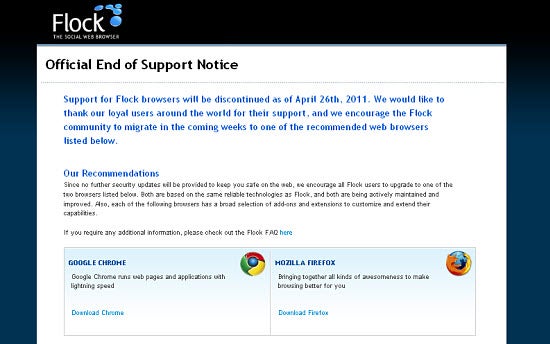
As of April 26, social browser Flock‘s developers will no longer be offering support to users. Based on Chrome, Flock’s browser interface integrated several different social networks including Facebook and Twitter to give its users the ultimate social browsing experience.

Flock’s creators advise current users to switch to other browsers and specifically recommend Mozilla Firefox and Google Chrome. Without regular security patch updates, a browser may be susceptible to newer viruses, malware and other internet threats that could potentially do harm to your PC.

For those seeking a similarly social browsing experience to Flock, RockMelt is another fantastic option that integrates Facebook, Twitter and your favorite blog feeds quite seamlessly. In fact, we’ve even pitted Flock and RockMelt head-to-head here at OnSoftware before, with RockMelt coming out on top in its current development stage. There’s no shortage of good browser alternatives!

Do you use Flock? If so, what browser are you planning on switching to and why? Let us know in the comments below.

Help! What version do I have?!

We’ve all been there – you’re installing a program, and suddenly you find out that you need a certain version of DirectX, or that the program you’ve downloaded is only available for 64 bit versions of Windows. That’s cool, but how do you know what version you’ve got?!

If this has ever happened to you, keep reading: we’re going to tell you how to find out what version you have of DirectX, Windows, .NET Framework, Java, Flash and more!

What version of DirectX do I have?

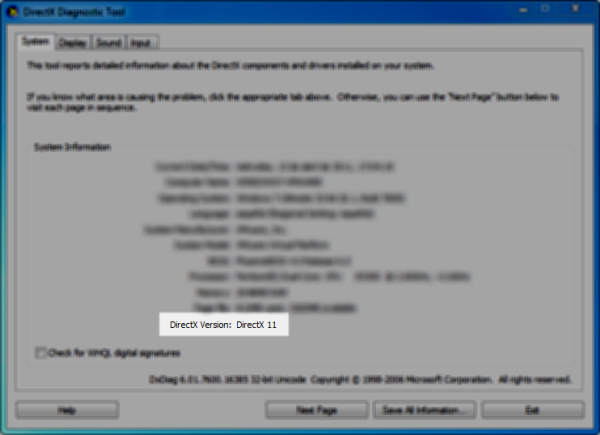
Ok, let’s start with an easy one. This is as simple as Start > Run, then write dxdiag in the box. Hit No when it asks if you want to check if your drivers are digitally signed, and like you see in the screenshot below, just read off the version installed on your computer.

What version of Windows do I have?

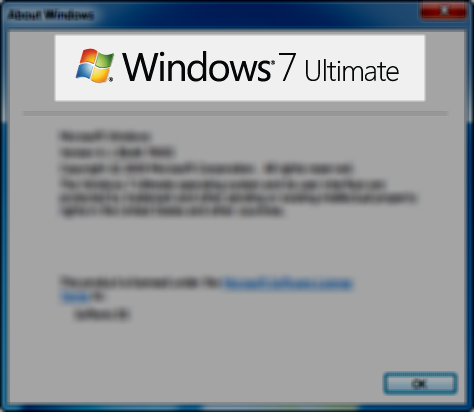
Ok, this is a pretty easy one too, but you know that if we don’t tell you, someone will complain! Again, just go to Start > Run and write winver. Right at the top, you’ll be able to see the version, in this case, Windows 7 Ultimate.


Continue reading “Help! What version do I have?!”

How to: Control your BlackBerry from a PC

Want to control your BlackBerry from your computer?  Well, there’s an app for that! It’s called Impatica viaDock and it lets you command the entire BlackBerry operating system from your PC.

Not to be confused with Virtual Network Client programs such as VNC Desktop and MochaVNC, which let you remotely control your PC from your phone, Impatica ViaDock works the other way around, giving you the power to use the BlackBerry OS via Windows.

It’s particularly useful for typing emails or long SMS or BlackBerry Messenger messages, using a conventional keyboard. You can even use it as a hands-free dialer for your phone, making ViaDock a useful option for home workers.

Here’s a quick guide to how Impatica ViaDock works…

Continue reading “How to: Control your BlackBerry from a PC”

Free Browser Game: Cat Astro Phi

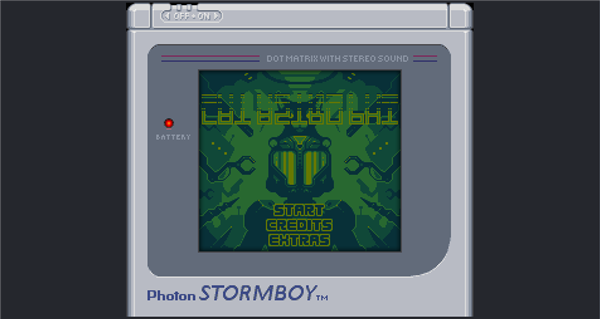
Cat Astro Phi is a retro Gameboy adventure that you can play in your browser. Traveling through space, your ship is damaged in an meteor storm, and Jonesy the Cat is ejected onto a nearby planet. Can you escape this hostile world and rescue him?

Cat Astro Phi has an excellent 8-bit soundtrack, and it’s impressive how much effort has been put into making a totally new Gameboy style adventure. The tiny graphics are full of character and, though the gameplay is simple, it is fun. Play it over at Newgrounds now!

Top alternatives to Firefox, Chrome and IE

You’ve tried, contrasted and compared, and by now you’re probably dedicated to your favorite browser. There’s a good chance that browser is one of the big three, in other words, Internet Explorer, Firefox or Chrome.

What you might not be aware of, however, is how many alternative browsers are out there. There’s a niche for different ways to surf the web, and judging by the number of apps out there, it’s not that small. More browsers means more options for users, and that’s got to be a good thing, right?

So, fancy taking a look at the competitive world of the alternative browser? Excellent! Step this way…

Maxthon was born as MyIE2, an optimized version of Microsoft’s legendary browser. Today it has reached a 3rd version under the name Maxthon. This browser boasts two rendering engines, Trident and WebKit, which guarantees optimal web page viewing, and it also adds extras like ad-blocking and mouse gestures. It’s one of the most popular of the alternative browsers, and with good reason – it’s packed with options!

Pale Moon is an optimized version of Firefox that aims to bring you the best performance on computers running a Windows-based operating system. Compared to Mozilla’s browser, it’s faster and lighter on resources, although being based on Firefox, Pale Moon features the same stability and reliability, as well as support for extensions and themes. A fourth version was recently launched, keeping it bang up to date with Firefox’s latest effort.

Rockmelt is also known as the social browser, and we’ve already mentioned it a few times. Its main advantage is integration with apps like Twitter and Facebook, and truth be told, browsing without having to open new tabs for your social networking is very comfortable. It runs on WebKit, the same engine as Chrome and it’s pretty quick.

Continue reading “Top alternatives to Firefox, Chrome and IE”