Midipiano: a great keyboard piano for Windows

If you’ve always wanted to learn the piano but don’t want to invest in a real keyboard, you can always turn your PC keyboard into a Piano! It’s not ideal, but also not a bad way of playing simple melodies on your PC. MidiPiano is the neatest Windows app I’ve found for this.

Qwerty piano keyboard

MidiPiano has two windows, the keyboard with controls, and a piano roll into which you can upload midi files. When you record yourself playing, it’s recorded here too, in midi format.

How to use MidiPiano

I’ve played a real piano a couple of times, and using a qwerty keyboard is a bit awkward in comparison! The layout runs the white keys along four rows: starting at the bottom with the Z to M keys, then continuing with A to L, Q to P and then 1 to 0.

The cursor keys, and numpad also let you run further up the keyboard, but it’s much more comfortable sticking to the four first rows. Black keys can be found by using Ctrl plus any other key. Holding shift allows you to play one note with the octave above at the same time. The record feature helpfully starts when you play your first note, and the midi file will finish with your last.

MidiPiano is free, and doesn’t require installation. Check out my review and download MidiPiano here.

Get the new Android Ice Cream Sandwich keyboard now!

Want a touch of Ice Cream Sandwich before the new Android OS is released?  You can now install the Ice Cream Sandwich keyboard on your Android device via a free download.

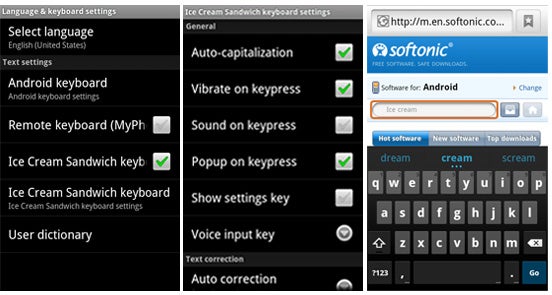
The unofficial version of the Android 4.0 keyboard, posted by AstronautMillionaire on Reddit, replicates the look and function of the new Android keyboard. The keyboard doesn’t look radically different from the current Android 2.3 keyboard, but it’s smart and it has some significant multi-touch, auto-correct, and prediction improvements.

To install the new Android Ice Cream Sandwich keyboard, simply download the APK and install it. Then activate the keyboard by going into ‘Language & keyboard’ settings in the Android Settings menu. The app’s options menu lets you tweak various options as well, such as auto-capitalization, vibrate on keypress, popup on keypress, and more.

To turn on the Android 4.0 keyboard, long-press in a text field and select ‘Ice Cream Sandwich keyboard’ in the ‘Input Method’ pop-up.

The new Android 4 keyboard

If you’re still not impressed with the Android keyboard, you can always install a third-party keyboard application for Android that make typing faster and easier. My personal favorites are SwiftKey X, Swype and SlideIT.

Skype adds video calling to Facebook

You can now use Skype to video chat via Facebook thanks to the announcement of Skype 5.7 beta for Windows and Skype 5.4 beta for Mac.

You don’t have to log into Facebook to use the new feature however. Simply allow Facebook to connect to Skype, select a contact in Facebook who is online and you can initiate video calls instantly.

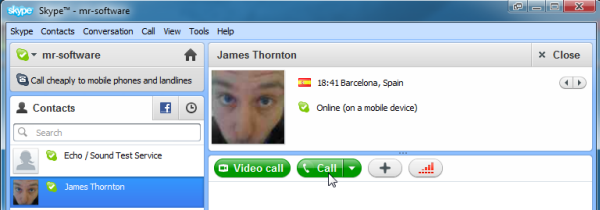

The new feature comes just a few months after Skype introduced Facebook chat integrating the two services even close since Skype was bought by Microsoft.

There have been no changes to the Mac interface however which will disappoint those already unhappy with the latest one. If you’re one of them and are thinking of switching to Facetime, don’t forget to check-out our Skype v Facetime analysis.

How to record Skype calls using PrettyMay

Want to record voice calls in Skype? Install PrettyMay for Skype and you’ll be able to record and save all of your Skype calls very easily.

PrettyMay Call Center is a stand-alone Skype audio recorder for Windows. To use it, you need to install Skype on your PC then download PrettyMay and install it. The call recording software is available as a 30-day trial, with a 30-minute per call recording limit.

Make a call with Skype

When you launch PrettyMay it will automatically load Skype, so you’re instantly ready to record your calls and conversations. Place your call in Skype by clicking on the name of a contact or calling their number with the dialer.


Continue reading “How to record Skype calls using PrettyMay”

How to install and play the Minecraft release candidate

If you don’t want to wait till the official 1.0 release of Minecraft, you can already download and play the RC2 (release candidate 2). Here’s how to download the file and install it.

According to Minecraft creator ‘Notch‘, the final version will only feature minor tweaks and fixes, and RC2 is fine for reviewing purposes. I’ve been playing it, and have found no problems so far.

  1. For Windows 7 users

    Download the .jar file. Click this link, and save the file.

    – Click the Start button

    Enter %appdata% in the search box.

    Click and open the ‘Roaming’ folder.

    Double click the Minecraft folder, then the ‘bin’ folder.

    Now delete the ‘minecraft’ file. Don’t worry!

    Drag the file you just downloaded into the bin folder.

    Start Minecraft as normal. It will update and you’ll be playing the new version!


  2. For Apple OS X users

    Download the .jar file. Click this link, and save the file.

    Open Finder.

    Type this into searchlight: /Library/Application Support/Minecraft/bin.

    Delete the minecraft .jar file. Drag in the version you just downloaded.

    Start Minecraft as usual and you’ll be good to go!


How to lose your lover over your computer

Computers affecting your sex lifeMany couples these days meet through the internet, but I’ll bet that for every love match made online, another couple splits up because of computers. Here are some of the common examples of computer-induced relationship meltdown, together with some advice on how to prevent them:

Too much time on your PC

ClockNo one can say that harvesting your tomatoes in Farmville, grooming your dog in Pet Society, and looking at videos of kittens on YouTube aren’t vitally important tasks. However, you should remember that your partner probably needs a little attention too.

Don’t worry, the worlds of Mordor or the plains of Lordaeron will not cease to exist if you decide to take a romantic trip to McDonalds with your loved one. If you need a bit of encouragement to get off the computer, then install some breakout software, such as WorkRave, which will force you to get off your PC at scheduled times.

The curse of the ‘Away’ status

MSN idle iconStatus indicators in programs such as Windows Live Messenger, Facebook Chat, or Yahoo! Messenger can be a relationship killer. In particular the ‘Away’ state is a big protagonist, causing breakdowns in communications that can lead to bust-ups. Here are some common scenarios:

* Your messenger program is set to Idle, showing your partner that you left your computer in mid-conversation.

* The same app puts your status back to Available when you move your mouse, and your beloved sees that you’re back at your PC and you still haven’t responded.

* If you’ve disabled status indicators and are always listed as ‘Available’, this can cause even more problems. Get up from your computer for a few minutes and your partner may start talking to you with no response, appearing that you’re ignoring them. Continue reading “How to lose your lover over your computer”

Firefox 9 beta released

Firefox 9 has officially gone from Alpha (Aurora) to Beta now that Firefox 8 final has been released. Mozilla continues to follow the same strategy as Google does with Chrome, creating different development channels to release early versions of their browser as soon as they’re available and keep the final one updated as often as possible.

There are several improvement in Firefox 9, although a few of them will only really benefit Mac users. For instance, there’s improved theme integration for OS X Lion and Mozilla have finally added two finger swipe navigation for Lion.

There’s also added support for querying Do Not Track status via JavaScript and improved general JavaScript performance courtesy of adding Type Inference. There have been several other minor tweaks too including improved standards support for HTML5, MathML, and CSS and overall stability has been improved.

The interface is pretty much the same as Firefox 8, with a minimalist toolbar and there’s still no way of removing elements that you may not want such as Java and .Net Framework. The major downside for most users however is that some plug-ins or add-ons won’t work with Firefox 9 yet – so if you have a lot installed, prepare to be disappointed.

Firefox 9 Beta has some useful enhancements for fans of the browser, especially those on Mac.

FreeTwitTube: Read tweets on YouTube video pages

Let’s face it. Sometimes comments on YouTube video pages just don’t cut it when you’re trying to get others’ opinions about it. Or maybe you just want to read more comments than are available. Wouldn’t it be nice to see what users are saying on Twitter about the specific video in question too?

Now you can do just that directly on YouTube’s video pages with FreeTwitTube. This handy and simple tool works as a browser enhancement and adds an area to each video page on YouTube so you can read what other users have tweeted about the video in question. Of course, not all videos will have tweets available to read about, but it can be especially useful when you want to read opinions on a movie trailer or news piece, for example, or even to see if a video recipe is worth trying out.

In addition to being able to read tweets on the video, you can also comment on it yourself  and respond to other users if you’re logged into your Twitter account, without ever leaving the YouTube video you were viewing in the first place. This app is convenient and lightweight, a great little addition for frequent YouTube browsers and power tweeters alike. It’s also simple to install.

FreeTwitTube works on Firefox, Internet Explorer and Google’s Chrome browsers on Windows PCs. There is also a version available for Mac.

iOS 5 gets first update – fixes battery life issues

iOS 5 logoApple has released its first update to iOS 5 since the operating system was released last month.

iOS version 5.0.1 fixes a number of issues with the platform that had blighted performance. Perhaps the biggest improvement is a battery life fix, meaning devices running iOS 5 stay charged for longer. Other changes include fixes to document sync with iCloud, enhanced voice recognition for Australians, and the addition of multi-touch gestures for iPad 1 users. iPad 2 owners will also be pleased to hear that the notorious Smart Cover hack is now patched.

For a detailed breakdown of the security content of the iOS 5.0.1 software update check out Apple’s log here. The new iOS update is available for free via iTunes.

In depth: Google Chrome for Business

I’m going to be controversial here – Chrome is hands-down the best browser around. If you agree, then you’ll want to use Google’s browser wherever you can. whether at home or in work. If you have a business, or manage a company network, then you’ll need Google Chrome for Business, the version of Chrome specifically tailored to networked organizations.


Continue reading “In depth: Google Chrome for Business”