
MWC 2013: Opera to release new browser for Android

Softonic-MobileWorld-Congress-2013Opera is set to release a new version of Opera Mobile for Android, simply called Opera. This will be a completely redesigned browser from the Norwegian company that focuses on a modern interface and performance.

The new Opera bears a striking resemblance the current Google Chrome browser for Android. There is an address bar at the top with a button to access tabs as well as other Opera features. Tabs show up as cards with thumbnails for each site, making it easy to locate specific tabs. Tabs flow with a slick animation, something Chrome users will be familiar with.

There’s also an all new “Discover” tab where users can find news content. You can customize categories of news for a personalized feed.

“Speed Dial” makes a return, giving users quick access to their most visited sites. You can create folders of bookmarks to treat them more like web applications.

In terms of performance, the new Opera will also include bandwidth optimizations like its desktop and Opera Mini browsers. This is great for those who want to conserve bandwidth while browsing the web on the go. This feature is called “Off-Road” mode and will give information about how much data you’ve saved with it enabled. Opera recently purchased the mobile browser company, Skyfire, so video compression should be right around the corner.

There’s no word yet if the new browser will make its way onto iOS but it would be safe to assume it would, as Opera just embraced WebKit.

Check out the pictures below to see how the new Opera looks. Continue reading “MWC 2013: Opera to release new browser for Android”

How to disable third party cookies

With the news that Firefox 22 will disable 3rd party cookies by default, you may be wondering how to do the same in your browser. Third-party cookies are those usually left by advertisers in your browser so that they can track and learn from your surfing habits when you’ve left the site.

If you’re not comfortable with this, or you’d rather just block them, here’s how in Firefox, Chrome and Internet Explorer.

Continue reading “How to disable third party cookies”

Firefox 22 will block all third party cookies by default

Firefox 22 will block third-party cookies by default, meaning only sites you visit will be able to install cookies in your browser. Third-party cookies are often from advertisers, which track you across websites, and allow better targeting of adverts.

Firefox won’t be the first browser to do this – Safari has done this for a long time. It is already possible to disable third party cookies in Firefox settings. Chrome allows all cookies by default, while Internet Explorer blocks third party cookies that do not have a compact privacy policy, or that save information that could be used to contact you without your consent.

To ensure this new policy doesn’t break websites, or interfere with browsing, it will spend ‘about 6 weeks each in the pre-alpha, alpha and beta builds’ of Firefox 22 according to its creator Jonathan Mayer.

Download the latest Firefox here, which now has an integrated PDF reader.

Mozilla presents Firefox OS

Firefox OS has been presented at the Mobile World Congress in Barcelona, Spain. It is an open-source mobile operating system based on HTML 5 and other open web standards, designed to be a lighter smartphone OS that can run on cheaper devices.

Like other mobile operating systems, it has an app store, Firefox Marketplace. However, Mozilla says you don’t have to use the Marketplace, and developers will be free to distribute apps to you without using it.

While the app-grid interface looks similar to iOS or Android, the search is different. As well as searching your apps, Firefox OS also searches the Marketplace and the internet, so you should always find what you want. Any apps you find in a search can be pinned to one of your home-screens.

Firefox OS comes with Facebook, Wikipedia and Twitter apps installed, and there are plenty of other big names that already have apps developed for the platform. Our first impressions of using the OS were good. It’s pretty fluid and responsive, even when running a few apps .

Breaking the hegemony of Android and iOS will be tough, Firefox OS has two advantages – it’s open source, and will run on cheap hardware. It’s not as polished as the competition yet, but breaking the trend of ‘walled gardens’ may be enough for Firefox OS to get a foothold in the market.

Firefox OS will be launched in Brazil first, and is expected in the US in 2014.

Facebook updates its iOS app to support free voice calling

Facebook previously updated its Messenger app on iOS to support free voice calling and now the company has brought the same functionality to the main Facebook app.

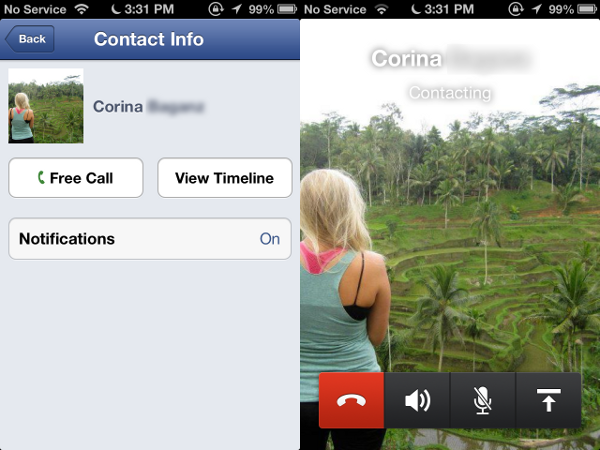
Version 5.5 of the Facebook app will bring free calling for Facebook users within the United States and Canada. The interface and functionality are exactly the same as you get with the Facebook Messenger app. While it may be redundant if you have both the Facebook and Facebook Messenger apps, it’s nice that this feature is now accessible to those who only use the Facebook app.

Calls will work over Wi-Fi or cellular data, so you can save your minutes by using Facebook to call. To get to the calling feature, tap on the messaging icon at the top, find a friend, tap on the “i” button at the top right, and you’ll see the option initiate a voice call. You and your friend will have to have the latest version of Facebook or Facebook Messenger for iOS for this to work. There is no word when this feature will come to Android.

facebook messenger calling

You can download the latest Facebook for iOS here.

Twitter adopts DMARC to combat phishing

twitter iconTwitter has been under pressure to increase its security after it was hacked a little over two weeks ago. While the company still hasn’t released two-factor authentication for its apps, it is stepping up security by adopting DMARC, which stands for “Domain-based Message Authentication, Reporting and Conformance.”

What DMARC does is helps reduce email-based phishing attacks. DMARC gives email providers a means to block emails from fake domains. Phishing is an attempt to gain access to a user’s account through tricking a users to click a malicious link to a fake website. There are many Twitter users who have had their logins phished. Just this past week, Burger King had its Twitter account hacked and defaced, claiming that the company had been sold to McDonalds.

Twitter now joins the ranks of AOL, Gmail, Outlook, and Yahoo! Mail as having implemented DMARC. While this won’t stop hacks, it acts as a first line of defense.

Source: Twitter

BlackBerry 10 won’t get a native Instagram app

BlackBerry 10 has to be stellar if it is to stand a chance in a world dominated by iOS and Android. To succeed, BlackBerry 10 needs apps and lots of them. Unfortunately there’s some bad news for BlackBerry 10 users: a native Instagram app will not be coming to the operating system.

While BlackBerry 10 will feature native apps from big names like Facebook, Twitter, LinkedIn, and Foursquare, its app ecosystem needs to be more fleshed out than just those few apps. According to AllThingsD, a close source has said that a native Instagram app will not be coming to BlackBerry 10 any time soon. The anonymous source goes on to say, “Frankly, I’m not sure there will ever be.”

While this is bad news, it’s not as bad as it could be. BlackBerry 10 has the ability to run Android apps so the company is now hard at work to make an Android port for BB10. This is a temporary solution as these Android ports are often laggy and aren’t meant to be used with the BlackBerry OS. For example, Android apps rely on the back and menu buttons, which BlackBerry 10 doesn’t have. There are gestures that replace these buttons but they may not be instinctive to users.

Even if BlackBerry manages to port the Android version of Instagram to BB10, it still needs the stamp of approval from Facebook. If the app doesn’t perform up to Facebook’s standards, the social networking giant will block the app from being available.

Although Instagram was purchased by Facebook, it has been left autonomous for the most part. Instagram currently has about 20 employees so the company simply doesn’t have enough resources to dedicate to supporting another operating system.

Be sure to read our post about what’s new in BlackBerry 10.

Source: AllThingsD

Mac app of the week: Origin for Mac

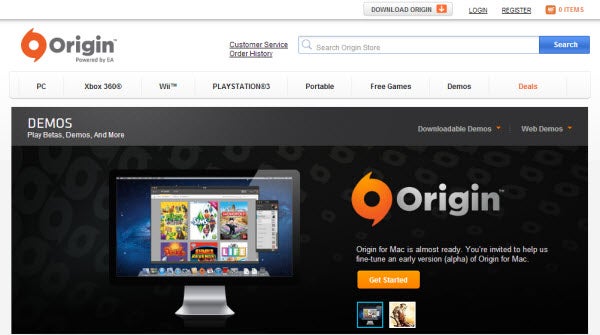
Origin for Mac has been out for a few weeks now and if you haven’t taken a look, you’re missing out on some great EA games that are finally available for Mac. Origin for Mac is Electronic Art’s gaming platform that allows you to buy and download EA games in the same way as Steam. Origin for Mac was launched in Alpha in North America and the United Kingdom in January but was given a full release in February 2013.

At the moment there are 48 games to download including The Sims 3 (plus expansion packs), Harry Potter and Star Wars with the new SimCity expected to launch next month. There is no sign of FIFA 13 for Mac yet however and no word from EA on whether it will be released. But if you like EA games and prefer to buy digital copies of games instead of buying them at the shops, you need Origin for Mac.

Download Origin for Mac

Follow the Mobile World Congress with Softonic

Next Monday 25th February, the eyes of the tech world will be on Barcelona for the start of the world’s biggest mobile tech event, the GSMA Mobile World Congress (MWC).

Softonic, which is headquartered in the Catalan capital, will be present at the show to bring you the latest up-to-the minute coverage. When we spot any interesting new apps or discover some cool piece of technology you’ll be the first to know. You can follow all the action here on OnSoftware, as well as through our Twitter and Facebook pages. For details of what delights to expect at the show check out our MWC 2013 rumor round-up post.

Continue reading “Follow the Mobile World Congress with Softonic”

Native Instruments bring Traktor to iPad

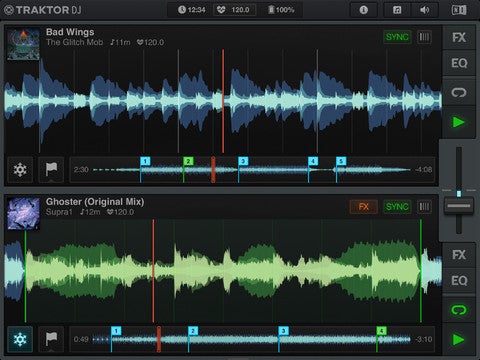
Native Instrument’s Traktor Pro is the best desktop software for DJing, and now there’s an adapted version for iPad: Traktor DJ. Like its desktop cousin, it lacks any traditional DJ visual cues, instead opting for a functional design that suits digital Djing. While not as fully featured as Traktor Pro, Native Instruments have packed a lot onto the iPad’s screen without it becoming cluttered.

Some sources are suggesting that the lack of visual ‘decks’ in Traktor is a surprise, as other DJ apps tend to look like a virtual vinyl setup. However, Traktor software has never used this, instead focusing on the track waveforms, which are much more useful for manipulating digital music.

The interface shows two waveforms, which you can beat match, scratch and loop really easily. While it looks similar to the older Touch DJ, Traktor DJ is much cleaner and more intuitive, while its BPM detection is exceptional.

Traktor DJ accesses you iPad’s iTunes store, and lets you modify beat grids and add cue points, which can be synced to Traktor Pro 2. This means you can use Traktor DJ as a tool to prepare sets for the desktop version.

Traktor DJ could be the ideal route into digital DJing, mixing powerful features with a really intuitive interface.