Saints Row 4 denied classification in Australia, devs working on changing game

Saints Row fans in Australia will be disappointed to know that the Australian Classification Board (ACB), similar to the ESRB, has denied Saints Row 4 classification. The ACB cites “interactive, visual depictions of implied sexual violence which are not justified by context” as reason for not allowing the game classification.

If Saints Row 4 continues to be refused classification by the ACB, it essentially bans the game from being sold in Australia. Deep Silver, the publisher for Saints Row 4 have confirmed that the game has been denied classification and that developer, Volition, is reworking the game to meet ACB’s standards. Here’s what they had to say:

“Volition, the developer, are reworking some of the code to create a version of the game for this territory by removing the content which could cause offence without reducing the outlandish gameplay that Saints Row fans know and love. Saints Row 4 has been awarded PEGI 18 and ESRB M ratings where fans can enjoy their time in Steelport as originally intended.”

The ACB recently created a new classification, R18+, which is meant for games with mature content but even that rating doesn’t allow for the “sexual violence” in Saints Row 4. The game will still be available in New Zealand, which will classify it under the R18+ rating.

[Source: Polygon]

Firefox 22 out now, brings upgraded video player and other performance enhancements

firefox headerThe latest version of Firefox is out today, bringing some under-the-hood performance upgrades. The most notable change is that WebRTC is enabled by default. This means web apps will see a huge performance increase to near-native performance. WebRTC is a standardized protocol so it may affect how developers create web apps in the future.

Another great feature about WebRTC is that developers can build apps with video and audio calling ability without requiring the user to install a plugin. Google’s Chrome browser already supports this so it’s nice to see Mozilla jump on the bandwagon as well.

Also included in Firefox 22 is an upgraded HTML5 player, which now supports changing playback rates. Those with high resolution monitors can rejoice as Firefox 22 follows display scaling options to render text better these displays. Mac users will see a download progress bar in the dock icon as well.

There are a bunch of other back-end updates as well so check out the full changelog at the source link. You can also download the browser for your platform in the links below.

[Source: Mozilla, TechCrunch | Download: Windows, Mac]

Steam trading cards leave beta, Steam event ahead

In a very specific announcement, Steam have let us know that their trading cards are leaving beta tomorrow, Wednesday June 26th at 11am PDT (UTC−8). In case you weren’t sure what the trading cards are, they’re virtual cards that are earned by playing games on Steam. You collect them and, when you have enough, craft them into game badges. In turn, game badges will earn you tradable items like profile backgrounds and coupons.

If you’ve been using trading cards, you’ll be pleased they’re coming out of beta. If you haven’t, take heart, because the announcement came with some further news – the blog post also said: “Making trading cards available to all Steam users is a step towards an event we think everyone can be excited about…

Any ideas what Steam might have in store?

Vine vs. Instagram Video

Vine has competition now that Instagram has updated with video recording. Both apps are available on Android and iOS, making the rivalry even more heated. Vine and Instagram have a multitude of similar and different features, and we’ll dissect what each has to offer. You might find that Vine still offers the complete package, or that Instagram will quickly steal your heart.

Video Composition
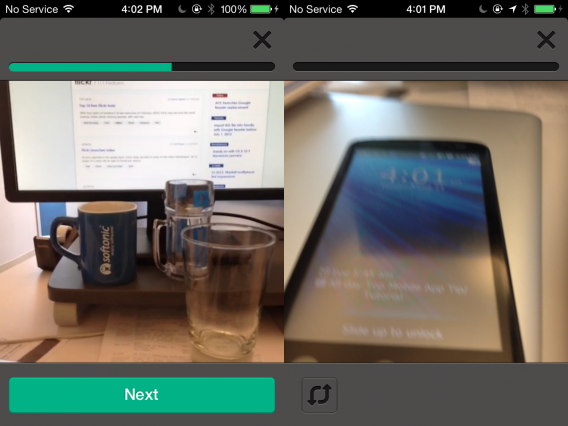
making vine video

Instagram boasts an increased length of 15 seconds, over twice the amount of Vine’s 6. In the realm of bite-sized clips, though, 15 seconds might be too long. Around 10 seconds would have been the best balance, but Instagram does provide room for padding and editing space. Still, with users used to and largely happy with such short content, it’s not likely Vine will be dethroned in this category.

instagram-photo-video

Speaking of editing, Instagram does at least allow users to delete the final clip in the series, but you still can’t delete the first or any middle clips. This is at least a leg up from Vine’s inability to remove any portions of a sequence. Both apps are rather restrictive on sequence editing, but Instagram has a slight edge.

instagram-filter-cover-frame

Bearing in mind that it is Instagram, the video portion has a multitude of filters to edit the look of your creation. There are thirteen new filters specifically for video, many of them visually very different to the photo filters. Vine will need to add this or similar effects to stay as artsy as Instagram.

Another point for Instagram is the Cinema mode that helps with video stabilization. At the moment the feature is only in the iOS version, but could come to Android later; many Android devices and operating systems are known to have very steady cameras out of the box. Stability will help older iOS devices produce clearer pictures although this could decrease image quality. Vine has nothing like this and has not announced plans to include it.

Social Sharing

Both video apps allow you to share to social networks. At the moment both include Facebook, Twitter, and of course the native app. However, Instagram expands on this by including Tumblr, Foursquare, Flickr, and sending through email.
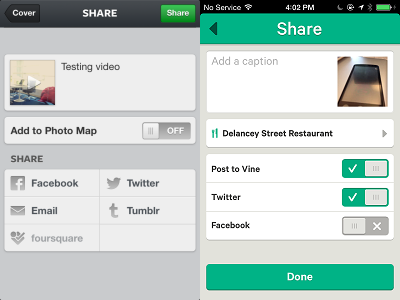
share-upload_vine_instagram

While Instagram does have more services, sharing on Twitter is superior on Vine. Vine fully supports Twitter cards, allowing them to appear in your Twitter feed. Instagram does win a few points for allowing users to search for users based on geo-tag locations, though.

Native feeds and websites

exploring apps

After a video is created and shared, users are of course going to want to find those videos. Both Vine and Instagram can be viewed inside the apps or linked to on their corresponding websites.

playback

Playback on the two apps is similar on mobile devices. Videos will autoplay, but Instagram will have a slight buffer. Vine was nearly instantaneous during our testing. Both Vine and Instagram on mobile make it easy to discover new videos, with followed content appearing in a feed. There are buttons to quickly like and comment on videos, and the ability to search using tags.
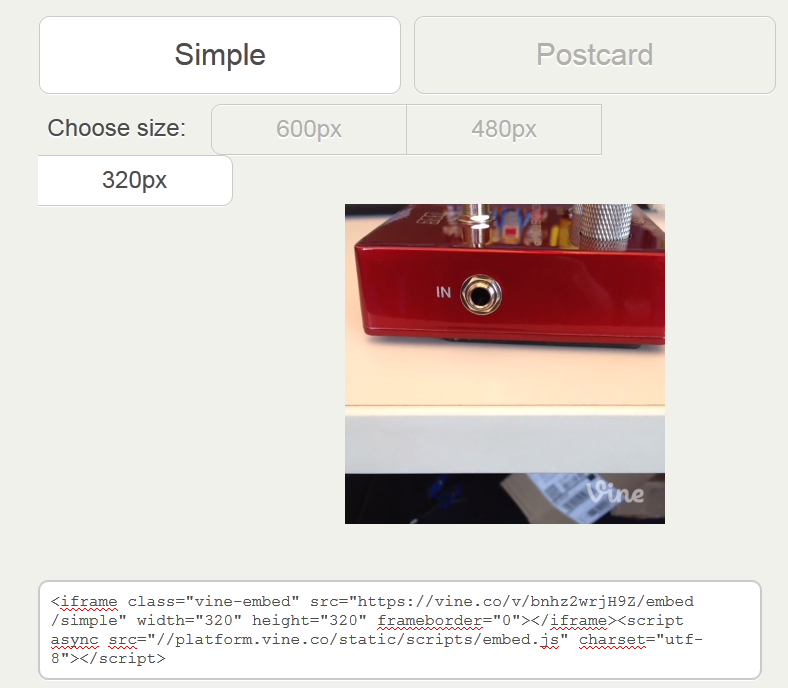
embedding Vine

On the web, the two services work very differently. Vine videos are viewed individually, with no way to officially view all of the clips you or others have created. However, each Vine has an embed code, allowing you to easily share. Vine videos can be muted and also loop, making them very snappy and easy to consume.

Instagram, on the other hand, includes videos right within the Instagram feed, alongside pictures. It lacks the other features of Vine; it doesn’t allow embedding, looping, or muting. While you do need to use a third party service to quickly view all of your Vines, the extra features tip it slightly ahead of Instagram for sharing and utility.

Which reigns supreme?

The two apps offer many different features that appeal to different tastes. There are key reasons to use one or the other.

  • Vine should be your choice if you prefer compact and looping videos. It’s also possible to embed a Vine within Twitter cards or a website, giving them much more exposure. Vine is great for sharing with those that might not use Vine themselves.
  • Instagram video should be your choice if you want slightly better editing power and fun filters. Instagram allows sharing to more social networks, searchable geo-tags, and an easy way to browse on the web. Instagram has the edge when sharing with others within your network of followers.

We’ve assessed the differences and similarities within Vine and Instagram. Each has strengths and weaknesses, and we hope that the competition will motivate both companies to constantly improve their apps. It’s likely each app will gain each other’s features over time, and we look forward to what Twitter and Facebook announce in the future.


Vine for Android updates with Facebook sharing and hashtag support

vine for androidVine for Android received a few updates following the announcement of Video for Instagram. When we first reviewed Vine for Android, we were disappointed that it lacked many features that were available to iOS users. This gets fixed for the most part in this update as Vine for Android finally gets Facebook sharing and hashtag support. Hashtags will allow users to search for related tweets and users. Facebook sharing was also added but the feature doesn’t seem to work on several of our phones. We get a message asking for permission to connect to Facebook but it never goes through with it.

While these changes are great, it’s still lacking one key feature that even its newest competitor, Instagram, has: front-facing camera support. Twitter has promised that front-facing camera support is coming down the line but the company is focusing on faster video capture and better video quality. You can get the Vine update in the download links below.

[Download: Vine for Android]

AOL launches Google Reader replacement

aol reader betaCompetition between Google Reader alternatives is heating up, a week before its official closure. Feedly has moved completely into the cloud, helping users migrate their Google Reader feeds automatically. Digg is launching their Digg Reader on June 26th in beta, and now AOL has released their Google Reader alternative, simply named “AOL Reader.” Users can get started by logging in with their AOL account or simply link it to your Facebook, Twitter, or Google accounts.

AOL’s news reader features will launch as an invite-only beta, due to “overwhelming interest.” It features a minimalist design similar to that of Digg Reader. In fact, its features and looks make it one of the most generic feed readers out there, which is good for those who are familiar with the familiar two panel look but doesn’t offer features for power-users like Feedly does.

If you want to try AOL Reader, you can sign up at the source link below.

[Source: AOL Reader]

Snapchat introduces SnapKidz feature for iOS, removes sharing ability and all fun

snapkidzSnapchat is trying something new to appease its thirteen and younger crowd. The last Snapchat update added an age-gate, which required users who wanted to create an account to enter in their birthday. Those under 13 years of age were not allowed to create an account but that changes in the latest iOS version of Snapchat. Instead of turning away young users, the company is introducing the new SnapKidz feature that will allow kids to create an account but gets rid of the ability to share snaps. Instead, snaps, captions, and drawings will be saved locally to the device, which seems odd for a company which is known for not saving anything locally.

SnapKidz is still an experimental feature but the company has said it will bring it to the Android version if it receives positive feedback. It’ll be interesting to see if kids will actually use the SnapKidz feature or simply lie about their age like they’ve been doing since the beginning of time.

[Source: Snapchat Blog]

Hotline Miami coming June 25 to PS3 and Vita

playstation hotline miamiThe retro top-down action game, Hotline Miami is finally coming to the PlayStation 3 and PlayStation Vita on June 25th. The game will set you back $9.99 but will include cross-buy support, meaning you buy it once and own it for both platforms. The game isn’t just a port of the PC version, which has been out for quite a while, but will add new features like touch controls on the Vita.

Hotline Miami for PlayStation will also include trophy support and an exclusive new mask called “Russel the Raging Bull.” The mask doesn’t give players any advantage other than to change the color scheme and video filter of the game to make it look like a classic film.

[Source: PlayStation Blog]

Import RSS file into Feedly with Google Reader before July 1, 2013

Feedly has positioned itself as a complete Google Reader replacement. The company announced that its cloud sync service rolled out and would automatically import existing Google Reader accounts into Feedly. Previously a browser extension, Feedly has also introduced a web version of the reader so you can access your feeds without installing anything.


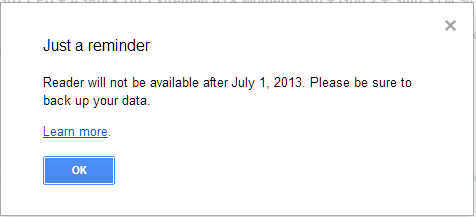
But while Feedly will automatically import Google Reader, it doesn’t support RSS XML file imports. So while a transition from Google Reader to Feedly is easy, using a RSS file isn’t possible with Feedly directly. You have two options – manually recreate your feed manually in Feedly or import your feed into Google Reader before July 1, 2013.

If you want to use Feedly instead of your current RSS reader, you should import your RSS XML now because you don’t have a lot of time left.

Import RSS XML into Google Reader

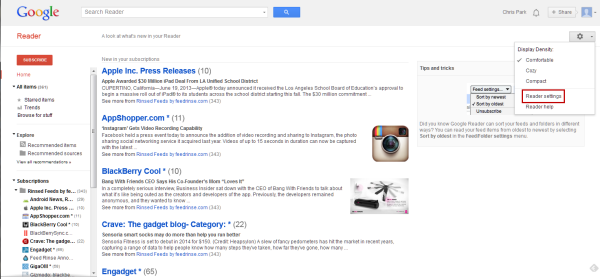
Go to Google Reader and sign in. Click on the gear icon for Settings and select Reader settings.

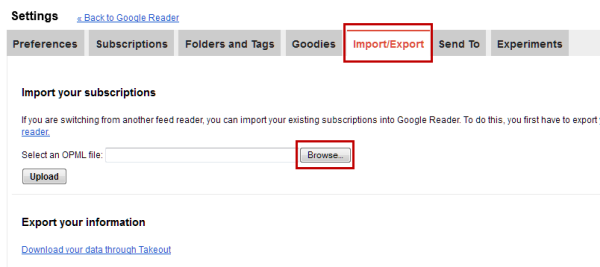
When you are in Settings, click on Import/Export and import the RSS XML file that contains all your feeds. After the import, Google Reader will load all your feeds.

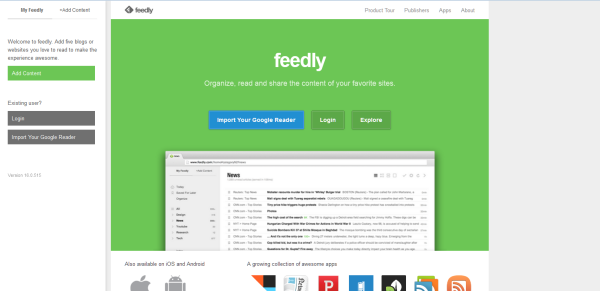
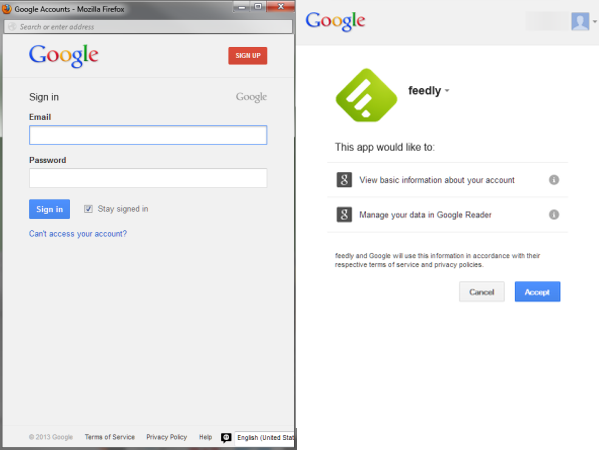
Sign into Feedly with your Google account

Sign into Feedly with your Google account. This will enable Feedly to access Google Reader’s data.

It will ask for app permissions to manage Google Reader data to import your feeds.

Start using Feedly

After migrating Google Reader into the web app, all your feeds will be available. The cloud sync allows access to your RSS feeds through any browser. You can’t directly import an RSS XML file into Feedly yet, but it wouldn’t be surprising if it was added after Google Reader shuts down.

The Softonic Minute: Skype, Rovio, Steam and Instagram

Rovio goes Viking, Steam could allow game shares and Instagram gets video, in The Softonic Minute.

Here’s your Friday dose of this week’s top news in the world of software.

<!–
By use of this code snippet, I agree to the Brightcove Publisher T and C
found at https://accounts.brightcove.com/en/terms-and-conditions/.
–>

<!–
This script tag will cause the Brightcove Players defined above it to be created as soon
as the line is read by the browser. If you wish to have the player instantiated only after
the rest of the HTML is processed and the page load is complete, remove the line.
–>
brightcove.createExperiences();

Steam to allow game sharing? This is our best guess after seeing Steam’s most recent beta version. In the code, we can see lines that make reference to an inactive directory, for the moment called a “shared game library”. Phrases like “Just so you know, your games are currently in use” make us think that soon our friends could loan us their games, something that even Microsoft has recently decided to allow.

Free video messages on Skype. From now on, there’s no more limits on the number of messages you can send to your contacts via Skype. The Microsoft service that absorbed Messenger is removing restrictions and will now allow you to send an unlimited number of free video messages. Ironically, the only users who still don’t know when they’re going to be able to use the service are those who use Windows Phone!

Rovio’s got a new game. It’s called Icebreaker and is a puzzle game where you’ve got to help some funny little Vikings cross the ice. The game mechanic reminds us of Cut the Rope, and it gets more difficult as you progress. We’re guessing it’s going to be another addicting game from the creators of Angry Birds, and experience shows that addicting games is something they do pretty well.

Instagram now comes with video. Facebook has announced a new feature for its popular photo app. As we suspected, it’s added videos, in a 15-second format. It has shades of Vine, with the same snippets of recording, but with some interesting extras, like filters, the ability to delete video clips and Cinema, an awesome video stabilizer. We’ve already tried it.

For all these stories and more, click here.