Far Cry 4 on the horizon

Far Cry 4, Beyond Good & Evil 2 and Prince of Persia are all possibilities for the PS4 and Xbox One. The news has been confirmed by Ubisoft, the developer of the franchises.

Speaking about Far Cry 4, Ubisoft had this to say recently at E3: “We haven’t announced anything yet. We’re thinking of the future of this brand. We don’t know yet when it will emerge. Again, it’s cooking. Something is cooking!”

Moving on to Prince of Persia for PS4 and Xbox One, Ubisoft’s Europe boss Alain Corre commented, “It will happen when we feel it is ready, when the creators have brought something interesting. That’s the case for all our franchises. They’re cooking. Some are cooking longer than others, but they’re cooking.”

Finally, the Ubisoft boss addressed the long delays behind Beyond Good & Evil 2, saying “There are some works on it. There are some iterations on it. Now, some games are taking longer to be done, depending also on the creativity the creator can bring. You see the level of quality of the games today is very high. It takes time to find the right angle and message.”

Although the news is hopeful, it’s also a bit vague and frustrating. As Corre mentions, however, when you think about the quality of games like Far Cry 3, it’s not really surprising that they take so long.

Whatever the wait, we’re really, really looking forward to seeing what such a long incubation might result in!

[Via Eurogamer]

Hands on with OS X 10.9 Mavericks

Apple is saying goodbye to the big cats with OS X 10.9 Mavericks. First revealed at WWDC 2013, OS X 10.9 Mavericks brings changes in the form of Finder, Safari, Maps, Calendar, iBooks and more. Mavericks includes increased security in the form of iCloud, Keychain and boosts energy-saving features. OS X 10.9 Mavericks supersedes OS X 10.8 Mountain Lion and although it doesn’t introduce any revolutionary changes to OS X, includes some nice features, especially for fans of iOS. Here are some of the highlights:

Finder Tabs

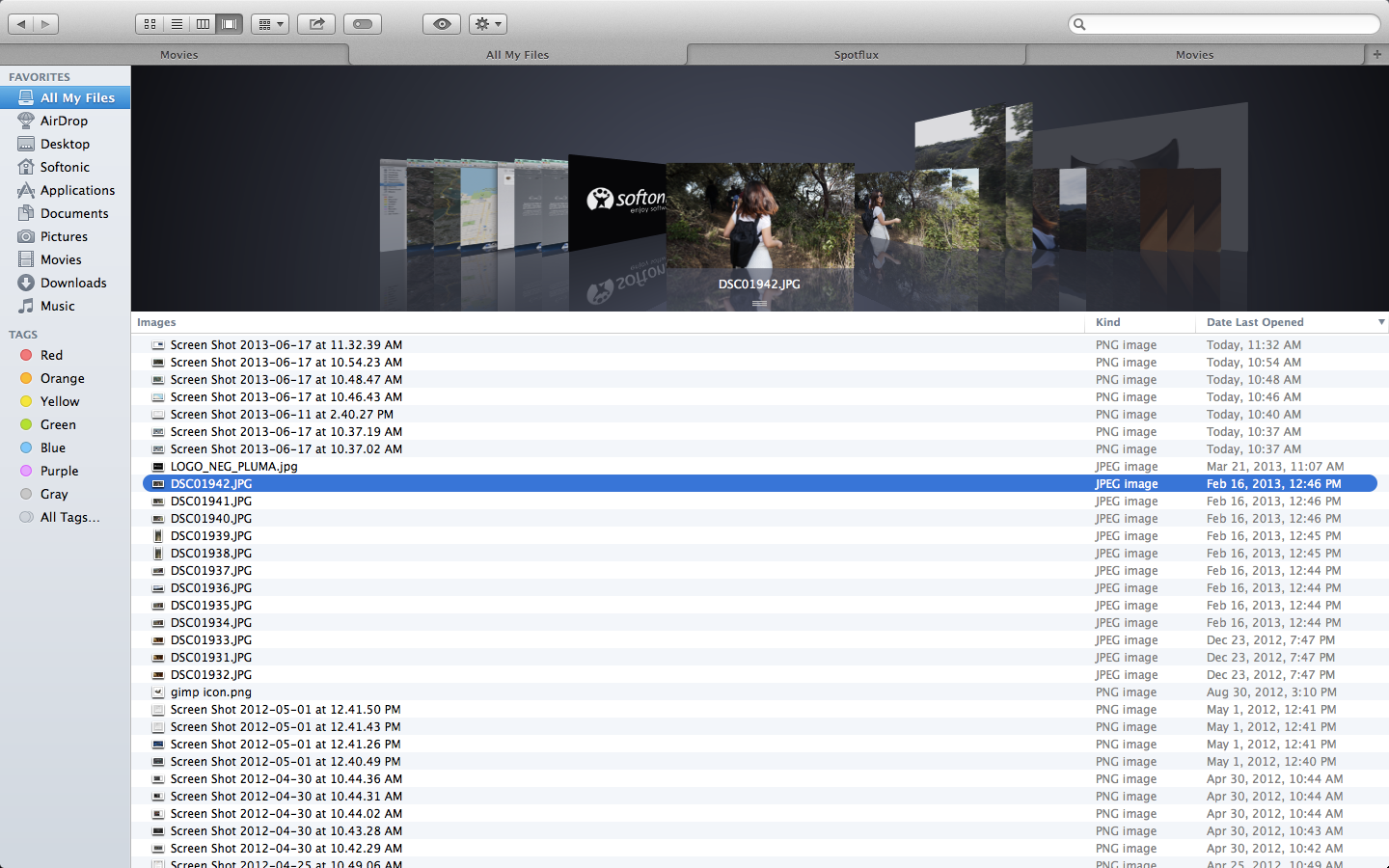
Finder now has tabs to help reduce clutter as you browse through categories. Previously, you’d have to open up multiple windows for the same effect. You can set up tabs for folders such as Applications, Desktop, Movies, and Pictures. Similar to web browser tabs, Finder tabs will change category when you select any of the options on the sidebar. This can be a little confusing at first, but quickly becomes intuitive.

Finder Tabs

You can also use tabs to easily move files between locations – simply drag and drop a file between tabs. The Finder window can also be set to full screen, making it even easier to move files. We thought that one of the most convenient features is the ability to turn several Finder windows into tabs via the window menu.

Tags

A new feature you’ll spot in Finder are tags, which can help organize files. The tag button at the top of the window will allow you to create new tags and rename the ones you already have. All tags will display on the left sidebar, allowing fast access to tagged files. Lastly, you can search for tags in the Finder search field.

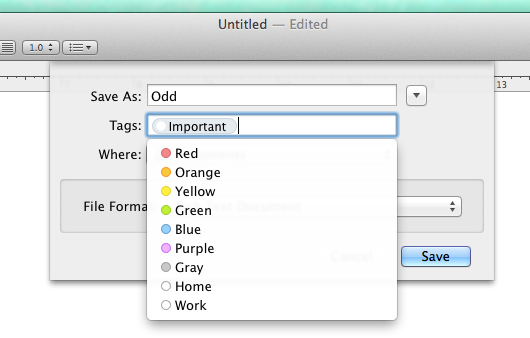
tags while saving

The best part is that tags go beyond just the Finder. When you save a document, even simple ones such as text documents or pictures, you can assign tags right in the save confirmation window. You can even quickly add tags to files within iCloud, allowing a fast universal search for both local and cloud stored files. Using tags in conjunction with Finder is very easy to understand – it’s fluid and makes it very simple to track documents.

Safari

Safari has several new technical upgrades, among them Fast Start and Nitro Tiered JIT. Apple claims these make the web browser faster and more responsive, and improves power saving. We didn’t notice drastic changes during our testing, which could mean the changes are subtle, working quietly in the background, or it could mean they’re just not that great!

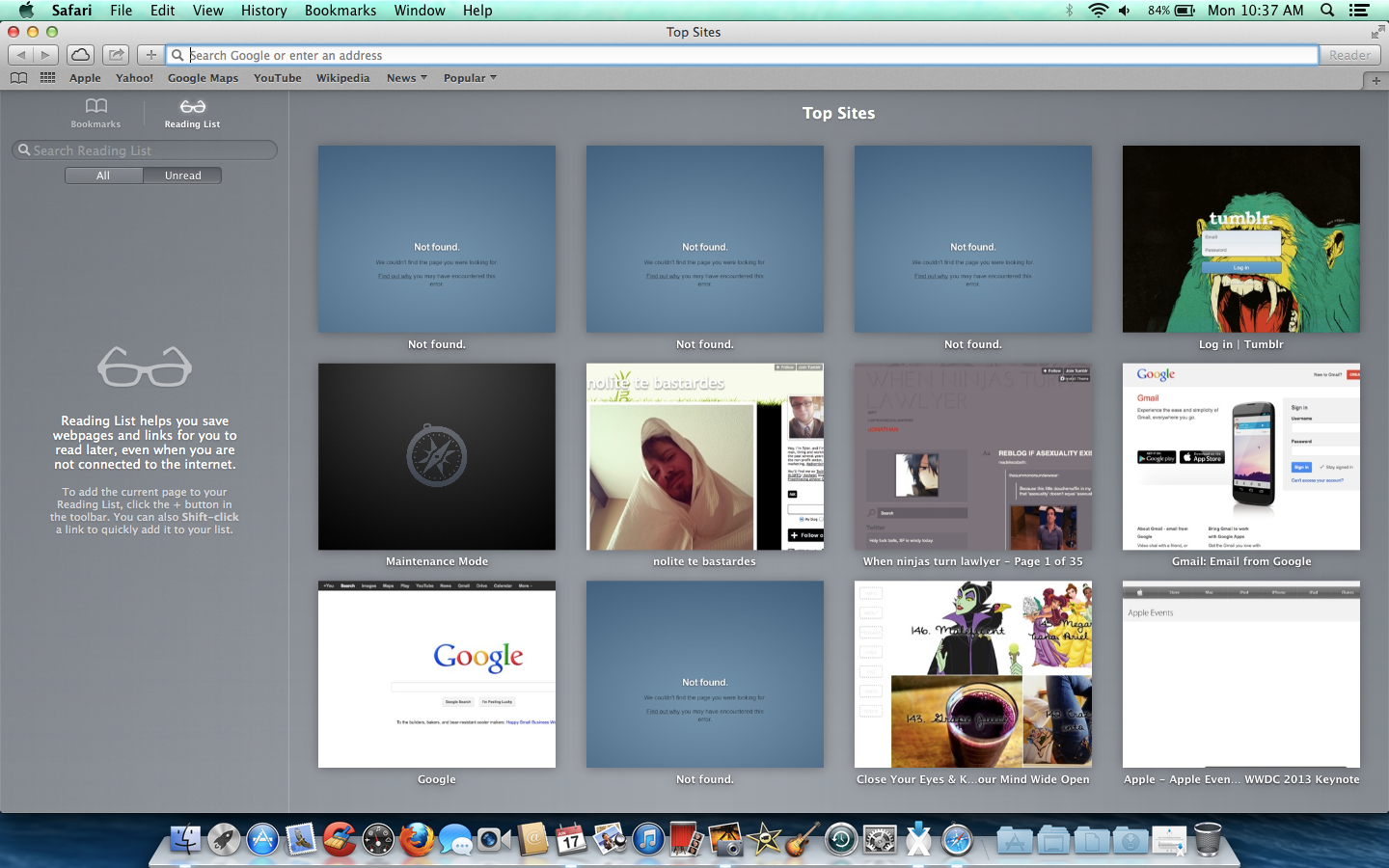
Safari changes

There are also many cool new frontend features that will come in handy. First, when you open Safari or a blank new tab you will see Top Sites, which includes sites you frequent, and favorites. While this isn’t new on its own, it’s now much faster to organize and delete any of the sites that show here. The sidebar has been upgraded to list bookmarks, reading list, and shared links.

The shared links is impressive, providing links posted by people you follow on social networks such as LinkedIn and Twitter. It even includes their corresponding message/tweet, giving you context for what site these people want you to see. While Safari’s other features are mostly bonuses, shared links has the potential to easily connect people’s interests without the need of external apps or sites, making it a truly noteworthy feature.

iCloud Keychain

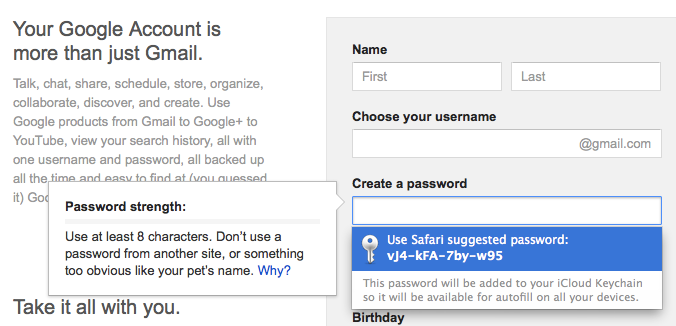
Improvements to Safari might mean you’ll use the internet more often, which in turn might make it hard to remember all of your passwords. Thankfully, Mavericks includes iCloud Keychain to help remedy this issue. Similar to other password security apps such as PasswordBox, iCoud Keychain stores your usernames and passwords and encrypts them. You can even use iCloud Keychain on other compatible devices, like iPhones running iOS 7.

keychain suggestion

Besides storing passwords, iCloud Keychain can suggest new passwords when you create online accounts and store credit card information. With 256-bit encryption, it sounds like it will be a very secure feature, although it’s always possible that dedicated hackers will attempt to breach security. iCloud already requires an Apple ID and enabling two-step verification might be a good way to further strengthen iCloud Keychain. For now, though, the sheer convenience of having a first party service that stores and suggests passwords is very useful.

Read iBooks on your Mac

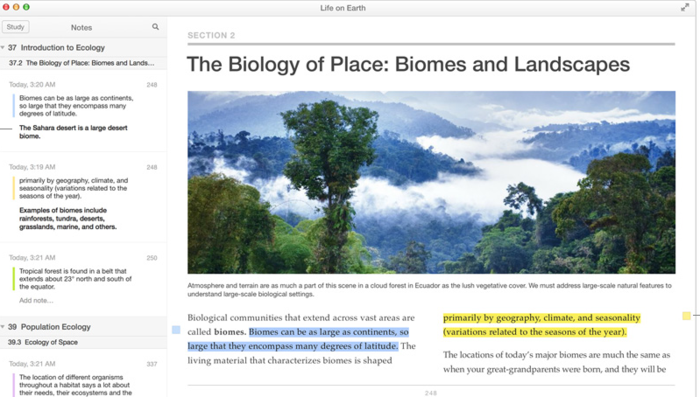
Another iOS feature that’s arrived on Mac is iBooks. Now you can read anything that you’ve downloaded with iBooks on your iPhone or iPad on your Mac. Again, reading books on a Mac isn’t exactly the most popular pursuit for many users but for students and academics, it can be a useful took when it comes to writing essays and quoting textbooks. And with iCloud, iBooks always remembers which page you were on no matter which device you are using.

Notifications

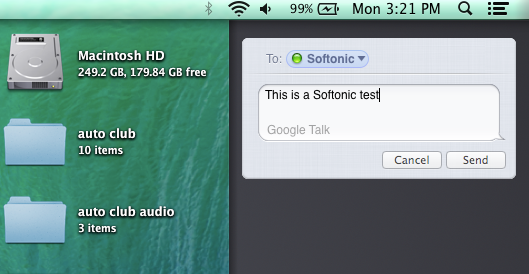
Mavericks has improved notifications, allowing you to see updates outside of the app you’re using, or even while your computer is locked. You can use notifications to get updates on email, FaceTime, and websites you frequent. By default, the notifications appear in the top right hand corner and feature a simple headline, summary/message, and an icon to identify the source. You can also check a summary of all recent notifications, and use this space to quickly send messages or respond to linked services. During our testing we were never bombarded with too many notifications, but it will be interesting to see how notifications evolve once in the hands of the public.
notifications

Maps

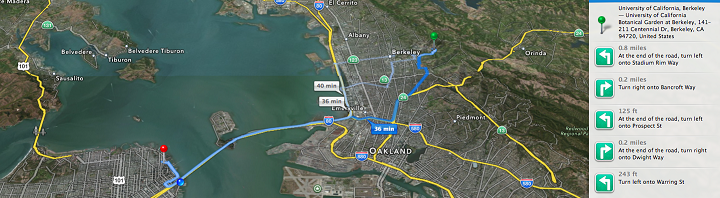
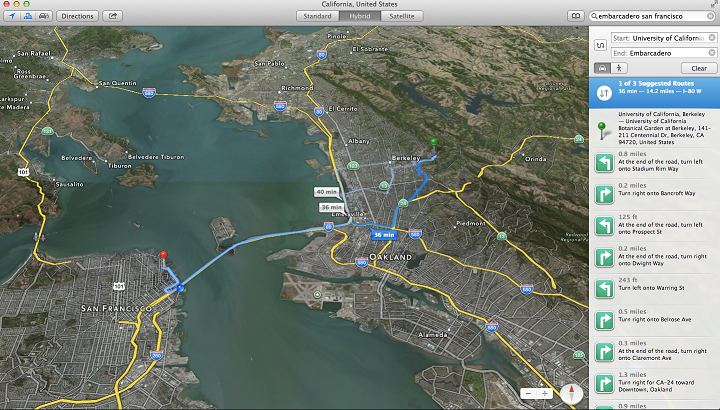
Originally on iOS, Apple Maps leaps to Mavericks and retains much of the same functions. You can view maps in standard, satellite, and a hybrid view. The latter two are more graphically intensive, which for us made the maps load slowly. There are of course standard tilt and zoom controls, and also the ability to bookmark locations and get real-time traffic updates.

apple maps

While it’s nice to have a map app packed right in the OS, Apple Maps still pales in comparison to the great updates within Google Maps. The latter also still has clearer and easier to find directions, especially when you’re on the go, and provides accurate routes quickly. What is nice is that the Apple Maps on Mavericks can quickly sync to iOS 7 maps, which in turn can provide voice navigation. Still, at the moment that isn’t really enough to compete with Google.

Calendar

calendar

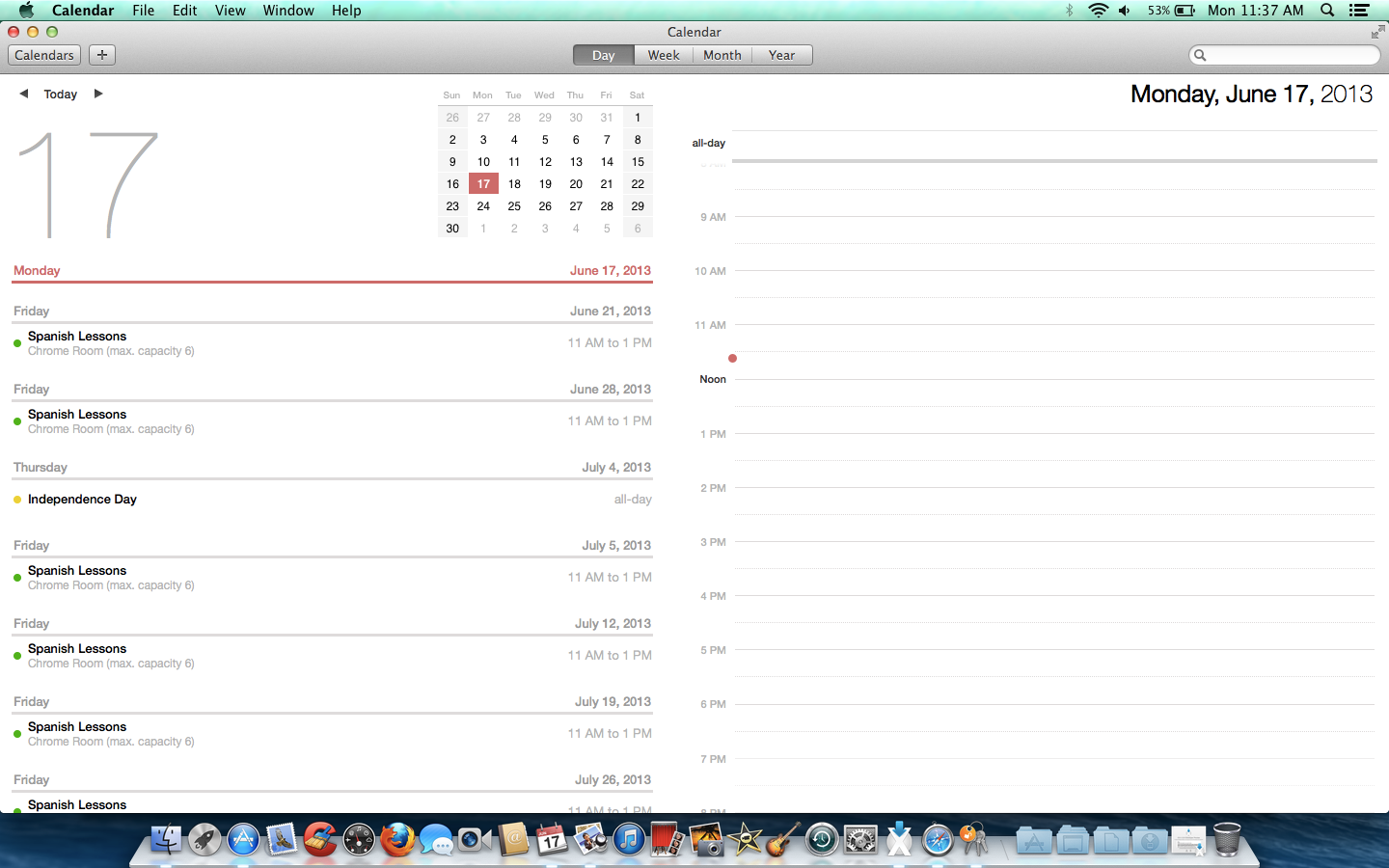
The calendar app has a new redesign that adds new views and features. First you can continuously scroll between dates, allowing you to view partway through one month and into the start of the next. Calendar syncs to other apps, showing events provided by services such as Facebook, and adds travel times to events. When hovering over an event, an improved inspector popup will show details including driving directions and weather reports. This view can even suggest related and nearby locations simply by typing an address. These improvements are very nice if your meetings require a lot of travel to new and distant locations, but will be less useful for nearby appointments.

Just a taste

These are some of the highlights in OS X 10.9 Mavericks. There are also a few more complex and hardware-focused features in the OS, such as network servers, multiple screen display improvements, and battery conservation, but these aren’t that interesting for most standard users. Let us know what you think of the latest incarnation of OS X.

E3 2013: Titanfall multiplayer first impressions

Titanfall will be one of the first games to release on Xbox One, as Microsoft showed at their E3 2013 presentation. Developed by Respawn, Titanfall is set in a futuristic world where players take control of huge war machines called Titans. The game, which promises lots of swift, relentless action, has features reminiscent to Call of Duty and Mirror’s Edge. The graphics weren’t nearly as stellar as other Xbox One games, but this could be because it will also release for Xbox 360 and Windows PC.

Default player


brightcove.createExperiences();

Clash of the Titans

The game takes place in the not-so-distant future on a remote planet, where human armies wage war against one another. There’s no sign of alien life yet, and players take the role of a yet unnamed soldier. The game is a first person shooter, with much of the time spent riding inside the massive Titans.

Titans are mechs, similar to those seen in other games such as Metal Gear or Xenogears, and players will be expert pilots. Despite their size, the Titans move at the speed you’d expect a foot soldier to move. They are also very powerful, but even the mighty machines can eventually be destroyed. When a Titan is near destruction, it propels the rider into the sky and away to safety.

Titanfall - Titan throws pilot

While the fights between Titans are mesmerizing, players will need to be aware that pilots have their own set of skills, making them fierce elite warriors in their own right.

Agile fighters

Outside of Titans, pilots are very agile soldiers in their own right, equipped to the teeth with powerful weapons. Pilots can double jump due to their jetpacks, and can even slide across walls. Movements like these are very similar to those found in Mirror’s Edge (soon to receive its own reboot). This movement creates many new and interesting strategic choices. For instance, instead of sneaking up on foes, you could run along a wall and drop on them.

titanfall pilot wall running

Frantic battles

Besides Mirror’s Edge, we noticed clear cues from the Call of Duty franchise. This makes sense, as members of the Modern Warfare 2 team are part of the Titanfall development team. The gameplay is fast and relentless, yet doesn’t ever seem messy or chaotic.

TitanFall armies

The game first seemed to have a steep learning curve, but as we watched the demo more closely it became very easy to orientate ourselves. With further observation, it was easy to see where player characters, enemies, and objectives were at all times.

War among humans

Titanfall has a clear focus on online multiplayer. In fact, no single player aspects were shown at the Microsoft press event. This could lead to speculation that Titanfall is better suited to multiplayer. The game’s conquest mode allows up to 14 players simultaneously. This might seem like a bit too many for the pace of the action, but as stated before it’s not hard to adjust to Titanfall’s swift gameplay.

Holding out for 360

We later discovered that the demo presented was of the Windows PC version of Titanfall. As with other multi-generation releases, it made us curious as to how Titanfall will look and play on the older Xbox 360. For now, we’re impressed with the smooth animations, intense explosions, and the Titan’s cockpit design. Will these graphics look nearly as good on the Xbox 360? While unlikely, we’re still looking forward to comparing versions.

titanfall titan vs pilot

Titanfall isn’t the most groundbreaking game we saw at E3 2013, but its futuristic action will likely appeal to the public. The gameplay is simple, clear, and looks like it can provide hours of fun.

Are you looking forward to the giant robot shooter?

WhatsApp surpasses 250 million monthly users

whatsapp play bannerUniversal messaging app giant WhatsApp has passed 250 million monthly users. With apps for iOS, Android, BlackBerry, Symbian, Windows Phone, and more, it’s no surprise that WhatsApp is one of the most popular universal messaging apps across platforms. The company has amassed an additional 50 million users since December, matching Twitter and gaining ground on Skype’s 280 million active users.

WhatsApp is currently the #1 paid app in the iTunes App Store and #28 in Google Play. The demand for messaging apps is high as they offer distinct advantages like read receipts and free messaging. Still, the market is saturated with competitors like Facebook Messenger, Google Hangouts, LINE, Kik, Tango, Viber, Kakaotalk, and more.

[Source: The Wall Street Journal]

How to use Video on Instagram

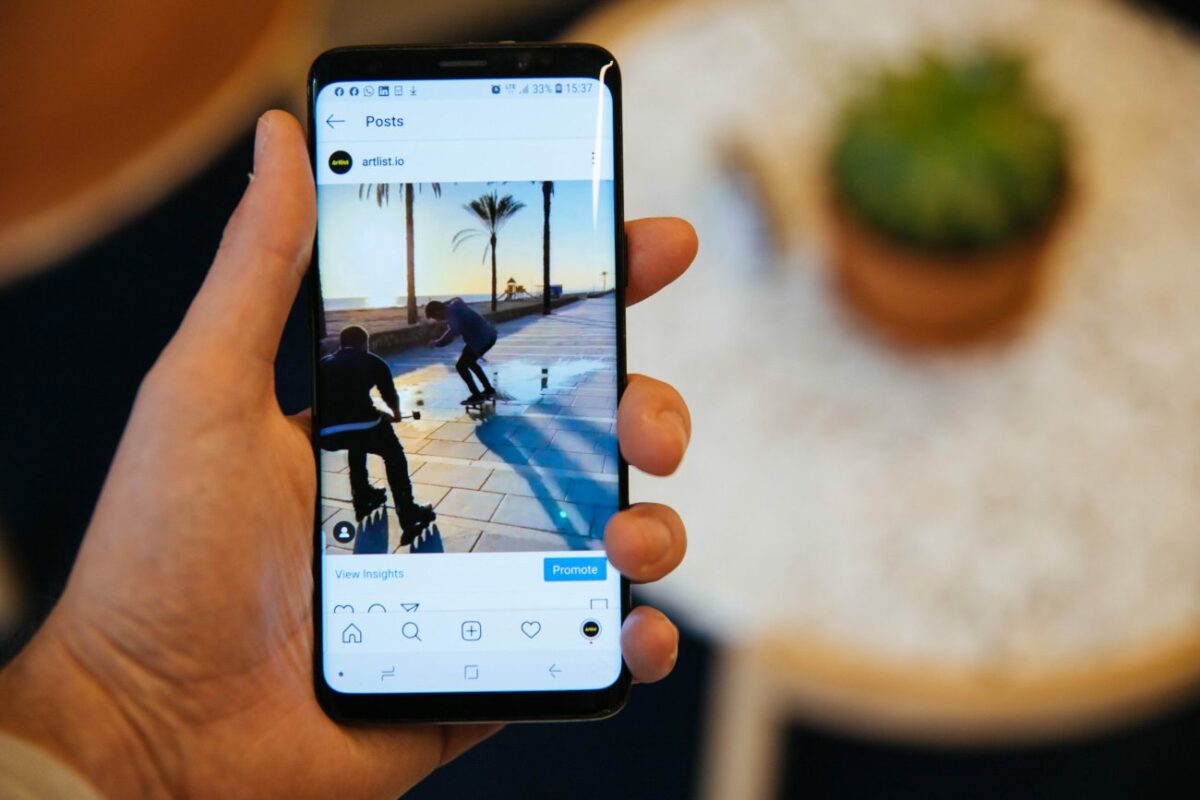
Facebook and Instagram released Video on Instagram today. While Twitter’s Vine supports 6 seconds of video recording, Video on Instagram allows up to 15 seconds. While 9 more seconds doesn’t seem like a big difference, creative users will appreciate the extra time.

Instead of releasing a standalone video app, this update expands the usability of the Instagram app. Both iOS and Android are receiving the update at the same time today, but iOS is getting one exclusive feature: Cinema stabilization, which will stabilize video shaking. It’s easy to tell that Cinema stabilization was implemented on iOS because of standardized devices.

The same steps as taking an Instagram photo

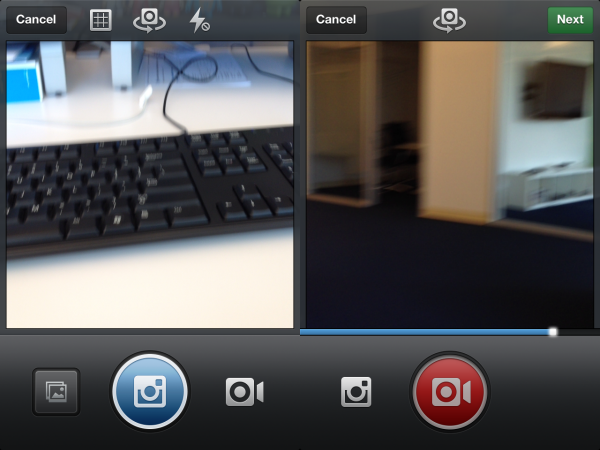
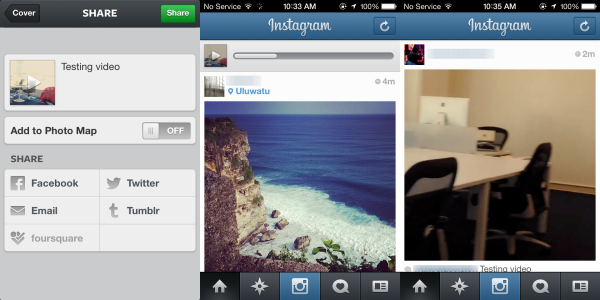
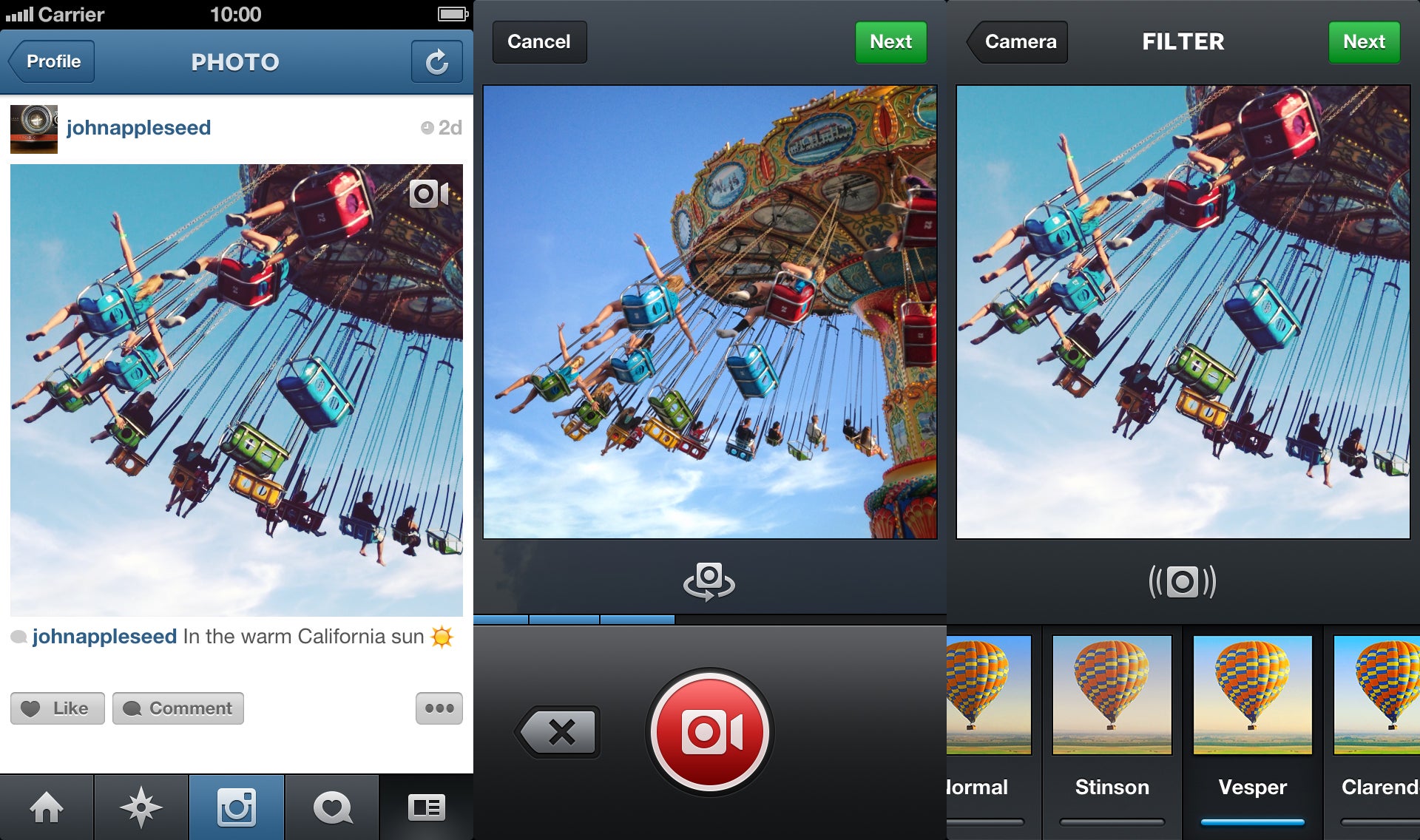
Taking video with Instagram is basically the same as taking a photo. After you launch the app and your feed has refreshed, you will see the Instagram photo icon. There is the new, red video camera icon next to the main photo button.

After tapping the camera button, Instagram will enable video recording. The Instagram icon to the left of the record button will take you back to the photo menu. When you’re ready to take video, hold down the red camera button to record.

Add a filter and cover

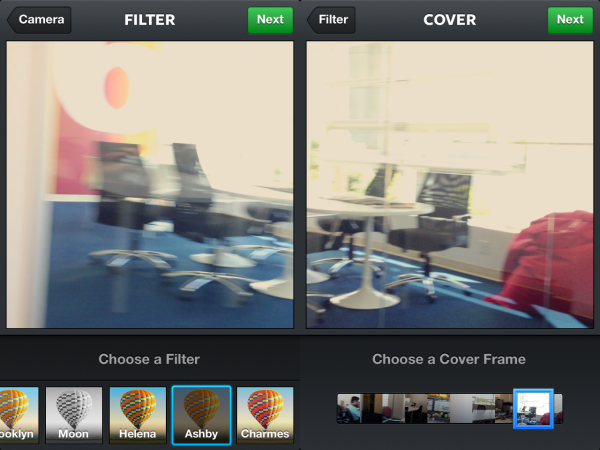
Instagram gives users 13 new filters to apply to their videos. Unlike the photo filters, the video filters are a little harder to differentiate from each other, but this will probably depend a lot on the recorded video.

Once you apply the filter, you choose your Cover Frame. This is the image that will be shown in your Instagram feed. The slider will scroll though the entire video so you can pick your favorite image.

Share online

With your video recorded, filter applied, and cover frame selected, sharing the video is the same as sharing a photo. Enter your text and choose the different social networks to share to. Once you press “Share,” the video will upload. The time for the upload to complete will depend on your connection. After it’s uploaded into your feed, all you have to do is tap on the cover frame for the video to play.

Facebook versus Twitter

Right now it doesn’t look like you can tag people in video like you can with photos, but this may be a possible update in the future.

Video on Instagram is the logical next step for the app. Users on Vine have been able to create some impressive short videos. Instagram’s 15 seconds will allow users more time to create interesting video.

This update puts both social networks head to head again, but Facebook was smarter by releasing identical updates for both Android and iOS simultaneously, instead of Vine releasing a very basic version for Android compared to iOS.

Instagram users have shared 16 billion photos, 1 billion likes every day

instagram 16 billion photosDuring today’s Instagram announcement, Kevin Systrom took some time at the beginning of his presentation to provide some statistics about the image (and now video) sharing service. Instagram users have now shared over 16 billion photos. That’s not bad for a company that launched its first app 2 years ago. The service also now has 130 million active monthly users, up fro the 40 million users it had when the company launched its Android app April of last year. Systrom also said that users like 1 billion photos per day, showing just how engaged its users are. Now with a new video sharing feature, Instagram is hoping to draw more users and increase engagement across the board.

Facebook announces Video on Instagram

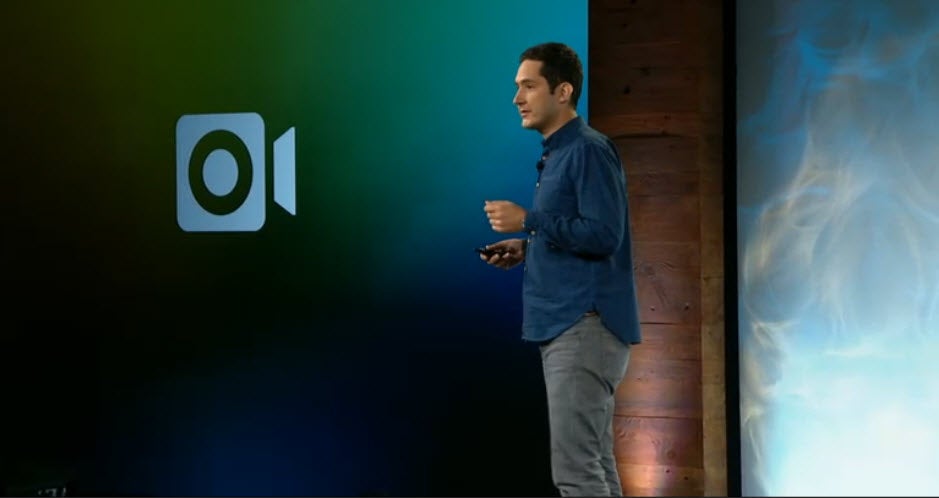
instagram videoKevin Systrom, the CEO of Instagram, took to the stage today to announce video recording for Instagram. We previously speculated that this feature was coming to Facebook or Instagram. This new feature is functions similarly to Vine, the popular video sharing application from Twitter, but with a 15 second limit instead of 6. Videos can be as short as 3 seconds, if desired.

Video on Instagram gives you the ability to take short movies, just by tapping on the screen to begin recording. The company touted that video should be fast and simple and recording video with Instagram definitely is. It works similarly to apps like Vine and Snapchat. After you’re done recording, you can put one of thirteen filters on your video before sharing, something Vine currently lacks. Instagram also announced that image stabilization would be built in for iOS users so shake will be reduced, if not eliminated.

instagram video combined

Systrom stressed that Instagram needs to be fast and responsive so it’ll be interesting to see how smooth video in the Instagram feed will be. Currently, Vine struggles loading some of its video clips. One differentiator between the two apps is that Instagram videos won’t loop, unlike Vine’s.

Twitter launched Vine in January, an app that lets you create and share short videos with the rest of the world via its social network. The application was immediately very popular and became one of the most downloaded free apps in the App Store and Google Play. Facebook obviously took notice and now Vine has to compete with Instagram for video sharing dominance.

Facebook is quickly evolving features across all of its apps and services to be more Twitter-like. Yesterday, the company released a feature where you could reply with a photo and last week, the company announced hashtag support, a long requested feature.

The video update to Instagram will launch on both iOS (iPhone 5 and 4S only) and Android today.

[Source: Facebook Newsroom]

Reports of Facebook video service heat up as announcement nears

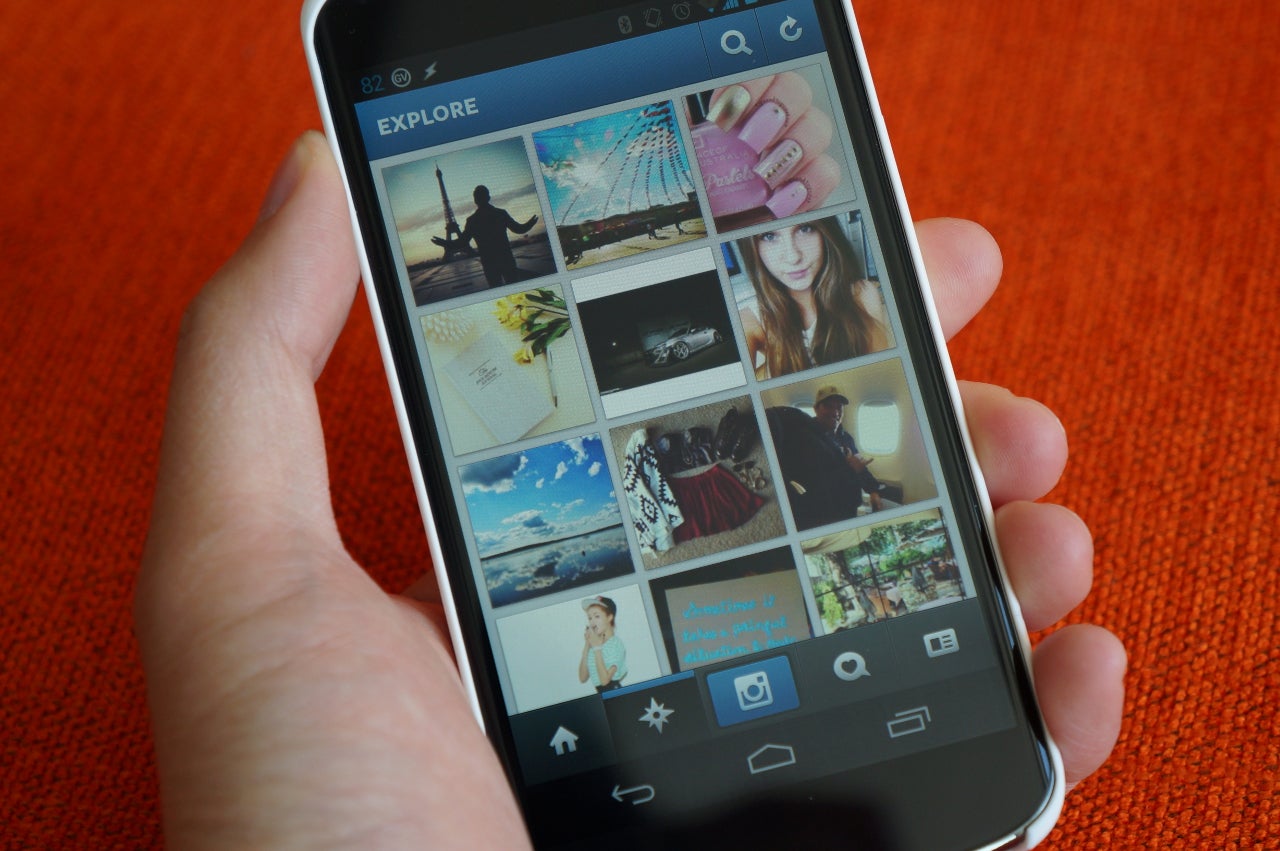
instagram nexusLast week, Facebook sent out a mysterious invitation for a product launch. We speculated at first that it would be a Google Reader replacement but that turned out to be false. We then got reports that Facebook is looking to integrate Vine-like video into Instagram, its popular photo sharing app. This morning, The Wall Street Journal and its sister site, All Things D, are reporting that the announcement will in fact be for a video service. “Sources said that Thursday’s event will solely be focused on Instagram’s new video product and there will be no other Facebook product reveals,” writes All Things D.

This move makes sense as Vine’s popularity is undeniable, topping the App Store and Play Store charts for free apps. Video has always been a forgotten feature for Facebook. By putting a time restriction of under 10 seconds and easy sharing using Instagram, Facebook could make short videos popular on its social network (for better or worse).

[Source: The Wall Street Journal, All Things D]

Microsoft Build 2013 preview

At next week’s Build 2013 conference, Microsoft are expected to introduce their newest products. They’re following in the footsteps of Apple and Google, who recently made exciting announcements about things like iOS 7 and a new version of Google Maps. At the Build conference, we’re looking forward to news about Windows 8.1, but we’re also hoping Microsoft has a few other surprises up its sleeve…

Windows 8.1

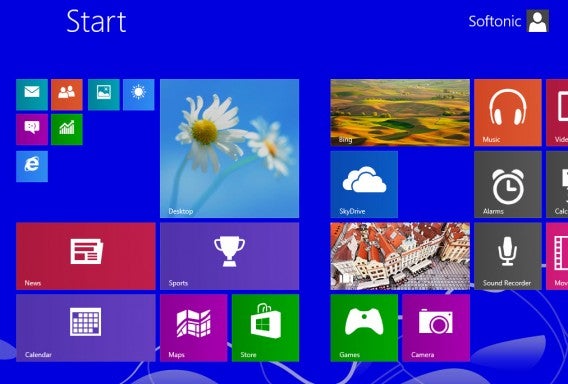
The star of the show is expected to be the first-ever update to Windows 8. Microsoft will release a preview of Windows 8.1 and we’re expecting big changes, as we’ve already heard a lot about the planned details of the release.

Besides the typical bug fixes and visual improvements, Windows 8.1 is expected to herald the return of the start button after a litany of complaints. You’ll be able to download the preview from Softonic as soon as it is made available.


Windows Phone 8 GDR2 Update

We’re also expecting an update for Windows Phone 8. Microsoft released a small update last winter known as GDR1. As with Windows 8, Microsoft has already released information about this update, but has already told us that it’s planning a more extensive update for fall. We also think it’s likely that the update could include improvements to Office Mobile.


A global Windows Store for Windows 8 and Windows Phone 8

There’s a possibility that Microsoft will release the first-ever Global Windows Store at Build 2013. We already know that a new Windows Store is coming, the question now is whether or not it will be global. So far, the Windows Phone Store and Windows Store run totally separately, and the Windows Store doesn’t even have a home page that you can visit via a browser. You can access individual app pages by typing the address directly, but it’s hardly the most user-friendly approach!


New Office RT apps

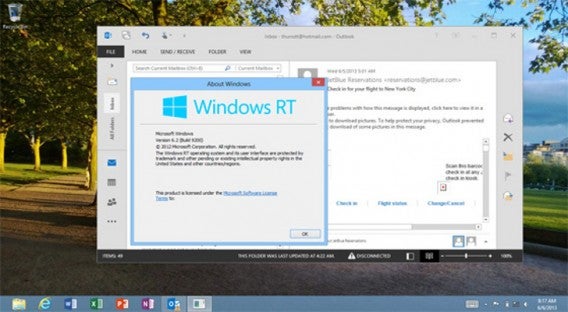
Microsoft has already let us know that Microsoft Office RT will be joined by RT offsets of Outlook, Access, Publisher, InfoPath and Skydrive Pro in 2013. As things stand now, Office RT only includes Word, Excel, PowerPoint and OneNote. The question we want an answer to is whether these apps will be free to access, or whether Microsoft will package then as a paid premium version.

Screenshots from Outlook RT can already be found online. There are rumors that it’s actually been around for a while, but that due to battery drain issues, they haven’t been able to make it public. Let’s hope that’s been fully sorted before the app is launched – battery drain is a real deal-breaker!


Office apps optimized for tablets

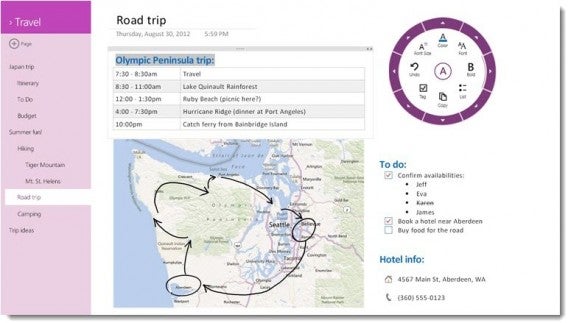
We’re also hoping that Microsoft announces a few new Office apps for tablets. As it stands, Office 2013 isn’t great on touchscreen devices, but OneNote has already shown us that there are better ways to do things. We’re expecting Microsoft to want to make Windows 8 and Windows RT particularly appealing to business customers, as office apps and business customers mean more money in the bank.


Internet Explorer for Windows 7

Internet Explorer 11 is expected as part of Windows 8.1‘s standard repertoire and has already been spotted in early leaks of the build. As we saw with its predecessor, we might also see a customized version of IE 11 for Windows 7 – perhaps Microsoft’s already working on a 2013 preview?


Visual Studio 2013

We’re also pretty sure that we’ll see a Visual Studio 2013 preview at the BUILD event. Visual Studio is an app that supports the creation of Windows applications and dynamic websites with a variety of programming languages.


So, what do you think? Think that Microsoft’s announcements will rival Apple and Google’s recent events?

Android 4.2.2 vs iOS 7 Beta

The reveal of iOS 7 in beta form at WWDC 2013 showed what many suspected: a drastic and long-overdue rethink of the user interface in Apple’s mobile OS. iOS had a design that still worked but was starting to look out of date, particularly after a steady stream of UI improvements on Android.

It’s admirable of Apple to essentially throw away the previous design scheme and replace it with something more modern. Senior Vice President of Industrial Design Jony Ive was the leader in the redesign and his work on physical devices finally extended into the software. iOS 7 removes a lot of of the visual bloat to make many actions more streamlined, but these changes also require a new period of learning: there are new gestures, settings panels, icons and more to get used to.

Google released 4.2.2 in February 2013 adding bug fixes and small improvements, but as a comparison between newest versions on both platforms, Android 4.2.2 will be compared to iOS 7 Beta. The official release of iOS 7 is slated for the Fall, but we don’t expect future versions of the beta to change dramatically.

Homescreen
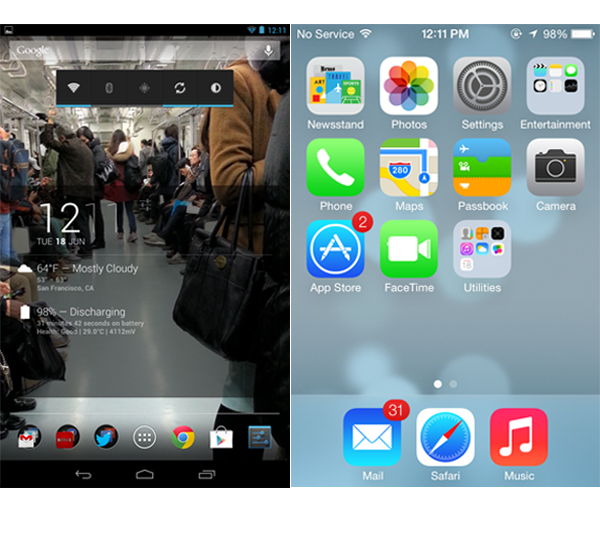
The core homescreen of iOS doesn’t change. It’s still a grid with icons and folders. All the first party apps have new ‘flat’ icons, but 3rd party app developers will need to update their icons to match. iOS 7’s design is much cleaner and modern compared to the past, but the live wallpaper feels superfluous. This also applies to Android which has its own collection of live wallpapers.

But iOS 7 still suffers from old problems. Beyond putting icons where you want, you can’t customize the homescreen, and the lack of widget support is still disappointing. Apple has fixed folders by allowing you to add more than 9 apps, creating pages within the folder that you can swipe through. This feels like a stop gap solution because Android contains an app launcher to display all your apps.

The new app icon design is a negligible annoyance because each icon is named like before. Android still leads against iOS for the ability to customize your homescreen with information that you may want without opening apps or new menus. iOS 7 Beta is slowly moving the operating system forward, but doesn’t look like it will allow expanded customization like Android or other platforms.

Notifications
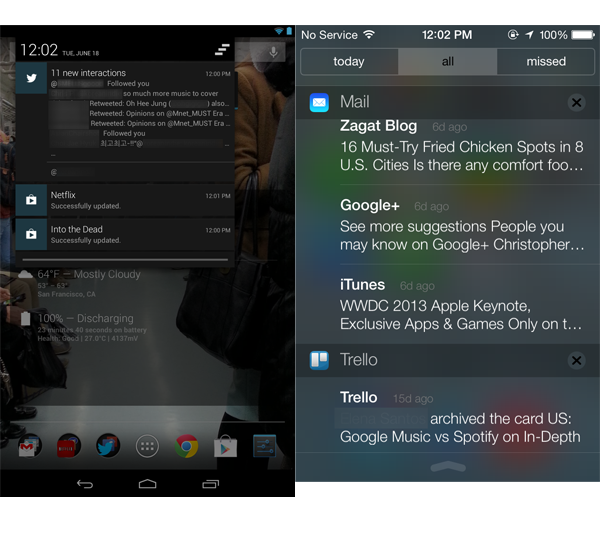
Android’s notifications have improved a lot over time and now include the ability to interact with notifications. Twitter and Gmail allow you to perform actions directly from the drawer and show other information like app updates and music controls when playing Google Play Music. iOS 7 updates the Notifications Center to match the new design, but it doesn’t add much in functionality. You still can’t dismiss all notifications at once and it doesn’t allow for direct interaction with notifications.

Control Center
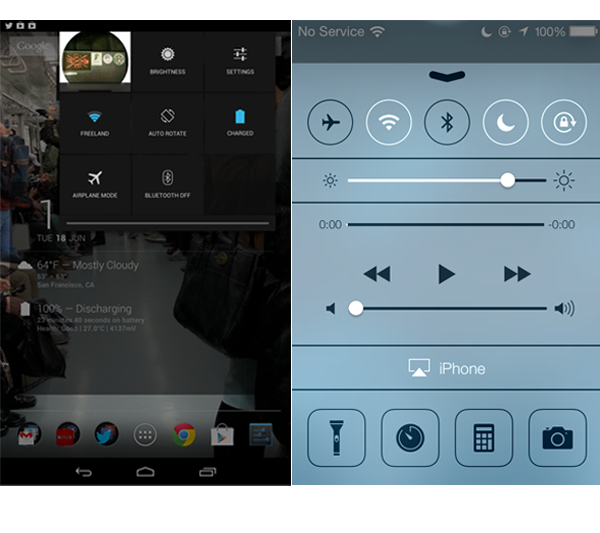
Apple’s Control Center is a new feature already found in Android: Quick Settings. Apple adds options like music controls and access to apps like a flashlight, calculator, and Do Not Disturb. Until now, you had to open Settings and drill down for the specific option. It’s nice to see Apple taking cues from other systems to add more ease-of-use for iOS users.

One problem that I foresee is that swiping up from the bottom of the screen might lead to problems when using apps. It already happened to me, using an app’s refresh button and pulling down the Notification Center by accident. It’s possible that this problem will continue in Control Center.

Multitasking
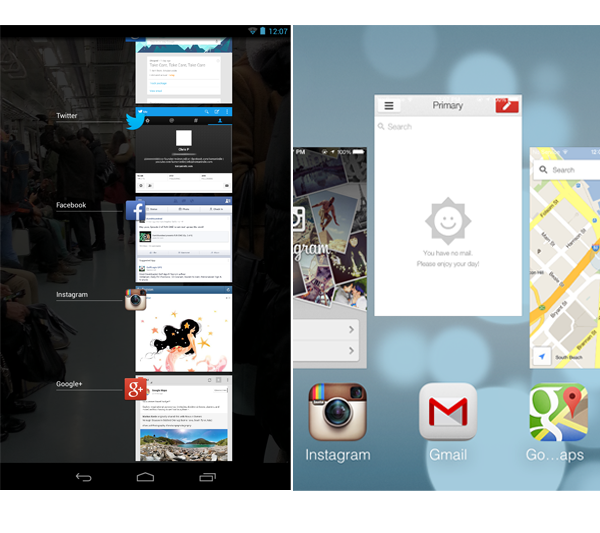
Apple will allow background apps in iOS 7, but the operating system will “learn” which apps to allow to run consistently depending on usage. It’s a big difference from before when apps were suspended. Ron of Droid Life stated that Apple “straight up copied Palm’s implementation of multitasking.”

Having used webOS, I can’t argue with this. Multitasking in iOS 7 is almost identical to webOS except it uses the empty space more efficiently. Android’s multitasking hasn’t changed with apps aligned on the right and you swipe left or right to close.

Apple has improved on the backend of multitasking by allowing apps to be persistent, but instead of closing icons, you close an entire card with a new gesture. Swipe upwards to quit an app. I’m not sure this is the best gesture they could have used for this function, however.

Music
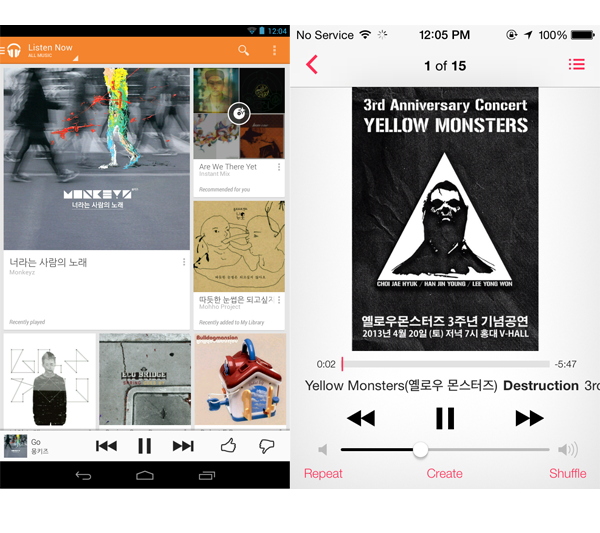
It’s difficult to compare Google Play Music All Access and iTunes Radio because they’re designed to serve different purposes, but it’s easy to compare music players. Google Play Music is centered around streaming online, but allows you to download tracks for offline listening. iTunes has always been about carrying your music library on the device.

The recent updates to Google Play Music made it much more visual by offering different sections like “Listen Now” and creating “Instant Mixes.” Generally it’s easier to find new music in Google Play Music compared to Apple’s Music app.

Both music apps work well enough, though the settings for Google Play Music are contained in the app while settings for Music in iOS 7 are still within the Settings app, the default location for settings in iOS.

Chrome vs Safari
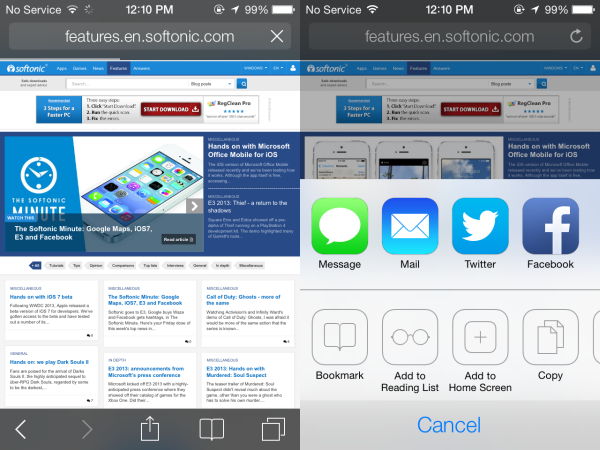
With both operating system’s first party browsers, Safari hasn’t really evolved. Users who use Chrome can be connected on multiple devices with a single login and access many of Google’s services. Safari’s redesign makes navigation easier, but the lack of sharing options is disappointing. Safari does offer syncing across devices, a feature also found in Chrome.
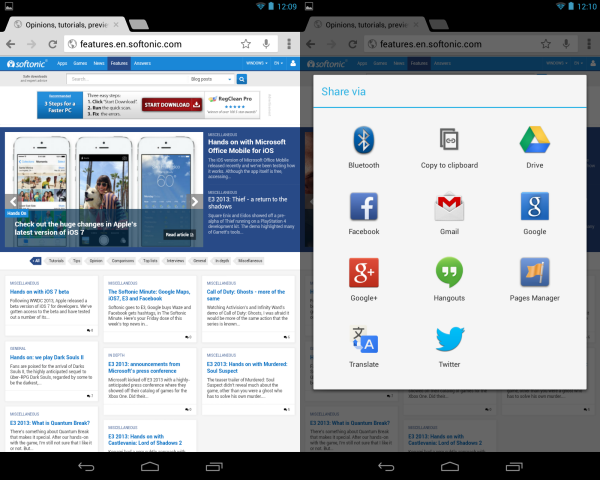
Apple is adding new social sharing options to iOS 7, such as support for Flickr and Vimeo, and rumored support for LinkedIn. That said, Apple’s control over sharing is disappointing. In Android, new apps can add new sharing options to menus throughout the device. In iOS, Apple needs to decide to add sharing options in an OS update, and that can really feel limiting.

Calendar
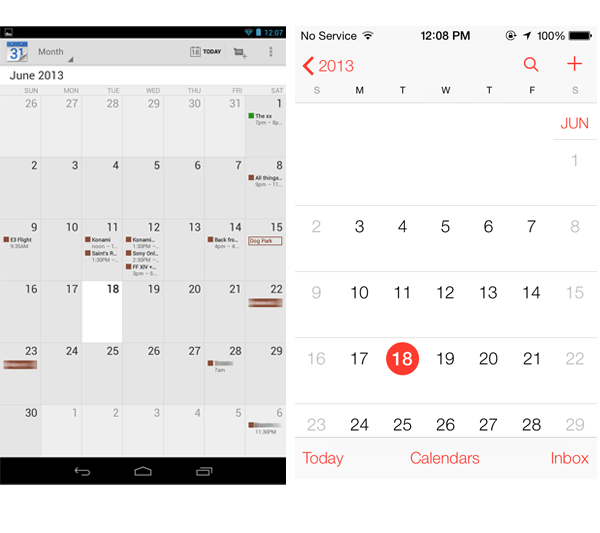
When I used iOS as my primary device, I rarely used the calendar app. It didn’t give me enough information about appointments and events. The updated Calendar app on iOS 7 Beta is designed to be minimal, but for some reason even after connecting my Google account and enabling it in Settings, it wouldn’t show any notifications in the month view.

The only time I saw any information was in the daily view. iOS 7 beta did show the event in the Notifications Center, but the lack of notifications in a monthly view is a problem for any Calendar user. Google Calendar is much more informative in monthly view, displaying multiple calendars for events and appointments.

It may be another work-in-progress for the beta to connect all existing services and a final decision can’t be made until the final version of iOS 7 is released with completed first party apps.

iOS finally gets dynamic

The iOS 7 Beta finally gives users something new visually. The backend and functionality of iOS have been updated with each major release, but the visual interface remained stagnant. Finally with iOS 7 there is something new to see and while there is a new learning curve with the release because of added features like Control Panel, it shouldn’t take long for users to feel comfortable.

When I left iOS for Android, I never found a compelling reason to look beyond Apple’s keynotes, but now I want to see the operating system in its final form.

Generally, the functions that iOS 7 offers exist on other platforms. The beta isn’t convincing enough to switch and the continued lack of customization is still disappointing (though there are rumors of extra customization options, hidden in the beta). The new user interface is compelling. iOS 7’s design is a stark difference from iOS 6 and is finally updating one of my biggest problems with Apple’s mobile OS.

When it releases this Fall, it will be interesting to see how far Apple has gone to coax Android users into reconsidering the iPhone.