Anonymous Browsing: Comparing Tor, JonDo, VPN and web proxies

Almost every internet user is easily identifiable on the basis of their IP address, but it is possible to have a bit of privacy when it comes to browsing. In this article, we’ll compare four options for anonymous browsing to see how they stack up in keeping you incognito online.

Note: The basis for all anonymizing services is concealing a user’s IP address. Your IP address is the unique numerical code assigned by your respective internet provider. Like a phone number, an IP address guarantees a specific connection between two devices online. Literally every user can be identified via their IP address when combined with connection data collected by your service provider.

Tor

Tor masks your IP address using several connected proxy servers; your PC only communicates with the first proxy server in the Tor network. From there, the service forwards the data using a different IP address. For web pages, the identity of the visitor (by IP address) can’t be traced.

Installation

Tor runs in the background and redirects all internet traffic from your browser upon request via the Tor network. It operates using a graphical interface named Vidalia. You can install Vidalia separately or use it in conjunction with the Tor Browser Bundle, which, in addition to Vidalia, installs a version of Mozilla Firefox optimized for security. If you’re not tech savvy, the Tor Browser Bundle is probably the best choice.

Operation

A simple click of the mouse after installation and that’s it- you can surf safely using Tor. The Vidalia software will start running and automatically establish a connection with the Tor network, loading the Tor optimized version of Firefox.


Another click and you can disconnect the Tor network in Vidalia (at this point, Tor Firefox will no longer work). You can run the Tor browser with Vidalia alongside a normal version of Firefox, only accessing Tor when needed.

In addition to anonymizing the IP address, using Tor browser with optimized settings, as well as HTTPS-Everywhere and NoScript add-ons, ensures additional safety. Instead of Google, it uses other secure search engines like DuckDuckGo. You can use advanced features and adjust settings using the toolbar.

Speed

Tor allows for reasonably quick surfing, but for large downloads, video streaming or file sharing, Tor is very slow. In our download test, the browser maintained an average download speed of 240 KB / sec. The speed changes depending on the data being transferred and the number of people using the Tor network at any given time.

Safety

If you aren’t running from the FBI or Interpol, Tor is a really safe option. A comprehensive security test at ip-check.info shows how well it hides your real identity.

Having said that, there is a possible risk of traffic interception from inside the proxy server network. Tor shares its data load among a network of unknown volunteers, and virtually anybody can turn their PC into a Tor-Node (you can set your PC as a proxy for the Tor network in Vidalia’s settings). This division of data is the reason behind Tor being a free service.

Theoretically, its possible that monitoring institutions, like the much talked about NSA, participate actively with computers in the Tor network to get access to transmitted data. In 2007, for example, a hacker demonstrated the vulnerability of Tor and gained access to sensitive connection data with only five computers participating in the Tor network. All data that wasn’t transmitted via HTTPS/SSL was particularly easy to pick-up. The decryption of SSL connections is also technically possible.

JonDo

JonDo, also known as JAP or Java anonymous proxy, also uses interconnected proxy servers to disguise your IP address. In contrast to Tor, however, it only uses certified partners as nodes. There are several proxy-mixes available for you to choose from to get access. You can see the country location of those proxies and choose accordingly for increased security and faster access. In addition to free access, JonDo offers a paid service for increased speed.

Installation

Like Tor, JonDo relies on changing the IP address associated with your connection. After installing JonDo, you can access the web using any browser. For increased security, JonDoFox offers an optimized profile for Firefox, as well as its own Firefox-based browser called JonDoBrowser. The connection between the JonDo-anonymizer and the browser must be set up manually in the browser’s proxy settings. We recommend using JonDo and JonDoBrowser in combination with each other.

Operation

The JonDo proxy software and the JonDoBrowser must be loaded separately. Using JonDo, you can choose which proxy network you want to use; the location of each network can be identified by country flags.

Clicking ‘On’ starts the anonymization process. In contrast to Tor, you can turn off JonDo and still surf using the same browser (without anonymity). Similarly, it’s not necessary to have multiple browsers running parallel with each other using JonDo. As an additional option, you can purchase data for increased surfing speeds.

The JonDo browser, similar in layout to the Tor browser, is also a customized version of Firefox. In addition, add-ons such as HTTPS Everywhere and No Scripts are also integrated. As for default search engines, the JonDo browser offers a wider selection than Tor. As well as Duckduckgo, Startpage and ixquick, you can also find encryption profiles for both Wikipedia and Google.

Speed

In free mode, JonDo speed is limited to 50 KB per second; that’s only one-fifth of the speed of Tor. Although you’ll have to pay for it, you can increase the speed to about 600 KB per second.

Safety

The JonDo network only works with proxy servers from certified partners. A breakdown of the data load across members isn’t possible with JonDo (as it is with Tor). As a result, JonDo is slower but safer. Theoretically, it’s only possible to identify a user by collecting the connection data of all proxy networks they have used. Thankfully, the majority of partners don’t collect connection data.

VPN

VPN stands for Virtual Private Network and is a simplified protected network connecting two computers online. Everything that users send and receive goes through an SSL-VPN-Server. For website owners, the IP address of the VPN server is visible, not the IP address of the individual user.

Anonymizing VPN services typically apply to paid subscriptions. A good overview of different service providers can be found on  Best VPN Service.

Installation and Operation

VPN providers either work with their own software or will redirect traffic through a proxy server which is directly accessible on the web. For VPNs, a special browser isn’t necessary, although it is possible to use the Tor and JonDo browsers in combination with VPN services.

Speed

Since VPN services don’t redirect data across many servers, they’re relatively fast. With an adequate data plan, you can surf almost as quickly as you usually would.

Safety

In theory, it’s possible to analyze packets transmitted through a VPN in a way that reveals the connected websites. Some estimate that this interception method is up to 90% accurate. Although a high level of privacy is ensured through encryption, VPNs don’t guarantee anonymity.

Additionally, there’s the risk that VPN services might collect and share your connection data,  get screened, hacked, or steal your data. There’s also the possibility that the provider’s server isn’t adequately secured and monitored. You must weigh these risks with your use of VPNs.

If you still want to opt for using a VPN, you should take into account the server location of the company. Services in countries such as Germany or Switzerland tend to be a better choice than an operator from the United States, for example.

Web Proxies

In addition to the above mentioned services, a web proxy is another option for offering anonymity. Instead of relying on a web browser, it accesses web pages via an input field from the web proxy, which renders the content on its own site. The popular VPN provider Hide My Ass offers a similar web proxy.

Safety

According to test results with ip check.info, Web proxies as anonymization services are pretty useless. In particular, when accompanied by JavaScript, the IP address can, in most cases, be determined easily. It should be noted that in some cases, you can disable JavaScript; in turn, however, many websites may become unusable.
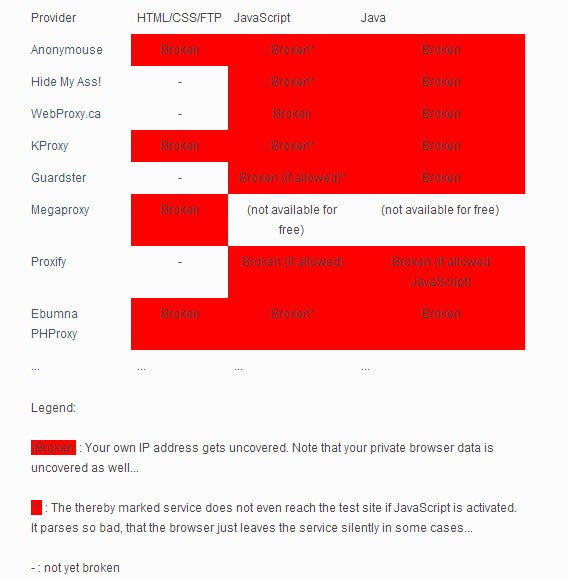
Source: anonymous-proxy-servers.net/en

Conclusion

For secure and anonymous surfing, JonDo is really the only option worth considering. Tor is slightly faster, and theoretically, is also anonymous, but the risk of large-scale monitoring of Tor by intelligence services should not be underestimated after the PRISM scandal. VPN services can only reliably ensure privacy, which can hardly be recommended for anonymous surfing! As for web proxies – avoid them at all costs!

Downloads

Tor Browser Bundle for Windows

Tor Browser Bundle for Mac

JonDo for Windows/Mac/Linux

JonDoBrowser for Windows/Mac/Linux

Original article, written by Markus Kasanmascheff first published on Softonic DE

Anonym surfen: So funktioniert der Tor-Browser

[Gamescom 2013] Call of Duty Ghosts: a first look at multiplayer

After trying out a few campaign missions in Call of Duty: Ghosts at E3, we were finally able to try out multiplayer at Gamescom 2013, specifically the PS4 version. Gameplay hasn’t changed much, but it’s worth taking a look the new options and modes that will delight CoD fans. Start of Brightcove Player

Design your soldier

In Call of Duty: Ghosts, customization options let you personalize your soldier and create 20,000 different combinations. This means you won’t see two soldiers the same in the multiplayer mode. Even better, it now includes women, a great new feature which will please many female CoD players.

Obviously, customizing your soldier isn’t just about aesthetics, you can also choose your weapons. Among the options you’ll find marksman rifles, IEDs (Improvised Explosive Devices), canister bombs (you throw them and they explode after a few seconds) or various types of grenades.
Perks – it’s all about the points

Customizing your soldier is great, but one aspect that’s always important for Call of Duty fans is the perks system. Ghosts debuts a new one, this time based on points.

You start with 8 points, which can increase up to 11 if you get rid of your secondary weapons. With these points you can buy perks, the cheapest of which cost one point and the most expensive, five. With this system you can set your number of perks to your liking; strengthening the skills you’re good at, or making improvements that make you indispensable. One of these is our highly-anticipated new best friend. Yes, even your faithful dog gets into multiplayer as a perk.

This new system aims to revolutionize the franchise and establish itself as a new model that other games will surely copy. Do you like this new system of perks or do you prefer what we’ve seen in CoD Black Ops 2 and other games in the Call of Duty series?

Squads: a mode that goes beyond multiplayer

Call of Duty Ghosts lets  you create your own squad of up to 10 soldiers. They will gain combat experience and, even better, there are no limits on their use.

With the new Squads mode you can take your elite soldiers and put them into combat in any game mode: alone against the AI ​​and cooperatively or competitively against your friends or any other CoD user.

Like the new perks, the Squads mode is also meant to be a turning point in the series, as it combines the best of the classic multiplayer modes with much more advanced AI. When we say AI, we’re talking about the AI of your fellow soldiers, who act in a much more logically than before: they can shoot while they’re jumping, they offer better coverage and act accordingly to the weapons they’re equipped with.

Within the Squad submodes you’ll find Squad vs Squad, where you pit your squad against a friend’s squad;  Wargame, where your squad faces another AI squad or Safeguard, a mode inspired by Modern Warfare 3’s Survival mode.

New modes for the classic player

If your idea of multiplayer is more traditional, you’ll be pleased to know that some new modes have been debuted in Call of Duty: Ghosts and we were able to test them at the Gamescom demo.

The first mode we tried was Search and Rescue. In this mode, similar to Kill Confirmed for Black Ops 2, when you die you drop your badge: if a teammate picks it up you keep playing, but if your opponent does, you’ll be dead until the next round begins.

We also tried Blitz, an interesting twist on the classic Capture the Flag. This time the action focuses on points of the map where you generate battles for control of the territory. These battles allow you to enter enemy territory and score a point, while your opponents return to the starting point … It’ll take a few seconds, just enough to regroup, and then another battle begins. When the time runs out, whoever has the most points, wins. In reality, Blitz is just a variation on what we’ve seen hundreds of times in other games, but we appreciate Infinity Ward’s attempt to revitalize it.

The third mode we saw was Cracked, which takes the basic themes of the classic Team Deathmatch but with a twist: when you kill an enemy you have 30 seconds to eliminate another. If you fail, you explode and are blown to bits!

CoD 24/7

It seems that the future of the FPS is going social. We saw this in the new Killzone for PS4, and now we’ve seen it in Call of Duty: Ghosts. Activision’s slogan – COD, Anywhere – seems pretty spot on. The developers want you to be connected to your game at all times and to share your achievements with the community.

To this end, we have the CoD profile, which allows you to store your multiplayer game data in the cloud and access it from any console. Furthermore, with the new smartphone app you can check your stats, connect with other fans and, more importantly, use it as a second screen for your Ghosts games.

When it comes to connectivity, Activision also talked about clan wars, a game in parallel with the general multiplayer.

¿Is CoD better in multiplayer?

We warned you at E3 that for all the spectacular features and new friends that have been added, the single player mode of Call of Duty: Ghosts left us unimpressed.

So what did we make of multiplayer? Well, revolution is probably pushing it, but at the very least the new modes, the Squads function and the new Perks system have convinced us.

Are you addicted to Call of Duty multiplayer

Original article written by Maria Baeta, published on Softonic ES.

Google Play basics Part 5: Send apps to your Android device from a PC

The Google Play Store allows you to send an app or game directly from your computer to your Android device. This can be really useful, especially if you find an interesting app when you’re browsing on your computer. Forget about reaching for your phone, opening the Google Play Store and searching for the app.

In this final installment in our Google Play Basics series, we’ll teach you how to send those apps directly from your computer to your Android device.

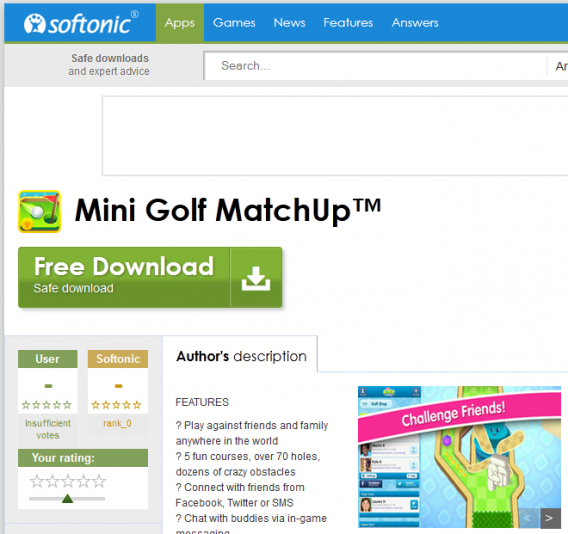
1. Download from Softonic

Click the ‘Download’ button under the name of the selected game or app in Softonic. We use Mini Golf MatchUp in the example below. This step takes you to the Google Play store. If you’re already at the Play Store, you can skip this step.

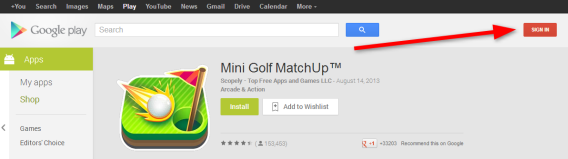
2. Log into Google Play

Sign in to your Google Account on the Play Store. Click the Sign In button in the upper right hand corner of the screen.

Note: In order to send apps to your phone or tablet, you need to log in to Google Play on your device too. If you haven’t done that yet, do it now so that you won’t have to repeat this step every time.

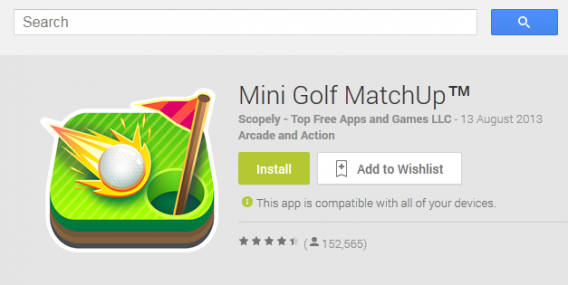
3. Click Install

On the app page, right next to the icon, click the green ‘Install’ button.

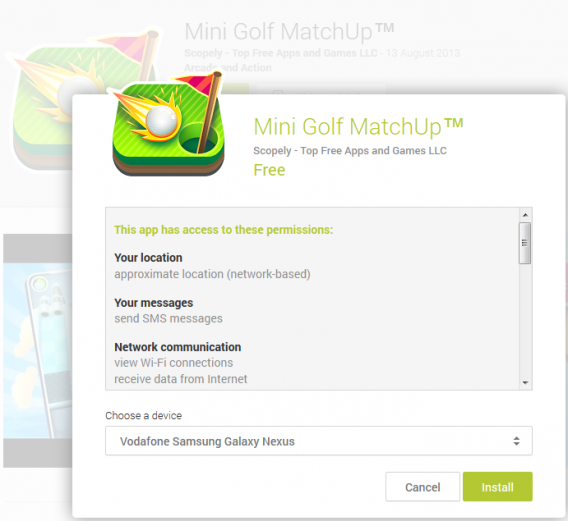
4. Select the device on which you want to install the app

If you have more than one Android device, like a smartphone and a tablet, choose the one that you want to install the app on. Select it from the list at the bottom of the window that pops up, and then click ‘Install’.

5. Wait until the app downloads and installs

Double check that the Wi-Fi on your phone or tablet is turned on and is connected to a Wi-Fi network. Otherwise, the app won’t install on your device.

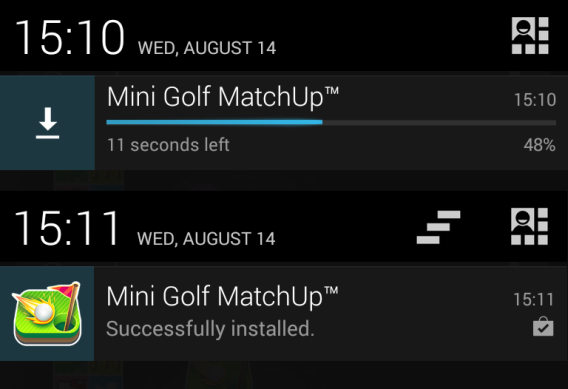
And that’s it! Check your Android phone or tablet and see if the application has been retrieved and installed.

How many apps have you installed this way?

Read the other articles in our Google Play guide:

Original article written by Radek Grabarek, published on Softonic PL.

Now you can edit your Facebook posts

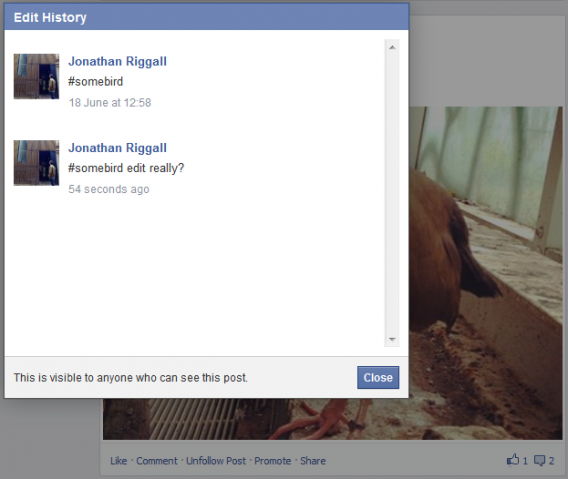
If you make a mistake on a Facebook post, now you can edit and correct yourself, something that many people will be happy about. However, your post will be marked as ‘edited’, and anyone who can see the post will be able to view the edit history.

Editing posts on Facebook is possible on the web, and is being rolled out to the Android app. So far we have not been able to edit posts on any Android device, and iOS users will have to wait till the next app update.

You can edit anything you posted on your Timeline, apparently as far back in the past as you like. Click the arrow on a post, and you’ll now have the option to edit. Once you do, that post will be marked as ‘edited’, even if you undo your edit. This is not a way to hide your mistakes or embarrassing posts! You can, of course, still delete anything you post.

The editing history could be quite funny, if used creatively, it will be interesting to see whether editing posts becomes normal amongst Facebook users.

10 fantastic Google Easter Eggs

Google loves hiding secrets in their services and products. The company has had 15 years to fill the internet with memes, references to pop culture, and humorous oddities. To coincide with Google’s birthday, I’ve compiled a list of the ten best Easter Eggs, and how you can access them. This list extends to many Google services and software, including Search, YouTube, Android, Maps, and more.

Search Easter Egg: Zerg Rush

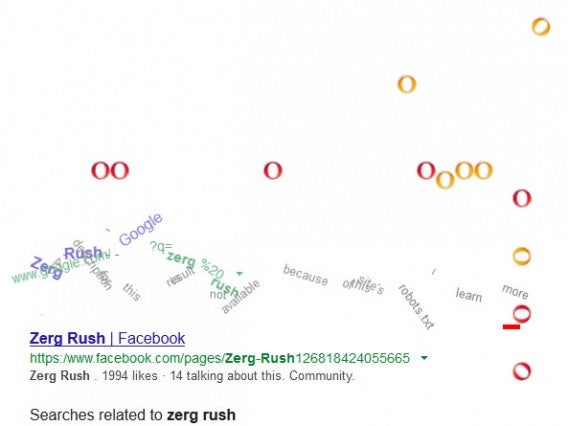
If you’ve ever played the Blizzard game Starcraft you might be aware of the Zerg, an alien hive mind race that attacks in ravenous swarms. One of the main strategies is the Zerg Rush, with prioritizes releasing an army of cheap units to overwhelm the enemy with sheer numbers. Typing in Zerg Rush into Google web search recreates this tactic.

“O’s” will descend on the search results and destroy each link. Each O can be destroyed by clicking on it three times, but the amount on screen makes it a hard job. Upon destroying all link the O’s form into a large “GG”, a common Starcraft term for “good game”.

Translate Easter Egg: Beatbox

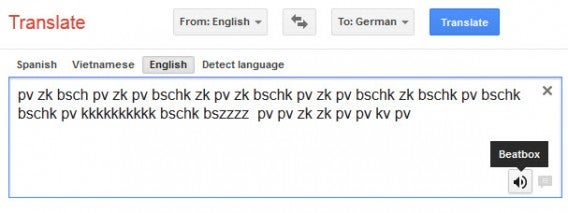
Google Translate is a means of understanding other languages, but what about the universal language of music? Alright, beatboxing might not be a traditional, but it’s a really neat way of turning your voice into a percussion instrument. Entering certain phrases into the Google translate dialog box will turn the normal “Listen” icon into “Beatbox” mode. You have to include several lines to turn on this feature, though it’s hard to find the actual minimum. The following are some of the text sounds that roughly translate to Beatbox rudiments.

pv = brushing
bk = bass
vk = roll tap
zk = symbol
krp = hig hat
pv = short roll
ds = rimshot
bsch = snare
tk, kt = flam

YouTube Easter Egg: VHS button

For the 57th anniversary of the VHS, YouTube added a “Tape Mode” button. This gave videos a degraded, VHS look, complete with a blurry pause and lots of visual noise. While the button is off by default, it can be accessed by including “&vhs=1” at the end of any YouTube link.

Android Easter Egg: Secret images

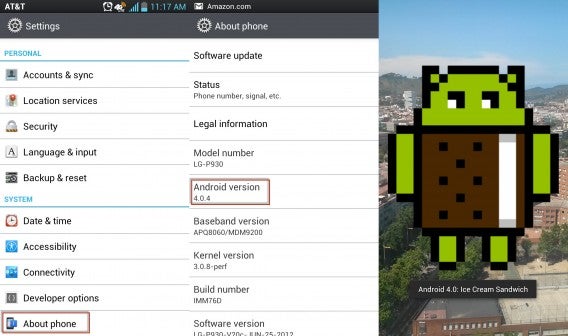
Since Android 2.3 (Gingerbread), Android has included secret images that can be accessed in the “About phone” menu. Enter “Settings”, “About phone” and quickly tap “Android version”. With enough speed a secret graphic will appear based on the OS.

  • 2.3 (Gingerbread) – an Android Robot in a zombie apocalypse.
  • 3.0 (Honeycomb) – an Android Bee.
  • 4.0 (Ice Cream Sandwich) – Android Robots flying like Nyan Cat.
  • 4.1 and 4.2 (Jelly Bean) – Lots of jelly beans fill the screen and can be flung with swipes.
  • 4.3 (Jelly Bean) – Similar to the above, but it starts with a single large jelly bean that generates more beans when tapped.

Images Easter Egg: Atari Breakout

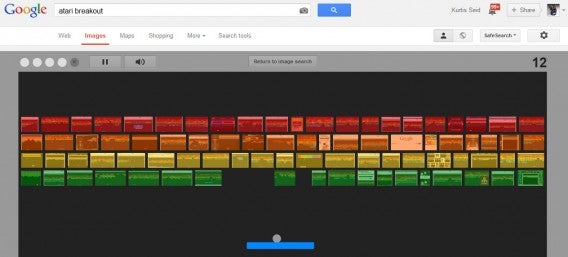
Doing an image search for “Atari Breakout” will turn the search results into a colorful grid similar to the game Breakout. A paddle can be controlled with the mouse to bounce a ball and destroy the images. When a level is completed, a new random image search will be done and the corresponding images will be used for that level.

Multiple Services Easter Egg: Klingon, Pirate, and other languages

Google services are available in common languages such as English, Spanish, and German. What might surprise you is that in some of these services, such as search, you can expand the list to include more uncommon languages. Most of these are real languages, but among them are also settings to languages to Pirate, Kilingon, Elmur Fudd, Hacker, and more. These extra humorous ones typically only change the initial main page, while leaving more important sections in American English.

Maps Easter Egg: Google Staff in Street View across the world

Google has multiple headquarters around the world, and there are plenty of employees who enjoy their work. By searching some of these locations, you can view see groups of Google staff on Street View!

This includes Barrow St. in Dublin, Ireland and 1600-1632 Charleston Road Mountain View, CA, USA. It also used to include the Wroclaw, Poland office, but this seems to have been removed.

Maps Easter Egg: Half Moon Island Antarctica

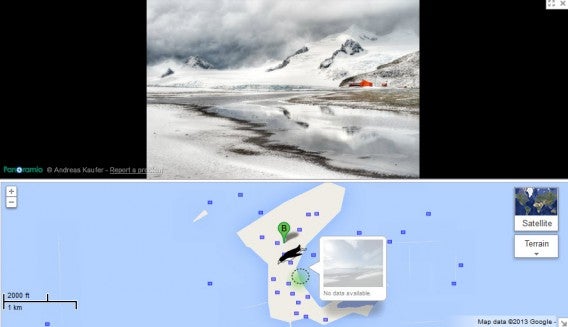
If you switch to classic maps view (or never upgraded in the first place), you can explore the entirety of Half Moon Island. Drag the man icon onto the island and he will transform into a penguin. You will be able to “Street View” the island, just like a road. As mentioned before this Easter Egg doesn’t function in the updated version of Maps.

Maps Easter Egg: Other Maps secrets

There are many assorted secrets within Google Maps, mostly scattered around random locations. Searching 44 14’39.77″N 7°46’10.71″E and zooming in will show a large rabbit. Searching 47.110579, 9.227568 and entering street view will give you a glimpse of heaven in the clouds.

You can also get a peek into the Tardis from Doctor Who by searching for “Police Telephone Box London”.

Logo Easter Egg: Two player Pac-Man

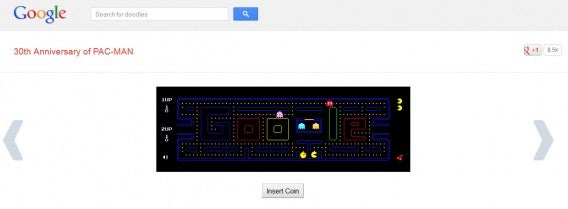
Google celebrated Pac-Man’s birthday by changing the search homepage logo into a working version of Pac-Man. By hitting “Insert Coin” two times Ms. Pac-Man appears, allowing two players simultaneously. While the game has been removed from the homepage, it can still be accessed through Google Doodles which display past logos.

Google loves Easter Eggs and these are just a few of the crazy ones still around. Unfortunately, they’ve removed some other cool ones, such as playing Snake in YouTube videos. We’re looking forward to the new Easter Eggs Google hides in KitKat, Google Glass, and other future products.

Have you found other amazing Google Easter Eggs?

Google celebrates 15 years of organizing the world’s information

It’s hard to believe the search giant is only 15 years old today. Designed by two brilliant students at Stanford University, Sergey Brin and Larry Page, created one of the most iconic names in Silicon Valley.

In September 1998 Brin and Page, who were still computer science students at Stanford University, opened up a bank account in the name of their newly founded company. Their startup was called Google Inc., a name derived from the mathematical term that refers to a number expressed with 1 followed by 100 zeros.

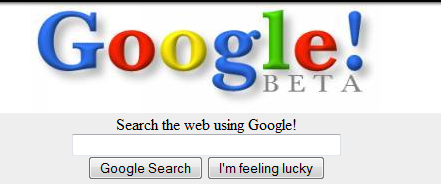
first google logo

On August 30th, 1998 marked the  first ever Google Doodle, drawn for the Burning Man Festival. Even in its infancy, Google managed to be listed as one of PC Magazine’s 100 Top Web Sites and search engines of 1998.

burning man google doodle

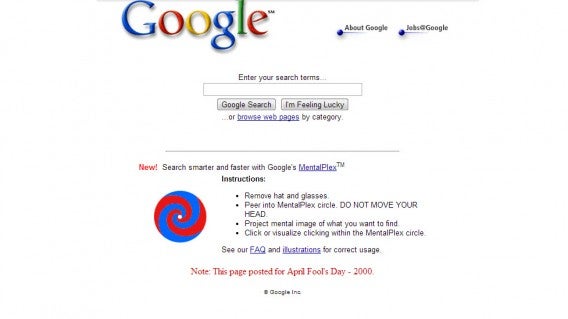
The company then established their headquarters in Mountain View, California and celebrated launching AdWords in October of 2002. The early years of Google were marked by a constant explosion of innovation and bold choices. Still, employees of the company made time to have fun, creating the first April Fools prank that Google is now known for. The prank was for a mind reading tool called the MentalPlex.

mentalplex

In 2001, Google launched Image Search, one of the most used Google services today. Google’s index of web pages grew to over 3 billion that year and became the first search engine in Latin America.

In 2004, Google went public with an initial public offering of $1.9 billion. Google’s stock currently sells for almost $880 per share with a market cap of $292.62 billion. The company continued its world domination by opening offices in Tokyo, Sydney, and Dublin. The same year on April 1st (April Fools Day), Google released Gmail, which is now one of the most popular email services in the world.

Google Dublin atrium

In 2005, Google launched Maps, Earth, Analytics, Calendar, and Docs. A year later, the company purchased YouTube for $1.65 billion. The purchase turned out to be a great idea as YouTube is now the third most trafficked sites on the internet, behind Google and Facebook.

YouTube header

Then in 2008, Google Chrome was born along with Google’s first version of Android, Android 1.5 “Cupcake”. Today, Android is the most popular mobile operating system with an 80% market-share.

Of course, things weren’t always successful for the big G. In 2011, Google tried to wage war against Facebook by launching its own social network, Google+. To this day, Facebook is still the dominant social networking site with 819 million monthly active users at the time of this writing.

flat google logo

Today, Google looks toward the future with Glass, a wearable device that pairs with your phone to provide a heads-up display of useful information.

What does Google have in store for us? Only time will tell.

More details about Windows 8.1 update

Windows 8.1 will be launching soon on October 17th. The update will be distributed for free to current Windows 8 users. Although Windows 8.1 has achieved Released to Manufacturing status, Microsoft has plans to integrate more features after its launch. The company has provided a few more details about what’s to come for Windows 8.1.

The Verge reports Windows 8.1 will be getting a new feature called “Photo Loop“, which allows users to “rewind” a photo to the perfect shot. Essentially, Windows 8.1 will take a series of shots and will let users scrub through them to pic the best one. The camera will begin taking photos as soon as it’s launched but it won’t be detectable to the user. Unfortunately, the feature will require new camera hardware so existing Windows 8 tablets won’t support Photo Loop.

Bing is also an area of concentration for Microsoft as it integrates more information into its own apps. Bing Food & Drink will offer video content from famous chefs and over 100,000 different dishes. Bing Travel will receive an upgraded data base with information from Trover and Michelin. Bing Sports also gets updated with the Sports Hub, which provides real-time score reports for more than 20 international competitions.


RELATED STORIES


Source: The Verge | Tech Radar

Shopping with Google Shopping Express

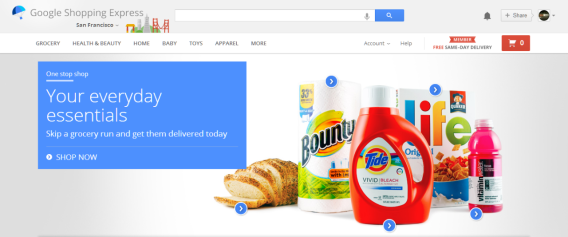
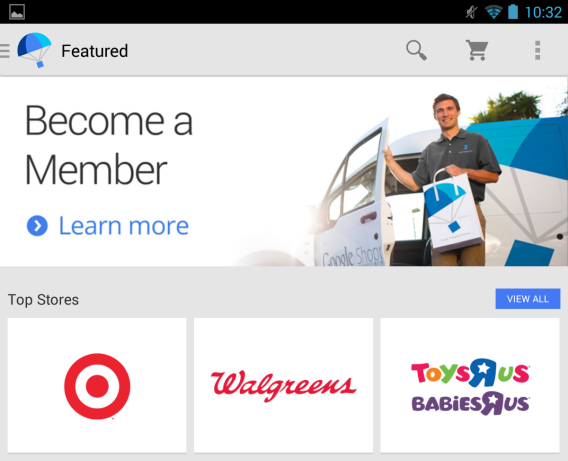
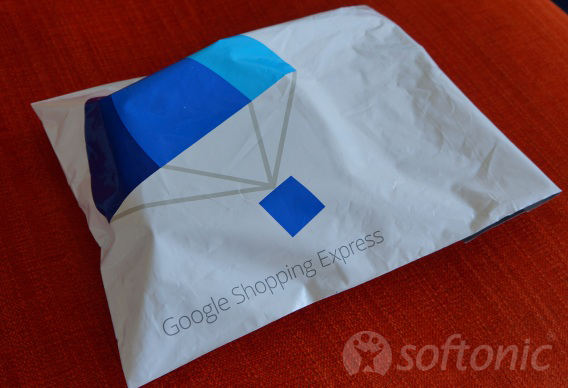
As Google opened Google Shopping Express to residents of San Francisco and the South Bay area up to San Jose, I thought it would be the perfect time to order something from one of the participating stores.

Do you need same-day delivery? Do you absolutely need to have creamy peanut butter delivered by 9 PM from Whole Foods?

Probably not, but in a city as congested as San Francisco where parking is like hunting for a bail jumper, having your preferred organic apple juice delivered to your overpriced studio apartment in the Mission district is a wonderful option.

How has my experience been with Google Shopping Express?

Actually, it was very easy to use and required no hard work on my part except for maintaining a steady refresh of my Google Shopping Express Chrome tab with my order status.

Limited selection

One of the main problems with Google Shopping Express isn’t the number of stores, but the selection.

These are the stores that you can order from:

  • Target
  • Walgreens
  • Toys R Us/Babies R Us
  • Whole Foods Market
  • L’Occitane
  • Blue Bottle Coffee Co
  • REI
  • Dodocase
  • Lucky supermarket
  • Staples
  • Nob Hill Foods
  • Photojojo!
  • American Eagle Outfitters
  • Office Depot
  • Guitar Center

It’s a bit of a mix between all the stores. It makes sense for grocery deliveries and Target is a good place to save money on Target-brand goods.

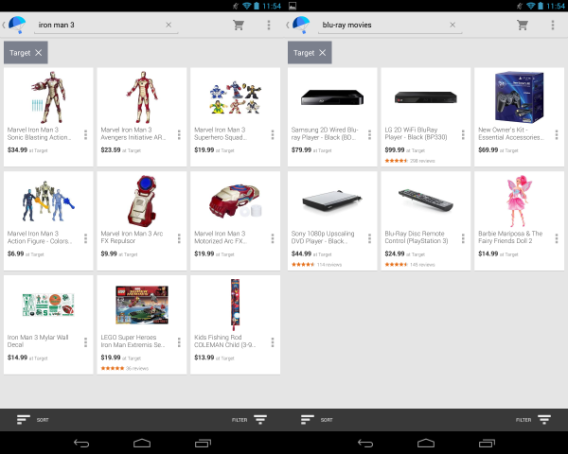
The problem with Google Shopping Express is the selection. The stores don’t offer the same items that they can offer in individual online stores or brick-and-mortar locations. Target is a great example. I looked up Iron Man 3 on Blu-ray.

I couldn’t find Iron Man 3 on Blu-ray at Target. It’s strange that a major retailer like Target doesn’t include its current catalog of movies to purchase.

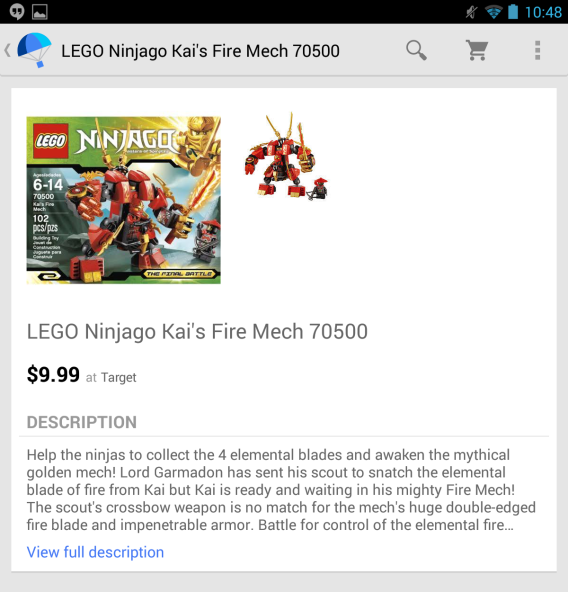
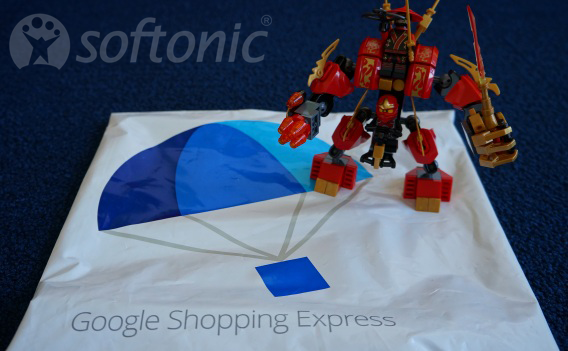
So back in the Google Shopping Express app, I started looking for something cheap to decorate my desk with. My result was the LEGO Ninjago Kai’s Fire Mech. I chose this amazing LEGO because it combines two things. It’s cheap and it’s LEGO.

Ordering

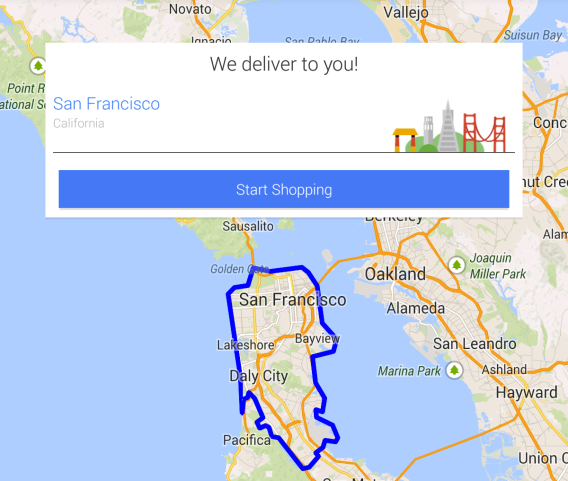
Ordering from the app is simple. When you sign up for the service, you can check if your zip code is supported. Since all of San Francisco is available for delivery, I had the LEGO set delivered to the Softonic office.

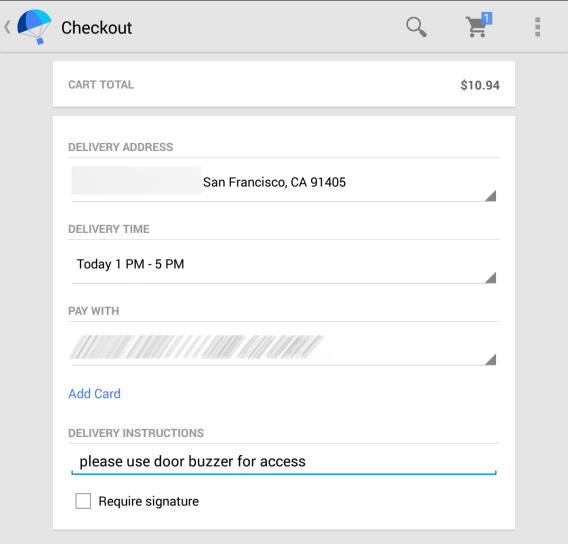
I signed up with the current promotion, which offers six months of free same-day delivery. You have to connect a credit card to Google Shopping Express, but if you already have Google Wallet, it it will load the credit card automatically, making check out simple. One of the best options in Google Shopping Express is you can specify a window for delivery, even extending into the next day.

Since I work until 5 PM, I chose the delivery window of 1 PM -5 PM. In the delivery instructions, I added a note to use the building’s intercom to call the office. This addition is smart because it enables delivery drivers to know of any possible problems when delivering a purchase.

The order was completed with the Google Shopping Express app at 10:50 AM and I received a Gmail confirmation a minute later.

Then I waited.

The package arrived at the office at 2:24 PM. That’s very acceptable considering delivery windows for other carriers can be “until 8 PM” or just a generic “out for delivery” message. Google Shopping Express doesn’t give real time delivery details, but it’s more than enough to see the status of the order until shipment.

From ordering to physically receiving my package took a little over three hours. That’s impressive. I’m curious how well this will work for residents south of San Francisco instead of people working and living in the city.

Room to grow

Google Shopping Express has the potential to be the way people get things from their favorite stores. The limited number of stores and the even more limited items, the majority directed towards grocery, make using the service a hit-or-miss. Google Shopping Express may be angling itself away from Amazon and eBay in the products they are focused on selling, but with those two companies also pushing same-day delivery, it may be a struggle.

eBay also offers products from Toys R Us, Target, Guitar Center, and Walgreens making the choice of Google Shopping Express an option only if you can’t find the item or you’ve missed the order deadline.

The service may be focused less on offering “everything” like Amazon and focusing on products that people need within a certain time frame. Google Shopping Express has a lot of room to grow. It’ll be interesting to see what direction the service heads in.

I still have six months to order from Google Shopping Express so hopefully the selection will increase to make it more worthwhile to use.

Facebook editing coming to web and Android, iOS coming later

Facebook is finally bringing editing to its mobile apps and mobile web. Previously, posts could only be deleted entirely. Android and mobile web users will be the first ones to see this new feature, which begins rolling out today. iOS users will have to wait a bit longer to get the feature.

With the new editing feature, users can now tap on a post to edit it. This makes fixing typos much easier instead of deleting your post and writing it out again. There will be a viewable history of the changes too so users will get some context of what’s changed in an update.

Additional updates include the ability to create and share albums from the mobile app and sharing emoticons, which are both pretty minor update. This update will be released in a staggered roll-out so it may be a few days before you see your update.

UPDATE: This post previously stated that only the mobile web would be getting editing features but Facebook’s desktop site will also get the editing feature.


RELATED STORIES


Source: The Verge

Google’s upcoming Google Search for iOS update brings cross platform notifications

Google is not finished with its app updates, even after updating a ton of its Android apps yesterday. The company has announced a slew of updates for its iOS apps, including a new Google Search app, which syncs notifications between Android and iOS.

New to Google Search for iOS is the ability to “wake” the search app by saying, “OK, Google.” This feature debuted on Android and it’s nice to see Google isn’t forgetting about its iOS users. Additionally, reminders have been integrated to Google Search for iOS, which now sync between your Android and iOS devices.

knowledge graph android

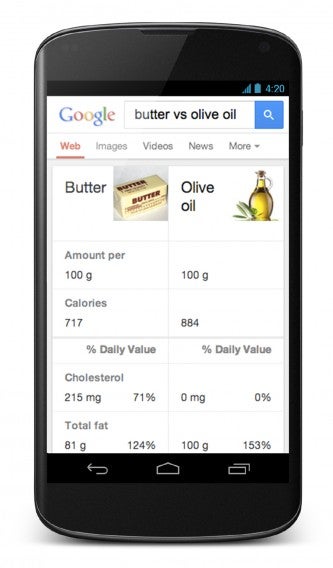
Google is also focusing on its search results and Knowledge Graph, giving users more relevant information quickly.


RELATED STORIES


Source: Google (Google+) | Google Search Blog