Windows 8.1 box copies available for pre-order for $119, $199

Microsoft has listed both Windows 8.1 and Windows 8.1 Pro up for pre-order on their web store today. The official launch date of Windows 8.1 is still about two weeks away but now you can reserve your copy on DVD beforehand. If you’re running Windows 8 already, Windows 8.1 will be a free update, which can be downloaded from the Windows Store on October 17th.

Those looking for upgrade pricing will be disappointed as Windows 8.1 will only be sold as a full version. This means you can use it to upgrade from Windows 7 or do a clean installation on your machine. Windows 8.1 costs $119 while Windows 8.1 Pro will cost $199.

Check out more of our Windows 8.1 coverage here.


RELATED STORIES


[Source: Windows 8.1 pre-order | Windows 8.1 Pro pre-order]

Hulu Plus joins Chromecast apps list

The limited number of apps at the launch of the Chromecast still exists months after the device launched. The core apps at launch were Google Play Music, Google Play Movies & TV, and Netflix.

Developers found a lot of other services within the SDK like HBO Go, Pandora, Vimeo, and Amazon Instant Video that shows potential support, but hasn’t resulted in more apps updating to cast to the dongle.

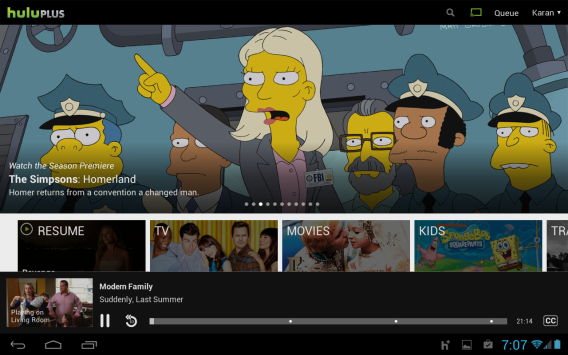
Now, Hulu Plus has updated its Android and iOS iPad app to support the Chromecast. Like the other apps, you can push content from your device to the dongle which will take over an stream the selected media.

Hulu Plus does require a $7.99 subscription to use the service, much like Netflix, but now you can stream media over Wi-Fi to your television.

It’s unknown if other apps will update to support the device, but with two months since launch there’s still not a huge reason to need the Chromecast yet.

Source: Google Play Store

Download Chromecast: Android/iOS

Download Hulu Plus: Android/iOS

Apple working on iOS update to fix iMessage bugs

Apple has responded to user complaints about iMessage after upgrading to iOS 7. Users report missing messages, messages sent as texts instead of iMessages, and messages refusing to send. The company has told the Wall Street Journal that it is aware of the issue and is working on a fix. Here’s what Apple had to say:

“We are aware of an issue that affects a fraction of a percent of our iMessage users, and we will have a fix available in an upcoming software update. In the meantime, we encourage any users having problems to reference our troubleshooting documents or contact AppleCare to help resolve their issue. We apologize for any inconvenience this causes impacted users.”

Although Apple tells customers to contact AppleCare about issues with iMessage, it’s unclear what Apple’s support team can actually do to resolve the problems. This isn’t the first time Apple’s messaging service has experienced problems. The company issued an update for Mac users who received iMessages out of order back in June of this year.

Apple has been quick to update iOS 7, releasing iOS 7.0.2 to fix a lock screen vulnerability less than a week after the operating system’s launch. It’s likely that Apple’s upcoming iOS 7.0.3 update will address these iMessage bugs and should be releasing soon.


RELATED STORIES


[Source: Wall Street Journal]

3 free DJing apps for Android

Android has gotten a bit of grief in the past for not having many good DJing apps compared to iOS, but a number of relatively new apps on the market now give Android users some great options for DJing using their device.

iPhone and iPad apps have been more popular for DJing mainly because of the popularity of Apple hardware for mixing, but as Android tablets continue to grow in popularity, developers are starting to tap the market with some great free apps that put Android users in front of the turntables. Check out three of the most popular and versatile ones below.

DJ Studio 5

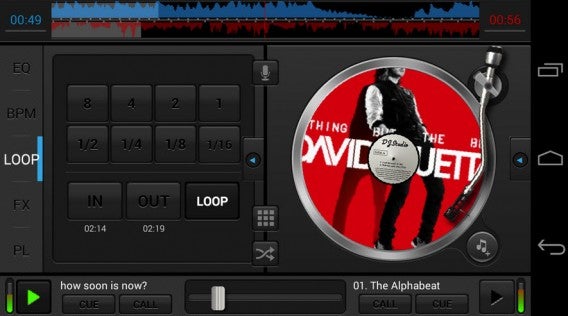
As the first DJ application for Android, DJ Studio 5 remains the most popular DJ app for Android devices. Its usability makes it a good option for both beginner and intermediate mixers and is probably the most complete free DJing app available on Android.

Basic functions let you mix, scratch and loop songs on your device with two virtual turntables and a crossfader, while more advanecd options include sound effects, 3-band equalizers and customizable sample pads. You can even record your set and share your mixes on Soundcloud.

Its free, but what’s even better is that there are no ads and no registration is required. DJ Studio 5 is compatible with Android 2.2 and higher.

edjing

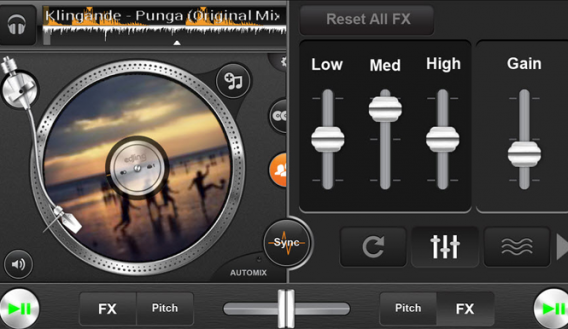
Having just received additional funding to continue growth from its startup roots, edjing gained popularity on iOS and has expanded to Android to become a successful multi-platform DJ’ing app, voted as Best App of the Year at the 2013 AppAwards.

edjing lets you mix with the music on your own device, as well as music on streaming sites Deezer and Soundcloud. Similar to DJ Studio 5, the app has two turntables and a crossfader to seamlessly transition between songs, as well as the option of manually matching or automatically syncing BMPs when switching beats. You can also share your mixes made in edjing on Twitter and Facebook.

While the app is free, some of the more advanced features, like reverse, double flipping and auto scratch are paid-for upgrades within the app. You do have the option, however, to earn ‘vinyls’ to buy more effects. edjing is comptabile with Android 4.0 or higher.

DJ Basic

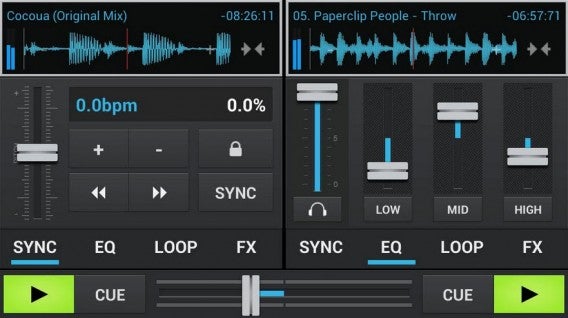
DJ Basic is the free version of the paid-for ADJ for Android app. The Basic (free) version is slightly limited since full functions are reserved for those willing to pay for the upgrade, but the app itself has a few high-tech features that aren’t available in other Android apps on the market. DJ Basic includes accurate waveform visualization, hi-pass, echo and flange effects, fine pitch and bend, and a very low latency response.

Unlike DJ Studio 5 and edjing, the display in DJ Basic doesn’t feature two turntables but instead focuses more on the controls, with Multi-touch functions available for Android 3.3 to really enhance the app’s functions.

It’s easy to stick to streaming with so many services going mobile, but you might want to up your game with a bit of mixing too, and these apps will certainly help you become the life of the party.

What DJing apps do you use on your Android?

Google launches free Web Designer for PC and Mac

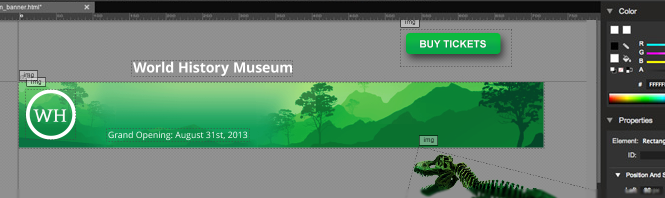
Google has launched a free web design tool for Windows and Mac users. Currently in beta, Web Designer lets users create HTML 5 designs (including animations) with a minimum of fuss.

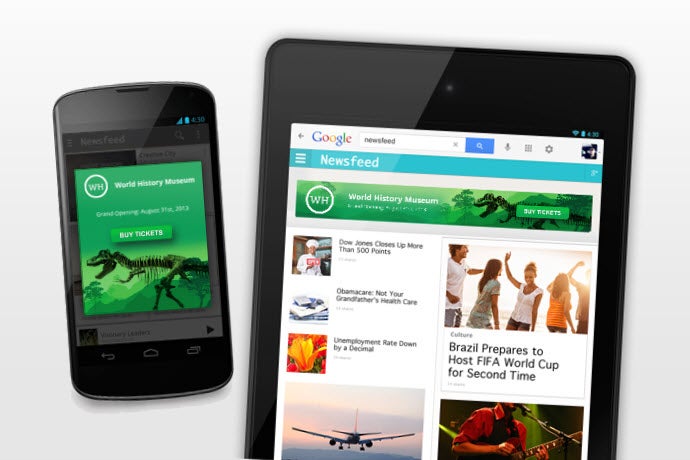
The new tool, released two days ago, needs to be installed on your computer. But it seems to effectively run as a web app packaged in a customized Chrome window. The program comes with a couple of design options, but the only templates included are for Google Ads banners, which suggests that the main purpose of this software is the quick creation of animated HTML5 ads.

Google Web Designer

As John Gruber of Daring Fireball points out, Web Designer doesn’t have the best user interface design in the world. It features non-standard menu items and while it does have some online help pages (never guaranteed with Google products), the level of actual support for this free software is likely to be minimal. Other beta-ish elements persist, like the way the app opens in Spanish on my work PC, with no apparent option for changing the user interface language.

All the same, Web Designer is a pretty simple, easy to use app which users can use to create either impressive, clean website layouts or hideous 3D nightmares, depending on their design sensibilities and capabilities. Most importantly, it offers beginners a super simple way of creating ad banners for Google advertising services.

Download Google Web Designer for Windows

Google Play Basics Part 6: Get a refund for an app purchased in Google Play

So you’ve bought an application or game from the Google Play Store, but once you open it, you realize it’s not what you expected. Even though most apps are relatively cheap, the cost of purchasing apps you don’t like or won’t use can add up.

Thankfully, there is a way to get your money back, but you have to act fast: you can get a full refund if you return the application within 15 minutes of purchase. How do you do it? It’s simple and may be something you didn’t even notice. Read part 6 of our Google Play Basics series to find out how!

1) Search for the application or game

Search for the app you want to return in the Google Play store.

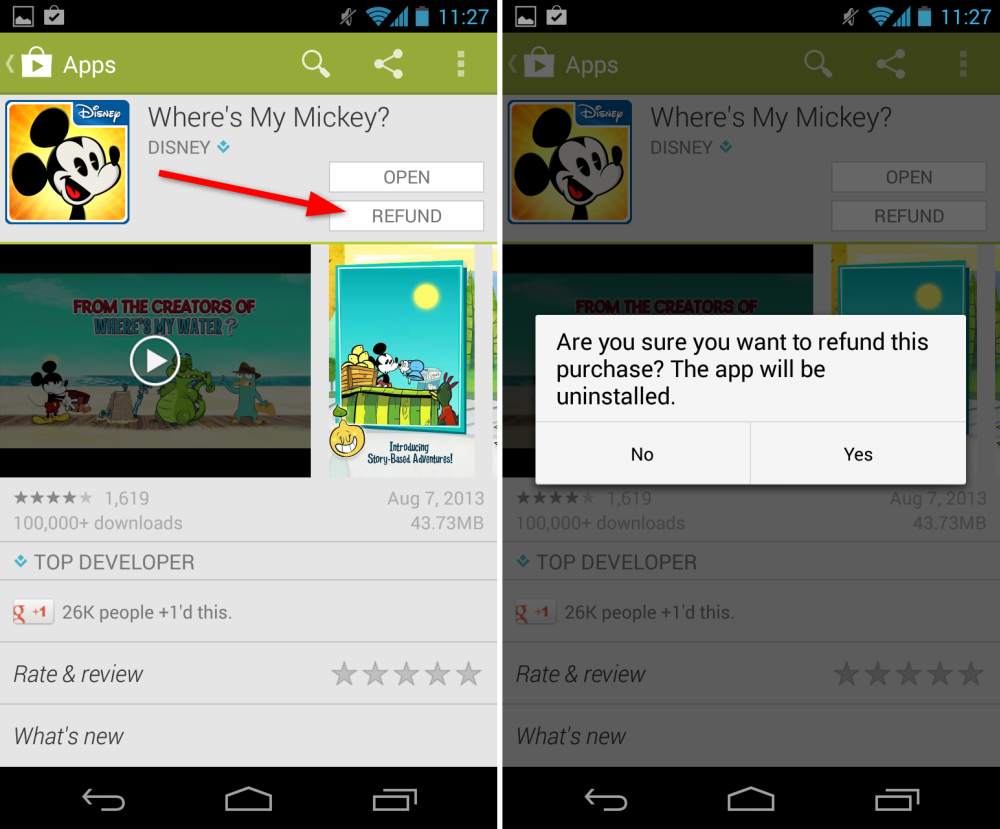
2) Click ‘Refund Money’

Once you find the app, you’ll see that in place of the download button will be one that says ‘Refund’. Click this button, then click ‘Yes’ to confirm that you want the refund and wish to uninstall the application.

3) Rules of Google Play

Purchasing and canceling confirmations are sent by email. If you have any problems or aren’t sure about something, take a look at the rules of purchasing and returning content on Google Play.

Just remember, if you change your mind and decide to buy the application again, you won’t be able to get a refund the second time around.

Have you ever gotten a refund from the Google Play store?

Read the other articles in our Google Play guide:

Original article written by Radek Grabarek, published on Softonic PL.

Google Helpouts: the Answers of the future?

Wouldn’t it be great if you could get an IT guy to show you exactly how to set up your home cinema? Or a pastry chef to tell you why your muffins suck? What about a personal trainer to guide you as you train for the season?

This is the aim of Google Helpouts, a professional consulting service soon to be launched by Google. Helpouts will use the same chat platform as the existing Hangouts, allowing users to connect to thousands of experts via video conference.

Helpouts = Hangouts for experts

The concept is simple: if you’re an expert, you can give your presentation via webcam at any time, from anywhere with an internet connection, as long as you let your clients know in advance what day and time you will be online.
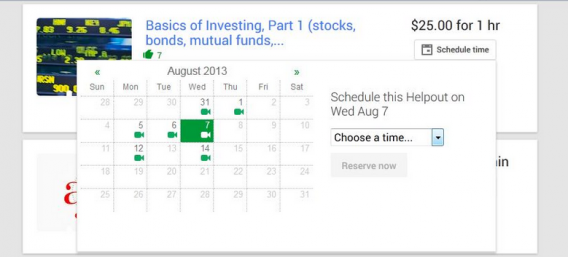
A Helpout set-up screen (source)

So how do you contact an expert? You do so by going into their profile, which will contain clear, truthful and realistic information about the service they offer. The profile will show their professional qualifications, which Google will verify in the case of health professionals.

Payments via Google

A Helpout session can be free, priced per minute or priced per session. Payment is made via Google Wallet, Google’s own version of “PayPal”. If you’ve purchased apps via Google Play, then you already have a Wallet account.
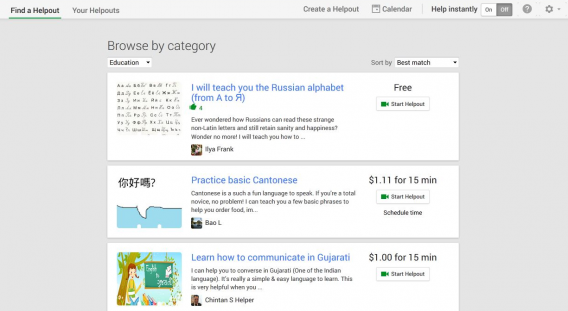
Meetings on Helpouts.  Some are free, but others are paid for (source)

Do you want to keep the video? A recording of the Helpout can be offered if both participants (the client and the expert) have given their permission. This allows you to save the session so you can listen to it or watch it again later.

Strict terms and conditions

False promises are not permitted, and neither is spam or scams.  Equally, profiles must not contain personal details, such as telephone numbers or e-mail addresses, as this would allow Helpouts’ commission to be bypassed.
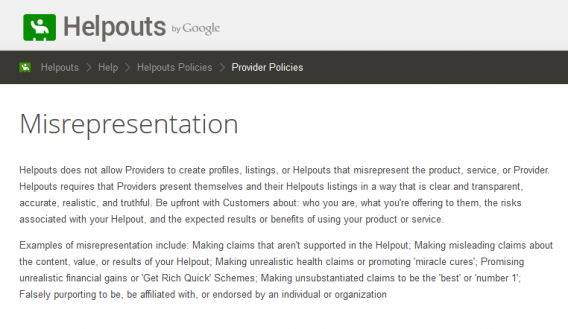
Helpouts policy is very strict (source)

These restrictions supposedly protect both the client and the expert. Since it uses a closed platform, security is greater. For example, if the client isn’t satisfied, Google has a money-back guarantee.

Google decides what’s acceptable

Such security unfortunately means that Google can record Helpouts for various reasons, such as quality control or security (if the client is under 18 years of age, the Helpout is always recorded).  If the subject of the Helpout is of a personal nature, however, nothing is recorded.
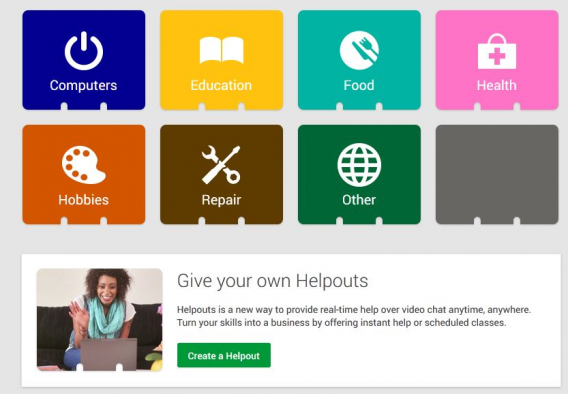
The main Google Helpouts categories (source)

Prohibited content on Helpouts includes explicitly illegal material (as one would expect), along with what Google calls “adult-themed content”, such as relationship advice, birth control, abortion, and sexual health.
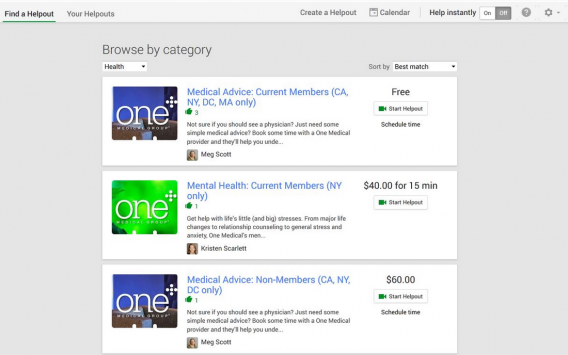
Medical content and content relating to mental health is treated differently (source)

Helpouts reserves the right to decide what is appropriate and what is not. As a business offering its services, it has the right to regulate content. This will not come as good news to those who value their privacy, nor to the defenders of free speech.

Why Helpouts? Why now?

This is not the first time that Google has tried to save the world with a service that gives expert advice. Google Answers, launched in 2002, was essentially the same thing as Helpouts, but in text form: experts answering your questions.
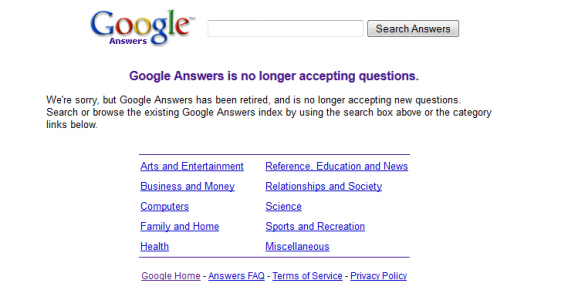
Sadly, this is how Google Answers looks these days

Google Answers was not a success. Riddled with problems such as overly-stringent rules and a downright lack of popularity, it closed in 2006. It was followed by much more successful services such as Yahoo! Answers and Quora, which are free of charge.

With the success of video tutorials on YouTube and Google Hangouts as a platform for online meetings, the managers at Google must have had a major brainstorm.

The popularity of YouTube tutorials is unquestionable, and difficult to beat

Helpouts sounds very interesting, but there’s always the risk that it will suffer the same problems as Answers did in its day. The information that has been leaked so far suggests that there will be significant businesses involvement.

It’s not just a question of money (many people aren’t prepared to pay for knowledge), but also of freedom: Google requires payment through Wallet, has control over the meetings, and decides on the acceptability of the content.

So what’s the alternative? Use Hangouts on a personal basis (arrange your own meetings with experts) or look for expert advice on YouTube. Just remember, neither offers the same guarantee of security, quality or accountability.

How would you use Google Helpouts?

Original article, written by Fabrizio Ferri-Benedetti, published on Softonic ES.
Players report GTA V update erases game save

Rockstar just can’t catch a break today. After facing overcapacity on its servers from excited gamers looking to play Grand Theft Auto Online, there are now reports from players that the update required to play GTA Online erases single-player game saves.

Players on NeoGAF and Rockstar’s support site are reporting a myriad of bugs in the game after updating Grand Theft Auto V, an update that is required in order to play GTA Online. The list of bugs include missing weapons, inability to create a character, and even the inability to progress in the single-player story. Other users are reporting more severe bugs like erased game saves and the inability to play the single-player campaign at all.


RELATED STORIES


Rockstar is aware of players’ trouble getting online due to the lack of servers but the company has not commented on these single-player issues yet.

[Source: Rockstar Support | NeoGAF]

Google Drive redesigned on the web

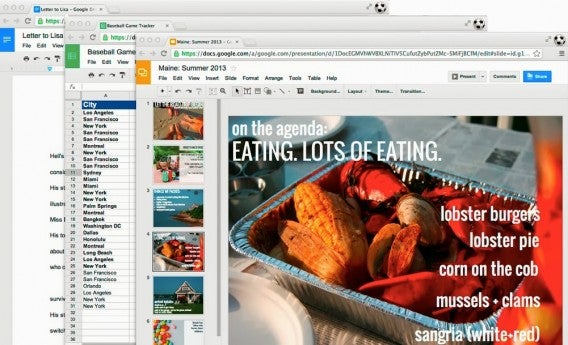
If Google Drive looks a little different on the web, it’s not just you. Google’s online productivity suite was updated today with minor changes to help users focus more on content. The most noticeable difference is that each file opened in Docs, Sheets or Slides will show an icon at the upper left, which functions as a shortcut back to Drive. The header has also been redesigned to be more compact, giving more space for your own content.

google drive redesign

These changes aren’t groundbreaking but they do help give context to what you’re doing and gives you more space to work with your content.


RELATED STORIES


[Source: Google Drive Blog]

Chrome 30 brings search by image to desktop, gestures to Android

Chrome has been updated to version 30 for the desktop and Android. Desktop users can look forward to a new “search by image” feature while Android users can look forward to some gesture controls we previously saw in the Chrome beta channel.

On the desktop version of Chrome, users will now be able to right click on an image and “Search Google for this image.” This streamlines the process for searching the origins of a photograph. Previously, users had to copy the image URL and paste it into Google Image Search. Chrome 30 does this all with a couple of clicks.

chrome beta

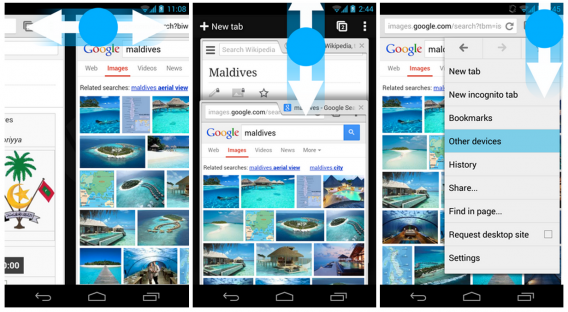
On the Android front, users get a slew of new gesture controls that were previously introduced in the Chrome beta channel. Here ‘s what you can do with the gestures:

  • Swipe horizontally across the top tollbar to quickly switch tabs.
  • Drag vertically down from the toolbar to enter the tab switcher.
  • Tap and drag from the menu button to select

While none of the gestures are ground breaking, it does make navigating Chrome a bit easier. Previously, users could swipe between tabs by swiping from the edge of the screen. Unfortunately, this gesture was often triggered by accident while scrolling around a web page. Moving the gesture target to the toolbar stops this problem.


RELATED STORIES


Chrome 30 will be rolling out to users “over the next few days” so you may not get the update immediately.

[Source: Google Chrome Blog]