The best PC games for… playing with the family

Lets continue our “The best PC games for…” series with the best games to play with the kids.

If  you have children, siblings, nephews, nieces or cousins, and want to play games that are a little more age appropriate than Call of Duty: Ghosts, you have more family friendly options that won’t leave you stuck with Peppa Pig. There are tons of affordable video games accessible for all ages, that also happen to look great, have an awesome story line, or are just plain fun to play.

Rayman Legends: Teamwork

Rayman LegendsThe platform genre is one of the oldest in the world of video games. When I was little (just a couple of decades ago), I loved playing them, and they served me fairly well.

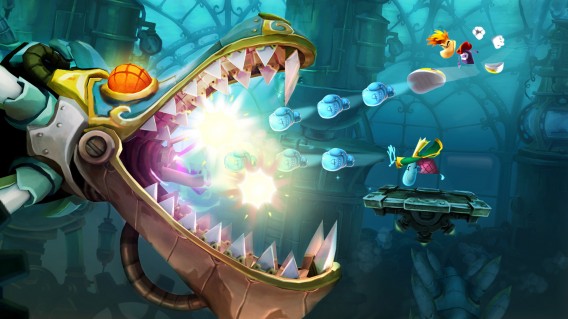
Although there are many platformers for PC that I’d highly recommend, Rayman Legends has to top the list. Big kids and little kids alike enjoy this Ubisoft classic, and not just because it’s a great game –it’s also an asymmetric multiplayer.

This means that a character has the lead role (they can jump, attack enemies and go forward) while others act as supporting characters, moving platforms or cutting ropes to move forward. Too easy for your little one? Then switch roles and let them be the main star.
Download Rayman Legends

Rayman Legends

Lego Marvel Super Heroes: Co-op action with zero violence

Lego Marvel Super HeroesWho doesn’t like superheroes? Kids certainly do, and they’ll go crazy for the latest LEGO game based on the Marvel  franchise.

Lego Marvel Super Heroes has all the mainstays of games from developers TT Games: levels full of secrets, hundreds of characters with different abilities, multiplayer for two, a sense of humor and, in this case, a fun open world based in Spider-Man‘s New York.

You can rest easy that when you play this Lego game with your little ones, there won’t be even a hint of graphic violence. The humor is very clean (but very successful), and the difficulty level is accessible for almost everyone.

Download Lego Marvel Super Heroes
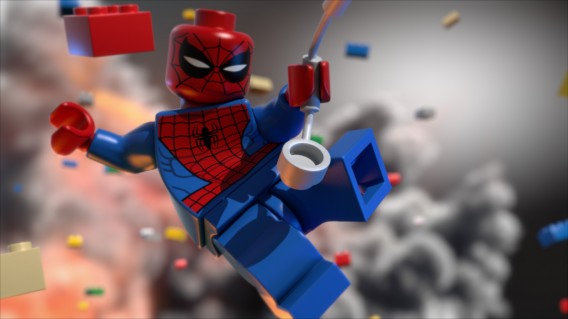
Lego Marvel Super Heroes

Sonic & All-Stars Racing Transformed: Every race is an adventure

Sonic & All-Stars Racing TransformedAnother theme that gets kids really excited is cars, motorcycles and pretty much any machine that moves. Windows has lots of driving simulators, but most are too complex for smaller kids. That changes, however, if you add Sonic & All -Stars Racing Transformed into the mix, which is especially recommended for children from 7 years and up.

In the game, you control the legendary hedgehog, all of his friends, and even the most colorful of SEGA characters, from a “Football Manager” to a Total War Shogun. The objective is clear: to get the first goal in a circuit filled with colorful and original obstacles in which you’ll drive vehicles that can transform into other objects. Up to 4 players can enjoy racing at the same time on a split screen, so encourage the whole family to join the party.

Sonic & All-Stars Racing Transformed is obviously similar to the legendary Mario Kart, but it does have some advantages over it, like its planes and seafaring vehicles and the ability to do stunts. Your kids are sure to love it, and you will too!

Sonic & All-Stars Racing Transformed
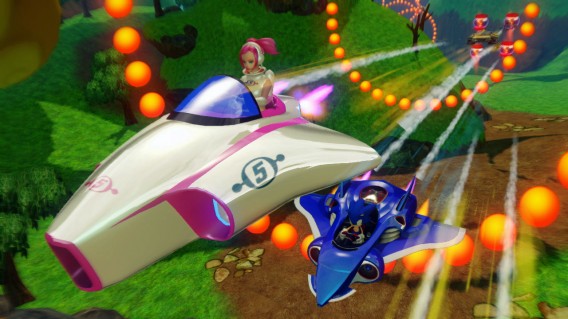
Sonic & All-Stars Racing Transformed

SimCity: Build your city

SimCityIt’s true that the last Maxis game didn’t have a multiplayer for playing at home, but with the classic title, your entire family can play together.

With so many management options, your kids could get overwhelmed. I propose another way to play: you take the reins of the game and ask them to lend a hand with advice on where to place the buildings, or ask them what they think is missing in your city. With this approach, they feel useful and, without realizing it, they’re be learning basic organizational concepts, which can help them when it comes to things like keeping their rooms clean!

In addition, SimCity will soon have another benefit: you can install mods. This will infinitely expand the possibilities of the game, just like in these titles.

Download SimCity

SimCity

Bad Piggies: Fun for little geniuses

Bad PiggiesAngry Birds and company are very popular on mobile phones, but most of their games are also available for Windows. This includes the series spin-off that places the spotlight on the green piggies.

In Bad Piggies, you need to help the piggies retrieve the eggs that the birds are trying to steal. To do this, you must build machines with the pieces provided in each level.

Like SimCity, Bad Piggies may be a bit complex for younger children, but they’ll feel really useful if they can help you make little machines (in fact, the game has a PEGI rating of +3). For slightly older children, especially those with a talent for building logic and mathematics, the game doesn’t involve too much difficulty, and it can be you helping them instead of them helping you.
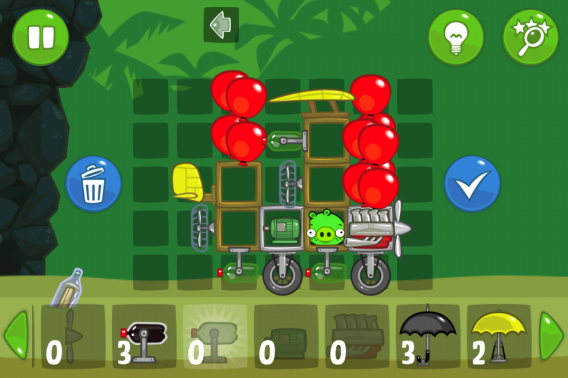
Download Bad Piggies

Bad Piggies

There’s fun beyond the tablet

It’s very easy to give children a tablet and let them immerse themselves in a world of fun and learning. Sometimes this can give you a much-needed moment of peace and quiet, but there will also be times when you want to play with the kids. Thanks to the PC, you won’t miss the opportunity to share some time with them. Everyone will have fun and they may even learn something.

If you like this article, check out the rest of our ‘The best PC games for…’ series!
Photoshop goes 3D: the great new version of CC

In its latest update, Adobe has added two spectacular new features to Photoshop CC (14.2). In this article, I’m going to explain what they are and what they mean for the future of Photoshop.

As usual, the latest update to Photoshop CC is automatically distributed through the Adobe Cloud. Since early Creative Cloud versions were launched in June 2013, the version numbers have disappeared from the “About” pictures, but they are still there. This time around, Photoshop has been updated to version 14.2.

This adds two exciting new features: printing 3D objects and the change perspective tool. Although neither are essential for normal Photoshop use, it does point to where the star of the Adobe suite is headed.

Photoshop now paints and sculpts

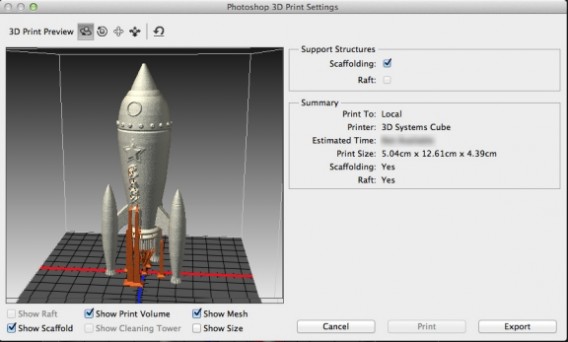
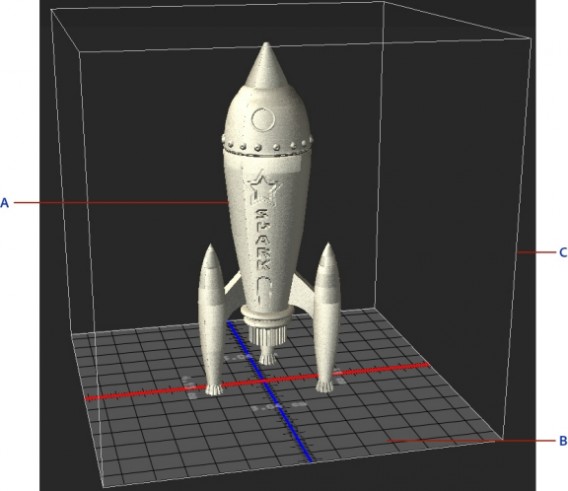
The most spectacular new feature of the 14.2 update is the ability to retouch and print 3D models. This isn’t entirely revolutionary – Windows 8.1, for example, already allows us to print in 3D – but Adobe makes the process easier through many small improvements to pre-printing, like automatic support structures and mesh repair.

Photoshop CC 3D Printing

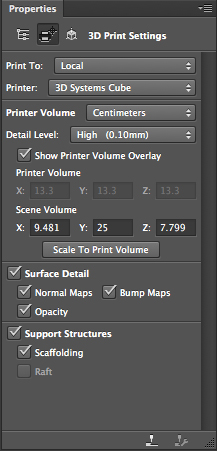
If you enter the 3D workspace and open a model, the 3D Photoshop menu displays a panel called “3D Print Settings.” You can send the models to 3D printers connected via USB (e.g. the excellent Makerbot), or send the model in pages to a remote 3D printer pages like Shapeways.com.

Photoshop CC 3D settings

Anyone who tries to draw a parallel between the 2D and 3D printing will notice that the latter has nothing to do with classic printing, but Adobe has endeavored to give it a familiar flavor. You can choose the level of detail (low, medium, high), the scale or size of the printed pattern and textures. There’s even a preview.

Photoshop CC 3D Printing

Warp Perspective for a taste of Blade Runner

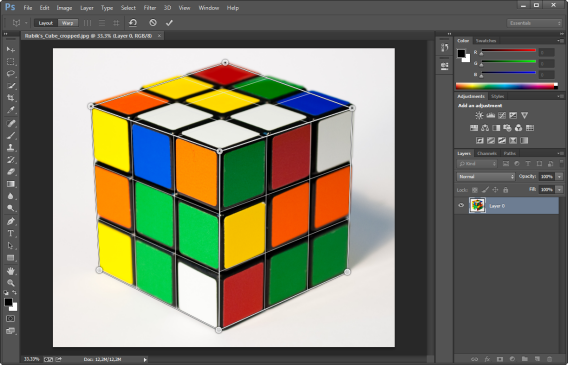
Another new feature of Photoshop CC is Warp Perspective, a tool to alter the perspective of a photograph. It is spectacular. To use it you just have to define the surfaces by matching points with the vertices of an object and then dragging. Look, for example, what I did with this Rubik’s cube.

Photoshop CC warp perspective

Step 1: mark the surfaces that define the original perspective

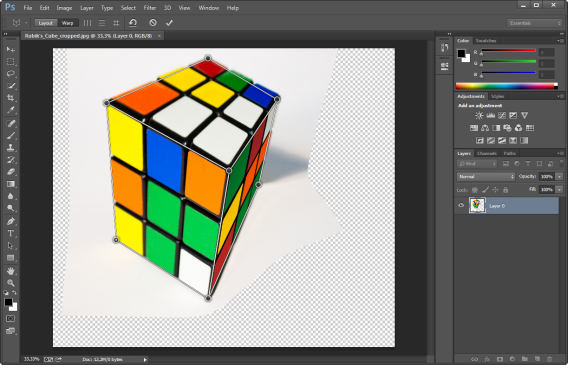
Then I dragged it to change the perspective radically. Photoshop CC didn’t let me turn the subject round completely because, obviously, it can’t invent a side that doesn’t exist, but it did let me rotate it quite considerably. Here you can see the result: it only took me a minute.

Photoshop CC 3D Printing

Step 2: By moving the vertices, the object you’ve defined changes perspective

Good news for the undecided: trial periods are restarted

In an unexpected, but nice, turn of events, it’s been announced that all trial periods will restart. Those who tried the first version of Photoshop CC and other products have another 30 days to sink their teeth into the latest features. With the demise of annual releases, this reset makes sense. Hopefully this happens each time CC is updated.

Photoshop CC Trial

As shown by the official chart, Adobe has already released three versions of its Creative Cloud in less than a year. If opting to restart the one month trial periods every so often, you would get to enjoy Photoshop (and the others) several times a year without paying.

Where’s Photoshop headed?

In the 80s, Adobe gave a kickstart to desktop publishing. Years later, after failing to achieve the same with the web, it bought Macromedia and its products. Today it seems to be stumbling through uncharted territory, 3D. By adding 3D printing to Photoshop, it’s beinginning to look like Adobe are having an identify crisis, turning Photoshop into jack of all trades of design, so to speak.

All this, it seems, with the intention of renewing itself amidst a sea of ​​troubles, most recently the theft of millions of user accounts. The criticisms that have rained on Adobe for moving from a traditional model of annual software to the cloud (SaaS, software as a service) have done considerable damage.

Photoshop, the great workhorse of Adobe, has become a tool that serves both to retouch photographs and design prototypes of web pages. It now also lets you put the finishing touches on 3D models before they’re printed. If you want to improve reality, Adobe seems to say, you need Photoshop.

Meanwhile, however, some people wonder if Photoshop perhaps shouldn’t pay more attention to web design, especially since the demise of Fireworks, the formatting tool par excellence. Maybe Adobe wants to forget the web and drown its sorrows in 3D?

What do you think about the latest news from Photoshop CC?

Paper, the latest app from Facebook, launches February 3rd in US

Paper is a new app from Facebook that takes the news feed and recreates it in a similar style to Flipboard. It will be released on February 3rd for iOS in the US at first.

Paper is less about being social, and more about sharing and discovering content, whether it be photos, news articles, video and so on. It doesn’t have the familiar buttons from the Facebook app – instead you have to learn some basic gestures to navigate the app. As you can see in the video below, Paper is all about making content on Facebook look good. It’s a radical change from the traditional app, but it’s not a replacement, or at least not yet!

Default player


brightcove.createExperiences();

A new Facebook app like this is an interesting departure for the social network. It suffers a lot of criticism from the community when it makes small changes to its interface or features. In creating Paper to stand alongside the traditional app, Facebook may sidestep the possible uproar that changing the traditional app could start. If you like Paper, you can use it, if not stick with the original Facebook app.

No announcements have been made about either an Android version of Paper, or when it might be launched worldwide. Paper is the first app to come from Facebook’s Creative Labs, its innovation and ideas department.

RELATED STORIES

Spotify is coming to Last.fm for on-demand music

Last.fm has always been great at community and recommendations based on what you listen to, but it’s never been great for actually listening to music. Now the CBS owned service is teaming up with Spotify to make its entire catalog playable from Last.fm pages.

Last.fm will get a Spotify ‘playbar’ at the bottom of the page, allowing you to listen to any track you see just by clicking it. The service will work whether you have a free or premium Spotify account. Tracks you play via Spotify will of course be scrobbled into your Last.fm listening history.

As this is a new feature, Last.fm says there are some known problems which will be ironed out over time. Firstly, if Spotify is not available in your country, it won’t be available via last.fm either. Some tracks which are not in Spotify’s 20 million song catalog will incorrectly have a play button next to them, and mobile browsers, Internet Explorer 11 and Opera are not supported. You can see the full list of issues here, and add your feedback here.

RELATED STORIES

[Source: Last.fm]

TitanFall to get ‘aim-assist’ on PC

Respawn’s massive shooter TitanFall, coming this March, will feature ‘aim assist’ for PC gamers using gamepads. This was confirmed by the developer on Twitter, and raises some questions about how balanced the game can be.

PC gamers usually play shooters with keyboard and mouse, which gives them fast and accurate control. Console owners, with their gamepads, cannot keep up with the speed of PC players, as gamepads are slower and less accurate. This means using a gamepad on PC will put you at a disadvantage against mouse/keyboard players.

Respawn responded to a user asking if gameplay would be balanced between keyboard/mouse and controller players. Respawn replied saying “there is some controller aim assist for PC.” We already know there is no cross platform play between PC, Xbox One and Xbox 360.

This raises some concerns about TitanFall. Will there be separate PC servers for each control type? Controllers with aim assist sounds like an advantage over keyboard/mouse control, and many player will prefer a level playing field (of course, you could use a controller without aim assist, but that would be a disadvantage by choice).

Aim-assist is generally unpopular with PC FPS fans, where gamepads/controllers are seen as a simplification brought over from consoles. Developers have tried to balance play between keyboard/mouse and controller players before, either by making the former harder to aim, or adding aim-assist to controllers. Neither solution is great, and the ideal world is one where no-one is handicapped by the control system they use.

TitanFall has the potential to be this year’s best first person shooter, let’s hope that they get little details like control balance right during the beta testing, before the March 11th release date.

RELATED STORIES

[Source: Twitter]

The Wolf Among Us Episode 2 trailer shows the dark side of Fabletown

A new “Red Band” trailer for The Wolf Among Us: Episode 2 shows the dark side of Fabletown. Episode 2, titled “Smoke and Mirrors,” walks players through new mysteries to solve around Fabletown, the fictional town in New York City where Fables reside.

The trailer shows a much darker side of Fabletown than the first episode. We can see sheriff Bigby Wolf using torture to get information from a Fable. “Everyone has a weakness. Just have to find where it is and push,” says Bigby.

Episode 2 of The Wolf Among Us will be released the first week of February (next week) so it won’t be long until you can solve the mysteries of Fabletown for yourself. If you haven’t played the first episode, make sure to do so as your decisions will influence the gameplay in “Smoke and Mirrors.”

You can view the trailer below, but there’s some nudity and swearing in the trailer so view at your own discretion.

Source: IGN (YouTube)

RELATED STORIES

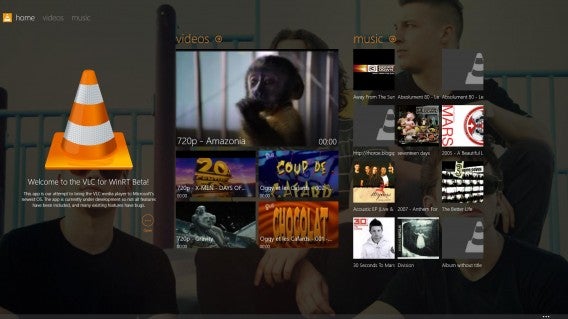
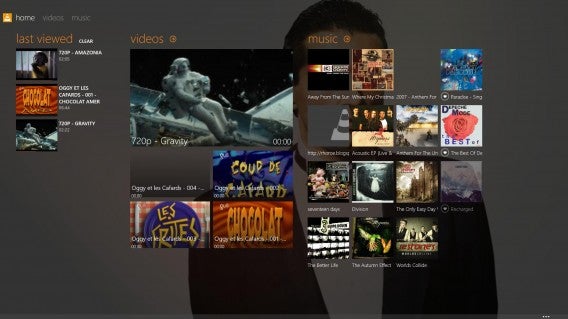
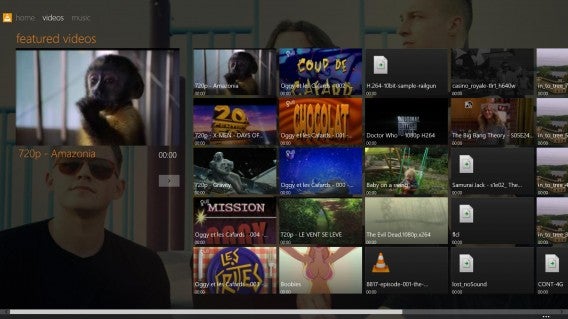
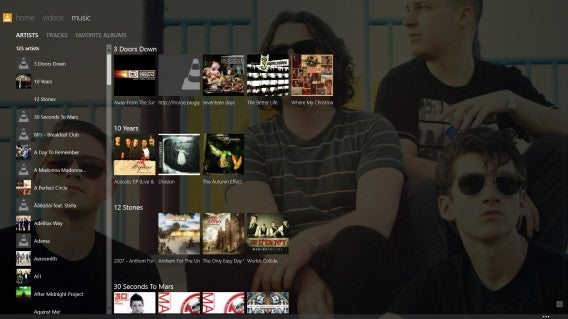
VideoLAN submitting VLC for Windows 8 app soon

VLC for Windows 8 is finished and will be submitted to Microsoft’s Windows Store “in the next couple of days,” according to VLC’s Kickstarter page. The VideoLAN team raised £47,056 from 3,080 backers to create the WinRT-based media player.

Audio crashing issues were plaguing the team, but have been resolved by rewriting the audio stack for WinRT. Fixing audio issues means VLC for Windows will finally be ready for the app submission process.

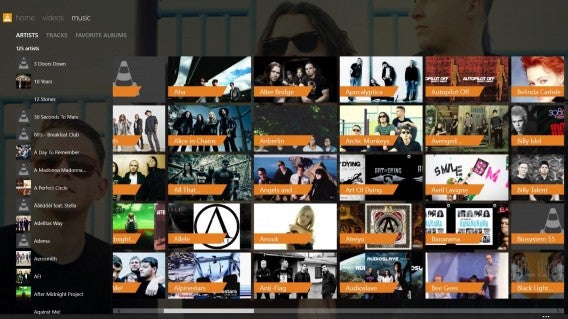
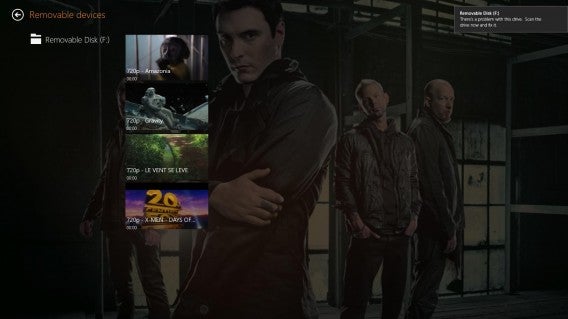
In the meantime, VideoLAN has published a bunch of screenshots of the app so you can get a feel of how the app will look and work when it’s ready to download. Take a look:

Main Start ScreenMain Screen with recent viewMain Video ScreenMain Audio ScreenAudio Screen unzoomedExternal Disk Browse

Source: Kickstarter

Via: Windows Phone Central

RELATED STORIES

Twitter for iOS updated with new photo features, recommendations

Yesterday, Twitter updated its Android app with photo cropping and content recommendations and today, iOS users get those updates as well. iOS users get better photo features in the form of a photo gallery and the aforementioned cropping features to help you quickly crop shots into wide or square aspect ratios. Twitter for iOS will also serve up content it thinks is relevant to you if you refresh your timeline and there is nothing new to show.

You can grab the free Twitter update for iOS in the App Store or you can download it at the link below.

Download Twitter for iOS

Source: iTunes

RELATED STORIES

Viber for Windows Phone 8 updated with better notifications and stickers

Viber for Windows Phone 8 has been updated with stickers and various notification improvements. Users will now be able to download the company’s free and paid stickers from the new Sticker Market, which is already available on other platforms like Android and iOS. Notifications have been improved as well, finally allowing Viber to use its own notification sounds for incoming push notifications. Users will also have the ability to disable notifications. As for performance of the app, Viber has improved the resume and loading speed of the app as well as the push notification system.

The latest update to Viber for Windows Phone 8 is out now in the Windows Phone store.

Download Viber for Windows Phone 8

Source: Windows Phone Store

Via: Engadget

RELATED STORIES

Google Play removing apps that save Snapchat photos

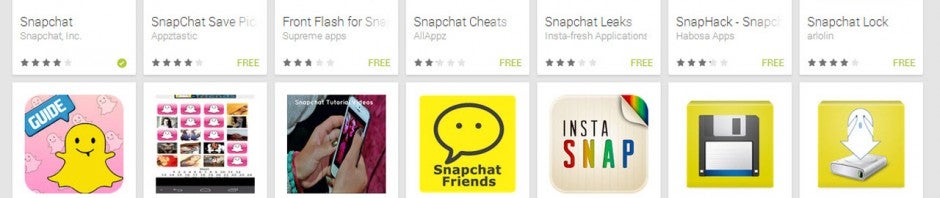
Google is apparently cracking down on third-party apps in the Play Store that allow users to save Snapchat photos without alerting the sender their snap was saved. While some of these apps are still listed in Google Play, many popular options have been removed, angering developers.

Snapchat’s usefulness comes from its ability to share photos and videos securely and ephemerally. Third-party Snapchat apps that save photos defy Snapchat’s mission and one can see why Snapchat would like these apps removed. But looking at Google Play’s terms of service reveals that these third-party apps have been violating the Play Store’s policies by accessing another app “in an unauthorized manner.”

“You agree that you will not engage in any activity with the Market, including the development or distribution of Products, that interferes with, disrupts, damages, or accesses in an unauthorized manner the devices, servers, networks, or other properties or services of any third party including, but not limited to, Android users, Google or any mobile network operator. You may not use customer information obtained from the Market to sell or distribute Products outside of the Market.”

Snapchat may be pressuring Google to remove these types of apps after 4.6 million usernames and phone numbers were exposed last month. The company has been under scrutiny for its poor security practices since. New security measures like a ghost-based captcha system were implemented but proved ineffective after a programmer created a program to thwart the system in 30 minutes.

Still, it doesn’t explain why some Snapchat photo saving apps are still listed in the Play Store. Perhaps this marks the beginning Google’s crackdown on these types of apps. It also appears that iOS users are safe from this crackdown as third-party Snapchat apps have been left alone in the App Store.

Source: TechCrunch

RELATED STORIES