Microsoft SkyDrive renamed OneDrive

After losing a trademark case with BSkyB in the UK, Microsoft is renaming cloud storage system SkyDrive to OneDrive.

While the name is changing, and Microsoft is relaunching the service with a promotional video you can see below, the features and functions of SkyDrive won’t change. Your SkyDrive will continue to work in the same way, just with a different name. This isn’t the only time Microsoft has been forced into changing a name – its radical new interface was dubbed ‘Metro’ until a German firm came after the Redmond-based company with a lawsuit.

Default player


brightcove.createExperiences();

SkyDrive is one of the more generous cloud storage options, with 7GB of free storage for your files and photos, plus apps to access them on iOS, Android and Windows Phone. We don’t know quite when SkyDrive will be rebranded as OneDrive, but users have nothing to fear from the change this time.

RELATED STORIES

How to: find your tablet’s operating system and version number

If you’ve recently become the proud owner of a new tablet, you may be wondering which operating system is installed. In this article, we’ll help you figure out which OS your tablet is running, information you’ll need to both install new apps, and use your device properly.

The first thing you need to do is avoid the most common mistake: mixing up the brand of your device with the operating system (OS). The hardware (the tablet) and software (the operating system that makes it work) are two very different things; thinking they’re the same is like saying the team and the game they’re playing are the same things.

Samsung, Apple, LG, and Kindle are some examples of hardware manufactures which make the physical product. This differs from the operating system, like Android, iOS and Windows, which is intangible and which runs programs, lets you play games, and helps you browse online.

The applications you’re able to install, the things you can do, and the way these functions perform vary depending on the operating system you have on your tablet. As a result, knowing which OS is installed on your tablet is crucial. To identify your operating system, we’ll show you the most popular tablets, as well as the appearance and characteristics of each.

We’ll also show you how to find out the version number of your OS, which will help you determine which applications you can use. Some apps, for example, are only available for the latest operating system, as well as some specific functions that may have been introduced in the latest version of the OS.

Now, let’s have a look at the different operating systems for tablets and how to recognize the version number.

Android

Tablets running on Android are, at present, the most widely used. Produced and developed by Google, Android runs on devices like the Samsung Galaxy Tab 2 and 3, the Nexus 7:10 or the Kindle Fire (very different from the ebook reader), but also on many other models.

The Android icon is a green robot, just like you see in the image on the left. If you have a tablet with this OS, you should be able to see the word “Google” in the top left corner of your home screen, as seen in the screenshot below.

Android home screen

To be sure you have an Android tablet, you can use the following method to figure out the version number. There are two ways to do it:

Method #1:

Go to whatismyandroidversion.com from your tablet. On the page that opens, you can see the OS version installed on your device. If you see “Android not detected”, your tablet has a different operating system.

Your Android version

Method #2:

Go to the Settings of your device. You can access Settings by touching the time at the bottom right of the screen, followed by the wheel icon (or horizontal bars), and then again clicking on the same icon.

Android settings

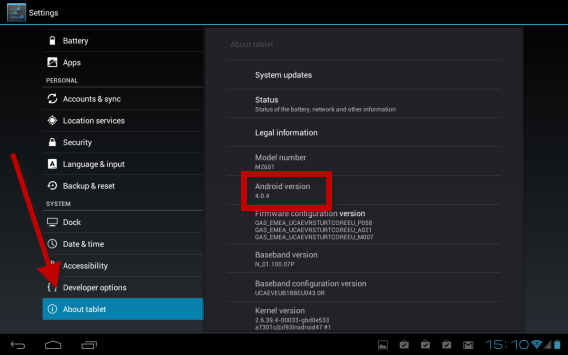
On the next screen, scroll down the left column until the last item, About tablet, and click here. On the right, under Android version, you should see a number – that’s the Android version you have installed on the device. To learn how to update it, you can read this article.

Your Android version

What’s the Android firmware?

On Android devices, you’re not always able to update to the latest version of the OS. This is because the firmware (the code that the operating system is based on) is “branded” by the manufacturer of the tablet, meaning that once the new version of the OS is released by Google, it passes through the hands of the manufacturer of the hardware, like Samsung or HTC, and is modified.

Take this metaphor as an example: a particular pair of jeans is produced in a factory, after which it’s distributed to clothing stores like H&M, where they apply their logo to the jeans. These jeans will only be available once H&M releases the branded ones. The same is true for versions of Android: if you have a Samsung tablet, for example, you’ll have to wait until Samsung releases the branded version of the operating system before you’re able to install it.

To learn more about Google’s operating system, you can read our Basic tips for Android series, where we show you how to use Android smartphones and tablets.

iOS

The Apple operating system is exclusive to the iPad. The symbol of this OS is a bitten apple, so if you see this symbol when you turn on your device, you’ve definitely got an iPad, which runs iOS.

To be 100% certain, check out the main screen, which should look like the one below. To find out the version number of your iOS operating system, press the gears icon, where you can see Settings.

Your iPad desktop

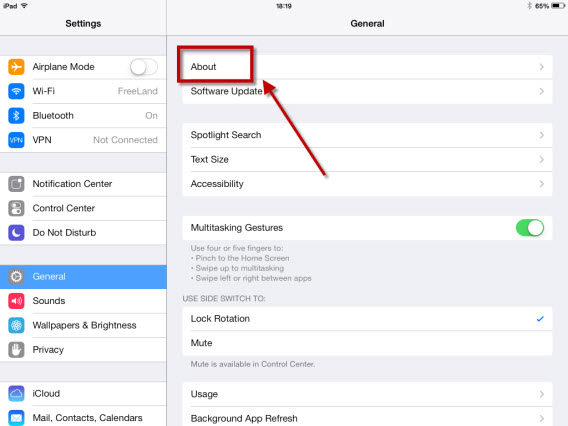
In the window that opens, under General in the left column, click About in the right column.

Your iPad settings

On the right side of the new screen, look for Version; to the right of it you’ll see a number. This will be the version of your operating system.

Your iPad settings (2)

For more information on Apple’s operating system, and to read the most important news, videos, insights and features of iOS 7, you can check out our article.

Windows 8 and RT

With the release of Windows 8, Microsoft has launched itself into the world of tablets. The interface is identical to the PC version, and if you have this OS installed on your home computer, then you’ll know at a glance whether it’s also the one installed on your tablet. If not, we can help.

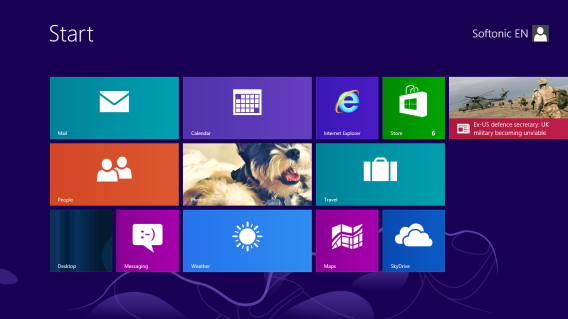
Once you’ve logged onto the device using either your account or through Windows Live, the main screen you’ll see is very similar to this:

Your Windows 8 tablet desktop

The version of Windows on your tablet will be either 8 or RT, but can also be updated (or not) to Windows 8.1. To find out which version you have, just slide your finger across the screen from right to left to bring up the sidebar (also called the Charms Bar) and press the magnifying glass icon.

Search your tablet

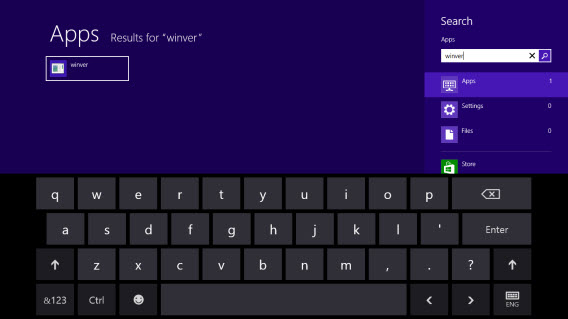
In the new screen, type “winver” and then press Enter on the program icon that appears on the left.

Find your Windows 8 version number

The program will take you to the desktop interface. In the window that pops up, you can see if you have Windows 8 or RT and the version number of your operating system.

Find your Windows 8 version number

Are you ready to get the best from your tablet?

Now that you’ve discovered which operating system you have installed on your tablet, you’ve taken the first step towards full mastery of the medium. Whether you have an Android, Windows 8 or iOS tablet, you’re now aware of the software that’s the basis of your device, the version number, and which applications you can install. The second step is to become familiar with the operating system of your tablet, which you can do by checking out these Softonic guides:

Which operating system do you have installed on your tablet? Do you have any doubts about your OS?

Rumor: Titanfall beta from February 14th to 19th

A French games site has published images of marketing material which suggests Titanfall will get a beta from February 14th -19th on all platforms, probably worldwide.

Titanfall is the upcoming multiplayer shooter from EA, one of the most impressive looking of all the next gen games announced last year. While it’s a major Xbox One launch title, it will also be released on PC and Xbox 360. A big beta test is not surprising, as most major online multiplayer games fail to launch smoothly as we saw with SimCity and Grand Theft Auto Online last year.

Default player


brightcove.createExperiences();

The evidence found by XBOXYGEN is two photos of in-store advertizing. Both look official, and claim that preordering will give you beta access from Februay 14th to 19th. The game promises more freedom of movement that we’re used to, with an almost parkour feel, as well as the huge mech Titans you can call upon and control.

Titanfall is set for launch on March 13th 2014.

RELATED STORIES

[Source: XBOXYGEN]

Microsoft’s personal assistant, Cortana, seen in leaked video

A video appeared on Twitter apparently showing Cortana, Microsoft’s rumored voice assistant app. Cortana is Microsoft’s answer to Apple’s Siri, the ‘intelligent personal assistant’ in iOS.

In the short video you can see Cortana being used to plan a travel route, taking into account the method of transport.. You can also see the Cortana start guide, visible in the notification bar near the battery icon. Unfortunately the video isn’t great quality, as is often the case with leaks, and the music in the background doesn’t make it any easier to work out what’s going on. Watch for yourself here.

We first wrote about Microsoft’s plan to create a Siri-like personal assistant in September. Cortana is the artificial intelligence character in the iconic Xbox series Halo, although the Windows version of Cortana looks a lot less sci-fi than the original. We expect to find out more about Cortana at the Microsoft Build Conference in April, where we should also hear more about the Window 8.1 2014 update and Windows 9.

RELATED STORIES

Instagram guide: Get that “10,000 likes” image

In this first episode of our guide to Instagram, I’m going to explain a few tricks from the professionals so that you can take beautiful pictures, and get lots of likes. Photography is an art form, and is thus free by definition. A single subject can be shot in virtually any way. There are, however, some useful tips things that will help you avoid common mistakes and let you take photos with shared aesthetics. In short, photographs that have appeal.

Here’s our advice on how to gain followers for your Instagram profile.

What’s the subject?

The most common mistake to make is not clearly show the main subject of the photo. Some photos don’t have one at all, while others have more than one. The result is an image that isn’t very interesting,  or one that’s difficult for the viewer to focus on.

So it’s important that we make it clear who the protagonist is in photos. This doesn’t mean that it has to be be a person, but it should be a single subject – it could also be a road, the converging lines of a building, a road sign, a herd of zebras, or a crowd in a plaza – it just has to be clearly identifiable. To ensure that the subject is clearly the star of a shot, there are various methods you can use. You could just take the photograph of them against a neutral background, which doesn’t contain any distracting elements.

Or you can fill the entire frame with the subject, as in a close-up shot, which means that there is no opportunity for other distracting elements to be in shot. Equally, you can work on the depth of field, to make sure that only the main character is in focus, and not the rest of the image. We will have a look later on at how to do this. So remember – one subject only. This way, you’re (almost) guaranteed a Like!

The rule of thirds

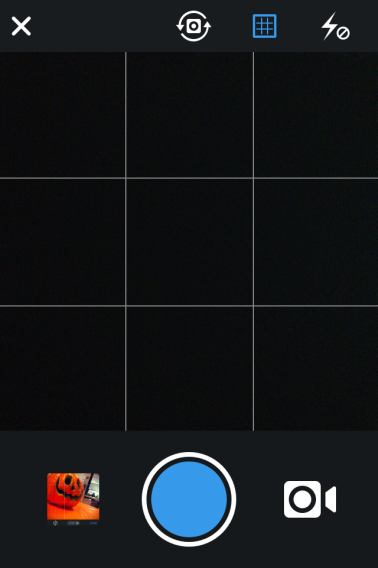
This is usually the first technique you learn on photography courses, and is fairly simple. You should ideally divide the frame into nine equal parts by drawing two horizontal and two vertical lines, like these

.Instagram grid view

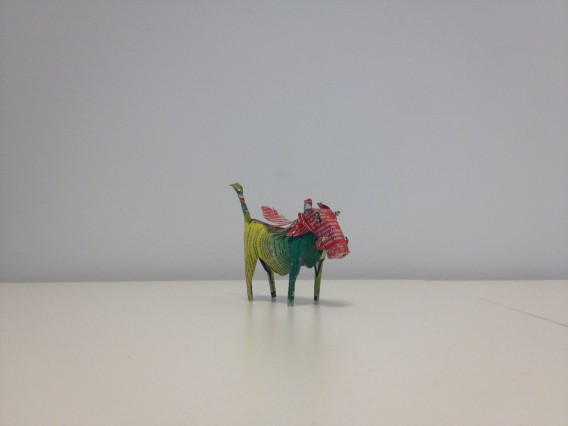
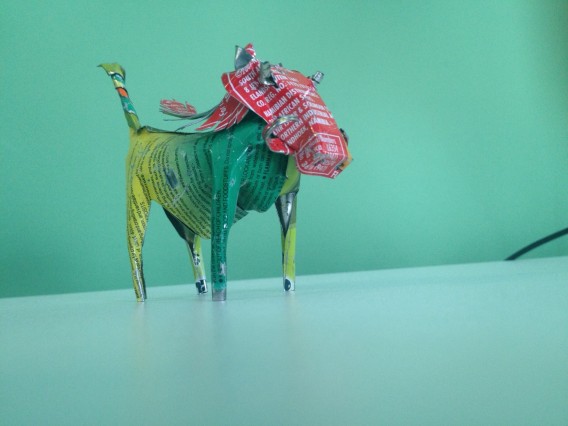
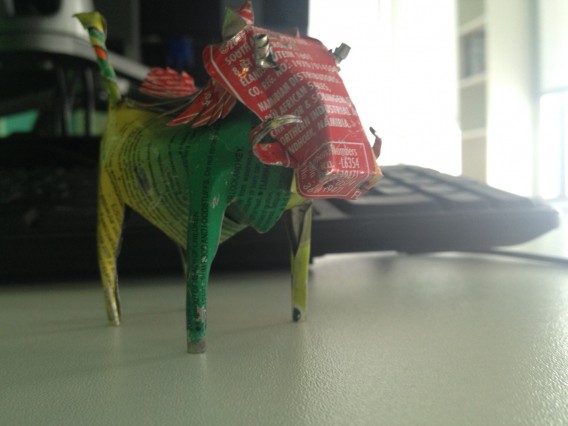
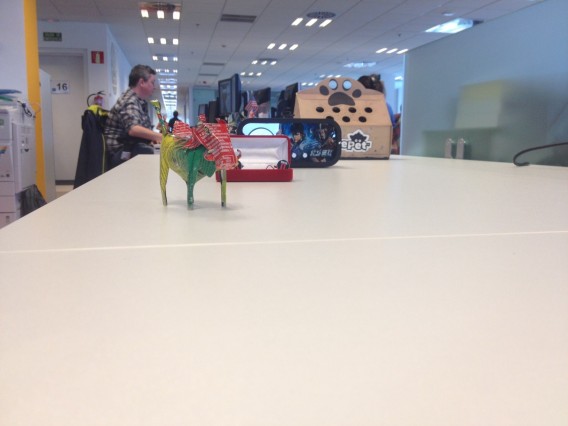
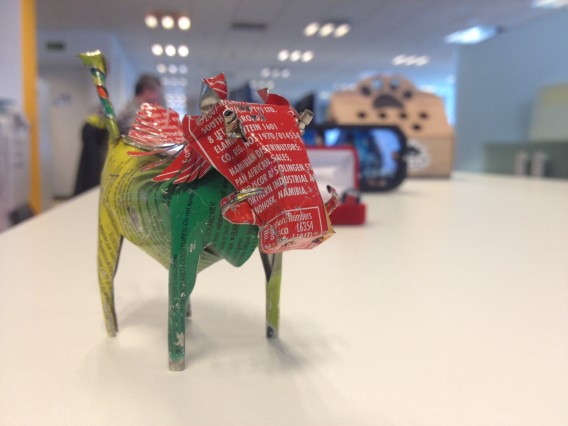
The intersection points of the lines are the places where the eye most focuses its attention. And it’s on these points that you should try to place the main subject of your photo. Here are a few examples using Pindar, my tin warthog, as a model. In this first photo, it’s located in the center of the image. It’s not wrong, but the shot is static and not very interesting.

Photo subject in center

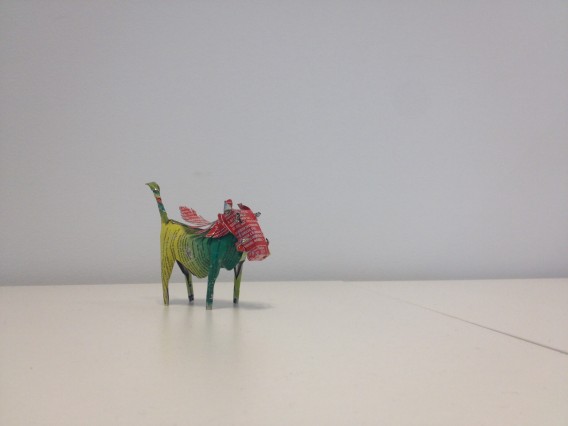
In this second image, however, we placed Pindar a bit more to the left, on one of the intersection points we’ve just been talking about.

Photo subject off center

The composition is more interesting, and the space that has been left by virtue of the fact the viewer’s gaze has been directed to the subject, makes the picture much more dynamic. Whether your followers are aware of this or not, the rule still works.

And if you stick to the rules, your photos will improve in quality as well as getting more people to click on them. Of course, like all the rules that relate to photography, they can be broken and this will still result in excellent pictures, but for now, let’s play it safe!

Managing light

Some smartphones do not allow you to adjust the exposure manually, but you can choose the point in the frame that you want to use for calibration. When you focus on a subject, the smartphone might decide to adjust the exposure according to a point that is either too dark or too bright. If it’s too dark, the shaded areas will be properly exposed, but those in the light will be overexposed.

Light exposure

If it’s too bright, the zones in the light will be seen, but the dark areas will be almost black.

Light exposure
Because you want to see all areas in the photo, you have to use the light meter and show the camera an area that is neither too dark nor too bright. To do this, simply touch the part of the screen you have chosen, and the iPhone and Android will set the exposure.

If you’re not satisfied with the result, tap different points until you find the right one. Even so, always bear in mind the principle that we talked about previously: photography rules are made to be broken! A photo that has clearly overexposed or underexposed parts can be interesting, emotionally intense and creatively remarkable.

Photo of the sun

Sunset in Swakopmund, in Namibia

One last tip: The flash almost always produces a funeral effect on the photos. If you’re planning to take shots at night or indoors, using the flash, it’s unlikely to be particularly pretty. Alternatively, you can use it when you’re shooting during the day; for instance, it can be used to lightly correct the shadowed areas of a face when you do a portrait, as well as dampening the contrast between parts of a subject that are in both areas of light and shade.

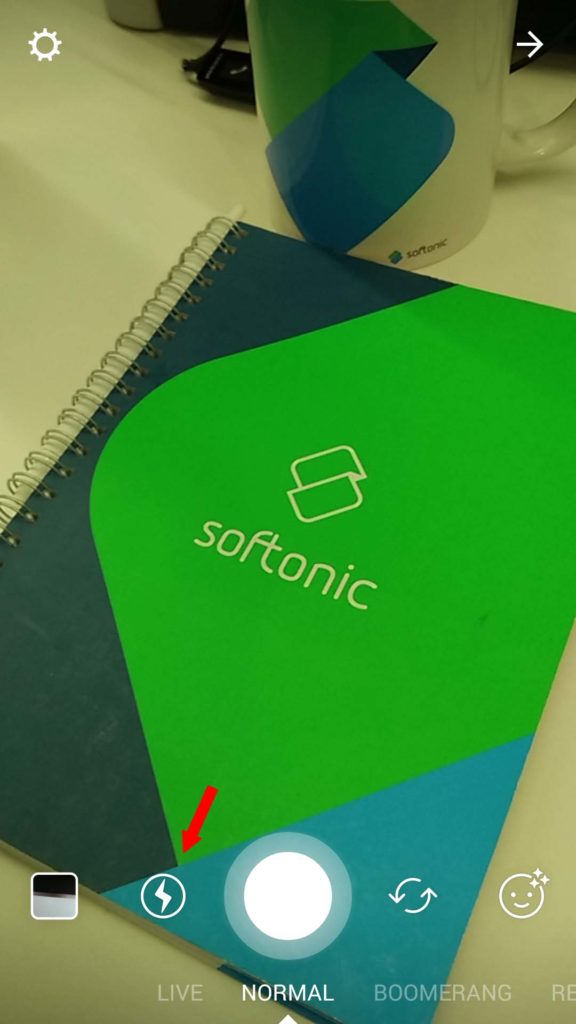
To enable and disable the flash in Instagram, tap the lightning icon next to shutter button when you’re in Normal mode.

instagram

Keep it straight, please

This is another rule that seems obvious, but isn’t. Most of the pictures where the subject isn’t facing the professional photographer, are crooked. The feeling that a picture isn’t straight, whether you’re particularly aware of it or not, is annoying, and it’s then hard to give someone a like for it.

Unstraightened photo

Crooked photo

Straightened photo

Straight photo

What to photograph and how

Point of view matters a lot in photography. The angle from which a subject is photographed often shows more of the chosen subject. Our advice is to showcase people and things from a point of view that differs from the norm.

One example is children (who always manage to look good in pictures). As adults, we are used to seeing them from above, so if you photograph them from that perspective, you’re only showing something that’s already been seen, and so it will be more difficult to get likes.

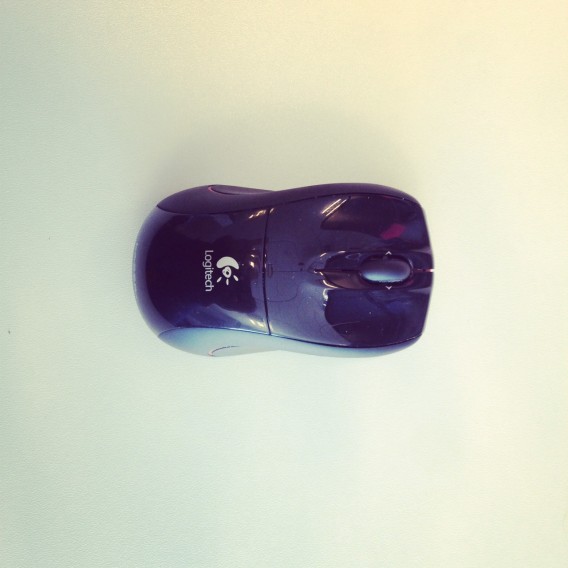
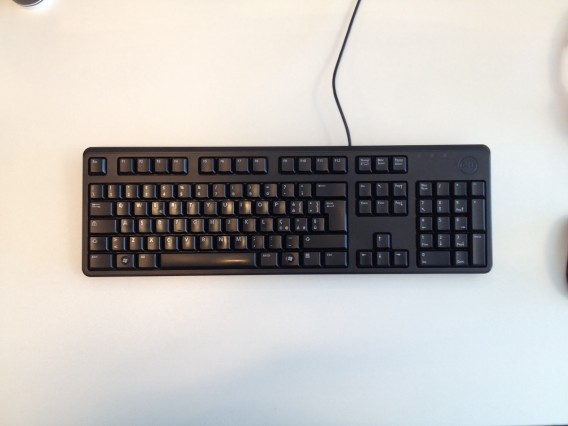
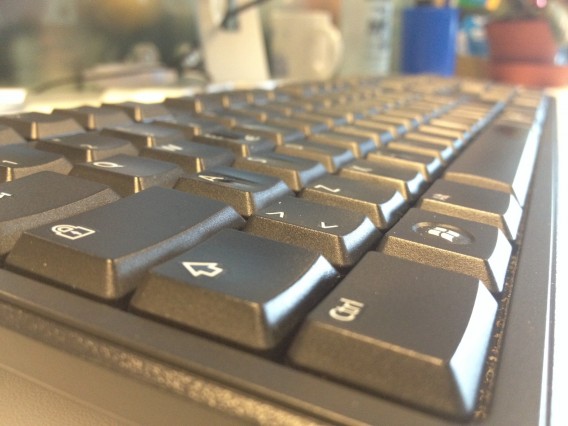
But if we photograph them from the ground, looking upwards, you get a whole different perspective, which will easily attract more attention and people will happily ‘like’ the photo. Another trivial example is the image of the keyboard and mouse, below. Seen from above, as we usually see them, the picture doesn’t say much.

Aerial photo of computer mouse

Aerial photo of computer keyboard

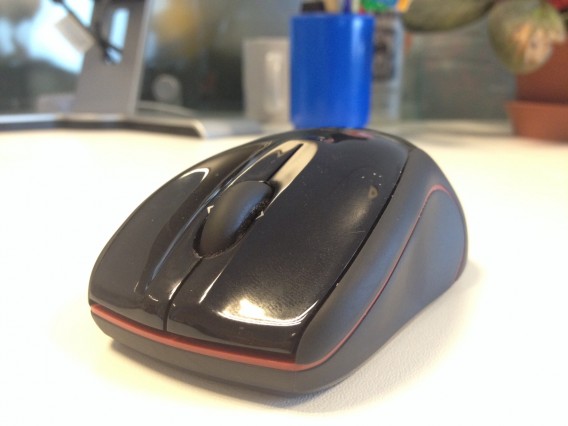
But when viewed from an angle that’s unusual, if not compelling, then it at least looks a little more interesting.

Angled photo of mouse

Angled photo of keyboard

Another interesting topic is the beauty of detail. Again, this is something unfamiliar to us, because we almost never pay attention to it, but that’s why it’s a great photographic subject. The details found in a mundane object can be very interesting indeed, and, with a bit of luck, will also tell a story.

Depth of field

A narrow depth of field is a valuable ally when it comes to giving more prominence to the subject that we’re photographing; in fact, if we can maintain the focus of the subject and blur the rest, then it prevents the person who is looking at the photo from getting distracted.

Background elements

Background elements are less distracting when out of focus

But what is depth of field? Put simply, “it’s the distance in front of and behind the focal subject that appears to be sharp” (Wikipedia). Professional and semi-professional cameras allow you to manually adjust nearly all of the parameters, including shutter speed and aperture, as well as framing several objects, as required.

It is these three elements that affect the depth of field. Lenses with large focal lengths (telephoto lenses, for example) tend to reduce it (but this also depends greatly on the use). Something that has a greater effect on the depth of field, is the aperture opening: the greater it is, the smaller the depth of field. But these parameters, in most smartphones at least, are set automatically.

So, what leeway do we have? If you also take into consideration the fact that the lens on a smartphone is a wide angle, and therefore has a very small focal length (and consequently a large depth of field), how can we try to decrease the area in focus when photographing objects or taking portraits?

Basically, there are two ways: the distance from the subject, along with blurring in post-production, which is something that you can do in Instagram. The closer we are to the person or thing that we are photographing, the smaller the depth of field, and the more of the subject will be in focus along with what is behind or in front of it, while if you increase the distance from the subject, things become progressively more blurred. In this way, you can get physically closer to the subject in order to blur the background and give the subject greater prominence.

Large depth of field

This large depth of field fails to highlight the subject

Small depth of field

Here, however, the depth of field is smaller, because we have gone in close to the subject

In a great light…

In this article, as we’ve said a couple of times, it wasn’t our intention to make photography into something governed by a series of rules and regulations. Our recommendations are only based on the experience of many photographers, who through experimenting have found that there are certain things that work better than others.

Now, it’s over to you to try things out and see if our recommendations have increased the number of likes you get for your photos!

In the next installment of this guide, we’ll explain how to manage the privacy settings on your Instagram account.

Instagram series

This Softonic guide is for people who want to be Instagram stars, using the app to make the most beautiful photos and videos you can, increasing your followers and making them happy in the process!

Instagram represents a tiny revolution in the world of the smartphone, transforming non-professional photography into a self-contained world bursting with possibilities. How? By mixing a social network with an evocative world of Polaroid-like vintage filters. That’s why we decided that to get the most from Instagram, we needed to give you tips and tricks that bridge the two worlds that make up Instagram: photography and social networks.

What will you learn?

Lots! From basic photo techniques and video editing to tricks to increase your followers and use Instagram Direct. And that won’t be all. If you’ve got an Android or iPhone, and an Instagram account, you’re going to see just how easy it is to go from taking your first steps as an Instagrammer to becoming a bona fide professional of the social network.

Who should read it?

Anyone who has Instagram installed and uses it from time to time, but who also wants to learn how to get more from it, both in terms of maximizing the quality of the photos you take, to building a solid identity in the world’s largest photographic community.

The series

The episodes planned for this series are below, and will be updated as they are published:

So grab your smartphone, and lets start taking some beautiful photos!

Third-party Snapchat apps to save Snapchat photos

As images continue to dominate social networks, many third-party Snapchat apps have emerged to help users save their fleeting Snapchat images.

Although it’s not a traditional social network, Snapchat has added features that make it more than just a 10 second glimpse into someone’s life. Adding ‘Snapchat Stories’ lets contacts see a photo for up to 24 hours, and for what’s become a legitimate form of communication, especially among teenage users, 24 hours may not be a long enough time frame for its growing use as a pseudo social network.

Default player


brightcove.createExperiences();


For those who see value in keeping fun or entertaining Snapchat photos from friends (and prefer an easier method than taking screen shots), there are plenty of third-party apps for iOS and Android that let you to download and save Snapchat photos to your phone.

Note, to use all of these apps, you must log in with your Snapchat username and password.

ANDROID

UPDATE (30-01-2014): Google has removed some of these third-party apps from Google Play citing a violation of the Play Store’s policies.

SnapCapture for Snapchat

SnapCapture for SnapchatAs one of the most popular Android solutions for saving Snapchat images, SnapCapture is a very basic but useful app. It does nothing more than save your Snapchat images to either the in-app gallery, or to your device’s photo album. Like most Snapchat saving apps, you have to open the images in SnapCapture before opening them in Snapchat if you want to save them. Unfortunately, you can only save images for free during the 7-day trial before you’re forced to pay for an upgrade.

SnapSave for Snapchat

SnapSave for SnapchatSnapSave (no the same as the iOS version) works in the same way as SnapCapture, letting you either save unopened images and videos, or view them as many times as you’d like within the app. Images from someone’s story, on the other hand, will be automatically saved in your photo gallery. Another big difference between saving single snaps or stories? Users will be notified when you view a story, but you can choose whether or not you want the user to know that you’ve viewed a regular snap. Again, after the first 25 images, you must purchase an upgrade to continue using the app.

SnapChat Save Pics

SnapChat Save PicsSnapChat Save Pics works in almost the exact same way as SnapSave: automatically save stories, view or save images and videos, and only notify the user that the image was been viewed if you want. The biggest difference? SnapChat Save Pics is completely free, with no upgrade needed to save more than a set number of images.

iOS

Snap-hack Pro for Snapchat

Snap-hack proThere’s both a pro and a lite version of this app, but the pro version has proven more popular among users thanks to some cool features. It’s the app that functions most similarly to Snapchat, not only letting you save Snapchat images to your iPhone, but also letting you take pictures within the app and add stickers and effects not available in Snapchat. If you’re looking to do a little more than just save photos, Snap-hack Pro is a good option.

SaveSnap for Snapchat

SaveSnap for SnapchatThe app is simple, but one of the nicest looking ones on the list, doing exactly what you’d expect: it lets you save any Snapchat photo or video to your camera roll by opening it first in SaveSnap. The (dangerous) standout feature of the app is letting you share photos directly to Facebook, Twitter, Instagram or email. SaveSnap lets you save a limited number of snaps before requiring an upgrade.

Snap Save for Snapchat

Snap Save for SnapchatNot to be confused with the previously named SaveSnap, Snap Save is another run of the mill option for saving photos and videos from Snapchat. It doesn’t have any outstanding features, but it does separate individual photos and stories into categories, even letting you view snaps that have been cleared from your Snapchat feed, as long as they’ve been cached in the app. Again, you must pay for unlimited photo saving.

As Facebook’s growth continues to decline and Instagram surpasses expectations as the fastest growing social network, it’s become apparent that a combination of photo-sharing and mobile platforms is a key ingredient to the modern social network. Apps like Snapchat, which is massively popular with teens, quick, instant and, most importantly, strictly visual, is further proof of this platform’s success. Even more add-ons to enhance the experience are are emerging, like LaterSnap, which lets you send images from your camera roll via Snapchat.

Of course, at its core, it’s still meant to be a fleeting photo-sharing app that lets users exchange photos instantly, but if 10 seconds just isn’t enough, there are plenty of third-party apps that can help you save those memories.

RELATED STORIES

Beats Music: broken promises

The launch of Beats Music has been rough; my personal experience with the new streaming music service hasn’t been the best. Even though Beats Music playlists are curated by people and not computer generated algorithms like other services, it still doesn’t offer the exact experience that I’m looking for in a streaming service, paid or free. The visual design of the app promotes a “urban” look, but when it comes to actual usability, it’s like letting go of control and blindly trusting someone to pick music they think you will enjoy.

The saving grace of Beats Music is that it’s still new and has time to prove itself. Whether it can do that within the seven day trial period remains to be seen, but as of now, I don’t see any reason to move away from other services like Spotify or Rdio.

A trial-and-error sign up (so far)

Beats Music presented me with a ton of problems, which is a frustrating first impression. Signing up for Beats Music requires you to use an email, Facebook, or Twitter account. I used the email option because I didn’t want to have to work around my two factor authentication settings for Twitter and Facebook. The problem with signing up with an email is if the app doesn’t communicate with the Beats Music service properly, it will tag the email as registered without actually creating an account.

Beats Music connection problems

I found this out when I attempted to sign in with one email. The iOS app crashed, but all signs pointed that the email and password were accepted. After restarting the app and trying to log in, Beats Music stated that the email was already taken.

I entered my credentials so I should be able to sign in but I had no luck. I couldn’t change the password and I couldn’t sign in. Perhaps it was just a glitch. So I tried another email on my Nexus 5 but was presented with the same problem. The app crashed and the email was tagged as used. I still couldn’t sign in.

My last attempt was signing up on the website. This time, I was finally granted my seven day trial. I logged into the iOS app with my (finally) approved email (I even got an email stating I was registered) and was told to “tap on the genres you like.” I selected the standard indie, alternative, electronic, rock, and folk/blues genres that I listen to on a semi-regular basis. The next step was to choose “3 artists you like.” Again not a problem.

Beats Music genre and artist selection

The problem is the overly animated design scheme of Beats Music. These little circles in the app? They’re animated. You can swipe on them and they move. To remove a circle, you have to hold your finger on it for three seconds. Let me remind you – these circles move based on taps. Since I don’t listen to Scorpions, Oneohtrix Point Never, or Shinedown I removed them. That’s already nine seconds of not listening to music.

Beats Music also gives you the option of adding more artists so you can fine tune your preferences even more. So add another three seconds to each artist I don’t want. In the end, I probably spent about a minute removing artists. That’s twenty artists that I don’t want to listen to. At that point, I gave up and decided to just start the app.

Now Beats Music’s curation begins. At least it said it was curating my music preferences.

Beats Music curation

Playlists are your best friend

I used the same account on both Android and iOS so I expect the app to recognize my preferences. I had deselected Linkin Park as one of my artist choices and what do I see on the main screen of Beats Music on Android? Linkin Park. Granted it’s a playlist of influences, but if I didn’t want Linkin Park’s music, then why provide me a playlist related to them?

Beats Music wrong suggestion

I have to admit that Beats Music is a very well designed app. The Android and iOS apps actually match each other, which isn’t always the case. The different main screens offer separate options. ‘Just For You’ contains suggestions (at least I think that’s what it’s for). I’m not sure why it suggested I listen to Queen (another artist I removed from my choices).

‘The Sentence’ is a section I feel like most people will use. By completing a sentence based off of specific keywords, Beats Music will create a playlist for you. Whether it contains any relevant artists is another issue, but I like how it allows you to create of different playlists based off of keywords.

Beats Music The Sentence

The next section is ‘Highlights,’ which looks like promoted content. While it currently contains ‘Beats and friends’ content, it wouldn’t be surprising to see this as a huge ad space in the future. The final section, ‘Find It,’ is a customary breakdown by genre, activities like ‘Breaking Up’ (there are 20 playlists for this), and a list of curators like Academy of Country Music, Ellen DeGeneres, KROQ, Pitchfork, Rolling Stone magazine, and XXL.

Beats Music is definitely pushing curated content through all these sections. If you enjoy listening to discover new artists, then the majority of the sections will give you a lot of options. Personally, I think ‘The Sentence’ is where most people find the best new music.

What if I want to search for a specific artist?

Beats Music Galaxy ExpressBeats Music wants you to live inside its main homescreens and to devour the “carefully” curated playlists based on your personal preferences and what Beats Music wants you to like.

You can still search for specific artists within the sidebar, which also contains sections for your profile, playlists, library, and settings. With a catalog of 20 million songs, you should be able to find your favorite artists but searching in Beats Music is unintuitive.

Results contain artists, songs, playlists, and users. So on occasion you may come across duplicate artist names. As bands come and go, it’s not surprising that musicians would fall under the same name. Search inside Beats Music is adequate enough to help you find bands to create playlists, but it’s obviously not the main focus of the app.

I did spend some time searching for more obscure artists like the ones I listen to from South Korea and there were actually a lot of artists available. I did find that while there are a lot of artists, many artist pages were devoid of music.

There is an inherent weakness with Beats Music; you have to “like” a lot of artists for the service to specifically understand your personal tastes, which is also a drawback found in Pandora.

This may not matter to most users, but considering the vast number of international artists outside of the United States, being able to search in languages other than English may be a necessity. For example, Korean uses ideograms rather than the Roman alphabet. A lot of bands have names in English, but some of them are loosely translated. How will this affect other international bands and how they are represented in the app?

While the number of artists who don’t use the Roman alphabet is small, it would be great to see improvements when searching for specific artists. I know there are also Japanese artists I would like to look up that only have Japanese ideograms for their names.

It will be interesting to see when the service expands to other countries if  its library of 20 million songs can cover international markets. But for now, Beats has enough work on its hands fixing its launch issues.

Playback

The interface of Beats Music for playback is good enough. It has a simpler design than its section for curated content and single artist pages contain the available songs sorted by the latest releases, top songs, and essentials. There’s also a space for suggested Beats Playlists and Similar Artists.

If you’re on an album page, you can share to Twitter and Facebook, like or dislike the album, add the album to your library or playlist, and download music for offline playback.

Beats Music share like dislike add to

Offline playback stores music on your device so you can play it when you’re offline. Beats Music shows how much available space you have, which is an appreciated feature.

Under the ‘Sound Quality & Downloads’ options menu, you can choose the download and streaming quality.

The last menu shows your downloads under three headers: ‘Space Used,’ ‘Space Left,’ and ‘Total Space.’ These measurements are for the device as a whole, not a partition of space that Beats Music will use.

Beats Music album playback and sound options

The design of the ‘Now Playing’ screen is rather embarrassing. Instead of the usual sections to play, pause, and skip, Beats Music uses a large circle. You play and pause with large icons in the center and scrub through a track by tracing the circle. While Beats Music celebrates music, I can’t understand why the designers made the choice to cover album art with player controls. Other buttons for music playback and sharing clutter the interface. For example, the sharing options could be hidden from view until a user taps on the screen.

Beats Music playing music

Lockscreen playback fares a little better by using the existing design schemes for Android and iOS. The unobscured album art is just more visually pleasing.

Beats Music Android iOS lockscreen

I’m sure the app will go through interface changes as users start giving feedback. I do hope that Beats Music implements a better playback user interface so album art can stand out from the player controls.

Too early for success or failure

Beats Music The SentenceThe launch of Beats Music happened like most launches from hotly anticipated services. The company was unprepared for the “extremely high volume of interest.” Beats Music is taking the right approach by offering the app on Android, iOS, and Windows Phone at launch.

But offering the app on every major mobile platform increases the number of users who want to test the app. Complications during the signup process will deter some people (until they’re fixed), but I can imagine a lot of people using the seven day trial.

Like most popular apps, there will be a massive growth in the user population and Beats Music will be able to collect a lot of usage information from the app. But as the trials end and people stop using the app, this will be the time that Beats Music will really have to prove its service is worth $9.99 per month.

Eventually, people may realize that the curated playlists don’t really aggregate the music they want to listen to all the time and the “learning” that the service is supposed to have over recommendations isn’t as strong as other services like Spotify.

From my experience, Beats Music is a very much “play and forget” service. The initial setup is easy, but the service doesn’t do a good job of suggesting relevant artists, at least in the beginning. Users may find it will take a lot of time interacting with the app for it to begin suggesting music relevant to your tastes, just like with other streaming music services.

Beats Music has a lot to prove because it’s a late player to the music streaming game. Even with all the press about how it’s a different type of service, it still offers the same basic functionality of other streaming services. The addition of a premium-only model will either make or break the service.

In these early days of Beats Music, there’s really no reason to move away from music services you’ve been using. Maybe in a few months, Beats Music will show how different and relevant it can be compared the competition.
Plants vs Zombies Garden Warfare: Let the battle commence!

Plants take on the most famous members of the undead family with multiplayer action in true Battlefield style. Pick your side and let the battle commence!

I’m sure you know the mechanics of Plants vs. Zombies and its sequel: protect the plants from wave after wave of imminent zombie attacks. We love this gameplay, and it’s been imitated many times, but we’ve always wanted to play on the other side: the side of the undead.

This will now be possible thanks to Garden Warfare, the first spin-off of the original franchise, which leaves the innocent puzzles aside to put you at the epicenter of a war between plants and zombies that plays like a third person action game.

A traditional shooter

Intended as an online multiplayer game, Plants vs. Zombies: Garden Warfare is a shooter battling 12 against 12, or various users against the computer. Both sides move around in urban settings that are recognizable from the original games, except that they’re now in 3D and can be fully explored.

Don’t go expecting realism, though. Instead, you’ll get a faithful representation of the universe that PopCap Games created with their first Plants vs. Zombies, along with a reminder that each character is important.

Plants vs. Zombies Garden Warfare

Two sides, eight classes

Both sides have soldiers made up of 4 classes, each with unique physical characteristics in terms of both powers and weapons.

Zombie classes

In the zombie camp, there are four classes:

Soldier –  The soldier is always in the line of fire. Equipped with two guns: a BB gun and a grenade launcher. They also have the advantage of being able to duck out of the action at any stage, thanks to their jet pack.

Engineer – An expert in creating equipment that he and his other colleagues will benefit from, the engineer is equipped with firearms and a stun grenade.

Scientist – The scientist is the only one who can heal his companions. That doesn’t mean he can’t be combative, because for weapons, he has a sticky gun and bomb, as well as the ability to teleport.

All-Star – The big-hitter in the team, the all-star is equipped with a heavy machine gun and the ability to carry out melee attacks. On the downside, he’s slower and larger, which in certain situations can make him defensively weak.

The scientist

Plant classes

The Plants aren’t lagging behind, and are also divided into 4 classes, somewhat strange classes with no real equivalent  in the more conventional zombie classes.

Peashooters – The equivalent to the soldier, the peashooter is the most offensive member of his team and has interesting weapons, like pea guns, as well as the ability to literally plant himself in the ground to generate bursts of gunfire.

Cactus – The closest thing to an engineer, the cactus’ greatest skill is throwing barbs; the key is to use it over long distances. It’s also equipped with mines that can be spread across the battlefield, and can build individual trenches.

Sunflower – The “scientist” of the plants, the sunflower can cure his friends in two ways: using a daisy, and with sunshine. In addition, its rays can also be harmful to its opponent.

Carnivorous plants – The carnivorous plant is an expert in knocking out the enemy by gobbling them up as snacks, as well as the great ability to be able to move underground, allowing him to get behind his enemies and take them by surprise. The most offensive class is equivalent to the the All-Star of the zombies.

The sunflower is a powerful ally

Customization beyond the classes

Classes aren’t the only thing that you’re able to customize in the game. All of the characters have a variety of costumes and accessories available, as well as skins for the weapons they use. Some merely provide cosmetic changes, while others slightly vary the gameplay.

Famous influences

Although the name Garden Warfare is a reference to the famous Modern Warfare, it’s certain that this new Plants vs Zombies has a more direct influence, the Battlefield series, which isn’t really surprising considering developer PopCap belongs to Electronic Arts.

Specifically, both games share modes. The mode called “Garden and Graveyards” is inspired by two famous Battlefield modes, “Rush” and “Conquer“.

Intended to support up to 24 players online, “Gardens and Graveyards” is a variation of the classic Capture the Flag, where the zombies are trying to take control of the plant’s base to turn it from a garden into a cemetery.

Another common mode in Battlefield and other games like it is Team Death, which makes an appearance in this game with “Team Vanquish“, a competitive multi-player mode where the first group to kill 50 of their rivals wins.

Another classic that has had a noticeable influence on the game is Gears of War. Not only does this saga and Garden Warfare share a third-person view, it also has a Horde mode, where you take on waves of enemies, each more complicated and numerous than the last. The further you get, the greater the reward, which you divide up with your other three teammates.

Hoard mode

Direct action, but with some strategy

Plants vs. Zombies: Garden Warfare shouldn’t face any great difficulties because it aims to capture part of the casual audience that already enjoys the original games of the franchise. It’s because of this that the gameplay is based on fast multiplayer games with no trace of a campaign mode, which is normally very common in war games.

The game, however, does include details that come together to form a challenging game in its own right. For example, it’s essential that you have a balance between the classes, and although there is infinite ammo, you’ve got to reload weapons. Finally, special powers can’t be used indefinitely, and you have to let them recharge over time.

Plants vs. Zombies Garden Warfare

You don’t have to wait until Spring to fight in the garden

Plants vs. Zombies: Garden Warfare will go on sale on the 18 of February for Xbox 360 and Xbox One. PC gamers will have to wait a little longer to play.

Taking advantage of a household name, Garden Warfare aims to break into the third person shooter sector – it’s a sector that is jam-packed with good, consolidated titles but is perhaps missing a less sophisticated game that’s suitable for the whole family.

Do you like this shift in the Plants vs. Zombies franchise?

The Softonic Minute: Chrome, GTA V, Mac and the worst passwords

Chrome experiences two separate security issues, GTA V for PC is rumored to be available on Amazon France and Germany, Mac celebrates its 30th birthday, and SplashID reveals the most unsafe passwords of the year. Check out all of this week’s top software news in the Softonic Minute.

Default player


brightcove.createExperiences();

Mac OS launched 30 years ago

The Apple computer and its operating system are celebrating 30 years together, a milestone that marked the beginning of three decades of innovation and revolution in computing. On January 24th 1984, Steve Jobs introduced the first Macintosh computer and its operating system Mac OS.

Amazon Germany and France accepting pre-orders of GTA V on PC

The rumored Windows adaptation of the latest version of GTA has appeared on Amazon France and Germany. Although this isn’t the first time it’s happened, this time, you can actually reserve the PC edition. This means that the PC adaptation of GTA V exists, although Rockstar has yet to confirm the rumor. Download GTA V.

What’s the worst password of 2013?

Pssword Manager app maker SplashData has released a top ten worst passwords list, based on all the passwords that were exposed in hacks during the year. Much of the data came from the infamous theft and publication of millions of Adobe passwords.

Google removes adware-serving chrome extensions from store

The browser has experienced two serious problems this week. The sale of suspicious extensions to spam companies has affected more than 30,000 users. Even more worrying is a security breach that lets some web pages use your mic to hear your conversations. Google says it is looking for solutions to both problems. Download Google Chrome.

Check out all of our past Softonic Minutes here.