After 12 years of honorable service, Windows XP is retired. This means that many users will have to choose another operating system. Maybe it’s the perfect time to get a Mac. I’ll explain why.
It’s a reality: on April 8, 2014, Windows XP closed its doors. At the moment official Microsoft support ended, the historic operating system was already installed on 17% of PCs in the world – in Asia peaking at 25%. A very respectable percentage, I’m sure you’ll agree.
And so, for its millions of users this brings a dilemma: what to do?
Those who decide to migrate to Microsoft’s latest OS (Windows 7 or Windows 8) will have PCmover Express at their disposal. But is this really the best option?
Maybe not. Perhaps this is actually the perfect time to get a Mac. Here’s why.
Friendly interface
The desktops of Macs and PCs have always been slightly different.
Windows 8 changed things completely and introduced the Modern UI interface, a concept borrowed from Windows Phone, but not one that all Windows users have enjoyed (at least until now).
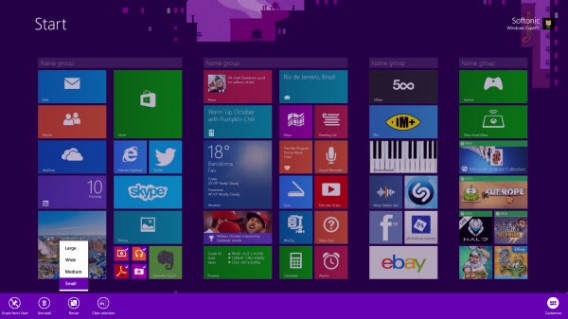
The Modern Windows Desktop 8.1 is very different from the classic Windows
The upgrade hasn’t exactly been immediate because the design of the new user interface is very different from the legacy Windows UI. The result: doing what you’ve always done has become rather complicated. In other words, the learning curve is high and not particularly intuitive.
Finder from OS X has a function that’s similar to Windows Explorer, and the whole organization of the user interface is based on similar philosophies, so it’s easy to feel at home.
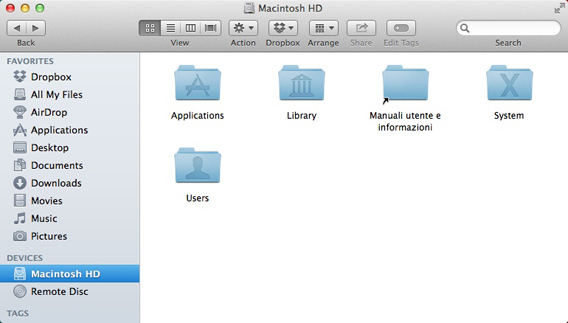
Finder window in OS X
So what now? Well, it could be the perfect time to switch to a Mac. OS X (rather paradoxically) offers a more familiar environment to those coming from XP (or even Vista and 7) with respect to what’s in Windows 8.
Familiarizing yourself with the differences requires a few minutes: once your aquainted and know the main features it’ll be easy, and you won’t feel homesick for either XP nor Windows.
And if you think that you’ll miss the Start button if you switch to Mac be happy with the face that the Start button doesn’t exist in Windows 8!
A removal of software, however, is inevitable
From the point of view of the programs, even upgrading from Windows XP to Windows 8 is a radical change. In the new OS you won’t find many of the programs that you used on a daily basis.
There is Internet Explorer 10, but the Modern version doesn’t offer the same user experience that you were used to before. When it comes to the rest, you won’t find Paint, Messenger, Windows Movie Maker, Minefield, Outlook, Solitaire, or Pinball. On OS X you’ll have gained Mail, the Calendar app, and Messaging.
Given the magnitude of the change, therefore, a Mac might be a palatable option. In this article you’ll find, for any Windows application that you used, the corresponding one for Mac, while in this article we show you how to do everything on a Mac that you did on Windows. And in less than thirty minutes you’ll be a fully fledged member of the Apple society!
Making you feel at home
Many of the important applications that you had on XP are also on Mac, such as Microsoft Office, Firefox, and Chrome. This does not mean that they’re missing from Windows 8: it’s just that now, the operating systems from Apple and Microsoft share a large number of programs for everyday use.
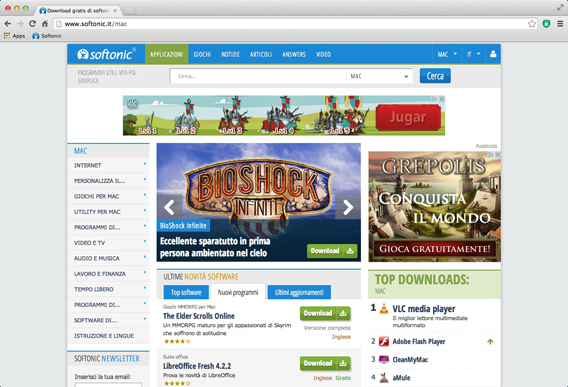 Chrome for Mac
But there is another aspect of the software issue to consider: when it comes to Modern versions for Windows 8, programs for OS X are very similar to those you used with Windows XP, even almost identical, with respect to those specifically for Win 8 .
Skype, VLC, and Chrome, for example, offer versions for the Modern UI, but they usually have fewer features than versions for legacy OS (VLC is a prime example), and, most importantly, the user experience is completely different.
In these cases, therefore, a move to OS X provides more familiarity than to Windows 8.
Microsoft is focusing more on the new interface, so that, until the last update of Windows 8.1, the PCs booted exclusively into the Modern UI, and didn’t allow you to boot into the traditional desktop.
Some changes, but they’re for the better
Of course Mavericks is not XP, and there are differences. But it’s very likely that these will be well-received! For example, you will finally be free from the shackles of antivirus, its updates, incompatibility, and delays.
Not that a Mac is inherently immune to attacks. But it certainly has very strong shoulders. Unix, the system on which both OS X and Linux are based, includes more than 40 years of development, with all that follows from decades of evolution in terms of strength, stability, and security.
And that’s not all. OS X is an operating system developed around specific hardware, and for that reason it’s a perfect fit. Windows, however, must be able to run on multiple (often very different) machines, and therefore can’t rely on the same degree of integration between hardware and software. Stability is frequently the first thing to suffer here.
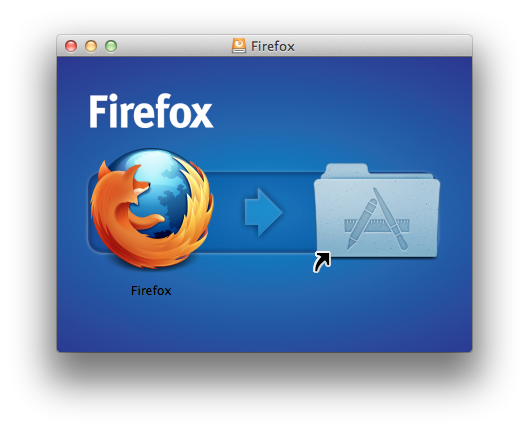
Another difference that you will notice immediately in the switch from PC to Mac is the simplification of processes. An example is the installation of programs, which in most cases, in OS X, is done with a simple drag and drop into the Applications folder .
Even when it comes to backing up, Macs offer a pleasant surprise: Time Machine. This is a tool that automatically performs periodic backups of your entire machine. This means that you never have to worry about losing anything, because everything will be safely stored on a disc – all done by the operating system, with no effort on your part.
And if you need to look for something on your Mac, that’s easy thanks to Spotlight. OS X’s internal search engine is accurate, powerful, and easy to use, and shows you previews of documents simply by passing the mouse over the name.

Spotlight, the internal search engine of OS X, is a powerful tool
And if you’re looking for a program? With Launchpad it’s a matter of a single click, or, if you have a trackpad, a simple gesture. This is definitely a feature we’ve become attached to!
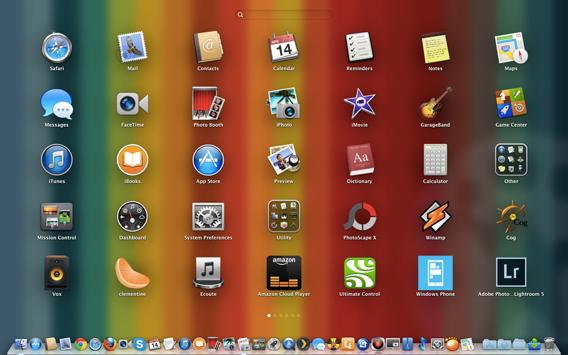
Looking for a program is a matter of a single click
Finally, mention should be made of the application stores. Both OS X and Windows 8 have one, but in terms of both quality and quantity, the Mac App Store is far superior to the Windows Store, not to mention better organized.
The Apple store has been around longer, and has very strict policies for the admission and exclusion of applications. This can sometimes drive developers a little crazy, but does ensure good standards of quality.
The Windows Store has suffered the consequences of a policy that has focused, especially in the beginning, on quantity over quality, and so has flooded the Windows Store with poor quality applications.
Are you ready to take the leap?
In short, if you’re thinking about a replacement for your Windows XP computer, the Mac might be your best choice, and one that could make the change of operating system less traumatic and more fulfilling.
If you’re also a member of the iPhone or iPad club, you can count on perfect and complete integration with iCloud to fully sync all your devices automatically, without installing anything.
This, of course, does not mean that Windows 8 is a bad operating system. Quite the reverse. But at the moment when a change of OS becomes almost unavoidable or (as in this case), make life easier and more pleasant, then it’s always a good option. And maybe, OS X is just the answer you’re looking for.
If you have any doubts about what the end of Windows XP support from Microsoft means for you, we’ve compiled the most frequently asked questions with all the answers in this article.