The Softonic Minute: Snapchat, Skype, Microsoft and Call of Duty

Snapchat gets text and video calls, Skype makes video calls free, Microsoft patches IE security bug for XP users, and Call of Duty: Advanced Warfare releases a new trailer. Check out this week’s hottest software news in the Softonic Minute.

Default player


brightcove.createExperiences();

Snapchat introduces video calls and chat

Snapchat has announced two new features for its messaging app. As well as photos, you can now text chat and make video calls. Continue reading…

Skype group video calls are finally free

Until now, group video calls on Skype were exclusive to Premium account holders. Now, Microsoft has decided to get rid of the $8.99 monthly subscription fee and make them free for all users. Continue reading…

Microsoft issues emergency Internet Explorer update, even for XP users

Even though Windows XP was discontinued last month, Microsoft is issuing an emergency security patch for its users. The security hole was discovered on Monday, and allows an attacker to run unauthorized code on a user’s machine. Continue reading…

Watch the reveal trailer for Call of Duty: Advanced Warfare

The first trailer for Call of Duty: Advanced Warfare has been released ahead of the expected November release date. The biggest surprise is a familiar face, none other than Kevin Spacey. Continue reading…

Make sure to check out all of our past Softonic Minutes.

Trials Frontier: 6 essential tips to maximize gameplay

Trials Frontier, the mobile version of Ubisoft’s bike game Trials Fusion for Xbox One, Playstation and PC, is already a phenomenon. In less than a week, the game attracted more than 6 million iOS users.

While the game is completely free, you need to buy in-app purchases if you want unlimited play. If you’re already hooked on Trials Frontier and want to progress quickly without having to dip into your pocket, follow these 6 essential tips.

If you fall, restart the race from the beginning

This is probably the best piece of advice you’ll hear about Trials Frontiers: when you fall, rather than restarting from the last checkpoint, you can restart the track by pressing and holding down the arrow at the top right

.Trials Frontier Restart button

In other words, checkpoints are useless. By starting again from the begging, the timer is automatically reset. Another advantage is that you don’t have to pay the gas tax required for each race. There’s no secret: to get a good time, try to finish every race without falling.

Only time counts; style is secondary

Aerial acrobatics are only useful when you’re asked to perform them. The important thing is to cross the finish line as quickly as possible and to pass through all the intermediary points. On the other hand, if you’re feeling like Travis Pastrana and your air time allows it, then there’s nothing stopping you from combining business with pleasure.

Trials Frontier Backflip

Leaning forward, the key to overcoming obstacles

This may seem obvious, but it really is key to becoming a master: weight distribution on the bike is crucial. That’s why in many situations, you need to shift your character’s weight to the front of the bike at the right place and the right time.

Trials Frontier Lean front

Although there are only 4 buttons to control your 2 wheels, the laws of physics are fairly well respected. To pass over vertical walls, you need to give yourself momentum by shifting your character’s weight forward.

Press and hold over the item you want

After playing the game for about a hour, one of the characters you meet in the village saloon gives you an unbeatable tip: press and hold on an item to increase your chances of winning it when you’re spinning the wheel at the end of the race.

Trials Frontier Wheel of fortune

This technique is only effective when the girl tells you about it. You should be able to do this from about level 6.

Spend your money at the right time

As with many free-to-play games, one of the developer’s techniques to get you to buy credits is to make you wait. To avoid this inconvenience, only upgrade your motorbike at the end of the game.

Trials Frontier Bike upgrade

After each upgrade, you’ll wait longer and longer before the opportunity for the next one comes along. The trick is to upgrade before closing the game. The next time you login, you’ll find your bike tuned and ready to go.

Prioritize the boy’s missions

Continuing with the upgrades, when you see a mission suggested by the small boy who loves acrobatic flips, accept it. These missions help you build a new bike using the blueprints you collect, and of course, this is an essential step if you want to progress in the game.

Trials Frontier Backflips

By following these invaluable hints, you’ll be able to play Trials Frontier for several hours without having to dip into your pocket.

Follow me on Twitter @bbrassart
RELATED ARTICLES

Watch the launch trailer for Sir, You Are Being Hunted

Sir, You Are Being Hunted has been released after long alpha and beta testing phases. Version 1.0 was launched on May 1st, alongside a new trailer which you can see below.

The game is ‘a procedurally-generated first-person game of stealth and survival set in a very British world where robots hunt humans for sport.’ That means that you are put on an island with a British flavor, and have to fight for your life while being hunted by robots, and every game the environment will be different.

Default player


brightcove.createExperiences();

Sir, You Are Being Hunted was announced in March 2012, with a Kickstarter campaign later in the year to fund development. It’s an unusual game, with its 19th Century Britain-with-Victorian-Robots vibe, and it’s a tense humorous experience.

Big Robot says that version 1.0 is not the end of development for the game, with multiplayer and a customization tool for level generation planned.

Source: Big Robot

RELATED STORIES

Never lose your parked car again with the latest Google Search for Android

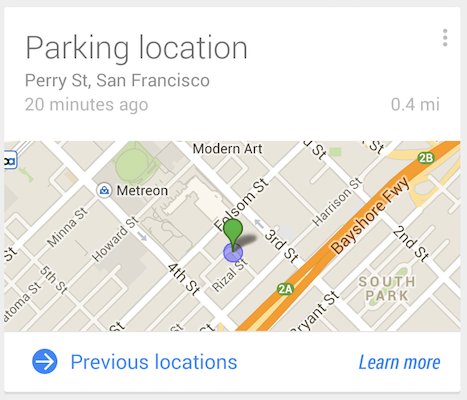
The latest update to Google Search for Android introduces ‘Parking Location’ in Google Now. It’s version 4.3, and also features a new reminders interface, a centralized list for nicknames and more.

If you drive a car, you can now use Google Now to see where you left it. A ‘Parking location’ card will appear in Google Now, with an approximate location for your car. You can also browse previous parking locations. Google stresses that this data isn’t shared with anyone else.

Parking location works by using your phone’s sensors to detect when you stop and leave a moving vehicle. This can mean you get Parking location cards after leaving a bus or friend’s car. You can configure these cards in Google Now when one appears, by pressing the Menu icon.

If you don’t drive, tap ‘No’ when asked if you want to get reminders about parking location. Another way to turn them on or off is to open the Google Now screen, and go into Customize, Everything Else and How do you usually get around?

Download Google Search for Android

Source: Google Search Help

RELATED STORIES

Watch the reveal trailer for Call of Duty: Advanced Warfare

Activision has leaked the reveal trailer for Call of Duty: Advanced Warfare. Watch it below

Kevin Spacey features as the power crazed political villain, and it’s difficult not to think about the recent House of Cards series while watching the trailer. Call of Duty: Advanced Warfare has a ‘near future’ setting again, but this time the technology has been ramped up. There are robotic exo-skeletons, hover bikes, jet boots and more futuristic weaponry.

Default player


brightcove.createExperiences();

It’s typical over the top Call of Duty territory, and Kevin Spacey will no doubt give the game a bit more gravitas. The announcement of Call of Duty: Advanced Warfare was slated for May 4th, but the official Call of Duty YouTube channel published the trailer today. This means there could be more details announced on Sunday. Stay tuned for more.

This official announcement also kills this year’s CoD rumors, none of which have turned out to be true – it’s neither called Modern Warfare 4 nor BlackSmith.

We expect the game to be released on PC, PlayStation 4 and Xbox One.

RELATED STORIES

Vine focuses on the web experience

Vine has always focused on its mobile experience, resulting in a less than stellar web experience. Today, Vine completely redesigned its site to be a destination with channels and curated content. Now it’s a site you’ll actually want to visit.

Channels offer a great way to browse Vines for a particular topic like pets, humor, and music. These channels work exactly like they do in the Vine apps. Click on a channel and you’ll get a stream of top Vines for that category.

Curated content offers a great look at which Vines are trending and popular. The main page promotes exploration by jamming in tons of content. You can hover your pointer over a Vine and it’ll start playing with audio.

Last but not least, Vine has improved search so you can find people, tags, and locations.

Check out all the changes at vine.co.

Download Vine: Android | iOS | Windows Phone

Source: Vine

RELATED STORIES

Yahoo stops honoring Do Not Track browser settings

Yahoo announced today that the company would stop honoring Do Not Track settings in web browsers. The Do Not Track standards allow users to opt-out of targeted advertising, which relies on collecting some user data.

Companies like Facebook and Google already ignore the Do Not Track standard. However, there are a few companies that are still committed to the standard like Twitter and Pinterest.

This move shouldn’t be surprising as Yahoo stands to benefit from selling targeted ads on its sites. Google also relies on collecting browsing data to sell targeted ads.

Popular browsers like Internet Explorer, Firefox, and Chrome have Do Not Track options but it won’t matter if sites ignore the standard.

Yahoo says it has yet to see a successful single standard for opting out of targeted ads. The company still offers users the ability to change opt out of targeted ads in their Privacy Center.

Source: Yahoo

Via: The Verge

RELATED STORIES

Microsoft issues emergency Internet Explorer update, even for XP users

Even though Windows XP was discontinued last month, Microsoft is issuing an emergency security patch for its users. The security hole was discovered on Monday, and allows an attacker to run unauthorized code on a user’s machine. All versions of Internet Explorer are affected, from version 6 to 11. While Microsoft says the vulnerability is “overblown,” it has issued a patch in record time to protect its users.

Although XP users are included in this update for Internet Explorer, the company is still encouraging XP users to upgrade to Windows 7 or 8.1.

“Just because this update is out now doesn’t mean you should stop thinking about getting off Windows XP and moving to a newer version of Windows and the latest version of Internet Explorer,” writes Microsoft Trustworthy Computing group General Manager Adrienne Hall.

This patch for Windows XP is an exception to the rule, so don’t expect Microsoft to support XP any further.

The patch has been rolling out since 10:00AM PT today. Users who have automatic updates enabled won’t have to do anything. If you want to check for the update manually, click on Control Panel, Windows Update, and then “Check for Updates.”

Check out our handy FAQ for more information about the discontinuation of Windows XP and what you can do to protect yourself.

Source: The Official Microsoft Blog

RELATED STORIES

Beats Music comes to the iPad

Beats Music released a teaser yesterday for “something big” and here it is. iPad support is finally here with an interface that takes advantage of its big screen. Beyond that, not much has changed. You can still sign up for a subscription within the app and create sentence-based playlists.

If you’re looking for an alternative to Spotify Premium, give Beats Music a look. Be sure to check out our review of Beats Music while you’re at it. You can download the universal app (works with iPhone and iPad) below.

Download Beats Music for iOS

Source: Beats Music (iTunes)

Via: 9to5Mac

RELATED STORIES

LEGO The Hobbit: How to unlock all game characters

Imagine what it would be like to star in The Hobbit next to Galadriel, Sauron, and even Peter Jackson himself. Like in previous LEGO games (such as The Movie or Marvel Super Heroes), LEGO The Hobbit hides many secrets you’ll discover as you play.

Today we’ll help you in this task by showing you how to get over 25 additional characters.

Forget about complicated challenges or completing never-ending missions, unlocking characters in LEGO The Hobbit is as easy as using a code. Follow the steps you’ll find below and start enjoying extra characters with amazing powers.

How to unlock additional characters

  • Pause the game.
  • Go to Extras.
  • Access Enter Code.
  • Write the codes you’ll find below to get the characters you want.
  • Every time you start a new game you’ll have to enter the codes of the characters you want.

LEGO The Hobbit

List of additional characters in LEGO The Hobbit

Alfrid – FAVZTR

Azog – 84ZZSI

Bain – W5Z6AC

Bard – UER3JG

Barliman Butterbur – XTVM8C

Barrow-Wight – 555R9C

Beorn – KEID2V

Bolg – ZIBYHO

Braga – MXUXKO

Elros – H2CAID

Fimbul – THAVRM

Galadriel – 00TE7J

Gollum – 3CE37P

Grinnah – TPD7YW

Lindir – V4Y5HZ

Master of Lake-town – 9NOK35

Narzug – 4FYKKB

Necromancer – NM3I2O

Percy – 74KN31

Peter Jackson – 5OJEUC

Rosie Cotton – TB4S6J

Sauron – OARA3D

Thror – SYKSXF

Tom Bombadil – 4Y95TJ

Witch-king – V8AHMJ

Yazneg – S6VV33

Have you tried LEGO: The Hobbit? Download the game here.