The Sims 4 PC requirements show it will run on low-spec machines

Electronic Arts revealed the minimum system requirements to run the upcoming The Sims 4. If you have a computer made within the last eight years or so, you should be able to run the game.

Here’s are the full system requirements:

REQUIRED: Internet connection required for product activation.

OS: Windows XP (SP3), Windows Vista (SP2), Windows 7 (SP1), Windows 8, or Windows 8.1

PROCESSOR: 1.8 GHz Intel Core 2 Duo, AMD Athlon 64 Dual-Core 4000+ or equivalent (For computers using built-in graphics chipsets, the game requires 2.0 GHz Intel Core 2 Duo, 2.0 GHz AMD Turion 64 X2 TL-62 or equivalent) MEMORY: At least 2 GB RAM

HARD DRIVE: At least 9 GB of free space with at least 1 GB additional space for custom content and saved games

DVD-ROM: DVD ROM drive required for installation only

VIDEO CARD: 128 MB of Video RAM and support for Pixel Shader 3.0. Supported Video Cards: NVIDIA GeForce 6600 or better, ATI Radeon X1300 or better, Intel GMA X4500 or better

SOUND CARD: DirectX 9.0c Compatible

DIRECTX: DirectX 9.0c compatible

INPUT: Keyboard and Mouse

The Sims is a popular franchise with a far-reaching audience so it’s not surprising that EA wants the game to run on older computers. Of course, expect a hit in performance and visual quality if you’re using an older machine. You’ll still want a fairly powerful machine to experience the game with settings cranked to ultra.

The Sims 4 will be released September 2nd for the PC. There are currently no plans to bring the game to Mac or consoles.

Source: The Sims 4 FAQ

RELATED STORIES

The Sims 4: Create A Sim demo

The Softonic Minute: Firefox 31, Modern Combat 5, The Sims 4 and Google Maps

Candy Crush Soda Saga: 5 tips to beat any level

Alien: Isolation DLC video highlights original cast

Beatbuddy music adventure game coming to iOS in September

Follow Lewis on Twitter: @lewisleong

Instagram apps are vulnerable to account hijacking

A critical flaw discovered in Instagram’s mobile apps makes it easy for hackers to steal your user information. The flaw centers around the app’s use of unencrypted connections. This means an enterprising hacker can sniff out your personal information over an open Wi-Fi hotspot or even over your cell network.

By leaving data unencrypted, Instagram lets hackers have access to session cookies which can be used to impersonate you. This vulnerability can give someone access to your private photos, username, and password.

Facebook, who owns Instagram, has known about the issue since 2012 but still hasn’t fixed it. The company responded to Mazin Ahmed, the security researcher who reported the vulnerability, with the following statement:

“Facebook has discussed this issue at length and plans on moving everything on the Instagram site to HTTPS. However there is no definite date for the change. At the moment Facebook accepts the risk of parts of Instagram communicate over HTTP and not HTTPS. We consider this a known issue and are working toward a solution in the future.”

It’s worrying that Facebook has known about the issue for so long yet decided it wasn’t important enough to fix.

For now, users can use Instagram’s mobile site which is encrypted. Be aware that public Wi-Fi networks are inherently less secure and should be used with caution. You should be fine browsing Instagram over a cellular connection since it’s much harder to intercept data this way.

Source: Mazin Ahmed

Via: The Hacker News

RELATED STORIES

Canvas fingerprinting web tracking tool isn’t the end of privacy

Firefox 31 brings new tab search bar, increased download security

Critical Java update prevents hackers from remotely controlling your computer

Security researchers find critical flaws in web-based password managers

The Softonic Minute: Android, Minecraft Pocket Edition, Google Maps and Windows 7

Follow Lewis on Twitter: @lewisleong

How to speed up your Android: 5 tricks that really work

Over the years, Android has become a very efficient operating system, even for low end phones and tablets. But there’s ways to make Android even faster.

Using the these 5 tricks, you can make your Android faster, and you don’t need to download any apps or unlock the device by rooting it, making it the safest way to speed up your device. Check out the 5 tricks below.

Get rid of widgets and animated wallpapers

I regret to inform you that live wallpaper with tropical fish and weather widgets have considerable impact on your phone. Get rid of constantly updating widgets on your home screens and change the background to a static one.

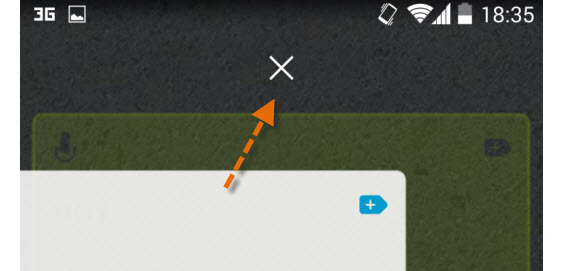
Android remove widgets

Drag widgets to the delete symbol to get rid of them

Delete apps you’re not using

Each app you don’t use is taking up space space and occasionally runs in the background. If you delete apps you don’t need, not only will you have more free space, you’ll also get rid of possible resource vampires.

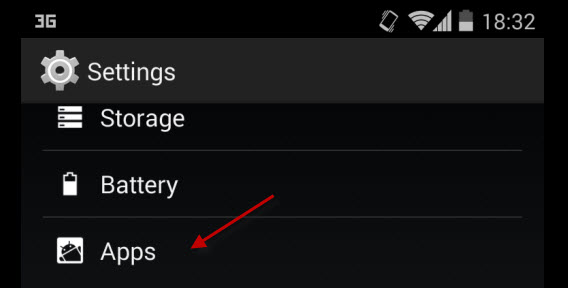
First go to the Settings > Apps menu.

Android settings

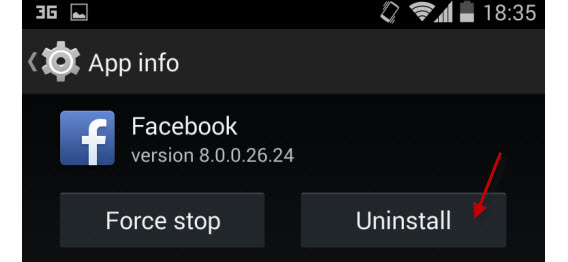
Then, go to one of the apps, and select the option to uninstall it from the device.

Android app uninstall

Disable system apps you’re not using

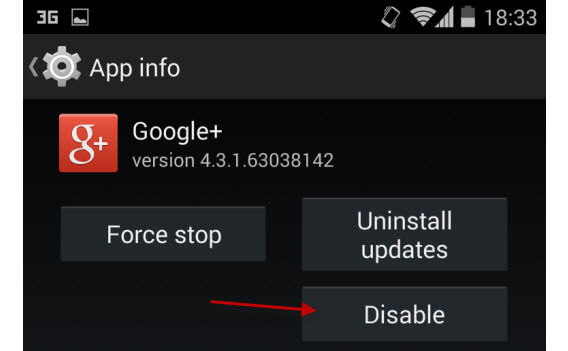
The apps that are pre-installed in Android can’t be uninstalled, but you can disable them. To do this, simply open them from the app menu (Settings > Apps) and tap on Disable.

Android disable apps

The apps can be enabled again from the Disabled section on Settings> Apps.

Update the Android OS

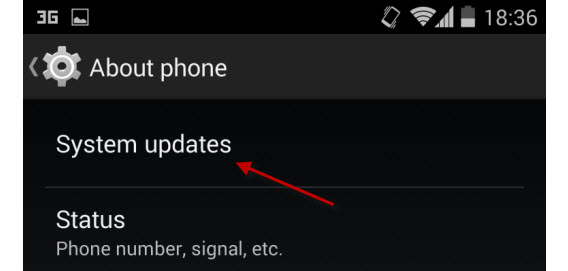
System updates can speed up your device. You can search for the upgrade manually by going to Settings > System updates. To know when you’ll get an update, check the manufacturer’s site.

Android system updates

Choose optimized apps

Sometimes the problem isn’t the phone you’re using or what version of Android you have, but the apps you install. Some are bloated with simple functionality. Look for alternatives whenever possible.

A small but big difference

Some sites recommend enabling developer options that can damage the device, but also make it slower. Don’t pay attention to those “tips.” I haven’t mentioned the possibility of changing the operating system with a custom ROM operating system because, although it can be useful, it involves the risk of damaging the device.

If you want to clean and speed up your device, don’t look for complicated options: the tricks above might seem like common sense, but they work better than installing a fake optimizer. If you follow these tips, you can get a better experience out of your Android without compromising your device.

RELATED ARTICLES

Software Clinic: “How can I find my lost phone?”

Use IM+ as an alternative to Facebook’s Messenger app

How to add photos to your Snapchat Story

The Sims 4: How To Create A Sim

A spectacular way to customize your Sims, but with some surprising limitations… This is what I think about Create-a-Sim, the character creator for The Sims 4.

I decided to use myself as a guinea pig, creating my Sim alter ego. My first impressions with this tool: a big improvement on previous versions, but also some drawbacks compared with The Sims 3.


//

Shaping every single trait of the sims

What’s surprised me the most about the Create-a-Sim mode in The Sims 4 is the high degree of customization of both face and body. Although I know how the system works from having tried it last year, I have now seen all the possibilities it offers.

Creating the appearance and anatomy of a sim is as simple as modeling its features with your mouse. Shapes and sizes change slowly, so you can decide how every inch of your character looks.

Choose a model or enter the details; you decide.

As for the body, you can change absolutely every area: from its torso, abdomen, breasts or hips, to its legs, arms and even feet. Not even some of the mods released by fans for earlier versions of The Sims had achieved so much detail.

This same extreme customization can be applied to the face. For each feature and for the entire face, you have predefined patterns that match typical traits of all ethnic groups, but you can then change them one by one.

With all these options, I tried to create myself. The feeling I got is that if the sim I created doesn’t look more like me, it’s not due to the technical limitations of the tool but because I was in a rush and didn’t have a mirror to examine my features. I’m sure that if a friend decides to create a sim that looks like me, I would have a digital clone.

With patience, you can create a true clone made out of pixels.

What happened with the colors and textures?

While I was pleasantly surprised with the body and face customization of the sim, I can’t say the same for the clothes, hairstyles and accessories. While in The Sims 3 you could choose any color for your hair (and every hairstyle had 4 hair colors to choose from), or any color or pattern for your clothes and accessories, you don’t have those options in The Sims 4.

Create-a-Sim offers different colors and patterns for each garment, accessory or makeup. The same applies to hairstyles and skin, limited to a fairly conventional palette.

I hope that this limitation is only in the demo, because in The Sims 3, I could spend hours and hours editing every detail of  my characters, and I don’t want to lose that!

Can we have infinite hair colors?

Choose your path

Before I could finish creating my alter ego, I had to complete one very important trait: select your vital aspiration and its features.

Aspiration is a key element in the lives of your sims

The aspirations are the desires that your sims would like to fulfill before dying. This is divided into different fields like sports, creative, family, and love, and within these, there are specific desires. Since one of my passions is literature, I decided that my sim wanted to be a famous writer.

I still have to see how these aspirations influence the life of my sim, but what I can tell you is that by choosing an aspiration, you will unlock a bonus feature. In my case it was ‘Muser’, which is supposed to boost my skills when I’m inspired.

The bonus feature can help you achieve your aspirations

After the aspiration, I had to choose three traits. These are similar to those you would have seen in The Sims 3, and range from physical to social skills, including several hobbies or character traits. In my case– trying to create a reflection of the real Maria– I opted to get the Creative, Music Lover and Glutton traits, three of the features that most people use to describe me.

As you can see, the game’s moved from the five features of The Sims 3 to only three. How will this affect the personality of the sims? In principle, it should limit the options, but it won’t. EA has warned us that the sims will be more unique than ever, which will be achieved by joining the characteristics of each trait, with its interaction with the environment and with other sims. To know more about this though, we’ll have to wait until its release.

My first sim is ready! Shall I create another one?

What will children and old people look like?

I also have to wait to see what the sims will look like in other life stages, because in the Create-a-Sim demo, I could only create adults. Although I’ve seen old people, teenagers and children in some trailers, the truth is that I know very little about them. I assume that their evolution will be similar to The Sims 3, but don’t forget that this time, the game skips a vital step– toddlers– something that has been very controversial among loyal fans.

Read more news and articles about The Sims 4:

The Sims 4 gets a release date

The Sims 4 are smarter, but with stranger personalities

The Sims 4: More romance, more ‘WooHoo’

Follow me on Twitter: @mariabaeta

iOS 8 will include an iPhoto to Photos migration tool

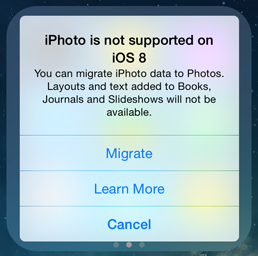
Apple is preparing iPhone users for the discontinuation of iPhoto with a new migration tool. Those who are running the developer preview of iOS 8 are receiving a warning message that iPhoto is not supported and offers the option to migrate to Photos. There’s also a “Learn More” link, which appears to be dead at the moment.

iPhoto warning - credit 9to5MacApple warns text added to Books, Journals and Slideshows in iPhoto may not function properly after migration. Photos will most likely discontinue these features in favor of a simplified photo editing experience. iPhoto has grown bloated and slow over the years, languishing with infrequent updates.



The new Photos app has yet to appear in the iOS 8 or OS X Yosemite beta so we don’t know know well the app works yet. Apple will most likely streamline Photos to be a lightweight photo editor, stripping it of unnecessary features. The facial recognition software present in iPhoto may disappear too.

Apple is also discontinuing its professional photograph app, Aperture. The company is working with Adobe to create a migration tool to Adobe’s Lightroom program.

Apple hasn’t nailed down a specific release date for the Photos app, only saying it’ll come “early next year.”

Source: 9to5Mac

RELATED STORIES

comiXology goes DRM-free, lets you keep your comics forever

Google Maps Explore feature takes on Yelp and Foursquare

Beatbuddy music adventure game coming to iOS in September

Instagram accidentally leaks ad for Bolt, its Snapchat competitor

Modern Combat 5: Blackout available on multiple platforms

Follow Lewis on Twitter: @lewisleong

The Softonic Minute: Firefox 31, Modern Combat 5, The Sims 4 and Google Maps

Firefox 31 is released, Modern Combat 5 lands on mobile, The Sims 4 shows off some gameplay, and Google Maps helps you get a bit more adventurous. Check out this week’s latest software news in The Softonic Minute. And make sure to get your fix now, because after this week’s edition, we’ll be on holiday for three weeks!

Default player


brightcove.createExperiences();

Firefox 31 brings new tab search bar, increased download security

The latest version of Firefox, version 31, brings a few minor improvements. First up is the new search bar when you launch a new tab. This feature has been in Google Chrome for some time now, but is one less click for users to get to the search field. Continue reading…

Modern Combat 5: Blackout available on multiple platforms

What is sometimes considered Call of Duty for mobile, Modern Combat 5: Blackout is available on multiple mobile platforms as well as the Windows Store. Make sure to check out our essential tips for becoming unbeatable in Modern Combat 5.

The Sims 2 Ultimate Edition free until July 31st

If you’re a fan of The Sims, Electronic Arts is giving The Sims 2 Ultimate Collection away for free until July 31. All you need is an EA Origin account. It doesn’t matter if you are a new or old member of Origin. Continue reading…

Google Maps adds Explore feature to take on Yelp and Foursquare

Google wants you to use Google Maps for more than just getting to your destination. The company updated Maps for Android and iOS to include a new Explore feature, which will take on competing apps like Yelp (Android | iOS) and Foursquare (Android | iOS). Continue reading…

Make sure to check out our past Softonic Minutes, and don’t forget, we’ll be on holiday for the next three weeks!

Candy Crush Soda Saga: 5 tips to beat any level

Candy Crush Soda Saga (currently available on Android and Facebook), is a hyper version of the popular Candy Crush Saga. In addition to the candy you already know and love, you can also find soda, gummy bears, and cupcakes, among others. If you’ve already played Candy Crush, it won’t be difficult to get the hang of this one, but it’s worth following a few tips to understand the new features of this release.

What happens if the level of soda goes up? What are those cupcakes doing there? Are fish important? Here, I’ll answer all these questions with five essential tips you need to beat any level.

Your soda level has to be above the bears

The goal of some levels is to make the gummy bears reach the row of candy that’s at the top of the screen. To do this, you must make the bear go up, but the soda level has to go up at the same time.

To avoid making useless moves, always make sure that the level of soda is above the bear. That way, you’ll have more freedom of movement.

In this case, you should prioritize the move highlighted here

Make combos of special candies

Candy Crush Soda Saga has many pieces with special powers: some make a whole row disappear, while others remove all the candy with the same color. On their own, these pieces are very useful, but combined, even more so.

If you combine two striped candies, for example, you’ll get rid of both a horizontal and a vertical row, and if you combine a striped candy with a ball, you’ll destroy many pieces in the level. Try all the possible combos and be amazed by the results.

By combining these two special pieces, you’ll get rid of two rows easily.

Pave the way

Some levels have obstacles, such as the cupcakes in the picture below. Before you start making candy combinations at random, try to get rid of them.

To destroy the cupcakes, just make combos of the pieces that surround them. One to three moves, depending on the cupcake, should be enough to make them disappear.

Removing these barriers will be particularly useful for those levels where your goal is to take the bears to the top of the screen.

You must get rid of the cupcakes to get to the bottles that raise the soda level.

Get rid of the fish

The special fish pieces have a great power: when you get rid of them, they take with them a bottle from the board, raising the soda level. Whenever you can, get rid of the fish and the level will be yours.

There are no bottles to match, so the fish will do the work for you

Focus on the target

Especially in those levels where you must release giant bears trapped in ice, focus on removing the ice blocks and forget about the rest. The sooner you do this, the sooner you’ll finish and, since you’ll have a few moves left, your score at the end will be higher.

You won’t get anything with the move crossed, focus on those that involve the ice

Discover more strategies

This article in only a quick overview of what you can find playing Candy Crush Soda Saga, but you’ll almost certainly find more strategies as you continue playing the game. In any case, if you’re a fan of Candy Crush Saga, this new edition to the series is sure to hit your sweet spot.

If you want more mobile game fun, check out our tips for another popular game in the King series, Bubble Witch Saga 2.

Follow Maria on Twitter: @mariabaeta

comiXology goes DRM-free, lets you keep your comics forever

Comic book distributor comiXology is abandoning digital rights management (DRM), used to prevent piracy. This means you can now download and keep your comics forever.

Previously, comiXology required users to download and read purchased comics exclusively in their app. Now users can download comic purchased in the app as a PDF or CBR to use with other comic reader apps.

Only some publishers have enabled DRM-free downloads for now. comiXology plans to make all of its 50,000 comic books downloadable in the future.

comiXology DRM free

Screenshot credit: Lewis Leong

There is an industry-wide trend of allowing users to actually keep their digital purchases. In 2007, iTunes ditched DRM for its music store. Publisher Image Comics has been offering DRM-free books for some time.

Starting today, you can go to comiXology.com and download your comics to keep forever. You can find all your comics under the My Books tab.

Source: Washington Post

DOWNLOADS

comiXology for Android

comiXology for iOS

comiXology for Kindle Fire

comiXology for Windows 8

RELATED STORIES

Google Maps adds Explore feature to take on Yelp and Foursquare

Gmail for Android and iOS updated with Drive features

Instagram accidentally leaks ad for Bolt, its Snapchat competitor

App of the Week: GT Racing 2

Canvas fingerprinting web tracking tool isn’t the end of privacy

Follow Lewis on Twitter: @lewisleong

Google Maps Explore feature takes on Yelp and Foursquare

Google wants you to use Google Maps for more than just getting to your destination. The company updated Maps for Android and iOS to include a new Explore feature, which will take on competing apps like Yelp (Android | iOS) and Foursquare (Android | iOS).

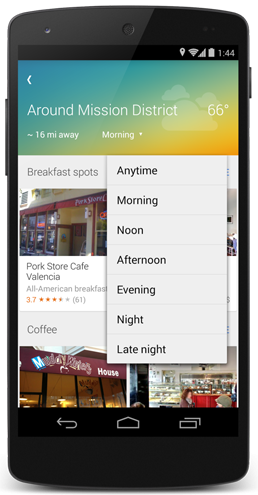
Google Maps ExploreThe Explore button, located at the bottom right of the screen, shows you different places and activities around you. You can filter by distance, time of day, and type of place. And of course, you’ll get ratings from Zagat and users as well as business information.

This means you won’t be seeing results of restaurants that are closed, since Maps will detect the time of day. Maps is even aware of weather conditions, making sure you don’t head to a park when it’s about to rain.

Maps, like Google Now, will learn where you frequent and will offer suggestions based on your location history. To train the app, you’ll have to confirm the places you visit on the map. You can do this by tapping on the My Loaction button. Of course, you’ll need to turn on your location services and history for any of this to work.

Android users will see the update without doing anything as it’s being pushed to your phone via Google Play Services. iOS users should be seeing an update in the App Store soon.

DOWNLOADS

Google Maps: Android | iOS

Source: Google Maps | Background header image: Jamie McCaffrey

RELATED STORIES

Gmail for Android and iOS updated with Drive features

Beatbuddy coming to iOS in September

Instagram accidentally leaks ad for Bolt, its Snapchat competitor

App of the Week: GT Racing 2

Modern Combat 5: Essential tips to become unbeatable

Follow Lewis on Twitter: @lewisleong

Alien: Isolation DLC video highlights original cast

Alien: Isolation is slowly revealing more details about the upcoming game. The pre-order DLC featuring the original cast of the 1979 movie are featured in this video from SEGA. The cast discusses returning to these characters and the immersive environment that Creative Assembly’s upcoming game will have.

Default player


brightcove.createExperiences();

If you missed our preview, you will have a great introduction to the game.

Alien: Isolation is scheduled for release October 7, 2014 on PC, PlayStation 3, PlayStation 4, Xbox 360, and Xbox One.

For more information follow Alien: Isolation: Official site | Facebook | Twitter

RELATED STORIES

Play as Sigourney Weaver in Alien Isolation

Alien: Isolation preview – the beast has returned

Modern Combat 5: Essential tips to become unbeatable

Follow me on Twitter: @chrislikesrobot