Twitter for Mac finally receives updated photo features

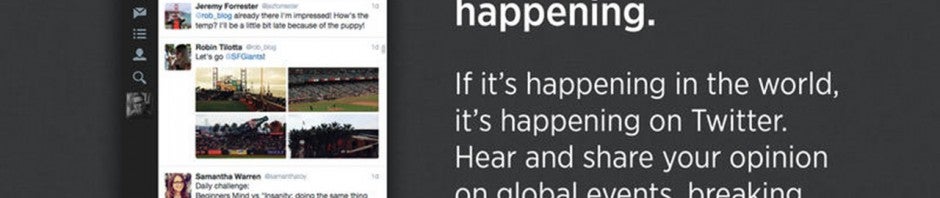
Twitter finally updated its Mac application with features it introduced to its other apps earlier in the year. Now Mac users can post or view tweets with up to four attached photos. They will also be able to send and receive photos privately using direct messages.

Both of these “new” features debuted on Twitter’s mobile applications earlier in the year. Twitter’s focus has always been its mobile applications and it’s not surprising to see its desktop applications for Mac and Windows being ignored.

Twitter for Mac works well if you just want the basics for Twitter. If you want more advanced features, check out the TweetDeck app for Chrome, which lets you set up multiple columns for different feeds. You’ll also be able to schedule tweets in advance.

Download Twitter for Mac

Source: Twitter for Mac (iTunes)

Related Stories

Apple prepares OS X Yosemite for launch

Apple releases OS X Shellshock bug patch

Apple releases iOS 8.0.2 to fix Touch ID and connectivity problems

Windows gets iCloud Drive support before Mac

Follow me on Twitter: @lewisleong

Hong Kong protesters flock to Firechat off-the-grid messaging app

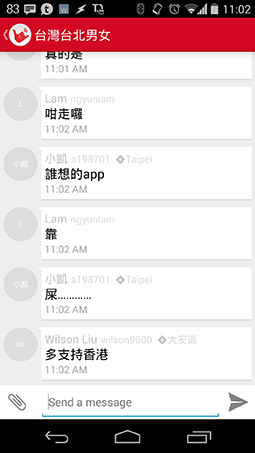
Hundreds of thousands of people in Hong Kong are taking to the streets to fight for pro-democracy reform. The protests began over the weekend and continued through October 1st, the 65th anniversary of Communist rule in China. Fears of the Chinese government shutting down internet and cell service has resulted in protesters looking for alternative messaging apps. Firechat is one such app and has received over 200,000 downloads over two days, propelling it to the number one downloaded app in Hong Kong in both the App Store and Google Play.

Firechat Hong Kong protestsWhat makes Firechat uniquely suited to the protests in Hong Kong is its ability to connect people using only Wi-Fi and Bluetooth. This means if the Chinese government does take down the internet and cell service, Firechat will still allow protesters to communicate with one another, completely off the grid.

All you need is someone’s username to chat directly with them. Although the Chinese government hasn’t taken down cellular networks in Hong Kong, protesters are reporting that connections are slow, possibly due to the high concentration of users in the area.

Furthermore, Firechat allows users to communicate anonymously, which is perfect for protesters who are avoiding giving out personally identifiable information in fear of police retribution.

Other chat apps like Facebook Messenger and WhatsApp require users to use their real name or to give out their phone numbers, which makes it easy for law enforcement to track.

By using Wi-Fi and Bluetooth to directly connect users, Firechat gets rid of any middle-man that may be snooping. With traditional messaging apps, messages are sent and stored on a company’s servers before making it to the recipient.

Firechat is more than just a direct line of communication for protesters. It also hosts “Firechats,” which are basically discussion boards for different topics. While there’s a ton of noise in the app, there are some serious groups that are showing solidarity with Hong Kong protesters. Many of Firechat’s users are using the app to get first hand accounts from protesters in Hong Kong.

Firechat developer Open Garden says it is seeing up to 20,000 concurrent users in Hong Kong, but this number only accounts for users who are online. There’s no way for Open Garden to track users who are using the app completely off the grid.

This isn’t the first time Firechat has seen an uptick in users. Many Iranians downloaded the app in May when WhatsApp and Instagram were blocked by the government. In March, Taiwan’s Sunflower student movement saw huge adoption of Firechat, but Hong Kong’s protests are already providing twenty-five times that traffic.

For more information about the protests in Hong Kong, check out Vox’s two minute explanation.

Download Firechat for Android and iOS.

Sources: Wired | The Wall Street Journal

Related Stories

Path Talk can be your human-powered assistant

Why does a keyboard app need ‘Full Access’ to my iPhone?

Firefox and Thunderbird get ‘critical’ security updates

WhatsApp for iOS updated with returning support for iCloud backups

Follow me on Twitter: @lewisleong

Redesigned VLC for Windows teased by developers

Even though Microsoft just announced Windows 10, developer VideoLAN is already preparing to launch its VLC media player app for the unreleased operating system. The app will work with Windows 8 and 8.1 as well so you won’t need to download the Windows 10 Technical Preview to use it.

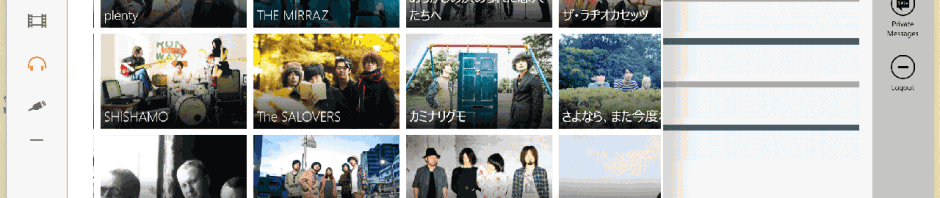
VLC already exists for Windows 8 as a Universal App, one that works across desktops and tablets. The teased screenshot shows a completely redesigned VLC media player with a persistent navigation column. Overall, the design looks easier to use and better organized than the Windows 8 version.

VideoLAN claims the app is ready and will appear in the store “in a few days (hopefully).” We’ll update you when the app is available to download.

Source: VideoLAN (Twitter)

Related Stories

Set up AVG Antivirus 2015 for optimal protection

How to get Windows 10’s best features right now

Microsoft previews Sway, the first addition to Office for a decade

Watch the full Microsoft Windows 10 presentation video

Follow me on Twitter: @lewisleong

App of the Week: Maps.me

Softonic’s App of the Week highlights some of the coolest, most unique, and biggest app releases for Android, iOS, Windows, and Mac. This week, don’t get lost on vacation with Maps.me for iOS and Android.

What sets Maps.me apart from other map apps? Its winning feature is offline maps. You can download and save a map of any location in the world, and you’ll be able to access it when you’re not connected to your mobile network or if you don’t have Wi-Fi, making it perfect for travelling.

Using GPS, you’ll be able to see and navigate your location on the map, but if you want routing from point A to point B, or if you want to look up places nearby, you’ll have to upgrade to the paid version. Check out all of Maps.me’s features in the video below.

Default player


brightcove.createExperiences();

If you’re constantly finding yourself lost in a city without a good wireless connection, try Maps.me and never lose your way again.

Download Maps.me for: Android | Blackberry | iOS

Make sure to check out some of our past App of the Week features:

App of the Week: My Wi-Fi Router

App of the Week: Pixlr

App of the Week: DU Speed Booster

Facebook clarifies its real-name policy in wake of controversy

Two weeks after enacting its controversial real-name policy, Facebook has now clarified what the company classifies as a “real-name.” Controversy arose when Facebook started deactivating accounts of well known drag queens, leading to a minor exodus to the Ello social network.

Facebook’s chief product officer Chris Cox posted a lengthy reply, which you can read on his Facebook. The gist of his apology is that Facebook fully supports the LGBTQ community and its right to use pseudonyms.

The spirit of our policy is that everyone on Facebook uses the authentic name they use in real life.

“Our policy has never been to require everyone on Facebook to use their legal name. The spirit of our policy is that everyone on Facebook uses the authentic name they use in real life. For Sister Roma, that’s Sister Roma. For Lil Miss Hot Mess, that’s Lil Miss Hot Mess. Part of what’s been so difficult about this conversation is that we support both of these individuals, and so many others affected by this, completely and utterly in how they use Facebook,” said Cox.

The reason why Facebook is enforcing a real-names policy is to cut down on harassment and trolling. Google had the same idea, requiring YouTube users to tie their real-names to their accounts with Google+. Google eventually removed its real-name requirement due to user backlash.

While Facebook understands the LGBTQ community’s need for anonymity, the company is also defending its need for a real-name policy.

“We believe this is the right policy for Facebook for two reasons. First, it’s part of what made Facebook special in the first place, by differentiating the service from the rest of the internet where pseudonymity, anonymity, or often random names were the social norm. Second, it’s the primary mechanism we have to protect millions of people every day, all around the world, from real harm. The stories of mass impersonation, trolling, domestic abuse, and higher rates of bullying and intolerance are oftentimes the result of people hiding behind fake names, and it’s both terrifying and sad. Our ability to successfully protect against them with this policy has borne out the reality that this policy, on balance, and when applied carefully, is a very powerful force for good,” writes Cox.

The company admits there’s a lot of work to be done to improve its “reporting and enforcement mechanisms” but doesn’t lay out any plans to do so. But at least the company is making exceptions to the rules. In the meantime, Ello will continue to enjoy its 31,000 sign up requests per hour as people try to find any social network to join other than Facebook.

Source: Chris Cox

Related Stories

Social network Ello is for people who hate Facebook

Path Talk can be your human-powered assistant

Facebook is testing an automatic Trip Slideshow feature

Photo Editing: 5 mobile apps are put to the test

Follow me on Twitter: @lewisleong

How to set up AVG Antivirus 2015 for optimal protection

AVG Antivirus is one of the best free antivirus programs but even the best programs won’t work unless it’s setup correctly. Using AVG Antivirus Free 2015, we’ll show you how to customize and optimize its settings to make sure you’re properly protected.

The default settings in AVG Antivirus Free 2015 are good, but they only cover general settings. It’s important to customize settings to setup the best security possible.

1. Open Settings

The interface of AVG Antivirus Free 2015 uses large icons to easily display types of protection. But what you need to open is the more advanced settings. In the top right corner, click Options, then Advanced Settings.

AVG open advanced settings 00

2. Adjust antivirus

In the left Settings menu, click Antivirus. This will load options for the Shield, which monitors background system actions.

The most important settings are already activated, but add the Report enhanced set of potentially unwanted programs option. This adds another level of security by watching for harmful programs. Some examples are web browser toolbars or hidden programs installed along with other programs.

You don’t need to activate Enable through scanning because it may warn AVG about old software that isn’t dangerous anymore. If you install updates to all your programs, you don’t necessarily need to increase your protection level.

But if you’re using Windows XP or haven’t installed updates, this option can be beneficial.

AVG settings - antivirus

You don’t need to worry about the settings located under Expert Settings. If you choose to Scan all files, AVG may try to continuously scan files on your entire computer. The default option is for AVG to only scan infectable files and avoid files that aren’t known to carry viruses.

AVG settings - antivirus - expert settings

The settings for Anti-Rootkit shouldn’t be changed for maximum protection.

AVG settings - anti-rootkit

You can also leave Cache Server alone. This will mark files as safe so AVG doesn’t have to rescan them. AVG will only scan when there’s a change and saves PC performance.

3. E-Mail virus protection

Email Protection uses AVG to monitor your email and protects it against dangerous attachments. The only problem is that many people don’t use an email program and prefer to use web services like Gmail.

If you only use webmail

If your main email is only accessed online, you can disable the option in Email Scanner or ignore it. Checking incoming email is only required if you have a separate email app installed.

AVG settings - email protection - email scanner webmail

Optimal settings for email programs

If you use an email program, it’s recommended that you enable options for full protection. This requires your program to connect to AVG Antivirus Free 2015.

Make sure you have Check outgoing mail checked which protects your contacts from possible infections.

Modify subject of virus infected messages adds ***VIRUS*** to the subject of potentially dangerous emails so you can recognize them easily.

Report enhanced set of potentially unwanted programs warns of software that may be embedded in email attachments. Be aware that mails will also be tagged as ***VIRUS***.

Enable thorough scanning will scan emails of possible dangerous programs in your emails.

AVG open advanced settings 00

You can also choose to add Report files containing macros and Report hidden extensions. This will let AVG look at files with specific code that can tell if the files are dangerous.

It’s important to note while AVG may flag some emails as dangerous, these emails may be safe. It’s important to know who is sending you these emails since spam emails usually come from people you don’t know.

Server Settings

For email scanning to work, you have to set AVG as a middleman between your email program and the provider (like Gmail).

  • Set up AVG with the proper server options: POP3, SMTP, and IMAP.
  • In the email program you have to set up the AVG email server instead of directly with the provider.

You can find details of how to do this on the AVG help page.

AVG settings - email protection - email scanner - servers

4. Scan Settings

You can specify the virus scan settings under Scans/Whole Computer. Instead of AVG just scanning files as they load, this scan will look at all the files on the computer.

Select Report enhanced set of potentially unwanted programs to make sure you’re not getting unwanted programs installed and Scan for tracking cookies if you want to disable cookies being stored.

Be aware that some sites use tracking cookies to remember your settings. If you always delete the tracking cookies, you will have to reenter your information because the site will think you are visiting for the first time.

Scan inside archives will search through compressed files like ZIPs or RARs. You should have this option enabled just in case so you don’t accidentally let a malicious file loose on your computer.

Enable thorough scanning should be enabled if you don’t know if your computer is always up to date.

Scan for rootkits is another layer of protection. Setting AVG to scan All file types will lengthen the scan time, but will ensure that AVG is scanning every possible file for infection.

AVG settings - scans - whole computer scanl

5. Antivirus for removable media

Enable Removable Device Scan. This will let AVG scan external flash drives once they’re connected to the computer. This is important if you trade USB drives with friends or connect a lot of different digital cameras.

Make sure that the Heal/remove virus infections without asking me isn’t activated. This could cause AVG to accidentally delete files from external USB drives.

You can enable Report enhanced set of potentially unwanted programs, Scan for tracking cookies and Enable thorough scanning if you want. Scan inside archives doesn’t make sense because scanning external media can take a long time.

AVG settings - scans - removal device scanl

6. Plan scans

Under Schedules/Scheduled Scan you should click Enable this task. This will activate the feature.

It’s recommended that you run one scan a week. Select Run at specific times and set a time when your computer is on, but you’re not doing any heavy processing. This helps AVG run in the background while you’re not trying to do any work, which could slow down your computer.

If the option Run when computer starts up if task has been missed is selected, AVG will start running the scan once the computer boots up if the scan wasn’t able to run. If the scan starts and you don’t want it to run, you can manually stop or pause it.

AVG settings - schedules - scheduled scan

7. Taskbar icon

When AVG is scanning your hard drive, you’ll see a white AVG triangle icon in the taskbar. If the computer is running, you can adjust the scan speed, pause the scan, or stop it completely.

Pause/Stop: Click the icon twice and in the window choose between Pause or Stop.

Scan slow: Click with the right mouse button on the AVG icon and then on Running Scans/Set priority for all scans.

  • Dynamic: AVG Free automatically adjusts the scan speed.
  • Basic: The scan takes longer, but doesn’t use as many resources.
  • Fast: The scan runs at maximum performance, and you will see a performance decrease.

AVG settings - tray icon settings

With these settings, your computer will be well protected. The always-on shield will cause a slight decrease in performance, but it shouldn’t be noticeable. The deep scan by AVG should find any dangerous programs on your system.

Be aware that every warning message doesn’t mean you have an infection. AVG’s database is very good, but in some cases you may get a false-positive (incorrectly flagged alert).

Related Articles

Why the Shellshock Bash bug is even scarier than Heartbleed

How to protect private pictures on your phone

Google is tracking your every move but you might want it to

Originally published in German on Softonic DE.

Follow me on Twitter: @mkasanm
The Windows 10 preview expires April 15, 2015

Microsoft announced Windows 10 yesterday, but it won’t be ready until 2015. Today, the company released a preview of the operating system for all users to try out. Users noticed that the preview is set to expire on April 15, 2015, which coincides with Microsoft’s target of a mid-2015 launch.

While we have a date for when the preview is expected to expire, it’s not a confirmation of a launch date for Windows 10. There’s a possibility that Windows 10 will be available before or after April 15th, depending on how much Microsoft has to polish.

Default player


brightcove.createExperiences();

If you want to try Windows 10 for yourself, head over to Microsoft’s site and sign up. You’ll then have access to download the operating system in your language. Both 32-bit and 64-bit operating systems are offered so check which one you’re running on the machine you want to test with. In Windows 7, you can check this by clicking the Start button and right-clicking My Computer and then Properties. Windows 8 users can check by right-clicking the Start button and clicking System. Your current system type will be listed in the opened window.

Be aware that the Windows 10 preview is very much experimental and may crash.

Related Stories

Meet Windows 10, Microsoft’s most ambitious operating system yet

How to get Windows 10’s best features right now

Microsoft previews Sway, the first addition to Office for a decade

Watch the full Microsoft Windows 10 presentation video

Follow me on Twitter: @lewisleong

How to get Windows 10’s best features right now

Windows 8 wasn’t as successful as Microsoft had hoped, but with Windows 10 it will try to correct its mistakes. Windows 10 contains a lot of new features, but many of these improvements are already available on Windows 8.1 with some useful third-party apps.

The Start Menu, easier navigation, and apps in windowed mode are all improvements that Microsoft will push in Windows 10. But you don’t have to wait until 2015 to experience these updates. App developers have already fixed these problems with apps.

Windows 10 Start Menu

Back in April 2014, Microsoft showed off the return of the Start Menu. Essentially it’s the Start Menu from Windows 7 with support for Windows Store apps.

If you don’t want to wait until 2015 to get your hands on Windows 10, there are already apps available for Windows 8.1 that give you most of Windows 10’s features. The apps look different, but offer almost the same functionality as the Windows 10 Start Menu. The only thing missing is Live Tiles.

Windows Store Apps in windowed mode

Windows 10 will let you use all programs and apps in windowed mode. The separation between Modern UI apps (now called Universal apps) and legacy desktop apps didn’t make it easy to navigate in Windows 8.1. Now everything will be able to be displayed in familiar windows, making it easier for new users to understand.


There are two apps available that let you use apps in windows: ModernMix and Actual Multiple Monitors.

windows_8-apps-in-desktop-window

Windows 10 – with or without the Charms Bar

Many Windows 8 users didn’t like the Charms Bar. Microsoft claims there will be improvements in Windows 10, but there aren’t any known details. According to rumors, Microsoft wants to automatically disable the Charms Bar on PCs without a touchscreen, which makes sense since features in the bar already exist elsewhere in the operating system.

Windows 10 Task View for Windows 8.1

Another new feature in Windows 10 is the Task View feature for switching between apps. The feature should make it much easier to organize your windows and apps in Windows 10. It’s basically a copy of OS X’s Mission Control, but developers have already created apps that do this in Windows 8.1.

Emcee for Windows 8 is an useful app for switching between apps. Desktop programs and Windows Store apps appear in different views. The app is also compatible with touchscreens.

Emcee for Windows 8.1
Windows 10 isn’t a revolutionary operating system, but it fixes a lot of issues people had with Windows 8 and 8.1. When the new operating system releases in 2015, Windows users should expect a more polished and well-designed OS.

The question is if there will be a substantial reason for Windows users to want to upgrade. It’s possible that Windows 10 will be a free upgrade, but Microsoft is staying quiet about pricing for now.

Related Articles

Meet Windows 10, Microsoft’s most ambitious operating system yet

Windows 10 Preview available for download

Microsoft previews Sway, the first addition to Office for a decade

Article translated from German for Softonic DE.

Follow me on Twitter @mkasanm.

Windows 10 Preview available for download

Yesterday Microsoft showed off a few of the new features that will be in Windows 10. The idea behind this new operating system is to unify all of Microsoft’s devices together along with combining features that Windows 7 and Windows 8 users are familiar with.

Microsoft released the Windows 10 Technical Preview today, allowing you to explore an early build of the new operating system. Like all early builds, expect bugs and some features to not work.

Default player


brightcove.createExperiences();

According to the installation FAQ, Windows 10 Technical Preview should work on the same devices that run Windows 8.1 but there may be updates required. That’s a good sign that Windows 10 will work on some older devices and not force people to upgrade hardware to run the operating system.

Be warned that you should only install the Windows 10 Technical Preview if you’re comfortable with using an incomplete OS.

Sign up and download the Windows 10 Technical Preview.

Related Stories

Meet Windows 10, Microsoft’s most ambitious operating system yet

Watch the full Microsoft Windows 10 presentation video

Microsoft previews Sway, the first addition to Office for a decade

Follow me on Twitter: @chrislikesrobot

Microsoft previews Sway, the first addition to Office for a decade

Sway is an upcoming Microsoft app for making presentations that are sharable and viewable on any web browser or device, make it the first new addition to the Office suite in a decade.

While it’s still in development, the idea is to make creating attractive presentations easy for everyone, regardless of your design skills. You’ll be able to create them by dragging and dropping media from the web, like YouTube, image searches, or social networks like Facebook, into the app.

What makes Sway different is that when you drag and drop in your ideas, it will intelligently format them into a ‘cohesive layout’. Once you have everything together, you’ll be able to make any changes you want, but the general idea seems to be that you will have something that you can immediately show to other people.

Check out some examples of documents created in Sway here, here and here.

You can request an invite to test the app here, and when you’re, accepted you’ll be asked for your feedback to help shape the app’s development.

Source: Microsoft

Related Stories

3 free alternatives to Office for iPad

Students and teachers: check if you qualify for free Microsoft Office

Office Tip: type faster by replacing one word with another

Follow Jonathan on Twitter: @jonathanriggall