About Ebola, a free app to keep you informed about the disease

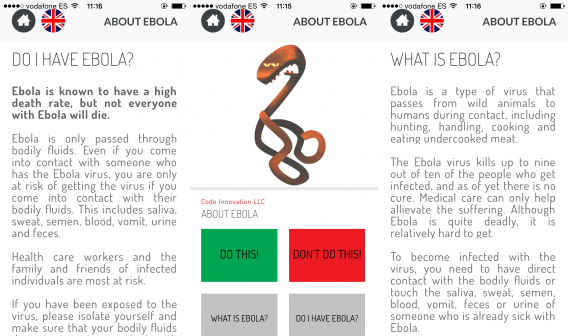
While doctors and authorities say there is a very small chance of an Ebola epidemic in the US or Europe, if you are worried there’s an app to help you recognize the symptoms, About Ebola.

There are other apps, like STOP EBOLA and Ebola 101, but those we tested also include ads and demand the seemingly unnecessary use of location services (which appear to be for the purpose of ads, not health). About Ebola is ‘clean’ and informative.

The app is simple and clear, with six useful segments like dos and don’ts and how to tell if you have the disease. The advice in About Ebola is sensible for everyone, although it was designed specifically for African countries where the problem is most severe. As well as English, there are six other languages: French, Jola, Wolof, Swahili, Liberian and Krio.

About Ebola is free, and available for iOS and Android.

Related Stories

Ping, a free app that wants to send you interesting information

Smartphone app detects when you are depressed

Apple Watch and iPhone work together with health and fitness apps

Follow Jonathan on Twitter: @jonathanriggall

How to send disappearing messages in iOS 8

iOS 8 may not be a revolutionary upgrade but it polishes the changes introduced in iOS 7. Even Apple can’t ignore the popularity of features of other apps, adding them as native features in its operating system. In this case, Apple has included self-destructing messages into Messages, just like Snapchat.

Apple offers free calls through Facetime and now you can also send audio and video messages with expiration times. This feature will give some people a sense of security because photos will be deleted after a period of time.

You should be aware that this function only works if both people are using iOS 8. If you are talking with someone on an older version of iOS, these features won’t work.

Two minutes to expiration

To send self-destructing photos or videos, hold the camera icon in Messages. A new option for taking a picture or recording video will pop-up.

iOS 8 Messages

You can choose to take a picture or use the record button for video.

When recording video, you can just tap the record button to start recording and tap it again to stop or hold it down and remove your finger when you’ve finished recording. After you’ve finished recording, you can preview the video, send it, or delete it.

iOS 8 Messages photos

Send a picture with the camera icon: If you press the camera icon, the device will take a picture immediately.

If you prefer to send a voice message, tap the microphone icon that’s to the right of the text box. Recording will begin automatically and after you’re finished, you can choose to send or delete it.

iOS 8 Messages audio message

To customize the settings for audio and video messages, go to Settings > Messages. You have two options: set the audio or video to expire after two minutes or keep it forever.

Expire time

Sending photos

Instead of taking a quick snapshot, if you hold the camera icon you can choose a photo or video from your library.

iOS 8 Messages photo library

While you can’t set photos to self-destruct, you can set a timer for Messages to delete chats. There are three options: 30 days, 1 year, or Forever.
iOS 8 Messages

Only works in iOS 8

These improvements for Messages are only available in iOS 8. If you use an older version of iOS or chat with someone using a different mobile OS, then the options in Messages won’t work.

Related Stories

What’s changed in iOS 8?

7 questions Siri can (and can’t) answer in iOS 8

The best keyboards for iOS 8

Originally published in Italian for Softonic IT.

Windows Tip: how to find your Wi-Fi password quickly

When you have multiple devices connected to your wireless router, you may forget what your Wi-Fi password is. Then when you need it, you have to try to remember what it was.

For some people, the password is stored on the computer’s desktop in a text file or on a small note near the computer. If you can’t find it, you’re forced to reset the wireless router back to its original configuration and reset the password.

But you can avoid all the trouble by finding the wireless password from an already connected computer.

1. View network connections

Using Windows, search for “network connections” and then click on View network connections. On Windows 7, you can type in your search in the Start Menu. On Windows 8, you can activate the Start screen and start typing anywhere.

2. Select the wireless connection

In the open window, choose the name of the WLAN access point. Normally this will be the network name of your router.

3. View wireless connection details

Click on the icon with the right mouse button and select Status.

windows - find out wifi password

This will open a new window. Click on Wireless Properties.

Clicking on Wireless Properties will open a new window. Click on the Security tab.

4. View the wireless password

Under the Security tab, the Network security key will be visible. It’s hidden and you will have to click on Show Characters. You will need administrator privileges to view the password so be ready to enter your password.

You will be able to see the wireless password for the router that the computer is connected to.

Related Articles

How to restart Windows Explorer if it isn’t responding

How to automatically update drivers in Windows 7 and 8

How to get Windows 10’s best features right now

Originally published in German on Softonic DE.

Follow me on Twitter: @mkasanm

Logitech’s Arx Control app extends the PC gaming experience to Android devices

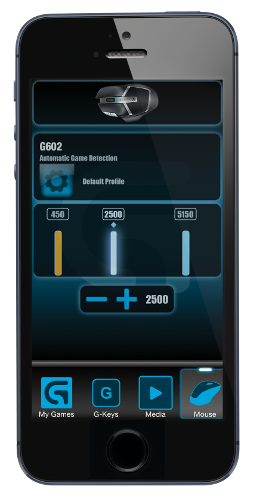
Available for free on the Play Store for owners of any Logitech G-series device, Logitech’s Arx Control app aims to extend the gaming experience to Android devices, including phones and tablets.

Arx Control uses Wi-Fi to connect a user’s Android device to a PC on the same network. Once connected, Arx Control gives gamers the ability to manage their various G-series devices via the Android “second screen.” The advantage of this is that users can more easily customize their gaming experience without having to back out of games. Some titles, for instance, disable the function keys during gameplay.

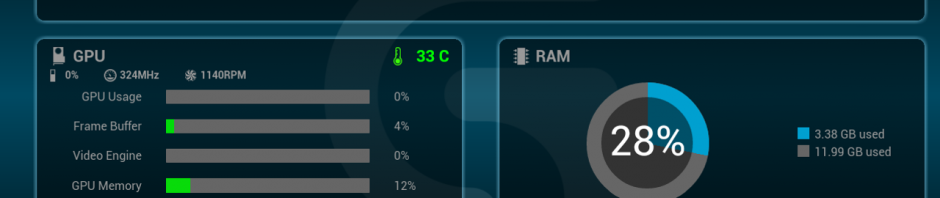
In addition to being able to more easily control G-series devices like mice, keyboards and headsets, Arx Control also allows users to monitor their system performance while gaming by providing performance data like CPU and GPU activity as well as the temperature of your system and memory usage.

According to Brent Barry, Head of Marketing for Gaming at Logitech, “Most gamers carry around incredibly powerful mobile devices with very high resolution screens. So Logitech G developed Arx Control to extend the PC gaming experience to gamers’ mobile devices for easy access to system and in-game data.”

In addition to providing the app for free to customers, Logitech also hopes that the developer and end-user communities too, will also take advantage of the technology. Again, Barry, “We also have an SDK that will enable developers to integrate Arx Control custom applets in their games and the community of gamers to create new and innovative applications.”

Arx Control is currently free to owners of Logitech G-series devices on the Play Store.

Related stories

Watch a video of the upcoming Android ‘L’ update with TouchWiz

EA announces SimCity BuildIt for iOS and Android

Assassin’s Creed: Pirates is now free to play on iOS and Android

Follow me on Twitter: @woneal

The Softonic Minute: Google Maps, Shellshock, Assassin’s Creed and Windows 10

Google Maps in Egypt, the Shellshock bug, Assassin’s Creed: Identity and Windows 10, all on this week’s Softonic Minute.

Default player

brightcove.createExperiences();

Google Maps takes you to ancient Egypt

Google Maps now lets you travel to see ancient Egypt. Take a tour of the Pyramids of Giza and other architectural marvels. If you want to discover the secret corners of ancient Egypt without leaving home, Google Street View is the perfect tool.

Shellshock leaves websites and Macs vulnerable

A newly discovered vulnerability in the Bash command left many computers and website servers vulnerable this week. Macs and were affected by the bug but Apple quickly pushed out a patch for the vulnerability. Even smart appliances like thermostats and web cameras are vulnerable to the Shellshock bug. The vulnerability is still new so we likely won’t see its full effects for some time.

Assassin’s Creed: Identity set to launch of Android and iOS

Ubisoft announced another game in the Assassin’s Creed franchise called Assassin’s Creed: Identity. It will be the first 3D adventure series for smartphones and tablets. In Identity, players can create their own assassins and fulfill missions in Italy during the Renaissance. The game will be available for Android and iOS devices some time in 2015.

Windows 10 is the next version of Windows

Microsoft shocked users by skipping Windows 9 and jumping directly to Windows 10. The company claims the changes to the operating system are dramatic enough to merit the jump. The operating system combines the best of Windows 7 and 8 with new features like a hybrid Start Menu and multiple desktops. There are also rumors that Microsoft had to skip Windows 9 because of a code bug that would mistake the operating system for Windows 95 and 98.

Make sure to check out all of our past Softonic Minutes.

Watch a video of the upcoming Android ‘L’ update with TouchWiz

Lime-pie, Lemon Meringue Pie or Lollipop… a new version of Android is on the way, and a video of an early developer build gives us a better idea of what’s coming.

The video comes from SamMobile, and shows a Samsung Galaxy S5 with Android L running on it. You can see there are new notifications that now appear on the lockscreen, replacing lock screen widgets. It appears you can also access app settings by tapping and holding an icon.

Multi-tasking gets a new look, with windows placed on top of each other, so you can flick between them. The interface is also a lot lighter in color.

There will be differences between this and the ‘clean’ Android that is eventually released. This version is Samsung’s own TouchWiz version, so will have some of its own alterations and tweaks.

Source: SamMobiles

Related Stories

This weekend’s gaming: Fruit Ninja 2.0 out now

Hong Kong protesters flock to Firechat off-the-grid messaging app

The next version of Android will encrypt your data by default

Follow Jonathan on Twitter: @jonathanriggall

iOS 8.1 could bring back your Camera Roll

One of the biggest changes in iOS 8 is how photos are organized. More precisely, there’s no ‘Camera Roll‘ anymore, replaced instead with ‘Recently Added’, which is not the same. But the Camera Roll could be making a comeback.

Many iOS users are unhappy with this change. While you have been able to organize your photos into folders for some time, most users probably stuck to browsing their Camera Roll, and now to see old photos you have to look through the Years, Collections and Moments area.

As we said this week, the next version of iOS 8, 8.1, has already been seeded to developers for testing, and according to one tech site, the Camera Roll is once again in the Albums section of the Photos app. A note of caution – features in beta versions of software don’t always make it, so we can’t guarantee seeing the Camera Roll when iOS 8.1 is released.

iOS 8.1 will also likely bring Apple Pay, and should arrive in late October.

Source: Product Reviews

Related Stories

Apple prepares OS X Yosemite for launch

iOS 8.1 will probably bring Apple Pay to iPhone users

iOS 8 ‘Reset All Settings’ bug erases iCloud Drive

Follow Jonathan on Twitter: @jonathanriggall

This weekend’s gaming: Fruit Ninja 2.0 out now

As we reported last week, there’s a great way to use your free time this weekend: Fruit Ninja 2.0 is out now for iOS and Android devices. Billed as the game’s biggest ever update, it’s a good reason to start playing it again.

Fruit Ninja 2.0 introduces new powers, new menus and new characters from the game’s universe ‘Fruitasia’.

The new powers are not only cosmetic, but have effects in game too, giving you more points for combos or extra time, and there’s an experience system so the more you play the more powerful you’ll become. Fruit Ninja features in-app purchases, so you can speed your progress, but it’s possible for parents to disable these.

The new characters from Fruitasia give the game a fresh feel, and more depth. You can still play Classic and Zen modes, but it’s the Arcade mode that’s the main thing after this update.

Download Fruit Ninja 2.0 for iOS and Android.

Related Stories

Gameloft ruins Asphalt Overdrive by turning it into a free-to-play endless runner

Shaq Fu: A Legend Reborn starts crowdfunding

Major update for Fruit Ninja coming in October (video)

Follow Jonathan on Twitter: @jonathanriggall

Office Tip: how to freeze and lock multiple Excel cells

Freeze and lock Excel cells: If I had to choose only one tip for Microsoft Excel, I would probably recommend this one. It’s very handy for sharing spreadsheets without having to worry about any accidental modifications.

In Microsoft Excel, locking cells of a spreadsheet has two major advantages: Firstly, by enabling this option, you won’t have to worry about accidentally changing the cells. Erasing a formula by mistake happens way too often. Secondly, it allows you to share spreadsheets with colleagues, associates or friends, without worrying about information getting changed.

Here’s how to protect your data in Excel:

1. When your Excel document is completed and ready to be shared, go to the Review tab and select Protect Sheet.

Review Protect the sheet Excel

2. In this new window, you need to set a password to secure the document. This is also where you manage the permissions for users of the document.

For example, you can allow users to: add columns to the document, insert hyperlinks, and so on.

Protect Sheet

3. Excel will ask you to enter a password and then re-enter it to confirm.

Confirm Password

All the cells in your document are now locked. Other users can’t edit the document or delete formulas by mistake. The only thing they’re able to do is copy the contents of the document and paste it into another worksheet.

4. If you try to change the content of the document afterwards, Excel displays a notification on the screen.

Protected Sheet Excel
To unfreeze the document, you need to click on Unprotect Sheet under the Review tab. You will need to type in your password.

5. One last tip: if some of your colleagues need to modify only a few Excel cells, you can manually unlock the boxes.

Before you lock the spreadsheet in step 1, click on the cell you want to make editable while holding down the Control key. Then right-click and choose Format Cells.

Format Cells

6.
Unlock the cell by unchecking the Locked box.

Protection Cells

7. You can then perform steps 1, 2 and 3 to freeze the rest of the document. Your colleagues will therefore only be able to modify the data that you have previously selected.

Related Articles

Office Tip: how to type multiple lines in an Excel cell

Office Tip: type faster by replacing one word with another

Office Tip: access your Word, PowerPoint and Excel documents online

Office Tip: use tabs in Word, Excel and PowerPoint

Office Tip: Restore or minimize the Ribbon interface in Word and Excel

Originally published in French on Softonic FR.

Follow me on Twitter: @bbrassart

Should I be afraid of the Shellshock bug?

It’s been a little over a week since security researchers discovered the Shellshock bug that allows hackers to remotely take over web servers and other devices. But is there really anything to fear or is it just another over hyped security vulnerability?

Let’s take a look at some numbers. The web-optimization company CloudFlare reported that it has blocked over 1.1 million Shellshock-based attacks since last week. 83% of those attacks are classified as “reconnaissance attacks,” which means hackers are probing for sites that are vulnerable. Over 80% of the attacks came from France with the US and Netherlands tied at 7% each.
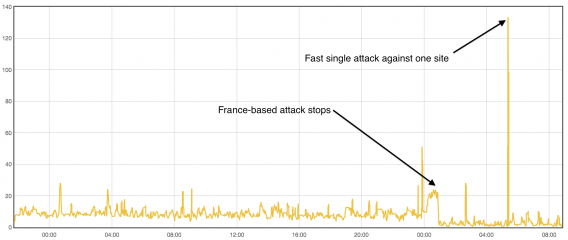
CloudFlare Shellshock attacks graph

For now, a majority of the attacks seems to be hackers trying to figure out how to use the Shellshock bug to exploit servers to do what they want. CloudFlare says many attacks are trying simple things like forcing a server to open its CD/DVD tray but more serious attacks are also being attempted.

One example is an attack where a hacker sends a command to have the web server go to sleep. By repeatedly sending this request to the server, the server struggles to keep up with legitimate requests, which results in a website being taken down. This kind of attack is called a denial of service, which prevents requests from legitimate website viewers from going through. This results in websites displaying errors that the server cannot be found.

While a majority of attacks are being directed toward websites, other attacks are targeting devices that have a web-based interface. This means hackers are trying to exploit laptops, thermostats, set-top boxes, network attached storage devices and other devices that are vulnerable to Shellshock.
Security header via David Goehring

Network attached storage manufacturer QNAP went as far as telling customers to disconnect their NAS boxes from the internet until a permanent Shellshock patch is found. This is extremely frustrating for customers as connecting to the internet to access their private files remotely is one of the biggest reasons to get a NAS in the first place.

However, not all hope is lost. Apple issued a patch for the Shellshock bug last week, even after claiming a majority of its users were unaffected by the bug. Still, some security researchers believe Apple’s patch is incomplete, as with many other patches issued by other companies.

The open-source software company Red Hat issued an incomplete patch immediately after the discovery of the Shellshock bug. The company has since completed patching the vulnerability but it shows that even seasoned companies are having a hard time patching the bug effectively.
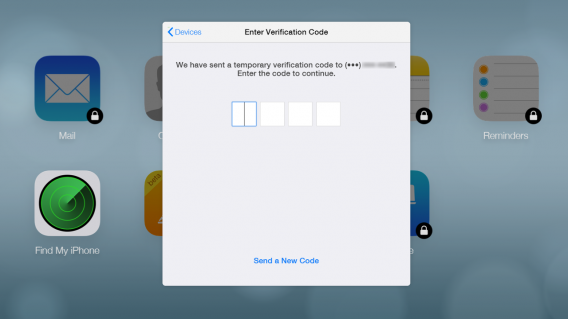
Two step verification for iCloud

So what can you do to protect yourself? Carefully watch for updates to your computer and other devices. Shellshock affects more than just a single type of device since Bash is used by so many types of devices.

But most importantly, don’t become jaded by the doom and gloom of headlines about security vulnerabilities like Heartbleed and Shellshock. Here’s what Mark Nunnikhoven, Vice President of Cloud and Emerging Technologies at Trend Micro, had to say about Shellshock.

“Shellshock is extremely serious. It merits 100% of the attention it’s currently garnering in the public view…Even with a bug this serious, some people have still managed to make hyperbolic claims about it’s impact. That doesn’t do anyone any good. Sensationalizing this very real issue polarizes the discussion needlessly and that leaves us all more exposed than we already are. Any time you have a complex issue, it’s difficult to relate the details to a wider audience. Unfortunately, people respond to dramatic claims more often than to nuanced ones. This won’t be the end of the internet but it is a very serious issue and one that needs to be addressed immediately.”

At the end of the day, no system is completely secure but that doesn’t mean we should give up hope and let hackers have their way. Instead, we should all take steps to stay as secure as possible. Be diligent about updates and understand how and why these attacks are happening.

If there’s anything we should take away from the Shellshock and Heartbleed vulnerabilities is that we are increasingly relying on the internet for our lives. Companies need to start taking security seriously so that our private pictures don’t leak onto the internet. But we should also take responsibility for ourselves and understand what is safe and what is dangerous.

Sources: CloudFlare | FireEye | Lifehacker | QNAP

Related Stories

Why the Shellshock Bash bug is even scarier than Heartbleed

Why does a keyboard app need ‘Full Access’ to my iPhone?

How to set up AVG Antivirus 2015 for optimal protection

Security company finds many popular Android flashlight apps could compromise your data

Follow me on Twitter: @lewisleong