The three worst Star Wars games ever

Star Wars Battlefront is here. This has led to a general buzz around the office – imagine the gentle hum of a Lightsaber – about all things set in a galaxy far, far away. After a little bit of happy reminiscing, our thoughts turned to the dark side, and we began discussing the worst games we have played that took their inspiration from George Lucas’s magnum opus.

Maria started us off, regaling us with tales of the 2001 Xbox game Star Wars: Obi-Wan. Placing you in control of the powerful Padawan, it was your task to guide him through his training on the path to becoming a Jedi Knight. Featuring a host of characters form the movie and that legendary battle with Darth Maul, it sounded like it should be good – unfortunately this was not the case. It looked awful with, Yoda’s appearance in particular managing to give the teenage Maria actual nightmares. Worst of all, it controlled like an arthritic Jabba the Hut.

When Star Wars: Yoda Stories was discovered by Danni in his local videogame store all the way back in 1997, he was thrilled by all that the PC game’s cover promised. Train as Luke with Yoda! Infinite levels! What could possibly go wrong? Well, pretty much everything it transpires. For instance, it turns out that “training with Yoda” basically consists of you becoming an errand boy. Not really what I anticipated for the hero of the rebellion. And you know what, looking at the gameplay, Danni might be right – this might be the worst Star Wars of all time. But that doesn’t stop my pick coming in a close second.

I went with Star Wars: Masters of Teräs Käsi, a game that used my own gullibility to con me out of fourth English pounds when I was 18. But this SoulCalibur style fighting game was a bad idea from the start, and I should have known it. You can’t put Darth Vader in an arena with anyone, let alone some unknown Tuscan Raider, and expect a fair fight. Unbalanced, grotty looking, and controlling horribly, Teräs Käsi’s only saving grace when it was released was that it got us even more excited for The Phantom Menace – and look how that turned out.

Did you play any similarly awful Star Wars games? I know there were more, so let us know in the comments. I’ll see you next week.

Related Stories

7 tips to get you started in Fallout 4’s Wasteland (and a few bonus hints)

Call of Duty: Black Ops 3 – Specialist quick guide

The best three free-to-play multiplayer shooters

Follow me on Twitter: @DoFuss

7 tips to get you started in Fallout 4’s Wasteland (and a few bonus hints)

Not got Fallout 4 yet, struggling to get started, or just daunted by how much there is to do? Well our seven hints will have you mastering the Commonwealth wasteland in no time.

1) Learn your lessons

Okay, lets be honest, Fallout 4 does not have a great tutorial. It introduces things quickly and it doesn’t go out of its way to explain. This is good because it keeps the pace moving but, if you miss one of the many important tool tips that pop-up, it can become a problem. Each of these impart some vital information about the game’s systems, but can easily be skipped if you are clicking around the screen doing something else.
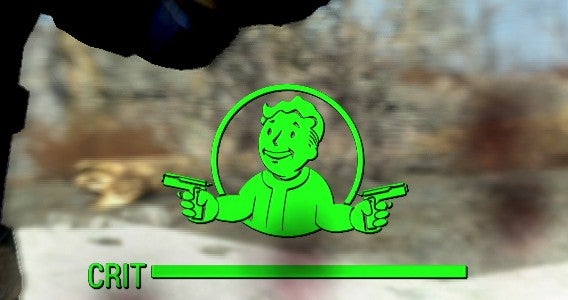
On the plus side, if you do get stuck, Fallout 4 offers a comprehensive “Help” option from the pause menu. This provides explanations to all of the game’s systems which may not otherwise be instantly apparent. If you are stuck – or feel you are missing something – a quick read of this will surface otherwise hidden gems of information… like how long you have to wait for that guy to forget you stole all his food.

2) You’re S.P.E.C.I.A.L – make a character to reflect that

Considering how many hours you will lose to Fallout 4 it is important that your character lets you play how you want to. The removal of a level-cap certainly helps with this, letting you eventually earn every skill you could want, but early on you are not as capable.
The S.P.E.C.I.A.L. stats (strength, perception, endurance, charisma, intelligence, agility, and luck) all start with one point in them and you receive a further 21 to divvy out how you please. Also, it’s worth noting, that within an hour of exiting Vault 111 you can find one further point from the “You are S.P.E.C.I.A.L.” children’s book found in your baby’s room, and a Perception point from the Bobblehead located with the Minutemen in the Freedom Museum.

How does that help? Well, if you want to focus on ranged attacks you will want Perception, or if you are like me and prefer to talk your way through conversations its Charisma you need… plus a little luck. Read the descriptions, think of how you want to play, build around that, and don’t be scared to leave some attributes at level one. Of course, if you really can’t decide, just having three points in every stat is a balanced start.

3) Feeling Perky

This is not the end of your S.P.E.C.I.A.L.’s importance. Just after you receive the Pip-Boy you get a chance to re-attribute the 21 starting points, and this is useful because it is the first time you get to see all of the available Perks.
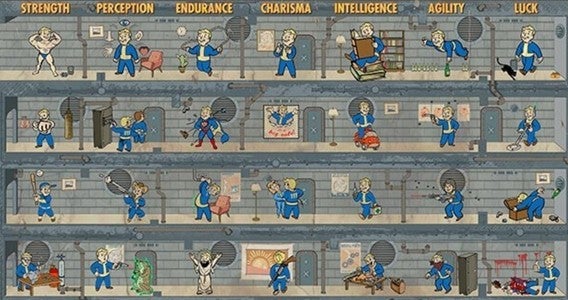
Be warned, it took me seven hours to figure out that the “Perks” tab on the Pip-Boy could scroll down and realize that each of the 7 stats have 10 skill attached. That´s 70 specialization options, each with multiple stages.

Bottom line – before finalizing your S.P.E.C.I.A.L., check which 10 of the 70 skills you want to unlock first, and ensure you character has the stats to do so from the start. In my case, having started with low luck, I needed to reallocate my points so I could quickly unlock my favorite Perk the Mysterious Stranger.

4) Home, sweet home

The new settlement feature of Fallout 4 can feel clunky at times – like it was designed for consoles, or some such nonsense – but it does deliver some useful advantages.

If well defended, these safe havens give you a reliable place to abandon weighty equipment, while also playing home to the various workstations you need to upgrade your armor and weapons. Workstations also have options to help your organize all the junk you have collected.

A tap of the T key automatically dumps all of your resources into the selected storage. Also, quick taps left and right on your inventory screen switches you between different collections of gear (apparel, weapons, aid, etc.) and a search option to find a specific item quickly. Best of all, items in your workbenches are synced between active settlements – so you can always have your resources close at hand.

This means that, even if you are not a fan of settlements, it’s still worth having a few nominally maintained bases around Boston’s wasteland. Just make sure their defense level is higher than that of their resources, or you will be called in to protect them a lot.

5) Leave your Power Armor at home… but keep the keys

Fallout 4 has accelerated the rate at which you unlock its various toys, most notably the Power Armor. There is a trade off though, as this devastating piece of equipment’s use is now limited by the need to fuel it with Power Cores.

When your run out of power your suit can still move but it can’t run and its attacks are limited. So, when you are out of gas, it is best to drop it off at home. Here you can safely store it, repair, and upgrade it.

The one thing the game doesn’t mention is that anyone can come along and walk off with your armor. But there is a simple solution, take the Power Core out. Once removed the armor is rendered inert and safe from theft.

6) Save, save, and save again

Yes, we all know that the saving is an essential part of the Fallout series. It allows for quick restarts after death, preservation of a point in time before – or after – a big event, or, in Fallout 4, the chance to make sure conversations go your way.

If you are trying to persuade, intimidate, or otherwise talk your way through a given situation, it’s worth knowing that you can now save mid chat. That’s right, just before you embark on one of those colored coded conversation options you can save and ask the same question as many times as you need to.

7) Diamond City – oddly – focuses you

Fallout 4 is massive and it can easily be overwhelming. But you are a character on the hunt for their missing child, and if you don’t focus that can easily forgotten as the main story quest is buried under a sea of side missions.

To avoid this don’t let the trail go cold, after you meet up with the Minutemen and Mama Murphy tells you to go to Diamond City, do it! Don’t hang about doing every little quest you can find first.

And you do not have to worry, those missions will still be there when you come back later.

A few bonus hints…

You have lots of ammo at the start right? Well, keep it that way! Radroaches, bloatflies, and even wild dogs can be handled with melee weapons, saving much needed munitions for later. Do keep some guns on your quick select keys though – just in case a radscorpion appears unexpectedly.

Talking of weapons, how are you liking that old pipe-rifle with a sniper-scope you found? It would be nice if you could just move it over to that hunting-rifle you use all the time wouldn’t it? Well, it turns out you can. Oddly though scraping the weapon just destroys these valuable extras, so you have to replace it with a alternative first to unequip it. So, in this example, replacing the pipe-rifle’s scope with a standard sight will result in the sniper-scope being freed up for you to reuse.

I love dogs, but no matter how much your heart brakes to hear his whimpers, Dogmeat will be fine and automatically heal after battle! And for the record so will all your other companions. Keep your stim packs for yourself.

Companions bring their own side quests and great dialog to keep you entertained – but they can also carry items for you when you overdo it. Even Dogmeat can lug stuff back to your homestead, allowing you to fast travel back with everything you have collected.

Finally, if you are overloaded, it is important to know what is valuable. Check what scraping an item gets you and prioritize – screws, aluminum, oil, gears, fiber optics, and nuclear material tend to be the hardest things to find.

Related Stories

Fallout 4 review

Call of Duty: Black Ops 3 – Specialist quick guide

Call of Duty: Black Ops III review

The best three free-to-play multiplayer shooters

Follow me on Twitter: @DoFuss

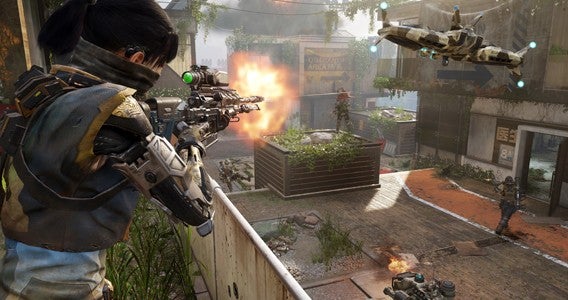
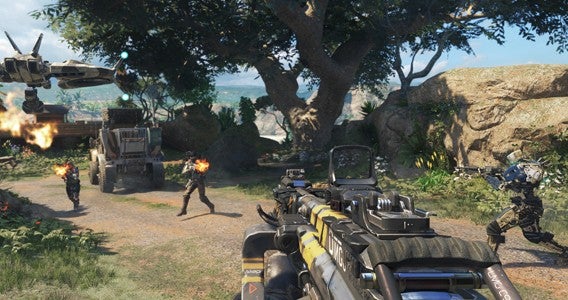
Call of Duty: Black Ops 3 – 5.5 multiplayer tips

Call of Duty: Black Ops 3 is here, and it is as good as we hoped. If you are getting started on the multiplayer and are feeling daunted by the changes, here is our refresher guide.

1) Wait… you are totally new to CoD?

Yup, if you have played Call of Duty before you may as well skip over this. But just in case you are new, here are a couple of quick pointers.

Team Deathmatch is the mode you want to start on. Its fast paced, but you should live long enough to get some practice in with each weapon in order to decide what works for you.

Also, take this time to adjust your stick/mouse sensitivity until you are comfortable – there nothing worse than constantly dying because everyone else on the battlefield can aim faster.

2) I like the way you move

The latest Call of Duty, once again, significantly alters movement. You are mobile than in many previous installments, but not quite as nimble as in the last installment, Advanced Warfare. The new thrust ability sits nicely between Black Ops 2’s mantling and Advanced Warfare’s jetpack which, when placed along side wall-runs, creates a momentum based system that requires skill to master.

These free-running and thruster abilities can be easily likened to games liken Titanfall, and they add a lot of options to how you get around the map. This means you have rethink cover. You are no longer safe behind that wall, and attacks can come from the left, right, or over the top. More importantly though, when considering attacks remember you too can vault, clamber, leap, and bound your way around the map to try and catch your adversaries unaware.

Oh, and master all of these new found mobility skills on the training missions.

3) Learn maps and routes

Call of Duty has always used verticality to its maps, but Black Ops 3’s extra mobility has made this even more important. Learn the maps, but also learn all the different ways you can now navigate them.

A skilled free-runner can catch unsuspecting players off-guard by scrambling their way across unlikely routes to higher levels. So, even if you can’t manage this reliably yourself initially, learn these routes so no one can get the drop on you.

And, as always, keep moving – stationary targets don’t last long (this isn’t Destiny).

4) Get that sweet XP

As previously stated Teamdeath Match is a great place to start, but another good way to get your all-important XP level up is with Capture the Flag – and to hang about to the end of a match even if your team is losing to get that sweet XP bump.

Also, think about is equipping achievable Scorestreaks. Even if they are not the best you have unlocked, setting a streak with a lower kill goal means that you will have more opportunity to use them, which in turn nets you better XP rewards.

Regularly switching weapons and Specialists can give you an XP bump too, but I tend to side with mastering what I am comfortable with – the choice there is yours.

5) War has changed (and so have the guns)

This year the Call of Duty community has spoken and decided that, of all the various weapon classes available, the LMGs is the weapon of choice – with a nod also going to SMGs.

LMGs are not only powerful this year, they are also incredibly versatile thanks to being easily able to deal damage at close and mid-range with ease.

This flexibility is particularly handy as a CQC attack is no longer a guaranteed kill. That’s right, getting up on a foe and knifing them is no longer an automatic kill, so a quick burst and stab is the best way to handle close encounters.

5.5) Specialize

I mentioned them before, but the addition of Specialists to multiplayer is significant. Each of these nine hero-like characters have their own unique weapons and abilities that are charged as matches unfurl, and knowing how to use these skills can change the flow of the match.

You level each class independently, but learning which works for your play style is vital. And, spoiler, it may not be the one you like the look of. Check out our quick reference guide to the Specialists for a better idea of who suits your play style.

Related Stories

Call of Duty: Black Ops 3 – Specialist quick guide

Call of Duty: Black Ops III review

The best three free-to-play multiplayer shooters

Fallout 4 review

Follow me on Twitter: @DoFuss

Call of Duty: Black Ops 3 – Specialist quick guide

Four Specialists are unlocked when you start Call of Duty: Black Ops 3. Battery, Prophet, Outrider, and Ruin make up this starting cast, with a further five – Seraph, Nomad, Reaper, Spectre, and Firebreak – unlocking at 22, 28, 34, 40, and 46 respectively.

Here is a quick taster of the kind of playstyles that suit each character. But, as with everything else, try them all at least once to see if the theory keeps holds true.

Battery – An out and out tank who gets into the middle of the action with her powerful Kinetic Armor ability and War Machine bouncing grenade launcher. Great if you like to be in the thick of the action.

Prophet – High tech fighter whose “Glitch” skill allows him to back along his path to get out of trouble. His chain lighting Tempest gun makes him perfect for dealing with groups on capture/control maps.

Outrider – Wielding a bow named Sparrow, Outrider’s weapon demands a little planning, because the weapon charges as the string is drawn, but once readied it can take people out in a single shot. If your accurate and fast enough to always make it count – which I am not – she is a very powerful choice, particularly with her Vision Pulse that briefly lets her see enemies through walls.

Ruin – Ruin is basically Jax from Mortal Kombat, only he chose to have his arms replaced with bionics. Ideal for close quarter fighters who miss the knife instant kills as most of his powers are based on speed – Overdrive speeds him up significantly – and smashing – his gravity spikes kill anyone near him when pounded into the ground.

Seraph (22) – Outrider and Seraph will attract similar players. Her powerful Annihilator handgun will take out anyone in a single shot, but sends your aim all over the place leaving you prone. Her Combat Focus skill also helps to accelerate her acquisition of Scorestreaks.

Nomad

Nomad (28) – Nomad is a character for the team player who enjoys point control maps. With a nice supply of sticky drones from his H.I.V.E. weapon, he can quickly set up a perimeter, while his Rejack allows him to quickly respawn and defend.

Reaper (34)Another defensive class, this robot lays down a swarm of covering fire with his Scythe mini-gun and has the ability to produce passive clones to distract the enemy with Psychosis.

Spectre (40) – Here is one if you like Ruin. Fast, easily able to get kills with Ripper melee attacks when up close, and an Active Camo cloak. This is one for all of you stealthy, quick assassins.

Firebreak (46) – He lacks the explosives of Battery, but Firebreak’s Purifier flamethrower provide similar advantages in small enclosed spaces. Once up close, his Heat Wave skill can also stun opponents in range.

Related Stories

Call of Duty: Black Ops III review

The best three free-to-play multiplayer shooters

Fallout 4 review

Follow me on Twitter: @DoFuss

Spiceworks’ Macbook Pro and Surface Pro giveaway

Spiceworks’ Network Monitor is the comprehensive network tool for IT professionals. It places everything you need to manage your network on a single screen, allowing you to see and fix problems in real-time. And best of all, if you try its free service for a week, you can win either a Mac Book Pro or a Surface Book Pro.

Custom built for IT professionals

Offering a massive range of practical and free tools, Spiceworks award winning range of products have been trusted by millions of IT professionals for almost a decade.

Its latest server-based tool, Network Monitor, uses knowledge gathered from their huge network of SysAdmins, Network Administrators, and Systems Administrators to create the perfect dashboard to monitor your whole Windows or Linux network environment.

Port View

Fix problems before they happen

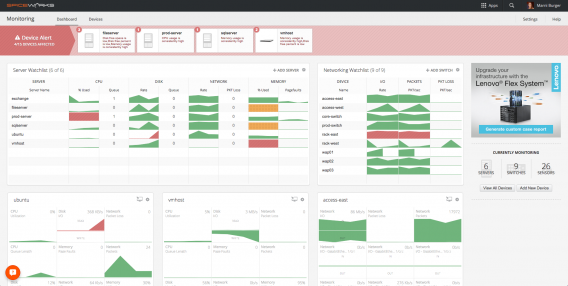
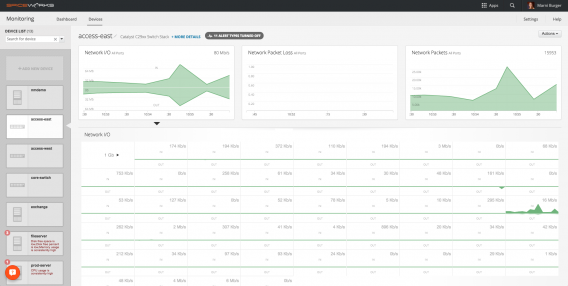
Network Monitor can be set up in minutes and allows you to track everything in real-time. You can see what is happening on critical interfaces, server, and device throughout your network. Network Monitor can track problems both onsite and offsite with ease – as well as allowing you to address potential issues through a remote desktop connection.

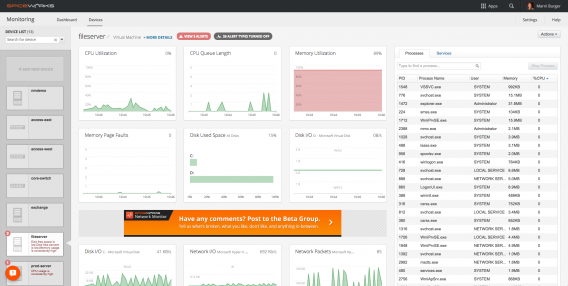
Network Monitor has a clean, easy to follow visual interface. Everything is displayed on a single screen, allowing you to track server activity and network utilization. This data includes disk and CPU usage, active processes and services, system memory, and other environmental data.

Help Desk

Spiceworks’ Network Monitor delivers all of this information in real-time. This enables you to pinpoint problems as they happen, see what is effected, who it effects, and fix it quickly. Now you can fix small issues before they become problems, and problems they ever impact your users!

As if this wasn’t enough, Spiceworks also offers Help Desk. This service is build for IT professionals who want to offer a help service to their users, but lack the hardware infrastructure to set it up. The Hosted Edition of Help Desk is filled with all the features millions of Spiceworks’ users have come to depend on, giving access to the tools and community they need to keep their customers happy.

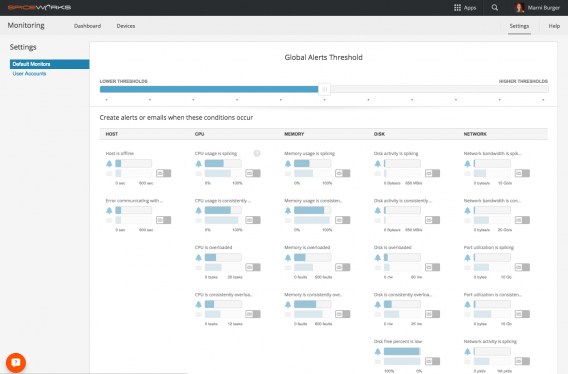
Global Thresholds

Macbook Pro and Surface Pro giveaway

Softonic is partnering with Spiceworks to bring IT professionals a brilliant offer, the chance to win a Macbook Pro or Surface Pro – your choice – for just trying the superb Network Monitor.

If you are a SysAdmins, Network Administrators, or Systems Administrators all you have to do is download Spiceworks’ Network Monitor and try out all of its incredible features.

After using it for one week, just leave a product review on the Spiceworks Community page, and you will be in with a chance to win one of these fantastic devices. Which will you choose?

Hurry. You only have until November 20 to download the Network Monitor and participate in the contest.

Win a Macbook or Surface

Microsoft to stop selling PCs with Windows 7 and 8.1 in 2016

Do you want to buy a license for Windows 7 or 8.1 or a new PC? Well, do it soon because Microsoft has confirmed that these two operating systems will be discontinued on October 31, 2016.

After that date, no matter what, any new PC you buy will come with Windows 10 pre-installed. The only exceptions will be the license agreements for companies, who can choose the version of Windows they require.

With this measure, that permanently abandons the (not so very) old Windows, Microsoft forces its users to “upgrade or expire”. Of course, in their defense, it should be stated that Windows 7 has been quite slow in going out. Usually, the “expiration date” of an operating system is two years after the launch of the new version. Given that Windows 8 came out in 2012, Windows 7 should have bid us adieu in 2014. However, the lack of acceptance of Windows 8 caused the company to consider extending the life of Windows 7.

That said, if you decide to buy a new PC with Windows 7 or 8.1 don’t be disheartened: Microsoft promises to provide technical support till 14 January, 2020 for Windows 7, and till 10 January 2023 for Windows 8.1.

Not averse to Windows 10 or interested in anything I’m saying? Then take a look at our section on Windows 10.

Avast 2016: How to protect your passwords

“Email claiming to be from Santander steals your passwords.”

“An attack on 000Webhost involving data from millions of users.”

“Warning about a security breach that steals your data and passwords.”

These are just some of the headlines from the online press last month that have password theft as the main subject. Almost every week we are shocked to read that a group of hackers has taken advantage of a security breach to obtain passwords. Surely, at least once, you have become overwhelmed with paranoia and thought “What if my password has been compromised?“.

If hackers are a greater threat today than traditional viruses, it is logical that antivirus software modernizes and strives to get rid of this new danger. The 2016 edition of Avast focuses on ensuring that you never become a victim of these attacks. One of the major developments in this regard is the “Password” function.

The goal of “Password” is to encrypt the passwords you use on the Internet to increase security. It also allows you to use one single “master password.” Remember it, and Avast will use auto-complete to save you time logging in. Finally, “Passwords” syncs your passwords across all your devices and helps you to create unique and secure passwords.

Using “Passwords” is simple. As well as this, the basic version is available in all versions of Avast (Free, Pro, Internet Security, and Premier).

After a rigorous tutorial you must choose your master password. Do not forget that, it is essential to access all the other functions!

After that, download its extension in your favorite browser. Then you must enable it when the conformation message appears.

The next step is to collate all your passwords. Whenever you log onto a website, Avast 2016 will ask if you want to add the password to your database. You do have other options, such as putting the data in manually or importing all the data from your browser.

When you have enough passwords, Avast will calculate an average safety rating. It will tell you which passwords are not secure. In this way, you will know which passwords are better for you.

Would you like more protection? Then you can set up an account using the premium payment option. This notifies you whenever a password may have been compromised and also allows you login to all your accounts with just one tap of the screen on your mobile device.

Remember that you can download 2016 Avast Free today, only on Softonic. There are four versions of the antivirus available:

Avast Free Antivirus 2016

Avast Pro 2016

Avast Internet Security 2016

Avast Premier Antivirus 2016

Want to know how to create secure passwords? At Softonic, we have guides and advice of all kinds. For example you can try out How to: create strong passwords.

Remember the controversy surrounding the iPhone 6? The new Nexus is even more worthless

We all have our pastimes. YouTuber JerryRigEverything’s pastime is trying to break all newly-released cellphones as they arrive on the market. This video shows an example how fast Google’s new Nexus 6P can be broken… much faster than the ill-fated iPhone 6.

As it says on Metro, the site where I found the video, it looks like we may have Bendgate 2.0 on our hands.

“I’m not kidding when I say that even my sister could break this Nexus 6P,” the YouTuber says at one point in the video.

(Can’t play the video? Click here to watch it on Youtube).

The only game that can face up to Pokemon Go is coming soon

Everything seems to point to Pokemon Go being the next great Nintendo game title that nothing can challenge, right? That’s not quite true. On Friday the 6th of November 2015, North America witnessed the launch by Nintendo of the first game of a franchise that has sold over 2 billion dollars’ worth of games, toys, and much more.

This series is called Yo-kai Watch. The aim is to capture ghostly creatures. Does this mission sound familiar? The franchise by Level-5 has been a huge hit in Japan; there’s anime, films, dances, and toys that sell out in moments.

(You can’t watch the video? Click here to enjoy it from Youtube)

So you get the idea, the two first Yo-Kai Watch games have sold a combined 8 million copies. A video games analyst called Sartori Bernbeck believes that the saga can generate hundreds of millions of dollars in the United States alone. Imagine what will happen when it gets to Europe in 2016!

(You can’t watch the video? Click here to enjoy it from Youtube)

Until now, whenever Nintendo has had problems, it was the Pokemon franchise that has got it out of trouble. Will this be its successor?

Source: Wall Street Journal

Top 5 Google Chrome extensions

At this point the internet browser has become a ubiquitous life tool. To the point that, when you think about searching for something online, the first thing you think of is not the browser but the search engine or webpage you want.

All of which got us thinking – maybe it’s time we paid this all important, but often forgotten, part of our digital lives a little love. Which is why we have put together our list of the top five Google Chrome extensions.

First up, for music fans, we have UpNext. This extension helps you to find any song you want from either SoundCloud or YouTube’s vast catalogs, and plays them in the background while you work. With a good range of search filters – including what is popular on Reddit – hunting down the track you want should be simple.

Now if you are reading this among dozens of open tabs, have you considered that they are all quietly consuming resources and slowing down your machine? Well, they are – and The Great Suspend is here to help. This little tool will completely pause any inactive tabs, preventing them from placing strain on your system’s resources while you work.

If opening a new Chrome tab feels a little mundane then you need Momentum – the extension that fills empty tabs with a plethora of information, from inspirational messages to the current weather. The only problem is you can add so much stuff that, by the time you are done reading it, you might have forgotten the reason you opened the tab.

For everyone tired of filling in online forms, user names, and passwords, the extension you need Dashlane (Windows|Mac) – a password manager that automatically fills in forms and logs you into services. Just install it, enter all of your information, and Dashline completely automates this dull process.

Finally, for everyone who likes to use all of the web’s worldwide fun, there is the Google Translate (iOS|Android) extension. All you have to do is let it know your native language then, whenever you select a foreign word, it will automatically display its translation.

There are 1000s more extensions for Chrome, but these are the five we think are best – if you disagree let us know in the comments. We will be back in seven days with the top five Windows 10 exclusive apps. See you then.

Related Stories

The best three free-to-play multiplayer shooters

Fallout 4 review

Five apps to survive the apocalypse

Follow me on Twitter: @DoFuss